How I found my first Chrome bug (CVE-2021–21210)
The report describes how the author implemented a NAT Slipstreaming attack using the RTSP protocol and found that Chrome (version 89.0.4389.72) was vulnerable, allowing an attacker to bypass NAT/firewall and access internal services. The attack works by having a victim visit a malicious webpage that sends crafted HTTP POST requests to a server on port 554, which triggers the router's ALG to open a pinhole.
 Published on vovohelo.medium.com
On October 31, 2020, @SamyKamkar published his research on NAT Slipstreaming. According to his own words, NAT Slipstreaming —
The full write-up lives on its author's site
It belongs to its author, so we link to it rather than copy it. The other two tabs are our own rewrites, checked against it.
Context
NAT Slipstreaming is a technique that lets an attacker reach TCP or UDP services bound to a victim machine from the Internet, bypassing the victim's NAT or firewall, simply by having the victim visit a web page. Samy Kamkar published his research on 31 October 2020, describing it as arbitrary firewall pinhole control. The author of this write-up treats NAT Slipstreaming as a whole vulnerability category rather than a single bug: whenever an attacker can force a user to generate traffic to a specific server on the Internet and control both the content sent and the target port, there is a potential NAT Slipstreaming vulnerability.
The feature that makes the attack possible is the Application-level gateway (ALG) in consumer routers. An ALG parses application protocol messages that carry addresses and ports, and creates the NAT rules needed for those protocols to work through the router. The target of this research is the browser: the question is whether a fully patched browser can be made to send traffic that a router's ALG will rewrite into a pinhole. The result was a bug in a fully patched Chrome.
Setup
The researcher's home network used a TP-Link Archer A7 v5.0 wifi router running the latest available firmware. The first step was to inspect which ALGs the router had enabled by default.
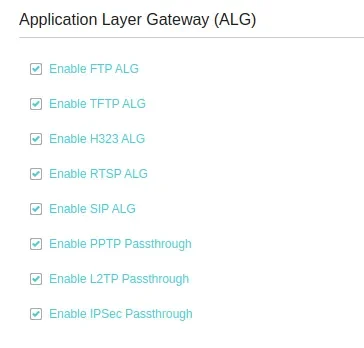
Figure 1: TP-Link Archer A7 v5.0 default ALG configuration
The attack needs a victim inside a network whose router implements an ALG for a specific protocol, a malicious web page that identifies the client's private IP address and sends an HTTP POST to a server controlled by the attacker, and a custom TCP server that receives the crafted POST requests and checks whether the ALG translated the addresses in the message. If the TCP segments are not aligned, the server replies with the offset needed to pad the payload; the page repeats this until the segments line up. Once they do, the server tries to communicate with the port the victim's router opened.
The researcher chose RTSP as the protocol. SIP had already been used by Samy, and H.323 by Ben Seri and Gregory Vishnipolsky of Armis in their v2.0 version of the attack, so both were discarded. RTSP was attractive because it is text-based, its messages are simple, and its Wikipedia page covered everything needed to understand it. The proof-of-concept files are published at https://github.com/bananabr/natslipstream.
Finding it
The RTSP SETUP message looked like a promising candidate. According to the protocol description, a SETUP request specifies how a single media stream must be transported, must be sent before a PLAY request, and contains the media stream URL and a transport specifier. That specifier typically includes a local port for receiving RTP data and another for RTCP data. The server reply confirms the chosen parameters and fills in missing parts such as the server's chosen ports. The following is the example request and response from the protocol documentation:
C->S: SETUP rtsp://example.com/media.mp4/streamid=0 RTSP/1.0 CSeq: 3 Transport: RTP/AVP;unicast;client_port=8000-8001S->C: RTSP/1.0 200 OK CSeq: 3 Transport: RTP/AVP;unicast;client_port=8000-8001;server_port=9000-9001;ssrc=1234ABCD Session: 12345678
The client tells the server which ports it can use to receive data back. Because those ports are dynamic, the protocol only works behind NAT if an ALG parses this kind of message and creates the required NAT rules when they are needed. The dynamic port exchange only happens when the data transport uses UDP. When TCP is used for data transport, the protocol uses Embedded (Interleaved) Binary Data, meaning data is encoded and encapsulated in the RTSP TCP connection itself, usually port 554/TCP, and no NAT is needed.
To confirm this, the researcher reviewed the RTSP conntrack module source code at https://github.com/maru-sama/rtsp-linux/blob/master/nf_conntrack_rtsp.c. The module references the SETUP message, and it also shows that if the selected transport is not UDP, message processing is stopped.
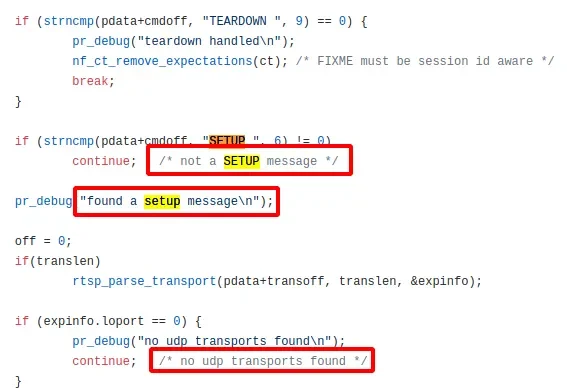
Figure 2: nf_conntrack_rtsp.c
Exploitation
Step 1: the malicious page
A simple HTML file simulates a malicious page visited by a victim. Once visited, the page makes an HTTP POST request to a server on the Internet running on port 554/TCP. The POST body contains a long string of padding followed by a fake RTSP SETUP message. The page also identifies the client's private IP address.
Step 2: alignment check on the custom server
When the custom server receives a message, it checks whether the SETUP message is properly aligned with its TCP segment. If it is not aligned, the server responds to the client page with the offset required to adjust the alignment, and the page repeats the request with the adjusted padding. This loop continues until the segments line up.
Step 3: the pinhole and the callback
If the message is aligned, the server parses the SETUP message and sends a UDP message containing the string "It works!" to the mapped port. Receiving that message proves the router's ALG created the NAT rule from the attacker's crafted traffic.
Step 4: browsers
The PoC worked in a non-patched version of Firefox. The researcher then tried it on a fully patched Chrome 89.0.4389.72 (Official Build) (64-bit), and it worked there too.
Root cause
Chrome allowed a web page to send an HTTP POST to port 554/TCP with attacker-controlled content. That port is the RTSP port, and the router's ALG inspects traffic on it for RTSP messages. When the TCP segments are aligned so that the fake SETUP message sits at the start of a segment, the ALG parses it, treats the client-supplied ports as legitimate, and creates a NAT rule that maps them.
Impact
An attacker can remotely access any TCP or UDP service bound to a victim machine, bypassing the victim's NAT or firewall, just by having the victim visit a website. The attack requires a victim whose router implements an ALG for the chosen protocol, a page that can identify the client's private IP address, and a server the attacker controls to receive the crafted requests and probe the opened port. The researcher's PoC worked against a non-patched Firefox and against Chrome 89.0.4389.72.
Fix
The report does not describe the fix. The PoC was demonstrated on Chrome 89.0.4389.72; the report does not state which Chrome version or change addressed it.
Variants to test
Concrete things to try:
- Other ALG protocols. SIP and H.323 were already used by earlier work; RTSP was chosen here. Test any other protocol the target router's ALG list includes, and look for a message that carries a client port. A positive result is the custom server receiving the callback on the mapped port.
- Other browsers. The PoC worked in a non-patched Firefox and in patched Chrome. Run the same page against other browsers and versions, and check whether the POST to port 554/TCP is sent with the crafted body. A positive result is the alignment loop converging and the UDP message arriving.
- Other routers. The default ALG configuration differs between models. Check which ALGs a router enables by default, then repeat the alignment process for each. A positive result is a NAT rule created for a port the attacker chose.
- Port selection. The attack depends on controlling the target port. Try other ports that routers commonly inspect for application protocols, and watch whether the ALG rewrites the addresses in the message.
Timeline
- 31 October 2020: Samy Kamkar publishes his NAT Slipstreaming research.
- 27 February 2021: the researcher revisits the publication and starts implementing the attack.
- Chrome 89.0.4389.72: the PoC works on a fully patched Chrome.
- 28 June 2021: the write-up is disclosed.
What happened, in plain words
Imagine your home network as an office building with one receptionist at the front door. Everyone inside can go out to the street freely, but nobody from the street can walk in and knock on an office door unless the receptionist has been told to expect them. That receptionist is your router, and the rule that lets an outside visitor reach a specific office is called a pinhole: a small, deliberate opening in the wall.
This article is about a technique called NAT Slipstreaming, which tricks the receptionist into opening a pinhole for the attacker. The trick is not to break the front door. It is to make the receptionist believe that someone inside has asked for a delivery, so the receptionist writes the visitor's name on the list of expected guests.
The person who first described this publicly is Samy Kamkar, on 31 October 2020. In his words, NAT Slipstreaming:
… allows an attacker to remotely access any TCP/UDP service bound to a victim machine, bypassing the victim’s NAT/firewall (arbitrary firewall pinhole control), just by the victim visiting a website.
The author of this write-up goes a step further and treats NAT Slipstreaming as a whole category of vulnerability rather than one single bug. The rule of thumb he gives is: whenever an attacker can force a user to generate traffic to a specific server on the Internet and control both the content sent and the target port, you have a potential NAT Slipstreaming vulnerability.
On 27 February 2021, a Saturday, he decided to revisit Samy's publication because he did not feel he understood the vulnerability well enough. It took a few rounds of reading to put the pieces together, but eventually he felt confident enough to try to implement the attack himself. The result of that work was a bug in a fully patched Google Chrome.
This article walks through the same steps he took, in the same order, explaining each concept from scratch. You only need to know how to use a browser and a computer to follow it.
The pieces you need to understand first
Before the attack makes sense, a handful of everyday ideas need names.
A private network and NAT. Your home devices (laptop, phone, TV) each have a private address that only makes sense inside your home, like room numbers inside a building. The Internet, however, needs one public address for the whole building. NAT (Network Address Translation) is the receptionist that rewrites the room number on outgoing mail into the building's public address, and rewrites incoming replies back to the right room. Because of NAT, an outsider cannot normally start a conversation with a device inside: the receptionist has no reason to forward the knock.
A firewall. A firewall is the security guard standing next to the receptionist. It has a list of what is allowed in and out. A pinhole is a temporary exception in that list, opened so that a specific outside conversation can reach a specific inside device.
TCP and UDP. These are the two main ways computers send data to each other. TCP is like a phone call: both sides agree to talk, and the conversation is ordered and confirmed. UDP is like dropping a postcard in a mailbox: no handshake, no confirmation, just send it. Many services use one or the other, and some use both.
A port. If an IP address is a building's street address, a port is the apartment number. A single computer runs many services at once, and each listens on its own port number. Port 554 is the conventional apartment for a media-streaming protocol called RTSP, which we will meet shortly.
An Application-level gateway (ALG). This is the key feature. Some protocols, such as media streaming or internet telephony, work by having one side tell the other "send the data to this port number". But behind NAT, that port number is a private room number that means nothing on the Internet. An ALG is a helper inside the router that reads those protocol messages, understands the port numbers inside them, and automatically creates the NAT rule (the pinhole) so the traffic can flow. It is like a receptionist who reads the delivery instructions inside a letter and updates the guest list accordingly. That helpfulness is exactly what the attack abuses.
A browser and a web page. The browser is the program the victim uses to visit a page. A malicious page is just an ordinary-looking web page that, once opened, quietly makes requests in the background. The attacker controls that page and a server on the Internet, and the victim only has to visit the page.
A vulnerability class. A class is a family of bugs that share the same underlying mistake, even if the specific details differ from product to product. Treating NAT Slipstreaming as a class means: do not look for one broken line of code, look for any situation where the attacker can control the content and the destination port of traffic the victim is made to send.
Setting up: what the router allows by default
The researcher's home network used a TP-Link Archer A7 v5.0 wifi router running the latest available firmware. The first step was to inspect which ALGs the router had enabled by default. This matters because the whole attack depends on the router having a helpful ALG that will read the attacker's message and open a pinhole.
Figure 1: TP-Link Archer A7 v5.0 default ALG configuration
The picture shows the ALGs that were enabled by default on the router.
The attack, as described, needs three things:
- A victim inside a network whose router implements an ALG for a specific protocol.
- A malicious web page that identifies the client's private IP address and sends an HTTP POST to a server controlled by the attacker.
- A custom TCP server that receives the crafted POST requests and checks whether the ALG translated the addresses in the message.
If the TCP segments are not aligned, the server replies with the offset needed to pad the payload, and the page repeats this until the segments line up. Once they do, the server tries to communicate with the port the victim's router opened.
Why alignment matters. TCP does not send a message as one neat block. It chops the data into pieces called segments, and the router's ALG looks at each segment separately. If the fake protocol message happens to start exactly at the beginning of a segment, the ALG sees a clean, valid-looking message. If it starts in the middle, the ALG sees garbage and ignores it. So the attacker pads the front of the payload with filler until the interesting part lands at the right boundary. It is like making sure a form starts at the top of a new page rather than halfway down the previous one.
Choosing the protocol. The researcher went through an elimination process. Samy had already used SIP, and Ben Seri and Gregory Vishnipolsky of Armis had used H.323 in their v2.0 version of the attack, so both were discarded from the start. After a little research he chose RTSP. The reasons were practical: the protocol is text-based, its messages are simple, and Wikipedia had everything needed to understand it (https://en.wikipedia.org/wiki/Real_Time_Streaming_Protocol).
What RTSP is. RTSP, the Real Time Streaming Protocol, is the language a media player and a streaming server use to set up a stream: think of it as the conversation that happens before a video starts playing, where the player says "I would like this stream, and please send the data to this port". Because it is text-based, a human can read the messages, which makes it easy to craft one by hand.
Finding the promising message
The RTSP SETUP message looked like a promising candidate. According to the protocol description:
A SETUP request specifies how a single media stream must be transported. This must be done before a PLAY request is sent. The request contains the media stream URL and a transport specifier. This specifier typically includes a local port for receiving RTP data (audio or video), and another for RTCP data (meta information). The server reply usually confirms the chosen parameters, and fills in the missing parts, such as the server’s chosen ports. Each media stream must be configured using SETUP before an aggregate play request may be sent.
In plain words: before a stream can play, the client sends a SETUP message that says which local ports it will listen on for the media data (RTP) and for the accompanying metadata (RTCP). The server answers, confirming the choice and adding its own ports. The following is the example request and response from the protocol documentation:
C->S: SETUP rtsp://example.com/media.mp4/streamid=0 RTSP/1.0 CSeq: 3 Transport: RTP/AVP;unicast;client_port=8000-8001S->C: RTSP/1.0 200 OK CSeq: 3 Transport: RTP/AVP;unicast;client_port=8000-8001;server_port=9000-9001;ssrc=1234ABCD Session: 12345678
Line by line, in plain words:
C->S:marks a message from the client to the server.SETUPis the request type.rtsp://example.com/media.mp4/streamid=0is the address of the stream being set up.RTSP/1.0is the protocol version.CSeq: 3is a sequence number, so the two sides can match requests with replies. It is like a ticket number.Transport: RTP/AVP;unicast;client_port=8000-8001is the important part. It tells the server which transport to use and, crucially, that the client will receive data on ports 8000 and 8001. Those two numbers are the client's private room numbers.S->C:marks the reply from the server to the client.RTSP/1.0 200 OKmeans the request succeeded (200 is the standard "OK" code).- The reply repeats the client's ports and adds
server_port=9000-9001, the server's own ports, plusssrc=1234ABCD, an identifier for the stream, andSession: 12345678, an identifier for this streaming session.
The client tells the server which ports it can use to receive data back. Because those ports are dynamic (chosen on the fly, not fixed), the protocol only works behind NAT if an ALG parses this kind of message and creates the required NAT rules when they are needed. That is the hook: a message that carries client-chosen port numbers, which a helpful router will turn into a pinhole.
There is an important detail. The dynamic port exchange only happens when the data transport uses UDP. When TCP is used for data transport, the protocol uses Embedded (Interleaved) Binary Data, meaning data is encoded and encapsulated in the RTSP TCP connection itself, usually port 554/TCP, and no NAT is needed. In other words, the helpful ALG behaviour only kicks in for the UDP variant of the message, so the attacker's fake message must look like that variant.
To confirm this, the researcher reviewed the RTSP conntrack module source code at https://github.com/maru-sama/rtsp-linux/blob/master/nf_conntrack_rtsp.c. Conntrack is the part of the Linux kernel that keeps track of connections so it can translate addresses for NAT; the RTSP module is the piece that understands RTSP messages. The module references the SETUP message, and it also shows that if the selected transport is not UDP, message processing is stopped.
Figure 2: nf_conntrack_rtsp.c
The figure shows those references to the SETUP message in the source code, and the check that stops processing when the transport is not UDP. Reading the code confirmed the theory before any attack was built: the router's helper really does look for SETUP and really does act on the ports inside it.
Building the attack
With the theory confirmed, the researcher had everything needed to implement an attack proof-of-concept (PoC). A PoC is a small demonstration that proves a vulnerability is real, without being a polished attack tool.
Step 1: the malicious page
A simple HTML file simulates a malicious page visited by a victim. Once visited, the page makes an HTTP POST request to a server on the Internet running on port 554/TCP. The POST body contains a long string of padding followed by a fake RTSP SETUP message. The page also identifies the client's private IP address.
Why each part is there:
- HTTP POST is the ordinary way a web page submits data to a server, the same mechanism a login form uses. Using it means the browser sees nothing unusual.
- Port 554/TCP is the RTSP port. Sending the request there is what makes the router's RTSP helper inspect the traffic.
- The padding is filler at the front of the body. Its only job is to push the fake SETUP message to the start of a TCP segment, as explained earlier.
- The fake SETUP message is the payload that the router's ALG will read and act on, containing port numbers the attacker chooses.
Step 2: alignment check on the custom server
When the custom server receives a message, it checks whether the SETUP message is properly aligned with its TCP segment. If it is not aligned, the server responds to the client page with the offset required to adjust the alignment, and the page repeats the request with the adjusted padding. This loop continues until the segments line up.
Think of it as a tailor: the customer tries on the jacket, the tailor says "take it in by two centimetres", and the customer comes back. Here the server measures where the message landed inside the segment and tells the page how much padding to add or remove. The loop stops when the measurement is right.
Step 3: the pinhole and the callback
If the message is aligned, the server parses the SETUP message and sends a UDP message containing the string "It works!" to the mapped port. Receiving that message proves the router's ALG created the NAT rule from the attacker's crafted traffic.
This is the moment of proof. The attacker's server is outside the victim's network, sending a message to a port that should have been closed to the outside world. If the message arrives, the receptionist has opened the door.
Step 4: browsers
The PoC worked in a non-patched version of Firefox. The researcher then tried it on a fully patched Chrome 89.0.4389.72 (Official Build) (64-bit), and it worked there too. That last result is what turned the exercise into a browser bug: a browser that is fully up to date should not let a random page push this kind of traffic to this kind of port.
All the files used to demonstrate the attack and to look for similar vulnerabilities in other browsers are published at https://github.com/bananabr/natslipstream.
Why it worked
Chrome allowed a web page to send an HTTP POST to port 554/TCP with attacker-controlled content. That port is the RTSP port, and the router's ALG inspects traffic on it for RTSP messages. When the TCP segments are aligned so that the fake SETUP message sits at the start of a segment, the ALG parses it, treats the client-supplied ports as legitimate, and creates a NAT rule that maps them.
In everyday terms: the browser was willing to post a letter to an unusual address, and it let the page write whatever it wanted inside the envelope. The router's helper read the letter, believed it, and updated the guest list.
What an attacker could do with it
An attacker can remotely access any TCP or UDP service bound to a victim machine, bypassing the victim's NAT or firewall, just by having the victim visit a website. The attack requires a victim whose router implements an ALG for the chosen protocol, a page that can identify the client's private IP address, and a server the attacker controls to receive the crafted requests and probe the opened port. The researcher's PoC worked against a non-patched Firefox and against Chrome 89.0.4389.72.
The fix
The report does not describe the fix. The PoC was demonstrated on Chrome 89.0.4389.72; the report does not state which Chrome version or change addressed it.
Other things worth testing
Concrete things to try:
- Other ALG protocols. SIP and H.323 were already used by earlier work; RTSP was chosen here. Test any other protocol the target router's ALG list includes, and look for a message that carries a client port. A positive result is the custom server receiving the callback on the mapped port.
- Other browsers. The PoC worked in a non-patched Firefox and in patched Chrome. Run the same page against other browsers and versions, and check whether the POST to port 554/TCP is sent with the crafted body. A positive result is the alignment loop converging and the UDP message arriving.
- Other routers. The default ALG configuration differs between models. Check which ALGs a router enables by default, then repeat the alignment process for each. A positive result is a NAT rule created for a port the attacker chose.
- Port selection. The attack depends on controlling the target port. Try other ports that routers commonly inspect for application protocols, and watch whether the ALG rewrites the addresses in the message.
Timeline
- 31 October 2020: Samy Kamkar publishes his NAT Slipstreaming research.
- 27 February 2021: the researcher revisits the publication and starts implementing the attack.
- Chrome 89.0.4389.72: the PoC works on a fully patched Chrome.
- 28 June 2021: the write-up is disclosed.
Glossary
-
ALG (Application-level gateway): a helper inside a router that reads certain protocol messages, understands the addresses and ports inside them, and automatically creates the NAT rules those protocols need.
-
Browser: the program used to visit web pages; in this attack it is the vehicle that sends the crafted traffic.
-
Callback: a message sent back from the attacker's server to the victim's network to check whether the pinhole was opened.
-
Chrome: Google's web browser; version 89.0.4389.72 was the fully patched build on which the PoC worked.
-
Conntrack: the part of the Linux kernel that tracks connections so it can translate addresses for NAT.
-
Dynamic port: a port number chosen on the fly by a program rather than fixed in advance.
-
Embedded (Interleaved) Binary Data: the RTSP mode where media data is carried inside the RTSP TCP connection itself, so no NAT rule is needed.
-
Firewall: the part of a network that decides which traffic is allowed in and out.
-
Firefox: Mozilla's web browser; the PoC worked in a non-patched version.
-
H.323: a protocol for internet telephony, used by Ben Seri and Gregory Vishnipolsky of Armis in their v2.0 version of the attack.
-
HTTP POST: the ordinary way a web page submits data to a server, as a login form does.
-
IP address: the number that identifies a device on a network; private addresses only make sense inside a home network.
-
NAT (Network Address Translation): the mechanism that lets many devices share one public address and rewrites addresses as traffic passes through the router.
-
NAT Slipstreaming: a technique, and in this write-up a whole vulnerability category, where an attacker who controls both the content and the target port of traffic a victim is made to send can cause a router to open a pinhole.
-
Padding: filler data placed in front of a payload so that the interesting part lands at the start of a TCP segment.
-
Pinhole: a small, temporary opening in a firewall or NAT that lets a specific outside conversation reach a specific inside device.
-
PoC (proof-of-concept): a small demonstration that proves a vulnerability is real.
-
Port: the number that identifies a particular service on a computer, like an apartment number in a building.
-
Private IP address: an address that is only meaningful inside a local network.
-
RTP: the protocol that carries the actual audio or video data of a stream.
-
RTCP: the protocol that carries metadata about a stream.
-
RTSP (Real Time Streaming Protocol): a text-based protocol used to set up media streams; its SETUP message carries client-chosen port numbers.
-
SETUP message: the RTSP request that tells the server how a stream will be transported and which local ports the client will use.
-
SIP: a protocol for internet telephony, used by Samy Kamkar in his original NAT Slipstreaming research.
-
TCP: a connection-oriented way of sending data, with a handshake and confirmation; data is split into segments.
-
TCP segment: one piece of a TCP conversation; the router's ALG inspects each piece separately.
-
UDP: a connectionless way of sending data, with no handshake and no confirmation.
-
Vulnerability class: a family of bugs that share the same underlying mistake, even if the details differ between products.


