The tale of CVE-2021–34479 (VSCode XSS)
The Markdown preview in Visual Studio Code used a weak nonce for its Content-Security-Policy, generated from a timestamp with little entropy. An attacker who controls a Markdown file could inject script tags with guessed nonces and achieve JavaScript execution when the victim previews the file.
 Published on medium.com
This April, I finally decided to take some time to study the Electron framework and the security considerations around it. After learning the basics, building a sample application myself, and reading a ton of old CVE write-ups, I decided it was time to assess a real-world project with my recently learned skills.
The full write-up lives on its author's site
It belongs to its author, so we link to it rather than copy it. The other two tabs are our own rewrites, checked against it.
Context
Visual Studio Code is a desktop editor built on the Electron framework. Electron lets a developer write desktop applications in JavaScript, and like any JavaScript application an Electron app can be vulnerable to Cross-Site Scripting (XSS). If an attacker can inject arbitrary JavaScript into an Electron application, that can potentially escalate to remote code execution (RCE). To prevent this, Electron ships secure-by-default configurations that stop renderer processes from reaching the NodeJS libraries. The relevant one here is the nodeIntegration flag.
The feature examined in this write-up is the built-in Markdown preview. VS Code lets you edit and preview Markdown files in real time, and the preview is rendered in a WebView whose HTML is built by the Markdown language extension.
Setup
The researcher cloned the vscode project from GitHub and reviewed the source. No accounts, roles or special versions are described. The work was done against the desktop application; the web version of VS Code is discussed only as a possibility, and the researcher states he was never able to make the web version run locally.
Finding it
The review started by searching for places where nodeIntegration was enabled.
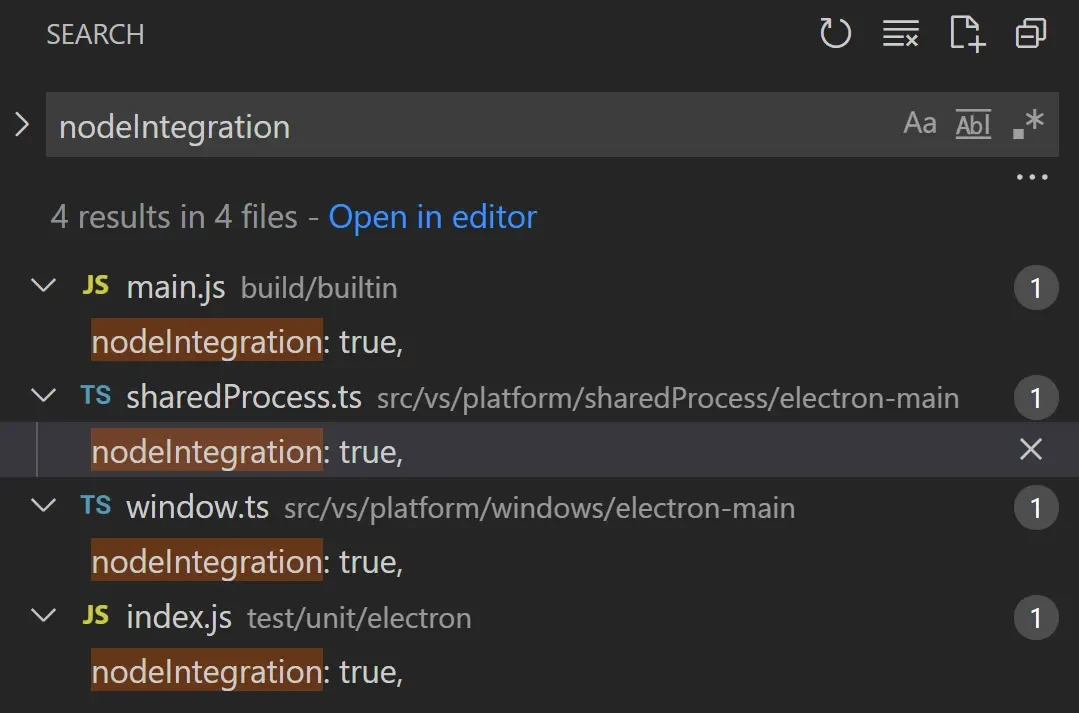
Figure 1: nodeIntegration flag enabled
The nodeIntegration value in window.ts appeared to be controlled by a command-line argument, and the researcher could not work out how sharedProcess.ts was used at the time. He therefore switched to an empirical approach and looked for XSS vulnerabilities directly.
At the time, almost every exploitation scenario he could think of seemed to have a control in place. One threat profile he tried: could an adversary publish a malicious extension whose details page contains untrusted JavaScript?
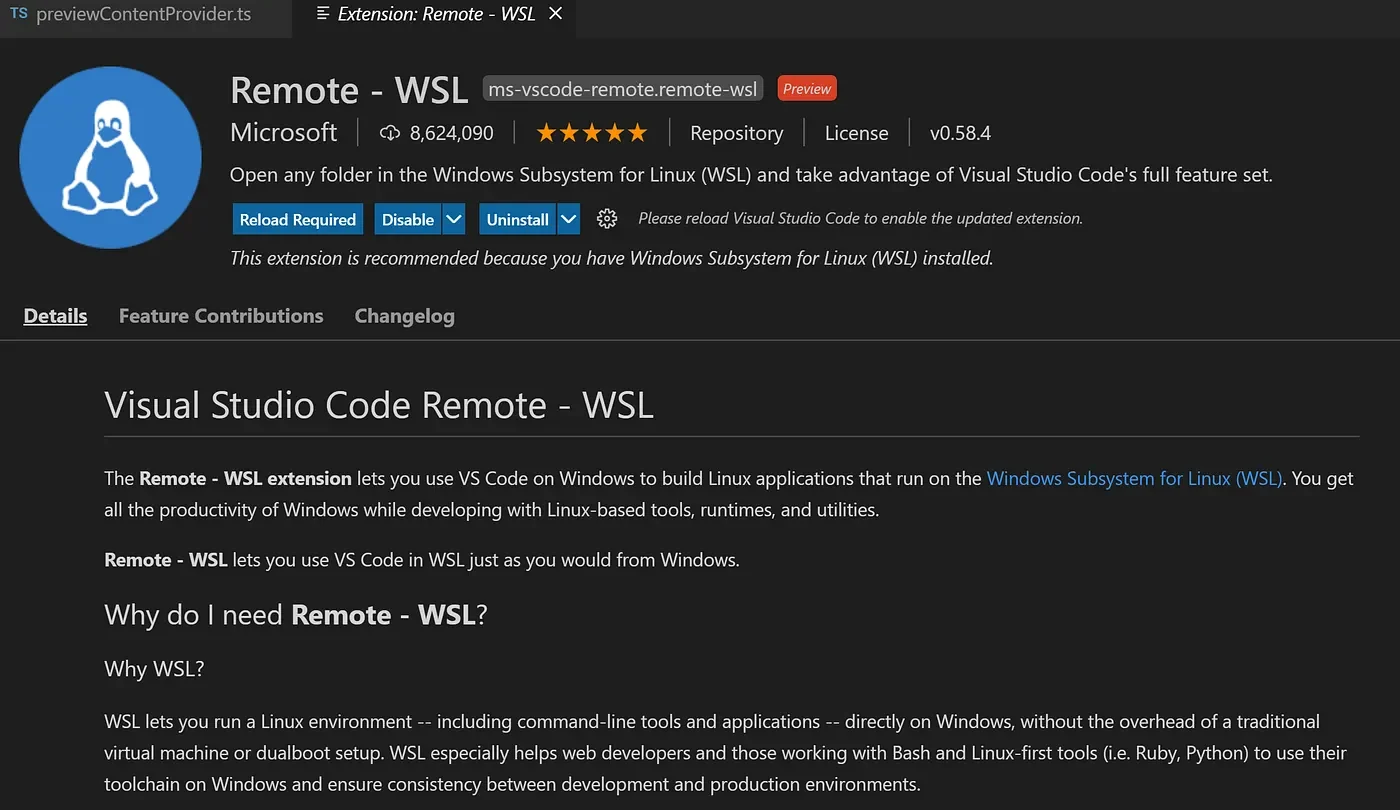
Extension details page example
The answer was no. VS Code uses a simple solution: every application page that needs to render user-provided HTML-capable code (for example Markdown content) implements a restrictive Content-Security-Policy (CSP). In extensionEditor.ts, only script tags with the correct nonce are allowed to run JavaScript.
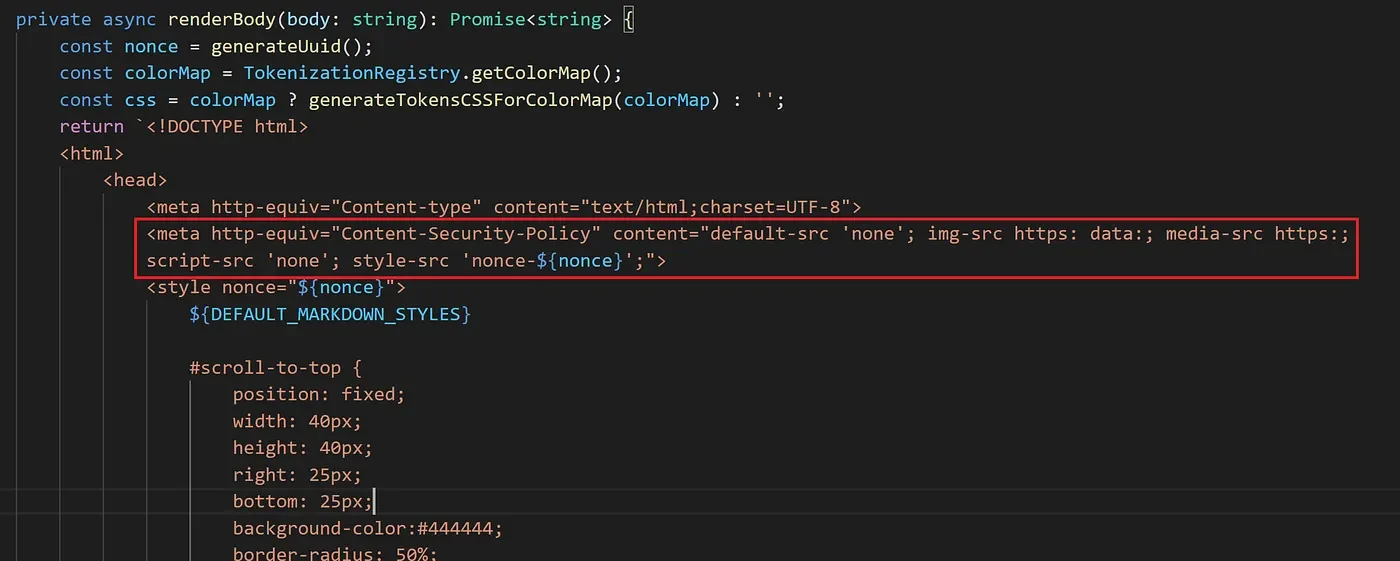
src/vs/workbench/contrib/extensions/browser/extensionEditor.ts
For extensionEditor.ts, an attacker would have to publish an extension whose details markdown contained a script tag with a nonce matching the UUID generated by VS Code. Synchronising that is almost impossible. The researcher notes that a UUID should not be considered cryptographically secure, but that it is an effective solution for this specific case.
Continuing the review, the file extensions/markdown-language-features/src/features/previewContentProvider.ts caught his eye. VS Code allows you to edit and preview Markdown files in real time, as shown below.
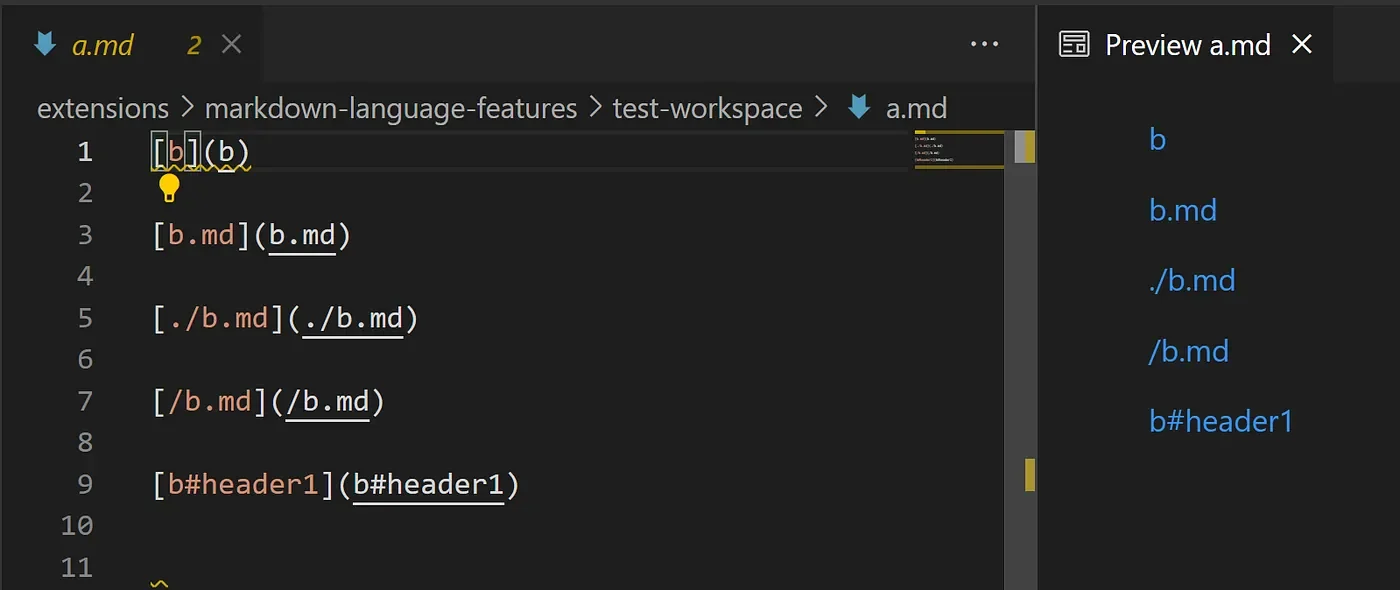
Markdown preview sample
The provideTextDocumentContent method of previewContentProvider.ts is responsible for building the HTML content displayed on the Markdown preview WebView. The code uses CSP to prevent arbitrary JavaScript execution, and the CSP uses a nonce generated by the following piece of code.

nonce generation snippet
The generated nonce is also not cryptographically secure. The concatenation of getMilliseconds() adds no entropy, because its result will match the last three characters of getTime() in virtually all cases. The reasoning that follows: if an attacker can constantly populate a Markdown file with script blocks carrying every possible nonce candidate for the next few seconds, a victim who previews the file with the built-in Markdown extension is vulnerable to XSS.
Exploitation
Step 1: generate the malicious Markdown file
For the proof of concept, the researcher used a NodeJS script to generate the malicious Markdown file. The researcher used a NodeJS script to generate the malicious Markdown file.
Step 2: keep rewriting the file with fresh nonce candidates
A bash one-liner was used to constantly update the Markdown file with nonces for the next 2 seconds, every 4 seconds. Generating too many nonces would freeze VS Code, so a balance had to be found between update interval and nonce count. A bash one-liner was used to constantly update the Markdown file.
Step 3: have the victim preview the file
The researcher recorded a video demonstrating how to use the two scripts to replicate the issue.
Root cause
The CSP on the Markdown preview relies on a nonce that is predictable. It is built from time values, and the getMilliseconds() component contributes nothing beyond the last three digits of getTime(), so the set of candidate nonces for a short window is small enough to enumerate. The CSP itself is correctly restrictive; the weakness is the quality of the nonce, which makes the policy bypassable by brute force rather than by breaking the policy mechanism. The nonce generator is shown in the snippet above.
Impact
Arbitrary JavaScript execution was possible if an attacker had control over a Markdown file previewed by a victim. The Markdown renderer process is sandboxed, and the researcher could not find a way to access NodeJS libraries, so as of the report this is a simple XSS with no path to exploiting a desktop user without a sandbox bypass. He notes the vulnerability probably also applied to the web version of VS Code, hedged because he never managed to run the web version locally and was not aware of web applications such as github.dev at the time.
The issue was reported to Microsoft and a fix was released as part of the July Patch Tuesday (2021). CVE-2021-34479 was assigned.
Fix
A fix was released as part of the July 2021 Patch Tuesday.
Variants to test
- Look for CSP nonces derived from time or other low-entropy sources in other Electron or web applications that render user-controlled Markdown or HTML. A positive result is a nonce whose candidate space for a few seconds can be enumerated and injected into the rendered content.
- Review other VS Code WebView content providers for the same nonce pattern. A positive result is a provider that builds its CSP nonce the same way as the Markdown preview.
- Test whether the same predictable-nonce bypass works in browser-hosted versions of the product. A positive result is script execution in a page where the CSP was assumed to block it.
- Check whether a sandbox bypass exists for the renderer process, which would turn this XSS into RCE. A positive result is access to NodeJS libraries from injected script.
What happened, in plain words
A security researcher spent some time learning how desktop applications are built with a toolkit called Electron, and then used what he had learned to look for bugs in a real program. The program he picked was Visual Studio Code, the code editor made by Microsoft. He found a way to make the editor run JavaScript code that an attacker controls, by tricking the editor's built-in Markdown preview. Microsoft fixed the problem in July 2021 and gave it the identifier CVE-2021-34479.
This article walks through the whole story slowly, assuming you have never read a security report before. Every technical word is explained the first time it appears, and there is a glossary at the end.
Some background you need first
What Visual Studio Code is
Visual Studio Code (often shortened to VS Code) is a free program you install on your computer for writing and editing text files, mostly computer code. It runs as a normal desktop application: you double-click an icon, a window opens, and you work inside it. It is also extensible, meaning other people can write small add-on programs called extensions that add features to it, and you install those from inside the editor.
What Electron is
Electron is a framework, which is a ready-made set of building blocks that programmers use to construct a program. Electron lets someone build a desktop application using the same languages and techniques used to build websites: HTML (which describes what is on a page), CSS (which describes how it looks) and JavaScript (which describes what it does). Many well-known desktop programs are built this way, because the same skills that make websites can then make desktop apps.
The important consequence is that an Electron application is, internally, a lot like a web browser showing web pages. The parts of the application that display content are called renderer processes, and they work much like a browser tab does.
What JavaScript is, and what XSS means
JavaScript is the programming language that web pages use to be interactive. When you load a page and something moves, updates or reacts to your click without the page reloading, JavaScript is usually doing it. Crucially, JavaScript running inside a page can read and change what is on that page, and can send information to other computers.
Cross-Site Scripting, usually written XSS, is a class of bug where an attacker manages to get their own JavaScript running inside a page or application that the victim trusts. The everyday comparison: imagine a noticeboard where employees pin messages. If a visitor can pin a note that looks exactly like an official company memo, other employees will believe it. XSS is the software version of that: the attacker's code runs with the same trust as the application's own code, so the application cannot tell the difference.
What RCE means, and why XSS in a desktop app is worse than in a website
Remote Code Execution (RCE) means an attacker can make the victim's computer run commands of the attacker's choosing, not just code inside a page. In a normal website, XSS is bad but is usually confined to the browser tab. In a desktop application, the stakes are higher: if the attacker's JavaScript can reach the operating system, the bug can turn into full control of the machine.
What NodeJS is, and what the nodeIntegration flag does
NodeJS is a runtime, meaning a program that can execute JavaScript outside a browser, with the ability to read files, start other programs and generally do anything a normal program on your computer can do. Electron applications are built on top of NodeJS.
If JavaScript that came from an untrusted source could reach NodeJS, it could do anything on the computer. To prevent that, Electron ships with secure defaults: by default, the renderer process (the part showing content) is not allowed to use NodeJS. The setting that controls this is called nodeIntegration. When nodeIntegration is enabled, the renderer is allowed to use NodeJS libraries. When it is disabled, which is the safe default, it is not.
So the researcher's first instinct was sensible: find places where nodeIntegration is turned on, because those are the places where an XSS could become an RCE.
Setup
To study the program, the researcher downloaded (cloned) the source code of VS Code from GitHub. GitHub is a website where programmers publish and share code, and cloning means making your own copy of a project so you can read it on your own computer. Reading the source code of a program, rather than only using the program, is called code review.
The report does not describe any accounts, roles or particular versions being used. The work was done against the desktop application. The web version of VS Code, which runs inside a browser, is mentioned only as a possibility, and the researcher says he was never able to make the web version run locally.
Finding it
The review started by searching the source code for places where nodeIntegration was enabled.
Figure 1: nodeIntegration flag enabled
The picture is captioned as showing the nodeIntegration flag enabled. Two of them are named in the report: window.ts and sharedProcess.ts. The .ts ending means these are TypeScript files, which is a variant of JavaScript with extra type information; for our purposes you can read them as JavaScript.
The nodeIntegration value in window.ts appeared to be controlled by a command-line argument. A command-line argument is extra text you type after a program's name when starting it from a terminal, for example to switch on an option. The researcher could not work out how sharedProcess.ts was used at the time.
Because he could not fully understand those two places, he changed tactics. Instead of trying to reason about the code from the top down, he took an empirical approach: try things and see what happens, the way you might test a lock by trying doors rather than by reading the manufacturer's manual. He went looking for XSS vulnerabilities directly.
At the time, almost every exploitation scenario he could think of seemed to have a control in place. A control here means a safeguard: something the developers built in specifically to stop that kind of attack. One threat profile he tried was this: could an adversary publish a malicious extension whose details page contains untrusted JavaScript? An extension's details page is the screen inside VS Code that describes an extension, including text written by the extension's author. If that text could contain JavaScript that runs, an attacker could publish a booby-trapped extension and attack anyone who looked at its page.
Extension details page example
The screenshot is captioned as an extension details page example. The answer to the question was no: the page does not run the author's JavaScript.
How is that prevented? VS Code uses a simple but effective solution. Every application page that needs to render user-provided content capable of containing HTML (for example Markdown content) implements a restrictive Content-Security-Policy (CSP).
Two terms need unpacking here. Markdown is a lightweight way of writing formatted text using plain characters: you write # Title for a heading, or wrap a word in asterisks to make it bold. It is popular because it is readable as plain text and easy to convert into a formatted page. HTML is the language that describes the structure of a web page, and it can include scripts, which is why content that may contain HTML is dangerous.
A Content-Security-Policy is a rule that a page sends to the browser (or, in an Electron app, to the component rendering the page) saying which sources of code are allowed to run. The everyday comparison: a nightclub with a guest list. Even if someone gets to the door, the bouncer checks the list, and anyone not on it is turned away. A CSP is that guest list for scripts.
One common way to build such a list is a nonce. A nonce (short for "number used once") is a random-looking value generated fresh each time a page is built. The page includes the nonce in its CSP rule and also attaches the same value to the script tags it legitimately wants to run. The browser then runs only scripts whose tag carries the matching nonce. An attacker who injects a script tag cannot guess the nonce, so the injected script is refused.
Using extensionEditor.ts as an example, only script tags with the correct nonce are allowed to run JavaScript.
src/vs/workbench/contrib/extensions/browser/extensionEditor.ts
The image is captioned with the file path. The path in the caption tells you where the file lives inside the project: src/vs/workbench/contrib/extensions/browser/extensionEditor.ts. Reading a path like this is like reading a postal address: src is the top folder, then vs, then workbench, and so on, down to the file itself.
In the case of extensionEditor.ts, to perform an XSS attack an attacker would have to publish an extension whose details markdown contained a script tag with a nonce that matched the UUID generated by VS Code. A UUID is a Universally Unique Identifier: a long string of characters designed to be different every time one is generated, so that two things created separately do not accidentally get the same name. Synchronising this attack, meaning getting the attacker's guessed nonce to match the one the application happens to generate at that moment, is almost impossible. The researcher notes that a UUID should not be considered cryptographically secure, meaning it is not produced by a method designed to withstand a determined attacker, but that for this specific case it is an effective solution.
The Markdown preview
Continuing the code review, the file extensions/markdown-language-features/src/features/previewContentProvider.ts caught his eye. VS Code allows you to edit and preview Markdown files in real time, as shown in the picture below.
Markdown preview sample
The screenshot is captioned as a Markdown preview sample. This is convenient, and it is also interesting from a security point of view, because the preview has to turn text into a page, and text can contain things that look like code.
The provideTextDocumentContent method of previewContentProvider.ts is responsible for building the HTML content displayed on the Markdown preview WebView. A method is simply a named block of code that does a job; this one's job is to produce the HTML for the preview. A WebView is an embedded browser-like component inside an application: a small window that renders web content. So the preview you see is really a tiny web page, generated on the fly from your Markdown file.
The code uses CSP to prevent arbitrary JavaScript execution, and the CSP uses a nonce generated by the following piece of code.
nonce generation snippet
The image is captioned as the nonce generation snippet. What matters is the description that follows.
The generated nonce is also not cryptographically secure. More importantly, it is built from time values. Two of the functions used are getMilliseconds() and getTime(). In JavaScript, a date object can report the current time in different units: getTime() gives the number of milliseconds since a fixed starting point in 1970, and getMilliseconds() gives just the milliseconds part of the current second, a number from 0 to 999.
The concatenation of getMilliseconds() adds no entropy. Concatenation means joining pieces of text end to end, and entropy here means unpredictability, the amount of genuine randomness. Because getMilliseconds() is simply the last three digits of the current time, its result will match the last three characters of getTime() in virtually all cases. So joining it on adds nothing an attacker could not already work out.
The reasoning that follows is the heart of the bug. If an attacker can constantly populate a Markdown file with script blocks carrying every possible nonce candidate for the next few seconds, a victim who previews the file with the built-in Markdown extension is vulnerable to XSS. In other words: the guest list changes every moment, but the possible names on it are few and predictable, so the attacker can print a ticket for every possible name and slip one through.
Exploitation
Step 1: generate the malicious Markdown file
For the proof of concept, the researcher used a NodeJS script to generate the malicious Markdown file. A proof of concept (PoC) is a small demonstration that proves a bug is real, without needing to be a polished attack tool. The researcher used a NodeJS script to generate the malicious Markdown file.
Why this step: the attacker needs a Markdown file containing many script tags, one for each nonce the application might generate in the next few seconds. Writing those by hand would be impractical, so a script generates them.
Step 2: keep rewriting the file with fresh nonce candidates
A bash one-liner was used to constantly update the Markdown file with nonces for the next 2 seconds, every 4 seconds. Bash is a command interpreter found on Linux and macOS: you type a command, it runs. A one-liner is a single command line that does a whole job. A bash one-liner was used to constantly update the Markdown file.
Why this step: the nonce depends on the current time, so candidates go stale quickly. The file has to be refreshed repeatedly with guesses for the upcoming moments. Generating too many nonces would freeze VS Code, so a balance had to be found between update interval and nonce count: too few guesses and the right one is missed, too many and the editor becomes unusable.
Step 3: have the victim preview the file
The researcher recorded a video demonstrating how to use the two scripts to replicate the issue. The idea is simple: the victim opens the file and looks at the preview, the preview is rebuilt with a fresh nonce, one of the attacker's pre-planted script tags happens to carry that nonce, and the script runs.
Root cause
The CSP on the Markdown preview relies on a nonce that is predictable. It is built from time values, and the getMilliseconds() component contributes nothing beyond the last three digits of getTime(), so the set of candidate nonces for a short window is small enough to enumerate. Enumerate means to list out one by one; here it means writing down every possible value and trying them all.
The CSP itself is correctly restrictive. The weakness is the quality of the nonce, which makes the policy bypassable by brute force rather than by breaking the policy mechanism. Brute force means trying every possibility until one works, rather than being clever. The nonce generator is shown in the snippet above.
Impact
Arbitrary JavaScript execution was possible if an attacker had control over a Markdown file previewed by a victim. "Arbitrary" means the attacker chooses what the code does, not just that some code runs.
The Markdown renderer process is sandboxed. A sandbox is a restricted environment: the code runs, but it is fenced off from the rest of the computer, so it cannot read your files or start other programs. The researcher could not find a way to access NodeJS libraries from inside that sandbox. So as of the report this is a simple XSS, with no path to exploiting a desktop user without a sandbox bypass. A sandbox bypass is a separate bug that would let code escape the fence.
He notes the vulnerability probably also applied to the web version of VS Code. He hedges with "probably" because he never managed to run the web version locally, and he was not aware of web applications such as github.dev at the time. github.dev is a version of the editor that runs in an ordinary browser tab.
The issue was reported to Microsoft, and a fix was released as part of the July Patch Tuesday (2021). Patch Tuesday is the day Microsoft regularly releases security updates, so called because it falls on a Tuesday. CVE-2021-34479 was assigned. A CVE is a public catalogue number for a known vulnerability, so that everyone discussing it refers to the same thing.
Fix
A fix was released as part of the July 2021 Patch Tuesday.
Variants to test
- Look for CSP nonces derived from time or other low-entropy sources in other Electron or web applications that render user-controlled Markdown or HTML. Low entropy means little unpredictability. A positive result is a nonce whose candidate space for a few seconds can be enumerated and injected into the rendered content.
- Review other VS Code WebView content providers for the same nonce pattern. A content provider is the piece of code that supplies the HTML for a WebView. A positive result is a provider that builds its CSP nonce the same way as the Markdown preview.
- Test whether the same predictable-nonce bypass works in browser-hosted versions of the product. A positive result is script execution in a page where the CSP was assumed to block it.
- Check whether a sandbox bypass exists for the renderer process, which would turn this XSS into RCE. A positive result is access to NodeJS libraries from injected script.
Glossary
- Bash: a command interpreter on Linux and macOS where you type commands for the computer to run.
- Brute force: trying every possible value until one works, instead of reasoning your way in.
- Cloning: making your own copy of a code project, for example from GitHub.
- Code review: reading a program's source code to look for problems, rather than only using the program.
- Command-line argument: extra text typed after a program's name when starting it, to switch on an option.
- Concatenation: joining pieces of text end to end into one string.
- Content-Security-Policy (CSP): a rule telling the browser or renderer which sources of code are allowed to run on a page.
- Control: a safeguard built into software to stop a particular kind of attack.
- CSS: the language that describes how a web page looks.
- CVE: a public catalogue number assigned to a known vulnerability so everyone refers to the same one.
- Electron: a framework for building desktop applications using web technologies such as HTML, CSS and JavaScript.
- Empirical approach: trying things and observing the results, rather than reasoning from documentation alone.
- Entropy: the amount of genuine unpredictability in a value.
- Enumerate: to list possibilities one by one, here to try every candidate.
- Extension: an add-on program that adds features to an application such as VS Code.
- Framework: a ready-made set of building blocks programmers use to construct a program.
- getMilliseconds(): a JavaScript function returning the milliseconds part of the current second, from 0 to 999.
- getTime(): a JavaScript function returning the number of milliseconds since a fixed starting point in 1970.
- GitHub: a website where programmers publish and share code.
- HTML: the language that describes the structure of a web page, and which can include scripts.
- JavaScript: the programming language that makes web pages interactive and that Electron applications are built with.
- Markdown: a lightweight way of writing formatted text using plain characters, easy to read and to convert into a formatted page.
- Method: a named block of code that performs a job.
- NodeJS: a runtime that executes JavaScript outside a browser, with access to files and other programs on the computer.
- nodeIntegration: an Electron setting that, when enabled, lets the renderer process use NodeJS libraries.
- Nonce: a value generated fresh for a page and used to mark which scripts are allowed to run.
- Patch Tuesday: the day Microsoft regularly releases security updates.
- Proof of concept (PoC): a small demonstration proving a bug is real.
- Remote Code Execution (RCE): a bug that lets an attacker make the victim's computer run commands of the attacker's choosing.
- Renderer process: the part of an Electron application that displays content, working much like a browser tab.
- Sandbox: a restricted environment that fences code off from the rest of the computer.
- Sandbox bypass: a separate bug that lets code escape the sandbox.
- Threat profile: a description of an attacker and what they might try, used to guide testing.
- TypeScript: a variant of JavaScript with extra type information, stored in
.tsfiles. - UUID: a long identifier designed to be different every time one is generated.
- WebView: an embedded browser-like component inside an application that renders web content.
- XSS (Cross-Site Scripting): a bug where an attacker gets their own JavaScript running inside a page or application the victim trusts.





