Clickjacking on google myaccount worth 7500
 Published on apapedulimu.click
Recently, I got surprised from google, I found bug Clickjacking On Google My account. And they reward me 7,500$ for single bug.
The full write-up lives on its author's site
It belongs to its author, so we link to it rather than copy it. The other two tabs are our own rewrites, checked against it.
Context
Google My Account hosts the pages where a user manages the people who have access to a brand account group. The researcher was poking around business.google.com, trying the features as a normal user, and noticed that when he went to manage the users of a group he was redirected to myaccount.google.com, which is where the bug turned up.
The page in question is the managers page for a brand account group, identified by a numeric group id, and it takes an origin parameter together with originProduct=AC:
https://myaccount.google.com/u/0/brandaccounts/group/101656179839819660704/managers?originProduct=AC&origin=https://business.google.com
That origin parameter is what the page uses to build its Content Security Policy, and the whole bug lives in how that value is validated and reflected.
Setup
The researcher was using the Community Edition of Burp Suite to look at requests and responses, and Firefox ESR as the browser. No special accounts beyond a normal user in a brand account group are described. The precondition for the attack is a group with an admin and a newly invited user, since the scenario depends on the new user being able to send the admin a page.
Finding it
Looking at the response for the managers page in Burp, the researcher saw that there was no X-Frame-Options header on it. He crafted a simple HTML page that framed the managers URL and it worked in Firefox ESR, so he reported it. That report was not applicable: on Firefox Quantum the frame was blocked by CSP.
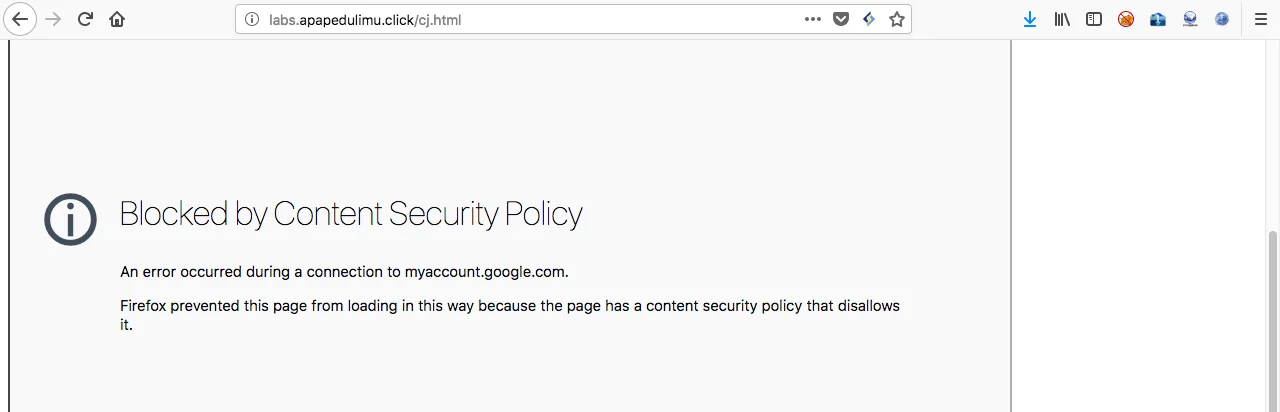
The screenshot shows the clickjacking attempt blocked by CSP on a modern browser. At this point the researcher left the research alone until 15 August.
Exploitation
Step 1: understand where the CSP comes from
When he came back to it, he read the code more carefully and realised that the CSP rule is reflected from his own request parameter. The parameter is the origin value, and on business.google.com the host in it is business.google.com. The request is the managers URL above, and the response he captured is:
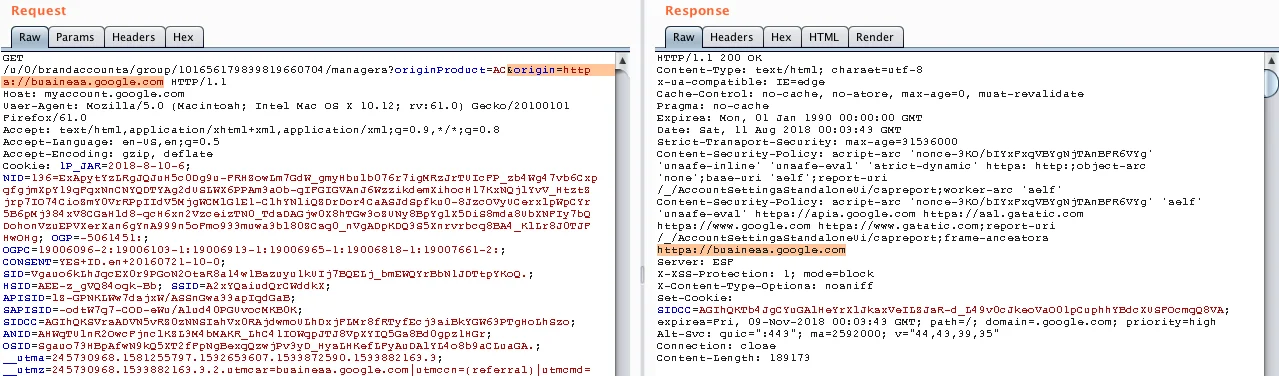
Step 2: test what the origin parameter accepts
Since the host appeared to be accepted only when it is business.google.com, he reasoned that the only way to execute the page would be from business.google.com. He then edited the origin parameter to a subdomain:
https://akugalau.business.google.com
That value was accepted, but the subdomain itself is impossible to use, so it did not help. The CSP was still present.
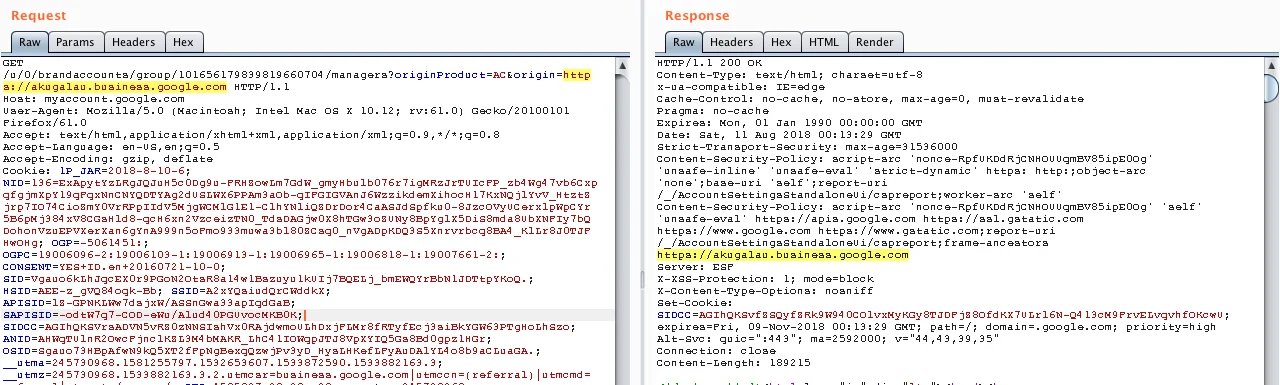
Step 3: add an illegal character
With time on his hands, he started adding illegal characters to the origin parameter, putting a URL-encoded character before business.google.com. The resulting URL was:
https://myaccount.google.com/u/0/brandaccounts/group/101656179839819660704/managers?originProduct=AC&origin=https://%0d.business.google.com
The %0d is a URL-encoded character placed before the host. With that value, the CSP disappeared.
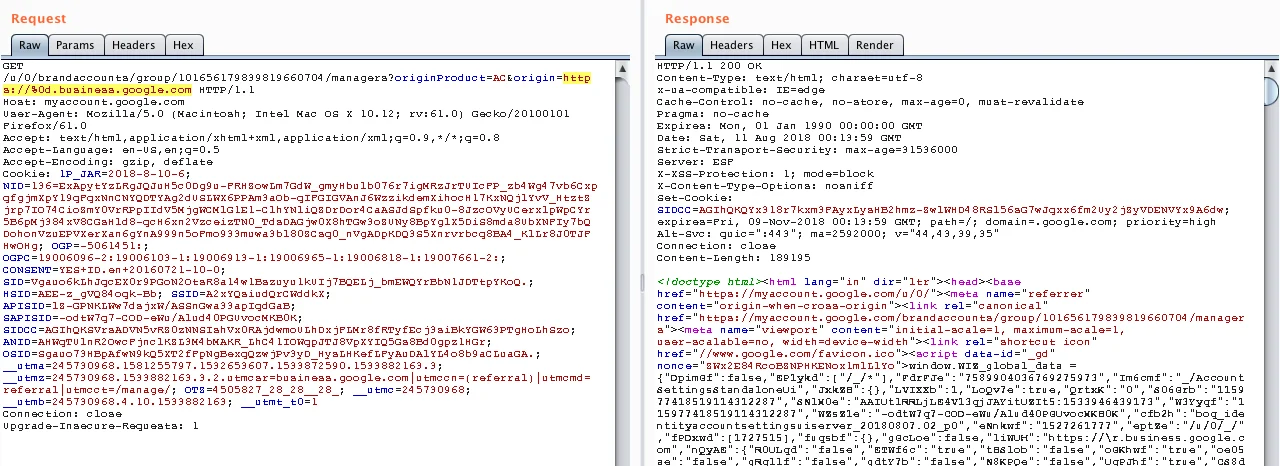
Step 4: frame the page
With the CSP gone, he framed the managers page and the clickjacking worked.
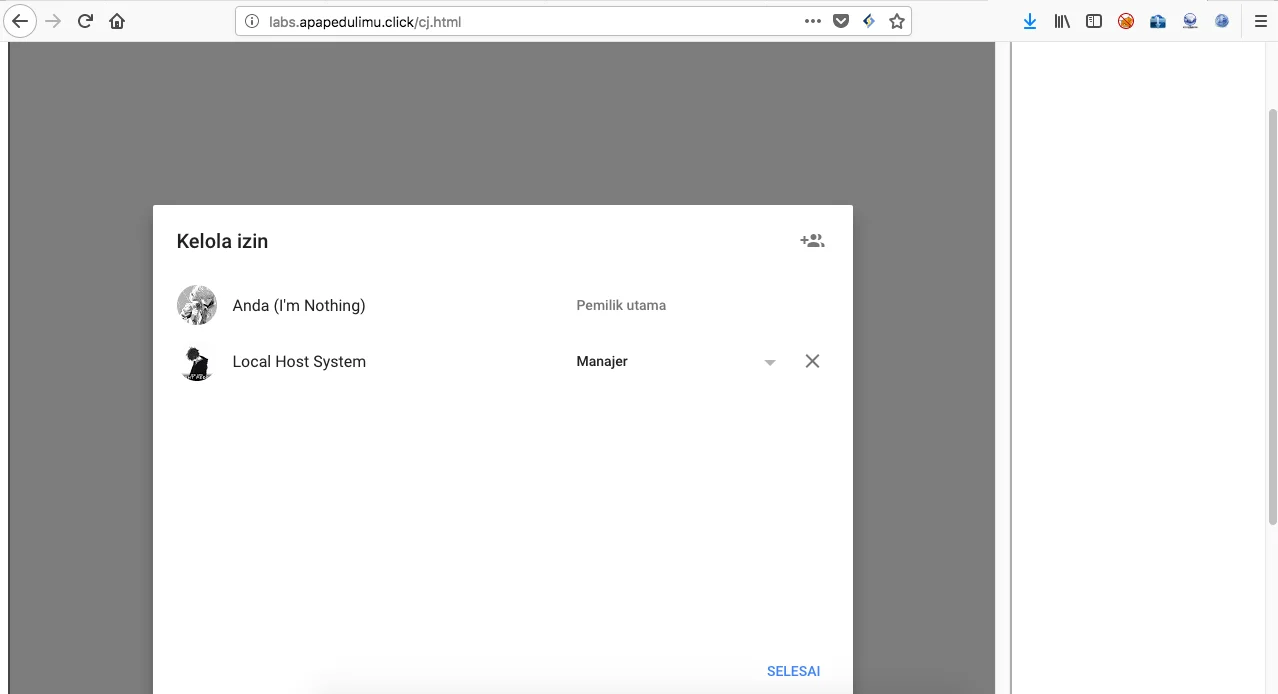
He states plainly that he does not understand the logic behind adding the URL encoding, and puts it down to luck.
Step 5: the proof of concept
The PoC page he submitted frames the managers URL with the crafted origin value:
The {your-group-id} placeholder is the group the attacker controls or belongs to, and the origin value carries the %0d that removes the CSP so the frame renders.
Step 6: attack scenario
The scenario he gave Google runs as follows:
- Admin invites a new user to the group id.
- The new user accepts the invitation.
- The new user learns the
{your-group-id}. - The new user creates a malicious page containing this clickjacking frame to trick the admin into making the new user account the owner.
- The group is taken over by the user.
A video was provided as the proof of concept for this flow:
Root cause
The page builds its CSP from the origin request parameter, and the validation of that parameter is what fails. The host check accepts business.google.com and also accepted a subdomain of it, but when a URL-encoded carriage return (%0d) is placed before the host, the CSP is no longer emitted at all. The report does not explain why the encoded character defeats the check; the researcher says he does not understand the logic and puts it down to luck.
X-Frame-Options was absent from the response, and the CSP that blocks framing is the thing the parameter controls. That makes the protection only as strong as the validation of a user-supplied value.
Impact
An attacker who is a member of a brand account group can frame the managers page for that group and trick an admin into changing the attacker's role to owner, after which the group is taken over. The attack requires the victim to be an admin of the group; the attacker needs to know the group id and to have been invited and to have accepted the invitation. The researcher's own framing of the reward was that he expected 3,133.7 or 5,000, and Google paid 7,500 USD.
Fix
The report does not describe the fix that Google applied. What the finding calls for is validation of the origin parameter that rejects illegal characters such as the encoded carriage return outright, so that a malformed value can never cause the CSP to be omitted, and a framing policy that does not depend on reflecting a request parameter at all.
Variants to test
- Try other URL-encoded control characters (
%0a,%09,%00) in the same position before the allowed host, and check whether the CSP header disappears from the response. A positive result is a response with no CSP where the unmodified value produced one. - Try the same trick on other Google pages that take an
originor redirect-style parameter and reflect it into a security header. A positive result is a header that changes or vanishes based on the parameter. - Test whether subdomains of the allowed host are accepted, as
akugalau.business.google.comwas, and whether any of them can be controlled or found dangling. A positive result is an accepted origin on a host you can serve content from. - Look for pages with no
X-Frame-Optionsand a parameter-driven CSP, and check the framing behaviour in both an older browser such as Firefox ESR and a current one. A positive result is a page that frames in the current browser once the parameter is manipulated.
Timeline
- Aug 11: Report to Google
- Aug 15: Google staff ask for detail
- Aug 15: Detail added
- Aug 21: Google cannot prove the bug
- Aug 21: Video PoC given
- Aug 28: Google asks about the attack scenario
- Aug 28: Attack scenario given
- Sep 11: Nice catch
- Sep 25: Bounty of 7,500 USD
- Sep 25: He cried
What happened, in plain words
A security researcher found a way to make a Google page appear inside another website without Google's permission. That trick is called clickjacking, and it let a member of a shared Google account group trick the group's admin into handing over control of the group. Google paid 7,500 USD for the report.
He first found the problem in March 2018, but at that point the clickjacking was blocked by CSP. In August he found a way around that block. This article walks through the whole story from the beginning, assuming you have never done security work before. Every technical word is explained the first time it appears, and there is a glossary at the end.
Background: the pieces involved
Before the steps, here is what each part of the story is.
A brand account group. Google lets a business own an account that several people can share. Inside that account there is a group of people, and each person has a role. One role is admin, which means that person can manage who else is in the group and what they are allowed to do. The group has a number that identifies it, called the group id. In the URL below it is 101656179839819660704.
The managers page. This is the page where an admin changes the roles of the people in the group. It lives on myaccount.google.com, Google's account management site.
business.google.com. This is a Google site for businesses. The researcher was exploring it as an ordinary user, clicking around the features without any special access. When he tried to manage the users of a group, the site sent him to the managers page on myaccount.google.com. That redirect is how he ended up looking at the page where the bug lived.
Burp Suite, Community Edition. A tool that sits between your browser and a website and shows you every request the browser sends and every response the server sends back. Think of it as a glass window in the post office: you still send and receive letters, but now you can read every envelope. The Community Edition is the free version.
Firefox ESR. A version of the Firefox browser that receives updates slowly and is meant for organisations. The researcher used it, and the browser you use matters in this story, as you will see.
A request and a response. When you open a page, your browser sends a request to the server: please give me this page. The server sends back a response: the page itself plus a set of instructions called headers. Headers are small labelled lines, like notes stapled to the envelope, that tell the browser how to treat the contents.
X-Frame-Options. A header a website can send to say: do not let other websites display my pages inside a frame. A frame (or iframe) is a window inside a web page that shows another page. Without this header, any site can put a Google page inside its own page, and the visitor may not realise which site they are really clicking on.
CSP, Content Security Policy. A newer and more flexible header that tells the browser which sources of content are allowed. One of the things it can say is which sites are allowed to frame this page. It can also say which sites are allowed to frame this page.
Clickjacking. Imagine someone places a transparent sheet over a photo of a button and asks you to tap the photo. You think you are tapping a harmless picture, but your finger lands on the real button underneath. Clickjacking works the same way: the attacker's page shows a real page inside a frame, positioned so that the victim's clicks land on buttons in the framed page. The victim believes they are clicking something on the attacker's site.
URL encoding. Some characters cannot appear in a web address as they are, so they are written as a percent sign followed by a code. %0d is a URL-encoded character that the researcher calls an illegal character in the origin parameter.
Setting up
The researcher used Burp Suite Community Edition to watch the requests and responses, and Firefox ESR as his browser. Nothing in the story needs a special account: the only access described is a normal user inside a brand account group. The attack later depends on a group that has an admin and a newly invited user, because the new user is the one who sends the admin a page.
Finding the first version of the bug
While looking at the response for the managers page in Burp, he noticed there was no X-Frame-Options header. That header is the older way of stopping a page from being framed, so its absence meant the page might be framable.
To test it, he wrote a small HTML page whose only job was to put the managers page inside a frame. It worked in Firefox ESR. He reported it to Google, and the report was marked not applicable. The reason: on Firefox Quantum, a newer version of Firefox, the frame was blocked by CSP instead.
The screenshot shows the clickjacking attempt being blocked by CSP on a modern browser. So the page was protected after all, just by a different mechanism. He decided he had been too inexperienced, left the research alone, and came back to it on 15 August.
Exploitation, step by step
Step 1: work out where the CSP comes from
When he returned, he read the page's code more carefully. He realised that the CSP rule was not fixed: it was built from a value in his own request. That value is a parameter called origin, and the page also receives originProduct=AC. A parameter is a named value attached to the end of a URL after a question mark, like a note saying "here is some extra information for you".
The request he was looking at is the managers page for a group, with the origin parameter set to https://business.google.com:
https://myaccount.google.com/u/0/brandaccounts/group/101656179839819660704/managers?originProduct=AC&origin=https://business.google.com
Line by line:
https://myaccount.google.comis the site hosting the managers page./u/0/brandaccounts/group/101656179839819660704/managersis the path to the managers page for that particular group. The long number is the group id.?starts the list of parameters.originProduct=ACis the first parameter, a fixed value the page expects.&separates parameters.origin=https://business.google.comis the second parameter, and this is the one the page uses to build its CSP.
The response he captured is shown here:
Step 2: test what the origin parameter accepts
Because the host in the parameter was business.google.com, he reasoned that the only way to make the page run would be from business.google.com itself. Then he tried changing the origin value to a subdomain of it:
https://akugalau.business.google.com
A subdomain is a name placed in front of a domain, like a room number in front of a building address. akugalau.business.google.com is a subdomain of business.google.com. The page accepted this value, but that particular subdomain cannot be used by an attacker, so it did not help. The CSP was still there.
Step 3: add an illegal character
With time on his hands, he started putting illegal characters into the origin parameter, placing a URL-encoded character before business.google.com. The URL he ended up with was:
https://myaccount.google.com/u/0/brandaccounts/group/101656179839819660704/managers?originProduct=AC&origin=https://%0d.business.google.com
Line by line:
- Everything up to
origin=is the same managers page as before. https://is the normal start of the address.%0dis a URL-encoded carriage return, a control character that is not allowed in a hostname..business.google.comis the rest of the host.
With this value, the CSP disappeared from the response.
Step 4: frame the page
With the CSP gone, he put the managers page inside a frame on his own page, and the clickjacking worked.
He says plainly that he does not understand the logic behind adding the URL encoding, and puts it down to luck.
Step 5: the proof of concept
The page he submitted to Google frames the managers URL with the crafted origin value:
Line by line:
<iframestarts a frame, a window inside the page that loads another page.src=”...”says which address the frame should load. Here it is the managers page with the%0dvalue inorigin.{your-group-id}is a placeholder for the id of the group the attacker controls or belongs to. The attacker fills in the real number.width=”1000″ height=”1000″makes the frame large, so the page inside it is fully visible and clickable.>closes the opening tag. The frame has no closing tag in this snippet.
Because the origin value carries the %0d, the CSP is not sent, so the browser allows the frame to render.
Step 6: the attack scenario
The scenario he gave Google runs as follows:
- The admin invites a new user to the group id.
- The new user accepts the invitation.
- The new user learns the
{your-group-id}. - The new user creates a malicious page containing this clickjacking frame, to trick the admin into making the new user account the owner.
- The group is taken over by the user.
In other words, the attacker is already inside the group as an ordinary member. The attacker builds a page that shows the real managers page in a frame, to trick the admin into changing roles. The admin, believing they are clicking something harmless on the attacker's page, actually promotes the attacker to owner. A video was provided as the proof of concept for this flow:
Why it worked
The page builds its CSP from the origin request parameter, and the check on that parameter is what fails. The host check accepted business.google.com and also accepted a subdomain of it. But when a URL-encoded carriage return (%0d) is placed before the host, the CSP is no longer sent at all. The report does not explain exactly why the encoded character defeats the check. A plausible reading is that the value is parsed or compared differently once the illegal character is present, so the policy is dropped rather than tightened, but that is not stated.
X-Frame-Options was absent from the response, and the CSP that blocks framing is the thing the parameter controls. That makes the protection only as strong as the validation of a value the user supplies.
Impact
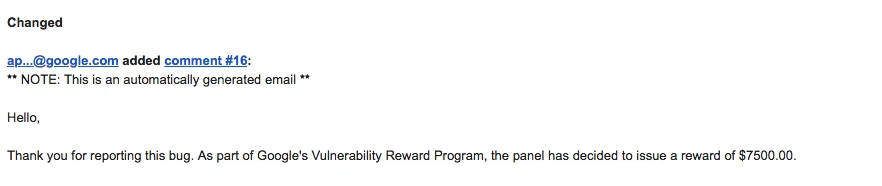
An attacker who is a member of a brand account group can frame the managers page for that group and trick an admin into changing the attacker's role to owner, after which the group is taken over. The attack requires the victim to be an admin of the group. The attacker needs to know the group id, and needs to have been invited and to have accepted the invitation. The researcher expected a reward of 3,133.7 or 5,000, and Google paid 7,500 USD.
Fix
The report does not describe the fix that Google applied. What the finding calls for is validation of the origin parameter that rejects illegal characters such as the encoded carriage return outright, so that a malformed value can never cause the CSP to be omitted, and a framing policy that does not depend on reflecting a request parameter at all.
Variants to test
- Try other URL-encoded control characters (
%0a,%09,%00) in the same position before the allowed host, and check whether the CSP header disappears from the response. A positive result is a response with no CSP where the unmodified value produced one. - Try the same trick on other Google pages that take an
originor redirect-style parameter and reflect it into a security header. A positive result is a header that changes or vanishes based on the parameter. - Test whether subdomains of the allowed host are accepted, as
akugalau.business.google.comwas, and whether any of them can be controlled or found dangling. A positive result is an accepted origin on a host you can serve content from. - Look for pages with no
X-Frame-Optionsand a parameter-driven CSP, and check the framing behaviour in both an older browser such as Firefox ESR and a current one. A positive result is a page that frames in the current browser once the parameter is manipulated.
Timeline
- Aug 11: Report to Google
- Aug 15: Google staff ask for detail
- Aug 15: Detail added
- Aug 21: Google cannot prove the bug
- Aug 21: Video PoC given
- Aug 28: Google asks about the attack scenario
- Aug 28: Attack scenario given
- Sep 11: Nice catch
- Sep 25: Bounty of 7,500 USD
- Sep 25: He cried
Glossary
- Admin: a person with permission to manage the other people in a group and their roles.
- Brand account group: a shared Google account for a business, with a set of members and roles.
- Burp Suite, Community Edition: a free tool that shows the requests your browser sends and the responses the server returns.
- Carriage return: a control character that means "go back to the start of the line"; written
%0din a URL. - Clickjacking: tricking a user into clicking something on a real page hidden inside the attacker's page, by making it look like part of the attacker's page.
- Content Security Policy (CSP): a response header that tells the browser which sources of content are allowed, including which sites may frame the page.
- Control character: a character that is not a letter, digit or symbol but an instruction, such as a carriage return.
- Frame (iframe): a window inside a web page that displays another page.
- Group id: the number that identifies a particular brand account group.
- Header: a small labelled line in a request or response that carries instructions, such as X-Frame-Options or CSP.
- Host: the part of a URL that names the server, such as
myaccount.google.com. - Illegal character: a character that is not allowed in a particular place, such as a control character in a hostname.
- Origin: in this story, a parameter whose value names a site; the page uses it to build its CSP.
- Parameter: a named value attached to a URL after a question mark, giving extra information to the page.
- Proof of concept (PoC): a small demonstration, such as a page or video, that shows the bug really works.
- Request: the message your browser sends to a server asking for a page.
- Response: the message the server sends back, containing the page and its headers.
- Role: what a member of a group is allowed to do, such as admin or owner.
- Subdomain: a name placed in front of a domain, such as
akugalau.business.google.comin front ofbusiness.google.com. - URL encoding: writing characters that are not allowed in a URL as a percent sign followed by a code, such as
%0d. - X-Frame-Options: a response header that tells the browser not to let other sites frame the page.