Grafana Admin Panel bypass in Google Acquisition(VirusTotal)
A Grafana instance on an internal-looking subdomain accepted the default basic-auth credentials shown in the vendor documentation, so anyone who tried them gained full admin rights. The attacker could then create admin users and API keys, and read a Telegram bot API key stored in the panel, allowing messages to be sent to the company's internal Telegram group.
 Published on jayateerthag.medium.com
I started with usual subdomain recon of a google acquisition(VirusTotal).This time I used a online subdomain finder service https://subdomainfinder.c99.nl/ for finding subdomains quickly.
The full write-up lives on its author's site
It belongs to its author, so we link to it rather than copy it. The other two tabs are our own rewrites, checked against it.
Context
VirusTotal is a Google acquisition, and the target of this research was a Grafana instance exposed on a subdomain of it. Grafana is a dashboard and visualisation application; its HTTP API includes endpoints for managing users, including adding and editing users and changing their passwords. Some of those user-management functions are restricted to administrators.
The researcher's goal was to reach the Grafana instance and, if possible, obtain administrative access to it.
Setup
The only tooling described is a subdomain enumeration service and a browser extension:
- An online subdomain finder,
https://subdomainfinder.c99.nl/, used to find subdomains quickly. - The Modify Header Value extension for Firefox (
https://mybrowseraddon.com/modify-header-value.html), used to inject a header into every request to the target host.
No accounts were available at the start. Sign-up was disabled, so there was no legitimate way to create a user on the instance.
Finding it
- The researcher began with the usual subdomain reconnaissance of the Google acquisition, using the online subdomain finder service to enumerate subdomains quickly.
- This surfaced a subdomain,
[redacted].virustotal.com. The wordinternalin the name prompted a visit out of curiosity. - The page was restricted to authorised users only. The researcher searched for Grafana endpoints and visited
/signup, attempting to register a new account. The response was that sign up was disabled. - The next idea was OAuth sign-in: if sign-in through Google, GitHub or another service were allowed, a new account might be created that way. Every option for new user sign-up was disabled.
- That left only logging in with an existing username and password. Because the target was a Google acquisition, the researcher did not want to attempt a brute-force attack against the credentials; an administrator was likely to have a very strong username and password.
- With those avenues closed, the researcher explored more endpoints and consulted the Grafana documentation. The page
https://grafana.com/docs/grafana/latest/http_api/user/describes endpoints to add and edit users and to change their passwords, some of which are available only to the administrator. - On that documentation page, most of the sensitive requests were shown with the following Basic Auth header:
Authorization: Basic YWRtaW46YWRtaW4=
The value is base64 encoded. Decoding it produced:
admin:admin
So the Basic Auth username and password used in the documentation examples were simply admin:admin. This looked like a default credential worth trying against the live instance.
Exploitation
Step 1: Inject the Basic Auth header into every request
The researcher installed the Modify Header Value extension in Firefox and configured it to send the Basic authorization header on all requests to [redacted].virustotal.com. The extension was configured to send the Basic authorization header on all requests to the host.
Step 2: Observe the result
With the header injected, the researcher was logged in as admin with full rights. No brute force, no OAuth, no sign-up: the default credentials from the documentation examples worked on the live instance.
Step 3: Demonstrate full access
To show the extent of the access, the researcher:
- Created a new user for themselves and granted that user admin rights.
- Created an admin API key.
- Sent a proof of concept with a simple curl request using the generated API key, to demonstrate full access to the application:
curl -H “Authorization: Bearer API_KEY” https://[redacted].virustotal.com/api/dashboards/home
This request calls the dashboards API with a bearer token. The API key is shown as API_KEY in the report.
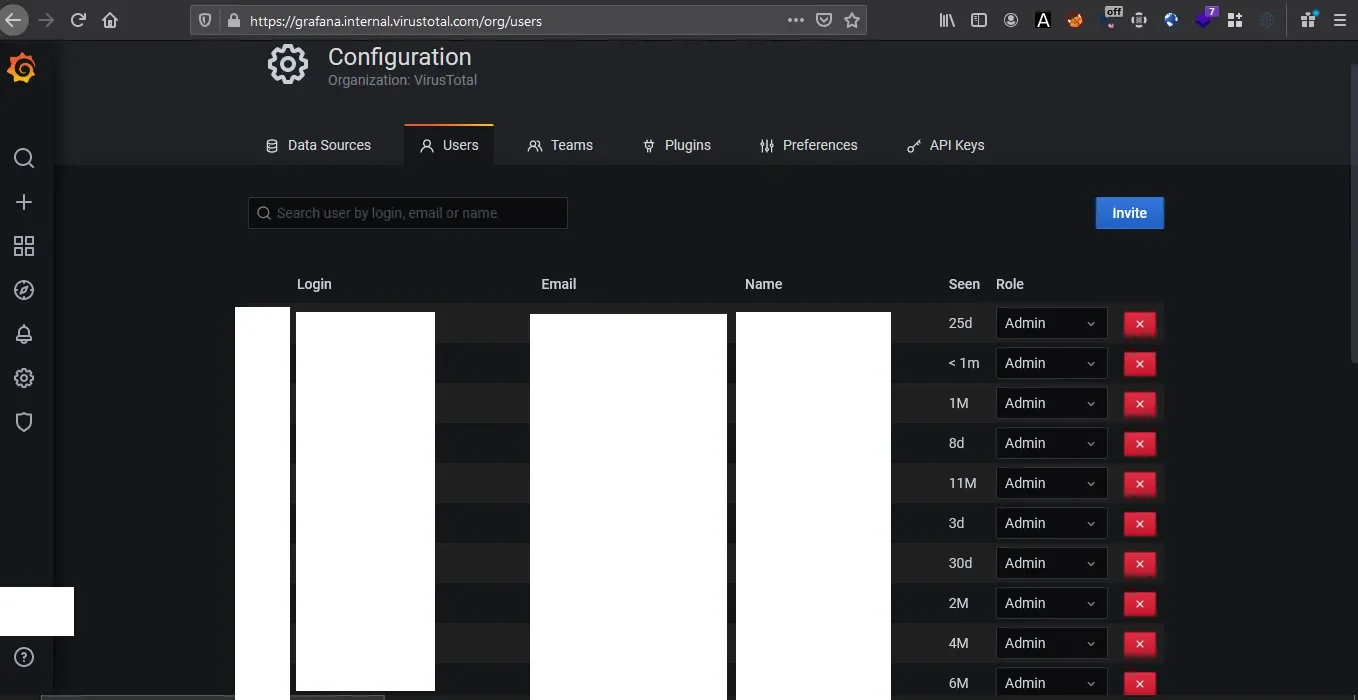
The screenshot shows the Grafana admin panel with the researcher logged in as Admin.
Step 4: A second finding in the admin panel
While browsing the admin panel, the researcher came across a page that leaked a Telegram API key. The key was used as a hook to send notifications to an internal Telegram group of VirusTotal.
A quick proof of concept was built with a simple curl request through which the bot could be used to send a message to anyone on Telegram:
https://api.telegram.org/bot_API_KEY/sendMessage?chat_id=userid&text=SOME_URL_ENCODED_TEXT
The URL places the bot token in the path (bot_API_KEY), takes the recipient in the chat_id parameter and the message body in the URL-encoded text parameter. With the key, the researcher had control over the Telegram bot as well as the Grafana panel.
Step 5: Report
A detailed proof of concept was written covering all the steps to reproduce the bug and its impact, and submitted to GoogleVRP. The bug was accepted and rewarded with $xxx, as the target was an acquisition of Google.
Root cause
The Grafana instance was reachable with the default administrator credentials admin:admin. The documentation examples use exactly this Basic Auth value, and the live instance accepted it. Because the credentials were valid, the injected Authorization: Basic header authenticated every request as the administrator, and the application granted full admin rights..
Sign-up and OAuth were disabled, which removed the normal paths for creating an account, but did nothing to protect the instance once the default password was in place.
The Telegram API key was exposed inside the admin panel, so anyone who reached the panel with admin rights could read it.
Impact
An attacker who reaches the instance can log in as administrator with the default credentials and obtain full rights over the Grafana application. From there they can create users, grant admin rights, create admin API keys and call the API with those keys, as demonstrated with the dashboards endpoint. The admin panel also exposed a Telegram API key used to send notifications to an internal VirusTotal Telegram group, so the same access allowed the attacker to use the bot to send messages to anyone on Telegram.
Fix
The report does not describe the remediation that was applied.
Variants to test
- Default credentials on internal-sounding hosts. Enumerate subdomains of an acquisition and look for names containing
internal,admin,grafana,kibanaor similar. A positive result is a login page that accepts credentials taken from the product's documentation, hereadmin:admin. - Credentials copied from documentation. Read the vendor's HTTP API docs for the product and decode any Basic Auth headers shown in examples. A positive result is a decoded value such as
admin:adminthat authenticates against a live instance. - Header injection for repeated authentication. Configure a browser extension to add the Basic Auth header to every request for the target host. A positive result is an authenticated session as the administrator without any interactive login.
- API key escalation. Once inside, create a new user with admin rights and an admin API key, then call an API endpoint with the key. A positive result is a successful response from an endpoint that requires admin rights, such as the dashboards API used here.
- Secrets in admin panels. Browse configuration and integration pages of the admin panel for third-party tokens and webhook URLs. A positive result is a key that can be used to act as the integration, for example sending a message through a Telegram bot.
What happened, in plain words
A security researcher was looking around the internet for parts of a company's website that are not meant to be found easily. The company was VirusTotal, which Google had bought. During that search he found a hidden web page that runs a program called Grafana. Grafana is a tool that turns numbers and logs into charts and dashboards, like a control room screen that shows how a system is doing. This particular Grafana page had the word internal in its address, which suggested it was meant for staff only.
The page asked for a username and password. Normally, a researcher in that situation would try to guess the password, but guessing is slow and noisy, and against a Google-owned site it is not a good idea. Instead he read the public documentation for Grafana and noticed that the examples in the docs used a username and password of admin:admin. He configured his browser to send that Basic Auth header on every request to the live page, and it worked. He was suddenly logged in as the administrator, the person with the most power over the tool.
Once inside, he showed what that power meant: he made himself a new account with admin rights, created a special key that lets a program talk to Grafana without a password, and used that key to fetch data from the tool. He also found, sitting in the admin pages, a secret key for a Telegram bot that VirusTotal used to send notifications to a private group. With that key he could make the bot send messages to anyone.
He wrote it all up and sent it to Google's bug bounty programme, which accepted it and paid a reward. This article walks through the same steps for someone who has never done security work before.
Background: what the pieces are
Before the steps, a few ideas need explaining, because the whole story depends on them.
A subdomain is a smaller address that sits under a main one. If example.com is the main building, then shop.example.com and internal.example.com are rooms inside it. Companies often put internal tools on subdomains whose names hint at what they are, such as internal, admin or grafana.
Grafana is a dashboard and visualisation application. You point it at data sources and it draws charts, tables and alerts. It has a web interface for humans and an HTTP API for programs.
An API (application programming interface) is a way for one program to ask another program to do something, without a human clicking buttons. A useful comparison is a restaurant: the menu and the waiter are the API. You do not walk into the kitchen; you ask the waiter for a dish by name, and food comes back. In web terms, the "dish names" are addresses called endpoints, such as /api/dashboards/home, and the "food" is the data the server sends back.
An endpoint is simply a specific address on a server that does a specific job. https://[redacted].virustotal.com/api/dashboards/home is an endpoint that returns the home dashboard.
Authentication is proving who you are. Authorisation is what you are allowed to do once you have proved it. A building pass proves you are an employee (authentication); the floors your pass opens are your authorisation.
Basic Auth is one of the oldest ways to authenticate on the web. The browser takes the username and password, joins them with a colon, encodes the result in base64, and sends it in a request header. Base64 is not encryption; it is just a way of writing data using a safe set of characters, and anyone can decode it. The header looks like this:
Authorization: Basic YWRtaW46YWRtaW4=
Line by line: Authorization is the name of the header, the label the server looks for. Basic says which authentication scheme is being used. YWRtaW46YWRtaW4= is the base64-encoded username and password. Decoding it gives admin:admin, which is the username admin and the password admin.
A header is a small piece of extra information attached to every web request and response, like the label on a parcel. Headers say things such as what browser you use, what format you accept, or, in this case, who you claim to be.
A cookie or token is a short piece of text a server gives your browser after you log in, so it can recognise you on the next request without asking for your password again. A bearer token (or API key) is the same idea for programs: whoever holds the token is treated as the user, like a cloakroom ticket. Anyone who has the ticket can collect the coat, so tokens must be kept secret.
Default credentials are the username and password a product ships with before anyone changes them, often admin/admin. The weakness here is a live system accepting the credentials shown in the product's documentation.
Brute force means trying many passwords in a row until one works. It is noisy, slow, and against a large company it is likely to be blocked or noticed, which is why the researcher avoided it.
OAuth is the "log in with Google / GitHub" button. It lets a website trust another company to confirm who you are, instead of handling a password itself.
curl is a command-line tool for sending web requests. It is the programmer's equivalent of typing an address into a browser and pressing Enter, except it can also attach custom headers and show you the raw reply.
A browser extension is a small add-on that changes how the browser behaves. The one used here, Modify Header Value, can add a header to every request the browser makes to a chosen site, automatically.
A bug bounty programme is a scheme where a company pays researchers who report security problems responsibly instead of exploiting them. Google runs one called GoogleVRP.
Finding the hidden page
- The researcher started with subdomain reconnaissance, the practice of listing all the subdomains a company owns. He used an online service,
https://subdomainfinder.c99.nl/, to do it quickly rather than running tools himself. - That list contained
[redacted].virustotal.com. The wordinternalcaught his attention, because internal tools are often less carefully protected than public ones, so he visited it. - The page was restricted to authorised users. He looked for Grafana's sign-up endpoint,
/signup, and tried to create an account. The site replied that sign up was disabled. - His next idea was OAuth: if logging in with Google, GitHub or another service were allowed, he might get an account that way. Every option for new user sign-up was disabled.
- That left only logging in with an existing username and password. Because the target belonged to a Google acquisition, he did not want to brute force it; an administrator was likely to have a very strong username and password, and the attempt would probably be noticed.
- With those doors closed, he explored more endpoints and read the Grafana documentation. The page
https://grafana.com/docs/grafana/latest/http_api/user/describes endpoints for adding and editing users and for changing their passwords, and notes that some of those functions are available only to the administrator. - On that documentation page, most of the sensitive requests were shown with this Basic Auth header:
Authorization: Basic YWRtaW46YWRtaW4=
This is the header a program would send to prove it is the administrator. Authorization is the header name, Basic is the scheme, and the long string is the encoded username and password.
- The value is base64 encoded, so he decoded it. The result was:
admin:admin
In other words, the examples in the public documentation used the username admin and the password admin. That is a default credential, and it was worth trying against the live instance, because documentation examples are sometimes copied straight into real deployments.
Getting in
Step 1: Send the header with every request
He installed the Modify Header Value extension in Firefox (https://mybrowseraddon.com/modify-header-value.html) and configured it to send the Basic authorization header on all requests to [redacted].virustotal.com. The value was the one decoded above, admin:admin, sent as Basic Auth.
Why do it this way? A browser normally only sends Basic Auth after you type credentials into a pop-up box, and it may forget them. By injecting the header into every request automatically, the browser behaves as if it is permanently logged in, and every page he opens is authenticated without typing anything.
Step 2: See what happens
With the header injected, he was logged in as admin with full rights. No brute force, no OAuth, no sign-up: the default credentials from the documentation examples worked on the live instance.
Step 3: Prove the access is real
Being logged in is one thing; showing what that login can do is another. To demonstrate the extent of the access, he:
- Created a new user for himself and granted that user admin rights.
- Created an admin API key.
- Sent a proof of concept with a simple curl request using the generated API key, to demonstrate full access to the application:
curl -H “Authorization: Bearer API_KEY” https://[redacted].virustotal.com/api/dashboards/home
Line by line: curl is the command-line web client. -H tells it to add a header to the request. “Authorization: Bearer API_KEY” is that header: Authorization is the header name, Bearer says the credential is a token rather than a username and password, and API_KEY is a placeholder for the key he generated (the real key is not shown). The address at the end is the dashboards endpoint, which returns the home dashboard. If the request succeeds, the key really does have admin-level access.
The screenshot shows the Grafana admin panel with the researcher logged in as Admin.
Step 4: A second secret in the admin panel
While browsing the admin panel, he came across a page that leaked a Telegram API key. Telegram is a messaging service, and bots on it are programs that can send messages. The key was used as a hook to send notifications to an internal Telegram group of VirusTotal.
He built a quick proof of concept with a simple curl request through which the bot could be used to send a message to anyone on Telegram:
https://api.telegram.org/bot_API_KEY/sendMessage?chat_id=userid&text=SOME_URL_ENCODED_TEXT
Line by line: https://api.telegram.org is Telegram's API server. bot_API_KEY is the bot's secret token placed in the address path; whoever knows it can act as the bot. sendMessage is the endpoint that sends a message. chat_id=userid says who should receive it, and text=SOME_URL_ENCODED_TEXT is the message body, URL-encoded so that spaces and special characters survive the trip. With the key, he had control over the Telegram bot as well as the Grafana panel.
Step 5: Reporting it
He wrote a detailed proof of concept covering all the steps to reproduce the bug and its impact, and submitted it to GoogleVRP. The bug was accepted and rewarded with $xxx, as the target was an acquisition of Google.
Why it worked
The Grafana instance was reachable with the default administrator credentials admin:admin. The documentation examples use exactly this Basic Auth value, and the live instance accepted it. Because the credentials were valid, the injected Authorization: Basic header authenticated every request as the administrator, and the application granted full admin rights..
Sign-up and OAuth were disabled, which removed the normal paths for creating an account, but did nothing to protect the instance once the default password was in place.
The Telegram API key was exposed inside the admin panel, so anyone who reached the panel with admin rights could read it.
What the impact was
An attacker who reaches the instance can log in as administrator with the default credentials and obtain full rights over the Grafana application. From there they can create users, grant admin rights, create admin API keys and call the API with those keys, as demonstrated with the dashboards endpoint. The admin panel also exposed a Telegram API key used to send notifications to an internal VirusTotal Telegram group, so the same access allowed the attacker to use the bot to send messages to anyone on Telegram.
How to fix it
The report does not describe the remediation that was applied.
Things to try yourself
- Default credentials on internal-sounding hosts. Enumerate subdomains of an acquisition and look for names containing
internal,admin,grafana,kibanaor similar. A positive result is a login page that accepts credentials taken from the product's documentation, hereadmin:admin. - Credentials copied from documentation. Read the vendor's HTTP API docs for the product and decode any Basic Auth headers shown in examples. A positive result is a decoded value such as
admin:adminthat authenticates against a live instance. - Header injection for repeated authentication. Configure a browser extension to add the Basic Auth header to every request for the target host. A positive result is an authenticated session as the administrator without any interactive login.
- API key escalation. Once inside, create a new user with admin rights and an admin API key, then call an API endpoint with the key. A positive result is a successful response from an endpoint that requires admin rights, such as the dashboards API used here.
- Secrets in admin panels. Browse configuration and integration pages of the admin panel for third-party tokens and webhook URLs. A positive result is a key that can be used to act as the integration, for example sending a message through a Telegram bot.
Glossary
- API: a way for one program to ask another program to do something, using named addresses and agreed formats.
- API key: a secret string that lets a program authenticate to an API, like a cloakroom ticket.
- Authentication: proving who you are.
- Authorisation: what you are allowed to do once you have proved who you are.
- Base64: an encoding that turns data into safe characters; it is not encryption and anyone can decode it.
- Basic Auth: an authentication scheme that sends the username and password, joined by a colon and base64-encoded, in an
Authorizationheader. - Bearer token: a credential where possession alone grants access, sent with the word
Bearerin theAuthorizationheader. - Brute force: trying many passwords in a row until one works.
- Bug bounty programme: a scheme where a company pays researchers who report security problems responsibly.
- Cookie: a small piece of text a server gives your browser so it can recognise you on later requests.
- curl: a command-line tool for sending web requests.
- Default credentials: the username and password a product ships with before anyone changes them.
- Endpoint: a specific address on a server that performs a specific job.
- Grafana: a dashboard and visualisation application that draws charts and alerts from data sources.
- Header: a small piece of extra information attached to a web request or response.
- HTTP API: an API reached over the web using HTTP requests and responses.
- OAuth: a sign-in method that lets a site trust another company, such as Google or GitHub, to confirm your identity.
- Proof of concept (PoC): a small, repeatable demonstration that a security problem is real.
- Reconnaissance: the information-gathering phase of security work, such as listing subdomains.
- Subdomain: a smaller address under a main domain, such as
internal.example.comunderexample.com. - Telegram bot: a program on Telegram that can send and receive messages using a secret token.
- Token: a short piece of text used in place of a password to prove identity.
- URL encoding: writing special characters in an address as
%codes so they survive the trip. - Vulnerability class: a category of security weakness, here default credentials.




