Google Meet Flaw — Join Any Organisation Call (Not an 0day but still acts as 0day) — Refused by GoogleVRP
The telephone dial-in page for Google Meet exposed the meeting PIN and phone number to anyone who knew the meeting link, without requiring admission by the host. An attacker could use these details to join an organisation's meeting by phone without an invitation.
 Published on basu-banakar.medium.com
The full write-up lives on its author's site
It belongs to its author, so we link to it rather than copy it. The other two tabs are our own rewrites, checked against it.
Context
Google Meet is a video conferencing tool used by organisations for virtual meetings and online collaboration. The normal flow the author describes is simple:
- The host creates a meeting.
- The meeting link is shared with users or employees through an invite.
- Invited users join through the link. A user who was not invited has to be admitted by the host of the meeting.
Meet also offers a dial-in feature: a meeting can be joined by telephone. The author's point is that this feature behaves differently from the web join flow, and that difference is the whole issue. He stresses that this is not technically a zero-day, but that it acts like one, and that he is not responsible for any targeted attacks: the write-up is for educational purposes and to notify organisations.
Setup
The author created a meeting using the address [redacted] to demonstrate the flow. The only precondition for the attack is knowledge of an organisation's meeting link. No account, invitation or admission by the host is needed on the attacker's side, because the dial-in page is reachable as an unauthenticated user.
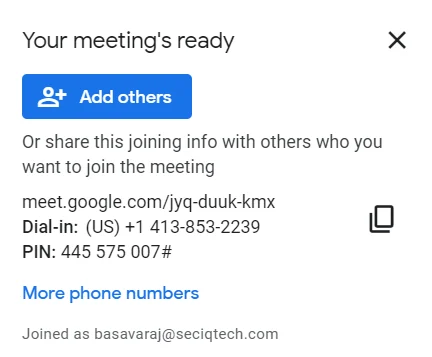
The screenshot shows the meeting created with the [redacted] address.
Finding it
The author asks whether the reader has noticed the feature for joining a meeting by telephonic call, and says the issue lies there. As far as he knows, joining an uninvited meeting through the web requires the host to admit the user. With the dial-in path, only the meeting link is needed: the attacker can join the organisation's meeting by telephone without any admission or invitation.
He notes that the issue is very easy and that he is not sure why nobody pointed it out earlier.
Exploitation
Step 1: Obtain the meeting link
The author starts from the meeting link of an organisation:
https://meet.google.com/jyq-duuk-kmx
Step 2: Try the web join
Joining through the web with this link requires admission by the meeting host. That is the expected behaviour and the barrier the attack bypasses.
Step 3: Open the dial-in page
Instead of the normal join URL, the author navigates to the telephone variant of the same meeting:
https://meet.google.com/tel/jyq-duuk-kmx
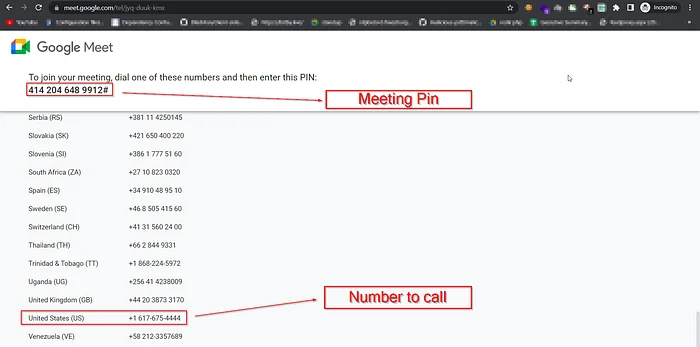
On this page, as an unauthenticated user, he is given the meeting PIN and the dial-in number.
Step 4: Dial in with the number and PIN
The author uses the number and PIN generated for that meeting ID to join by telephone, entering them in the form Phonenumber;Pin#.
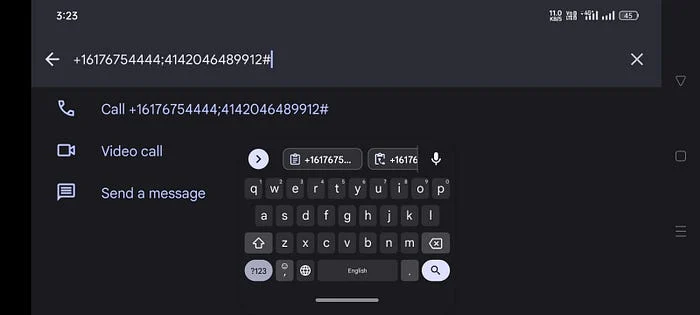
The screenshot shows the call being placed to the dial-in number.
Step 5: Join the call
The call connects and the author is in the meeting.
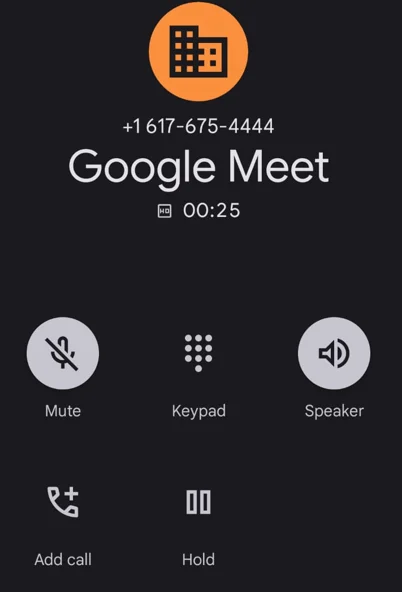
The screenshot shows the meeting joined via the telephonic call.
Step 6: Confirm from the host side
The author verifies the presence from the web as well, from the meeting host's side. The host confirms it.
Root cause
The dial-in flow exposes the meeting's dial-in number and PIN to anyone who knows the meeting ID, without authentication and without the host's admission step that the web flow enforces. The web join and the telephone join are therefore subject to different access checks: the host's admit/deny decision protects the web path but not the dial-in path. The report does not describe the server-side implementation, so the exact reason the PIN is issued to unauthenticated visitors is not stated;
Impact
The author describes the impact as potentially severe for organisations that use Google Meet daily for confidential or sensitive meetings. Unauthorised individuals may be able to eavesdrop on discussions or disrupt the meeting. In some cases they may even impersonate a legitimate attendee and participate as if they were authorised. The author says all of this requires only the meeting link, without an invitation or admission.
Fix
The report does not describe a code change or a confirmed fix. What it does show is the exchange with Google VRP. After the initial report the author received a first response, then a second response after he added additional impact. He questions the second response: He questions the second response, asking whether turning off dial-in for the whole organisation on behalf of a single attacker makes sense and whether it fixes the issue. and he asks whether that makes sense and whether it fixes the issue. He added a further comment, and after many conversations received a final response. The write-up presents these as unwanted responses and the issue as refused by Google VRP.
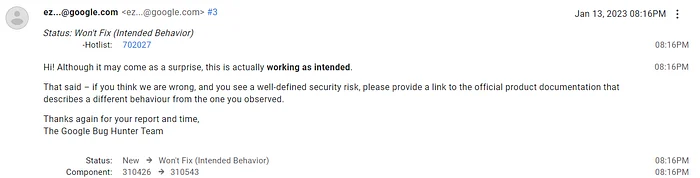
The first response from Google VRP.

The second response, after the author added additional impact.
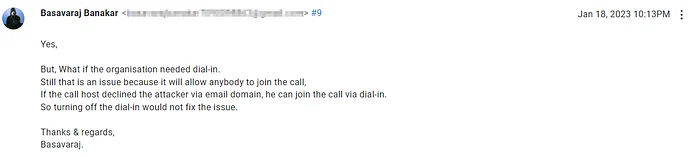
The author's additional comment on the second response.

The final response after the conversations.
Variants to test
- Other meeting platforms with PSTN dial-in. Check whether the dial-in page discloses the number and PIN to an unauthenticated visitor given only the meeting ID. A positive result is a page that returns both without login, followed by a successful call that lands in a meeting the web flow would have gated behind host admission.
- Meeting IDs from other sources. Try IDs harvested from public calendars, shared documents or leaked links, and compare the web join (blocked pending admission) with the dial-in join (connected). A positive result is the same asymmetry the author describes.
- Organisation-wide settings. Test whether an organisation can restrict dial-in per meeting or per user rather than only switching it off for the whole organisation, which is the point the author raises about the proposed response. A positive result is a granular control that closes the gap without disabling dial-in entirely.
What happened, in plain words
Google Meet is a video calling service. Many organisations use it every day for internal meetings, sometimes for confidential or sensitive discussions. Normally, a meeting works like this: the host creates the meeting, the host shares the meeting link with the people who should attend, and those people join through the link. If someone who was not invited tries to join through the web browser, the host has to actively let them in. The host has to admit anyone who was not invited.
The author of this write-up found that Google Meet also lets people join a meeting by ordinary telephone, and that this telephone route does not have the same waiting room. If you know the meeting link, you can open a special page that shows you the telephone number and a PIN for that meeting, without logging in to any Google account. You then call the number, type the PIN, and you are in the meeting. No invitation, no host approval, nothing.
The author is careful about one thing: this is not technically a zero-day. A zero-day is a flaw that the vendor does not know about yet and for which no fix exists. The author reported it through Google's bug bounty programme, called Google VRP. Google refused it. The author still argues that the flaw acts like a zero-day, because in practice an outsider can walk into an organisation's call. He also states that he is not responsible for any targeted attacks and that the write-up is for educational purposes and to notify organisations.
This article walks through the same steps the author took, in the same order, explaining every concept from scratch. You only need a browser and a computer to follow along.
The normal flow, and where it breaks
The author first describes how a Google Meet meeting is supposed to work:
- The host creates a meeting.
- The host shares the meeting link with users or employees, through an invite.
- Invited users join through the link. A user who was not invited has to be admitted by the host of the meeting.
Step 3 is the important one. Think of it like a block of flats with a concierge: even if you know the address, the concierge has to buzz you in. The host is the concierge, and the web join page is the front door.
Google Meet also has a dial-in feature. That means a meeting can be joined by telephone: you call a phone number, enter a PIN, and you are connected to the audio of the meeting. The author's point is that this feature behaves differently from the web join flow, and that this difference is the whole issue.
He notes that the issue is very easy to find and that he is not sure why nobody pointed it out earlier.
Setting up a test meeting
The author created a meeting using the address [redacted] to demonstrate the flow. Creating your own meeting is a sensible first step in any test: you control the meeting, you can see who joins, and you can check the result from the host's side without involving anyone else.
The screenshot shows the meeting created with the [redacted] address.
The only precondition for the attack is knowledge of an organisation's meeting link. On the attacker's side, no account, no invitation and no admission by the host is needed, because the dial-in page can be reached by an unauthenticated user. "Unauthenticated" simply means "not logged in": the page does not ask who you are before showing you information.
Finding it
The author asks whether the reader has ever noticed the feature for joining a meeting by telephonic call, and says the issue lies there. As far as he knows, joining an uninvited meeting through the web requires the host to admit the user. With the dial-in path, only the meeting link is needed: the attacker can join the organisation's meeting by telephone without any admission or invitation.
Exploitation, step by step
Step 1: Obtain the meeting link
The author starts from the meeting link of an organisation:
https://meet.google.com/jyq-duuk-kmx
This is the address of a meeting. The last part, jyq-duuk-kmx, is the meeting ID: a short code that identifies this one meeting, in the same way a house number identifies one house on a street. Anyone who has the link has the ID. Links like this get shared in emails, calendars, chat messages and documents, so they are not hard to come by.
Step 2: Try the web join
Joining through the web with this link requires admission by the meeting host. That is the expected behaviour, and it is the barrier the attack bypasses. If you open the link in a browser while not invited, you sit in a waiting area until the host lets you in. The host is the concierge, and the door stays shut until they press the button.
Step 3: Open the dial-in page
Instead of the normal join URL, the author navigates to the telephone variant of the same meeting:
https://meet.google.com/tel/jyq-duuk-kmx
This is the same meeting ID, but with /tel/ inserted into the address. The /tel/ part tells Google Meet that you want the telephone details for this meeting rather than the web join page. It is a different page on the same site, and that is the key: the same meeting can be reached through more than one door, and each door can have its own lock.
On this page, as an unauthenticated user, the author is given the meeting PIN and the dial-in number. A PIN here is a short numeric code, like the PIN of a bank card: it is meant to prove that the caller is allowed in. The problem is that the page hands the PIN to anyone who asks, so the PIN stops proving anything.
Step 4: Dial in with the number and PIN
The author uses the number and PIN generated for that meeting ID to join by telephone, entering them in the form Phonenumber;Pin#.
The screenshot shows the call being placed to the dial-in number. In plain words: you pick up a phone, dial the number the page gave you, and when the automated voice asks for the PIN, you type the digits followed by #, which is the key that tells the system "that is the whole code, submit it".
Step 5: Join the call
The call connects and the author is in the meeting.
The screenshot shows the meeting joined via the telephonic call. No waiting room, no host approval: the telephone door opened with the number and PIN alone.
Step 6: Confirm from the host side
The author verifies the presence from the web as well, from the meeting host's side. The host confirms it. The host confirmed it.
Why it works
The dial-in flow exposes the meeting's dial-in number and PIN to anyone who knows the meeting ID, without authentication and without the host's admission step that the web flow enforces. The web join and the telephone join are therefore subject to different access checks: the host's admit or deny decision protects the web path but not the dial-in path.
A useful comparison is a building with a front desk and a side entrance. The front desk checks every visitor, but the side door was fitted with a keypad whose code is printed on a sign next to it. The lock exists, but it does not check anything meaningful.
The report does not describe the server-side implementation, so the exact reason the PIN is issued to unauthenticated visitors is not stated.
Impact
The author describes the impact as potentially severe for organisations that use Google Meet daily for confidential or sensitive meetings. Unauthorised individuals may be able to eavesdrop on discussions or disrupt the meeting. In some cases they may even impersonate a legitimate attendee and participate as if they were authorised. The author says all of this requires only the meeting link, without an invitation or admission.
Eavesdropping means listening in without being seen as an outsider. Disruption means interrupting: talking over people, making noise, derailing the call. Impersonation means sounding like a normal participant, so the other attendees do not realise an outsider is present.
What Google said
The report does not describe a code change or a confirmed fix. What it does show is the exchange with Google VRP. VRP stands for Vulnerability Reward Program: a scheme where a company invites outside researchers to report security problems and pays a reward for valid ones. A report that is accepted is "triaged" and fixed; a report that is refused is closed without a fix.
After the initial report the author received a first response, then a second response after he added additional impact. He questions the second response: it appears to suggest turning off dial-in for the whole organisation on behalf of a single attacker, and he asks whether that makes sense and whether it fixes the issue. He asks whether that makes sense and whether it fixes the issue. He added a further comment, and after many conversations received a final response. The write-up presents these as unwanted responses and the issue as refused by Google VRP.
The first response from Google VRP.
The second response, after the author added additional impact.
The author's additional comment on the second response.
The final response after the conversations.
Things worth testing on other platforms
These are the variants the author's reasoning suggests checking. They are written as tests you could run yourself, on your own meetings, with permission.
- Other meeting platforms with telephone dial-in. Check whether the dial-in page discloses the number and PIN to an unauthenticated visitor who only has the meeting ID. A positive result is a page that returns both without login, followed by a successful call that lands in a meeting the web flow would have gated behind host admission.
- Meeting IDs from other sources. Try IDs harvested from public calendars, shared documents or leaked links, and compare the web join (blocked pending admission) with the dial-in join (connected). A positive result is the same asymmetry the author describes: one door locked, the other open.
- Organisation-wide settings. Test whether an organisation can restrict dial-in per meeting or per user rather than only switching it off for the whole organisation, which is the point the author raises about the proposed response. A positive result is a granular control that closes the gap without disabling dial-in entirely.
Glossary
- Zero-day: a security flaw that the vendor does not know about yet and for which no fix exists. The author says this issue is not technically one, but behaves like one in practice.
- Bug bounty programme: a scheme where a company invites outside researchers to report security problems and rewards valid ones. Google's is called Google VRP (Vulnerability Reward Program).
- VRP: Vulnerability Reward Program, Google's bug bounty programme.
- Triage: the process of reviewing a reported bug, deciding whether it is valid, and assigning it to be fixed.
- Host: the person who creates and runs a meeting, and who decides who is admitted.
- Meeting ID: the short code in a meeting link, such as
jyq-duuk-kmx, that identifies one specific meeting. - Meeting link: the full web address of a meeting, which contains the meeting ID.
- Dial-in: a feature that lets people join a meeting's audio by calling a telephone number and entering a PIN.
- PIN: a short numeric code used to prove the caller is allowed to join. Here it is handed out by the dial-in page itself.
- PSTN: the public switched telephone network, the ordinary phone system. A PSTN dial-in is a meeting joined over a normal phone call.
- Unauthenticated: not logged in. An unauthenticated page shows its content without asking who you are.
- Authentication: the process of proving who you are, for example by logging in with a password.
- Authorisation: the process of deciding what a person is allowed to do, once their identity is known.
- Admission: the host's decision to let a waiting participant into a meeting.
- Waiting room: the virtual holding area where uninvited participants wait until the host admits them.
- Eavesdropping: listening to a conversation you were not invited to.
- Impersonation: pretending to be a legitimate participant so others do not notice an outsider is present.
- Root cause: the underlying reason a flaw exists, as opposed to its visible symptoms.
- Asymmetry: a situation where two routes to the same thing are protected differently, so the weaker route undermines the stronger one.
- Granular control: a setting that can be applied narrowly, for example per meeting or per user, rather than only for a whole organisation.
- Workaround: a temporary way to avoid a problem without fixing its cause.

