Site Isolation bypass via Chrome extension
 Published on lf.lc
This vulnerability assumes a compromise of the renderer process as described in this post:
The full write-up lives on its author's site
It belongs to its author, so we link to it rather than copy it. The other two tabs are our own rewrites, checked against it.
Context
Google Input Tools is a Chrome extension that adds input method support to the browser. The extension ships a background script, chext_backgroundpage.js, which the extension's content scripts can talk to through chrome.runtime.sendMessage. That messaging channel is the feature at the centre of this report: a content script asks the background page to perform work on its behalf, and the background page, which runs with extension privileges, carries it out.
The vulnerability is a site isolation bypass. It does not assume the attacker can run code in the extension itself. It assumes a compromised renderer process, as described in the linked chromium-extensions thread, and shows that from that position a page can drive the extension's background script into making a credentialed cross-origin request and returning the response body to the renderer.
Setup
The reproduction needs the following:
- Google Chrome 78.0.3904.108.
- Google Input Tools extension version 5.9.0.0, installed from the Chrome Web Store.
- An "attacker" domain, for example
https://example.org, opened with DevTools. - The ability to simulate a compromised renderer and select the Google Input Tools content script from the DevTools scope dropdown.
The precondition is the renderer compromise itself. Everything after that is done from the content script, which is part of the renderer, so the code being executed is under the attacker's control once the renderer is compromised.
Finding it
The researcher started from the known model that a compromised renderer can send messages to an extension's background script. The question was what the Google Input Tools background script does with such a message. The answer was that it will issue a POST request with credentials to an arbitrary origin, with arbitrary headers, and hand the response back to the caller. That combination is what breaks site isolation: the renderer should not be able to read cross-origin responses, but here the extension performs the request on its behalf and returns the result.
Exploitation
Step 1: Install the extension
Install Google Input Tools from the Chrome Web Store:
https://chrome.google.com/webstore/detail/google-input-tools/mclfklkfljcocdinagocijmpgbhab
This provides the vulnerable background script and content script.
Step 2: Visit an attacker domain and open DevTools
Navigate to a domain the attacker controls, for example https://example.org, and open DevTools. This is the page whose renderer will be treated as compromised.
Step 3: Select the content script scope
Simulate compromise of the renderer process and select the Google Input Tools content script from the scope dropdown in DevTools. Code executed from here runs as the extension's content script, inside the renderer, and can use chrome.runtime.sendMessage.
Step 4: Send the message and read the response
Execute the following JavaScript from the content script and observe the response logged:
chrome.runtime.sendMessage({
  sq: true,
  url: "@mail.google.com/mail/u/0/",
  hd: {
    "x-arbitrary": "header"
  }
}, function(x) { console.log(x); })
The message has three parts. sq: true selects the behaviour in the background script that performs the request. url is the target, given here as @mail.google.com/mail/u/0/. hd carries arbitrary headers, in this case x-arbitrary: header, showing that the caller controls them. The callback logs whatever the background script returns, which is the cross-origin response.
Content script showing cross-origin response reading:
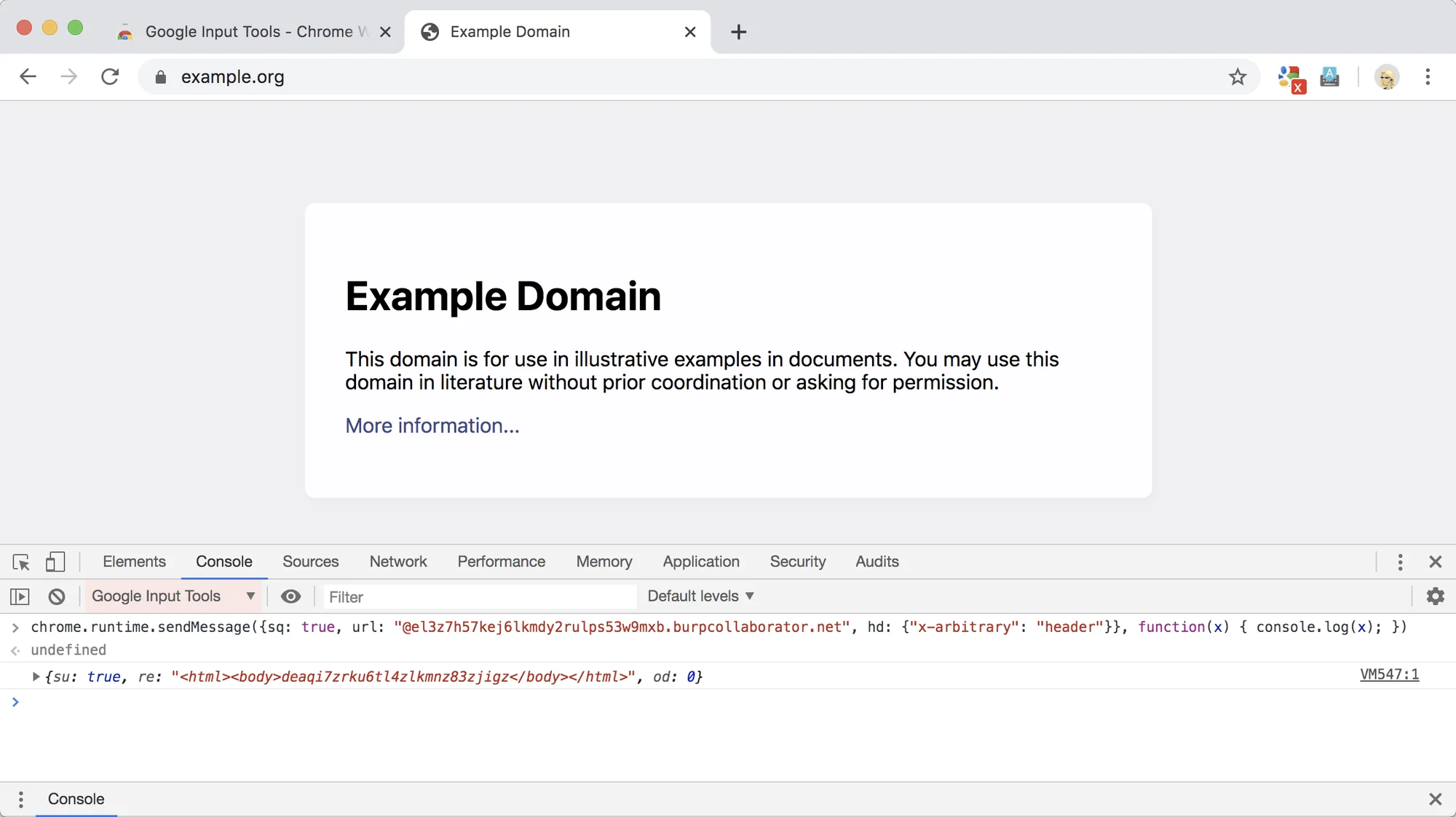
The screenshot shows the response being logged from the content script, which is the renderer reading a cross-origin response.
HTTP request sent by extension:
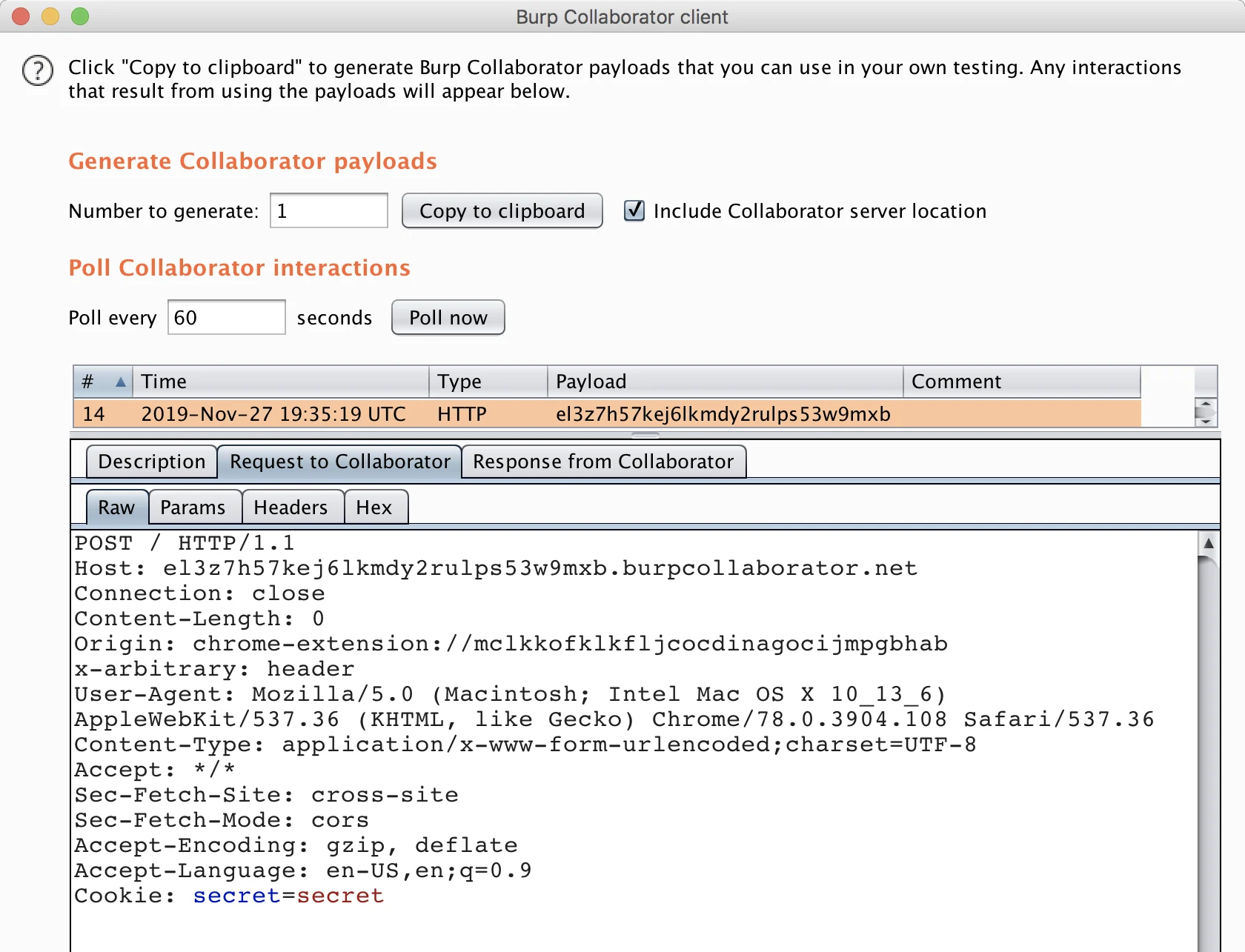
The second screenshot shows the HTTP request sent by the extension.
Root cause
The background script accepts a message from a content script and uses the caller-supplied url and hd values to build a request, then returns the response to the caller. Because the request is made by the extension rather than by the page, the browser's same-origin policy does not apply to it: the extension is allowed to fetch the cross-origin resource, and the renderer receives the body through the message callback. Site isolation assumes a compromised renderer cannot read other origins' responses; this message handler gives it a way to do exactly that.
The report does not describe the cause in the background script. The existing defence, site isolation, does not help because the request is not made by the renderer at all.
Impact
An attacker who compromises the renderer process can break site isolation and read cross-origin responses. The request must be a POST to an HTTPS resource, but the attacker can set any headers they like, and cookies are sent by default. In the demonstration the target is @mail.google.com/mail/u/0/, so the practical consequence is reading authenticated cross-origin content as the victim. The precondition is the renderer compromise; without it the message cannot be sent from the attacker's page.
Fix
The issue was fixed on 2019-12-28, after being reported to the Google VRP on 2019-11-27, triaged the next day, discussed for reproducibility with Google on 2019-11-28, and filed as an internal bug on 2019-12-15. A reward of $3133.70 was issued on 2020-01-07. The report does not describe the code change itself.
Variants to test
- Other extensions with a background message handler that takes a URL from the content script: a positive result is a response body from another origin logged in the content script.
- Handlers that accept a headers object from the caller: a positive result is a request carrying an attacker-chosen header, as with
x-arbitraryhere. - Handlers that perform POST requests to HTTPS resources with cookies by default: a positive result is authenticated content from the victim's session returned to the renderer.
- Message fields that select different request behaviours, like the
sqflag here: a positive result is any other mode that also returns a cross-origin response.
What happened, in plain words
Google Chrome is a web browser. Like most modern browsers, it tries to keep websites apart from each other so that one site cannot read another site's private data. One of the mechanisms that enforces this separation is called site isolation. The idea is simple: even if a malicious website manages to run its own code inside the part of the browser that draws a page (the renderer process), it should still not be able to read the contents of a different website, such as your Gmail inbox.
This report shows a way around that protection. The trick does not live in Chrome itself but in a Chrome extension called Google Input Tools. An extension is a small add-on program you install in the browser to add features. Google Input Tools adds support for typing in different languages and scripts. Part of the extension runs in the background and can make network requests on the extension's behalf. The researcher found that a compromised renderer can ask that background part to fetch another website, with cookies sent by default, and then hand the response back. That defeats site isolation: the page ends up reading data from a different origin.
Google paid a reward of $3133.70 for the report. The issue was fixed on 2019-12-28.
Background concepts, from zero
Before walking through the steps, here are the ideas you need. Each one is explained as if you have never met it before.
- Browser: the program you use to visit websites, such as Chrome, Firefox or Safari.
- Website / origin: an origin is the combination of protocol (http or https), host name (like
mail.google.com) and port. Two pages with different origins are treated as separate by the browser. Think of origins as separate buildings: the browser lets you walk between them, but it does not let one building read the other building's filing cabinets. - Same-origin policy: the browser rule that stops a page from one origin from reading responses from another origin. Without it, any website you visit could quietly read your webmail.
- Renderer process: modern browsers split work across several processes. The renderer is the process that runs a page's HTML, CSS and JavaScript and draws what you see. If an attacker can run their own code inside the renderer, they control that page completely.
- Site isolation: a Chrome feature that puts different websites into different renderer processes, so that even a compromised renderer for one site cannot reach the memory of another site. It is a second line of defence behind the same-origin policy.
- Extension: an add-on installed in the browser that adds features. Extensions have their own permissions and can do things ordinary web pages cannot, such as making requests to any site.
- Content script: a piece of JavaScript that an extension injects into a web page. It runs inside the page's renderer, so it lives in the same process as the page.
- Background script: a piece of JavaScript that runs inside the extension itself, not inside any web page. It has the extension's privileges. In this report the background script is called
chext_backgroundpage.js. - Message passing: extensions let their content scripts talk to their background scripts by sending messages. The content script calls a function, the background script receives the message, does some work, and can send a reply. Think of it as a customer at a counter asking a clerk in the back office to fetch a document.
- API: an interface that lets one piece of software ask another piece of software to do something, without knowing how it is done internally.
chrome.runtime.sendMessageis an API. - Cookie: a small piece of data a website stores in your browser after you log in, so the site can recognise you on later requests. Cookies are what make you "signed in". If someone else can make requests with your cookies attached, they act as you.
- Credentials: in this context, the cookies and other authentication data that identify you to a site.
- POST request: one of the HTTP methods. A GET request asks for a resource; a POST request sends data to a server. Here the important point is that the extension issues a POST, not a GET.
- Header: extra information attached to an HTTP request, such as the content type or a custom value. Headers are written as name and value pairs.
- Cross-origin request: a request from one origin to a different origin. Reading the response to such a request is normally blocked by the same-origin policy.
- DevTools: the developer tools built into Chrome, opened with a keyboard shortcut or the browser menu. They let you inspect pages, run JavaScript and change settings.
- Scope dropdown in DevTools: a control in DevTools that lets you choose which context your JavaScript runs in. Choosing the extension's content script means your code runs as that content script.
- Compromised renderer: a renderer process that an attacker has taken over, for example through a browser bug. The report assumes this has already happened; it does not show how to achieve it.
- Site isolation bypass: a way to make a request and read the response across origins even though site isolation is supposed to prevent it.
The setup
The reproduction needs the following:
- Google Chrome 78.0.3904.108.
- Google Input Tools extension version 5.9.0.0, installed from the Chrome Web Store.
- An "attacker" domain, for example
https://example.org, opened with DevTools. - The ability to simulate a compromised renderer and select the Google Input Tools content script from the DevTools scope dropdown.
The precondition is the renderer compromise itself. Everything after that is done from the content script, which is part of the renderer, so the code being executed is under the attacker's control once the renderer is compromised.
How the researcher found it
The researcher started from a known model: a compromised renderer can send messages to an extension's background script. That model is described in a chromium-extensions thread, which the report links to. The question was what the Google Input Tools background script does with such a message.
The answer was that it will issue a POST request with credentials to an arbitrary origin, with arbitrary headers, and hand the response back to the caller. That combination is what breaks site isolation: the renderer should not be able to read cross-origin responses, but here the extension performs the request on its behalf and returns the result.
Step by step
Step 1: Install the extension
Install Google Input Tools from the Chrome Web Store:
https://chrome.google.com/webstore/detail/google-input-tools/mclfklkfljcocdinagocijmpgbhab
This provides the vulnerable background script and content script. Without the extension installed, there is nothing to send a message to, so this is the starting point.
Step 2: Visit an attacker domain and open DevTools
Navigate to a domain the attacker controls, for example https://example.org, and open DevTools. This is the page whose renderer will be treated as compromised. The page itself is ordinary; the point is that we are pretending its renderer has been taken over, which is the situation the vulnerability assumes.
Step 3: Select the content script scope
Simulate compromise of the renderer process and select the Google Input Tools content script from the scope dropdown in DevTools. Code executed from here runs as the extension's content script, inside the renderer, and can use chrome.runtime.sendMessage. This step matters because the message must come from the content script, not from the page's own JavaScript; the content script is the part of the extension that is allowed to talk to the background script.
Step 4: Send the message and read the response
Execute the following JavaScript from the content script and observe the response logged:
chrome.runtime.sendMessage({
  sq: true,
  url: "@mail.google.com/mail/u/0/",
  hd: {
    "x-arbitrary": "header"
  }
}, function(x) { console.log(x); })
Line by line:
chrome.runtime.sendMessage(starts a message to the extension's background script. Thechrome.runtimeobject is the extension API that lets different parts of an extension talk to each other.{opens the message object, which is the data being sent.sq: true,sets a field calledsqtotrue. In the background script this selects the behaviour that performs the request. Think of it as choosing which counter clerk you want to speak to.url: "@mail.google.com/mail/u/0/",sets the target of the request. The value@mail.google.com/mail/u/0/is the target of the request. The@prefix is part of how this extension's handler interprets the value; the report does not explain the prefix further.hd: {opens an object of headers to attach to the request."x-arbitrary": "header"is a header with the namex-arbitraryand the valueheader. The name is deliberately arbitrary, to show that the caller controls the headers.}closes the headers object.}, function(x) { console.log(x); })closes the message object and supplies a callback. When the background script replies, the callback receives the reply asxand prints it to the console withconsole.log. This is how the renderer gets to see the cross-origin response.
Content script showing cross-origin response reading:
The screenshot shows the response being logged from the content script, which is the renderer reading a cross-origin response.
HTTP request sent by extension:
The second screenshot shows the HTTP request sent by the extension.
Why it works
The background script accepts a message from a content script and uses the caller-supplied url and hd values to build a request, then returns the response to the caller. Because the request is made by the extension rather than by the page, the browser's same-origin policy does not apply to it: the extension is allowed to fetch the cross-origin resource, and the renderer receives the body through the message callback. Site isolation assumes a compromised renderer cannot read other origins' responses; this message handler gives it a way to do exactly that.
The existing defence, site isolation, does not help because the request is not made by the renderer at all.
What an attacker could do with it
An attacker who compromises the renderer process can break site isolation and read cross-origin responses. The request must be a POST to an HTTPS resource, but the attacker can set any headers they like, and cookies are sent by default. In the demonstration the target is @mail.google.com/mail/u/0/, so the practical consequence is reading authenticated cross-origin content as the victim. The precondition is the renderer compromise; without it the message cannot be sent from the attacker's page.
How it was fixed
The issue was fixed on 2019-12-28, after being reported to the Google VRP on 2019-11-27, triaged the next day, discussed for reproducibility with Google on 2019-11-28, and filed as an internal bug on 2019-12-15. A reward of $3133.70 was issued on 2020-01-07.
Variants to test
- Other extensions with a background message handler that takes a URL from the content script: a positive result is a response body from another origin logged in the content script.
- Handlers that accept a headers object from the caller: a positive result is a request carrying an attacker-chosen header, as with
x-arbitraryhere. - Handlers that perform POST requests to HTTPS resources with cookies by default: a positive result is authenticated content from the victim's session returned to the renderer.
- Message fields that select different request behaviours, like the
sqflag here: a positive result is any other mode that also returns a cross-origin response.
Glossary
- API: an interface that lets one piece of software ask another to do something, without knowing how it is done internally.
- Background script: JavaScript that runs inside an extension itself, with the extension's privileges, rather than inside a web page.
- Browser: the program used to visit websites, such as Chrome.
- Callback: a function passed to another function, to be run when the work finishes. Here it receives the reply and logs it.
- Chrome Web Store: Google's official catalogue for installing Chrome extensions.
- Compromised renderer: a renderer process that an attacker has taken over.
- Content script: JavaScript an extension injects into a web page; it runs inside the page's renderer.
- Cookie: a small piece of data a site stores in the browser to recognise you on later requests, such as keeping you signed in.
- Credentials: the data that identifies you to a site, such as cookies.
- DevTools: the developer tools built into Chrome for inspecting pages and running JavaScript.
- Extension: an add-on installed in the browser that adds features and has its own permissions.
- Header: extra name and value information attached to an HTTP request or response.
- HTTPS: the encrypted version of HTTP, the protocol used to load web pages.
- Message passing: the mechanism extensions use to let a content script and a background script exchange data.
- Origin: the combination of protocol, host name and port that identifies a website for security purposes.
- POST request: an HTTP method that sends data to a server, as opposed to a GET request that asks for a resource.
- Renderer process: the browser process that runs a page's code and draws what you see.
- Same-origin policy: the browser rule that stops a page from one origin reading responses from another origin.
- Scope dropdown: a DevTools control that chooses which context your JavaScript runs in.
- Site isolation: a Chrome feature that puts different websites into different renderer processes as a second line of defence.
- Site isolation bypass: a way to read cross-origin responses despite site isolation.
- VRP: Google's Vulnerability Reward Program, which pays researchers for reporting security bugs.




