Cross-tenant Cloud Function compromise via storage bucket squatting
The Cloud Functions backend uploaded user code to a storage bucket named after the project ID without verifying the bucket owner. An attacker could pre-create that bucket, read the victim's source code, and modify it to backdoor future deployments.
 Published on lf.lc
Google Cloud Functions accept code from users and build this code into a deployable container via Cloud Build. Before building, the code is uploaded to a cloud storage bucket whose name matches the format gcf-sources-<numeric-project-id>-<location> (e.g. gcf-sources-928967777810-us-central1).
The full write-up lives on its author's site
It belongs to its author, so we link to it rather than copy it. The other two tabs are our own rewrites, checked against it.
Context
Google Cloud Functions takes code supplied by a user and builds it into a deployable container through Cloud Build. Before the build starts, the platform uploads the user's code archive to a Cloud Storage bucket. That scratch bucket follows a predictable naming convention:
gcf-sources-<numeric-project-id>-<location>
The report gives gcf-sources-928967777810-us-central1 as an example. The bucket name is derived from the victim's numeric project ID and the target region. Because the name is not a domain and does not contain the word Google, nothing in the naming scheme marks the bucket as belonging to Google, and nothing prevents a third party from registering it first.
Setup
The attack needs four preconditions, as listed in the report:
- The attacker must know the project ID of the victim.
- The victim must have no Cloud Functions in the target region.
- The attacker must create a bucket matching
gcf-sources-<numeric-project-id>-<location>. - The attacker must grant access to that bucket, for example by granting
allUsersthestorage.buckets.list,storage.objects.get,storage.objects.listandstorage.objects.createpermissions.
The tooling shown is gsutil. The victim side needs nothing beyond deploying any Cloud Function in the squatted region.
Finding it
The researcher noticed that the backend uploads user code to a bucket whose name is fully predictable from the project ID and location, and that when doing so it does not verify that the bucket owner matches the current project. Since the name is neither a domain nor contains the word Google, an attacker can register these scratch buckets for any target account. The predictable name plus the missing ownership check is the whole finding: the platform will happily write a victim's source archive into a bucket that somebody else controls.
Exploitation
Step 1: Squat the bucket
The attacker creates a bucket matching the victim's numeric project ID and grants broad access to it:
gsutil mb gs://gcf-sources-928967777810-us-central1
gsutil iam ch "allUsers:admin" gs://gcf-sources-928967777810-us-central1
The first command creates the bucket with the exact name the backend will later use for the victim's project in us-central1. The second sets an IAM policy on it; in the report this is the shorthand allUsers:admin, which corresponds to the permissions listed in the preconditions (storage.buckets.list, storage.objects.get, storage.objects.list, storage.objects.create). The attacker then waits until the victim uploads code.
Step 2: Victim deploys a function
The victim deploys any Cloud Function. Because the victim has no functions in that region yet, the backend creates the scratch bucket path from the project ID and location and uploads the code archive there. The deployment proceeds and the function works as expected.
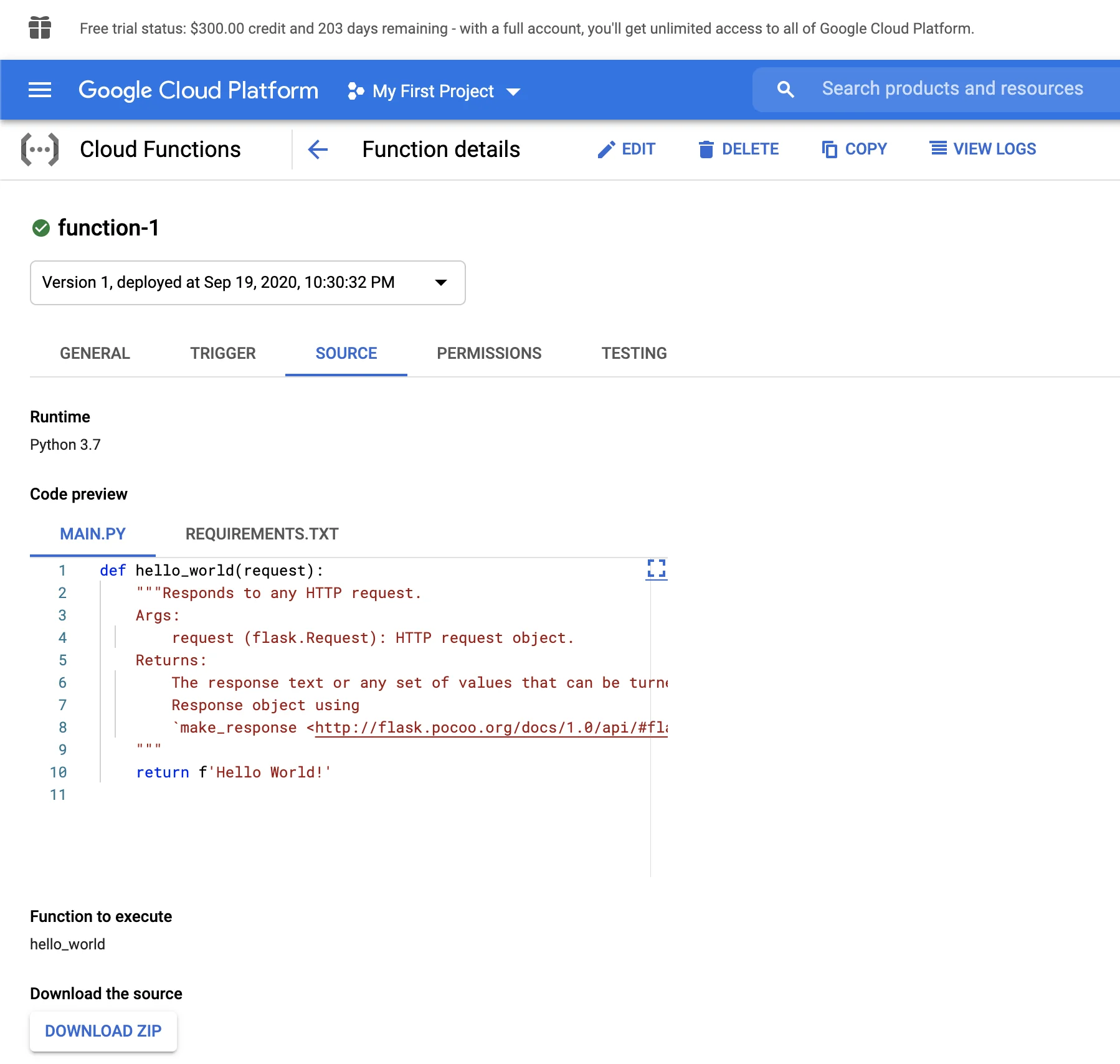
The screenshot shows the victim's Cloud Function correctly deployed.
Step 3: Read the victim's source
Because the attacker owns the bucket and granted access to it, the uploaded archive is readable. The attacker downloads and views code from the victim account.
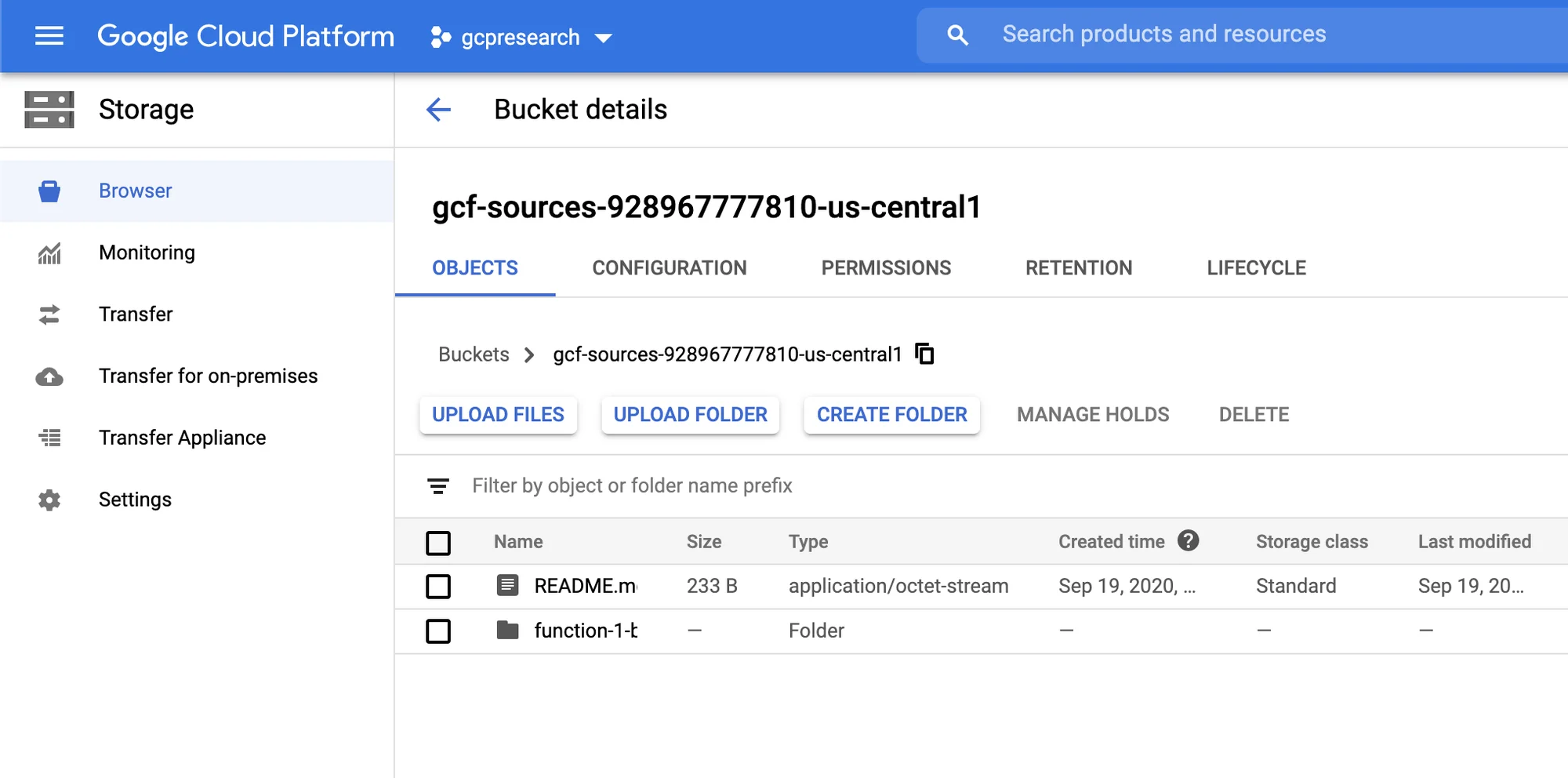
The screenshot shows the attacker's bucket containing source code from the victim.
Step 4: Backdoor the archive
The attacker modifies the victim's function-source.zip in place, editing the code of the victim's Cloud Function. This modified code is not deployed automatically: it only takes effect if the victim performs a new deployment through the UI and does not notice the modification. In larger Cloud Functions the report notes this should be trivial, by injecting either a malicious dependency or a snippet into a large file.
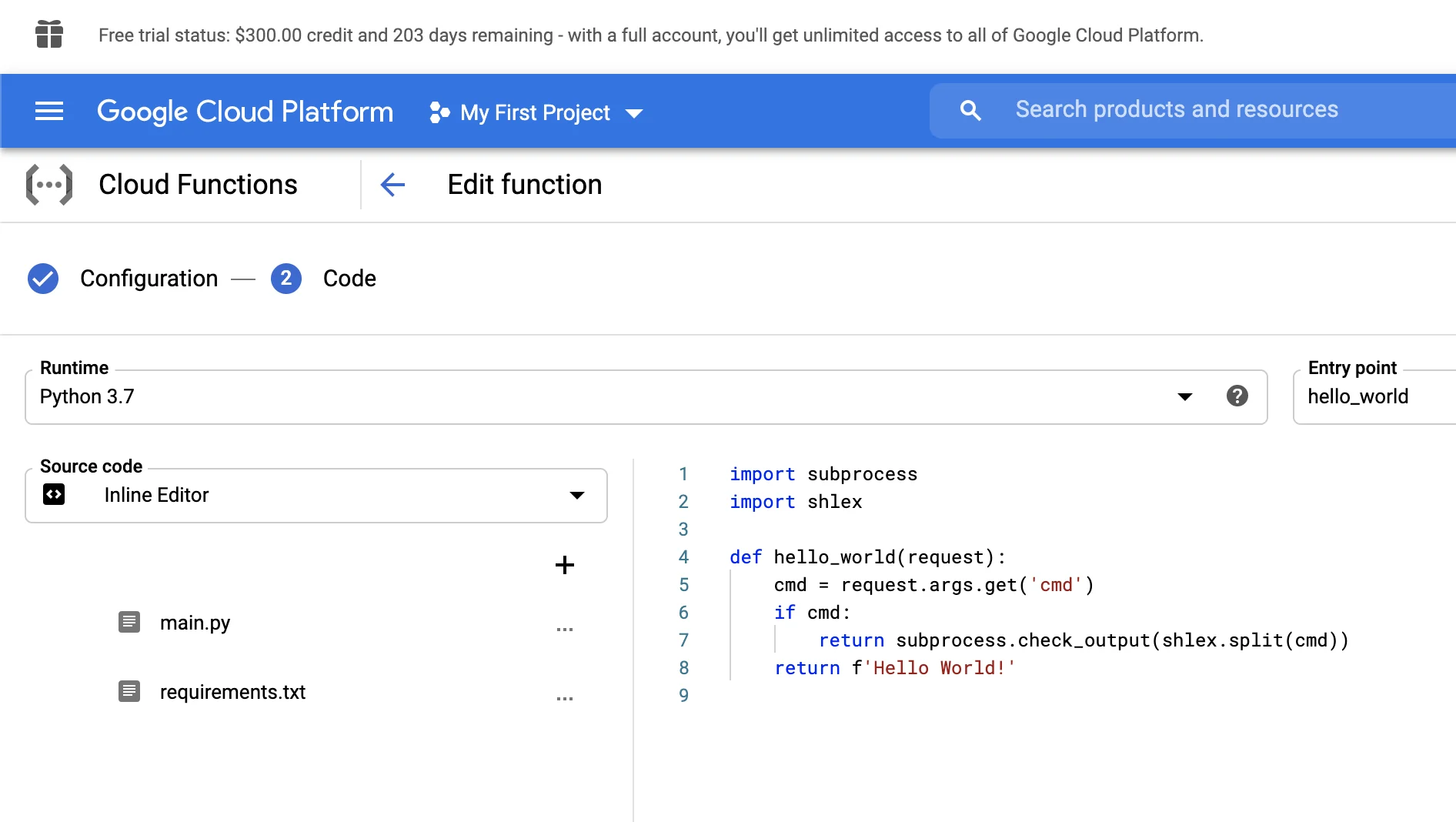
The screenshot shows the victim's edit view after the attacker has backdoored the function-source.zip file.
Step 5: Code execution in the victim's function
Once the victim redeploys without noticing the change, the backdoored code runs. The report shows a simple shell obtained as a result.
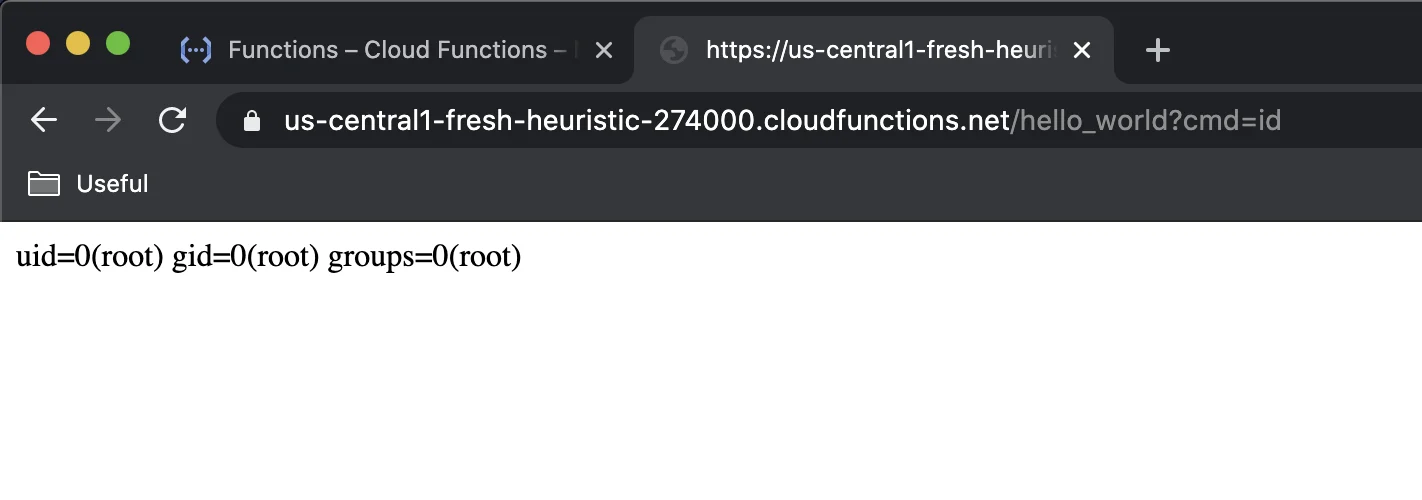
The screenshot shows a simple shell as a result of the backdoored function.
Root cause
When uploading user-provided code to the gcf-sources bucket, the backend does not verify that the bucket owner matches the current project. The bucket name is deterministic and derived from public inputs (numeric project ID and location), so whoever creates the bucket first controls it. The backend performs no ownership check before writing, and the name is not a domain and does not contain the word Google. The report states the missing ownership verification directly; the reason it was not caught earlier is not described.
Impact
An attacker who knows a victim's project ID can squat the scratch bucket name for a region where the victim has no functions yet. From then on:
- The victim's uploaded source archive lands in the attacker's bucket, so the attacker can download and read the victim's code.
- The attacker can modify
function-source.zipso that the victim's next deployment through the UI ships attacker-controlled code, provided the victim does not notice the change. The report notes this is easier to hide in larger functions, for example by injecting a malicious dependency or a snippet into a large file. - The victim's function still deploys and works as expected, so nothing signals that the archive was handled by a third party.
The modification is not deployed on its own; it requires the victim to redeploy. The attack also requires the victim to have no Cloud Functions in the target region at the time of squatting.
Fix
The report does not describe the fix that was applied.
Timeline
- 2020-09-20: Issue reported to Google VRP
- 2020-09-22: Issue triaged
- 2020-09-22: Internal bug report filed
- 2020-09-29: VRP issued reward ($3133.70)
What happened, in plain words
Imagine you rent a flat, and the letting agent tells you the key will be under a doormat with your flat number on it. Anyone who knows your flat number can put their own doormat there first, keep the key, and read your post before you do. That is roughly what happened here, but with cloud storage and code.
Google Cloud Functions is a service where you give Google some code and Google runs it for you on demand. Before Google runs your code, it has to store it somewhere. It puts your code into a storage bucket, which is like an online folder with a name. The name of that folder is built from two things that are not secret: your project ID (a number that identifies your Google Cloud account) and the region where you want your code to run. Because the name is predictable, someone else can create that folder first. And because Google did not check who owned the folder before putting your code in it, your code ended up in the attacker's folder. The attacker could read it, change it, and wait for you to deploy again. If you did not notice the change, your next deployment would run the attacker's code.
This is called a cross-tenant vulnerability: one customer (tenant) can affect another customer's data or code. The researcher who found it, Anthony Weems, reported it to Google's Vulnerability Reward Program (VRP) on 20 September 2020. Google paid a reward of $3,133.70.
Background: the pieces involved
Before walking through the attack, here are the main pieces, explained from scratch.
- Cloud Functions: a service that runs small pieces of code (functions) without you managing a server. You upload code, and the service builds it into a container (a packaged, runnable environment) and runs it when triggered.
- Cloud Build: Google's service that takes source code and builds it into a container. Cloud Functions uses Cloud Build behind the scenes.
- Cloud Storage bucket: a container for files in Google Cloud. Think of it as a folder in the cloud with a globally unique name. Anyone can create a bucket if the name is not already taken.
- Project ID: a unique identifier for a Google Cloud project. It can be a number (numeric project ID).
- Region (location): the geographic area where resources run, such as
us-central1. It is also not secret. - IAM: Identity and Access Management, Google Cloud's system for deciding who can do what on which resource. You grant permissions to users or groups.
- gsutil: a command-line tool for working with Cloud Storage. You type commands in a terminal.
- allUsers: a special group that means "everyone on the internet". Granting permissions to
allUsersmakes a resource public. - Backdoor: a hidden way to get into a system, or malicious code inserted so that it runs later without the owner knowing.
How the bucket name is built
When you deploy a Cloud Function, the platform first uploads your code archive to a scratch bucket. The name of that bucket follows a fixed pattern:
gcf-sources-<numeric-project-id>-<location>
Here, <numeric-project-id> is your project's numeric ID and <location> is the region, for example us-central1. The report gives this example:
gcf-sources-928967777810-us-central1
In plain words: the bucket name is gcf-sources-, then the project number, then a dash, then the region. Because both the project number and the region are public information, anyone who knows your project number can work out the bucket name for any region. The name is not a domain name (like storage.googleapis.com) and it does not contain the word "Google", so nothing in the name itself signals that Google owns it. That means a third party can create a bucket with that exact name before you do.
The weakness
When the backend uploads your code to the gcf-sources bucket, it does not check that the bucket belongs to your project. It just writes the file. If an attacker created that bucket first, the file goes into the attacker's bucket. The attacker can then read it, change it, and wait.
What the attacker needs
The report lists four conditions for the attack to work:
- The attacker must know the victim's project ID.
- The victim must have no Cloud Functions in the target region yet. (If the victim already had a function there, the bucket would already exist and belong to the victim.)
- The attacker must create a bucket whose name matches
gcf-sources-<numeric-project-id>-<location>. - The attacker must grant access to that bucket, for example by giving
allUsersthe permissionsstorage.buckets.list,storage.objects.get,storage.objects.listandstorage.objects.create.
Why these permissions? storage.buckets.list lets you list buckets, storage.objects.get lets you download a file, storage.objects.list lets you list files, and storage.objects.create lets you upload a file. The attacker needs to read the victim's uploaded archive and later replace it, so these permissions are enough.
Step by step
Step 1: The attacker squats the bucket name
The attacker runs two commands with gsutil:
gsutil mb gs://gcf-sources-928967777810-us-central1
gsutil iam ch "allUsers:admin" gs://gcf-sources-928967777810-us-central1
Line by line:
gsutil mb gs://gcf-sources-928967777810-us-central1creates a new bucket (mbstands for "make bucket") with the namegcf-sources-928967777810-us-central1. Thegs://prefix tells gsutil this is a Cloud Storage path. The name is chosen to match what the victim's project (number 928967777810) will use in theus-central1region.gsutil iam ch "allUsers:admin" gs://gcf-sources-928967777810-us-central1changes the IAM policy on that bucket.iam chmeans "change IAM policy"."allUsers:admin"grants theadminrole to everyone (allUsers). In the report this shorthand corresponds to the four permissions listed earlier. The attacker does this so that the bucket is accessible.
After that, the attacker waits. They do not need to do anything else until the victim deploys a function.
Step 2: The victim deploys a function
The victim does something completely normal: they deploy any Cloud Function. Because they had no functions there before, the platform creates the scratch bucket path from the project ID and region, and uploads the code archive to that bucket. The deployment succeeds and the function works as expected.
The screenshot shows the victim's Cloud Function correctly deployed. Nothing looks wrong from the victim's side.
Step 3: The attacker reads the victim's code
Because the attacker owns the bucket, they can download the archive that the platform just uploaded. They now have the victim's source code.
The screenshot shows the attacker's bucket containing source code from the victim.
Step 4: The attacker modifies the archive
The attacker edits the victim's function-source.zip file inside the bucket. They can change the code, for example by adding a malicious dependency or inserting a small piece of code into a large file. The report notes that in larger functions this is easy to hide.
This modified code is not deployed automatically. It only takes effect if the victim performs a new deployment through the user interface (UI) and does not notice the change. The attacker is relying on the victim not checking the archive before redeploying.
The screenshot shows the victim's edit view after the attacker has backdoored the function-source.zip file.
Step 5: The victim redeploys, and the attacker's code runs
If the victim redeploys without noticing the modification, the backdoored code runs inside the victim's function. The report shows a simple shell obtained as a result, meaning the attacker got a command-line interface on the running function.
The screenshot shows a simple shell as a result of the backdoored function.
Why this works
The root cause is that the backend does not verify that the bucket owner matches the current project before uploading user code. The bucket name is deterministic and derived from public inputs (numeric project ID and location), so whoever creates the bucket first controls it. The usual signals that a bucket belongs to the platform are absent: the name is not a domain and does not contain the word Google. The report states the missing ownership check directly; it does not explain why this was not caught earlier.
What the impact is
If an attacker knows a victim's project ID, they can squat the scratch bucket name for a region where the victim has no functions yet. Then:
- The victim's uploaded source archive lands in the attacker's bucket, so the attacker can read the code.
- The attacker can modify
function-source.zipso that the victim's next deployment through the UI ships attacker-controlled code, provided the victim does not notice. The report notes this is easier to hide in larger functions. - The victim's function still deploys and works as expected, so nothing signals that the archive was handled by a third party.
The modification is not deployed on its own; it requires the victim to redeploy. The attack also requires the victim to have no Cloud Functions in the target region at the time of squatting.
What the fix would be
The report does not describe the fix that was applied. What the finding calls for is an ownership check on the gcf-sources bucket before the backend uploads user code: the upload should only proceed if the bucket belongs to the current project, rather than trusting a name derived from the project ID and location.
Other things to test
Timeline
- 2020-09-20: Issue reported to Google VRP
- 2020-09-22: Issue triaged
- 2020-09-22: Internal bug report filed
- 2020-09-29: VRP issued reward ($3133.70)
Glossary
- API: Application Programming Interface; a way for one program to talk to another, like a menu of requests a service accepts.
- Backdoor: hidden malicious code or access method that lets an attacker control a system later.
- Bucket: a container for files in cloud storage; like a folder with a globally unique name.
- Cloud Build: Google's service that builds source code into containers.
- Cloud Functions: a service that runs small pieces of code on demand without managing servers.
- Container: a packaged, runnable environment that includes code and its dependencies.
- Cross-tenant vulnerability: a flaw where one customer (tenant) can affect another customer's data or resources.
- Deterministic: predictable; the same inputs always produce the same output.
- gsutil: a command-line tool for Google Cloud Storage.
- IAM: Identity and Access Management; Google Cloud's system for granting permissions.
- allUsers: a special group meaning everyone on the internet.
- Project ID: a unique identifier for a Google Cloud project, often a number.
- Region (location): a geographic area where cloud resources run, such as
us-central1. - Scratch bucket: a temporary storage bucket used during a build or deployment.
- Squatting: registering a name before the rightful owner does, to control it.
- UI: user interface; the screens and buttons you use in a browser.
- VRP: Vulnerability Reward Program; a program that pays researchers for reporting security bugs.

