Taming Agentic Browsers: Vulnerability in Chrome Allowed Extensions to Hijack New Gemini Panel
 Published on unit42.paloaltonetworks.com
We uncovered a High severity security vulnerability CVE-2026-0628 in Google's implementation of the new Gemini feature in Chrome. This vulnerability allows the attacker to tap into the browser environment and access files on the local operating system.
The full write-up lives on its author's site
It belongs to its author, so we link to it rather than copy it. The other two tabs are our own rewrites, checked against it.
Context
Google Chrome ships a feature called Gemini Live in Chrome, an AI side panel assistant built into the browser. The report describes this class of product, the "agentic browser" or "AI browser", as a new category that integrates AI assistants directly into the browsing environment. Examples named in the report are Atlas, Comet, Copilot in Edge and Gemini in Chrome.
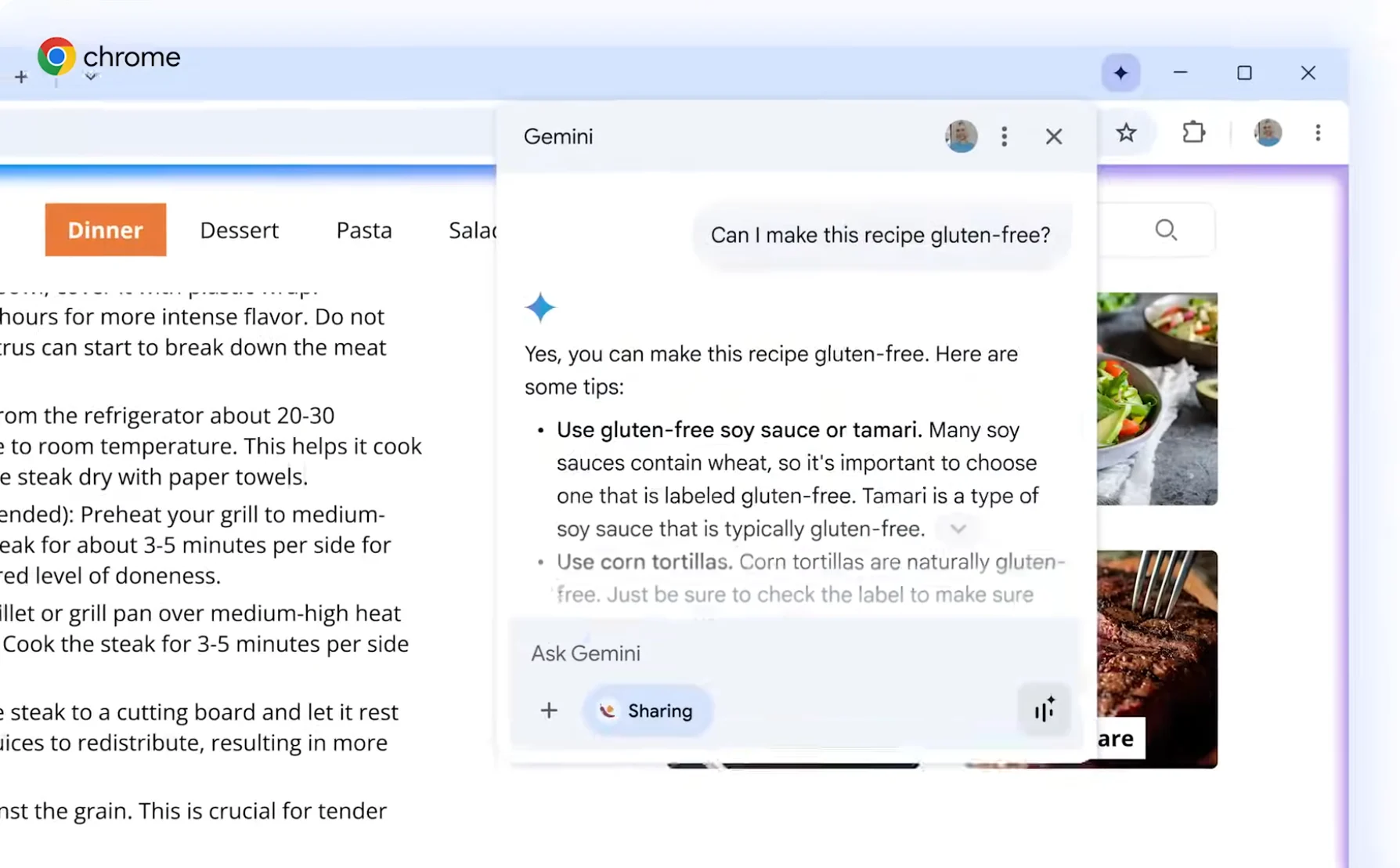
The core offering is an AI side panel assistant that performs real-time content summarisation, automated task execution and dynamic assistance for contextual understanding of the active webpage. Figure 1 shows the Gemini Live in Chrome assistant summarising a webpage.
Because the assistant is given direct, privileged access to the browsing environment, it can carry out complex, multi-step operations that previously required several extensions and manual steps. To do this it needs a multimodal view of what the user sees on screen, and it relies on the webpage itself for instructions and context. That expanded capability is also a widened attack surface.
The target of the research is the Gemini web app at hxxps[:]//gemini.google[.]com/app when it is loaded inside the new Gemini panel component rather than in an ordinary tab. The vulnerability is tracked as CVE-2026-0628 and was rated High severity.
Setup
The precondition is a browser extension holding a basic permission set that includes access to the declarativeNetRequests API. The only user interaction involved in the demonstrated attack is starting Gemini by clicking the Gemini button in the browser window's title bar.
The demonstration was delivered to Google as a report, and Google reproduced the conditions to exploit the vulnerability.
Finding it
The starting point is the browser extension threat model. Extensions run under a defined set of permissions governed by the browser's security model. They can interact with or modify content on webpages, and webpages sit below the extension in the privilege hierarchy. Modern browsers isolate extensions from each other, so one extension cannot interfere with or command another, and an extension is prevented from gaining unauthorised control over core, high-privilege browser-level components or processes. If extensions could undermine their host, that would be a severe security issue.
The declarativeNetRequests API lets extensions intercept and change properties of HTTPS web requests and responses. That is legitimate by design: it is how AdBlock stops requests that could lead to privacy-undermining ads. It is also by design that an extension can intercept and influence the contents of hxxps[:]//gemini.google[.]com/app when that URL is loaded under an ordinary website tab.
The flaw is in the second case. The researcher found that the same interception and modification of hxxps[:]//gemini.google[.]com/app was possible when the app is loaded within the Gemini panel. Injecting JavaScript into the Gemini web app in an ordinary tab is trivial and grants no special powers. When the Gemini app is loaded inside the new panel component, Chrome hooks it with access to powerful capabilities: reading local files, taking screenshots, accessing the camera and microphone, and more, so the app can perform complex tasks. Intercepting it in that setting hands those powers to the interceptor.
The distinction the researcher draws is between what loads the Gemini app. An extension influencing a website is expected behaviour. An extension influencing a component baked into the browser is a security risk.
Exploitation
Step 1: Load the Gemini panel
The user starts Gemini by clicking the Gemini button in the browser window's title bar. This is the only user interaction the attack requires. When the Gemini app is loaded within the panel component, Chrome hooks it with the browser capabilities described above.
Step 2: Intercept the panel's request with declarativeNetRequests
An extension with the basic permission set uses the declarativeNetRequests API to intercept and change properties of the HTTPS request and response for hxxps[:]//gemini.google[.]com/app as loaded in the panel.
Step 3: Inject JavaScript into the Gemini panel
Through that interception the extension injects JavaScript code into the Gemini panel. The code runs at hxxps[:]//gemini.google[.]com/app inside the privileged component, so it can access capabilities unavailable to the extension that injected it.
Step 4: Exercise the escalated capabilities
In the report to Google, the researcher demonstrated that an ordinary extension could hijack the Gemini panel and perform the following activities:
- Start the camera and microphone of the browser without asking for user consent.
- Reach local files and directories of the underlying operating system.
- Take screenshots of tabs showing any website that serves over HTTPS.
- Hijack the panel into carrying out a phishing attack.
All of this was accomplished with no user interaction other than starting Gemini. The phishing case is singled out as dangerous because the Gemini side panel is an otherwise trusted component of the browser, so web content rendered in a phishing layout inside it carries the weight of the browser itself.
Root cause
The design intent is that an extension may influence a website, but not a component baked into the browser. The Gemini app is the same URL in both cases, hxxps[:]//gemini.google[.]com/app, but the privilege of the context that loads it differs: an ordinary tab versus the Gemini panel, which Chrome hooks with access to local files, screenshots, camera and microphone. The report does not describe the code change or the specific check that was missing, so the exact mechanism is not stated. In effect the extension crossed the boundary that keeps it from commanding high-privilege browser-level components.
What it does state is that the difference in what type of component loads the Gemini app is the line between by-design behaviour and a security flaw, and that the flaw was in the ability to intercept and change properties of the app when loaded within the panel.
Impact
The vulnerability is rated High severity. It could have allowed malicious extensions with basic permissions to hijack the Gemini Live in Chrome panel and escalate privilege to actions including:
- Accessing the victim's camera and microphone without consent
- Taking screenshots of any website
- Accessing local files and directories
The phishing variant matters because the hijacked component is part of the browser and is otherwise trusted. The report notes that extension-based attacks are often dismissed because of the prerequisites for initial installation, but that reasoning comes from conventional browsers. The number of malicious extensions deployed to web stores has grown in recent years, and although they are often removed quickly, a substantial number of victims can install them before removal. Legitimate extensions have also been hijacked or sold to malicious actors who shipped malicious versions to already installed endpoints. Within an enterprise, an extension that gains access to workers' camera, microphone and local files is a real danger to the organisation.
Fix
Google reproduced the conditions to exploit the vulnerability and issued a fix in early January 2026. The disclosure timeline is: reported to Google on 23 October 2025, fix released in early January 2026, before publication of the information.
On the defensive side, the report points to Prisma Browser as designed to prevent extension-based attacks like this one, and to Advanced Web Protection (Live Page Scanning) for general phishing threats, with continuous monitoring of installed extensions for anomalous behaviour, privilege abuse and runtime manipulation. Advanced URL Filtering and Advanced DNS Security protect against pages hosting malicious JavaScript.
Variants to test
- Other privileged panels that load a web app. Take any browser feature that embeds a remote web origin inside a privileged component (AI side panels, assistant surfaces, built-in readers) and check whether an extension with declarativeNetRequests can intercept that origin when it is loaded in the panel but not in a tab. A positive result is an injected script executing with the panel's capabilities, for example a successful call to a camera or file API that the extension itself cannot reach.
- Same origin, different context. For each origin the browser loads in more than one context, compare what an extension can modify in a tab against what it can modify in the privileged context. A positive result is a modification that succeeds only in the privileged context.
- Capability probing from the injected context. Once injection is confirmed, enumerate which browser-granted APIs are reachable from the panel context (camera, microphone, screenshots, local file access) without a consent prompt. A positive result is any capability that the extension could not invoke directly.
- Phishing surface. Render attacker-controlled content inside the hijacked panel and check whether it is presented as part of the browser UI. A positive result is trusted-looking browser chrome displaying attacker content.
- Extension permission minimisation. Repeat the test with the smallest permission set that still includes declarativeNetRequests, to establish how low the bar is. A positive result is exploitation with only basic permissions, as in this report.
What happened, in plain words
Google Chrome now ships with an AI helper built into the browser, called Gemini Live in Chrome. It sits in a side panel and can read the page you are on, summarise it, and carry out tasks for you. To do that, Chrome gives this panel special powers that ordinary web pages and ordinary browser add-ons (extensions) do not have: it can look at files on your computer, take screenshots, and switch on your camera and microphone.
A security researcher at Palo Alto Networks found that a browser extension with a very basic set of permissions could inject its own code into that Gemini panel. Once its code was running inside the panel, it could reach capabilities the extension itself could never use. In other words, a low-privilege add-on could borrow the high-privilege powers of a part of the browser itself.
The flaw is tracked as CVE-2026-0628 and was rated High severity. The researcher reported it to Google on 23 October 2025, Google reproduced it, and a fix shipped in early January 2026, before the details were published. The only user interaction required was starting Gemini by clicking the Gemini button in the browser window's title bar.
This article walks through the same story for someone who has never studied security: what an AI browser is, why extensions are normally kept on a short leash, where the leash broke, and what an attacker could have done with it.
AI browsers: a new kind of browser
An "agentic browser" or "AI browser" is a browser with an AI assistant built in. The report names four examples: Atlas, Comet, Copilot in Edge and Gemini in Chrome.
The main feature of these browsers is an AI side panel. It can summarise a page in real time, carry out tasks automatically, and give you help that depends on what is currently on screen. Figure 1 shows Google Chrome's Gemini Live in Chrome assistant summarising a webpage.
Figure 1. Google's Gemini Live in Chrome browser AI assistant. Source: Google Chrome on YouTube.
Because the assistant is wired directly into the browser and given privileged access, it can do complicated, multi-step jobs that previously required several extensions and manual steps. To do those jobs it needs a "multimodal" view, meaning it sees what you see on screen, and it relies on the webpage itself to give it instructions and context.
That extra power is also extra risk. Every capability you add to a browser is a new surface an attacker can try to reach. The report calls this a widened attack surface.
Mixing AI into the browser: two kinds of danger
Putting an AI assistant inside a browser creates two separate security problems.
- The assistant itself is powerful. A malicious webpage could try to trick the AI into doing things a normal browser would block, using techniques called prompt injection. Examples the report gives are stealing data, getting around the same-origin policy (the rule that stops one website reading another website's data), and triggering privileged browser functions. The AI becomes a new middleman with too much access.
- The new component brings back old bugs. Adding a big new piece of software, the AI side panel, into the most privileged part of the browser can accidentally create classic flaws: cross-site scripting (XSS), privilege escalation and side-channel attacks. These can be exploited by less-privileged websites or by browser extensions. This second kind is what the research focuses on.
How extensions are supposed to be kept in check
A browser extension is a small add-on you install, for example an ad blocker. Extensions run under a fixed list of permissions that the browser enforces. One of the things they can do is read or change the content of webpages.
Modern browsers also isolate extensions from each other. One extension cannot interfere with or command another, because each runs in its own separate space. More importantly, an extension is not allowed to take control of the browser's own core, high-privilege parts.
This boundary is a core rule of the browser's security model, and for good reason. If an extension could undermine the browser that hosts it, that would be a serious security problem.
The vulnerability in Gemini Live in Chrome
The researcher found a flaw that broke exactly that rule. An extension with a basic permission set, including access to something called the declarativeNetRequests API, could inject JavaScript code into the new Gemini panel.
What is an API? Think of it as a set of buttons and levers a program is allowed to press. The declarativeNetRequests API is a set of levers that lets an extension watch and change HTTPS web requests and responses as they travel between the browser and a website. That is legitimate: it is how an ad blocker like AdBlock stops requests that would load privacy-invasive ads.
By design, an extension is allowed to intercept and influence the contents of hxxps[:]//gemini.google[.]com/app when that address is loaded in an ordinary browser tab. The flaw was that the same interception and modification was also possible when the Gemini app is loaded inside the Gemini panel.
The difference matters. Injecting JavaScript into the Gemini web app in an ordinary tab is easy and gives you no special powers. But when the Gemini app is loaded inside the new panel component, Chrome connects it to powerful capabilities: reading local files, taking screenshots, using the camera and microphone, and more, so the app can do complex tasks. If an attacker can intercept the app in that setting, the attacker gets those powers too.
The line between normal behaviour and a security flaw is what kind of component loads the Gemini app. An extension influencing a website is expected. An extension influencing a component built into the browser is a serious risk.
Privilege escalation: camera, files, screenshots and more
Privilege escalation means going from a low level of access to a higher one. Here, the attacker's code runs at hxxps[:]//gemini.google[.]com/app inside the Gemini panel. Because the panel is a privileged part of the browser, code running there can reach capabilities the extension itself could never use.
In the report to Google, the researcher showed that an ordinary extension could hijack the Gemini panel and do the following:
- Start the browser's camera and microphone without asking the user for consent
- Reach local files and directories on the underlying operating system
- Take screenshots of tabs showing any website served over HTTPS
- Hijack the panel to carry out a phishing attack
Phishing means tricking someone into trusting a fake page, for example a fake login form. Showing phishing content inside the Gemini side panel is especially dangerous, because that panel is normally a trusted part of the browser. The report notes that web content in a phishing layout is highly dangerous when the hijacked component is part of the browser itself.
All of this was possible with no user interaction other than starting Gemini by clicking the Gemini button in the browser window's title bar. Because the Gemini app legitimately needs these powers to do its job, hijacking the panel gives an attacker privileged access to system resources that an extension would not normally have.
What could have gone wrong
People often dismiss extension-based attacks because installing an extension is a hurdle. That reasoning comes from conventional browsers. As browsers add AI, the risks grow, and extension-based attacks become more dangerous.
The report also points out that the number of malicious extensions in web stores has grown in recent years. They are often removed quickly, but many victims can install them before that happens. Legitimate extensions have also been hijacked or sold to malicious actors, who then shipped malicious updates to people who already had them installed.
Inside a company, an extension that gains access to workers' cameras, microphones and local files is a real danger to the organisation.
Timeline: from discovery to fix
Right after discovery, the researcher responsibly disclosed the vulnerability to Google on 23 October 2025. Google reproduced the conditions needed to exploit it and issued a fix in early January 2026, before the information was published.
Conclusion
This case shows a specific vulnerability and highlights the security gaps that appear as AI features are added to browsers. AI browsers and AI features in existing browsers can improve the user experience, but it is important to keep watching for security flaws.
How Palo Alto Networks customers are protected
Palo Alto Networks customers are better protected through the following products and services:
- Prisma Browser is designed to prevent extension-based attacks like the one in this research.
- Prisma Browser customers are better protected against the general phishing threats mentioned in this blog when the Advanced Web Protection (Live Page Scanning) feature is enabled.
- Advanced Web Protection continuously monitors installed extensions for unusual behaviour, privilege abuse and runtime manipulation.
- A dedicated browser security team identifies, analyses and proactively mitigates new threats, and those protections are fed directly into the product.
- Advanced URL Filtering and Advanced DNS Security customers are better protected against pages that host malicious JavaScript.
If you think you may have been compromised or have an urgent matter, contact the Unit 42 Incident Response team.
Glossary
- Agentic browser / AI browser: a browser with an AI assistant built into it, such as Atlas, Comet, Copilot in Edge or Gemini in Chrome.
- AI side panel: a panel inside the browser where the AI assistant lives and works.
- Multimodal view: the assistant's ability to see what the user sees on screen, not just text.
- Attack surface: all the ways an attacker could try to get in. More features mean a bigger attack surface.
- Prompt injection: tricking an AI into following instructions hidden in content it reads, such as a webpage.
- Same-origin policy (SOP): a browser rule that stops one website from reading another website's data.
- Cross-site scripting (XSS): a flaw where an attacker gets their own code to run inside a trusted page.
- Privilege escalation: going from a low level of access to a higher one.
- Side-channel attack: learning secret information by observing indirect effects, such as timing.
- Browser extension: a small add-on installed in the browser, for example an ad blocker.
- Permission set: the fixed list of things an extension is allowed to do, enforced by the browser.
- Privilege hierarchy: the ranking of who has more power. The browser core is above extensions, and extensions are above webpages.
- Isolation: keeping programs in separate spaces so one cannot interfere with another.
- API: a set of buttons and levers a program is allowed to use to talk to another program or service.
- declarativeNetRequests API: a set of levers that lets an extension watch and change HTTPS web requests and responses.
- HTTPS request and response: the messages a browser sends to a website and the messages the website sends back, protected by encryption.
- JavaScript: the programming language that runs in web pages and in browser components.
- Inject: to insert your own code into someone else's page or component so it runs there.
- Component: a built-in part of the browser, as opposed to a website loaded in a tab.
- CVE-2026-0628: the identifier assigned to this vulnerability.
- High severity: a rating meaning the flaw is serious.
- Consent: the user explicitly agreeing to something, such as turning on the camera.
- Phishing: tricking someone into trusting a fake page, for example a fake login form.
- Malicious extension: an extension built to do harm.
- Responsible disclosure: telling the vendor about a flaw privately and giving them time to fix it before publishing.
- Prisma Browser: a Palo Alto Networks product designed to prevent extension-based attacks.
- Advanced Web Protection (Live Page Scanning): a feature that continuously monitors installed extensions for unusual behaviour, privilege abuse and runtime manipulation.
- Advanced URL Filtering / Advanced DNS Security: Palo Alto Networks services that protect against pages hosting malicious JavaScript.



