The Embedded YouTube Player Told Me What You Were Watching (and more)
The embedded YouTube player allowed a malicious site to load a victim's private playlists (such as watch history, watch later, liked videos, and uploads) and then retrieve their contents via the player's API. An attacker could steal a user's watch history, unlisted video IDs, and other sensitive information by tricking them into visiting a malicious page.
 Published on bugs.xdavidhu.me
I just submitted a bug, using which, I could simply send a link to someone, and when they click on it and visit my website, I could steal their YouTube watch history, the links to watch all of their unlisted videos, their Watch Later playlist, the list of videos they’ve liked, and more. It was pretty damn cool.
The full write-up lives on its author's site
It belongs to its author, so we link to it rather than copy it. The other two tabs are our own rewrites, checked against it.
Context
In October 2019 I was looking at YouTube: the special playlists every account has, and the embedded YouTube IFrame Player with its JavaScript API. The bug I found chained the two together. By embedding a player on a page I control and asking it to load a playlist, I could read back the contents of playlists that only the logged-in owner is supposed to see: the watch history, the Watch Later list, the liked videos, and the uploads playlist, which includes unlisted videos. I could also read metadata about a private video if I already knew its ID.
The report was submitted to the Google bug bounty programme on 11 October 2019 and rewarded with $1,337. The first part was mitigated on 30 November 2019 and the second part at an unspecified date in 2020.
Setup
No special tooling was needed. The whole thing runs in a browser with a normal YouTube session, plus a page served from an origin I control. The preconditions are:
- The victim is logged in to YouTube.
- The victim visits my page, which embeds a YouTube player.
- For the targeted attacks (liked videos, uploads, a specific private video), I already know the victim's channel ID or the ID of the private video.
The watch history and Watch Later attacks need no victim-specific information at all, because those playlists have the same IDs for everybody.
Finding it
The special playlists
A lot of YouTube's internals are playlists, and every account has several it never created. Four of them mattered here.
Watch History has the playlist ID HL (I assume that stands for History List). It contains every video the user has watched.
Watch Later is the playlist behind the little clock icon, with the ID WL.
Liked Videos is not a fixed ID. It is derived from the channel ID, which is a 24-character string visible in the channel page URL:
"https://www.youtube.com/channel/UCBvX9uEO0a3fZNCK12MAgug"
-> channel_id = "UCBvX9uEO0a3fZNCK12MAgug"
By trial and error against my own accounts I found that replacing the first three characters of the channel ID with LLD or LLB gives the Liked Videos playlist. One of the two is the right one:
// one of them will be the “Liked Videos” playlist of the given channel
“UCBvX9uEO0a3fZNCK12MAgug” -> “LLDvX9uEO0a3fZNCK12MAgug”
“UCBvX9uEO0a3fZNCK12MAgug” -> ”LLBvX9uEO0a3fZNCK12MAgug”
Uploads contains every video the user has ever uploaded, whatever its privacy setting. The same guessing applies, with UUD or UUB as the prefix:
// one of them will be the “Uploads” playlist of the given channel
“UCBvX9uEO0a3fZNCK12MAgug” -> “UUDvX9uEO0a3fZNCK12MAgug”
“UCBvX9uEO0a3fZNCK12MAgug” -> ”UUBvX9uEO0a3fZNCK12MAgug”
Alternatively, the channel page's Videos tab has a Play All button, when it is visible.
The obvious attack, opening someone's uploads playlist directly, does not work:
// how to steal someone's unlisted videos (very easy!!)

1. Open https://www.youtube.com/playlist?list=[victims-uploads-playlist]
2. Profit!?
These playlists are filtered per viewer. The owner sees everything in her Uploads playlist regardless of privacy setting; anyone else sees only the Public videos. Unlisted and Private entries are simply absent. So the playlists are sensitive but appear well protected.
The embedded player
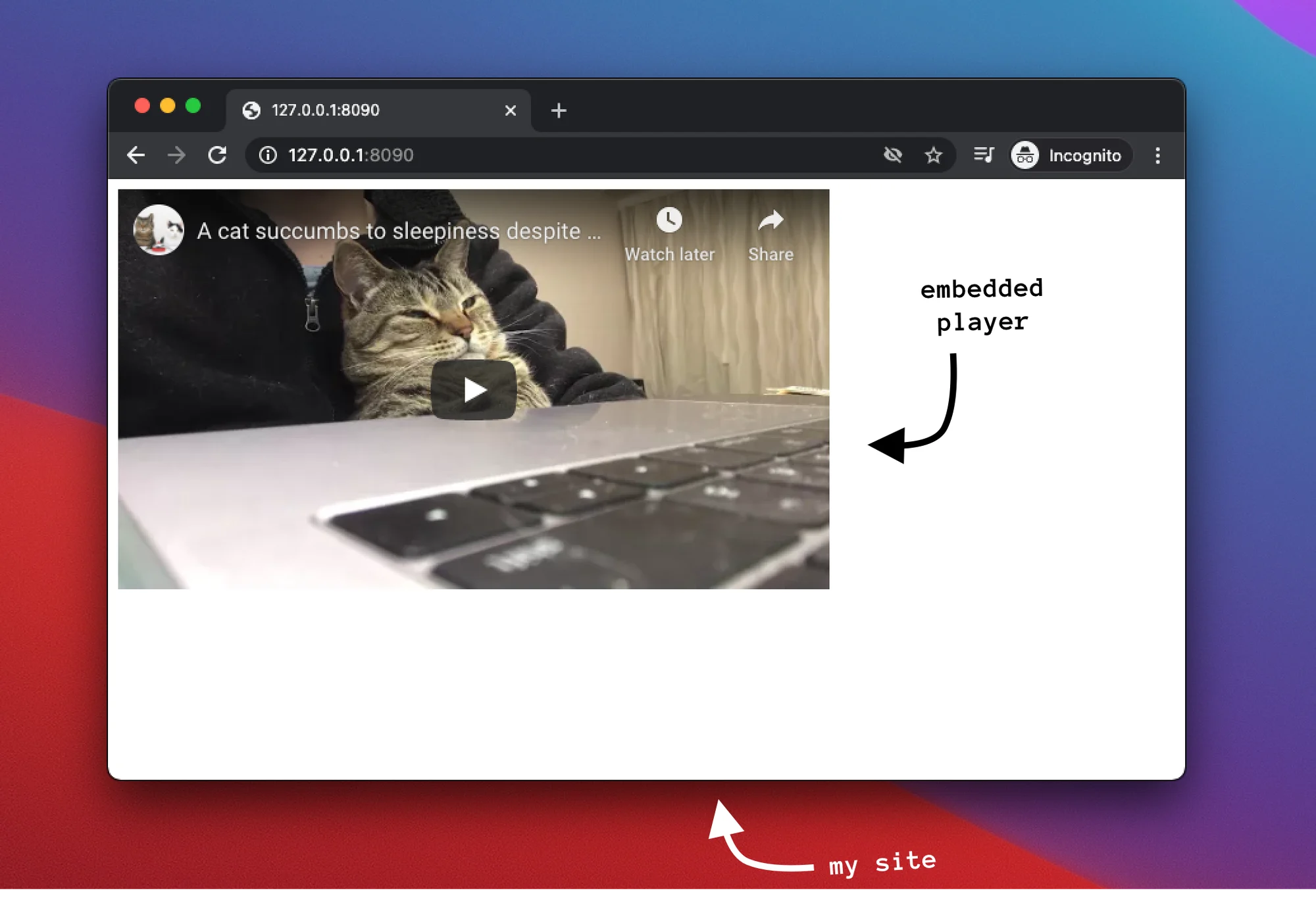
Embedding a player is a single iframe tag pasted into the page source.
For dynamic control there is the YouTube Player API: a JS library that creates and controls players, so that player.pauseVideo() pauses a video. Under the hood the library and the iframe talk over the browser's PostMessage API, which lets two different origins exchange messages. The iframe listens for commands, and it also pushes a lot of state back to the page unprompted, which is what makes event listeners possible.
A command from the page to the iframe, as sent when you call player.playVideo():
// this postMessage is sent from your site to the iframe under the hood when you call “player.playVideo()”
-> {"event":"command","func":"playVideo","args":[],"id":1,"channel":"widget"}
And examples of what the iframe sends back:
// the iframe sends a lot of stuff back, here are some examples
<- {"event":"infoDelivery","info":{"playerState":-1,"currentTime":0,"duration":1344,"videoData":{"video_id":"M7lc1UVf-VE","author":"","title":"YouTube Developers Live: Embedded Web Player Customization"},"videoStartBytes":0,"videoBytesTotal":1,"videoLoadedFraction":0,"playbackQuality":"unknown","availableQualityLevels":[],"currentTimeLastUpdated_":1610191891.79,"playbackRate":1,"mediaReferenceTime":0,"videoUrl":"https://www.youtube.com/watch?v=M7lc1UVf-VE","playlist":null,"playlistIndex":-1},"id":1,"channel":"widget"}
<- {"event":"onStateChange","info":-1,"id":1,"channel":"widget"}
The library is only an abstraction. The same messages can be sent with plain JavaScript, and any page can log everything it receives:
// listen for all “message” events and log them to the console:
> window.addEventListener("message", function(event){console.log(event.data)})
Two API functions are relevant. player.loadPlaylist(playlist_id) loads a playlist into an existing player, and player.getPlaylist() returns the video IDs in the loaded playlist in their current order:
> player.getPlaylist()

Array(20) [ "KxgcVAuem8g", "U_OirTVxiFE", "rbez_1MEhdQ", "VpC9qeKUJ00",
            "LnDjm9jhkoc", "BQIOEdkivao", "layKyzA1ABc", "-Y9gdQnt7zs",
            "U_OX5vQ567Y", "ghOqpVet1uQ", … ]
The second is player.getVideoData(), which is not in the official documentation and was supposedly removed years earlier, but still worked. It returns details about the currently playing video, including its title:
> player.getVideoData()

Object { video_id: "KxgcVAuem8g", author: "LiveOverflow2",
        title: "Astable 555 timer - Clock Module", video_quality: "medium",
        video_quality_features: [], list: "PLGPckJAmiZCTyI72iI2KaJxkp-vUKBlTi" }
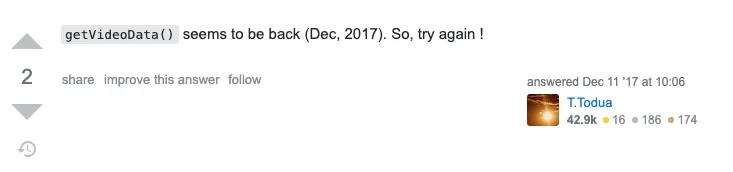
Even if the function were removed from the library, the iframe still sends the videoData object to the page, so it stays reachable.
The last piece: when you are logged in to YouTube, the embedded player is logged in too. Videos watched in it land in your Watch History, and the clock icon adds them to Watch Later. The player has the same access to the account as the main site.
Exploitation
The idea came to me while standing on a tram: only the owner can see a playlist's contents, the embedded player acts as the owner, and getPlaylist() reads the contents of whatever playlist is loaded. So load the owner's playlist in the player and read it back.
Step 1: watch history
I built a page that embeds a player, instructs it to play the HL playlist, and calls player.getPlaylist() once it has loaded, printing the result to the console. Opened with my test account, the page printed that account's watch history. No victim-specific setup is needed, since HL is the same ID for everyone.
Step 2: Watch Later
The same technique with the WL playlist returns the victim's Watch Later list.
Step 3: liked videos
This one is targeted. I take the victim's channel ID, derive both candidate Liked Videos playlist IDs (LLD... and LLB...), and have the page load both. One of them resolves, and getPlaylist() gives the list of every video the victim has liked.
Step 4: private playlists
Because the playlists are played in the victim's name, any custom private playlist can be read the same way, provided its ID is already known. Knowing the ID is the hard part, so the practical impact of this variant is low.
Step 5: private video metadata
If the ID of one of the victim's private videos is known, the page can embed that video and call player.getVideoData() to read its title and other details, such as the list of available caption languages. Again, obtaining the ID would probably need a different bug.
Step 6: unlisted videos
This is the one I liked most, because unlisted videos are how many people share material that is not public. I use the same technique on the Uploads playlist: derive UUD... and UUB... from the channel ID, embed the playlist, and call getPlaylist() to list every video ID in it.
One limitation: when an Uploads playlist is embedded, the owner sees the Public and Unlisted videos but not the Private ones. That is enough for this attack, but it means the private video IDs are not leaked this way, so the private titles and the private videos themselves cannot be reached through this route.
For an unlisted video, the ID is the only secret. Once all the unlisted IDs are stolen, all of the victim's unlisted videos can be watched.
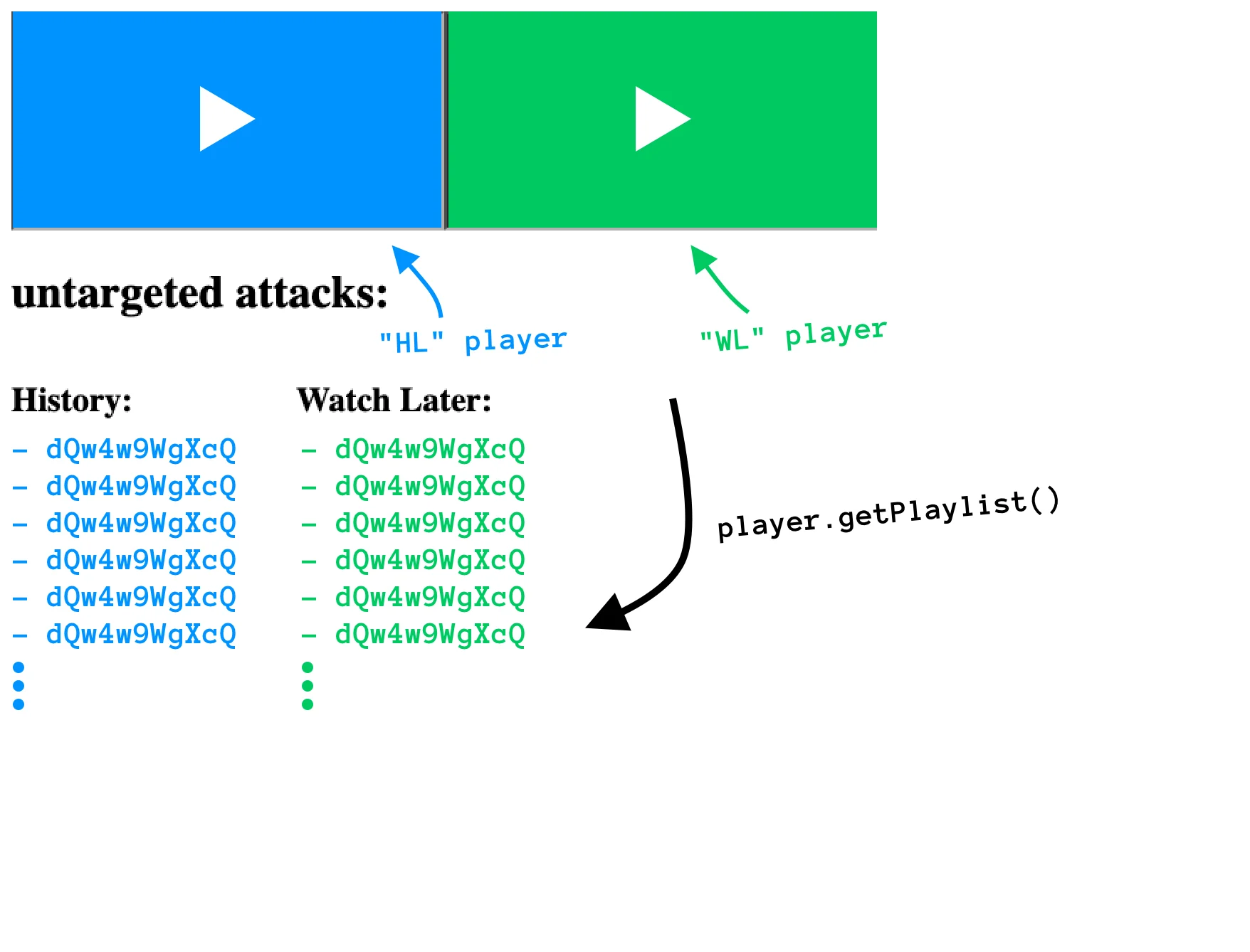
The POC I sent to Google embedded two playlists, HL and WL, on load and rendered their contents as two lists under the players:
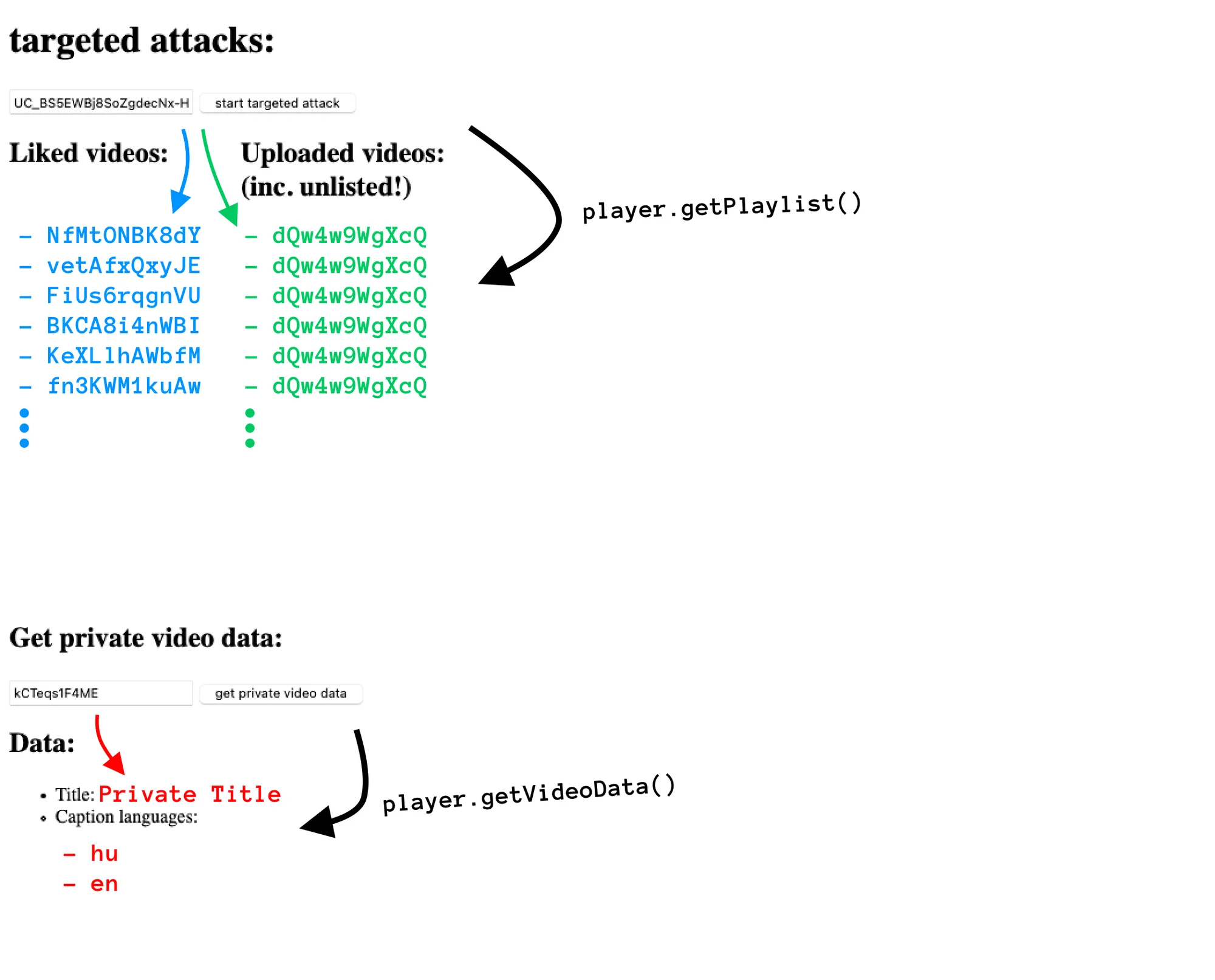
Further down was the targeted section. Entering a channel ID listed the liked videos and the uploaded videos, including the unlisted ones. Below that, entering a private video ID displayed the video's title and the available caption languages:
Root cause
The player is authenticated as the viewer and is allowed to load the viewer's own special playlists, including HL, WL and the derived liked and uploads playlists. The playlist contents are then handed back to the embedding page through getPlaylist(), and per-video metadata through getVideoData(). The player loads the playlists as the logged-in viewer, so the owner-scoped contents are returned to the embedding page through getPlaylist().
Impact
An attacker who gets a logged-in victim to visit a page can steal the victim's YouTube watch history, the links to all of their unlisted videos, their Watch Later playlist, the list of videos they have liked, and, if the IDs are already known, the contents of private playlists and the title and caption languages of private videos. The watch history and Watch Later attacks work against any logged-in user with no prior knowledge. The liked videos and uploads attacks need the victim's channel ID; the private playlist and private video attacks need the relevant IDs, which the report treats as hard to obtain.
I still think the impact was higher than the reward suggested. My own POC videos for potentially unfixed Google bugs are uploaded as unlisted videos, and losing all of them would matter to me, before even considering the watch history. I did not go back to Google about the reward, though explaining why a bounty should be higher might make them re-consider the decision.
Fix
When the embedded player loads a playlist it fetches the contents from the /list_ajax?list=[playlist-id] endpoint. After the fix, that endpoint returns an error for any private or special playlist, so embedding HL, WL and the rest fails and the player shows an error.
The videoData leak on private videos was still working after that first mitigation, and I pinged the bug to say so. I got no reply at first, then a reply that the product team would be informed. When I re-tested in 2021, that was fixed too: a private video can still be embedded, but the videoData object the player sends to the page is now empty.
Variants to test
- Other embedded players with an owner-scoped view. Look for players or widgets that render content filtered by the logged-in user and expose the result to the embedding page. A positive result is a page on your origin that receives the victim's private list contents over PostMessage.
- Special playlist IDs on other Google products. Try fixed IDs such as
HLandWL, and prefix substitutions on channel or account IDs, against any endpoint that accepts a playlist identifier. A positive result is a response containing entries the requesting account should not see. getVideoData()on private or restricted media. Embed a private item whose ID you know and log the messages. A positive result is a non-emptyvideoDataobject with a title or other metadata.- Undocumented API methods. Enumerate methods on the player object and compare them with the documentation, as with
getVideoData(). A positive result is a method that returns data the documented API does not expose. - PostMessage listeners that trust the sender. Check whether the player validates the origin of incoming commands, and whether the embedding page can drive it into states the UI does not offer. A positive result is a command accepted from an unexpected origin that changes what data is returned.
What happened, in plain words
In October 2019 I found a bug in YouTube. If I could get you to visit a web page I controlled, that page could quietly read your YouTube watch history, the list of videos you had liked, your Watch Later list, and the links to all of your unlisted videos. It could also read the title of a private video, but only if I already knew that video's ID.
No special tools were involved. The whole thing ran in an ordinary browser with an ordinary YouTube login. The trick was to combine two normal YouTube features in a way nobody had intended: the special playlists that every account has, and the YouTube player that websites embed in their pages.
I reported it to Google's bug bounty programme on 11 October 2019. Google paid a reward of $1,337. The first part of the problem was fixed on 30 November 2019, and the second part at an unspecified date in 2020.
A bug bounty programme is a scheme where a company pays people who report security problems to it, instead of punishing them. A reward (or bounty) is the money paid for a valid report.
The setup
Nothing exotic was needed. The ingredients were:
- The victim is logged in to YouTube in their browser.
- The victim visits a page I control, and that page contains an embedded YouTube player.
- For some of the attacks (liked videos, uploads, a specific private video), I already know the victim's channel ID or the ID of the private video.
The watch history and Watch Later attacks need no information about the victim at all, because those two playlists have the same ID for every user.
Finding it
The special playlists
A lot of YouTube's insides are built out of playlists. A playlist is simply an ordered list of videos. Every account has several playlists it never created, and four of them mattered here.
Watch History has the playlist ID HL. I assume that stands for History List. It contains every video the user has watched.
Watch Later is the playlist behind the little clock icon you see all over YouTube. Its ID is WL.
Liked Videos does not have a fixed ID. It is built from the channel ID, which is a 24-character string you can see in the address bar when you open someone's channel page:
"https://www.youtube.com/channel/UCBvX9uEO0a3fZNCK12MAgug"
-> channel_id = "UCBvX9uEO0a3fZNCK12MAgug"
Line by line: the first line is the address of a channel page. The second line shows the part of that address after /channel/, which is the channel ID. A channel is a user's page on YouTube, and the channel ID is the internal name of that page.
By trying things against my own accounts, I found that if you replace the first three characters of the channel ID with LLD or LLB, you get the Liked Videos playlist. One of the two is the right one:
// one of them will be the “Liked Videos” playlist of the given channel
“UCBvX9uEO0a3fZNCK12MAgug” -> “LLDvX9uEO0a3fZNCK12MAgug”
“UCBvX9uEO0a3fZNCK12MAgug” -> ”LLBvX9uEO0a3fZNCK12MAgug”
Line by line: the comment says that one of the two lines below will be the Liked Videos playlist of the channel in question. Each line takes the original channel ID on the left and shows a modified version on the right, where the first three characters UCB have been swapped for LLD or LLB. The rest of the string stays the same. This is a guess: you try both and see which one works.
Uploads contains every video the user has ever uploaded, whatever its privacy setting. The same guessing applies, with UUD or UUB as the prefix:
// one of them will be the “Uploads” playlist of the given channel
“UCBvX9uEO0a3fZNCK12MAgug” -> “UUDvX9uEO0a3fZNCK12MAgug”
“UCBvX9uEO0a3fZNCK12MAgug” -> ”UUBvX9uEO0a3fZNCK12MAgug”
Line by line: same idea as before. The comment says one of the two results will be the Uploads playlist. The left side is the channel ID, the right side is the same string with the first three characters replaced by UUD or UUB.
A privacy setting on a video decides who can see it. Public means anyone. Unlisted means anyone who has the link, but the video does not show up in search or on the channel. Private means only the owner (and people the owner picks) can see it.
There is another way to reach the Uploads playlist: open the channel page, click the Videos tab, and click Play All. That only works when the button is visible, which is not always the case.
The obvious attack, opening someone's uploads playlist directly, does not work:
// how to steal someone's unlisted videos (very easy!!)

1. Open https://www.youtube.com/playlist?list=[victims-uploads-playlist]
2. Profit!?
Line by line: the comment is sarcastic, pretending this is easy. Step 1 says to open the playlist page in a browser, with the victim's uploads playlist ID in the address. Step 2 says to profit, with a question mark, because it does not actually work.
These playlists are filtered per viewer. The owner sees everything in her Uploads playlist regardless of privacy setting. Anyone else sees only the Public videos. Unlisted and Private entries are simply absent. So the playlists hold sensitive information, but on the main site they look well protected.
The embedded player
If you have a website and want a YouTube player inside it, you paste a single iframe tag into the page source. An iframe is a window inside a web page that shows another website's content. Here it shows the YouTube player.
The screenshot shows an otherwise empty web page with an embedded YouTube player sitting in it.
For dynamic control there is the YouTube Player API. An API is a set of commands one piece of software offers to another, like a restaurant menu: you pick an item by name and the kitchen does the work. Here the API is a JavaScript library you add to your page, and it creates and controls players, so that player.pauseVideo() pauses a video. JavaScript is the programming language that runs inside web pages.
Under the hood the library and the iframe talk over the browser's PostMessage API. This is a built-in way for two different websites (here, your page and the YouTube iframe) to exchange messages. The iframe listens for commands, and it also pushes a lot of information back to the page without being asked, which is what makes event listeners possible. An event listener is a piece of code that waits for something to happen and then runs.
A command from the page to the iframe, as sent when you call player.playVideo():
// this postMessage is sent from your site to the iframe under the hood when you call “player.playVideo()”
-> {"event":"command","func":"playVideo","args":[],"id":1,"channel":"widget"}
Line by line: the comment explains that this message goes from your site to the iframe behind the scenes when you ask the player to play. The arrow -> means the direction, from page to iframe. The message is a small block of structured text. event says what kind of message it is, here a command. func names the command, playVideo. args is an empty list of extra arguments. id is a number used to match replies to requests. channel says which part of YouTube is being addressed.
And examples of what the iframe sends back:
// the iframe sends a lot of stuff back, here are some examples
<- {"event":"infoDelivery","info":{"playerState":-1,"currentTime":0,"duration":1344,"videoData":{"video_id":"M7lc1UVf-VE","author":"","title":"YouTube Developers Live: Embedded Web Player Customization"},"videoStartBytes":0,"videoBytesTotal":1,"videoLoadedFraction":0,"playbackQuality":"unknown","availableQualityLevels":[],"currentTimeLastUpdated_":1610191891.79,"playbackRate":1,"mediaReferenceTime":0,"videoUrl":"https://www.youtube.com/watch?v=M7lc1UVf-VE","playlist":null,"playlistIndex":-1},"id":1,"channel":"widget"}
<- {"event":"onStateChange","info":-1,"id":1,"channel":"widget"}
Line by line: the comment says the iframe sends a lot back, and these are examples. The arrow <- means the direction, from iframe to page. The first message has event set to infoDelivery, meaning a delivery of information. Inside info there are many fields: playerState (whether the player is playing, paused and so on), currentTime (position in the video), duration (length of the video), and a nested videoData block with the video's video_id, author and title. The remaining fields describe buffering, quality, playback rate and the video's web address. The second message has event set to onStateChange, meaning the player's state changed, and info is the new state.
The library is only a convenience layer. The same messages can be sent with plain JavaScript, and any page can log everything it receives:
// listen for all “message” events and log them to the console:
> window.addEventListener("message", function(event){console.log(event.data)})
Line by line: the comment says this listens for all message events and prints them to the console. The > is the prompt of the browser's developer console, where you type commands. window.addEventListener("message", ...) tells the browser: whenever a message arrives, run the function that follows. That function takes the event and calls console.log(event.data), which prints the message's contents to the console. The console is a panel in the browser's developer tools where you can type code and see output.
Two API functions are relevant. player.loadPlaylist(playlist_id) loads a playlist into an existing player. player.getPlaylist() returns the video IDs in the loaded playlist, in their current order:
> player.getPlaylist()

Array(20) [ "KxgcVAuem8g", "U_OirTVxiFE", "rbez_1MEhdQ", "VpC9qeKUJ00",
            "LnDjm9jhkoc", "BQIOEdkivao", "layKyzA1ABc", "-Y9gdQnt7zs",
            "U_OX5vQ567Y", "ghOqpVet1uQ", … ]
Line by line: the first line calls the function on the player object. The result is an Array(20), a list of 20 items, shown here with the first ten video IDs and an ellipsis for the rest. Each quoted string is one video's ID. A video ID is the short code that identifies a single video on YouTube.
The second function is player.getVideoData(). It is not in the official documentation and was supposedly removed years earlier, but it still worked. It returns details about the currently playing video, including its title:
> player.getVideoData()

Object { video_id: "KxgcVAuem8g", author: "LiveOverflow2",
        title: "Astable 555 timer - Clock Module", video_quality: "medium",
        video_quality_features: [], list: "PLGPckJAmiZCTyI72iI2KaJxkp-vUKBlTi" }
Line by line: the first line calls the function. The result is an Object, a bundle of named values. video_id is the video's ID, author is the channel name, title is the video's title, video_quality is the current quality, video_quality_features is an empty list, and list is the ID of the playlist the video is playing from.
The screenshot shows a comment on Stack Overflow saying that the function still works in 2017. Stack Overflow is a question-and-answer site for programmers.
Even if the function were removed from the library, the iframe still sends the videoData object to the page, so the information stays reachable.
The last piece: when you are logged in to YouTube, the embedded player is logged in too. Videos watched in it land in your Watch History, and the clock icon adds them to Watch Later. The player has the same access to the account as the main site. Think of it as a key card that opens the same doors whether you use the front entrance or the side door.
Exploitation
The idea came to me while standing on a tram. Only the owner can see a playlist's contents. The embedded player acts as the owner. And getPlaylist() reads the contents of whatever playlist is loaded. So: load the owner's playlist in the player, and read it back.
Step 1: watch history
I built a page that embeds a player, tells it to play the HL playlist, and calls player.getPlaylist() once it has loaded, printing the result to the console. Opened with my test account, the page printed that account's watch history. No victim-specific setup is needed, since HL is the same ID for everyone.
Step 2: Watch Later
The same technique with the WL playlist returns the victim's Watch Later list.
Step 3: liked videos
This one is targeted. I take the victim's channel ID, derive both candidate Liked Videos playlist IDs (LLD... and LLB...), and have the page load both. One of them resolves, and getPlaylist() gives the list of every video the victim has liked.
Step 4: private playlists
Because the playlists are played in the victim's name, any custom private playlist can be read the same way, provided its ID is already known. Knowing the ID is the hard part, so the practical impact of this variant is low.
Step 5: private video metadata
If the ID of one of the victim's private videos is known, the page can embed that video and call player.getVideoData() to read its title and other details, such as the list of available caption languages. Again, obtaining the ID would probably need a different bug. Metadata is information about something, rather than the thing itself: here, the title and caption languages rather than the video's pictures and sound.
Step 6: unlisted videos
This is the one I liked most, because unlisted videos are how many people share material that is not public. I use the same technique on the Uploads playlist: derive UUD... and UUB... from the channel ID, embed the playlist, and call getPlaylist() to list every video ID in it.
One limitation: when an Uploads playlist is embedded, the owner sees the Public and Unlisted videos but not the Private ones. That is enough for this attack, but it means the private video IDs are not leaked this way, so the private titles and the private videos themselves cannot be reached through this route.
For an unlisted video, the ID is the only secret. Once all the unlisted IDs are stolen, all of the victim's unlisted videos can be watched.
The proof of concept I sent to Google embedded two playlists, HL and WL, on load and rendered their contents as two lists under the players. A proof of concept (POC) is a small demonstration that a bug really works.
The screenshot shows the first part of the POC: two embedded players, with the contents of the two playlists listed underneath them.
Further down was the targeted section. Entering a channel ID listed the liked videos and the uploaded videos, including the unlisted ones. Below that, entering a private video ID displayed the video's title and the available caption languages.
The screenshot shows the second part of the POC: the targeted section with its input fields and the results it produced.
Root cause
The player is logged in as the viewer and is allowed to load the viewer's own special playlists, including HL, WL and the derived liked and uploads playlists. The playlist contents are then handed back to the embedding page through getPlaylist(), and per-video details through getVideoData(). The player loads the playlists as the logged-in viewer, so the owner-scoped contents are returned to the embedding page through getPlaylist().
Impact
An attacker who gets a logged-in victim to visit a page can steal the victim's YouTube watch history, the links to all of their unlisted videos, their Watch Later playlist, the list of videos they have liked, and, if the IDs are already known, the contents of private playlists and the title and caption languages of private videos. The watch history and Watch Later attacks work against any logged-in user with no prior knowledge. The liked videos and uploads attacks need the victim's channel ID; the private playlist and private video attacks need the relevant IDs, which are hard to obtain.
I still think the impact was higher than the reward suggested. My own POC videos for potentially unfixed Google bugs are uploaded as unlisted videos, and losing all of them would matter to me, before even considering the watch history. I did not go back to Google about the reward, though explaining why a bounty should be higher might make them re-consider the decision.
Fix
When the embedded player loads a playlist it fetches the contents from the /list_ajax?list=[playlist-id] endpoint. An endpoint is a specific address on a server that answers a particular kind of request. After the fix, that endpoint returns an error for any private or special playlist, so embedding HL, WL and the rest fails and the player shows an error.
The videoData leak on private videos was still working after that first mitigation, and I pinged the bug to say so. I got no reply at first, then a reply that the product team would be informed. When I re-tested in 2021, that was fixed too: a private video can still be embedded, but the videoData object the player sends to the page is now empty.
Variants to test
- Other embedded players with an owner-scoped view. Look for players or widgets that show content filtered by the logged-in user and expose the result to the embedding page. A positive result is a page on your own site that receives the victim's private list contents over PostMessage.
- Special playlist IDs on other Google products. Try fixed IDs such as
HLandWL, and prefix substitutions on channel or account IDs, against any endpoint that accepts a playlist identifier. A positive result is a response containing entries the requesting account should not see. getVideoData()on private or restricted media. Embed a private item whose ID you know and log the messages. A positive result is a non-emptyvideoDataobject with a title or other details.- Undocumented API methods. List the methods on the player object and compare them with the documentation, as with
getVideoData(). A positive result is a method that returns data the documented API does not expose. - PostMessage listeners that trust the sender. Check whether the player checks the origin of incoming commands, and whether the embedding page can drive it into states the interface does not offer. A positive result is a command accepted from an unexpected origin that changes what data is returned. An origin is the combination of scheme, host and port that identifies a website, for example
https://example.com.
Glossary
- API: a set of commands one piece of software offers to another, like a menu you order from.
- Bug bounty programme: a scheme where a company pays people who report security problems to it.
- Channel: a user's page on YouTube, identified internally by a channel ID.
- Channel ID: the 24-character internal name of a channel, visible in the channel page address.
- Console: a panel in the browser's developer tools where you can type code and see output.
- Endpoint: a specific address on a server that answers a particular kind of request.
- Event listener: a piece of code that waits for something to happen and then runs.
- iframe: a window inside a web page that shows another website's content.
- JavaScript: the programming language that runs inside web pages.
- Metadata: information about something rather than the thing itself, such as a video's title and caption languages.
- Origin: the combination of scheme, host and port that identifies a website.
- Playlist: an ordered list of videos.
- PostMessage API: a built-in browser mechanism that lets two different websites exchange messages.
- Privacy setting: the rule that decides who can see a video:
Public,UnlistedorPrivate. - Proof of concept (POC): a small demonstration that a bug really works.
- Reward (bounty): the money paid for a valid bug report.
- Stack Overflow: a question-and-answer site for programmers.
- Video ID: the short code that identifies a single video on YouTube.
- YouTube Player API: a JavaScript library that creates and controls embedded YouTube players.





