Discovering vendorspecific vulnerabilities in Android
Samsung's Android added custom system APIs and modified system apps without proper permission checks, so a third-party app could trigger privileged actions such as rebooting the device or launching any non-exported activity. The article describes the research method and gives examples, including a broadcast that reboots the device and a Settings flaw that allows LaunchAnyWhere.
 Published on blog.oversecured.com
For several years, Oversecured has been the best way to discover vulnerabilities in Android and iOS mobile apps. We are always carrying out research and improving the quality of our detection.
The full write-up lives on its author's site
It belongs to its author, so we link to it rather than copy it. The other two tabs are our own rewrites, checked against it.
Context
Oversecured is a scanner for finding vulnerabilities in Android and iOS mobile apps. Its rules and checks had been built around regular apps, such as banking or messaging apps, and covered only a small percentage of the Android system APIs that privileged apps can use. That gap meant a scan of a privileged app could miss a large number of vulnerabilities.
The work described here extended the scanner so that its checks covered all system APIs, and added support for two environments: Google and Samsung. Along the way the team found tens of Samsung vulnerabilities and a few on Google. The article explains the Android architecture behind system APIs, how AIDL interfaces are secured, the new analysis modes added to the scanner, and examples of vendor-specific fragmentation.
Setup
The research started from Google Android installed on a Google Emulator running API 33. The team gathered all the .jar files from the following directories:
/system//system_ext//apex/
these were decompiled and the resulting source code merged, giving all the code to investigate. The same steps were later repeated for Samsung Android:
- Pulled all
.jarfiles from the/system/,/system_ext/and/apex/directories - Decompiled the code and merged the resulting files
- Obtained a list of all accessible system services
- Compared the services received and the most important classes
No accounts or roles are involved; the precondition is a decompiled copy of the framework and the ability to run code on an emulator or device to enumerate services.
Finding it
The starting observation is that obfuscated apps still contain unobfuscated code for standard Android operations such as working with an Activity. That class is part of the standard Android APIs: when any app runs, /system/framework/framework.jar is loaded into its class loader, where android.app.Activity is declared, so no obfuscator can rename standard calls to this and many other classes.
Android has many standard managers, such as ActivityManager and TelephonyManager. These are convenient wrappers around lower-level system services, which provide all inter-process communication. Those services are AIDL interfaces running in the privileged system_server; only some services, like NFC or Bluetooth, are handled by separate, less privileged system apps. The question the team asked was which of the tens of thousands of classes were APIs that could present a security risk if handled improperly.
Step 1: enumerate the services
A list of all services an app can access is obtained with the following code:
try {
    for (String serviceName : listServices()) {
        IBinder binder = getService(serviceName);
        String descriptor = binder != null ? binder.getInterfaceDescriptor() : null;
        Log.d("dump", serviceName + " : " + descriptor);
    }
} catch (Throwable th) {
    throw new RuntimeException(th);
}
private String[] listServices() throws Throwable {
    return (String[]) Class.forName("android.os.ServiceManager")
            .getDeclaredMethod("listServices")
            .invoke(null);
}

private IBinder getService(String name) throws Throwable {
    return (IBinder) Class.forName("android.os.ServiceManager")
            .getDeclaredMethod("getService", String.class)
            .invoke(null, name);
}
The code reflects into android.os.ServiceManager to list services and fetch each binder, then logs the interface descriptor. The system reports more than 250 services on the emulator:
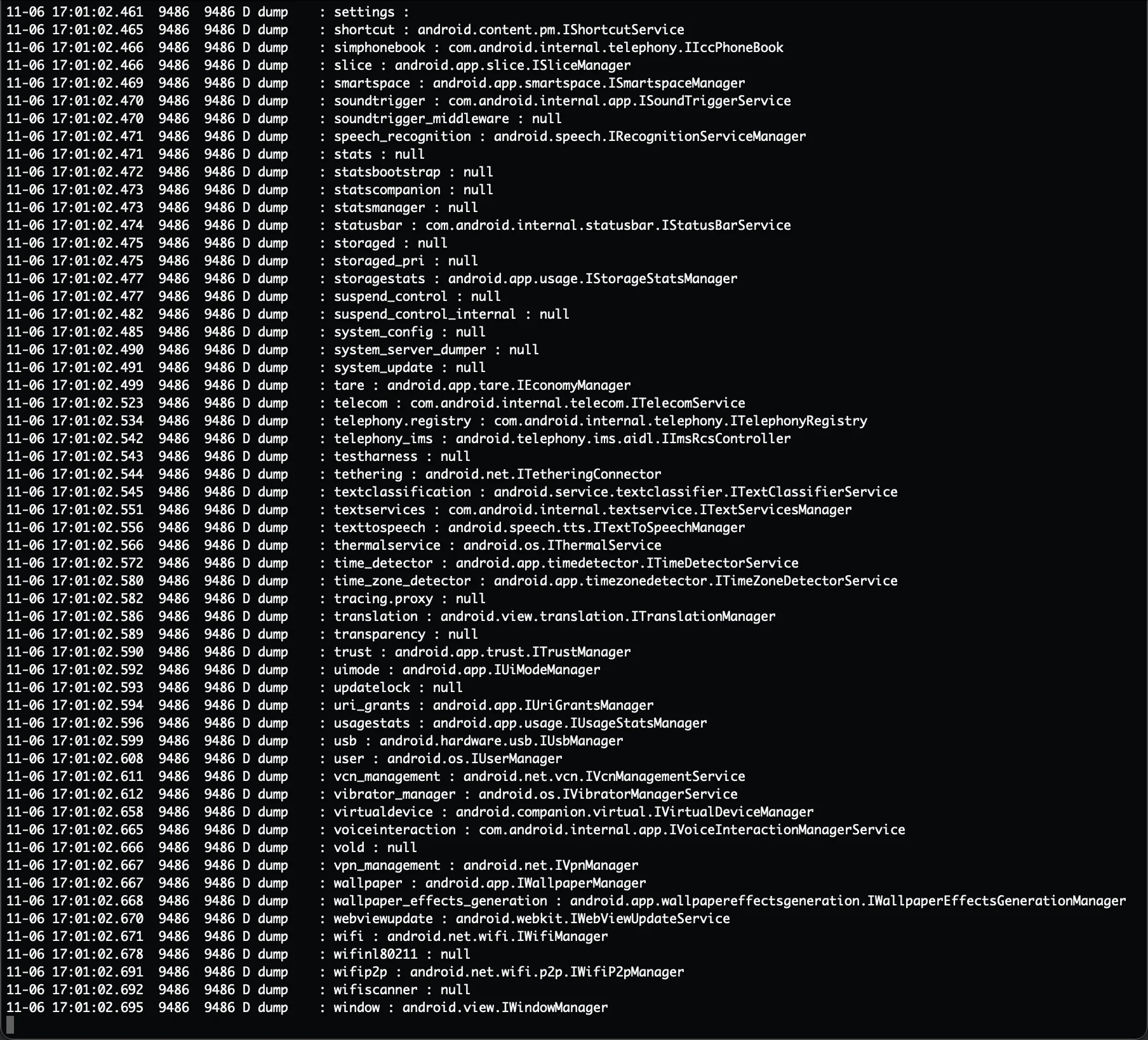
In nearly every case the interface descriptor is an AIDL interface whose name matches a Java class. For example, android.content.IClipboard corresponds to android/content/IClipboard.java when decompiled, or android/content/IClipboard.aidl in its original form.
Step 2: call an AIDL method directly
Reading the clipboard uses android.content.IClipboard.getPrimaryClip():
android.content.ClipData getPrimaryClip(java.lang.String pkg, int userId) throws android.os.RemoteException;
static final int TRANSACTION_getPrimaryClip = 4;
A call to it looks like this:
ClipData data = getPrimaryClip();
Log.d("dump", "getPrimaryClip(): " + data.getItemAt(0).getText());
static final int TRANSACTION_getPrimaryClip = 4;

private ClipData getPrimaryClip() throws Throwable {
    IBinder binder = getService("clipboard");
    Parcel parcel = Parcel.obtain();
    parcel.writeInterfaceToken(binder.getInterfaceDescriptor());
    parcel.writeString(getPackageName()); // first argument `pkg`
    parcel.writeInt(0); // second argument `userId`

    Parcel reply = Parcel.obtain();
    binder.transact(TRANSACTION_getPrimaryClip, parcel, reply, 0);
    reply.readException();

    if (reply.readBoolean()) {
        return ClipData.CREATOR.createFromParcel(reply);
    } else {
        return null;
    }
}

private IBinder getService(String name) throws Throwable {
    return (IBinder) Class.forName("android.os.ServiceManager")
            .getDeclaredMethod("getService", String.class)
            .invoke(null, name);
}
The static fields beginning with TRANSACTION_ are generated automatically for each method when the Java class is generated from the .aidl file. To see the method code, you open the decompiled source and examine it.
Step 3: understand how AIDL security works
The security of all AIDL operations is based on permission checks at the implementation level for each interface method. The AIDL server knows the UID, and therefore the package name, of the calling app and checks that the caller has the required permission.
A short example is the device reboot method, android.os.IPowerManager.reboot(), implemented in com/android/server/power/PowerManagerService.java:
public void reboot(boolean confirm, String reason, boolean wait) {
    mContext.enforceCallingOrSelfPermission("android.permission.REBOOT", null); // permission check
    if ("recovery".equals(reason) || "recovery-update".equals(reason)) {
        mContext.enforceCallingOrSelfPermission("android.permission.RECOVERY", null);
    }
    final long ident = Binder.clearCallingIdentity();
    try {
        shutdownOrRebootInternal(0, confirm, reason, wait);
    } finally {
        Binder.restoreCallingIdentity(ident);
    }
}
If the calling app lacks android.permission.REBOOT, Context.enforceCallingOrSelfPermission() throws a SecurityException and the device does not reboot. The recovery reasons additionally require android.permission.RECOVERY.
Step 4: add control flow analysis
The team studied all interfaces and all their methods on Google Android to find which were privileged, and created rules for the scanner covering improper interaction with them, plus rules for all managers and other classes that work with these interfaces internally. A manual audit of all interfaces also found absent or vulnerable checks for various actions, such as reading or altering data or the device configuration; reports of these bugs went to Google.
The scanner had been based on many well-known static and dynamic analysis approaches, with dataflow analysis as the main feature: it examined all an app's possible execution paths and the data propagation in them. Studying the system API functionality showed that the mere fact some code is executed could be a danger. Rebooting requires android.permission.REBOOT, but if an attacker can force a privileged app to execute that code, it becomes a vulnerability. Two additional analyses were added:
- control flow: if an attacker can force the app being analysed to perform an unsafe action, for example via an exported component
- dataflow to control flow: discover dynamically created handlers, such as unprotected broadcast receivers or local web servers, and report if their data processing involves executing unsafe actions
Step 5: compare Samsung Android with Google Android
Samsung was chosen next because the team had already worked with it the previous year and discovered 18 vulnerabilities in pre-installed apps of various levels of criticality; their experience with Samsung's VDP was very positive.
The scale of the changes was surprising: almost every key class was changed in one way or another. There are around 400 system services, and many AOSP services are extended. The reasons are support for Samsung's large ecosystem, additional device configuration options, extensive MDM functionality, and integration with Samsung hardware including the S Pen and S Watch.
From a security point of view, the main differences between the Google and Samsung versions of Android are:
- An extended set of permissions
- An extended set of protected broadcasts (actions that non-privileged apps can receive but cannot send)
- Additional APIs protected by various checks of the app signature, UID, package name, permissions, and so on
Step 6: a missing check in the backup service
One of the "funny" vulnerabilities found while studying the changes is in the backup service (android.app.backup.IBackupManager), file com/android/server/backup/BackupManagerService.java:
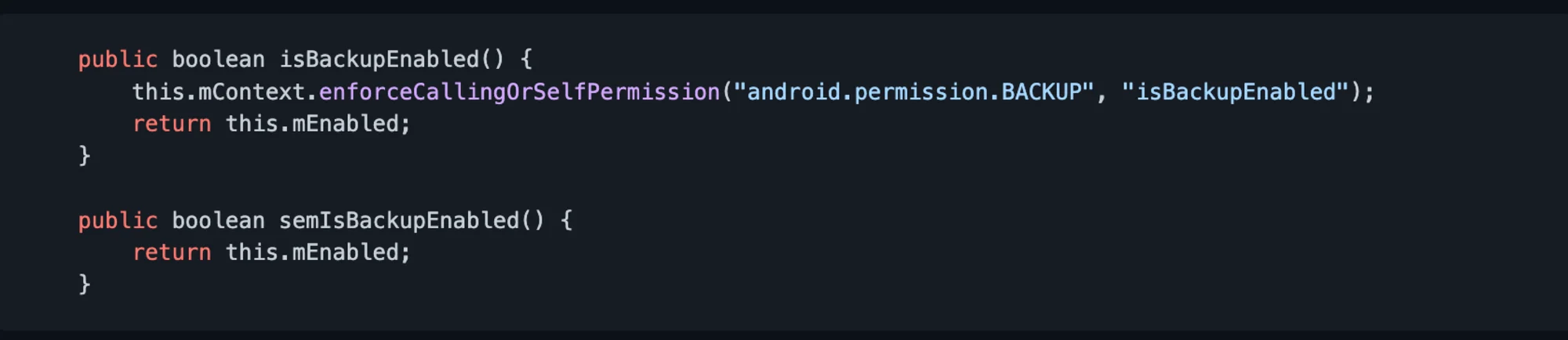
isBackupEnabled() is an AOSP method, and the permission android.permission.BACKUP is required to find out whether backups are switched on. Samsung added a custom method semIsBackupEnabled() that returns the value with no checks at all.
Step 7: scan the Samsung environment
An additional scanning environment was created for this version of Android, with rules to search for vulnerabilities in Samsung Android, the list of built-in permissions and protected broadcasts. The scan covered:
- Samsung Framework
- System apps
- All other Samsung apps
Step 8: dataflow to control flow in the framework
An example of the scan results and of Android's fragmentation is a vulnerability found with dataflow to control flow analysis of the Samsung Android Framework, in the patched file com/android/server/StorageManagerService.java:
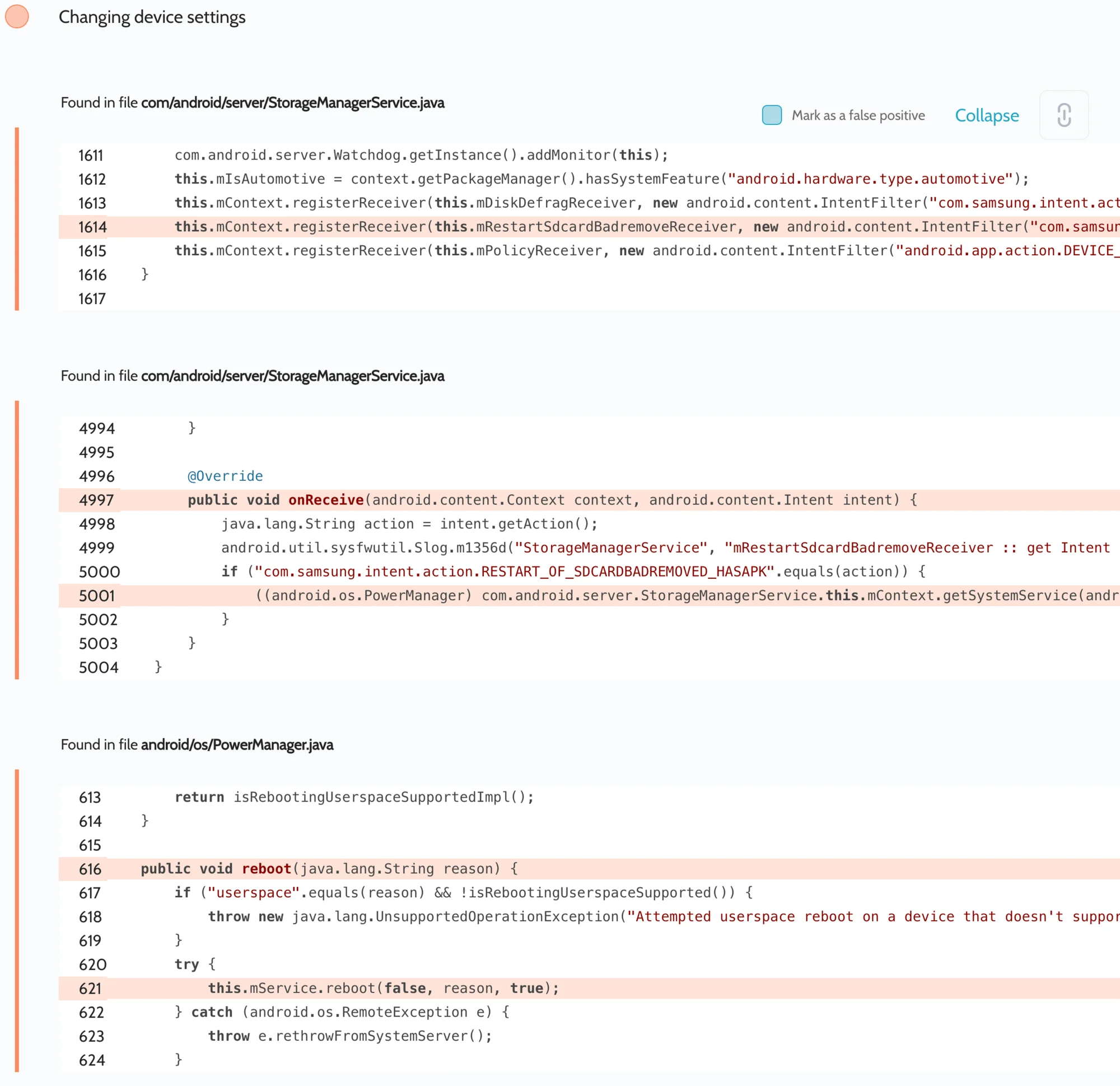
When the user sends a broadcast with the action com.samsung.intent.action.RESTART_OF_SDCARDBADREMOVED_HASAPK, the device automatically reboots, sidestepping permission restrictions.
Step 9: fragmentation in a system app
An example of system app fragmentation is a vulnerability in the Settings (com.android.settings) app. Samsung extended the com.android.settings.homepage.SettingsHomepageActivity class and added custom code that allowed a third-party app to access arbitrary activities:
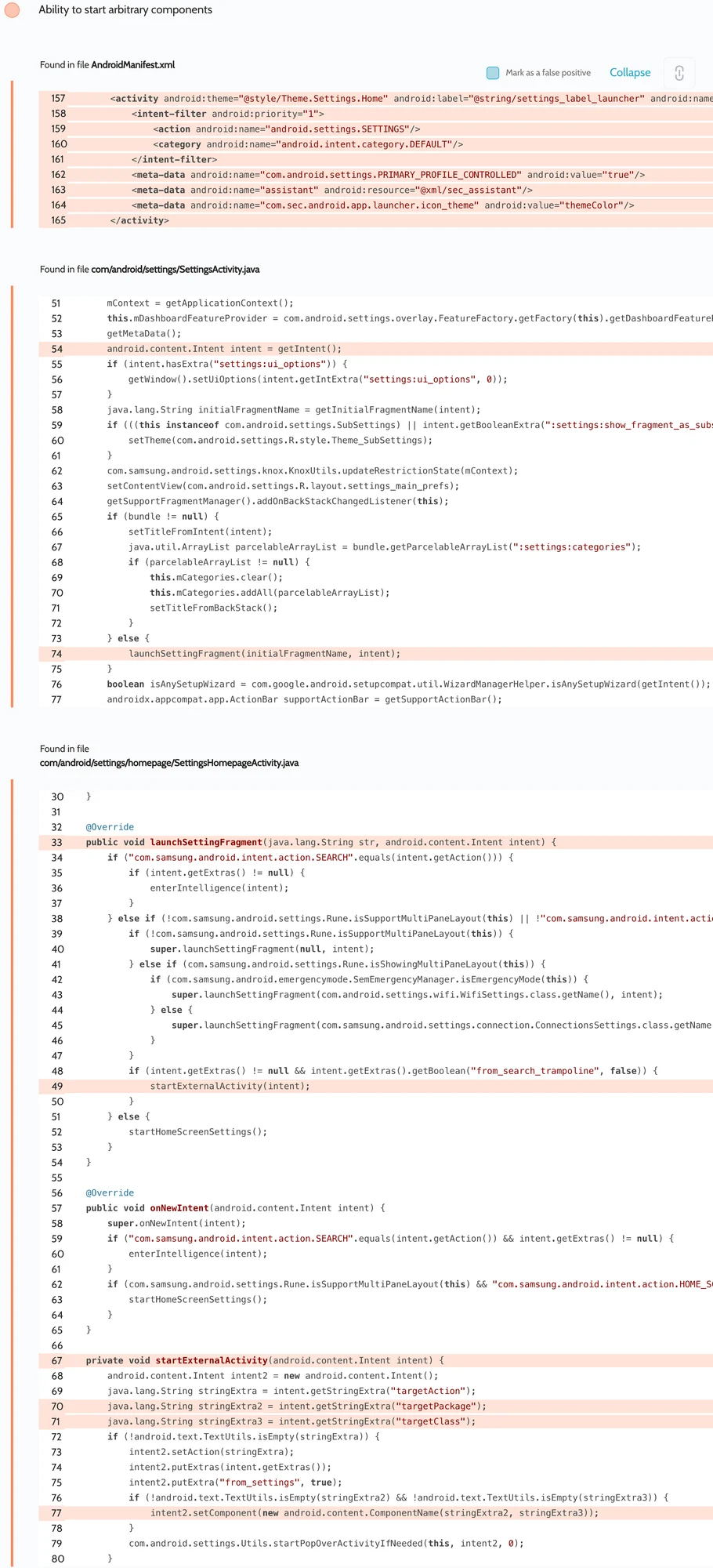
In a regular app this would only give access within that app, but Settings has UID 1000 (system), so the vulnerability led to access to any non-exported activities of any apps. This type of attack was previously called LaunchAnyWhere.
Root cause
The common thread is that security in Android's system APIs rests on per-method permission checks inside each AIDL implementation. Vendor changes add new methods and new code paths that do not repeat those checks. semIsBackupEnabled() returns the backup state without the android.permission.BACKUP check that isBackupEnabled() enforces. The Samsung StorageManagerService code reaches a reboot from broadcast handling, sidestepping permission restrictions. The extended SettingsHomepageActivity in Settings lets a third-party app reach arbitrary activities, and because Settings runs as UID 1000 the reach extends to non-exported activities of other apps. The scanner's earlier rules, limited to a small percentage of system APIs, might also have missed them.
Impact
- Any app can read whether backups are enabled on a Samsung device through
semIsBackupEnabled(), without holdingandroid.permission.BACKUP. - Sending the broadcast
com.samsung.intent.action.RESTART_OF_SDCARDBADREMOVED_HASAPKreboots the device, sidestepping permission restrictions. - Through the Settings flaw, a third-party app can access arbitrary activities, including non-exported activities of any apps, because Settings has UID 1000 (
system).
More broadly, the research revealed a large number of security problems in the Samsung ecosystem. Samsung has fixed more than 60 vulnerabilities so far, but a large number remain outstanding. Some of the vulnerabilities discovered by the research had not yet been fixed at the time of writing.
Fix
Samsung fixed more than 60 of the reported vulnerabilities; the rest were still outstanding. The report does not describe the individual patches. The pattern the examples point to is that vendor-added methods and code paths need the same permission checks as the AOSP methods they sit beside, and that extensions to system app classes must not widen what a third-party app can reach.
Variants to test
- Enumerate services with
ServiceManager.listServices()andgetService()on a vendor image, then diff the interface descriptors against AOSP. A positive result is extra services or extra methods in known interfaces. - For each vendor-added method in a privileged service, check whether the implementation calls
enforceCallingOrSelfPermission()or an equivalent UID, signature or package check. A positive result is a method that returns data or performs an action with no check, likesemIsBackupEnabled(). - Look for broadcast actions in the vendor's protected broadcast list and in framework code that trigger privileged actions. A positive result is an action a non-privileged app can send that reaches a privileged operation such as a reboot.
- Run dataflow to control flow analysis over dynamically created handlers, such as unprotected broadcast receivers or local web servers, and check whether their data processing reaches unsafe actions.
- Compare vendor-extended classes in system apps (UID 1000) with their AOSP versions, looking for added code that lets a third-party app start arbitrary activities. A positive result is the ability to launch a non-exported activity of another app, the LaunchAnyWhere pattern.
What happened, in plain words
Oversecured is a tool that scans mobile apps for security weaknesses. Think of it as a very thorough proofreader for code: it reads an app and points out places where someone could misuse it. Until this work, the proofreader was good at ordinary apps, such as banking or messaging apps, but it only understood a small part of the special features that the phone's own built-in software (the "system") offers to privileged apps. Privileged apps are apps that the phone trusts more than normal ones, because they ship with the device or are signed by the manufacturer.
That gap mattered. If you scanned a privileged app, the scanner could easily miss a large number of problems, because it did not know about most of the system features that app was allowed to use. So the team set out to teach the scanner about all of these system features, and to support two versions of Android: Google's and Samsung's. Along the way they found tens of vulnerabilities in Samsung's software and a few in Google's.
This article walks through how Android's system features are built, how they are supposed to be protected, what new kinds of analysis the scanner gained, and several concrete examples of how Samsung's version of Android differs from Google's in ways that create security holes.
Background: what an API is, and why the system matters
An API (Application Programming Interface) is a set of named operations that one piece of software offers to another. A simple everyday comparison: a restaurant menu. You do not walk into the kitchen and cook; you order from the menu, and the kitchen does the work. An API is that menu. The app orders "read the clipboard" or "reboot the phone", and the system does it.
Android has many standard managers, such as ActivityManager and TelephonyManager. A manager is a friendly front desk for developers: it presents a tidy menu of operations. Behind the front desk sit lower-level system services, which actually do the work and handle all communication between apps and the system. Those services are written as AIDL interfaces and run inside a privileged process called system_server. AIDL is Android's standard way of describing a menu of operations that one process offers to another. Only a few services, such as NFC (near-field communication, used for contactless taps) and Bluetooth, are handled by separate, less privileged system apps.
The team's first question was simple to state: among the tens of thousands of classes (code blueprints) in Android, which ones are APIs that could cause a security problem if they were handled carelessly?
Why decompiling the framework is the starting point
When an app is obfuscated, its code is deliberately made hard to read, so that people cannot easily copy or reverse-engineer it. But some code stays readable anyway: standard Android operations, such as working with an Activity. An Activity is a single screen in an app, for example the login screen or the settings screen.
The reason this code stays readable is that the class android.app.Activity is part of the standard Android APIs. When any app runs, the file /system/framework/framework.jar is loaded into its class loader, and that is where android.app.Activity is declared. A class loader is the part of the runtime that fetches code and makes it available. Because the standard classes come from the system, no obfuscator can rename the standard calls to them.
So all the standard Android APIs live in .jar files (Java archive files, essentially zipped code) in these directories:
/system//system_ext//apex/
Decompiling means turning compiled code back into readable source code, roughly like turning a baked cake back into a recipe. The team gathered all the .jar files from those directories on a Google Emulator running API 33, decompiled them, and merged all the resulting source code. That gave them the full code to investigate. An emulator is a program that imitates a phone on a computer, so you can experiment without a physical device. API 33 is the version number of that Android release.
Step 1: listing every service the phone offers
To find out which services exist, the team ran code that asks the system for the list. The first block loops over every service name and logs its interface descriptor, which is the service's formal name.
try {
    for (String serviceName : listServices()) {
        IBinder binder = getService(serviceName);
        String descriptor = binder != null ? binder.getInterfaceDescriptor() : null;
        Log.d("dump", serviceName + " : " + descriptor);
    }
} catch (Throwable th) {
    throw new RuntimeException(th);
}
Line by line:
try {starts a block where errors are caught rather than crashing the program.for (String serviceName : listServices())goes through every service name returned by the helperlistServices().IBinder binder = getService(serviceName);fetches a handle to that service. An IBinder is the phone's internal handle for talking to another process, like a phone extension number.String descriptor = binder != null ? ... : null;asks the handle for its interface descriptor, or records nothing if the handle is missing.Log.d("dump", ...)writes the name and descriptor to the debug log, so the team can read the list.catch (Throwable th)catches any error and rethrows it wrapped in aRuntimeException, so failures are visible.
The two helpers use reflection, a technique for calling code by name at runtime rather than at compile time. That lets the team reach internal classes such as android.os.ServiceManager that are not part of the public menu.
private String[] listServices() throws Throwable {
    return (String[]) Class.forName("android.os.ServiceManager")
            .getDeclaredMethod("listServices")
            .invoke(null);
}

private IBinder getService(String name) throws Throwable {
    return (IBinder) Class.forName("android.os.ServiceManager")
            .getDeclaredMethod("getService", String.class)
            .invoke(null, name);
}
Line by line:
Class.forName("android.os.ServiceManager")looks up the class by its name at runtime..getDeclaredMethod("listServices")finds the method calledlistServiceson that class..invoke(null)calls it. Thenullmeans it is a static method, one that belongs to the class rather than to a particular object.- The second helper does the same for
getService, passing the service name as the argument.
The system reports more than 250 services. Here is the result for the emulator:
In nearly every case the interface descriptor is an AIDL interface whose name matches a Java class. For example, android.content.IClipboard corresponds to android/content/IClipboard.java when decompiled, or android/content/IClipboard.aidl in its original form. In other words, once you know the descriptor, you know exactly which file to open to read the code behind it.
Step 2: calling a service method directly
As a worked example, the team read data from the clipboard. The clipboard is the temporary storage behind copy and paste. The operation is declared as android.content.IClipboard.getPrimaryClip():
android.content.ClipData getPrimaryClip(java.lang.String pkg, int userId) throws android.os.RemoteException;
This line is the menu entry: it says the method returns clipboard data (ClipData), takes a package name and a user ID, and may fail with a RemoteException (an error raised when talking to another process).
static final int TRANSACTION_getPrimaryClip = 4;
This is the method's internal number, 4. When processes talk to each other, they do not send method names; they send numbers. Think of it as a menu item number rather than its description.
A call to it looks like this:
ClipData data = getPrimaryClip();
Log.d("dump", "getPrimaryClip(): " + data.getItemAt(0).getText());
Line by line:
ClipData data = getPrimaryClip();calls the helper below and stores the result.Log.d(...)prints the text of the first item in the clipboard to the debug log.
The helper builds the request by hand:
static final int TRANSACTION_getPrimaryClip = 4;

private ClipData getPrimaryClip() throws Throwable {
    IBinder binder = getService("clipboard");
    Parcel parcel = Parcel.obtain();
    parcel.writeInterfaceToken(binder.getInterfaceDescriptor());
    parcel.writeString(getPackageName()); // first argument `pkg`
    parcel.writeInt(0); // second argument `userId`

    Parcel reply = Parcel.obtain();
    binder.transact(TRANSACTION_getPrimaryClip, parcel, reply, 0);
    reply.readException();

    if (reply.readBoolean()) {
        return ClipData.CREATOR.createFromParcel(reply);
    } else {
        return null;
    }
}

private IBinder getService(String name) throws Throwable {
    return (IBinder) Class.forName("android.os.ServiceManager")
            .getDeclaredMethod("getService", String.class)
            .invoke(null, name);
}
Line by line:
IBinder binder = getService("clipboard");gets the handle for the clipboard service.Parcel parcel = Parcel.obtain();creates a Parcel, a container for packing data to send to another process, like an envelope.parcel.writeInterfaceToken(...)writes the service's descriptor into the envelope, so the receiver can confirm which service the message is for.parcel.writeString(getPackageName());writes the caller's package name as the first argument.parcel.writeInt(0);writes the user ID 0 as the second argument.Parcel reply = Parcel.obtain();creates a second envelope for the answer.binder.transact(TRANSACTION_getPrimaryClip, parcel, reply, 0);sends the request: method number 4, the request envelope, the reply envelope, and a flag of 0.reply.readException();checks whether the other side reported an error and raises it here if so.if (reply.readBoolean())reads a yes/no flag saying whether data came back.return ClipData.CREATOR.createFromParcel(reply);rebuilds the clipboard data from the reply envelope.else { return null; }returns nothing when there is no data.
The static fields beginning with TRANSACTION_ are generated automatically for each method when the Java class is generated from the .aidl file. To see the method code, you open the decompiled source and examine it.
Step 3: how these services are supposed to be protected
The security of all AIDL operations is based on permission checks at the implementation level for each interface method. A permission is a named right, such as "may reboot the phone". The AIDL server knows the UID of the calling app, a numeric identity assigned by the system, and therefore its package name, and it checks that the caller holds the required permission.
A short example is the device reboot method, android.os.IPowerManager.reboot(), implemented in com/android/server/power/PowerManagerService.java:
public void reboot(boolean confirm, String reason, boolean wait) {
    mContext.enforceCallingOrSelfPermission("android.permission.REBOOT", null); // permission check
    if ("recovery".equals(reason) || "recovery-update".equals(reason)) {
        mContext.enforceCallingOrSelfPermission("android.permission.RECOVERY", null);
    }
    final long ident = Binder.clearCallingIdentity();
    try {
        shutdownOrRebootInternal(0, confirm, reason, wait);
    } finally {
        Binder.restoreCallingIdentity(ident);
    }
}
Line by line:
mContext.enforceCallingOrSelfPermission("android.permission.REBOOT", null);is the bouncer at the door: if the caller lacks the reboot permission, this line throws an error and nothing else runs.- The
ifblock adds a second check: rebooting into recovery mode (a special maintenance mode) also requires theandroid.permission.RECOVERYpermission. Binder.clearCallingIdentity()temporarily forgets who the caller is, so the internal reboot code runs with the system's own identity rather than the app's.shutdownOrRebootInternal(...)performs the actual reboot.finally { Binder.restoreCallingIdentity(ident); }puts the caller's identity back afterwards, even if something failed.
If the calling app lacks android.permission.REBOOT, Context.enforceCallingOrSelfPermission() throws a SecurityException and the device does not reboot. The recovery reasons additionally require android.permission.RECOVERY.
Step 4: teaching the scanner to think about what code runs, not just what data flows
The team studied all interfaces and all their methods on Google Android to find which were privileged, and created rules for the scanner covering improper interaction with them. They also wrote rules for all managers and other classes that work with these interfaces internally. A manual audit of all interfaces also found absent or vulnerable checks for various actions, such as reading or altering data or the device configuration; reports of these bugs went to Google.
The scanner had been based on many well-known static and dynamic analysis approaches. Static analysis examines code without running it, like proofreading a recipe. Dynamic analysis watches a program while it runs, like observing a cook at work. The main feature was dataflow analysis: it examined all of an app's possible execution paths and how data travels through them. That is excellent for finding most vulnerabilities, but studying the system APIs showed something new: the mere fact that some code is executed could be a danger. Rebooting requires android.permission.REBOOT, but if an attacker can force a privileged app to execute that code, it becomes a vulnerability. The dangerous thing is not the data, it is the action.
So two additional analyses were added:
- control flow: if an attacker can force the app being analysed to perform an unsafe action, for example via an exported component. A component is a part of an app that other apps can ask to do something; "exported" means it is open to outside callers. Think of a shop counter open to the street.
- dataflow to control flow: discover dynamically created handlers, such as unprotected broadcast receivers or local web servers, and report if their data processing involves executing unsafe actions. A broadcast receiver is a part of an app that listens for system-wide announcements, like a radio tuned to a station. If it is unprotected, anyone can broadcast to it.
Step 5: comparing Samsung's Android with Google's
Samsung was chosen next because the team had already worked with it the previous year and discovered 18 vulnerabilities in pre-installed apps of various levels of criticality; their experience with Samsung's VDP was very positive. A VDP, or vulnerability disclosure programme, is a formal channel a company runs for people to report security bugs.
The team repeated the same steps on Samsung Android:
- Pulled all
.jarfiles from the/system/,/system_ext/and/apex/directories - Decompiled the code and merged the resulting files
- Obtained a list of all accessible system services
- Compared the services received and the most important classes
The scale of the changes was surprising: almost every key class was changed in one way or another. There are around 400 system services, and many AOSP services are extended. AOSP stands for the Android Open Source Project, the public baseline version of Android that Google maintains and that manufacturers start from. The reasons for the changes are legitimate: support for Samsung's large ecosystem, additional device configuration options, extensive MDM functionality (mobile device management, the tools companies use to control phones issued to staff), and integration with Samsung hardware including the S Pen and S Watch.
From a security point of view, the main differences between the Google and Samsung versions of Android are:
- An extended set of permissions
- An extended set of protected broadcasts: actions that non-privileged apps can receive but cannot send. A broadcast is a system-wide announcement; "protected" means ordinary apps are not allowed to make that announcement themselves.
- Additional APIs protected by various checks of the app signature (the cryptographic stamp proving who built the app), UID, package name, permissions, and so on
Step 6: a missing check in the backup service
One of the "funny" vulnerabilities found while studying the changes is in the backup service (android.app.backup.IBackupManager), file com/android/server/backup/BackupManagerService.java:
isBackupEnabled() is an AOSP method, and the permission android.permission.BACKUP is required to find out whether backups are switched on. Samsung added a custom method semIsBackupEnabled() that returns the value with no checks at all. The prefix sem marks it as a Samsung addition. In everyday terms: the original door had a lock, and the new side door next to it was built without one.
Step 7: scanning the Samsung environment
An additional scanning environment was created for this version of Android, with rules to search for vulnerabilities in Samsung Android, the list of built-in permissions and protected broadcasts. The scan covered:
- Samsung Framework
- System apps
- All other Samsung apps
Step 8: a broadcast that reboots the phone
An example of the scan results and of Android's fragmentation (the way different manufacturers' versions of Android drift apart) is a vulnerability found with dataflow to control flow analysis of the Samsung Android Framework, in the patched file com/android/server/StorageManagerService.java:
When the user sends a broadcast with the action com.samsung.intent.action.RESTART_OF_SDCARDBADREMOVED_HASAPK, the device automatically reboots, sidestepping permission restrictions. In other words, sending this broadcast can trigger a privileged action, sidestepping permission restrictions.
Step 9: a system app that can launch anything
An example of system app fragmentation is a vulnerability in the Settings (com.android.settings) app. Samsung extended the com.android.settings.homepage.SettingsHomepageActivity class and added custom code that allowed a third-party app to access arbitrary activities:
In a regular app this would only give access within that app, but Settings has UID 1000 (system), so the vulnerability led to access to any non-exported activities of any apps. A non-exported activity is one that is meant to be reachable only from inside its own app. This type of attack was previously called LaunchAnyWhere: the ability to make a powerful app open any screen of any other app.
Why it happened
The common thread is that security in Android's system APIs rests on per-method permission checks inside each AIDL implementation. Vendor changes add new methods and new code paths that do not repeat those checks. semIsBackupEnabled() returns the backup state without the android.permission.BACKUP check that isBackupEnabled() enforces. The Samsung StorageManagerService code reaches a reboot from broadcast handling, sidestepping permission restrictions. The extended SettingsHomepageActivity in Settings lets a third-party app reach arbitrary activities, and because Settings runs as UID 1000 the reach extends to non-exported activities of other apps. The scanner's earlier rules, limited to a small percentage of system APIs, might also have missed them.
What the impact was
- Any app can read whether backups are enabled on a Samsung device through
semIsBackupEnabled(), without holdingandroid.permission.BACKUP. - Sending the broadcast
com.samsung.intent.action.RESTART_OF_SDCARDBADREMOVED_HASAPKreboots the device, sidestepping permission restrictions. - Through the Settings flaw, a third-party app can access arbitrary activities, including non-exported activities of any apps, because Settings has UID 1000 (
system).
More broadly, the research revealed a large number of security problems in the Samsung ecosystem. Samsung has fixed more than 60 vulnerabilities so far, but a large number remain outstanding. Some of the vulnerabilities discovered by the research had not yet been fixed at the time of writing.
How it was fixed
Samsung fixed more than 60 of the reported vulnerabilities; the rest were still outstanding. The report does not describe the individual patches. The pattern the examples point to is that vendor-added methods and code paths need the same permission checks as the AOSP methods they sit beside, and that extensions to system app classes must not widen what a third-party app can reach.
Things worth testing on other devices
- Enumerate services with
ServiceManager.listServices()andgetService()on a vendor image, then diff the interface descriptors against AOSP. A positive result is extra services or extra methods in known interfaces. - For each vendor-added method in a privileged service, check whether the implementation calls
enforceCallingOrSelfPermission()or an equivalent UID, signature or package check. A positive result is a method that returns data or performs an action with no check, likesemIsBackupEnabled(). - Look for broadcast actions in the vendor's protected broadcast list and in framework code that trigger privileged actions. A positive result is an action a non-privileged app can send that reaches a privileged operation such as a reboot.
- Run dataflow to control flow analysis over dynamically created handlers, such as unprotected broadcast receivers or local web servers, and check whether their data processing reaches unsafe actions.
- Compare vendor-extended classes in system apps (UID 1000) with their AOSP versions, looking for added code that lets a third-party app start arbitrary activities. A positive result is the ability to launch a non-exported activity of another app, the LaunchAnyWhere pattern.
Glossary
- API: a named set of operations one piece of software offers to another, like a menu you order from.
- Activity: a single screen in an Android app.
- AIDL: Android's standard way of describing operations that one process offers to another.
- AOSP: the Android Open Source Project, the public baseline version of Android that manufacturers start from.
- Broadcast: a system-wide announcement that apps can listen for.
- Broadcast receiver: the part of an app that listens for broadcasts.
- Class: a blueprint in code that describes data and behaviour.
- Class loader: the part of the runtime that fetches code and makes it available.
- Clipboard: the temporary storage behind copy and paste.
- Control flow analysis: examining which actions a program can be made to perform, and in what order.
- Dataflow analysis: examining how data travels through a program's possible execution paths.
- Decompile: turn compiled code back into readable source code.
- Dynamic analysis: examining a program while it runs.
- Emulator: a program that imitates a phone on a computer.
- Exported component: a part of an app that other apps are allowed to call.
- Fragmentation: the way different manufacturers' versions of Android drift apart.
- IBinder: Android's internal handle for talking to another process.
- Interface descriptor: the formal name a service reports for itself.
- LaunchAnyWhere: an attack where a powerful app is made to open any screen of any other app.
- MDM: mobile device management, tools companies use to control phones issued to staff.
- Non-exported activity: a screen meant to be reachable only from inside its own app.
- Obfuscation: deliberately making code hard to read.
- Parcel: a container for packing data to send to another process.
- Permission: a named right, such as "may reboot the phone".
- Protected broadcast: an announcement that ordinary apps may receive but not send.
- Reflection: calling code by name at runtime rather than at compile time.
- Signature: the cryptographic stamp proving who built an app.
- Static analysis: examining code without running it.
- System service: a lower-level part of Android that performs privileged work.
- UID: the numeric identity the system assigns to an app.
- VDP: vulnerability disclosure programme, a formal channel for reporting security bugs.
- Vulnerability: a weakness that someone could misuse to do something they should not be able to do.