How I Was Able To See The Bounty Balance Of Any Bug Bounty Program In HackerOne
The report shows that a JSON response for a report included permission flags such as can_award_bounty? and can_award_swag? that a user could change from false to true. By doing so, the user could reach a bounty-awarding endpoint and, by supplying a bounty_balance value, learn the program's exact bounty balance from an error message.
 Published on medium.com
Today. I will proudly share to you, how I found a bug in HackerOnethat reveals the bug bounty program’s balance without escalating user’s privilege.
The full write-up lives on its author's site
It belongs to its author, so we link to it rather than copy it. The other two tabs are our own rewrites, checked against it.
Context
HackerOne is a bug bounty platform. Each report page on hackerone.com is rendered from a JSON endpoint that the front end fetches with an XHR request. That JSON carries not only the report itself but also a set of abilities flags that tell the client what the current user is allowed to do with the report: comment, change state, award a bounty, award swag, and so on. The client uses those flags to decide which buttons to show.
The original goal was to find a way to comment on a disclosed report. While inspecting the traffic behind a report page, the JSON response caught his attention because it exposed the award-related ability flags, and the rest of the write-up follows what happened when he started flipping them.
Setup
- A HackerOne account (the researcher's own,
cjlegacion). - A browser with developer tools, used to capture the XHR request behind a report page.
- Burp Suite, and specifically its Repeater tool, to replay and modify the captured request.
- No special role is described as a precondition for the first steps: the request was made as an ordinary user viewing a report.
The report does not give a Burp Suite version or a browser version beyond what appears in the captured User-Agent header.
Finding it
While looking at a report page, the researcher captured the request that loads the report as JSON:
GET /reports/240273.json HTTP/1.1Host: hackerone.comUser-Agent: Mozilla/5.0 (Windows NT 10.0; Win64; x64; rv:57.0) Gecko/20100101 Firefox/57.0Accept: application/json, text/javascript, */*; q=0.01Accept-Language: en-US,en;q=0.5Referer: https://hackerone.com/bugs?subject=user&report_id=238941&view=all&substates%5B%5D=pre-submission&substates%5B%5D=new&substates%5B%5D=triaged&substates%5B%5D=needs-more-info&substates%5B%5D=resolved&substates%5B%5D=informative&substates%5B%5D=not-applicable&substates%5B%5D=duplicate&substates%5B%5D=spam&reported_to_team=&text_query=&program_states%5B%5D=2&program_states%5B%5D=3&program_states%5B%5D=4&program_states%5B%5D=5&sort_type=latest_activity&sort_direction=descending&limit=25&page=1X-Requested-With: XMLHttpRequestConnection: close
This is a plain GET for a single report, asking for JSON, marked as an XHR with X-Requested-With: XMLHttpRequest. The Referer shows it was issued from the report listing view.
The response is a large JSON document describing report 240273. The parts that matter for this story are the abilities object and the surrounding report metadata:
Two things in that body stand out. First, the abilities object contains "can_award_bounty?":false and "can_award_swag?":false, alongside many other permission flags. Second, the report itself is a duplicate of #225627, closed with severity none, and the researcher is the reporter ("is_me?":true).
The researcher's reasoning was simple: if you are looking at a report and want to test something, the first flag you would try to flip is can_award_bounty?.
Exploitation
Step 1: flip the ability flag
The first attempt was to change can_award_bounty? from false to true in the request. The researcher reports that this did not produce any useful response for awarding a bounty on the report he was viewing.
Step 2: understand when the flag matters
After 10 to 15 minutes of looking around the site, he saw the same request while checking his own reports. He realised that a member of a team that pays bounties on valid reports is able to set the amount to award. That is the context in which the award flow is actually used.
Step 3: repeat the flip and watch the endpoint
He repeated the change of can_award_bounty? from false to true, and this time the response pointed at an interesting endpoint. The write-up shows the result as a screenshot rather than as text.
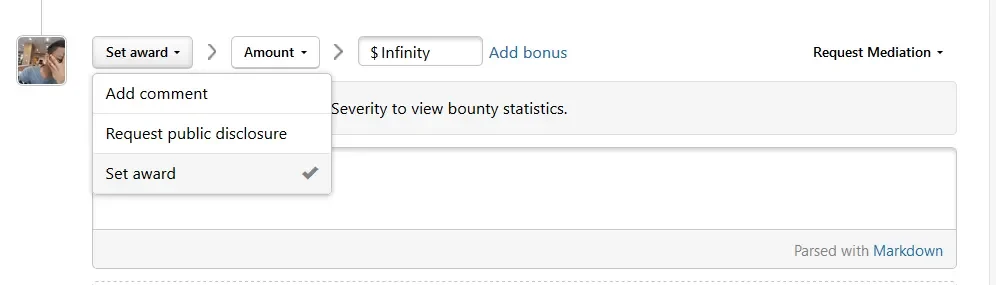
Step 4: send the award request
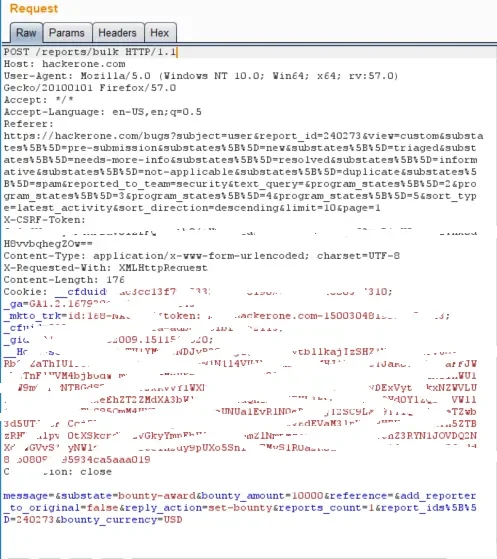
With the endpoint identified, he started checking what he could get from it. The request he sent is shown as a screenshot:
and the response as another screenshot:
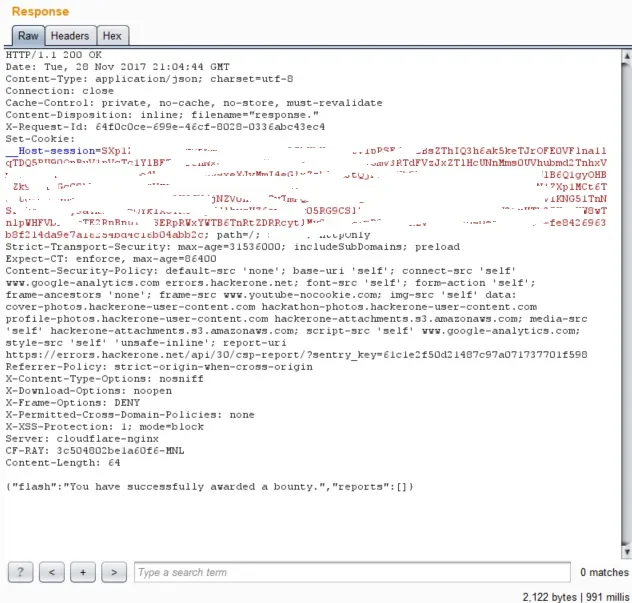
The response body contained:
{"flash":"You have successfully awarded a bounty.","reports":[]}
That message claims a bounty was awarded. However, after the page reloaded, the report did not show as rewarded, so the response was only a response: nothing had actually been paid out.
Step 5: add a bounty balance
The interesting response prompted him to replay the request in Burp Suite's Repeater and add a value for a parameter named bounty_balance. The request is shown here:
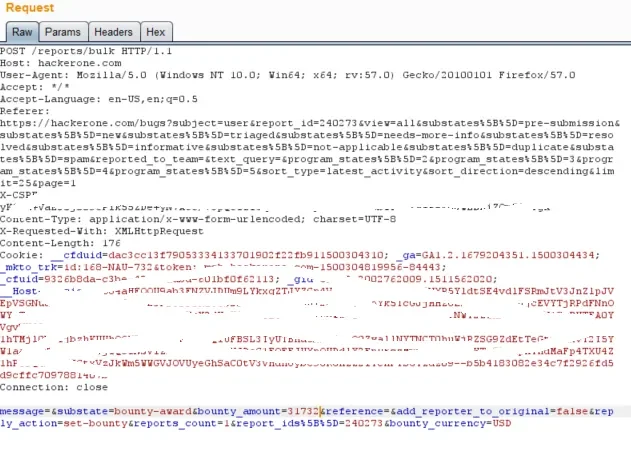
and the response here:
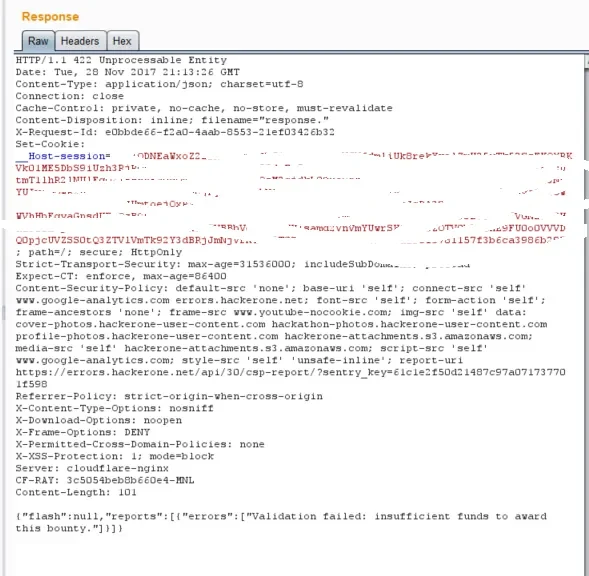
The response was an error:
{"flash":null,"reports":[{"errors":[""Validation failed: insufficient funds to award this bounty."]}]}
That error is the leak. By supplying a bounty_balance value and reading whether the server says there are insufficient funds, the researcher could determine the exact bounty balance of the program he wanted to check. The error message indicated insufficient funds to award the bounty, which let the researcher infer the program's balance.
Step 6: confirm it is worth reporting
He was unsure about the security impact, since the leak is only a program's bounty balance, so he asked Root Access and Sean (zseano) whether this counted as a real vulnerability and whether HackerOne would accept it. After zseano confirmed it was acceptable, he reported it, and it was triaged by @jobertabma within 30 seconds.
The report turned out to be a duplicate of #293299, filed 22 hours earlier. Despite that, @jobertabma described the report as well written and it was rewarded with swag.
Root cause
The abilities flags in the report JSON are meant to be a rendering hint for the client, but the award action appears to have accepted the flipped can_award_bounty? value as authorisation, and it accepted a client-supplied bounty_balance in its validation path. The validation error then echoed back the result of comparing that value with the real balance, turning a write endpoint into an oracle for a value the caller should never see.
Impact
An authenticated user could learn the bounty balance of the program he wanted to check, without being a member of that team. The write-up frames this as a logic flaw that reveals the program's balance. It does not claim that funds could be moved, that a bounty could actually be awarded, or that any other data was exposed; the success message was not reflected in the report state after reload.
The researcher notes that the vulnerability might have been fixed by HackerOne by the time of writing.
Fix
Based on the behaviour, the award endpoint should derive the caller's award permission from the server-side session rather than from client-supplied ability flags, and it should not accept a client-supplied balance for validation. Any balance comparison should happen server-side against the stored program balance, and the outcome should not be returned to a caller who is not authorised to award on that program.
Variants to test
- Flip boolean ability flags in JSON API responses (
can_*?,is_*?,has_*?) and replay the corresponding action requests. A positive result is an action that succeeds, or returns a different error, for an account that should not have the ability. - Look for endpoints that validate a client-supplied amount against a server-side value (balance, credit, quota, limit) and return a distinct error when the amount is too high. A positive result is a binary search over the amount that reveals the real value.
- Check whether success messages are returned before the state change is committed. A positive result is a
successresponse followed by no change in the object's state, which often means a later check can be bypassed or an earlier one leaks information. - Test the same award or payment flow from an account that is a member of one team against a report belonging to a different team, to see whether team membership is checked per object or only per session.
- Replay the request with the ability flags removed entirely, and with them set to unexpected types, to see whether the server defaults to allow or deny.
What happened, in plain words
HackerOne is a website where security researchers report bugs to companies, and companies pay money (called a bounty) for good reports. Every report on HackerOne has its own page. When you open that page in a browser, the page does not arrive as one finished picture. Instead, the browser quietly asks the server for the report's details in a machine-friendly format, then draws the page from that answer.
That machine-friendly answer contained a list of yes/no switches describing what the person viewing the page is allowed to do: comment, change the status, pay a bounty, give swag (company merchandise), and so on. The browser reads those switches to decide which buttons to show. The researcher noticed these switches and changed one of them from "no" to "yes". By adding one more value to the request, he could make the server reveal how much money the program he checked had in its account.
He was an ordinary logged-in user. That is the bug: a normal user could learn a private number (a program's bounty balance) that only the program's own team should see.

Background you need first
A few ideas come up again and again below, so here they are from zero.
A web page is often built from data, not from one document. Modern sites split work in two. The server sends a small page, and the page's own code (JavaScript, running inside your browser) asks the server for data and fills in the screen. Those background requests are called XHR requests (short for XMLHttpRequest, the old name of the browser feature that makes them). You can watch them in your browser's developer tools, usually under a tab called Network.
JSON is a way of writing data as text so a program can read it easily. It looks like labelled boxes inside labelled boxes: {"name":"value"}. Curly braces hold an object, square brackets hold a list, and each entry has a name (a key) and a value. Humans can read it too, which is why it is popular.
An API (application programming interface) is the set of addresses and rules a program uses to talk to another program. Think of a restaurant: the menu and the waiter are the API. You do not walk into the kitchen; you ask through the waiter, using the menu's names. When the browser asks /reports/240273.json, it is ordering from the menu.
A request and a response. Your browser sends a request: a method (like GET, meaning "give me"), an address, and some extra lines called headers that describe the request. The server sends back a response: a status code (like 200 OK, meaning success), its own headers, and a body (the actual data).
A parameter is a named value you send along with a request, for example ?page=1. The server reads the name and the value and acts on them. If the server trusts a parameter it should not trust, that is where bugs live.
A logic flaw is a bug where nothing crashes and no secret password is stolen, but the program's rules can be bent. The code does what it was told; the instructions themselves were wrong. A simple comparison: a cinema's website checks your ticket at the door, but never checks that the ticket is for today's film. Nothing is broken, yet the rule is bypassed.
Burp Suite is a tool that sits between your browser and a website so you can look at, pause, and change requests before they are sent. Its Repeater tab lets you take one captured request, edit it, and send it again and again, seeing each response. It is the standard way to test a request by hand.
A duplicate on a bug bounty platform means someone else reported the same bug first. The later report is closed as a duplicate, and the first reporter normally gets the credit.
Triaged means the platform's own security team has looked at a report and confirmed it is a real issue worth handling.
The setup
The researcher used:
- His own HackerOne account,
cjlegacion. - A browser with developer tools, to capture the request behind a report page.
- Burp Suite, and specifically Repeater, to replay and modify that captured request.
No special role is described as a precondition for the first steps: the request was made as an ordinary user viewing a report. The report does not give a Burp Suite version or a browser version beyond what appears in the captured User-Agent header.
Finding it
His original goal had nothing to do with money. He was looking for a way to comment on a disclosed report. While inspecting the traffic behind a report page, he captured the request that loads the report as JSON:
GET /reports/240273.json HTTP/1.1Host: hackerone.comUser-Agent: Mozilla/5.0 (Windows NT 10.0; Win64; x64; rv:57.0) Gecko/20100101 Firefox/57.0Accept: application/json, text/javascript, */*; q=0.01Accept-Language: en-US,en;q=0.5Referer: https://hackerone.com/bugs?subject=user&report_id=238941&view=all&substates%5B%5D=pre-submission&substates%5B%5D=new&substates%5B%5D=triaged&substates%5B%5D=needs-more-info&substates%5B%5D=resolved&substates%5B%5D=informative&substates%5B%5D=not-applicable&substates%5B%5D=duplicate&substates%5B%5D=spam&reported_to_team=&text_query=&program_states%5B%5D=2&program_states%5B%5D=3&program_states%5B%5D=4&program_states%5B%5D=5&sort_type=latest_activity&sort_direction=descending&limit=25&page=1X-Requested-With: XMLHttpRequestConnection: close
Line by line:
GET /reports/240273.json HTTP/1.1is the request line.GETmeans "give me this"./reports/240273.jsonis the address of report number 240273, and the.jsonending asks for the data version rather than the web page.HTTP/1.1is the version of the language being spoken.Host: hackerone.comtells the server which website this request is for. One server can host many sites, so it needs to know.User-Agent: Mozilla/5.0 ... Firefox/57.0is the browser introducing itself. Servers use it to tailor responses.Accept: application/json, text/javascript, */*; q=0.01says which formats the browser is willing to receive, with JSON first.Accept-Language: en-US,en;q=0.5says the browser prefers English.Referer: https://hackerone.com/bugs?...is the page the request was sent from. It shows the request came from the report listing view, with a long list of filters in the address.X-Requested-With: XMLHttpRequestmarks the request as one made by page code rather than by you typing an address. Servers often use this to tell the two apart.Connection: closeasks the server to close the connection after answering.
The response is a large JSON document describing report 240273. The parts that matter for this story are the abilities object and the surrounding report metadata:
HTTP/1.1 200 OKDate: Tue, 28 Nov 2017 20:33:14 GMTContent-Type: application/json; charset=utf-8Connection: closeCache-Control: private, no-cache, no-store, must-revalidateContent-Disposition: inline; filename="response.json"Content-Security-Policy: default-src 'none'; base-uri 'self'; connect-src 'self' www.google-analytics.com errors.hackerone.net; font-src 'self'; form-action 'self'; frame-ancestors 'none'; frame-src www.youtube-nocookie.com; img-src 'self' data: cover-photos.hackerone-user-content.com hackathon-photos.hackerone-user-content.com profile-photos.hackerone-user-content.com hackerone-attachments.s3.amazonaws.com; media-src 'self' hackerone-attachments.s3.amazonaws.com; script-src 'self' www.google-analytics.com; style-src 'self' 'unsafe-inline'; report-uri https://errors.hackerone.net/api/30/csp-report/Referrer-Policy: strict-origin-when-cross-originX-Content-Type-Options: nosniffX-Download-Options: noopenX-Frame-Options: DENYX-Permitted-Cross-Domain-Policies: noneX-XSS-Protection: 1; mode=blockServer: cloudflare-nginxCF-RAY: 3c5019db6afc60ae-MNLContent-Length: 9669{"id":240273,"url":"https://hackerone.com/reports/240273","title":"Possible Unsubscribing any Subscribed Email in https://ma.hacker.one/UnsubscribePage.html","state":"Closed","substate":"duplicate","severity_rating":"none","readable_substate":"Duplicate","created_at":"2017-06-15T16:57:36.209Z","reporter":{"disabled":false,"username":"cjlegacion","url":"/cjlegacion","profile_picture_urls":{"small":"https://profile-photos.hackerone-user-content.com/production/000/085/516/[redacted].jpg?1500409739"},"is_me?":true,"hacker_mediation":true},"team":{"id":13,"url":"https://hackerone.com/security","handle":"security","profile_picture_urls":{"small":"https://profile-photos.hackerone-user-content.com/production/000/000/013/[redacted].png?1445331713","medium":"https://profile-photos.hackerone-user-content.com/production/000/000/013/[redacted].png?1445331713"},"permissions":[],"default_currency":"usd","awards_miles":false,"state":"public_mode","program_health_enabled":true,"profile":{"name":"HackerOne","twitter_handle":"Hacker0x01","website":"https://hackerone.com","about":"Vulnerability disclosure should be safe, transparent, and rewarding."}},"has_bounty?":false,"in_validation?":false,"rejected_anc_report_that_can_be_sent_back_to_anc_triagers?":false,"can_view_team":true,"is_external_bug":false,"is_participant":true,"stage":3,"public":false,"visibility":"private","cve_ids":[],"singular_disclosure_disabled":true,"disclosed_at":null,"bug_reporter_agreed_on_going_public_at":null,"team_member_agreed_on_going_public_at":null,"comments_closed?":false,"vulnerability_information":"Hello HackerOne,\n\nI found that if the attacker are going to unsubscribe his/her email in the subscription list \n\n### Steps To Reproduce\n\n1. Go to https://www.hackerone.com/zerodaily/ and subscribe your email\n2. Wait for the email and Check the word \"Unsubscribe\" in email\n3. Now you are going to get an URL Link:https://ma.hacker.one/UnsubscribePage.html?mkt_unsubscribe=1\u0026mkt_tok=*\n4. Even the attacker are going to delete the parameter \"mkt_tok\" it's still able to put an email and unsubcribe the target email\n\nKindly check the attached photo\n\nThanks,\nCj Legacion\n","vulnerability_information_html":"\u003cp\u003eHello HackerOne,\u003c/p\u003e\n\n\u003cp\u003eI found that if the attacker are going to unsubscribe his/her email in the subscription list \u003c/p\u003e\n\n\u003ch3 id=\"steps-to-reproduce\"\u003eSteps To Reproduce\u003c/h3\u003e\n\n\u003col\u003e\n\u003cli\u003eGo to \u003ca title=\"https://www.hackerone.com/zerodaily/\" href=\"/redirect?[redacted]" target=\"_blank\" rel=\"nofollow noopener noreferrer\"\u003e\u003cspan\u003ehttps://www.hackerone.com/zerodaily/\u003c/span\u003e\u003ci class=\"icon-external-link\"\u003e\u003c/i\u003e\u003c/a\u003e and subscribe your email\u003c/li\u003e\n\u003cli\u003eWait for the email and Check the word \u0026quot;Unsubscribe\u0026quot; in email\u003c/li\u003e\n\u003cli\u003eNow you are going to get an URL Link:\u003ca title=\"https://ma.hacker.one/UnsubscribePage.html?mkt_unsubscribe=1\u0026amp;mkt_tok=*\" href=\"/redirect?[redacted]" target=\"_blank\" rel=\"nofollow noopener noreferrer\"\u003e\u003cspan\u003ehttps://ma.hacker.one/UnsubscribePage.html?mkt_unsubscribe=1\u0026amp;mkt_tok=*\u003c/span\u003e\u003ci class=\"icon-external-link\"\u003e\u003c/i\u003e\u003c/a\u003e\n\u003c/li\u003e\n\u003cli\u003eEven the attacker are going to delete the parameter \u0026quot;mkt_tok\u0026quot; it\u0026#39;s still able to put an email and unsubcribe the target email\u003c/li\u003e\n\u003c/ol\u003e\n\n\u003cp\u003eKindly check the attached photo\u003c/p\u003e\n\n\u003cp\u003eThanks,\u003cbr\u003e\nCj Legacion\u003c/p\u003e\n","weakness":{"id":12,"name":"Array Index Underflow"},"original_report_id":225627,"original_report_url":"https://hackerone.com/reports/225627","attachments":[{"id":194617,"file_name":"[redacted].png","expiring_url":"https://hackerone-attachments.s3.amazonaws.com/production/000/194/617/[redacted]/[redacted].png?X-Amz-Algorithm=AWS4-HMAC-SHA256\u0026X-Amz-Credential=[redacted]%2F20171128%2Fus-east-1%2Fs3%2Faws4_request\u0026X-Amz-Date=20171128T203313Z\u0026X-Amz-Expires=3600\u0026X-Amz-Security-[redacted]
Line by line, the parts that matter:
HTTP/1.1 200 OKis the status line.200means the server understood and answered successfully.Content-Type: application/json; charset=utf-8says the body is JSON text.Cache-Control: private, no-cache, no-store, must-revalidatetells browsers and proxies not to keep a copy. Sensitive pages do this so the data is not left lying around.Content-Security-Policy: ...is a long list of rules telling the browser which sources of images, scripts and frames are allowed on the page. It is a safety net against injected content.X-Frame-Options: DENYstops other sites from putting this page inside a frame.Server: cloudflare-nginxandCF-RAY: ...show the site sits behind Cloudflare, a service that sits in front of websites.Content-Length: 9669is the size of the body in bytes.- The body starts with
{"id":240273,...}.idis the report number,titleis its title,stateisClosed,substateisduplicate, andseverity_ratingisnone. So this is a closed duplicate report. reporterdescribes the person who filed it."username":"cjlegacion"and"is_me?":truemean the person viewing the page is the reporter.teamdescribes the program the report belongs to, here the HackerOne team itself.vulnerability_informationis the text of the report, andattachmentslists files attached to it.abilitiesis the important part. It is a list of yes/no switches:"can_add_comment?":truemeans the viewer may comment,"can_award_bounty?":falsemeans the viewer may not pay a bounty,"can_award_swag?":falsemeans the viewer may not give swag, and so on."is_member_of_team?":falseconfirms the viewer is not part of the program's team.
Two things in that body stand out. First, the abilities object contains "can_award_bounty?":false and "can_award_swag?":false, alongside many other permission flags. Second, the report itself is a duplicate of #225627, closed with severity none, and the researcher is the reporter ("is_me?":true).
The researcher's reasoning was simple: if you are looking at a report and want to test something, the first flag you would try to flip is can_award_bounty?.
Exploitation
Step 1: flip the ability flag
The first attempt was to change can_award_bounty? from false to true in the request. The researcher reports that this did not produce any useful response for awarding a bounty on the report he was viewing.
Why try this at all? Because the browser was being told "you may not pay a bounty" by the server itself. If the server later trusts that same value when the button is pressed, then changing it is like editing the label on a door from "staff only" to "open" and seeing whether the lock agrees.
Step 2: understand when the flag matters
After 10 to 15 minutes of looking around the site, he saw the same request while checking his own reports. He realised that a member of a team that pays bounties on valid reports is able to set the amount to award. That is the context in which the award flow is actually used.
In other words, the award feature is not something a random visitor ever uses. It belongs to program staff. Knowing who normally uses a feature tells you what a normal request for it looks like, and what a request from the wrong person should be refused.
Step 3: repeat the flip and watch the endpoint
He repeated the change of can_award_bounty? from false to true, and this time the response pointed at an interesting endpoint. The write-up shows the result as a screenshot rather than as text.
An endpoint here means a specific address on the server that performs an action. Finding one that the page never shows you is like finding a back corridor in a building: it exists, but visitors are not given a map to it.
Step 4: send the award request
With the endpoint identified, he started checking what he could get from it. The request he sent is shown as a screenshot:
and the response as another screenshot:
The response body contained:
{"flash":"You have successfully awarded a bounty.","reports":[]}
Line by line:
flashis a short message meant to be shown to the user at the top of the page, like a notification banner."You have successfully awarded a bounty."is that message. It claims the action worked.reportsis an empty list[], meaning no report details came back with it.
That message claims a bounty was awarded. However, after the page reloaded, the report did not show as rewarded, so the response was only a response: nothing had actually been paid out. This is an important lesson for beginners: a success message is not proof of success. Always reload and check the real state.
Step 5: add a bounty balance
The interesting response prompted him to replay the request in Burp Suite's Repeater and add a value for a parameter named bounty_balance. The request is shown here:
and the response here:
The response was an error:
{"flash":null,"reports":[{"errors":[""Validation failed: insufficient funds to award this bounty."]}]}
Line by line:
"flash":nullmeans there is no notification message this time.reportsnow contains one entry, and that entry has anerrorslist.- The error text is
Validation failed: insufficient funds to award this bounty.In plain words: the amount you asked to pay is more than the program has.
That error is the leak. By supplying a bounty_balance value and reading whether the server says there are insufficient funds, the researcher could determine the exact bounty balance of the program he wanted to check. The error message indicated insufficient funds to award the bounty, which let the researcher infer the program's balance.
A comparison: imagine a shop assistant who will not tell you how much cash is in the till, but will always answer "not enough" or "fine" for any amount you name. By naming amounts and listening to the answers, you can work out the exact amount in the till without ever being told directly. Security people call a system that answers questions like this an oracle.
Step 6: confirm it is worth reporting
He was unsure about the security impact, since the leak is only a program's bounty balance, so he asked Root Access and Sean (zseano) whether this counted as a real vulnerability and whether HackerOne would accept it. After zseano confirmed it was acceptable, he reported it, and it was triaged by @jobertabma within 30 seconds.
The report turned out to be a duplicate of #293299, filed 22 hours earlier. Despite that, @jobertabma described the report as well written and it was rewarded with swag.
Asking more experienced people before reporting is normal and useful. It saves you from sending a report that will be closed as not a security issue, and it teaches you how to judge impact.
Root cause
The abilities flags in the report JSON are meant to be a rendering hint for the client, but the award action appears to have accepted the flipped can_award_bounty? value as authorisation, and it accepted a client-supplied bounty_balance in its validation path. The validation error then echoed back the result of comparing that value with the real balance, turning a write endpoint into an oracle for a value the caller should never see.
A session is how a website remembers who you are between requests. After you log in, the server gives your browser a small piece of data (often a cookie) that it sends with every request, like a wristband at an event. The server should look at the wristband to decide what you may do, not at anything you type into the request.
Impact
An authenticated user could learn the bounty balance of the program he wanted to check, without being a member of that team. The write-up frames this as a logic flaw that reveals the program's balance. It does not claim that funds could be moved, that a bounty could actually be awarded, or that any other data was exposed; the success message was not reflected in the report state after reload.
The researcher notes that the vulnerability might have been fixed by HackerOne by the time of writing.
Why does a balance matter? A program's budget is private business information. Knowing it tells a researcher how much a company can pay, which can influence how they negotiate or which programs they target. It is not the same as stealing money, but it is information the company did not choose to share.
Fix
Based on the behaviour, the award endpoint should derive the caller's award permission from the server-side session rather than from client-supplied ability flags, and it should not accept a client-supplied balance for validation. Any balance comparison should happen server-side against the stored program balance, and the outcome should not be returned to a caller who is not authorised to award on that program.
In everyday terms: the door should check your wristband itself, not the sign you wrote and stuck on your own shirt. And if you are not allowed in the room, the door should not tell you how much is in the safe.
Variants to test
These are ways to look for similar bugs in other applications. Each one is a small experiment you can run with a browser and a tool like Burp Suite.
- Flip boolean ability flags in JSON API responses (
can_*?,is_*?,has_*?) and replay the corresponding action requests. A positive result is an action that succeeds, or returns a different error, for an account that should not have the ability. - Look for endpoints that validate a client-supplied amount against a server-side value (balance, credit, quota, limit) and return a distinct error when the amount is too high. A positive result is a binary search over the amount that reveals the real value. A binary search means guessing the middle of a range, then the middle of the half that is still possible, and so on, until only one number is left.
- Check whether success messages are returned before the state change is committed. A positive result is a
successresponse followed by no change in the object's state, which often means a later check can be bypassed or an earlier one leaks information. - Test the same award or payment flow from an account that is a member of one team against a report belonging to a different team, to see whether team membership is checked per object or only per session.
- Replay the request with the ability flags removed entirely, and with them set to unexpected types, to see whether the server defaults to allow or deny.
Glossary
- API: the set of addresses and rules one program uses to talk to another, like a menu and waiter in a restaurant.
- Bounty: money a company pays for a valid security report.
- Burp Suite: a tool that sits between your browser and a website so you can inspect and change requests.
- Cookie: a small piece of data a website stores in your browser and asks for back on each visit, often used to remember who you are.
- Duplicate: a report of a bug that someone else already reported first.
- Endpoint: a specific address on a server that performs an action or returns data.
- GET: the request method that means "give me this".
- Header: an extra line in a request or response describing it, such as the browser name or the data format.
- JSON: a text format for structured data, using curly braces for objects and square brackets for lists.
- Logic flaw: a bug where the program follows its rules but the rules themselves allow something they should not.
- Oracle: a system that answers questions about a secret indirectly, letting you work out the secret from the answers.
- Parameter: a named value sent with a request, such as
?page=1. - Repeater: the Burp Suite tab that lets you edit and resend one captured request repeatedly.
- Request: the message your browser sends to a server asking for something.
- Response: the message a server sends back, with a status code, headers and a body.
- Session: how a website remembers who you are across many requests, usually via a cookie.
- Swag: company merchandise given as a reward, such as a T-shirt.
- Triaged: reviewed by the platform's security team and confirmed as a real issue.
- User-Agent: the header in which a browser introduces itself.
- XHR: a background request made by a page's own code rather than by you typing an address.


