How I Was Able To View Private Tweets Of Any Private Twitter Account
 Published on medium.com
Did you ever tried to set your twitter account as private? Did you ever tried to tweet about your grievance to your boss, office mate, or anyone?
The full write-up lives on its author's site
It belongs to its author, so we link to it rather than copy it. The other two tabs are our own rewrites, checked against it.
Context
Twitter lets an account owner mark their account as private, so that their tweets are only visible to approved followers. The feature I looked at sits on the advertising subdomain, https://ads.twitter.com, which is used for posting campaigns and ads on Twitter. While working there I found a request that returned profile information for a user identified by a userId parameter, and the response included the private tweets of an account that had not approved me as a follower.
Setup
I had a normal Twitter account and access to the ads subdomain. For testing I created a second account, @LegacionTesting, with the display name Cj Legacion Testing, so that I could change the userId value in the request and see whose data came back. No special tooling is described beyond a browser and the ability to inspect and replay requests. The report does not give the exact request headers, the full URL, or the HTTP method.
Finding it
I had tested this subdomain before, around March, and had found an HTML injection with possible XSS that worked in Internet Explorer. I asked filedescriptor to confirm it and reported it to Twitter, which fixed it and paid a bounty. The proof of concept for that earlier issue is below; the payload was used for demonstration only.

While waiting for a reply about that HTML injection, I created an Ad Group to test for another XSS, but found none. Moving the mouse cursor, I accidentally pointed at what I would call the Settings button, and it showed the label "New".
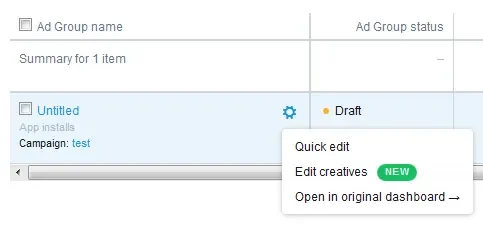
That made me curious, partly because I wondered whether someone else had already tested and reported it, and partly because a Twitter acknowledgement or Hall of Fame entry is high on the list of achievements for many bug bounty hunters. So I decided to check it, and I saw a request.
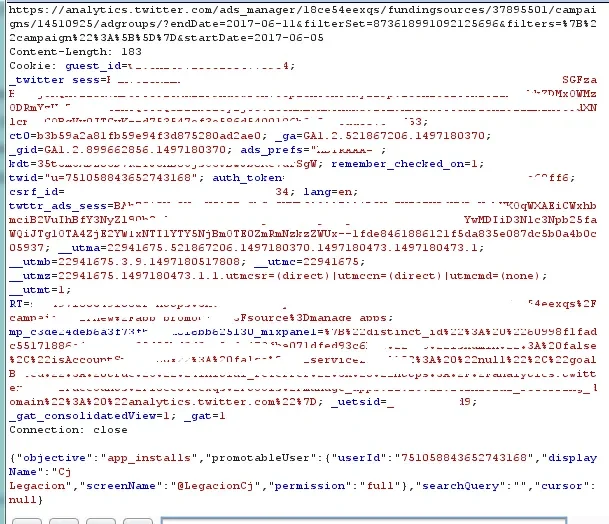
The parameter userId in that request caught my attention.
Exploitation
Step 1: Create a second account
I urgently created another account for testing, so that I could tell my own data apart from someone else's.
Step 2: Change the userId value
I changed the value of the userId parameter in the request.
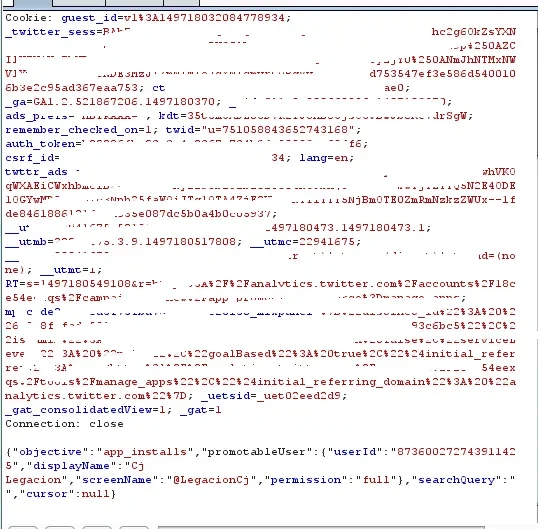
Step 3: Read the response
The response to the modified request came back with the profile of the other account, including @LegacionTesting and Cj Legacion Testing.
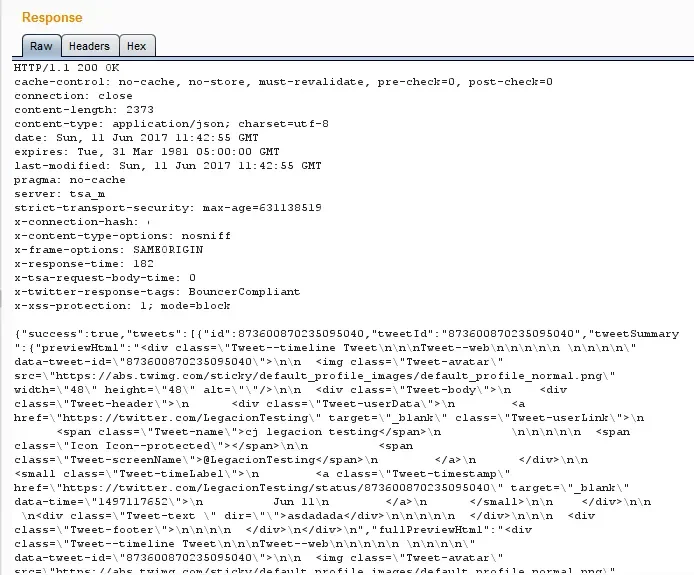
Seeing that response was the confirmation that the parameter was not being checked against the authenticated user. The report does not include the raw request or response text, only the screenshots above, so the exact endpoint, method and body are not reproduced here.
Step 4: Record and report
I recorded a video proof of concept and reported it to Twitter. After their first response, the issue was fixed within 13 to 15 minutes, which was the fastest resolution of any of my reports. The video proof of concept is embedded in the original post; it is not reproduced here.
Root cause
The request takes a userId from the client and returns that user's data without checking that the authenticated session belongs to that user. That is a classic insecure direct object reference: the object identifier is user-controlled and the authorisation check is missing or applied to the wrong object. The report does not describe the server-side code, so the exact location of the missing check is not stated.
Impact
Anyone who could reach the ads subdomain and send this request could view the private tweets of any private Twitter account by supplying that account's userId. The report does not discuss rate limiting, logging, or whether the same request exposed anything beyond the tweets shown in the response.
Fix
Twitter fixed the issue within 13 to 15 minutes of the first response.
- Look for other endpoints on the same subdomain that accept a
userIdor similar identifier and return profile or content data. A positive result is a response containing another account's data when you supply an identifier that is not yours. - Try the same parameter change with an account that has never interacted with yours, including one that has you blocked. A positive result is data returned for an account that should not be visible to you.
- Check whether the parameter is accepted in different places (query string, body, path) and whether any of them skip the check. A positive result is any variant that returns another user's private content.
- Test adjacent identifiers such as tweet IDs, ad group IDs and campaign IDs on the same subdomain. A positive result is any object returned to a session that does not own it.
What happened, in plain words
Twitter lets you mark your account as private. When an account is private, only people you have approved as followers can see your tweets. Everyone else should see nothing.
I found a way to read the private tweets of any private account through Twitter's advertising website, https://ads.twitter.com. That site is where people create and manage ad campaigns on Twitter. One of its requests asked the server for a user's profile information and identified that user with a number called userId. When I changed that number to somebody else's, the server sent back that person's profile, including tweets from a private account that had never approved me as a follower.
I reported it and Twitter fixed it within 13 to 15 minutes of their first response, the fastest fix of any report I had sent them.
To follow the rest of this article you only need a browser and a normal Twitter account. You do not need any special software. The report does not give the exact request headers, the full URL or the HTTP method used.
Background ideas you will need
A few words come up again and again, so here they are from zero.
- Subdomain: a smaller site that belongs to a bigger one.
twitter.comis the main site;ads.twitter.comis a subdomain of it, run for advertising. Think of a large building with a main entrance and a side door for deliveries: same building, different door. - Request and response: when your browser wants something from a website, it sends a request. The website sends back a response. It is like posting a letter with a question in it and getting an answer back.
- Parameter: a named value attached to a request, such as
userId=12345. It is the label on a form field: the name tells the server what the value means. - API: the part of a website that answers requests from programs and pages with data rather than with a finished web page. Think of a restaurant: the dining room is the website you see, the kitchen hatch where orders go in and plates come out is the API.
- Session: the server's memory of who you are while you are logged in. Your browser holds a small piece of proof, often called a cookie or a token, and sends it with every request so the server can recognise you. It is like a wristband at an event: you show it once at the door and it lets you back in without queuing again.
- Authenticated user: the person the server believes is making the request, based on that session. It is not necessarily the person whose data the request asks for, and that gap is where this bug lives.
- IDOR (Insecure Direct Object Reference): a bug where a request names an object, such as a user or an order, by an identifier, and the server hands that object over without checking that you are allowed to see it. Imagine a cloakroom that gives out any coat as long as you read the ticket number aloud, without checking that the ticket is yours.
- XSS (Cross-Site Scripting): a bug where an attacker gets their own code to run inside someone else's web page. It is not the bug in this article, but it is the earlier bug I found on the same subdomain, so it appears below.
- HTML injection: a milder relative of XSS, where the page accepts text that contains HTML markup and displays it as markup instead of as plain text.
- Proof of concept (POC): a small demonstration that a bug is real, usually a screenshot or a short video.
- Bug bounty: a programme where a company pays researchers for reporting security bugs responsibly instead of exploiting them.
- Hall of Fame / acknowledgement: a public thank-you list some companies keep for people who reported bugs. Many hunters treat a place on it as a real achievement.
The earlier bug on the same subdomain
I had tested https://ads.twitter.com before, around March, and found an HTML injection with possible XSS that worked in Internet Explorer. I asked filedescriptor to confirm it and reported it to Twitter. Twitter fixed it and paid me a bounty.
The proof of concept for that earlier issue is below. The payload was used for demonstration only.
That earlier bug matters here for one reason: it is why I was on the advertising subdomain at all, and why I was waiting for a reply when the next thing happened.
How I found the private tweet bug
While waiting for a reply about the HTML injection, I created an Ad Group to test for another XSS. I found no XSS there.
Then, moving the mouse cursor, I accidentally pointed at what I would call the Settings button, and it showed the label "New".
That label made me curious for two reasons. First, I wondered whether someone else had already tested and reported it. Second, a Twitter acknowledgement or Hall of Fame entry is high on the list of achievements for many bug bounty hunters, and I wanted one. So I decided to check it, and I saw a request.
The parameter userId in that request caught my attention. A userId is simply the number Twitter uses internally to identify an account. Seeing one in a request means the request is telling the server which account's data it wants. If the server trusts that number without checking who is asking, the door is open.
Exploitation, step by step
Step 1: Create a second account
I urgently created another account for testing, so that I could tell my own data apart from someone else's. If the response came back with the second account's details, I would know the server had answered for the account I named, not for the account I was logged in as.
Step 2: Change the userId value
I changed the value of the userId parameter in the request.
In plain words: the request still carried my own session, the wristband that proves I am logged in, but the number inside it now pointed at a different account. Nothing else about the request changed.
Step 3: Read the response
The response to the modified request came back with the profile of the other account, including @LegacionTesting and Cj Legacion Testing.
That response was the confirmation. The server had not checked whether the session making the request belonged to the account named in userId. It simply looked up the number and returned the data. The report shows this through the screenshots above; it does not include the raw request or response text, so the exact endpoint, method and body are not reproduced here.
Step 4: Record and report
I recorded a video proof of concept and reported it to Twitter. After their first response, the issue was fixed within 13 to 15 minutes, the fastest resolution of any of my reports. The video proof of concept is embedded in the original post and is not reproduced here.
Why it worked
The request takes a userId from the client, meaning from whoever is sending the request, and returns that user's data without checking that the logged-in session belongs to that user. That is a classic insecure direct object reference: the identifier is under the attacker's control and the authorisation check is missing or applied to the wrong object.
The report does not describe the server-side code, so the exact place where the check should have been is not stated.
What someone could have done with it
Anyone who could reach the ads subdomain and send this request could view the private tweets of any private Twitter account by supplying that account's userId.
The report does not discuss rate limiting, logging, or whether the same request exposed anything beyond the tweets shown in the response.
How it was fixed
Twitter fixed the issue within 13 to 15 minutes of the first response.
Variants worth testing
- Look for other endpoints on the same subdomain that accept a
userIdor a similar identifier and return profile or content data. A positive result is a response containing another account's data when you supply an identifier that is not yours. - Try the same parameter change with an account that has never interacted with yours, including one that has you blocked. A positive result is data returned for an account that should not be visible to you.
- Check whether the parameter is accepted in different places (query string, body, path) and whether any of them skip the check. A positive result is any variant that returns another user's private content.
- Test adjacent identifiers such as tweet IDs, ad group IDs and campaign IDs on the same subdomain. A positive result is any object returned to a session that does not own it.
Glossary
- API: the part of a website that answers requests with data rather than with a finished web page.
- Authenticated user: the person the server believes is making a request, based on the session.
- Bug bounty: a programme that pays researchers for reporting security bugs responsibly.
- Cookie: a small piece of data your browser stores for a site and sends back with requests, often used to prove you are logged in.
- HTML injection: a bug where a page accepts text containing HTML markup and displays it as markup instead of as plain text.
- IDOR (Insecure Direct Object Reference): a bug where a request names an object by an identifier and the server returns it without checking that you are allowed to see it.
- Proof of concept (POC): a small demonstration, usually a screenshot or short video, that a bug is real.
- Request: what your browser sends to a website to ask for something.
- Response: what the website sends back.
- Session: the server's memory of who you are while you are logged in, kept alive by a cookie or token.
- Subdomain: a smaller site belonging to a bigger one, such as
ads.twitter.comundertwitter.com. - Token: a piece of data, similar to a cookie, that proves your identity to a server.



