Unprotected API endpoint at HAwebsso.nl leads to data leak of +15k medical doctor usernames & password hashes
An unprotected API endpoint on the SSO service hawebsso.nl allowed anyone to retrieve user details, including password hashes, by specifying a user ID. An attacker could enumerate user IDs to leak data for over 15,000 medical doctors.
 Published on medium.com
Today we will have a look at the security of the Nederlandse Huisartsen Genootschap (NHG) and the Landelijke Huisartsen Vereniging (LHV). Those are professional organizations for general practitioners (GP) in the Netherlands.
The full write-up lives on its author's site
It belongs to its author, so we link to it rather than copy it. The other two tabs are our own rewrites, checked against it.
Context
The target is hawebsso.nl, the Single Sign-On (SSO) service shared by the Nederlandse Huisartsen Genootschap (NHG) and the Landelijke Huisartsen Vereniging (LHV), the two professional organisations for general practitioners in the Netherlands. The NHG sets standards and provides education, the LHV represents GPs' interests. At the time of writing there were about 13k GPs in the country.
Both organisations run several applications behind this SSO: HAweb.nl, an online community for doctors, and richtlijnen.nhg.org, where doctors can add personal notes to professional guidelines. Whenever an application needs authorisation, the hawebsso.nl login page appears. The researcher's framing is simple: if the SSO falls, everything behind it falls, but SSO products are usually heavily battle-tested pieces of software.
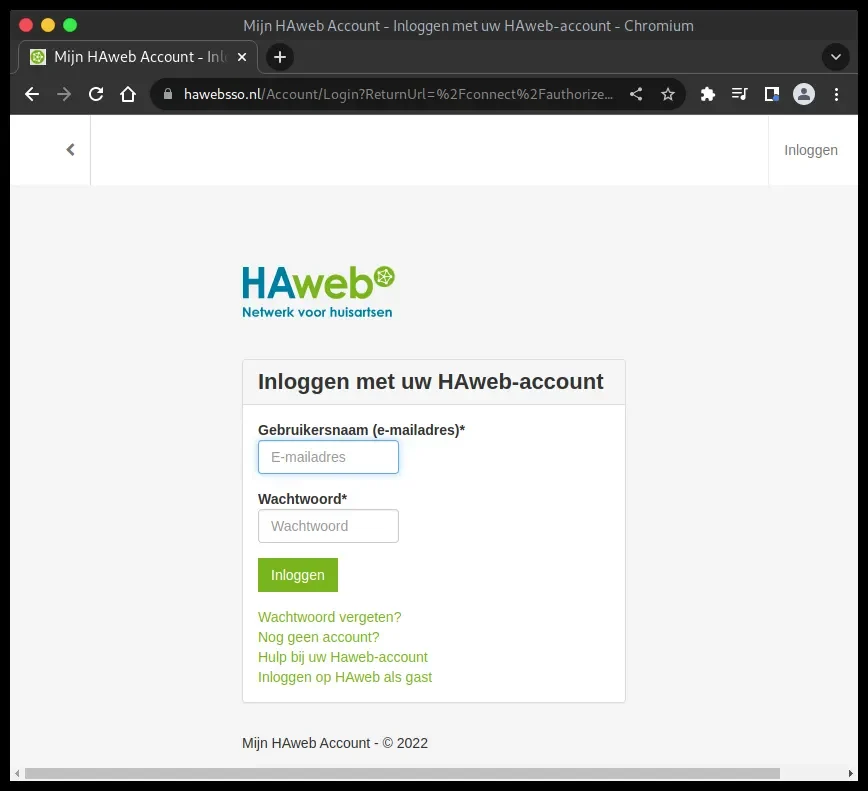
The login page of the SSO system used by the LHV and NHG.
Setup
The researcher is himself a GP with an SSO account, which matters later: it gives a legitimate session and a known user ID to compare against. The work is a browser, the login page's own JavaScript and a logged-in session. No special tooling is required to find the bug; the report mentions LinkFinder and Assetnote wordlists only as ways another attacker could have reached the same endpoint.
Finding it
Step 1: read the OpenID configuration
A quick way to see the scope of an SSO system is to fetch its OpenID discovery document:
https://hawebsso.nl/.well-known/openid-configuration
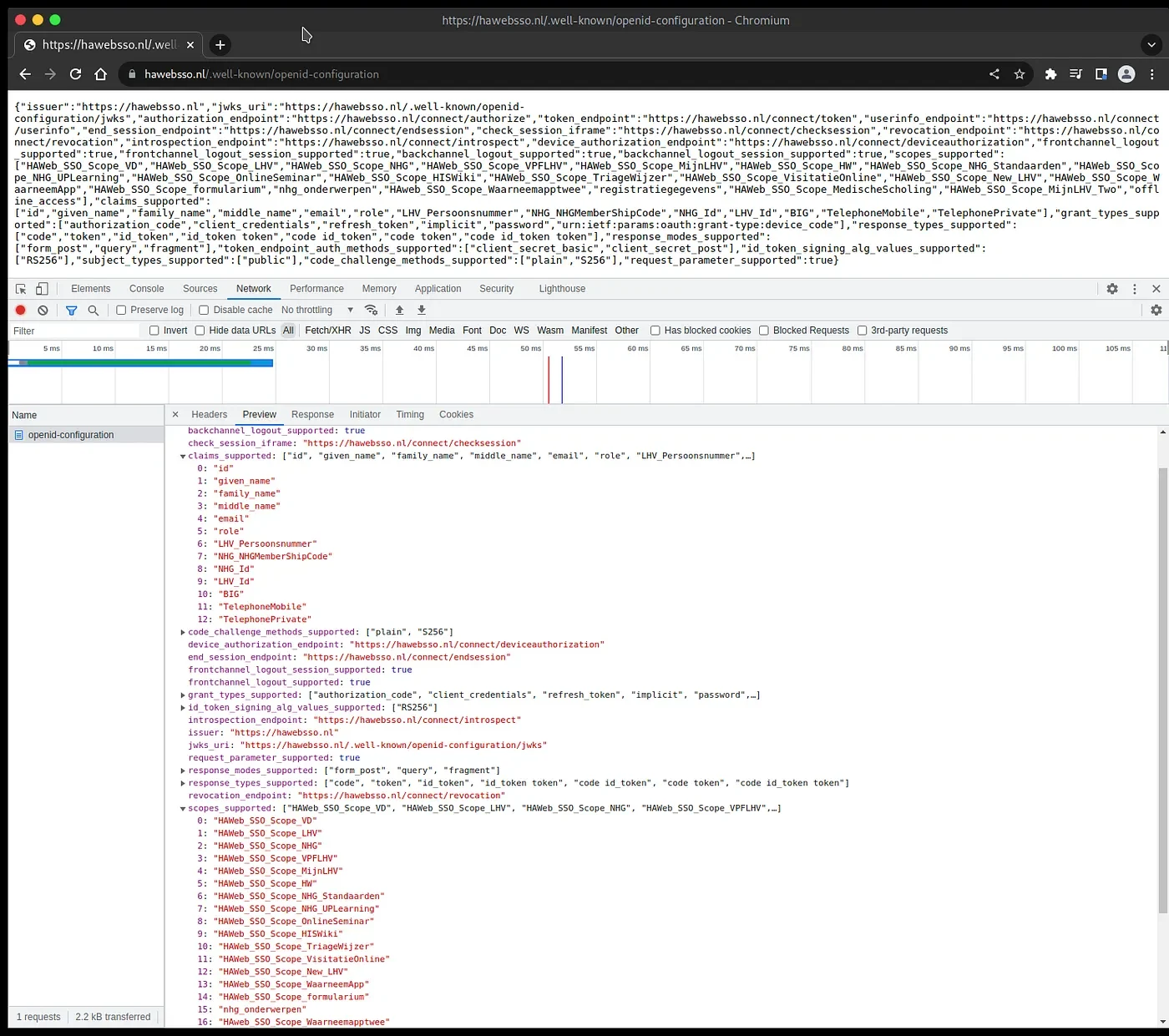
The document shows the user data the SSO holds (claims in OpenID) and the many scopes it supports, for example HAWeb_SSO_Scope_WaarneemApp, which grants access to WaarneemApp, a tool doctors use to trade shifts.
Step 2: fingerprint the server
The researcher then looks at the response headers of the same request to see what is running behind the SSO.
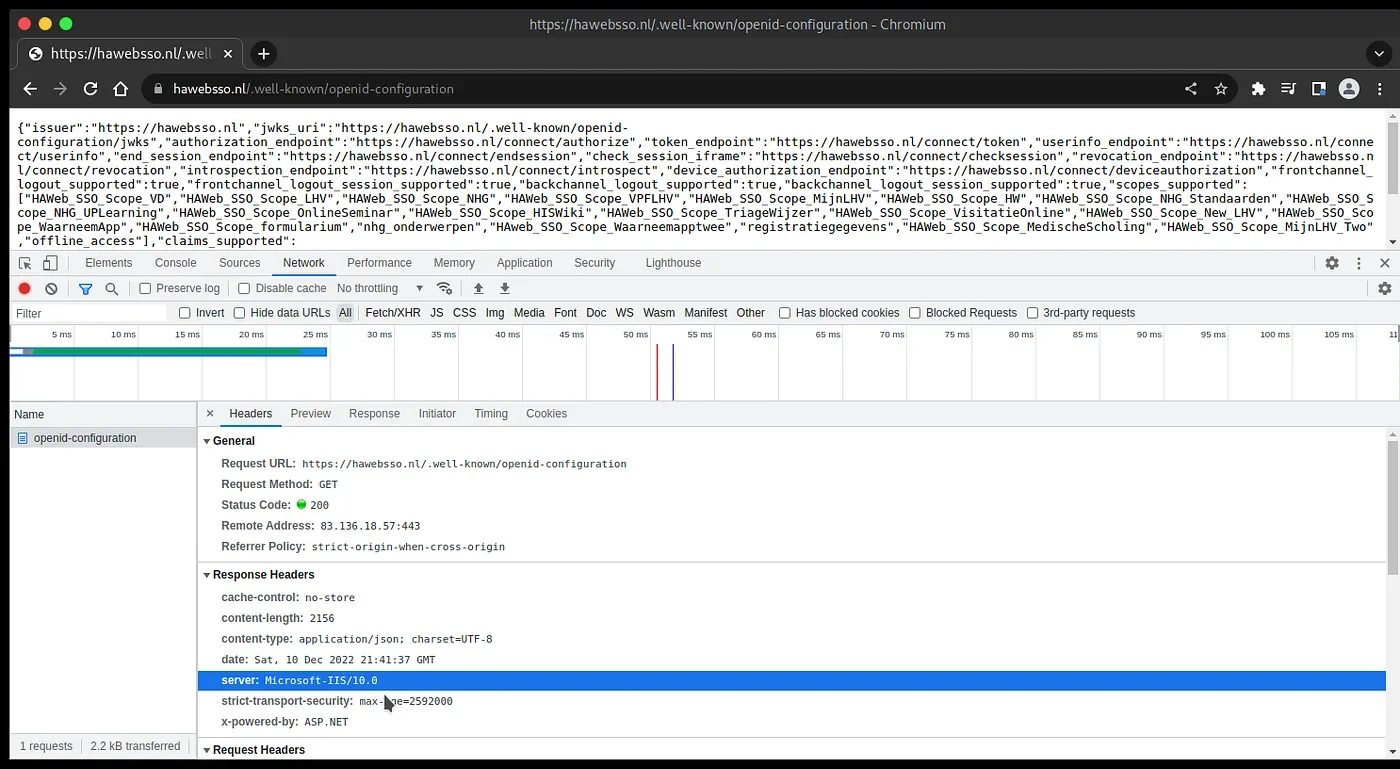
The SSO runs on Microsoft IIS/10.0, with no further hints about the application software. Nothing special so far.
Step 3: read the login page source
The next step is the source of the login page itself. It loads several JavaScript files that add functionality to the login form. None of them reveal the SSO product, which suggests a custom front end wrapping an ASP-powered back end.
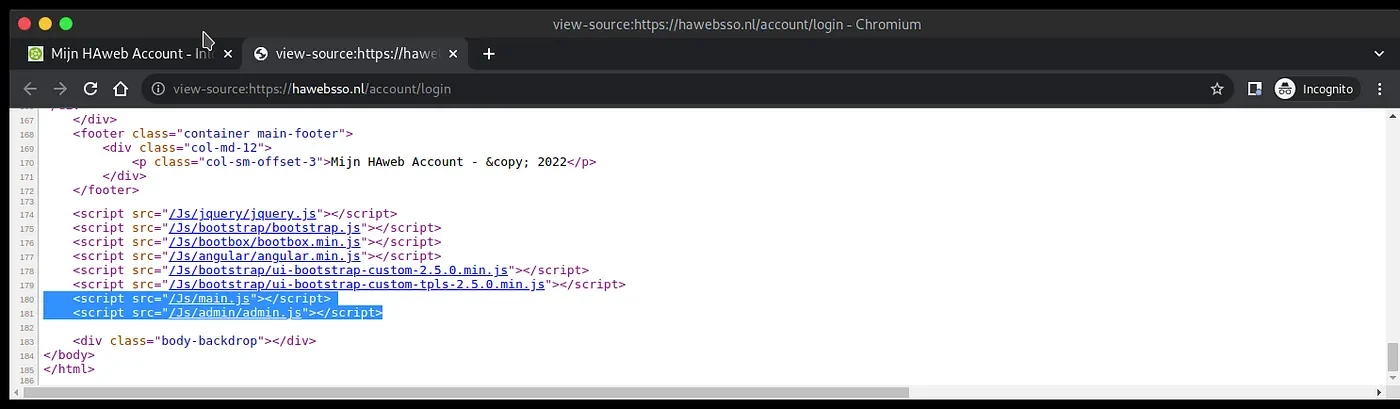
One loaded file stands out: admin.js. The word "admin" in a login page is always worth a look. Part of its source:
$scope.GetAdmin = function () { return $http({ method: 'GET', url: '/api/v1/user/admin', }).then(function (response) { $scope.adminUser = response.data; if ($scope.adminUser.roles != null && $scope.adminUser.roles.length > 0) { var roles = $scope.adminUser.roles.split(","); $scope.permissions = { admin_level_1: roles.indexOf("Admin_level_1") > -1, admin_level_2: roles.indexOf("Admin_level_2") > -1, allow_edit: roles.indexOf("Admin_allow_edit") > -1, allow_merge: roles.indexOf("Admin_allow_merge") > -1, allow_activate: roles.indexOf("Admin_allow_activate") > -1, allow_deactivate: roles.indexOf("Admin_allow_deactivate") > -1, allow_make_admin: roles.indexOf("Admin_level_1") > -1, allow_deactivate_admin: roles.indexOf("Admin_level_1") > -1, show_field_id: roles.indexOf("Admin_show_field_id") > -1, show_field_firstname: roles.indexOf("Admin_show_field_firstname") > -1, show_field_insertion: roles.indexOf("Admin_show_field_insertion") > -1, show_field_lastname: roles.indexOf("Admin_show_field_lastname") > -1, show_field_lhv_id: roles.indexOf("Admin_show_field_lhv_id") > -1, show_field_nhg_id: roles.indexOf("Admin_show_field_nhg_id") > -1, show_field_emailaddress: roles.indexOf("Admin_show_field_emailaddress") > -1, show_field_cat_override: roles.indexOf("Admin_show_field_cat_override") > -1, congres_admin: roles.indexOf("Admin_congres") > -1 }; } }).catch(function (response) { $scope.addMessage(response.data, response.status, response.status == 200 ? "success" : "error"); }); } $scope.GetAdmin();
This is an endpoint that admins can hit to get the roles of a user, in this case the /admin user. Shipping that code in the main login screen is odd in itself.
Exploitation
Step 1: call the endpoint as a logged-in user
Because the researcher is a GP with an SSO login, he can log in and hit the endpoint directly.
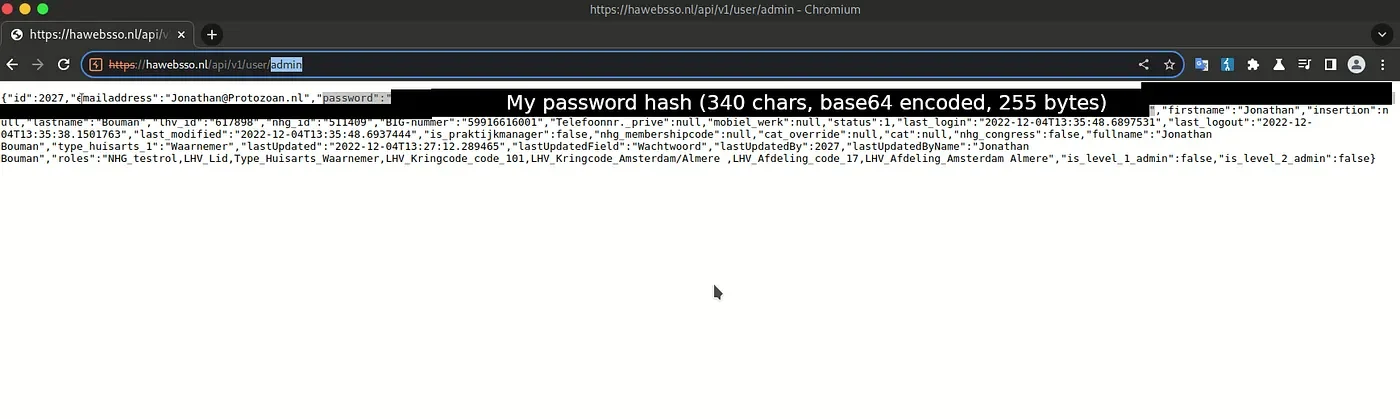
The endpoint returns all the data of the currently logged-in user, including a password hash. It does not properly check who is asking, and returns email, full name, password hash and some membership details.
Step 2: swap /admin for a numeric ID
The researcher's own account has ID 2027. If the last path segment is an object reference, any number should work. He tries ID 15000:
https://hawebsso.nl/api/v1/user/15000
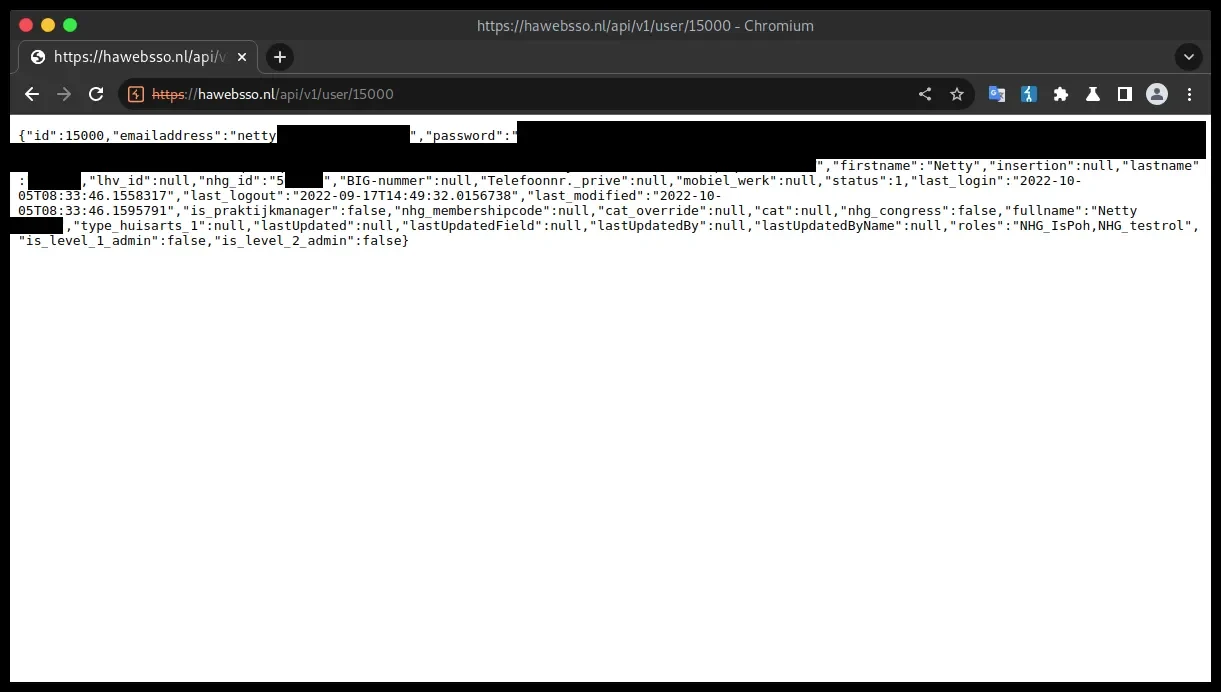
User ID 15000 exists, and all of its account details come back, including the password. The endpoint leaks the details of everyone enrolled in the SSO service. In technical terms this is an IDOR, an insecure direct object reference (CWE-639).
Step 3: note how easily the endpoint is discovered
/api/v1/user/1 is a generic path, the kind of thing a hacker finds with wordlists. The report points at Assetnote's shared wordlists; the list at https://wordlists-cdn.assetnote.io/data/automated/[redacted].txt contains this specific endpoint with an ID that would return a hit.
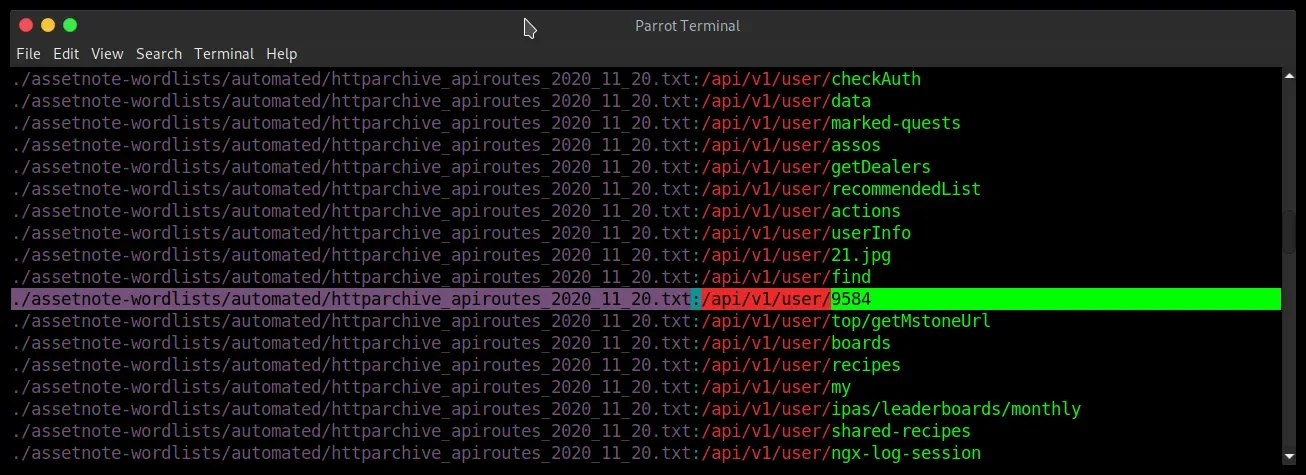
An example of a wordlist entry that would give a hit.
A second route is scanning the JavaScript files for endpoints; LinkFinder does this automatically. Either way, the reference hidden in admin.js on the login page would have pointed a scanning attacker straight at it.
Step 4: drop authentication entirely
The IDOR shows the endpoint leaks user details, but does it require a session? The researcher opens the same endpoint in an incognito window, with no cookies set and not logged in.

All user details are still returned. The endpoint requires no login at all, which is a second bug: Missing Authentication for Critical Function (CWE-306).
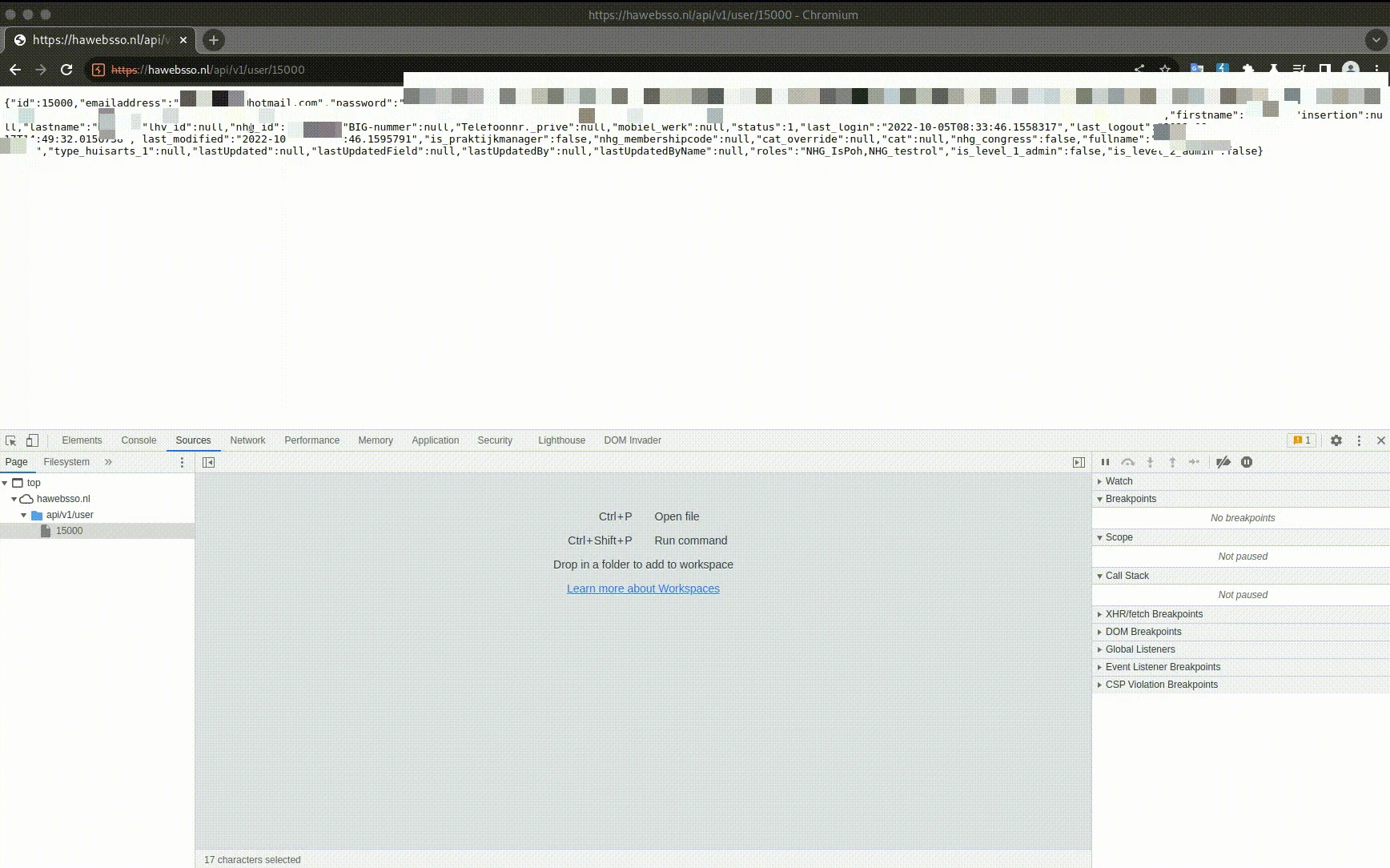
Proof that the endpoint works without being logged in, with confidential data censored.
Step 5: assess the password hash
With the hash in hand, the question is whether it can be cracked. Password hashes limit the impact of a leak because the password has to be recovered first. Older hashes such as MD5 fall to rainbow tables, precomputed lists of hashes; modern systems use stronger algorithms and per-user salts.
Changing his password to the same value produced a new, unique hash, which suggests a unique salt per user and makes rainbow tables useless here. The hash used for testing (the researcher's own, with a dummy password):
[redacted]+7Pa7hj718HfKfIolp/5rDgsp/52UOqawXrNGHgwCHYsd+S0gG4K+ba3zjsjg5cVXCpIrqvlJbO45DkPqZ+B/REWhOmkBdRdie76z9oWk1qp7LFa9l/4Z3TtCgucS+[redacted]/[redacted]/eTeCcgbEpsJhb3bwAulMVl0F3
Experienced testers can often name a hash type on sight, the way a doctor recognises a skin condition:
[redacted] - [redacted] - SHA-256$2y$12$[redacted].kkX0PZr73pH5LC - Bcrypt
This one is not recognisable. A fellow ethical hacker pointed out that it looks like a base64-encoded string, and decoded it is exactly 255 bytes long.
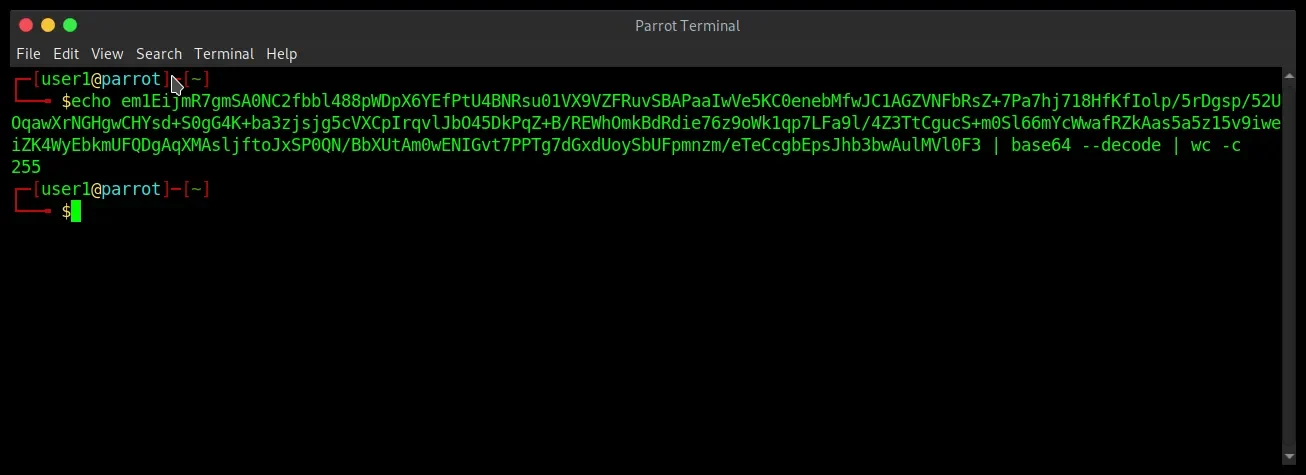
The output of echo <hash> | base64 — decode | wc -c.
Knowing from recon that ASP runs on the server, the researcher turned to Microsoft's documentation on ASP.NET Core Identity. A five-year-old blog post on the ASP.NET Core Identity password hasher contained the relevant line:
ASP.NET Core Identity Version 3: PBKDF2 with HMAC-SHA256, 128-bit salt, 256-bit subkey, 10000 iterations
That suggests ASP uses a proper hashing algorithm out of the box, one the researcher could not easily crack, so he gave up on the hashes for now and invited readers to try cracking his own hash.
Root cause
The endpoint /api/v1/user/{id} returns the full user record for any ID, and does so without checking the caller's identity or session. The IDOR and the missing authentication are two separate defects on the same handler: even a logged-in user could read other users' records, and no login was needed at all. The front end made discovery trivial by shipping the /api/v1/user/admin call in admin.js on the public login page.
Why the existing defences did not stop it: the report does not describe any authorisation layer on the API, and the endpoint was reachable directly, so whatever protections existed on the login flow did not extend to the API behind it. The bug existed for about three years, since the end of 2019 according to the LHV, with no signs of abuse in the logs of the last two years. A reader later pointed out that the admin.js file existed in 2017 in the Wayback Machine, which would put the exposure at more than five years; the LHV said it would double-check with the developer.
Impact
The endpoint leaks the details of users enrolled in hawebsso.nl, about all of their emails and password hashes: email address, full name, password hash and membership details. Given the SSO is shared by the NHG and LHV applications, that population is the Dutch GP community, roughly the 13k doctors the report cites. Anyone on the internet could request an ID without an account, and the generic path made the endpoint easy to guess or find in wordlists.
The password hashes limit the immediate impact: the researcher suspected ASP.NET Core Identity's default PBKDF2 with HMAC-SHA256, a 128-bit salt, a 256-bit subkey and 10000 iterations, and could not crack them. If a hash were cracked, the password could be reused against other services through credential stuffing, which is why the report stresses not reusing passwords. HAwebsso.nl supports two-factor authentication but does not enable it by default, so a leaked password alone could be enough to reach an account where 2FA is off.
Fix
The report does not describe the code change that was made. What it does record is the response: the LHV privacy officer confirmed the bug the day after it was reported, sent updates, and on 12 December 2022 the LHV and NHG informed all members by email and asked them to reset their passwords. The blog was published on 14 December 2022.
The report's recommendations:
- Enforce authorisation on every API handler, so a request for another user's object is rejected regardless of session state.
- Require authentication for any endpoint that returns user data, and do not rely on the front end to hide it.
- Enable two-factor authentication by default rather than leaving it optional.
- Publish a responsible disclosure policy on every online asset;
hawebsso.nlhad no reference to one, and the NHG.org site using the SSO did not share one either. - Make security guidance documents openly accessible so people outside the membership can use them.
- Use threat modelling, for example the INCLUDESNODIRT method, whenever new functionality is added: ask whether the new admin functionality on
hawebsso.nlis properly secured against unauthorised access, and require an explanation of how.
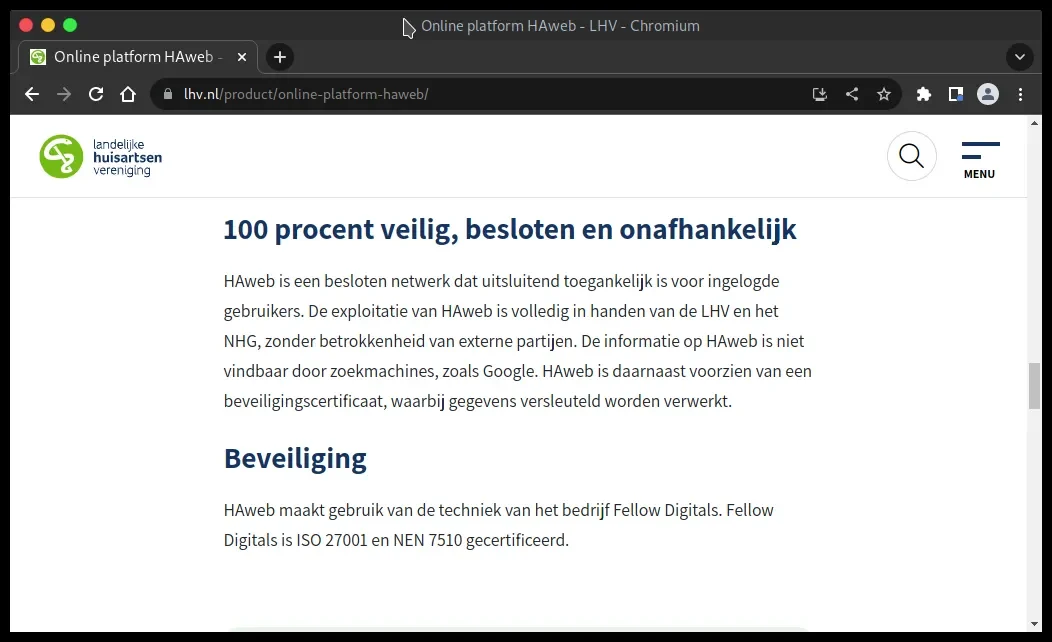
Certificates are good, but they do not protect you from getting hacked. The report says no certification would have stopped this bug, while still recommending structured improvement such as ISO 27001.
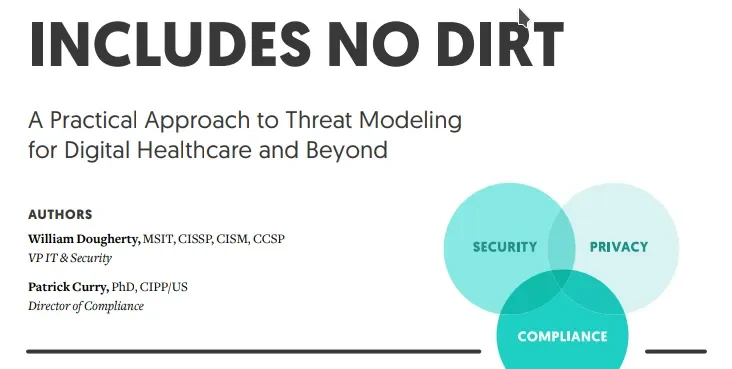
Threat modelling for digital health care.
Variants to test
- Numeric object references on API paths. Take any endpoint of the form
/api/v1/<object>/<id>found in JavaScript or wordlists and substitute IDs, including your own, a neighbouring one and a large one such as15000. A positive result is another user's record returned with fields you should not see. - The same endpoint without cookies. Repeat every hit in a private window or with the session cookie removed. A positive result is identical data with no authentication, which upgrades an IDOR to missing authentication.
- JavaScript files on login and public pages. Fetch every script the page loads and grep for
url:,/api/andadmin. A positive result is an endpoint referenced in client code that the UI never calls for your role. - OpenID discovery documents. Request
/.well-known/openid-configurationon SSO hosts and read the claims and scopes. A positive result is a scope that exposes more user data than the application needs, or claims that reveal internal identifiers. - Wordlist and crawler discovery of generic API routes. Run a list such as Assetnote's
httparchive_apiroutesagainst the host, or a link extractor such as LinkFinder over the JavaScript. A positive result is a route that answers with user data rather than a 401 or 404. - Hash behaviour on password change. Change your password to the same value and compare hashes. A positive result is a new unique hash, which indicates per-user salting and rules out rainbow tables, so effort should go to the authentication gap rather than cracking.
Timeline
| Date | Event |
|---|---|
| 04-12-2022 | Bug found, reported to the LHV privacy officer by email |
| 05-12-2022 | Privacy officer confirms the bug |
| 06-12-2022 | Update from the privacy officer |
| 08-12-2022 | Update: bug exists for 3 years (since end 2019), no signs of abuse in the logs of the last 2 years |
| 11-12-2022 | Blog written |
| 12-12-2022 | Draft sent to the privacy officer; LHV and NHG inform all members by email and request a password reset |
| 13-12-2022 | LHV suggests minor changes |
| 14-12-2022 | Blog published |
| 15-12-2022 | Reader reports admin.js existed in 2017 in the Wayback Machine; LHV will double-check with the developer |
What happened, in plain words
A security researcher who is also a working doctor found a hole in a login system used by Dutch general practitioners. The system is called hawebsso.nl and it is a Single Sign-On service: one username and password that lets a doctor into several different websites run by the NHG and the LHV, the two professional organisations for GPs in the Netherlands. The NHG sets standards and provides training; the LHV looks after GPs' interests. At the time there were about 13k GPs in the country.
The hole was an address on the website, an API endpoint, that handed back the personal details of any user you asked for, by number. It returned email address, full name, a password hash (a scrambled form of the password) and membership details. It did this even if you were not logged in at all. Anyone on the internet could request a user's record by number without logging in, and the report says the endpoint leaks about all the emails and password hashes used by GPs.
The researcher found the address because it was written in plain sight in a JavaScript file that the public login page loads. He reported it, the LHV responded quickly, and on 12 December 2022 the LHV and NHG emailed all members asking them to reset their passwords. The blog was published on 14 December 2022.
This article walks through the same steps at a beginner's pace. You only need a browser and a computer to follow along; no special tools are required to find the bug itself.
Background: why this target matters
The researcher works as a GP by day and as a security researcher by night. One of his goals is to learn enough to audit healthcare products himself, rather than trusting certificates and logos.
The NHG and LHV both run online applications that doctors log into. Examples in the report are HAweb.nl, an online community for doctors, and richtlijnen.nhg.org, where doctors can add personal notes to professional guidelines. What these applications share is the SSO at hawebsso.nl: whenever an application needs to know who you are, the hawebsso.nl login page appears.
What SSO means, from zero. Single Sign-On is one login for many websites. Think of a festival wristband: you show your ticket once at the gate, get a wristband, and after that every tent and stage lets you in without asking for the ticket again. The wristband is the proof that you already logged in. In web terms, after you log in the SSO gives your browser a small piece of proof, and the other applications trust that proof.
The researcher's framing is simple: if the SSO falls, everything behind it falls. The catch is that SSO products are usually heavily battle-tested pieces of software.
The login page of the SSO system used by the LHV and NHG.
Setup: what the researcher brought to the table
The researcher is himself a GP with an SSO account. That matters later for two reasons: it gives him a legitimate session (he is allowed to log in), and it gives him a known user ID to compare against when he starts changing numbers.
The work is a browser, the login page's own JavaScript and a logged-in session. The report mentions LinkFinder and Assetnote wordlists as ways another attacker could have reached the same endpoint.
Finding it
Step 1: read the OpenID configuration
A quick way to see the scope of an SSO system is to fetch its OpenID discovery document. OpenID Connect is a standard way for a login system to publish, in a machine-readable file, what it can do and what information it holds about users. The file lives at a fixed address, so you can simply visit it in a browser:
https://hawebsso.nl/.well-known/openid-configuration
What this line is: a URL. The part /.well-known/openid-configuration is a convention: many login systems answer at exactly this path with a description of themselves. Visiting it costs nothing and tells you a lot.
The document shows the user data the SSO holds (called claims in OpenID) and the many scopes it supports. A claim is a fact about a user, such as an email address or a name. A scope is a permission label that says which application may ask for which claims. One scope listed is HAWeb_SSO_Scope_WaarneemApp, which grants access to WaarneemApp, a tool doctors use to trade shifts.
Why this step: before poking at anything, you want to know what the system is and what it stores. The discovery document is the system introducing itself.
Step 2: fingerprint the server
The researcher then looks at the response headers of the same request to see what is running behind the SSO. Response headers are the small lines of metadata a web server sends along with the page, before the page content itself. They often name the server software and its version.
The SSO runs on Microsoft IIS/10.0, with no further hints about the application software. Nothing special so far. IIS is Microsoft's web server; knowing it is there is a small clue, not a vulnerability.
Step 3: read the login page source
The next step is the source of the login page itself. Every browser can show it: right-click the page and choose to view the page source. It loads several JavaScript files that add functionality to the login form. JavaScript is the programming language that runs inside your browser and makes pages interactive; a page can pull in several such files.
None of the files reveal the SSO product, which suggests a custom front end wrapping an ASP-powered back end. ASP is a Microsoft framework for building web applications.
One loaded file stands out: admin.js. The word "admin" in a login page is always worth a look, because admin features are the most powerful part of any system. Part of its source:
$scope.GetAdmin = function () { return $http({ method: 'GET', url: '/api/v1/user/admin', }).then(function (response) { $scope.adminUser = response.data; if ($scope.adminUser.roles != null && $scope.adminUser.roles.length > 0) { var roles = $scope.adminUser.roles.split(","); $scope.permissions = { admin_level_1: roles.indexOf("Admin_level_1") > -1, admin_level_2: roles.indexOf("Admin_level_2") > -1, allow_edit: roles.indexOf("Admin_allow_edit") > -1, allow_merge: roles.indexOf("Admin_allow_merge") > -1, allow_activate: roles.indexOf("Admin_allow_activate") > -1, allow_deactivate: roles.indexOf("Admin_allow_deactivate") > -1, allow_make_admin: roles.indexOf("Admin_level_1") > -1, allow_deactivate_admin: roles.indexOf("Admin_level_1") > -1, show_field_id: roles.indexOf("Admin_show_field_id") > -1, show_field_firstname: roles.indexOf("Admin_show_field_firstname") > -1, show_field_insertion: roles.indexOf("Admin_show_field_insertion") > -1, show_field_lastname: roles.indexOf("Admin_show_field_lastname") > -1, show_field_lhv_id: roles.indexOf("Admin_show_field_lhv_id") > -1, show_field_nhg_id: roles.indexOf("Admin_show_field_nhg_id") > -1, show_field_emailaddress: roles.indexOf("Admin_show_field_emailaddress") > -1, show_field_cat_override: roles.indexOf("Admin_show_field_cat_override") > -1, congres_admin: roles.indexOf("Admin_congres") > -1 }; } }).catch(function (response) { $scope.addMessage(response.data, response.status, response.status == 200 ? "success" : "error"); }); } $scope.GetAdmin();
Line by line, in plain words:
$scope.GetAdmin = function () {starts the definition of a function namedGetAdmin. A function is a named block of instructions.return $http({ method: 'GET', url: '/api/v1/user/admin', })sends a request to the server.GETmeans "give me something". The address is/api/v1/user/admin, relative to the site you are on, so in full it ishttps://hawebsso.nl/api/v1/user/admin. An API is simply a set of addresses a website's own pages use to talk to its server, usually returning raw data rather than a pretty page..then(function (response) {says: when the answer comes back, run the following with that answer.$scope.adminUser = response.data;stores the returned data under the nameadminUser.if ($scope.adminUser.roles != null && $scope.adminUser.roles.length > 0) {checks that the user has roles at all. A role is a label such as "admin" or "editor" that decides what you may do.var roles = $scope.adminUser.roles.split(",");turns a comma-separated string of roles into a list.- The block of
admin_level_1: roles.indexOf("Admin_level_1") > -1,and similar lines checks, one by one, whether each role is present in that list, and stores the answer as true or false.indexOfreturns the position of a piece of text in a list, or -1 if it is not there, so> -1means "found". .catch(function (response) {handles the case where the request fails.$scope.addMessage(...)shows a message to the user, withsuccessif the HTTP status was 200 (the code for "OK") anderrorotherwise.$scope.GetAdmin();at the end actually runs the function as soon as the file loads.
So this is an endpoint that admins can hit to get the roles of a user, in this case the /admin user. Shipping that code in the main login screen is odd in itself: the public login page should not need to know about admin roles.
Exploitation
Step 1: call the endpoint as a logged-in user
Because the researcher is a GP with an SSO login, he can log in and hit the endpoint directly. "Hitting an endpoint" just means visiting that address, either by typing it in the address bar or by letting the page do it for you.
The endpoint returns all the data of the currently logged-in user, including a password hash. It does not properly check who is asking, and returns email, full name, password hash and some membership details.
A password hash is the result of putting a password through a one-way scrambling recipe. The server stores the scrambled value, not the password itself, so that a stolen database does not directly hand over passwords. The idea is that you cannot turn the hash back into the password, only guess passwords and scramble each guess to see if it matches.
Step 2: swap /admin for a numeric ID
The researcher's own account has ID 2027. If the last part of the address is simply a reference to a user record, then any number should work, not just the word admin. This is the core idea of the bug class called IDOR, which stands for Insecure Direct Object Reference: the application takes a reference to an object (here, a user number) straight from the request and hands over the object without checking whether you are allowed to see it. A useful comparison is a hotel where the key card is just the room number written on it: change the number and you can open someone else's door.
He tries ID 15000:
https://hawebsso.nl/api/v1/user/15000
What this line is: the same endpoint as before, with the word admin replaced by a number. Nothing else changed.
User ID 15000 exists, and all of its account details come back, including the password. The endpoint leaks the details of everyone enrolled in the SSO service. In technical terms this is an IDOR, an insecure direct object reference (CWE-639). CWE-639 is the catalogue number for this kind of weakness in the Common Weakness Enumeration, a public list that gives each known kind of bug a number so people can refer to it unambiguously.
Step 3: note how easily the endpoint is discovered
/api/v1/user/1 is a generic path, the kind of thing a hacker finds with wordlists. A wordlist here is a long text file of common addresses and file names; a tool tries each one against the site and notes which ones answer. The report points at Assetnote's shared wordlists; the list at https://wordlists-cdn.assetnote.io/data/automated/[redacted].txt contains this specific endpoint with an ID that would return a hit.
An example of a wordlist entry that would give a hit.
A second route is scanning the JavaScript files for endpoints. Because the browser must download those files to run them, anyone can read them, and they often contain addresses the visible page never shows. LinkFinder is a tool that does this scanning automatically. Either way, the reference hidden in admin.js on the login page would have pointed a scanning attacker straight at it.
Step 4: drop authentication entirely
The IDOR shows the endpoint leaks user details, but does it require a session? A session is the state of being logged in: the server remembers you, usually by giving your browser a cookie, which is a small piece of data the browser stores and sends back with every request to that site. If you have no cookie, the server has no reason to believe you are logged in.
The researcher opens the same endpoint in an incognito window, with no cookies set and not logged in. Incognito mode is a private browser window that starts with no stored cookies or history, which makes it a clean way to test what a stranger sees.
All user details are still returned. The endpoint requires no login at all, which is a second bug: Missing Authentication for Critical Function (CWE-306). Authentication means proving who you are; this endpoint never asks. CWE-306 is the catalogue entry for a function that matters but is left open to anyone.
Proof that the endpoint works without being logged in, with confidential data censored.
Step 5: assess the password hash
With the hash in hand, the question is whether it can be cracked. Password hashes limit the impact of a leak because the password has to be recovered first. Older hashes such as MD5 fall to rainbow tables, precomputed lists of hashes; modern systems use stronger algorithms and per-user salts. A salt is a random value mixed into each password before hashing, so that two people with the same password get different hashes, and a precomputed list built without that salt is useless.
Changing his password to the same value produced a new, unique hash, which suggests a unique salt per user and makes rainbow tables useless here. The hash used for testing (the researcher's own, with a dummy password):
[redacted]+7Pa7hj718HfKfIolp/5rDgsp/52UOqawXrNGHgwCHYsd+S0gG4K+ba3zjsjg5cVXCpIrqvlJbO45DkPqZ+B/REWhOmkBdRdie76z9oWk1qp7LFa9l/4Z3TtCgucS+[redacted]/[redacted]/eTeCcgbEpsJhb3bwAulMVl0F3
What this block is: one long string of characters, the scrambled form of a password as the server stored it. It is not a password and it is not a command; it is data.
Experienced testers can often name a hash type on sight, the way a doctor recognises a skin condition:
[redacted] - [redacted] - SHA-256$2y$12$[redacted].kkX0PZr73pH5LC - Bcrypt
What this block is: three example hashes with the algorithm name written after each one, as a reference for what different hash types look like. MD5 and SHA-256 produce short fixed-length strings; Bcrypt strings start with $2y$ and carry settings inside them.
This one is not recognisable. A fellow ethical hacker pointed out that it looks like a base64-encoded string, and decoded it is exactly 255 bytes long. Base64 is a way of writing arbitrary data using only ordinary letters, digits and a few symbols, so it can travel safely through systems that expect text. Decoding it turns it back into raw bytes.
The output of echo <hash> | base64 — decode | wc -c. This is a shell command line: echo prints the hash, the pipe | passes that output to the next command, base64 — decode converts it from base64 back to raw bytes, and wc -c counts the bytes. The result is the 255-byte length the researcher mentions.
Knowing from recon that ASP runs on the server, the researcher turned to Microsoft's documentation on ASP.NET Core Identity. A five-year-old blog post on the ASP.NET Core Identity password hasher contained the relevant line:
ASP.NET Core Identity Version 3: PBKDF2 with HMAC-SHA256, 128-bit salt, 256-bit subkey, 10000 iterations
What this line is: a description of how one version of Microsoft's login library turns passwords into hashes. PBKDF2 is a recipe designed to be slow on purpose; HMAC-SHA256 is the underlying scrambling function; the salt is 128 bits; the derived key is 256 bits; and the recipe is repeated 10000 times to make each guess cost time. Slow is good here: it makes guessing expensive for an attacker.
That suggests ASP uses a proper hashing algorithm out of the box, one the researcher could not easily crack, so he gave up on the hashes for now and invited readers to try cracking his own hash.
Root cause
The endpoint /api/v1/user/{id} returns the full user record for any ID, and does so without checking the caller's identity or session. The curly braces around id are a placeholder meaning "whatever number you put here". The IDOR and the missing authentication are two separate defects on the same handler: even a logged-in user could read other users' records, and no login was needed at all. The front end made discovery trivial by shipping the /api/v1/user/admin call in admin.js on the public login page.
Why the existing defences did not stop it: the report does not describe any authorisation layer on the API, and the endpoint was reachable directly, so whatever protections existed on the login flow did not extend to the API behind it. Authorisation is the check of what you are allowed to do once you are known; authentication is only who you are. The bug existed for about three years, since the end of 2019 according to the LHV, with no signs of abuse in the logs of the last two years. A reader later pointed out that the admin.js file existed in 2017 in the Wayback Machine, which would put the exposure at more than five years; the LHV said it would double-check with the developer. The Wayback Machine is an archive that keeps old copies of web pages, so it can show what a site looked like years ago.
Impact
The endpoint leaks the details of users enrolled in hawebsso.nl, about all of their emails and password hashes: email address, full name, password hash and membership details. Given the SSO is shared by the NHG and LHV applications, that population is the Dutch GP community, roughly the 13k doctors the report cites. Anyone on the internet could request an ID without an account, and the generic path made the endpoint easy to guess or find in wordlists. Enumerating means simply trying 1, 2, 3 and so on.
The password hashes limit the immediate impact: the researcher suspected ASP.NET Core Identity's default PBKDF2 with HMAC-SHA256, a 128-bit salt, a 256-bit subkey and 10000 iterations, and could not crack them. If a hash were cracked, the password could be reused against other services through credential stuffing, which is why the report stresses not reusing passwords. Credential stuffing is trying a leaked username and password pair on other websites, because many people reuse the same password in several places. HAwebsso.nl supports two-factor authentication but does not enable it by default, so a leaked password alone could be enough to reach an account where 2FA is off. Two-factor authentication means a second proof on top of the password, such as a code from an app.
Fix
The report does not describe the code change that was made. What it does record is the response: the LHV privacy officer confirmed the bug the day after it was reported, sent updates, and on 12 December 2022 the LHV and NHG informed all members by email and asked them to reset their passwords.
The report's recommendations:
- Enforce authorisation on every API handler, so a request for another user's object is rejected regardless of session state.
- Require authentication for any endpoint that returns user data, and do not rely on the front end to hide it.
- Enable two-factor authentication by default rather than leaving it optional.
- Publish a responsible disclosure policy on every online asset;
hawebsso.nlhad no reference to one, and the NHG.org site using the SSO did not share one either. A responsible disclosure policy is a page that tells security researchers how to report a problem safely and what they can expect. - Make security guidance documents openly accessible so people outside the membership can use them.
- Use threat modelling, for example the INCLUDESNODIRT method, whenever new functionality is added: ask whether the new admin functionality on
hawebsso.nlis properly secured against unauthorised access, and require an explanation of how. Threat modelling is sitting down before building something and asking, on purpose, what could go wrong and how you would know it is protected.
Certificates are good, but they do not protect you from getting hacked. The report says no certification would have stopped this bug, while still recommending structured improvement such as ISO 27001. ISO 27001 is an international standard for managing information security; NEN 7510 is the Dutch standard for information security in healthcare. A certificate says a process was followed, not that a particular address is safe.
Threat modelling for digital health care.
Variants to test
- Numeric object references on API paths. Take any endpoint of the form
/api/v1/<object>/<id>found in JavaScript or wordlists and substitute IDs, including your own, a neighbouring one and a large one such as15000. A positive result is another user's record returned with fields you should not see. - The same endpoint without cookies. Repeat every hit in a private window or with the session cookie removed. A positive result is identical data with no authentication, which upgrades an IDOR to missing authentication.
- JavaScript files on login and public pages. Fetch every script the page loads and grep for
url:,/api/andadmin. A positive result is an endpoint referenced in client code that the UI never calls for your role. - OpenID discovery documents. Request
/.well-known/openid-configurationon SSO hosts and read the claims and scopes. A positive result is a scope that exposes more user data than the application needs, or claims that reveal internal identifiers. - Wordlist and crawler discovery of generic API routes. Run a list such as Assetnote's
httparchive_apiroutesagainst the host, or a link extractor such as LinkFinder over the JavaScript. A positive result is a route that answers with user data rather than a 401 or 404. Those two numbers are HTTP status codes: 401 means "not allowed, log in first", 404 means "no such page". - Hash behaviour on password change. Change your password to the same value and compare hashes. A positive result is a new unique hash, which indicates per-user salting and rules out rainbow tables, so effort should go to the authentication gap rather than cracking.
Timeline
| Date | Event |
|---|---|
| 04-12-2022 | Bug found, reported to the LHV privacy officer by email |
| 05-12-2022 | Privacy officer confirms the bug |
| 06-12-2022 | Update from the privacy officer |
| 08-12-2022 | Update: bug exists for 3 years (since end 2019), no signs of abuse in the logs of the last 2 years |
| 11-12-2022 | Blog written |
| 12-12-2022 | Draft sent to the privacy officer; LHV and NHG inform all members by email and request a password reset |
| 13-12-2022 | LHV suggests minor changes |
| 14-12-2022 | Blog published |
| 15-12-2022 | Reader reports admin.js existed in 2017 in the Wayback Machine; LHV will double-check with the developer |
Glossary
- API: a set of addresses a website's own pages use to talk to its server, usually returning raw data rather than a formatted page.
- API endpoint: one specific address in that set, such as
/api/v1/user/15000. - ASP / ASP.NET Core: Microsoft's framework for building web applications.
- Authentication: proving who you are, usually by logging in.
- Authorisation: deciding what a known user is allowed to do or see.
- Base64: a way of writing arbitrary data using ordinary letters, digits and a few symbols so it can travel as text.
- Bcrypt: a password hashing algorithm whose output starts with
$2y$and carries its settings inside the string. - Claim: a fact about a user published by an OpenID login system, such as an email address or a name.
- Cookie: a small piece of data a website asks your browser to store and send back with later requests, often used to remember that you are logged in.
- Credential stuffing: trying a leaked username and password pair on other websites, relying on people reusing passwords.
- CWE-306: the catalogue entry for Missing Authentication for Critical Function, a function that matters but is open to anyone.
- CWE-639: the catalogue entry for Insecure Direct Object Reference.
- Endpoint: see API endpoint.
- Fingerprinting: learning what software and version a server runs, often from response headers.
- Hash / password hash: the scrambled form of a password produced by a one-way recipe, stored instead of the password itself.
- HMAC-SHA256: the scrambling function used underneath PBKDF2 in the described setup.
- HTTP status code: a number a server returns with its answer, such as 200 for OK, 401 for not allowed, 404 for not found.
- IDOR: Insecure Direct Object Reference, where an application takes an object reference such as a user number straight from the request and returns the object without checking permission.
- IIS: Microsoft's web server software.
- Incognito window: a private browser window that starts with no stored cookies or history.
- ISO 27001: an international standard for managing information security.
- JavaScript: the programming language that runs inside your browser and makes pages interactive.
- LinkFinder: a tool that scans JavaScript files for endpoints.
- MD5: an old, fast hashing algorithm that is easily defeated with precomputed tables.
- NEN 7510: the Dutch standard for information security in healthcare.
- OpenID Connect: a standard way for a login system to publish what it can do and what user data it holds.
- PBKDF2: a password hashing recipe designed to be slow on purpose, so guessing is expensive.
- Rainbow table: a precomputed list of hashes used to look up the password behind a hash.
- Responsible disclosure policy: a page telling security researchers how to report a problem safely and what to expect.
- Role: a label such as admin or editor that decides what a user may do.
- Salt: a random value mixed into each password before hashing, so identical passwords produce different hashes.
- Scope: a permission label in OpenID that says which application may ask for which claims.
- Session: the state of being logged in, usually remembered by the server through a cookie.
- SHA-256: a hashing algorithm producing a short fixed-length string.
- Single Sign-On (SSO): one login that gives access to several separate applications.
- Threat modelling: deliberately asking, before building something, what could go wrong and how you would know it is protected.
- Two-factor authentication (2FA): a second proof on top of the password, such as a code from an app.
- Wayback Machine: an archive that keeps old copies of web pages.
- Wordlist: a long text file of common addresses and file names that a tool tries against a site.