Stored XSS in SupportFlow Ticket Subject
The ticket subject field in the admin ticket form is not escaped before being placed in the value attribute of an input element, allowing stored cross-site scripting. An attacker could create a ticket with a malicious subject that executes script when another user views the ticket in the admin area.
 Originally disclosed on HackerOne
- Triaged in 14 hours
- Fixed in 13 days
- Paid in 38 hours
- Disclosed after 13 days
SupportFlow contains an XSS vulnerability in how it handles ticket subjects in the admin-side ticket form, because the subject is not escaped before being used in the value attribute of the subject input element.
This first requires wptexturize to be disabled (not that uncommon):
add_filter( 'run_wptexturize', '__return_false' );
Then, create a ticket with a subject like this:
"><script>alert('hi');</script>
The next time someone views that ticket (any other user) in the admin area at SupportFlow -> All Tickets -> [Ticket], XSS is triggered.
This is due to this line not using esc_attr() on the title value (core does not do this automatically):
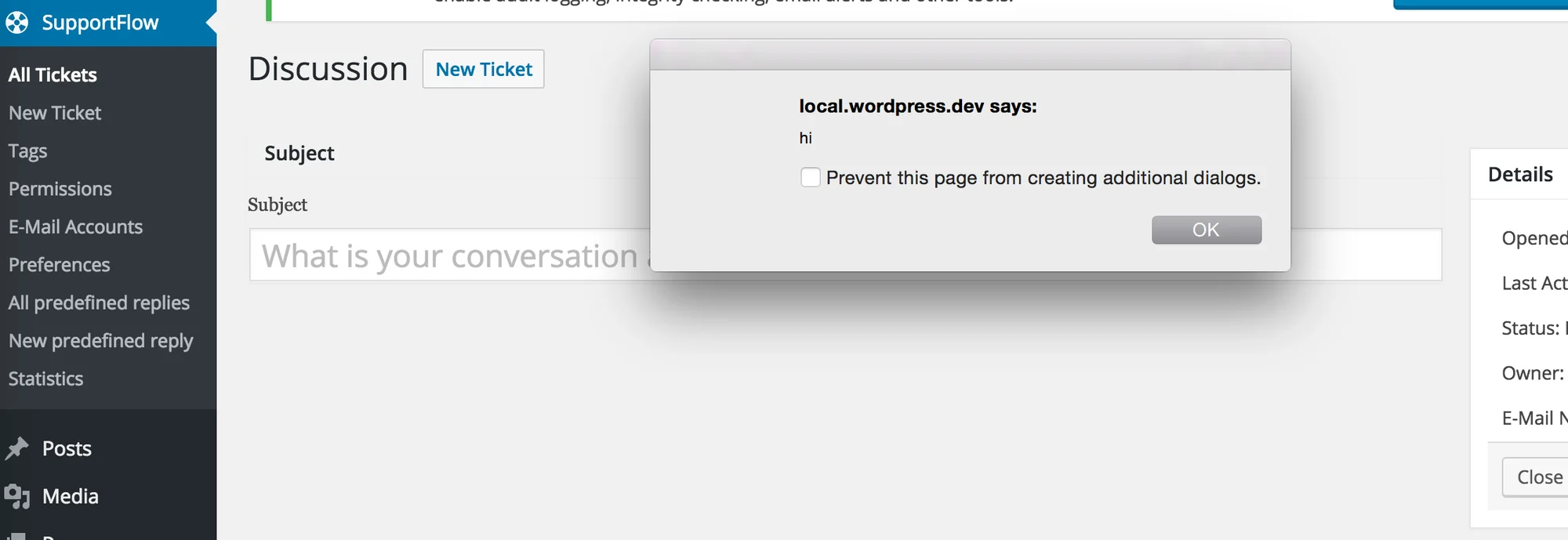
I've attached a screenshot demonstrating the XSS alert - please let me know if you have any questions or if I can clarify anything.
Attachments
Context
SupportFlow is a WordPress plugin for handling support tickets. The vulnerable feature is the admin-side ticket form: when an administrator or any other user opens a ticket in the admin area, the ticket subject is rendered into the value attribute of the subject input element. That is the normal behaviour of the feature, showing the stored subject in an editable field.
The report describes a stored cross-site scripting (XSS) issue in that rendering path: the subject is not escaped before it is placed into the value attribute.
Setup
Two conditions are described in the report:
wptexturizemust be disabled. The researcher notes this is "not that uncommon" and gives the filter used to disable it:
Finding it
The report states that the ticket subject is written into the value attribute of the subject input element without being escaped. In WordPress, escaping for an HTML attribute is normally done with esc_attr(), and the report states that core does not do this automatically. Because the subject is attacker-controlled data that is stored and later rendered in the admin area, an unescaped value attribute is a stored XSS sink.
The report points to line 905 of classes/class-supportflow-admin.php as the place where the title value is used without esc_attr().
Exploitation
Step 1: Disable wptexturize
The payload depends on the subject being stored and rendered without texturisation interfering. The report gives the filter used to disable wptexturize. Without this precondition, the report indicates the payload as written would not work.
Step 2: Create a ticket with a crafted subject
The subject is set to the following value:
"><script>alert('hi');</script>
The leading "> closes the value attribute of the subject input and the surrounding tag, so the following <script> element is parsed as markup rather than as part of the attribute value. The script calls alert('hi') as a proof of concept.
Step 3: Have another user view the ticket
When any other user opens the ticket in the admin area at SupportFlow -> All Tickets -> [Ticket], the stored subject is rendered into the form and the script executes in that user's session. The report does not describe the exact HTTP request or response for this step, only the navigation path.
The screenshot attached to the report shows the resulting alert firing, demonstrating the XSS.
Root cause
The subject value is inserted into the value attribute of the subject input element without esc_attr(). Attribute context requires attribute-specific encoding: characters such as " must be converted so they cannot terminate the attribute, and < must not be able to start a new tag. Because the subject is stored and then rendered to other users, the missing escaping turns a stored value into executable markup.
The existing defence that would normally have interfered, wptexturize, had to be disabled for the payload to survive as written. The researcher notes that disabling wptexturize is "not that uncommon".
Impact
A user who can set a ticket subject can store a script that runs in the admin area of any other user who views that ticket. The report frames the trigger as viewing the ticket at SupportFlow -> All Tickets -> [Ticket] by "any other user". The script runs with the privileges of the viewing user in the admin interface, which is the standard consequence of stored XSS in an administrative page. The report does not enumerate specific actions an attacker could take beyond the alert proof of concept.
Fix
The report notes that line 905 of classes/class-supportflow-admin.php does not use esc_attr() on the title value. The report does not state that a patch was applied or which version contains it.
Variants to test
- Other ticket fields rendered into HTML attributes in the admin form (for example other input
valueattributes ordata-attributes). A positive result is a stored value containing"that breaks out of the attribute and produces executable markup when the ticket is viewed. - The same subject rendered in other contexts, such as list tables, export views or notification emails. A positive result is the payload appearing unescaped in a context where the browser parses it as markup.
- Payloads that do not rely on
wptexturizebeing disabled, for example attribute breakouts using characters that texturisation leaves alone. A positive result is script execution with the default texturisation settings. - Stored values viewed by higher-privileged users than the one who created them. A positive result is execution in an administrator's session from a lower-privileged account.
Hunting notes
This kind of bug hides in admin-side rendering of user-supplied fields, especially where a value is echoed straight into an HTML attribute. During recon, look for plugins that store free-text fields (titles, subjects, names) and display them in editable forms in the admin area. The signal is a field whose value is reflected into an attribute without obvious encoding; testing with a " character shows quickly whether the attribute can be broken out of.
The report documents that wptexturize must be disabled and gives the filter used to do so. The proof of impact was a screenshot of the alert firing when another user viewed the ticket, matching the report's stated trigger path.
What happened, in plain words
SupportFlow is a plugin for WordPress, a popular system for building websites. A plugin is an add-on that gives a website extra features, a bit like an app you install on a phone. SupportFlow adds a helpdesk: customers or staff can open support tickets, which are written requests for help, and staff answer them from a private administration area of the website.
The problem is in the admin-side ticket form, the page where a staff member opens a ticket to read and edit it. One of the fields on that form is the ticket subject, a short title for the ticket. When the page is built, the subject is placed inside the HTML of the page, specifically inside the value attribute of the subject input box. An attribute is a small piece of information attached to an HTML element, and value is the attribute that tells an input box what text to show inside it.
The subject is not escaped before it goes there. Escaping means converting special characters into harmless versions so that they are treated as plain text rather than as instructions to the browser. Because that step is missing, someone can put characters into a ticket subject that the browser reads as code instead of as a title. The browser then runs that code. This class of bug is called cross-site scripting, usually shortened to XSS: a site ends up displaying content from one user as if it were part of the site itself, and the browser executes it.
Because the subject is saved in the database and shown again every time anyone opens the ticket, this is a stored XSS. The malicious text is stored once and then delivered to other people later. The report shows this with a simple pop-up box, an alert, as proof.
Background you need
A few ideas come up repeatedly, so here they are from zero.
HTML and attributes. A web page is written in HTML, a language of tags such as <input>. Tags can carry attributes, written as name="value". The quotation marks mark where the attribute value starts and ends. If a piece of text placed inside those quotes itself contains a ", the browser thinks the attribute has ended early, and anything after it is read as new HTML.
In WordPress the usual tool for this in an attribute is a function called esc_attr(). A function is a named piece of code that does one job; esc_attr() takes text and returns a safe version of it. The report says WordPress core does not apply this automatically, so the plugin has to do it itself.
Stored XSS. There are two broad flavours of XSS. Reflected XSS bounces a payload straight back to the person who sent it. Stored XSS saves the payload, for example in a database, and serves it to whoever views the page later. Stored XSS is more dangerous because the victim does not have to click a crafted link; simply opening a normal page is enough.
wptexturize. WordPress has a feature called wptexturize that automatically prettifies text, for example turning straight quotes into curly ones. Curly quotes are not the same character as the straight " that closes an HTML attribute, so texturisation can break a payload like the one in this report. The report states that wptexturize must be disabled first and gives the filter used to do so.
Filters. WordPress lets developers change behaviour without editing core files by registering small hooks called filters. The line below registers a filter that makes wptexturize do nothing.
Setup
The report describes two conditions that must be in place before the bug can be triggered.
wptexturizemust be disabled. The researcher notes this is "not that uncommon", meaning many real sites turn it off, so the precondition is realistic rather than exotic.- A ticket must be created whose subject contains the payload. The report does not say which account or role was used to create the ticket. It only says the ticket is later viewed by "any other user" in the admin area.
The vulnerable code is identified at a specific point in the plugin's source: a particular commit, which is a saved snapshot of the code at one moment in time, of the file that handles admin screens.
https://github.com/SupportFlow/supportflow/blob/[redacted]/classes/class-supportflow-admin.php#L905
This is a link to a code-hosting site. The long string of letters and numbers is the commit identifier, classes/class-supportflow-admin.php is the file, and #L905 points at line 905 inside it. The link is there so a reviewer can jump straight to the exact line that is at fault.
Finding it
The report states that the ticket subject is written into the value attribute of the subject input element without being escaped. In WordPress, escaping for an HTML attribute is normally done with esc_attr(), and the report states that core does not do this automatically.
The subject is data that an attacker can control: anyone who can create or edit a ticket chooses its subject. That data is stored, and later it is rendered, meaning turned into HTML, in the admin area. An unescaped value attribute is therefore a stored XSS sink. A sink is the place in the code where data finally lands in a dangerous context; here the dangerous context is inside an HTML attribute.
The report points to line 905 of classes/class-supportflow-admin.php as the place where the title value is used without esc_attr().
Exploitation
Step 1: Disable wptexturize
The payload depends on the subject being stored and rendered without texturisation interfering. The report gives the filter used to disable wptexturize. Without this precondition, the report indicates the payload as written would not work.
"><script>alert('hi');</script>
Line by line: the first two characters are `"` and `>`. The `"` closes the `value` attribute early, and the `>` closes the surrounding `<input>` tag. Everything after that is no longer inside an attribute; the browser treats it as fresh HTML. `<script>` opens a script element, which tells the browser that what follows is code. `alert('hi')` is a JavaScript command that shows a pop-up box containing the text `hi`. `</script>` closes the script element. The pop-up is only a proof of concept: it demonstrates that code ran, without doing anything harmful.

### Step 3: Have another user view the ticket

When any other user opens the ticket in the admin area at _SupportFlow -> All Tickets -> [Ticket]_, the stored subject is rendered into the form and the script executes in that user's session. A session is the period during which a browser is logged in as a particular user; code running in that session acts with that user's permissions. The report does not describe the exact HTTP request or response for this step, only the navigation path: the SupportFlow menu, then All Tickets, then the individual ticket.

The screenshot attached to the report shows the resulting `alert` firing, demonstrating the XSS.

{{media:0}}

The image is a screenshot of the pop-up appearing, which is the visible evidence that the browser executed the injected script.

## Root cause

The subject value is inserted into the `value` attribute of the subject input element without `esc_attr()`. Attribute context requires attribute-specific encoding: characters such as `"` must be converted so they cannot terminate the attribute, and `<` must not be able to start a new tag. Because the subject is stored and then rendered to other users, the missing escaping turns a stored value into executable markup.

The existing defence that would normally have interfered, `wptexturize`, had to be disabled for the payload to survive as written. The researcher notes that disabling `wptexturize` is "not that uncommon".

## Impact

A user who can set a ticket subject can store a script that runs in the admin area of any other user who views that ticket. The report frames the trigger as viewing the ticket at _SupportFlow -> All Tickets -> [Ticket]_ by "any other user". The script runs with the privileges of the viewing user in the admin interface, which is the standard consequence of stored XSS in an administrative page. In plain terms, the code inherits whatever the victim is allowed to do, so an administrator viewing the ticket runs the code with administrator rights. The report does not enumerate specific actions an attacker could take beyond the `alert` proof of concept.

## Fix

The report notes that line 905 of `classes/class-supportflow-admin.php` does not use `esc_attr()` on the title value.

## Variants to test

- Other ticket fields rendered into HTML attributes in the admin form, for example other input `value` attributes or `data-` attributes. A positive result is a stored value containing `"` that breaks out of the attribute and produces executable markup when the ticket is viewed.
- The same subject rendered in other contexts, such as list tables, export views or notification emails. A positive result is the payload appearing unescaped in a context where the browser parses it as markup.
- Payloads that do not rely on `wptexturize` being disabled, for example attribute breakouts using characters that texturisation leaves alone. A positive result is script execution with the default texturisation settings.
- Stored values viewed by higher-privileged users than the one who created them. A positive result is execution in an administrator's session from a lower-privileged account.

## Hunting notes

This kind of bug hides in admin-side rendering of user-supplied fields, especially where a value is echoed straight into an HTML attribute. Echoing means printing data directly into the page. During recon, the exploratory phase where you map out what a target does, look for plugins that store free-text fields such as titles, subjects and names, and display them in editable forms in the admin area. The signal is a field whose value is reflected into an attribute without obvious encoding; testing with a `"` character shows quickly whether the attribute can be broken out of.

The report documents that `wptexturize` must be disabled and gives the filter used to do so. The proof of impact was a screenshot of the `alert` firing when another user viewed the ticket, matching the report's stated trigger path.

## Glossary

- **Attribute**: a named setting on an HTML tag, written as `name="value"`, that configures the element.
- **Commit**: a saved snapshot of a code repository at a particular moment, identified by a long string.
- **Echo**: to print data directly into the page being generated.
- **Escaping**: converting special characters into harmless forms so they are treated as text, not instructions.
- **Filter**: a WordPress hook that lets code change a value or behaviour without editing core files.
- **Function**: a named block of code that performs one task and can be called by name.
- **HTML**: the language web pages are written in, made of tags and attributes.
- **Input element**: an HTML form control, such as a text box, that holds a value.
- **JavaScript**: the programming language browsers run inside web pages.
- **Plugin**: an add-on that gives a WordPress site extra features.
- **Privileges**: the permissions a logged-in user has, such as whether they can administer the site.
- **Recon**: the exploratory phase of testing where you map out how a target works.
- **Rendered**: turned into the HTML that the browser displays.
- **Session**: the period during which a browser is logged in as a particular user.
- **Sink**: the place in code where data ends up in a dangerous context, such as inside an HTML attribute.
- **Stored XSS**: XSS where the payload is saved and later served to other viewers.
- **Support ticket**: a written request for help, tracked by a helpdesk system.
- **Triager**: the person who reviews and assesses a submitted security report.
- **WordPress**: a widely used system for building and running websites.
- **wptexturize**: a WordPress feature that automatically prettifies text, for example turning straight quotes into curly ones.