CVE-2023-40273: Session fixation in Apache Airflow web interface
After an admin reset a user's password, existing authenticated sessions remained valid until they expired, so anyone already logged in as that user kept access. The text describes this as a session fixation issue in the Apache Airflow web interface.

- Triaged in 37 hours
- Fixed in 4 days
- Paid in 4 days
- Disclosed after 11 days
Summary by the program
The session fixation vulnerability allowed the authenticated user to continue accessing Airflow webserver even after the password of the user has been reset by the admin - up until the expiry of the session of the user. Other than manually cleaning the session database (for database session backend), or changing the secure_key and restarting the webserver, there were no mechanisms to force-logout the user (and all other users with that).
With this fix implemented, when using the database session backend, the existing sessions of the user are invalidated when the password of the user is reset. When using the securecookie session backend, the sessions are NOT invalidated and still require changing the secure key and restarting the webserver (and logging out all other users), but the user resetting the password is informed about it with a flash message warning displayed in the UI. Documentation is also updated explaining this behaviour.
Users of Apache Airflow are advised to upgrade to version 2.7.0 or newer to mitigate the risk associated with this vulnerability.
The report
When I reset the password of the test user through the button Reset Password, I hope that the person who previously had the password of the test user will lose the corresponding authority. However, if others have logged in to the test user before, they can still use the account.
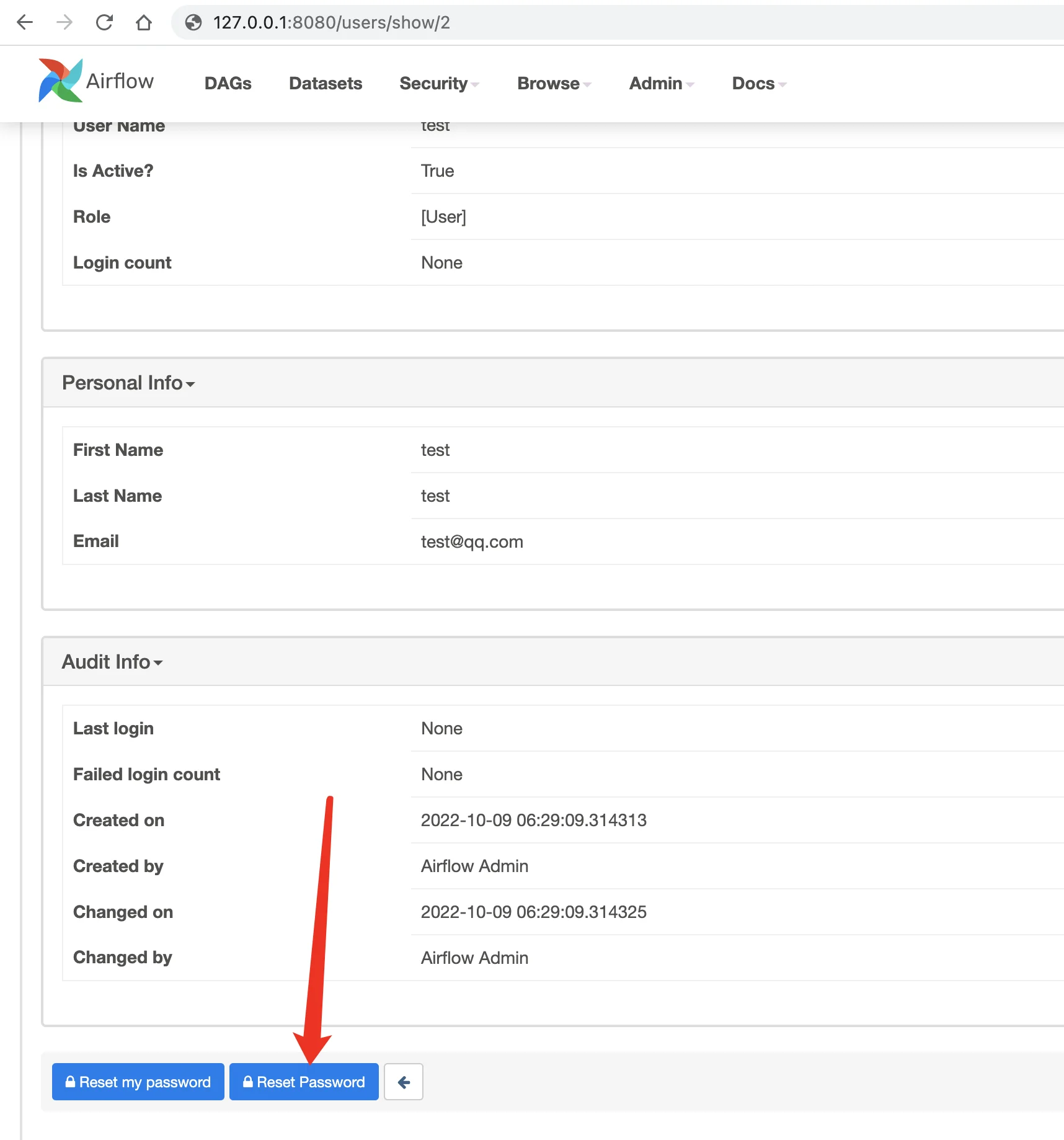
In short,Change user password wouldn't prevent an already authenticated user from being able to continue using the UI or API.
Impact
The session fixation vulnerability allowed the authenticated user to continue accessing Airflow webserver even after the password of the user has been reset by the admin - up until the expiry of the session of the user.
Context
Apache Airflow is a workflow orchestration platform with a web interface (the webserver) that administrators and users log into. The feature at the centre of this report is password reset: an administrator opens a user's entry and presses Reset Password, expecting that whoever knew the old password loses access to that account.
What actually happens is that the reset changes the credential but does not touch the sessions that were already established. An attacker who has authenticated as the user before the reset keeps working through the UI and the API until the session expires on its own. The report classifies this as session fixation, severity low, and it was filed against the apache/airflow repository through the Internet Bug Bounty programme.
Setup
The report describes a test user whose password is reset by an administrator through the Reset Password button in the Airflow UI. The precondition is that someone else has already logged in as that user, so a valid session exists at the moment of the reset. No specific Airflow version, deployment topology or tooling is given in the report itself; the advisory text says users should upgrade to 2.7.0 or newer.
Finding it
The researcher's expectation is stated plainly: after pressing Reset Password for the test user, the person who previously held that user's password should lose the corresponding authority. Instead, if others had logged in to the test user before the reset, they could still use the account.
The conclusion drawn from the two screenshots is that changing a user's password does not prevent an already authenticated user from continuing to use the UI or the API.
Exploitation
Step 1: obtain a session as the target user
Someone logs in to the Airflow webserver as the test user. The report does not show the login request or the resulting cookie, so the exact session mechanism in play is not documented beyond the fact that a session exists and survives the reset.
Step 2: the administrator resets the password
An administrator uses the Reset Password button for that user. The password changes, but the session created in step 1 is not invalidated.
Step 3: keep using the account
The holder of the old session continues to reach the Airflow webserver through the UI and the API. This continues until the session expires, which is the only bound the report gives on how long the access lasts.
Root cause
The design flaw is that the password reset path does not invalidate existing sessions. The advisory summary explains the consequence in terms of the session backend in use:
- With the database session backend, there was no mechanism to force-logout a user other than manually cleaning the session database.
- With the securecookie session backend, the only way to force a logout was to change the
secure_keyand restart the webserver, which logs out every user, not just the one whose password was reset.
So the reset operation changed the credential while leaving the authenticated state intact. The report does not include the code path responsible, so the precise reason the reset handler skipped session cleanup is not shown; The report does not include the code path responsible, so the precise reason the reset handler skipped session cleanup is not shown..
Impact
An authenticated party who holds a session for a user keeps access to the Airflow webserver after an administrator resets that user's password, through both the UI and the API, until the session expires. The advisory frames this as a session fixation issue: the reset does not revoke authority that was already granted. The practical value of the attack depends on the attacker having obtained a session before the reset, and the window closes when the session expires. The severity assigned was low.
Fix
The fix shipped in Apache Airflow 2.7.0, and users are advised to upgrade to 2.7.0 or newer. The behaviour after the fix depends on the session backend:
| Session backend | Behaviour after password reset |
|---|---|
| Database | Existing sessions of the user are invalidated when the password is reset |
| Securecookie | Sessions are not invalidated; the secure key must still be changed and the webserver restarted, which logs out all other users |
For the securecookie case the person performing the reset is now told about this limitation through a flash message warning displayed in the UI, and the documentation was updated to explain the behaviour.
Variants to test
- Password reset on other session-backed applications. Create a session as a user, have an administrator reset the password, then replay the old session cookie. A positive result is any authenticated response from the UI or API after the reset.
- Role or permission changes. The same question applies to privilege revocation: demote a user or remove a role, then reuse the existing session. A positive result is that the old session still carries the removed privileges.
- Account disable or lock. Disable the account while a session is live and replay the cookie. A positive result is continued access until natural expiry.
- Both session backends. Where an application supports server-side sessions and signed-cookie sessions, test each separately, since the fix here treats them differently.
- API tokens issued before the reset. Check whether tokens minted before a password change remain valid afterwards. A positive result is a successful API call with the pre-reset token.
Hunting notes
This class of bug hides in account lifecycle features: password reset, password change, email change, account disable, role removal and forced logout. The signal during recon is a session model you can reason about: does the application store sessions server-side (so it could delete them) or in a signed cookie (so it cannot, without rotating a key)? If the only documented way to revoke access is restarting the service or clearing a table, that is the gap.
The impact case here was made by showing the lifecycle in the UI: a live session, an administrator resetting the password through the Reset Password button, and the same session still working afterwards against both the UI and the API. Framing it around the administrator's expectation, that a reset removes the old holder's authority, is what turns a session-handling quirk into an accepted report. The programme's own summary then spelled out the backend-specific limits, which is worth mirroring in any report of your own: state exactly which configurations are affected and which are not.
What happened, in plain words
Apache Airflow is a tool that runs and schedules automated jobs, and it comes with a web interface (called the webserver) where people log in to manage those jobs. This report is about one button in that interface: Reset Password. An administrator clicks it on a user's account when they want to change that user's password, for example because the old password leaked or because someone left the team.
The natural expectation is that once the password is reset, whoever knew the old password can no longer get in. What the researcher found is that this is not what happens. If someone had already logged in as that user before the reset, their login kept working afterwards, through both the web interface and the API, until the login expired on its own. Changing the password did not kick them out.
This kind of problem is called session fixation. To understand it you need to know what a session is. When you log in to a website, the server does not ask for your password on every single page. Instead it gives your browser a small piece of data, usually stored in a cookie, which acts like a cloakroom ticket: you show the ticket, the server knows who you are. A session is that logged-in state, and it lasts until it expires or until the server deliberately throws the ticket away. Session fixation, broadly, is when an attacker can keep or plant a session and benefit from it. Here the specific issue is that the password reset did not throw away the existing tickets.
The report was filed against the apache/airflow repository through the Internet Bug Bounty programme, was rated low severity, and the fix shipped in Apache Airflow 2.7.0. Users are advised to upgrade to 2.7.0 or newer.
Context
Airflow is a workflow orchestration platform: you describe jobs and the order they run in, and Airflow runs them on a schedule and shows you the results. Administrators and ordinary users log into its web interface to do this work.
The feature at the centre of the report is password reset. An administrator opens a user's entry in the interface and presses Reset Password. The administrator's mental model is simple: the old password stops working, so whoever knew it loses access to that account.
What actually happens is that the reset changes the password but leaves the already-established sessions alone. An attacker who logged in as the user before the reset keeps working through the UI and the API until the session expires by itself. The report classifies this as session fixation, severity low.
A quick word on the API, since it appears throughout. The web interface is what a human sees in a browser: pages, buttons, forms. The API is the same application's other front door, meant for programs rather than people: another piece of software sends a request and gets data back, without any page being drawn. Both doors check the same session, which is why the report cares about both.
Setup
The report describes a test user whose password is reset by an administrator through the Reset Password button in the Airflow UI. The precondition is that someone else has already logged in as that user, so a valid session exists at the moment of the reset.
The report itself does not give a specific Airflow version, deployment layout or tooling. The advisory text says users should upgrade to 2.7.0 or newer.
Finding it
The researcher's expectation is stated plainly: after pressing Reset Password for the test user, the person who previously held that user's password should lose the corresponding authority. Instead, if others had logged in to the test user before the reset, they could still use the account.
The conclusion drawn from the screenshots is that changing a user's password does not prevent an already authenticated user from continuing to use the UI or the API. The conclusion drawn from them is that changing a user's password does not prevent an already authenticated user from continuing to use the UI or the API.
Exploitation
Step 1: obtain a session as the target user
Someone logs in to the Airflow webserver as the test user. Logging in is what creates the session, the cloakroom ticket described above. The report does not show the login request or the resulting cookie, so the exact session mechanism is not documented beyond the fact that a session exists and survives the reset.
Why this step matters: the whole bug depends on a session existing before the password changes. Without a live session there is nothing to test, because the question is precisely whether the reset takes that session away.
Step 2: the administrator resets the password
An administrator uses the Reset Password button for that user. The password changes, but the session created in step 1 is not invalidated.
Why this step matters: this is the moment where a correct implementation would delete every existing session belonging to that user. The reset is the administrator's way of saying "cut off the old holder", and the report shows that the cut does not happen.
Step 3: keep using the account
The holder of the old session continues to reach the Airflow webserver through the UI and the API. This continues until the session expires, which is the only bound the report gives on how long the access lasts.
Why this step matters: it turns the observation into a demonstration. The old session is not merely still present in a database somewhere; it still works, from both the browser-facing interface and the program-facing API.
Root cause
The design flaw is that the password reset path does not invalidate existing sessions. The advisory summary explains the consequence in terms of the session backend in use. The session backend is simply where the server keeps its record of who is logged in. Airflow supports two:
- With the database session backend, sessions are rows in a database table. Before the fix there was no mechanism to force-logout a user other than manually cleaning that table.
- With the securecookie session backend, the session lives inside a cookie that the server signs with a secret key, so the server keeps no list it could delete from. The only way to force a logout was to change the
secure_keyand restart the webserver, which logs out every user, not just the one whose password was reset.
So the reset operation changed the password while leaving the authenticated state intact. The report does not include the code path responsible, so the precise reason the reset handler skipped session cleanup is not shown; The report does not include the code path responsible, so the precise reason the reset handler skipped session cleanup is not shown..
Impact
An authenticated party who holds a session for a user keeps access to the Airflow webserver after an administrator resets that user's password, through both the UI and the API, until the session expires. The advisory frames this as a session fixation issue: the reset does not revoke authority that was already granted.
The practical value of the attack depends on the attacker having obtained a session before the reset, and the window closes when the session expires. The severity assigned was low.
Fix
The fix shipped in Apache Airflow 2.7.0, and users are advised to upgrade to 2.7.0 or newer. The behaviour after the fix depends on the session backend:
| Session backend | Behaviour after password reset |
|---|---|
| Database | Existing sessions of the user are invalidated when the password is reset |
| Securecookie | Sessions are not invalidated; the secure key must still be changed and the webserver restarted, which logs out all other users |
For the securecookie case the person performing the reset is now told about this limitation through a flash message warning displayed in the UI. A flash message is the short notice a website shows once, usually at the top of the page, to confirm an action or warn about it. The documentation was also updated to explain the behaviour.
Variants to test
These are the same question asked of other features, useful if you want to look for similar bugs elsewhere. In each case the idea is: create a logged-in state, change something that should remove authority, then check whether the old state still works.
- Password reset on other session-backed applications. Create a session as a user, have an administrator reset the password, then replay the old session cookie. Replaying means sending the same cookie again, as if the browser still had it. A positive result is any authenticated response from the UI or API after the reset.
- Role or permission changes. The same question applies to privilege revocation: demote a user or remove a role, then reuse the existing session. A positive result is that the old session still carries the removed privileges.
- Account disable or lock. Disable the account while a session is live and replay the cookie. A positive result is continued access until natural expiry.
- Both session backends. Where an application supports server-side sessions and signed-cookie sessions, test each separately, since the fix here treats them differently.
- API tokens issued before the reset. Check whether tokens minted before a password change remain valid afterwards. An API token is a password-like string a program uses instead of a login form. A positive result is a successful API call with the pre-reset token.
Hunting notes
This class of bug hides in account lifecycle features: password reset, password change, email change, account disable, role removal and forced logout. The signal during recon is a session model you can reason about: does the application store sessions server-side, so it could delete them, or in a signed cookie, so it cannot without rotating a key? If the only documented way to revoke access is restarting the service or clearing a table, that is the gap.
The impact case here was made by showing the lifecycle in the UI: a live session, an administrator resetting the password through the Reset Password button, and the same session still working afterwards against both the UI and the API. Framing it around the administrator's expectation, that a reset removes the old holder's authority, is what turns a session-handling quirk into an accepted report. The programme's own summary then spelled out the backend-specific limits, which is worth mirroring in any report of your own: state exactly which configurations are affected and which are not.
Glossary
- Apache Airflow: a workflow orchestration platform that runs scheduled jobs and provides a web interface to manage them.
- Webserver: in Airflow, the component that serves the web interface people log into.
- API: the program-facing side of an application, where software sends requests and receives data instead of a human clicking pages.
- Session: the logged-in state a server keeps for you after you authenticate, so you do not have to send your password on every request.
- Cookie: a small piece of data a website stores in your browser and the browser sends back with each request; often used to carry the session.
- Session fixation: a class of vulnerability where an attacker benefits from a session that should no longer be valid, for example because a security action did not revoke it.
- Session backend: where the server stores its record of active sessions, such as a database table or a signed cookie.
- Database session backend: a session backend that keeps sessions as rows in a database, which the server can delete.
- Securecookie session backend: a session backend that keeps the session inside a cookie signed with a secret key, so the server holds no list of sessions to delete.
- secure_key: the secret key used to sign securecookie sessions; changing it invalidates every existing signed cookie.
- Invalidate a session: to make an existing session stop working, so its holder must log in again.
- Password reset: an administrative action that sets a new password for a user account.
- Flash message: a short one-time notice shown in a web interface to confirm an action or warn about something.
- Severity: the rating given to a vulnerability to express how serious it is; here, low.
- Internet Bug Bounty: the bug bounty programme through which this report was filed.
- Replay: to send a previously captured request or cookie again, as if the original client were still using it.
- API token: a password-like string that a program presents to an API instead of logging in through a form.
- Recon: the exploratory phase of security testing, where you learn how an application is built before trying anything.