CVE-2023-42780: Apache Airflow: Improper access control vulnerability in the "List dag warnings" feature
An authenticated user with limited permissions could list warnings for all DAGs, including those they were not authorised to view. This exposed DAG identifiers and stack traces from import errors.

- Triaged in 4 days
- Fixed in 17 days
- Paid in 17 days
- Disclosed after 47 days
Summary by the program
CVE-2023-42780: Apache Airflow: Improper access control vulnerability in the "List dag warnings" feature Severity: low
Affected versions:
- Apache Airflow before 2.7.2
Description: Apache Airflow, versions prior to 2.7.2, contains a security vulnerability that allows authenticated users of Airflow to list warnings for all DAGs, even if the user had no permission to see those DAGs. It would reveal the dag_ids and the stack-traces of import errors for those DAGs with import errors. Users of Apache Airflow are advised to upgrade to version 2.7.2 or newer to mitigate the risk associated with this vulnerability.
Credit: balis0ng (finder) Hussein Awala (remediation developer)
Full Security Advisory: https://lists.apache.org/thread/h5tvsvov8j55wojt5sojdprs05oby34d
The report
Apache Airflow, versions prior to 2.7.2, contains a security vulnerability that allows authenticated users of Airflow to list warnings for all DAGs, even if the user had no permission to see those DAGs. It would reveal the dag_ids and the stack-traces of import errors for those DAGs with import errors.
Steps to reproduce :
- Here I create a role with very little permission. It only has read permissions for the DAG "example_setup_teardown_taskflow" and read warning permissions.
- Assign the role to an account and log in.
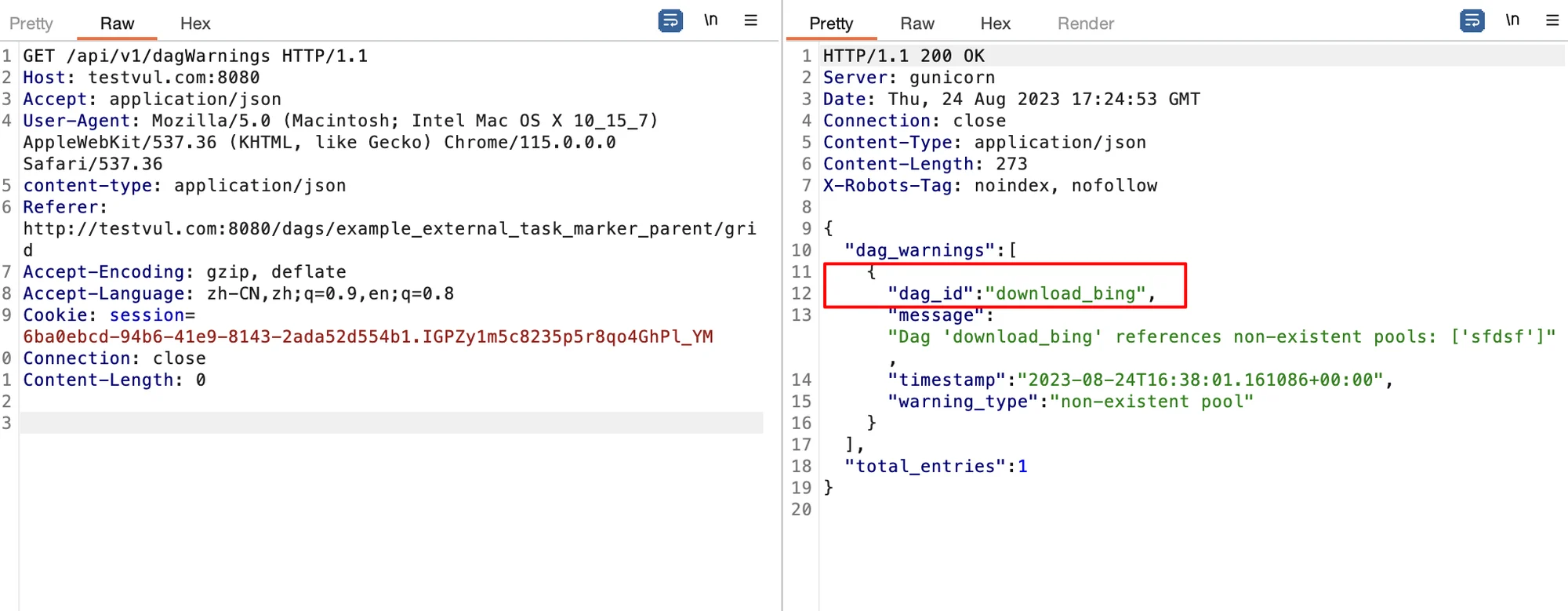
- Use burpsuite to send the following message, and you can see the warnings of other DAGs. (replaced with the session of the account)
GET /api/v1/dagWarnings HTTP/1.1
Host: testvul.com:8080
Accept: application/json
User-Agent: Mozilla/5.0 (Macintosh; Intel Mac OS X 10_15_7) AppleWebKit/537.36 (KHTML, like Gecko) Chrome/115.0.0.0 Safari/537.36
content-type: application/json
Referer: http://testvul.com:8080/dags/example_external_task_marker_parent/grid
Accept-Encoding: gzip, deflate
Accept-Language: zh-CN,zh;q=0.9,en;q=0.8
Cookie: session=6ba0ebcd-94b6-41e9-8143-2ada52d554b1.IGPZy1m5c8235p5r8qo4GhPl_YM
Connection: close
Content-Length: 0
Security Advisory: https://lists.apache.org/thread/h5tvsvov8j55wojt5sojdprs05oby34d Severity: Low Credit: balis0ng
Impact
It allows authenticated users of Airflow to list warnings for all DAGs, even if the user had no permission to see those DAGs. It would reveal the dag_ids and the stack-traces of import errors for those DAGs with import errors.
Context
Apache Airflow is a workflow orchestration platform in which workflows are defined as DAGs (directed acyclic graphs). Airflow ships a REST API, and one of its endpoints, dagWarnings, exposes the warnings that Airflow records for DAGs, including import errors and their stack traces.
The vulnerability described here, tracked as CVE-2023-42780, is an improper access control issue in the "List dag warnings" feature. In versions of Apache Airflow before 2.7.2, an authenticated user could list warnings for all DAGs, even DAGs the user had no permission to see. The response revealed the dag_id values and the stack traces of import errors for those DAGs.
The issue was reported through the Internet Bug Bounty program on HackerOne by balis0ng, with Hussein Awala credited as the remediation developer. It was rated low severity and disclosed on 29 November 2023, with a bounty of 540 USD.
Setup
The researcher worked against an Airflow instance reachable at testvul.com:8080 and used Burp Suite to craft and replay API requests. The precondition is a normal authenticated account: the whole issue is about what an authenticated but low-privileged user can reach.
To make the test meaningful, the researcher first created a role with very little permission. That role grants only:
- read permission for the DAG
example_setup_teardown_taskflow; - read permission for warnings.
The role was then assigned to an account, and the researcher logged in with that account. The account therefore has no permission to view any DAG other than example_setup_teardown_taskflow, but it can read warnings.
Finding it
The feature under test is the warnings listing. A user who is allowed to read warnings should only see warnings belonging to DAGs they are allowed to see. The dagWarnings endpoint returned warnings for DAGs outside the account's authorised set.
That matters because warnings are not just labels: for DAGs with import errors, the warning carries the stack trace of the import failure, and every entry carries the dag_id. Both are information about DAGs the user is not supposed to know exists or how it is built.
Exploitation
Step 1: Create a restricted role
The researcher created a role with only two permissions: read access to the DAG example_setup_teardown_taskflow and read access to warnings. This establishes the boundary the test is meant to cross: the account should see one DAG and its warnings, nothing else.
Step 2: Assign the role and log in
The role was assigned to an account, and the researcher authenticated as that account. From this point on, every request carries only the privileges of this restricted user.
Step 3: Request the warnings endpoint
Using Burp Suite, the researcher sent the following request, with the session of the restricted account substituted in the Cookie header:
GET /api/v1/dagWarnings HTTP/1.1
Host: testvul.com:8080
Accept: application/json
User-Agent: Mozilla/5.0 (Macintosh; Intel Mac OS X 10_15_7) AppleWebKit/537.36 (KHTML, like Gecko) Chrome/[redacted] Safari/537.36
content-type: application/json
Referer: http://testvul.com:8080/dags/example_external_task_marker_parent/grid
Accept-Encoding: gzip, deflate
Accept-Language: zh-CN,zh;q=0.9,en;q=0.8
Cookie: [redacted]
Connection: close
Content-Length: 0
The request is a plain GET to /api/v1/dagWarnings with Accept: application/json. The Referer points at the grid view of example_external_task_marker_parent. The only credential is the session cookie of the low-privileged account.
The response returned warnings for other DAGs, not just for example_setup_teardown_taskflow. The screenshot below shows the result of the request:
Because the endpoint returned warnings beyond the authorised DAG, the restricted account could read the dag_id values of other DAGs and, for those with import errors, the stack traces of those errors.
Root cause
The report attributes the flaw to the "List dag warnings" feature.
The report does not include the code change, so the exact location of the missing filter is not stated;
Impact
An authenticated Airflow user can list warnings for all DAGs, even DAGs they have no permission to see. This reveals the dag_id values of those DAGs and the stack traces of import errors for DAGs that fail to import. In practice that means disclosure of DAG names and of internal details contained in import error traces, to any account holding the warning-read permission. The program rated the issue low severity.
Fix
Apache Airflow users are advised to upgrade to version 2.7.2 or newer, which mitigates the risk associated with this vulnerability. The report does not describe the code change itself.
- Other list endpoints in the same API. Try endpoints that return collections of objects governed by per-object permissions (for example runs, tasks, logs or events) with a role that has the collection-level read permission but only one DAG. A positive result is a response containing objects belonging to DAGs outside the role's set.
- Filter parameters. If a list endpoint accepts a
dag_idor similar filter, omit it and see whether the default result set is scoped to the caller. A positive result is an unscoped default listing. - Error and warning surfaces. Import errors, parse errors and warnings often carry stack traces. Check whether any endpoint that surfaces them applies the same per-DAG check as the DAG detail view. A positive result is a trace for a DAG the account cannot open in the UI.
- UI versus API parity. Compare what the web UI shows for the restricted account with what the API returns for the same account. A positive result is data in the API response that the UI never renders for that user.
This kind of bug tends to hide in secondary or auxiliary endpoints: features bolted onto the main DAG views, such as warnings, errors, logs and audit-style listings, where the developer checks the feature permission but forgets the object permission. During recon, look for roles that can be assembled from granular permissions, and check whether each permission is enforced per object or only per feature. The signal is an endpoint whose name is plural and whose response is a list: lists are where scoping is most often missed.
The researcher demonstrated impact by building the weakest role that still reached the feature (read on a single DAG plus read on warnings), then showing that the response crossed the DAG boundary and exposed dag_id values and import-error stack traces. That combination, a minimal role plus concrete leaked data, is what makes an access control report convincing.
What happened, in plain words
Apache Airflow is a tool that runs and schedules workflows. In Airflow, a workflow is called a DAG, short for directed acyclic graph: a set of tasks with arrows between them showing what runs after what. Airflow also has a web interface and an API. An API is a way for one program to talk to another over the network, a bit like a service counter where you ask for something by name and get data back instead of a printed form. Airflow's API has an endpoint called dagWarnings, which returns the warnings Airflow has recorded for DAGs. A warning can be a small notice, but for a DAG that failed to load (an import error) it includes the stack trace, which is the list of internal steps where the failure happened.
The problem, tracked as CVE-2023-42780, is an access control bug in the "List dag warnings" feature. Access control means deciding who is allowed to see or do what. In Airflow, permissions are set per DAG: a user can be allowed to see one DAG and not another. In versions before 2.7.2, a logged-in user could ask the warnings endpoint for warnings and receive warnings for every DAG, including DAGs they had no permission to see. The answer revealed the dag_id values (the internal names of the DAGs) and the stack traces of import errors for those DAGs.
The issue was reported through the Internet Bug Bounty program on HackerOne by balis0ng, with Hussein Awala credited as the remediation developer. It was rated low severity and disclosed on 29 November 2023, with a bounty of 540 USD.
Setup
The researcher tested an Airflow instance reachable at testvul.com:8080 and used Burp Suite to build and resend API requests. Burp Suite is a tool that sits between your browser and a website so you can look at and change the requests before they are sent. The only precondition is a normal logged-in account: the whole question is what a logged-in user with few rights can still reach.
To make the test meaningful, the researcher first created a role with very little permission. A role is a named bundle of permissions that you attach to an account, like a badge that opens only certain doors. That role grants only:
- read permission for the DAG
example_setup_teardown_taskflow; - read permission for warnings.
The role was then assigned to an account, and the researcher logged in with that account. The account therefore has no permission to view any DAG other than example_setup_teardown_taskflow, but it can read warnings.
Finding it
The feature under test is the warnings listing. A user who is allowed to read warnings should only see warnings belonging to DAGs they are allowed to see. The dagWarnings endpoint returned warnings for DAGs outside the account's authorised set.
That matters because warnings are not just labels: for DAGs with import errors, the warning carries the stack trace of the import failure, and every entry carries the dag_id. Both are information about DAGs the user is not supposed to know exists or how it is built.
Exploitation
Step 1: Create a restricted role
The researcher created a role with only two permissions: read access to the DAG example_setup_teardown_taskflow and read access to warnings. This sets the boundary the test is meant to cross: the account should see one DAG and its warnings, nothing else.
Step 2: Assign the role and log in
The role was assigned to an account, and the researcher logged in as that account. From this point on, every request carries only the privileges of this restricted user. Logging in is what produces the session, the short-lived proof that the server hands to the browser after a successful login so it can recognise the user on later requests.
Step 3: Request the warnings endpoint
Using Burp Suite, the researcher sent the following request, with the session of the restricted account substituted in the Cookie header:
GET /api/v1/dagWarnings HTTP/1.1
Host: testvul.com:8080
Accept: application/json
User-Agent: Mozilla/5.0 (Macintosh; Intel Mac OS X 10_15_7) AppleWebKit/537.36 (KHTML, like Gecko) Chrome/[redacted] Safari/537.36
content-type: application/json
Referer: http://testvul.com:8080/dags/example_external_task_marker_parent/grid
Accept-Encoding: gzip, deflate
Accept-Language: zh-CN,zh;q=0.9,en;q=0.8
Cookie: [redacted]
Connection: close
Content-Length: 0
Line by line, in plain words:
GET /api/v1/dagWarnings HTTP/1.1is the request itself.GETmeans "give me something",/api/v1/dagWarningsis the address of the warnings list on the API, andHTTP/1.1is the version of the language the request is written in.Host: testvul.com:8080says which server is being asked, here the test machine on port 8080.Accept: application/jsontells the server the client would like the answer in JSON, a text format for structured data that both programs and people can read.User-Agent: ...identifies the browser that supposedly made the request.content-type: application/jsondescribes the format of any body sent with the request. Here there is no body, so it has no real effect.Referer: http://testvul.com:8080/dags/example_external_task_marker_parent/gridsays which page the request came from. That page is the grid view ofexample_external_task_marker_parent.Accept-Encoding: gzip, deflatelists the compression formats the client can handle for the answer.Accept-Language: zh-CN,zh;q=0.9,en;q=0.8lists the languages the client prefers, with weights.- `Cookie: [redacted] is the credential. A cookie is a small piece of text the browser stores for a site and sends back on every request; the session cookie is what tells the server which logged-in user is asking. The value is the restricted account's session, so the server sees only that account's rights.
Connection: closeasks the server to close the network connection after answering.Content-Length: 0says the request body is empty.
The response returned warnings for other DAGs, not just for example_setup_teardown_taskflow. The screenshot below shows the result of the request:
Because the endpoint returned warnings beyond the authorised DAG, the restricted account could read the dag_id values of other DAGs and, for those with import errors, the stack traces of those errors.
Root cause
The report attributes the flaw to the "List dag warnings" feature.
A useful comparison is a hotel receptionist who checks that you are a guest, then hands you the keys to every room instead of only yours. The report does not include the code change, so the exact location of the missing filter is not stated;
Impact
An authenticated Airflow user can list warnings for all DAGs, even DAGs they have no permission to see. This reveals the dag_id values of those DAGs and the stack traces of import errors for DAGs that fail to import. In practice that means disclosure of DAG names and of internal details contained in import error traces, to any account holding the warning-read permission. The program rated the issue low severity.
Fix
Apache Airflow users are advised to upgrade to version 2.7.2 or newer, which mitigates the risk associated with this vulnerability. The report does not describe the code change itself.
- Other list endpoints in the same API. Try endpoints that return collections of objects governed by per-object permissions (for example runs, tasks, logs or events) with a role that has the collection-level read permission but only one DAG. A positive result is a response containing objects belonging to DAGs outside the role's set.
- Filter parameters. If a list endpoint accepts a
dag_idor similar filter, omit it and see whether the default result set is scoped to the caller. A positive result is an unscoped default listing. - Error and warning surfaces. Import errors, parse errors and warnings often carry stack traces. Check whether any endpoint that surfaces them applies the same per-DAG check as the DAG detail view. A positive result is a trace for a DAG the account cannot open in the UI.
- UI versus API parity. Compare what the web UI shows for the restricted account with what the API returns for the same account. A positive result is data in the API response that the UI never renders for that user.
This kind of bug tends to hide in secondary or auxiliary endpoints: features bolted onto the main DAG views, such as warnings, errors, logs and audit-style listings, where the developer checks the feature permission but forgets the object permission. During recon, look for roles that can be assembled from granular permissions, and check whether each permission is enforced per object or only per feature. The signal is an endpoint whose name is plural and whose response is a list: lists are where scoping is most often missed.
The researcher demonstrated impact by building the weakest role that still reached the feature (read on a single DAG plus read on warnings), then showing that the response crossed the DAG boundary and exposed dag_id values and import-error stack traces. That combination, a minimal role plus concrete leaked data, is what makes an access control report convincing.
Glossary
- API: a way for one program to ask another for data or actions over the network, like a service counter with named requests.
- Endpoint: one specific address on an API that answers one kind of request, such as
/api/v1/dagWarnings. - Apache Airflow: a platform for scheduling and running workflows.
- DAG: a workflow in Airflow, drawn as tasks connected by arrows so each task knows what runs after it.
dag_id: the internal name that identifies a DAG.- Import error: a failure that happens when Airflow tries to load a DAG's definition and cannot.
- Stack trace: the list of internal steps a program went through when something failed, useful for debugging and revealing about internals.
- Warning: a notice Airflow records for a DAG, which for import errors includes the stack trace.
- Access control: the rules that decide who may see or do what.
- Improper access control: a bug where those rules are missing or too loose, so someone reaches data they should not.
- Authenticated user: someone who has logged in and is recognised by the server.
- Role: a named bundle of permissions attached to an account.
- Permission: a single allowed action, such as reading one DAG or reading warnings.
- CVE: a public identifier for a known security vulnerability.
- Severity: a rating of how serious a vulnerability is, here low.
- Bounty: a payment made to a researcher for reporting a valid vulnerability.
- Burp Suite: a tool that sits between browser and server so requests can be inspected, changed and resent.
- HTTP request: the message a client sends to a server to ask for something.
GET: the HTTP method that means "give me this".- Header: a labelled line in a request or response carrying extra information, such as the cookie or the accepted format.
- Cookie: a small piece of text a browser stores for a site and sends back with each request.
- Session: the server-side record of a logged-in user, referenced by the session cookie.
- JSON: a text format for structured data, made of names and values.
Referer: the header that says which page a request came from.User-Agent: the header that identifies the browser or client making the request.Accept: the header that says which response format the client wants.Accept-Encoding: the header that lists the compression formats the client can handle.Accept-Language: the header that lists the languages the client prefers.Content-Length: the header that gives the size of the request body, here zero.Connection: the header that controls whether the network connection stays open after the response.- Port: a numbered channel on a server, here 8080, that a service listens on.
- Root cause: the underlying reason a bug exists, as opposed to its visible symptom.
- Filtering: narrowing a list of results to only the items a user is allowed to see.
- Recon: the early phase of testing where you map out what a system offers before trying anything.
- UI versus API parity: whether the web interface and the API show the same data to the same user.


