Local Privilege Escalation during execution of VeraCryptExpander.exe (UAC bypass)
VeraCryptExpander.exe opens a web page from an elevated process using ShellExecute, which resolves the URL handler from the current user's registry hive. An attacker with limited admin rights can tamper with browser registry keys so that clicking the Homepage button executes a malicious script with elevated privileges, bypassing UAC.

- Triaged in 8 months
- Fixed in 2.3 years
- Paid in 2.3 years
- Disclosed after 2.4 years
Summary:
Your VeraCryptExpander.exe is vulnerable to a Local Privilege Escalation (UAC BYPASS) during execution. The issue is located here: https://github.com/veracrypt/VeraCrypt/blob/a108db7c85248a3b61d0c89c086922332249f518/src/ExpandVolume/VeraCryptExpander.manifest https://github.com/veracrypt/VeraCrypt/blob/a108db7c85248a3b61d0c89c086922332249f518/src/ExpandVolume/WinMain.cpp
The issue is detected on the fact that you launch a web page through an elevated process but trust the link to be opened by an app specified by registry keys belonging to HKCU Hive (current user domain) and not an elevated HIVE set like HKEY_LOCAL_MACHINE. It is possible for an attacker that has limited admin privileges (not full admin with UAC) to hijack the execution of you code by tampering specific registry keys linked to browsers and elevate his privileges ultimately tampering your installation folder by writing malicious code in it or replacing binaries with his own.
A file less malware that has hijacked the reghive altering or creating specific keys can hijack the execution of you binary and bypass UAC achieving full admin right. Examples of malware using UAC bypass: https://attack.mitre.org/techniques/T1088/ The attack was successfully tested in both WIN 7 and WIN 10
Steps To Reproduce:
Windows OS 7 (tested) for this example Default browser Chrome (works with any default browser option just change the right reg) User role ADMINISTRATOR - name of my user for the example is: TEMP Step0. Create malicious script to elevate: malstaller.bat on desktop (attached)
Step1. Tamper Registry Keys - run add.bat attached after altering the current username This action simulates an attacker (with low privilege admin) tampering the content of the following registry keys (no need for full admin rights). These keys are tampered to cover all cases of popular default browsers:
[HKEY_CURRENT_USER\Software\Classes\ChromeHTML\shell\open\command] @="C:\Users\Temp\Desktop\malstaller.bat "%1""
[HKEY_CURRENT_USER\Software\Classes\ChromeURL\shell\open\command] @="C:\Users\Temp\Desktop\malstaller.bat "%1""
[HKEY_CURRENT_USER\Software\Classes\FirefoxHTML\shell\open\command] @="C:\Users\Temp\Desktop\malstaller.bat "%1""
[HKEY_CURRENT_USER\Software\Classes\FirefoxURL\shell\open\command] @="C:\Users\Temp\Desktop\malstaller.bat "%1""
[HKEY_CURRENT_USER\Software\Classes\IE.HTTP\shell\open\command] @="C:\Users\Temp\Desktop\malstaller.bat "%1""
[HKEY_CURRENT_USER\Software\Classes\IE.HTTPS\shell\open\command] @="C:\Users\Temp\Desktop\malstaller.bat "%1""
[HKEY_CURRENT_USER\Software\Classes\HTTP\shell\open\command] @="C:\Users\Temp\Desktop\malstaller.bat "%1""
[HKEY_CURRENT_USER\Software\Classes\HTTPS\shell\open\command] @="C:\Users\Temp\Desktop\malstaller.bat "%1""
The path is altered to point to the malicious script that attacker wants to be elevated (UAC bypass attack/privilege escalation). This script can do anything like deleting/creating files under C:. Scheduling tasks etc.
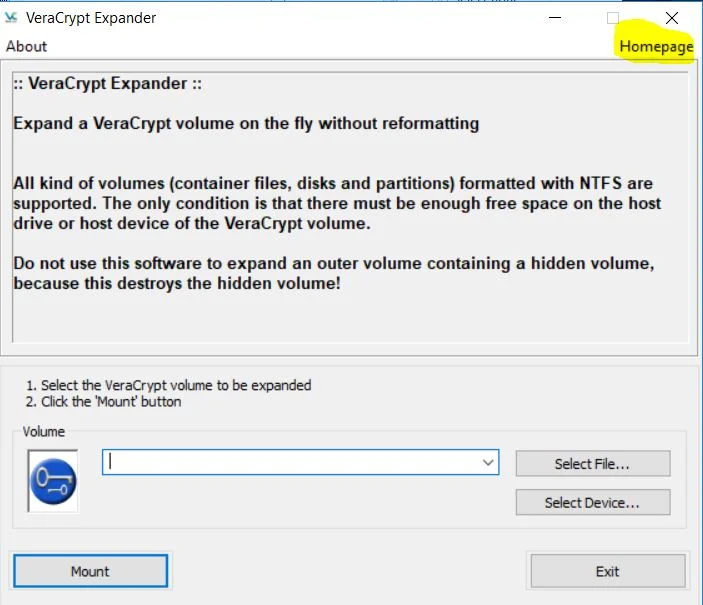
Step2. To achieve/activate UAC bypass Run VeraCryptExpander.exe and click on the button : "Homepage" on the higher top part of the window. The execution in now hijacked (see video) and UAC bypass is achieved.
A one liner used in the video will place fake VeraCrypt2.exe (with putty.exe as PoC) under your installation folder and execute it with full admin priviledges.
Useful files of your installation can be tampered alternatively and used as backdoor.
Watch the video attached were a simple .bat script gains elevated admin privileges during your software execution and writes in admin space.
WINDOWS 10 User Role: Administrator
In order to successfully replicate the attack on Windows 10 the following steps must be followed (a little bit different from WIN 7) . As windows have changed some security setting you cannot alter the default browser for the attack to happen seamlessly. But win 10 users are still vulnerable. The difference is that after tampering reg keys to trap various browsers (not the current default) on the system in the affected system the victim must change the default browser to one that has been trapped for the exploit to happen.
In the example below on WIN 10 and with Default Browser assuming EDGE, we will trap IE. If after we alter reg keys executing the add.bat, the user chooses IE or any other browser in place as his default browser the exploit works as before.
Be Admin user logged in! Step 1: Tamper or create registry keys for IE (or run add.bat) no UAC is needed to do so (your default browser is EDGE):
[HKEY_CURRENT_USER\Software\IE.HTTP\shell\open\command] [HKEY_CURRENT_USER\Software\IE.HTTPS\shell\open\command]
With value: "C:\Users{PLACE PROPER USER ACCOUNT NAME HERE}\Desktop\malstaller.bat" "%1"
Step 2: After step 1 is done and only then admin user chooses to set IE as default browser (your default browser is IE but in reality user has set our malicious script as default browser!!!).
Step3: Execute your vulnerable software that triggers the execution of the malicious code with elevated privileges as before. click button "Homepage"
Note: If the tampered keys are already set for ex. IE (booby-trap set) and for some reason the admin users chooses to change default browser from ex. Edge to IE (booby-trapped) then the attack works smoothly.
Both add.bat and malstaller.bat need changes in the username and relative paths to work for you.
Fix:Remove any link/button to external web resources on elevated processes.
In CPP while inside an elevated process (UAC accepted), use: void safeCall() { system("explorer http://www.test.com"); }
Instead of: void unsafeCall() { ShellExecute(0, 0, L"http://www.test.com", 0, 0, SW_SHOW); } The safeCall() will trigger a new process to open the URL with less privileges, keeping you safe from the attack. Stupid workaround but it works if you need to keep the link.
Impact
It is possible for an attacker that has limited admin privileges (not full admin with UAC) to hijack the execution of you code by tampering specific registry keys linked to browsers and elevate his privileges ultimately tampering your installation folder by writing malicious code in it or replacing binaries with his own. The installation of your software can be fully compromised.
Attachments
Not written yet. The AI write-up for this report has not been written yet. The Original tab links to the source.
How it worked
Impact
An attacker with limited admin privileges could hijack execution and elevate to full admin, allowing tampering with the installation folder or replacing binaries; the attack was tested on Windows 7 and 10, though on Windows 10 the victim must change the default browser to a trapped one.
What the attacker needed
Limited admin privileges; ability to modify HKCU registry keys; victim clicks Homepage button; on Windows 10, victim changes default browser
The fix
The report suggests removing links to external web resources from elevated processes or using a method that opens the URL with lower privileges, such as launching explorer.exe.
How it was found
- Create a malicious script on the desktop.
- Tamper with registry keys under HKCU for browser URL handlers to point to the malicious script.
- Run VeraCryptExpander.exe and click the Homepage button.
- The malicious script executes with elevated privileges, allowing tampering with the installation folder.
Explained by bugbounty.wiki with AI from the original and checked against quotes from it; it can still be wrong. Read the original before relying on a detail.
Not written yet. The AI write-up for this report has not been written yet. The Original tab links to the source.
When a program runs with administrator rights, it can do anything on the computer. This program has a button that opens a web page, but it asks Windows to open the page using settings that a normal user can change. An attacker who already has some admin access can change those settings so that clicking the button runs their own program with full administrator rights.
What is Access control?
A user can do something their role should not allow: reach an admin function, act on a feature they have not paid for, or skip a permission check. IDOR is the special case where the object belongs to someone else.



