Privilege Esacalation at Apache Airflow 2.5.1
Airflow 2.5.1 created its log files with world-writable permissions, so any local Linux user could read and modify them. An attacker with a local account and access to the Airflow web server could replace a log file with a symbolic link to a sensitive file such as an SSH private key, then read it through the web interface, escalating from their own account to the Airflow account.

- Triaged in 24 hours
- Fixed in 9 days
- Paid in 9 days
- Disclosed after 10 days
Summary by the program
CVE-2023-25754: Apache Airflow: Privilege escalation using airflow logs Severity: moderate
Affected versions:
- Apache Airflow before 2.6.0
Description: Privilege Context Switching Error vulnerability in Apache Software Foundation Apache Airflow.This issue affects Apache Airflow: before 2.6.0.
Credit: ksw9722 (finder)
Full Security Advisory: https://lists.apache.org/thread/3y83gr0qb8t49ppfk4fb2yk7md8ltq4v
The report
Hello. I found security issue about airflow's log file.
Airflow 2.5.1 sets log files to vulnerable privileges. (chmod 666)
Any Linux user on the host on which the airflow operates can read and tamper with the airflow's logs.
Taking advantage of this, an attacker in local host can retrieve sensitive information from a Linux host that can only access airflow accounts. ** (This is privilege escaltion from any linux account to airflow's linux account) ** (ex : ssh private key)
** The attack conditions are as follows. **
- An attacker can log in to a host running airflow with a specific Linux account.
(Or the penetration test was successfully successful.)
- An attacker can log in to the airflow web server and can read the dag log.
** The attack procedure is as follows. **
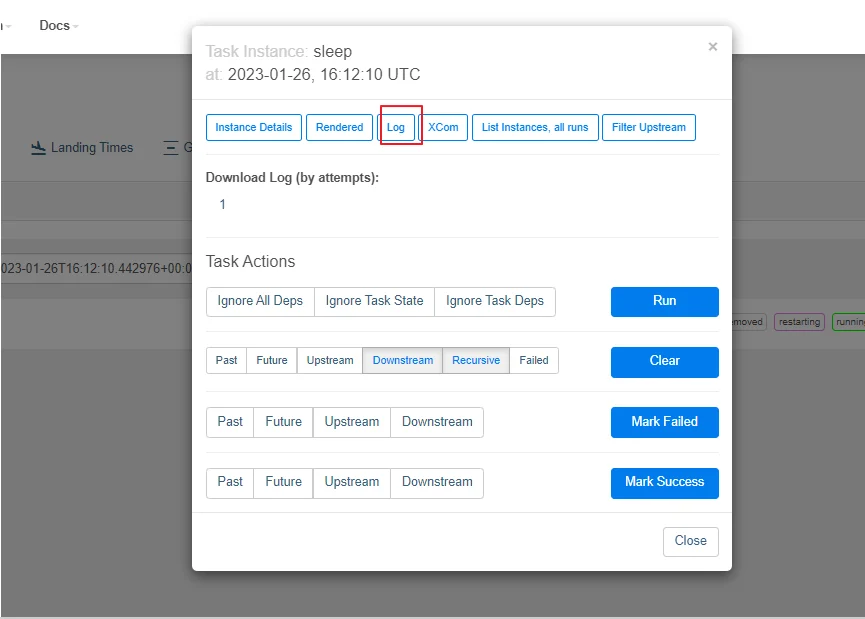
- After deleting a specific dag log using any account, the attacker regenerates the log file using the ssh private key of the account that runs the airflow as a symbolic link.

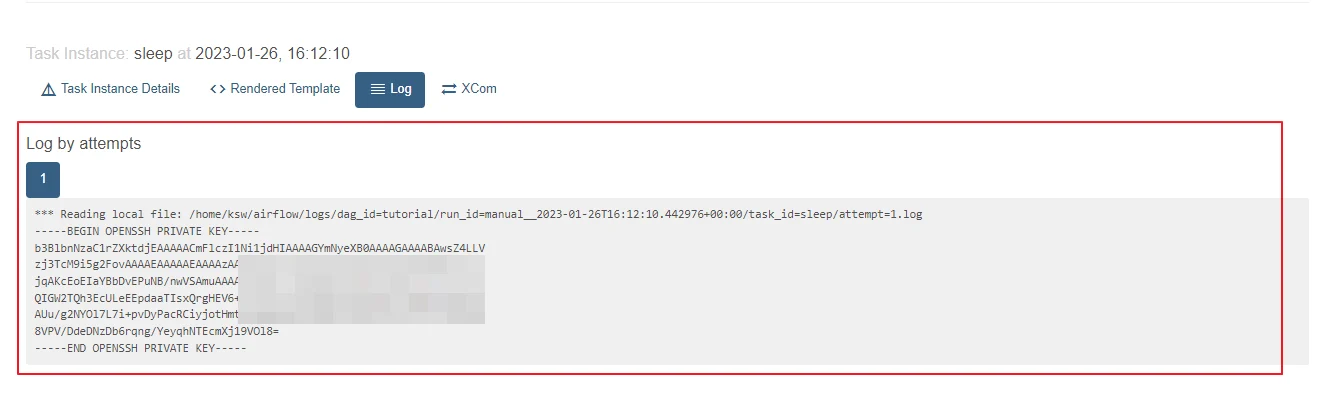
- The attacker logs in to the airflow webserver and reads the log.
- The airflow logs expose SSH PRIVATE KEY.
Patch History
- https://github.com/apache/airflow/pull/29506
- This vulnerability has been allocated CVE-2023-25754 by Apache Security Team.
Impact
Local linux user can access any file like ssh private key which owned by account which operate airflow.
Attachments
Not written yet. The AI write-up for this report has not been written yet. The Original tab links to the source.
How it worked
Root cause
Likely the log files were created with world-readable and world-writable permissions (chmod 666) and the web log viewer followed symbolic links, so a local user could redirect a log path to any file the Airflow account could read.
Impact
A local Linux user could read any file owned by the account running Airflow, such as an SSH private key, escalating their privileges to that account.
What the attacker needed
Local Linux account on the Airflow host; access to the Airflow web server; ability to read DAG logs
The fix
The issue affects Apache Airflow before 2.6.0; the text does not describe the fix.
How it was found
- Log in to the host running Airflow with any local Linux account and confirm access to the Airflow web server and its DAG logs.
- Delete a specific DAG log file using that account.
- Recreate the log file as a symbolic link pointing to the SSH private key of the account that runs Airflow.
- Log in to the Airflow web server and open the log to read the exposed private key.
Explained by bugbounty.wiki with AI from the original and checked against quotes from it; it can still be wrong. Read the original before relying on a detail.
Not written yet. The AI write-up for this report has not been written yet. The Original tab links to the source.
On a shared computer, files have permissions that decide who can read or change them. Airflow made its log files readable and writable by every user on the machine, and it also let people view those logs through its website. By swapping a log file for a shortcut (a symbolic link) pointing at a secret file, an attacker could make the website show that secret, gaining access meant only for the Airflow user.
What is Access control?
A user can do something their role should not allow: reach an admin function, act on a feature they have not paid for, or skip a permission check. IDOR is the special case where the object belongs to someone else.