How I found reflected XSS on IDFC Bank with burp-suite Intruder
A parameter on the bank's main domain reflected user input inside an HTML tag, but a WAF and character encoding blocked XSS payloads. The researcher then tested the same endpoint on other subdomains and found multiple reflected XSS issues.
 Published on notifybugme.medium.com
My name is Santosh Kumar Sha, I’m a Security Researcher/Ethical Hacker from India(Assam). In this article, I will be Describing How I found reflected XSS on IDFC Bank with burp-suite Intruder.
The full write-up lives on its author's site
It belongs to its author, so we link to it rather than copy it. The other two tabs are our own rewrites, checked against it.
Context
This is a write-up of how I found multiple reflected XSS issues on IDFC Bank using Burp Suite Intruder, and how I automated the search for them across different domains while fuzzing parameters at the same time. The target is described in the article under the assumed name idfcfirstbank.com, with everything under *.idfcfirstbank.com treated as in scope.
The feature involved is a simple one: an endpoint that reflects user input back inside an HTML tag. On the main domain the reflection was there, but a WAF blocked the XSS payloads and the application encoded the special characters, which limited the XSS. That combination is what made the main domain hard, and it is what pushed me to look at the same endpoint elsewhere.
Setup
The tools used for the exploitation were:
- Subfinder (https://github.com/projectdiscovery/subfinder)
- httpx (https://github.com/projectdiscovery/httpx)
- gau (Corben), https://github.com/lc/gau
- waybackurls (tomnomnom), https://github.com/tomnomnom/waybackurls
- Burp Suite, https://portswigger.net/burp
No accounts or roles are described. The precondition is simply that the wildcard scope *.idfcfirstbank.com is in scope, and that the endpoint reflects a parameter inside an HTML tag. and that the endpoint reflects a parameter inside an HTML tag.
A note I make in the article: do not go outside the test scope without permission, and always abide by the rules of engagement.
Finding it
While casually browsing and exploring the main domain, I noticed an endpoint that reflected my input inside an HTML tag. The reflection was real, but the WAF blocked every XSS payload I sent, and the application also encoded all the special characters, which limited the XSS. I tried multiple encoding and decoding techniques to bypass this, plus multiple WAF bypass payloads and some custom payloads, with no success. Bypassing the WAF and the encoding to trigger the XSS on their main domain was very hard.
After trying everything, I asked myself why not try the same endpoint on another domain, and also check whether there was some other parameter that might be vulnerable and that I had missed. That question is the pivot of the whole write-up: the endpoint and its reflection behaviour were the interesting part, not the single host.
Exploitation
Step 1: Collect subdomains from internet archives
To gather all the subdomains from internet archives I used subfinder, waybackurls and gau. The individual commands were:
subfinder -d idfcfirstbank.com -silent
gau -subs idfcfirstbank.com
waybackurls idfcfirstbank.com
Because the chance of missing a subdomain still exists, and I did not want to miss any subdomain for testing, I used subfinder, gau and waybackurls to get all the domains for all the subdomains where they exist, and saved the output to files. The final commands were:
gau -subs idfcfirstbank.com | unfurl domains>> vul1.txt
waybackurls idfcfirstbank.com| unfurl domains >> vul2.txt
subfinder -d idfcfirstbank.com -silent >> vul3.txt
unfurl domains reduces each URL to its domain, so the three files hold hostnames rather than full URLs. Then I merged the files and removed duplicates:
cat vul1.txt vul2.txt vul3.txt | sort -u >> unique_sub.txt
At this point all the unique domains were stored in unique_sub.txt.
Step 2: Build a custom parameter wordlist
The parameter list was built from the same archive sources, keeping only URLs that contain a query string and extracting the parameter names. The commands as written in the article are:
gau -subs [dnb.nl](https://sharefile.dnb.nl) | grep “=” | sed ‘s/.*.?//’ | sed ‘s/&/\n/’ | sed ‘s/=.*//’ >> param1.txt
waybackurls [dnb.nl](https://sharefile.dnb.nl) | grep “=” | sed ‘s/.*.?//’ | sed ‘s/&/\n/’ | sed ‘s/=.*//’ | sort -u >> param2.txt
cat param1.txt param2.txt | sort -u >> param.txt
grep "=" keeps only URLs with parameters, the first sed strips everything up to the query separator, the second splits on & so each parameter lands on its own line, and the third removes the value after =. The result is a list of unique parameter names in param.txt. Note that the host in these three commands is written as dnb.nl in the article, not the IDFC domain; the pipeline is the same either way.
I now had a list of unique domains and a custom parameter list for fuzzing.
Step 3: Automate the reflection search with Burp Intruder
While playing with the endpoint in Burp Repeater I found a parameter that was reflected inside an HTML tag, but the XSS payload was blocked by the WAF and the special characters were encoded. After failing to bypass that on the main domain, I took the same endpoint to other domains and checked for other parameters that might be vulnerable, using Burp Suite Intruder.
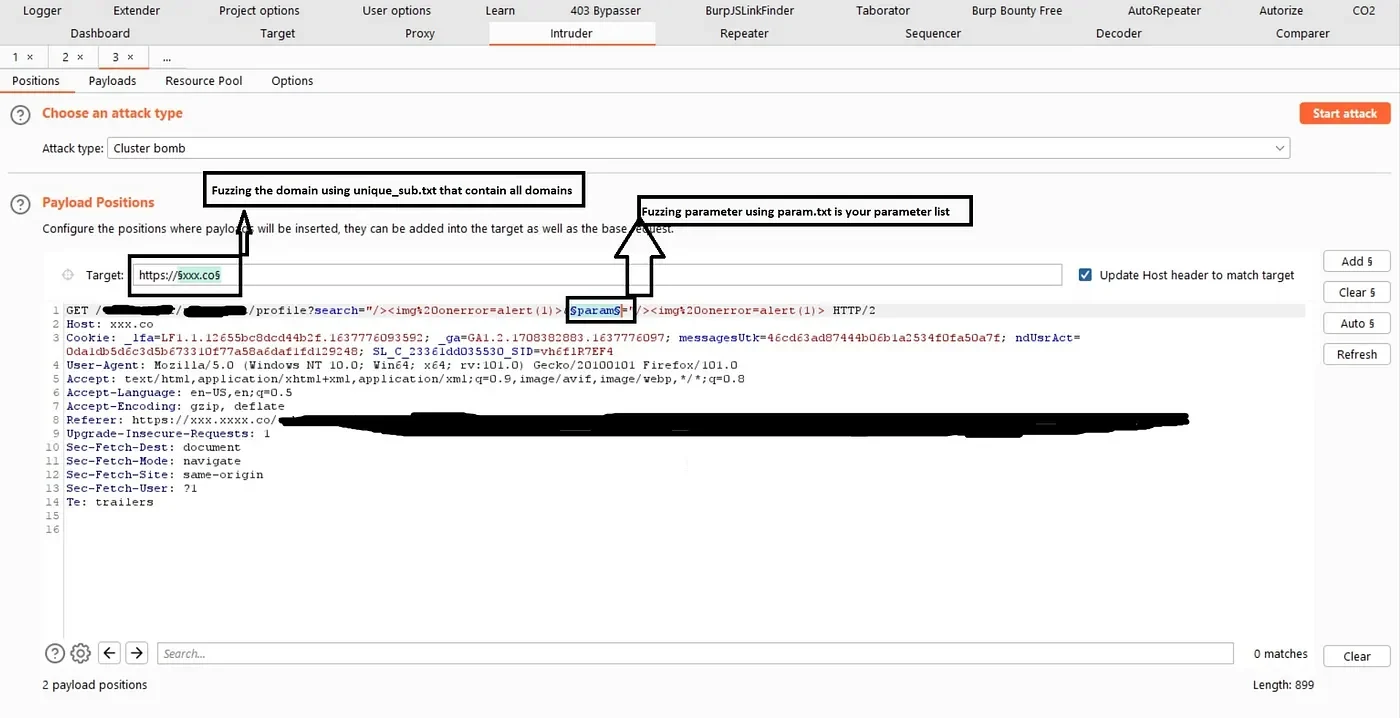
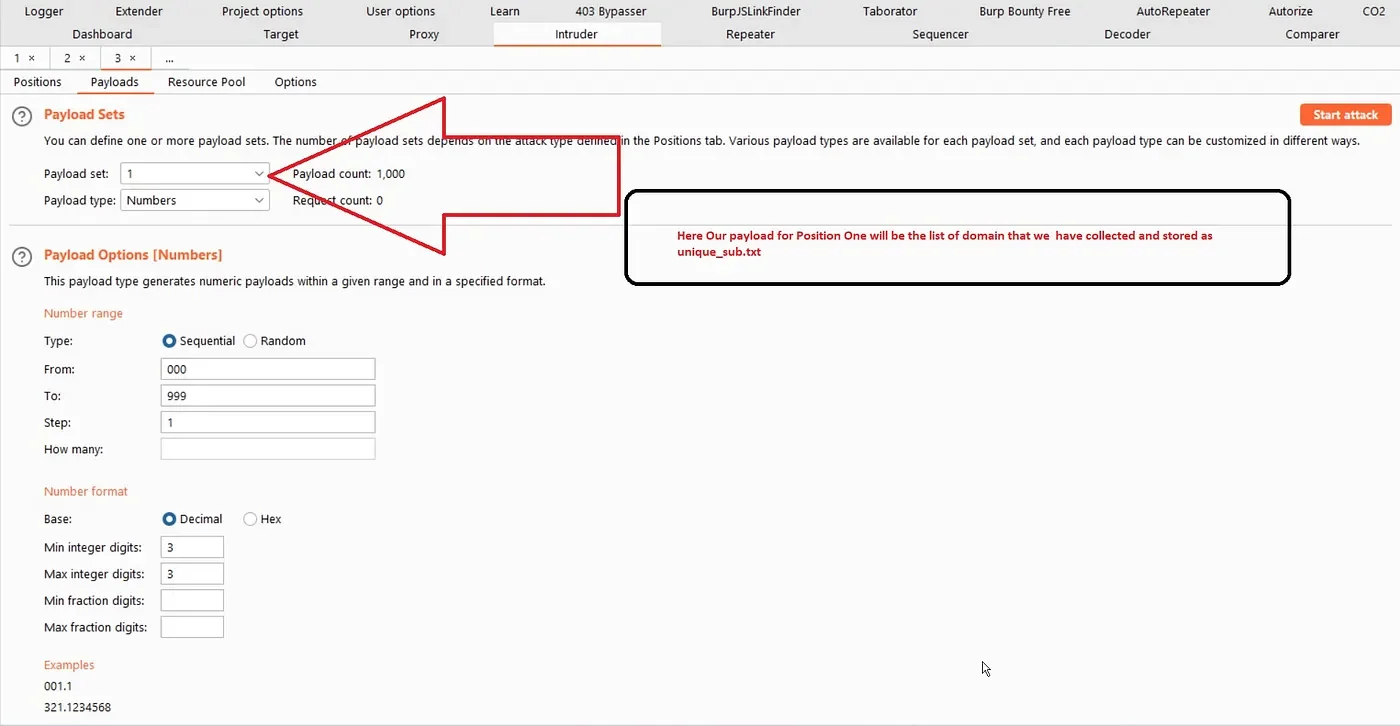
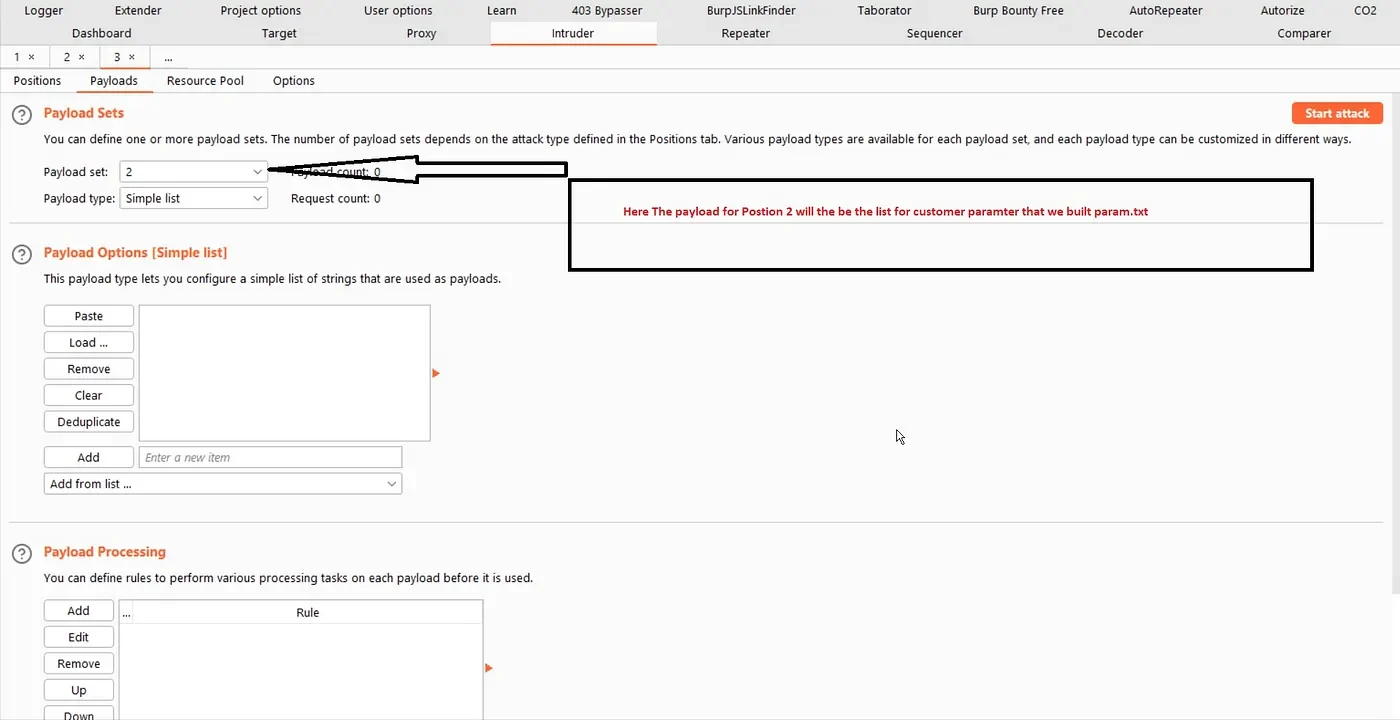
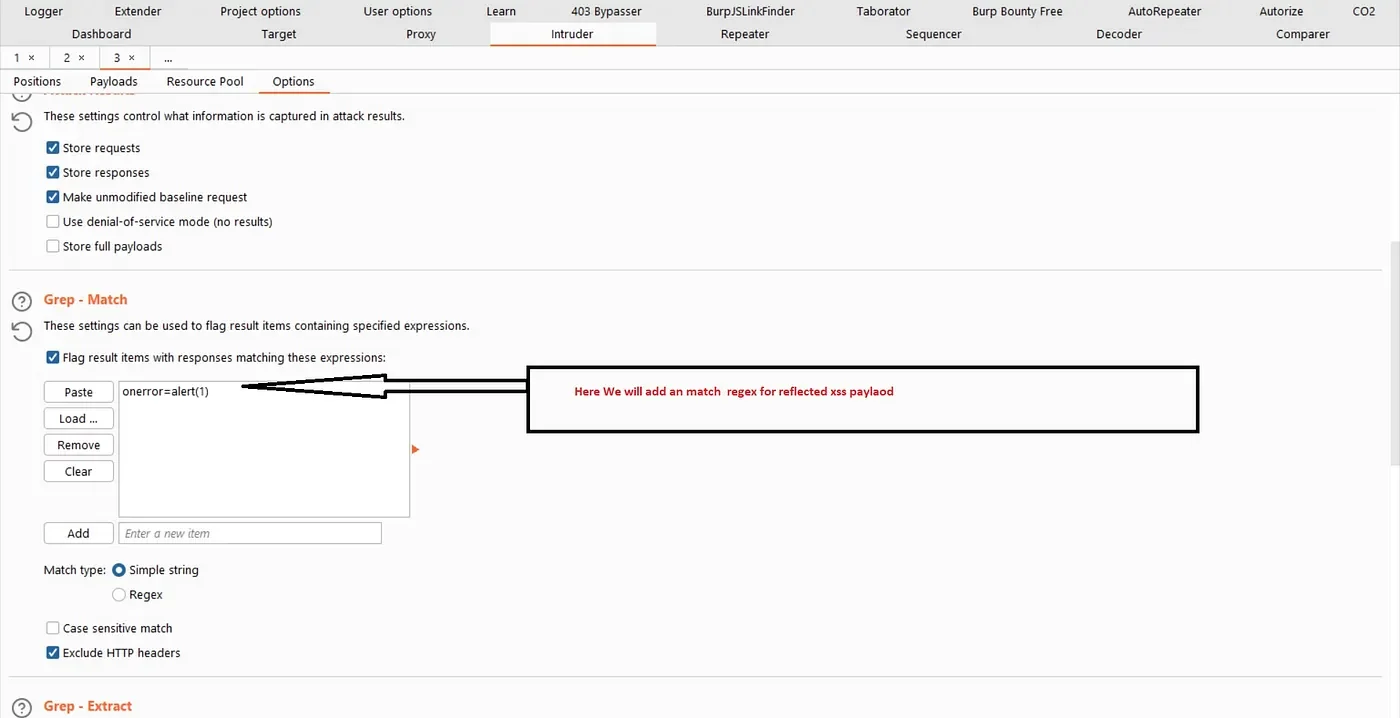
Using this method I was able to find multiple reflected XSS with Burp Suite Intruder.
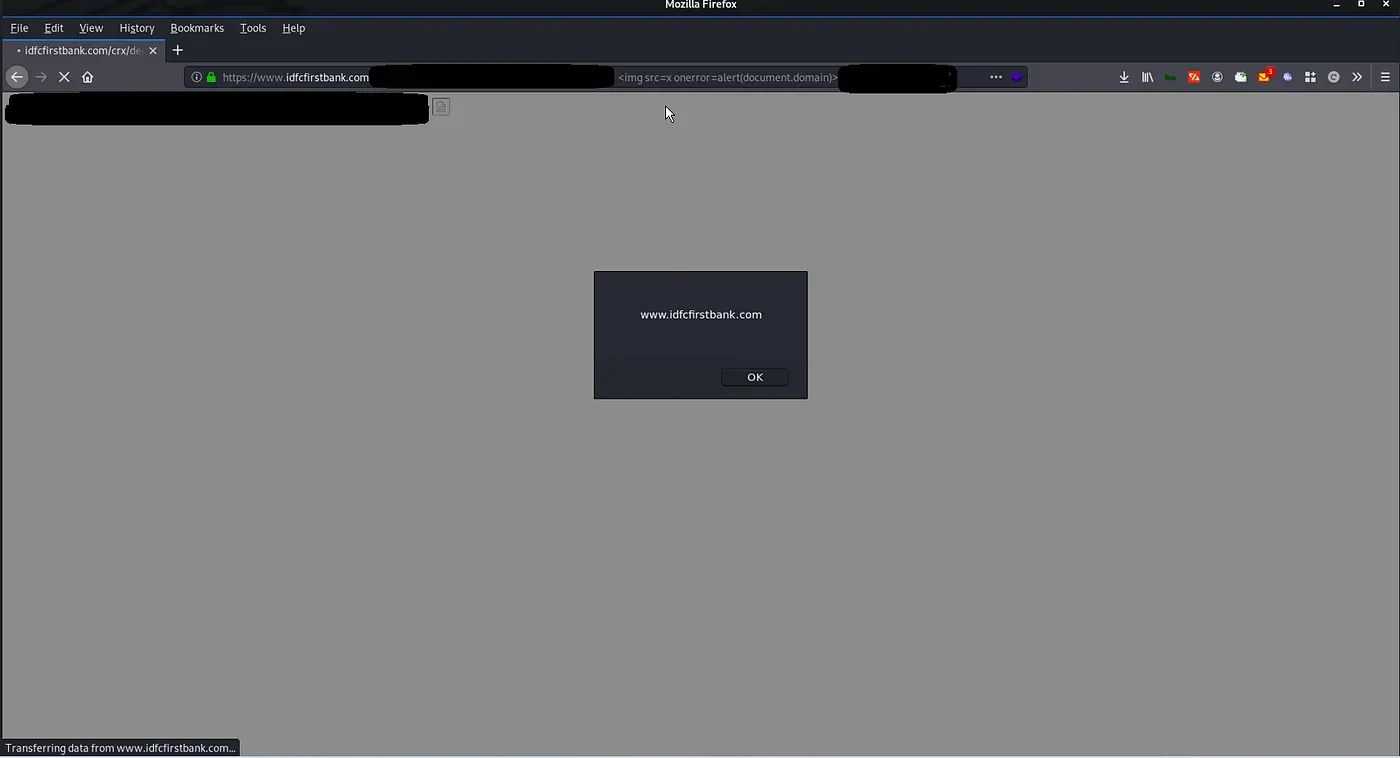
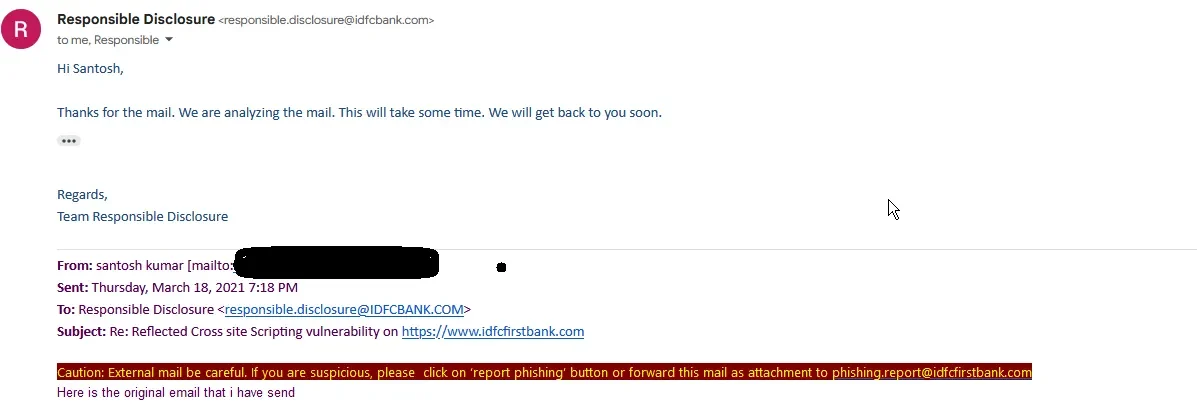
I reported all the issues in a single report. Because all the issues had the same root cause, I was rewarded once only.
Root cause
The endpoint reflects a user-controlled parameter inside an HTML tag without sufficient output encoding on the affected hosts. On the main domain the WAF and the character encoding prevented the payload from executing; the same endpoint on other domains was where the reflected XSS was found. The report does not describe the server-side code, so the exact encoding routine is not shown; the shared root cause across all the findings is the reflection itself.
Impact
The report does not state which users or data were exposed, and it does not give a severity or CVSS score. On the main domain the WAF and encoding blocked the payload, which is why I looked at the same endpoint on other domains.
Fix
The fix that follows from the root cause is context-aware output encoding of the reflected parameter on every host that serves the endpoint, so that the input cannot break out of the HTML tag it is placed in, applied consistently rather than only on the main domain.
Variants to test
- Take a reflected parameter that is blocked on the main domain and replay the same endpoint on every subdomain collected from archives. A positive result is a host where the same payload is reflected without the encoding or the WAF block.
- Fuzz the parameter names from the archive-derived wordlist against the endpoint. A positive result is a parameter that reflects inside an HTML tag and is not on the list of already tested names.
- Compare the reflection between hosts for the same parameter. A positive result is a host where the special characters come back unencoded while another host encodes them.
- Repeat the archive collection with subfinder, gau and waybackurls and merge the output before deduplicating, so that hosts missing from one source are still covered. A positive result is a host in the merged list that was not in any single source.
Takeaway
Use Burp Suite as an automation tool: it has a lot of power to offer and you do not need programming knowledge for it, you just need to know how to use it. This is how I approached finding multiple reflected XSS with Burp Suite Intruder, and I share it to highlight this technique for exploiting such vulnerabilities.
What happened, in plain words
A security researcher found a class of bug called reflected XSS on several web hosts belonging to a bank. The bug was simple in nature: a web page took something the visitor typed into the address bar and pasted it straight back into the page's HTML without cleaning it up first. If the pasted text is a piece of JavaScript, the browser will run it as if the bank's own site had written it. That is the whole idea behind reflected XSS.
The interesting part of this story is not the bug itself but how the researcher found it. On the bank's main website the bug was there, but two protections stood in the way: a WAF (a filter that inspects incoming requests and blocks ones that look malicious) and output encoding (the site turning dangerous characters such as < and > into harmless text before putting them on the page). The researcher tried many tricks to get past both and failed. So instead of fighting the main site, the researcher asked a different question: does the same page exist on other hosts owned by the bank, and do those hosts have the same protections? The researcher moved on to the same endpoint on other domains, where reflected XSS was found.
To answer that question at scale, the researcher collected every hostname the bank had ever exposed to the public (from public archives of the web), collected a long list of parameter names from archived URLs, and then used Burp Suite Intruder, a tool that sends the same request many times with different values filled in, to send the request many times with different values. Several reflected XSS issues turned up. They were all reported together, and because they shared one root cause, the researcher was rewarded once only.
This article walks through that process from zero. You do not need to know how to program. You need to be able to use a browser and a computer, and you need patience.
Before anything: scope and permission
The researcher opens with a warning that matters more than any technique in the article: do not test outside the agreed scope without permission, and always follow the rules of engagement. In bug bounty terms, the scope is the list of hosts and features the programme owner has explicitly said you may test. Testing anything else is not research, it is unauthorised access, and it can be illegal. The rules of engagement are the programme's written conditions: what is in scope, what techniques are forbidden, how to report, and what you may not touch (for example, other people's data).
A useful everyday comparison: a bug bounty programme is like a shop that invites you to look for broken locks, but only on the doors it lists, only during opening hours, and only in the way its posted notice describes. Opening a door that is not on the list is burglary, not quality control.
The tools, and what each one is for
The researcher lists five tools. Here is what each one does in plain terms.
- Subfinder (https://github.com/projectdiscovery/subfinder): a command-line program that asks many public sources (certificate logs, search engines, DNS datasets) which subdomains exist for a given domain. A subdomain is a hostname under the main one, for example
shop.example.comunderexample.com. - httpx (https://github.com/projectdiscovery/httpx): a command-line program that takes a list of hostnames and checks which ones actually answer over HTTP or HTTPS, and what they answer with. It is a fast way to throw away dead hosts.
- gau (Corben), https://github.com/lc/gau: "get all URLs". It queries public web archives (services that have stored copies of pages over the years) and returns URLs that were once seen for a domain. Those old URLs often contain parameters that the current site still accepts.
- waybackurls (tomnomnom), https://github.com/tomnomnom/waybackurls: does the same kind of job, pulling historical URLs from the Wayback Machine archive.
- Burp Suite, https://portswigger.net/burp: a graphical tool that sits between your browser and a website. It lets you capture a request, change it, resend it, and, with its Intruder feature, send it many times with different values in chosen positions.
No accounts or roles are described in the report. The only precondition stated is that the wildcard scope *.idfcfirstbank.com is in scope, and that the endpoint reflects a parameter inside an HTML tag. and that the endpoint reflects a parameter inside an HTML tag. The target is described under the assumed name idfcfirstbank.com.
What reflected XSS actually is
A web page is text. The browser reads that text and decides what to do with each part: this bit is a heading, this bit is a link, this bit is a script to run. If a website takes something you supplied (a search term, a name, a value in the address bar) and pastes it into the page without marking it as "just text, do not interpret", then you can supply text that the browser interprets as markup or as code. That is XSS, cross-site scripting.
"Reflected" means the value comes back in the same response, immediately, rather than being stored on the server for later. A search page that shows "You searched for: <your words>" is a classic reflection point. If the words are pasted in raw, you can put a piece of HTML or JavaScript there and the browser will run it.
Why does that matter? Because the script runs in the context of the bank's site. The browser treats it as the bank's own code. The report does not state which users or data were exposed, and it does not give a severity or CVSS score.
Two defences stand in the way, and both appear in this story:
- Output encoding: before putting your text on the page, the site replaces dangerous characters with safe equivalents.
<becomes<,>becomes>, and so on. The browser then displays the characters as text instead of treating them as markup. This is the correct fix. - A WAF (web application firewall): a filter in front of the site that inspects each request and blocks ones matching known attack patterns. It is a seatbelt, not a fix: it can be bypassed, and it does not help if the request arrives in a shape it does not recognise.
Finding it
While casually browsing and exploring the main domain, the researcher noticed an endpoint that reflected input inside an HTML tag. An endpoint is simply a specific address on a server that does a specific thing, for example /search or /profile. The reflection was real, but the WAF blocked every XSS payload sent, and the application also encoded all the special characters, which limited the XSS.
A payload here means the piece of text you send hoping the browser will treat it as code. The researcher tried multiple encoding and decoding techniques to bypass the filter, plus multiple WAF bypass payloads and some custom payloads, with no success. Bypassing the WAF and the encoding on the main domain was very hard.
After trying everything, the researcher asked a different question: why not try the same endpoint on another domain, and also check whether there was some other parameter that might be vulnerable and had been missed. That question is the pivot of the whole write-up. The interesting thing was the endpoint and the way it reflected input, not the single host it was first seen on. A parameter is the name=value pair at the end of a URL after the ?, for example ?q=hello; q is the parameter name and hello is its value.
Exploitation
Step 1: Collect subdomains from internet archives
To gather all the subdomains from internet archives the researcher used subfinder, waybackurls and gau. The individual commands were:
subfinder -d idfcfirstbank.com -silent
Line by line: subfinder is the program. -d idfcfirstbank.com tells it which domain to look under. -silent tells it to print only the results, without banners or progress noise, which is what you want when the output is going to be piped into another program or saved to a file.
gau -subs idfcfirstbank.com
gau is the archive URL fetcher. -subs tells it to include subdomains of the given domain, not just the domain itself. The domain follows. The output is a list of URLs that public archives have seen for that domain and its subdomains.
waybackurls idfcfirstbank.com
waybackurls does the same kind of lookup against the Wayback Machine. The domain is the only argument. Running two archive tools rather than one is deliberate: each archive has seen different pages over the years, so the union covers more.
Because the chance of missing a subdomain still exists, and the researcher did not want to miss any subdomain for testing, subfinder, gau and waybackurls were used to get all the domains for all the subdomains where they exist, and the output was saved to files. The final commands were:
gau -subs idfcfirstbank.com | unfurl domains>> vul1.txt
gau -subs idfcfirstbank.com produces URLs. The vertical bar | means "take the output of the left side and feed it as input to the right side". unfurl domains is a small utility that reduces each URL to just its domain, so a long URL becomes a bare hostname. >> vul1.txt appends the result to a file called vul1.txt; the double arrow means append rather than overwrite, so repeated runs add to the file instead of wiping it.
waybackurls idfcfirstbank.com| unfurl domains >> vul2.txt
The same pipeline with the other archive tool, writing to vul2.txt. Note there is no space before the | here; the shell does not care.
subfinder -d idfcfirstbank.com -silent >> vul3.txt
Subfinder already outputs bare hostnames, so no unfurl step is needed. The result goes to vul3.txt.
Then the files were merged and duplicates removed:
cat vul1.txt vul2.txt vul3.txt | sort -u >> unique_sub.txt
cat prints the contents of the three files one after another. sort -u sorts the combined list and keeps only unique lines, which removes duplicates that appeared in more than one source. The result is appended to unique_sub.txt. At this point all the unique domains were stored in unique_sub.txt.
Why this step matters: the whole plan depends on having a wide list of hosts. If you only test the one host where you first saw the reflection, you test the one host that is best defended. The archives give you the hosts that are forgotten, old, or run by a different team, and those are exactly the ones where the same code may be deployed without the same protections.
Step 2: Build a custom parameter wordlist
The parameter list was built from the same archive sources, keeping only URLs that contain a query string and extracting the parameter names. The commands as written in the article are:
gau -subs [dnb.nl](https://sharefile.dnb.nl) | grep “=” | sed ‘s/.*.?//’ | sed ‘s/&/\n/’ | sed ‘s/=.*//’ >> param1.txt
This one is dense, so take it in pieces. gau -subs fetches archived URLs. grep "=" keeps only the lines that contain an equals sign, which in practice means only URLs that have at least one parameter. The first sed expression s/.*.?// strips everything up to and including the ? that starts the query string, so what remains is the parameter part. The second sed expression s/&/\n/ replaces every & with a newline, so each parameter lands on its own line. The third sed expression s/=.*// removes everything from the = onwards, leaving only the parameter name. >> param1.txt appends the result to a file.
A note on the host: in these three commands the host is written as dnb.nl in the article, not the IDFC domain. The pipeline is the same either way; the point is to harvest parameter names from a large set of archived URLs.
waybackurls [dnb.nl](https://sharefile.dnb.nl) | grep “=” | sed ‘s/.*.?//’ | sed ‘s/&/\n/’ | sed ‘s/=.*//’ | sort -u >> param2.txt
The same pipeline with the other archive tool, plus sort -u to remove duplicates before writing to param2.txt.
cat param1.txt param2.txt | sort -u >> param.txt
Merge the two files, sort, remove duplicates, append to param.txt. The result is a list of unique parameter names in param.txt.
Why this step matters: the endpoint you found reflects one parameter, but the same code may accept other parameter names too, and one of them may be reflected without the encoding. A wordlist of real parameter names harvested from real URLs is far more likely to hit a live one than a list of guesses.
Step 3: Automate the reflection search with Burp Intruder
While playing with the endpoint in Burp Repeater, the researcher found a parameter that was reflected inside an HTML tag, but the XSS payload was blocked by the WAF and the special characters were encoded. Repeater is the part of Burp that lets you take one captured request, edit it by hand, and send it again and again to see how the response changes. It is the manual, one-at-a-time tool.
After failing to bypass the protections on the main domain, the researcher took the same endpoint to the other domains collected in unique_sub.txt and fuzzed the parameters from param.txt against it, looking for a host or a parameter where the reflection was not protected the same way. Fuzzing means sending many variations of an input automatically and watching for a different result.
Intruder is the part of Burp that does this. You take a request, mark the positions you want to vary (for example, the parameter name, or the host), load a list of values for each position, and Burp sends the request once per combination and records every response. You then sort or grep the results to find the ones that differ.
Using this method the researcher was able to find multiple reflected XSS with Burp Suite Intruder.
All the issues were reported in a single report. Because all the issues had the same root cause, the reward was paid once only. That is a normal convention in bug bounty: a programme pays per distinct root cause, not per URL, so ten hosts sharing one bug are one finding.
Why it worked: the root cause
The endpoint reflects a user-controlled parameter inside an HTML tag without sufficient output encoding on the affected hosts. On the main domain the WAF and the character encoding prevented the payload from executing; the same endpoint on other domains was where the reflected XSS was found. The report does not describe the server-side code, so the exact encoding routine is not shown; the shared root cause across all the findings is the reflection itself.
In everyday terms: the same faulty lock was fitted to several doors. One door had a guard standing in front of it, so nobody could reach the lock. The other doors had no guard, and the lock was just as broken.
What an attacker could do
On the main domain the WAF and encoding blocked the payload, which is why the researcher looked at the same endpoint on other domains.
The fix
The fix that follows from the root cause is context-aware output encoding of the reflected parameter on every host that serves the endpoint, so that the input cannot break out of the HTML tag it is placed in, applied consistently rather than only on the main domain. "Context-aware" means the encoding matches where the value lands: inside HTML text, inside an HTML attribute, inside a JavaScript string and inside a URL each need different treatment. Encoding for one context does not protect the others.
Variants to test
These are the same ideas generalised, so you can try them on a target you are authorised to test.
- Take a reflected parameter that is blocked on the main domain and replay the same endpoint on every subdomain collected from archives. A positive result is a host where the same payload is reflected without the encoding or the WAF block.
- Fuzz the parameter names from the archive-derived wordlist against the endpoint. A positive result is a parameter that reflects inside an HTML tag and is not on the list of already tested names.
- Compare the reflection between hosts for the same parameter. A positive result is a host where the special characters come back unencoded while another host encodes them.
- Repeat the archive collection with subfinder, gau and waybackurls and merge the output before deduplicating, so that hosts missing from one source are still covered. A positive result is a host in the merged list that was not in any single source.
Takeaway
Use Burp Suite as an automation tool: it has a lot of power to offer and you do not need programming knowledge for it, you just need to know how to use it. This is how the researcher approached finding multiple reflected XSS with Burp Suite Intruder, and the write-up exists to highlight this technique for exploiting such vulnerabilities.
Glossary
- Bug bounty programme: an arrangement where an organisation invites outsiders to test its systems within a defined scope and pays for valid findings.
- Scope: the list of hosts, domains and features a programme has authorised for testing.
- Rules of engagement: the programme's written conditions on what may and may not be done during testing.
- Subdomain: a hostname under a main domain, such as
shop.example.comunderexample.com. - Wildcard scope: a scope written with a wildcard, such as
*.example.com, meaning every subdomain of that domain. - Endpoint: a specific address on a server that performs a specific function, such as
/search. - Parameter: a
name=valuepair in a URL's query string, for exampleqin?q=hello. - Query string: the part of a URL after the
?, holding parameters separated by&. - Reflection: when a value supplied by the user is placed back into the response page.
- Reflected XSS: XSS where the malicious value comes back in the immediate response rather than being stored on the server.
- Payload: the piece of text sent in the hope that the browser will treat it as code.
- Output encoding: converting dangerous characters into safe equivalents before placing them on a page, so the browser displays them as text.
- Context-aware encoding: output encoding chosen to match where the value lands (HTML text, attribute, script string, URL).
- WAF (web application firewall): a filter in front of a site that inspects requests and blocks ones matching known attack patterns.
- WAF bypass payload: a payload crafted to slip past a WAF's pattern matching.
- Fuzzing: sending many variations of an input automatically and watching for a different result.
- Wordlist: a file of candidate values (here, parameter names) used as input to an automated test.
- Burp Suite: a graphical tool that intercepts, edits and resends HTTP requests between a browser and a site.
- Burp Repeater: the part of Burp that lets you edit and resend one request by hand.
- Burp Intruder: the part of Burp that sends one request many times with different values in marked positions and records the responses.
- Subfinder: a command-line tool that discovers subdomains from public sources.
- httpx: a command-line tool that checks which hostnames respond over HTTP or HTTPS.
- gau: a command-line tool that fetches URLs seen in public web archives for a domain.
- waybackurls: a command-line tool that fetches historical URLs from the Wayback Machine.
- unfurl: a small utility that reduces a URL to a chosen part, such as its domain.
- Pipe (
|): a shell operator that feeds the output of one command into the next. - Append (
>>): a shell operator that adds output to the end of a file instead of overwriting it. grep: a command that keeps only lines matching a pattern.sed: a command that edits text by substitution, used here to strip parts of URLs.sort -u: a command that sorts lines and removes duplicates.cat: a command that prints the contents of files one after another.- Root cause: the underlying defect that produces a finding; multiple URLs sharing one defect are usually paid as one finding.
- CVSS: a standard scoring system for the severity of a vulnerability; the report gives no score.




