Self-XSS due to image URL can be eploited via XSSJacking techniques in review email
A recommendation image URL on a reviewer's public profile was not sanitised, so a crafted URL could inject script that ran when the profile was viewed. Because the profile page blocked framing but the full email preview did not, an attacker could frame the profile inside a review-request email and use clickjacking-style tricks to trigger the script.
 Originally disclosed on HackerOne
- Triaged in 11 days
- Fixed in 22 days
- Paid in 11 days
- Disclosed after 15 months
Summary:
Good day team,
I found a self-xss due to the image url of recommendations in your reviewer profile that can be exploited via XSSJacking techniques.
This one was honestly pretty tricky, since unlike the rest of the Judge.me App that whitelisted *.myshopify.com in the CSP this one has a set X-Frame-Options: SAMEORIGIN meaning unlike the rest of my XSS reports I can use my Shopify store's frontent. Luckily though I managed to find a place that allows me to load iframes, namely the full email preview of review requests.
Steps To Reproduce:
-
Login to your 'reviewer' account in Judge.me
-
Add a new recommendation for your public profile:
https://judge.me/[ID]?subtab=recommendations&tab=public_profile-> Add recommendation -
Go back to the recommendation list, click the pencil icon in the image and insert this payload to trigger the Self-XSS:
https://secure.gravatar.com/avatar/█████████.png?;'onload=alert(document.domain)> -
Now to exploit this, login to your Shopify account and open the Judge.me app
-
Click 'Request' -> 'Email Templates' and edit the existing email template
-
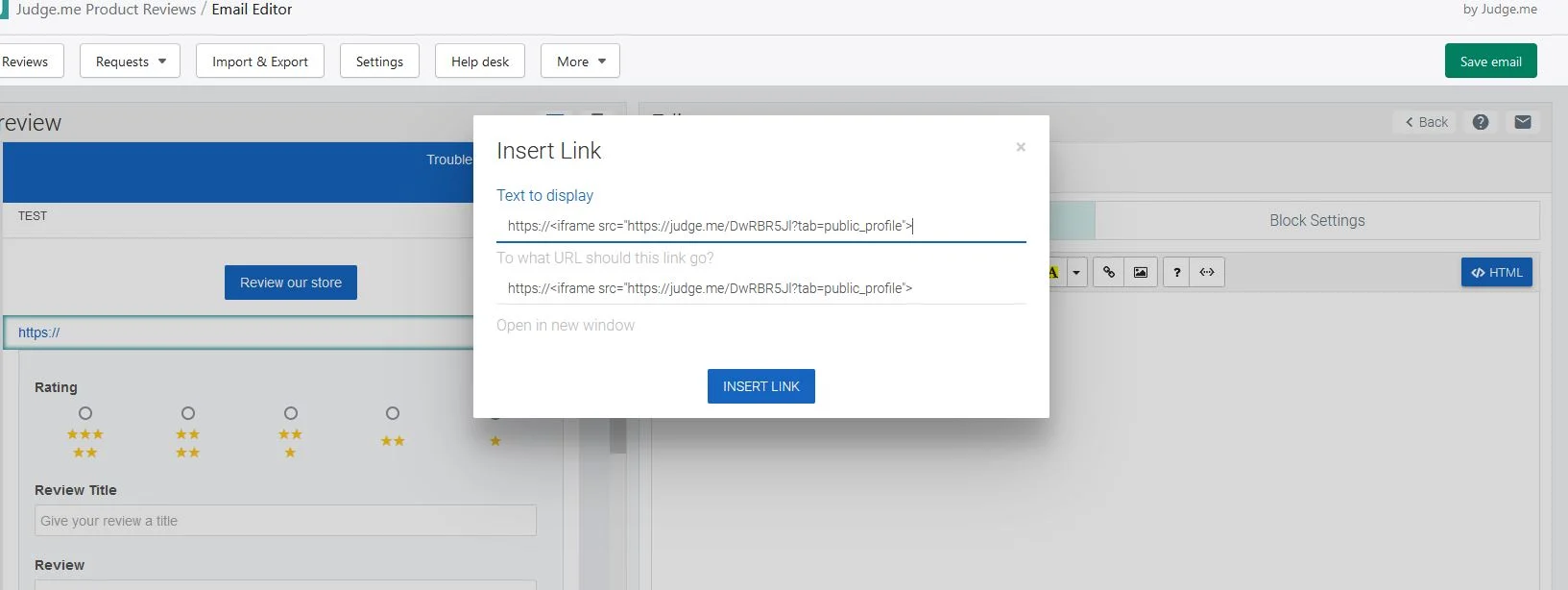
In the 'text block', add a link and insert this payload as the display text and url (make sure to edit the ID to targeted reviewer's ID):
https://<iframe src="https://judge.me/[ID_OF_TARGET]?tab=public_profile">
-
Click 'Save' two times. I'm honestly not sure why but it won't display properly unless you save it twice
-
Now to send that template, create an order in your Shopify instance and make sure to fulfill that order:
yourshop.myshopify.com/admin/draft_orders/new-> Mark as fulfilled. Make sure that the customer you use is the one from step 1 or the email of the reviewer account -
Once that is done, go back to the Judge.me app and click 'Requests' -> 'Request Dashboard'
-
Click 'Add manual request' -> 'Send Review Request for Old Orders'
-
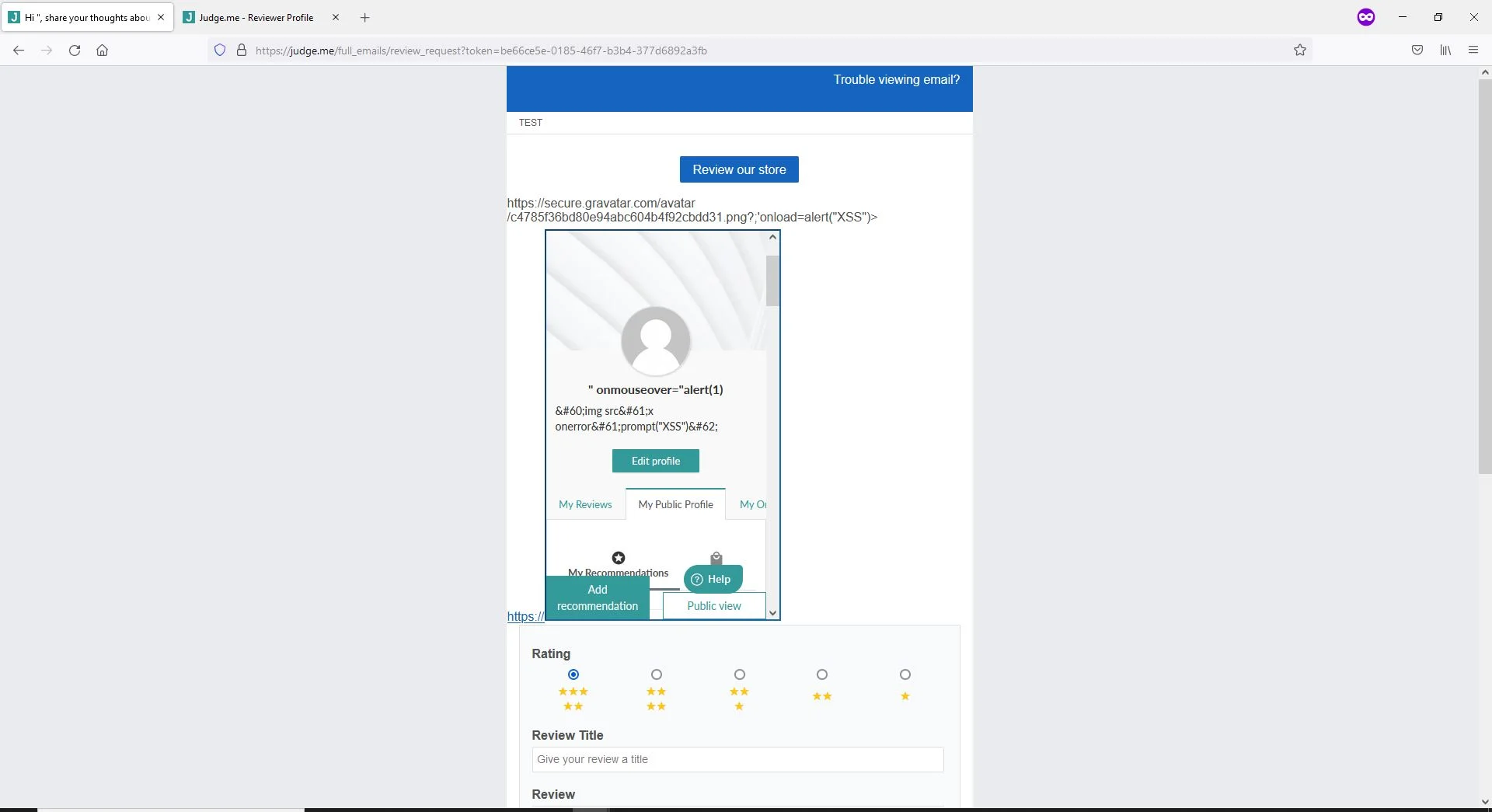
The reviewer account should receive an email notification regarding a review request, click 'Trouble viewing email' to access the full email preview
-
In there you should see that the iframe for the reviewer account is visible, now all that is needed to be done is perform XSSJacking techniques to trigger the Self-XSS
Note: Getting a valid review request that you can use for the preview is pretty confusing since the 'send me an example' doesn't work for full email preview, it took me quite a while before I successfully managed to do it so if there's anything that I haven't explained properly please let me know or you can directly ask the Judge.me team for help :)
Supporting Material/References:
As usual, if there is anything that doesn't make any sense please let me know.
Cheers, PenguinsHelp
Impact
XSS via XSSJacking techniques
Not written yet. The AI write-up for this report has not been written yet. The Original tab links to the source.
How it worked
Root cause
Likely the recommendation image URL was inserted into the page without proper encoding or validation, allowing an attribute-breaking value to add an event handler.
Impact
An attacker could run script in the context of a reviewer's profile page, but only if the victim interacts with the framed page in the email preview, so it depends on user clicks.
What the attacker needed
A reviewer account; a Shopify store with the Judge.me app; victim opens the email preview; victim performs clickjacking clicks
How it was found
- Log in to the reviewer account and add a recommendation to the public profile.
- Edit the recommendation image and insert a crafted image URL that breaks out of the attribute.
- In the Shopify admin, open the Judge.me email template editor and add a link whose display text and URL contain an iframe pointing at the target reviewer's profile.
- Save the template twice, then create and fulfil an order for the reviewer's email address.
- Send a manual review request from the request dashboard.
- Open the full email preview via the 'Trouble viewing email' link and use XSSJacking to trigger the injected script.
Explained by bugbounty.wiki with AI from the original and checked against quotes from it; it can still be wrong. Read the original before relying on a detail.
Not written yet. The AI write-up for this report has not been written yet. The Original tab links to the source.
A self-XSS is a script injection that only fires when the victim themselves types or pastes the malicious value, so on its own it is not very useful. Here the attacker gets around that by loading the victim's profile page inside a frame in an email preview and using clickjacking, where invisible page elements trick the user into clicking something they did not intend to click.
What is XSS?
Script an attacker supplies runs in another user's browser, on the target's origin, with that user's session.