Access to alerta.khanacademy.org leak sensitive data
The signup and login forms on alerta.khanacademy.org were hidden with a client-side CSS class, so removing it in the browser revealed them. An attacker could then create an account without email confirmation and access the alert dashboard.
 Originally disclosed on HackerOne
- Triaged in 10 hours
- Fixed in 2 months
- Disclosed after 9 months
Hi , I found to access https://alerta.khanacademy.org/ using signup bypass.That leak access to sensitive data of khanacademy.org
Step To Reproduce:
- Go to https://alerta.khanacademy.org/#/signup
- Inspect Q and remove ng-hide
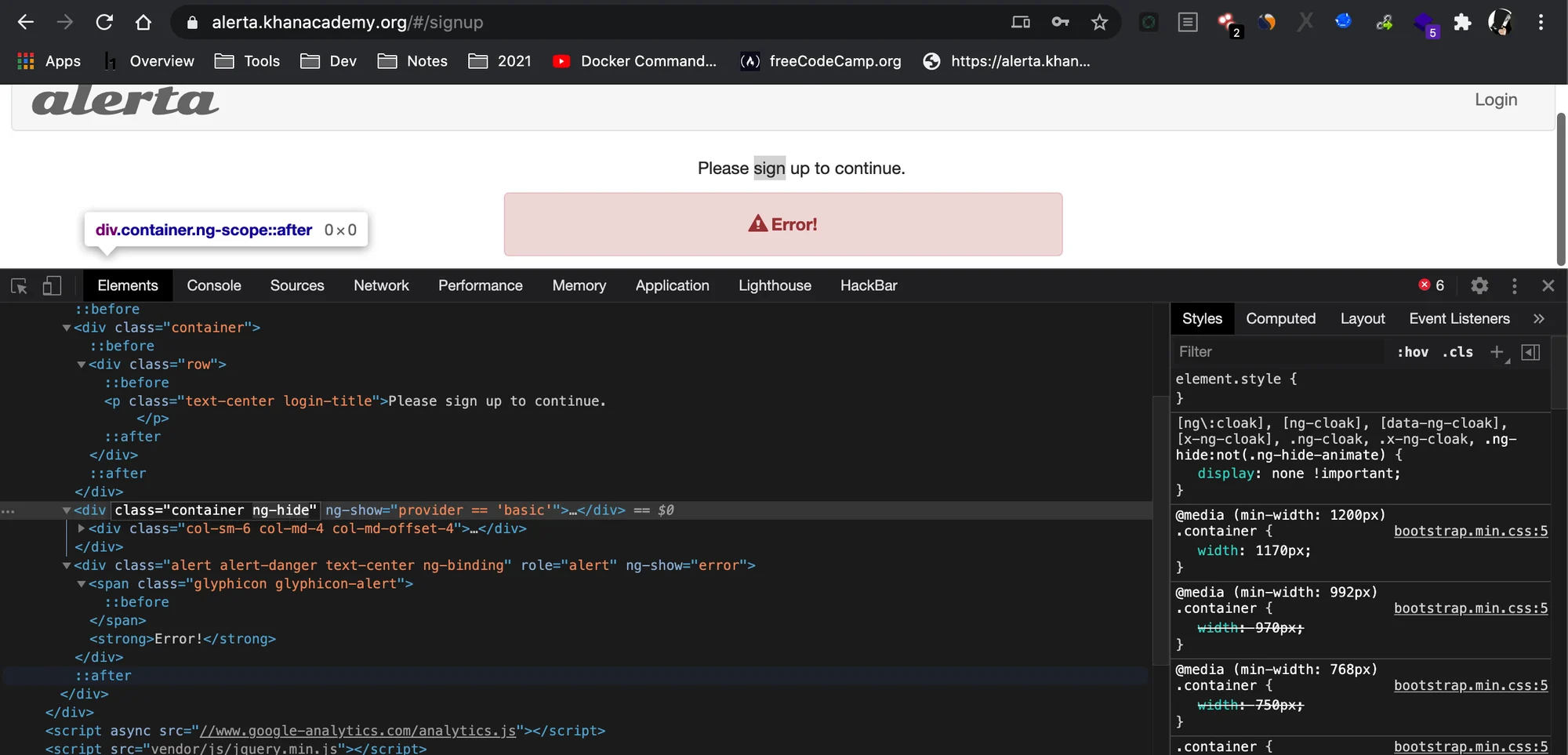
- You got Signup Form. Signup account using [email protected] mail.
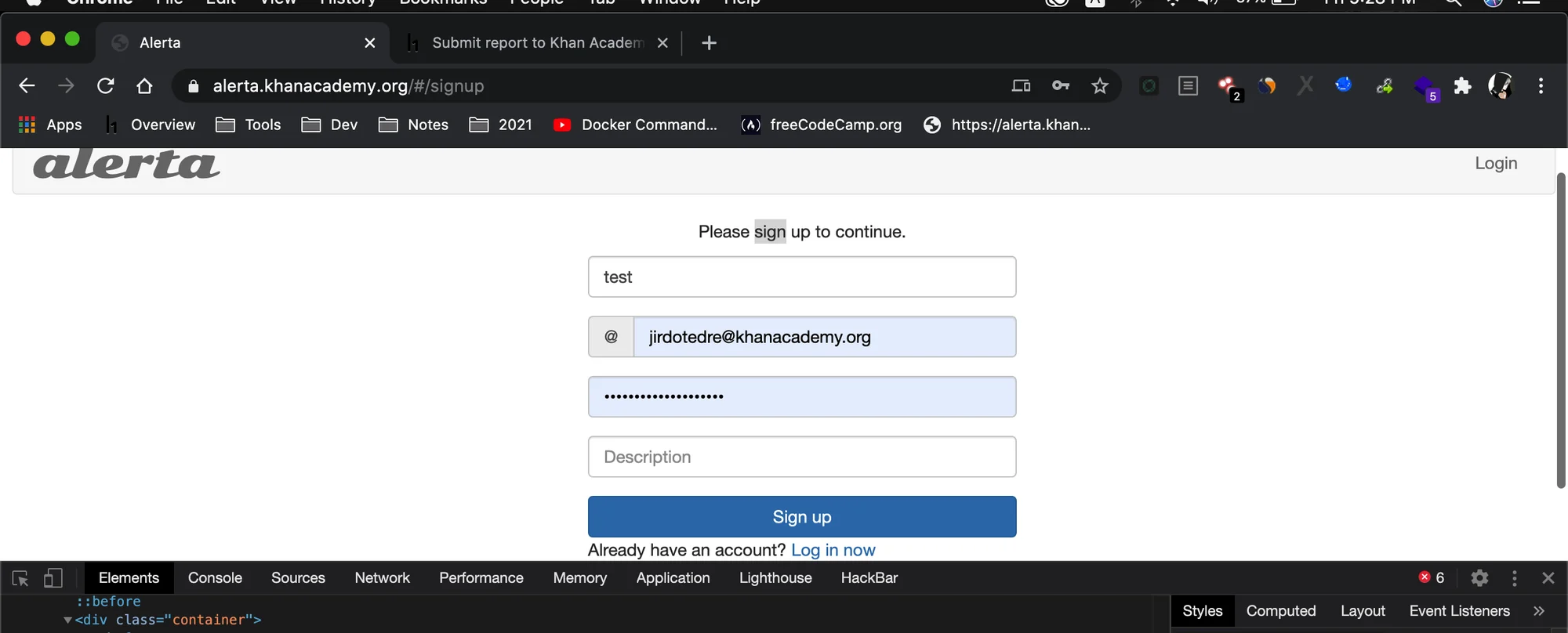
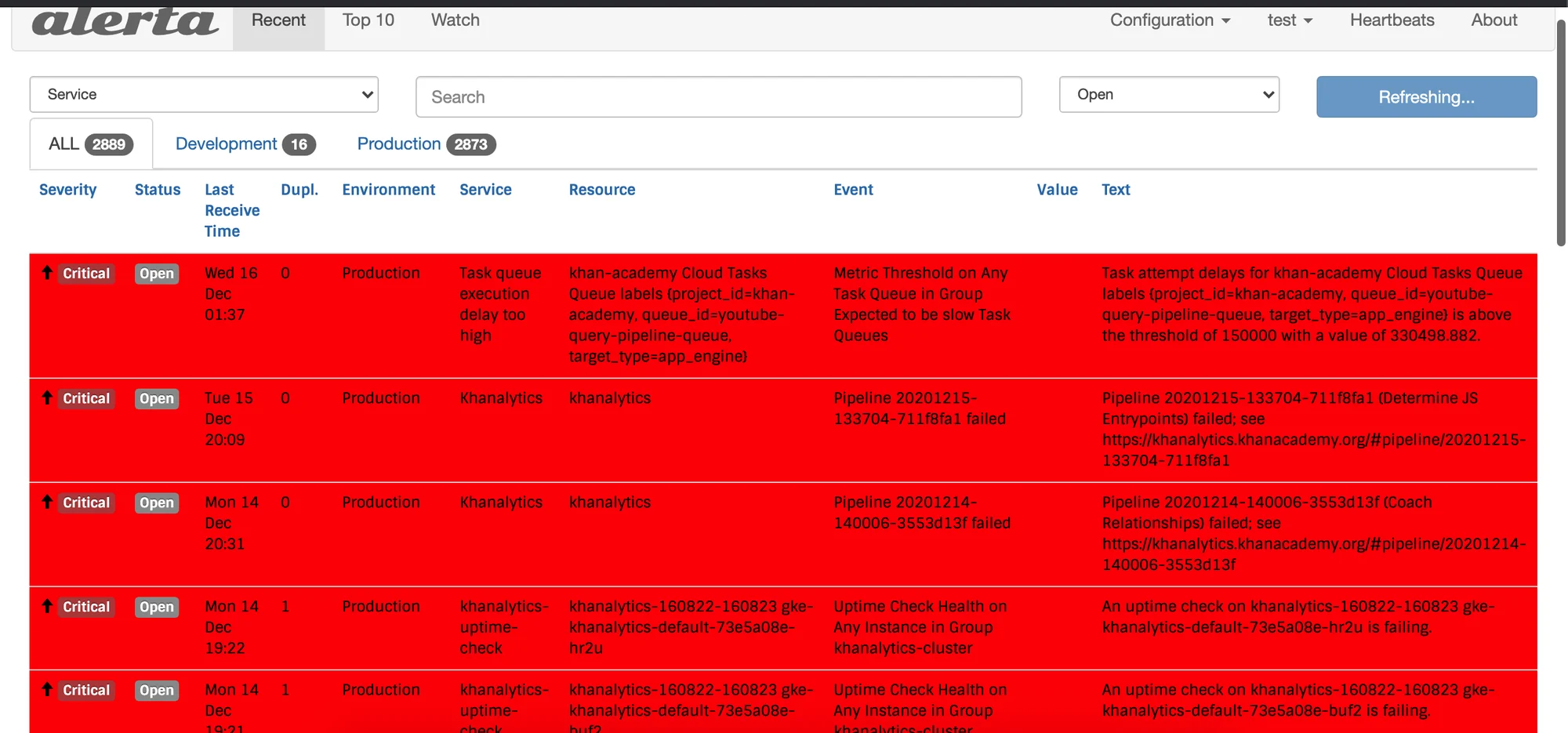
- When you successfully signup,You access alerta.khanacademy.org without confirm email.
If you not login direct .
- Go to alerta.khanacademy.org/#/login.
- Inspect Q and remove ng-hide
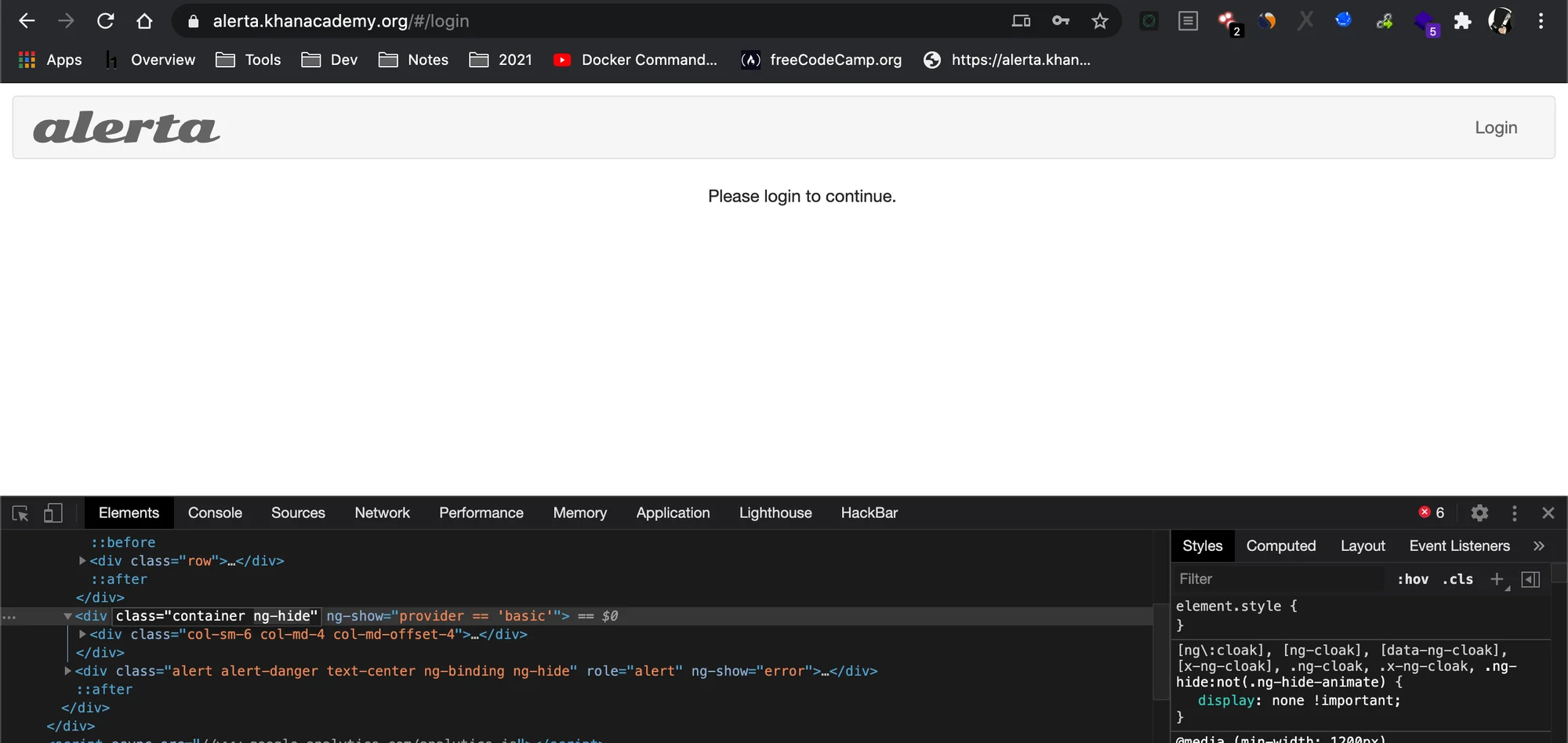
- Login with your register info.
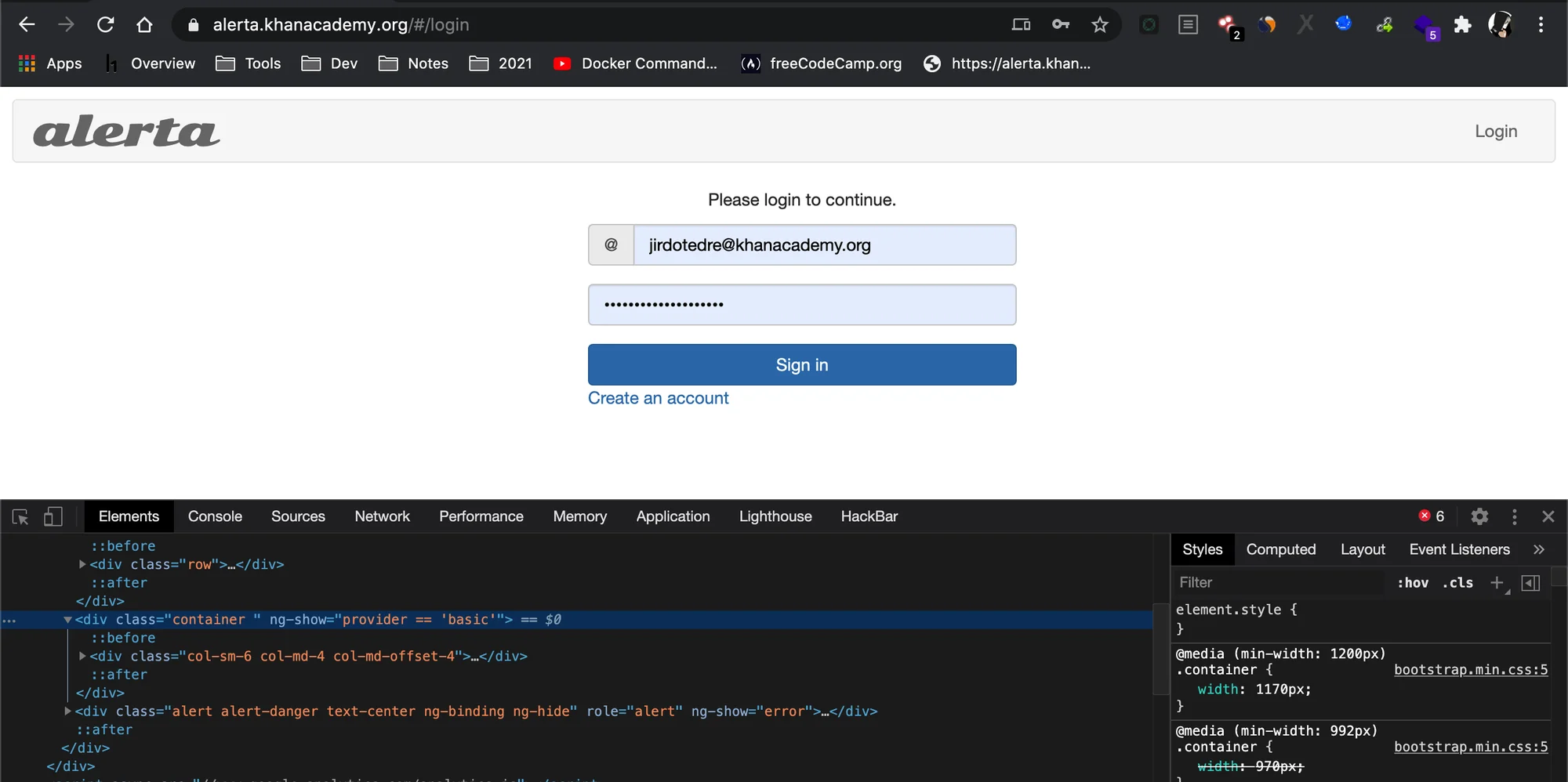
Impact
Attacker can access alerta dashboard
Thanks, @nightmare_msf
What the report shows
The target is the Alerta dashboard hosted at https://alerta.khanacademy.org/, a Khan Academy subdomain. The researcher found that the signup and login views of this AngularJS application could be reached by manipulating the page in the browser, and that a newly registered account could then use the dashboard without confirming its email address. The report describes the result as access to sensitive data of khanacademy.org.
The reproduction steps for the signup path are:
- Go to
https://alerta.khanacademy.org/#/signup. - Inspect the page and remove the
ng-hideclass from the element that carries it.
The screenshot shows the signup view after the ng-hide class has been removed in the browser's developer tools.
- The signup form is now visible. Register an account using an address of the form
[redacted].
- After a successful signup, the dashboard at
alerta.khanacademy.orgis accessible without confirming the email address.
The report then gives an alternative path for the case where the user is not logged in directly:
- Go to
alerta.khanacademy.org/#/login. - Inspect the page and remove
ng-hide.
- Log in with the registered credentials.
The stated impact is short: an attacker can access the Alerta dashboard. The report does not describe which data the dashboard exposes, does not include any HTTP request or response, and does not name a version of Alerta or AngularJS. The platform records the report as critical with a CVSS score of 9.8, weakness "Improper Access Control - Generic", disclosed on 8 September 2021. No bounty amount is recorded.
Root cause
The report shows that the signup and login views were hidden with the AngularJS ng-hide class, which the researcher removed in the browser. Removing the class in the developer tools makes the form usable. The report does not describe what the server did with the requests behind the form.
The report shows a registration using an address in the khanacademy.org domain and access to the dashboard before the address was confirmed.
Impact
The report's own claim is that an attacker can access the Alerta dashboard, and that this leaks sensitive data of khanacademy.org. The report does not enumerate what was visible, so the precise sensitivity is not established in the text. The platform records the report as critical with a CVSS score of 9.8.
How this kind of bug works
Single-page applications often decide what to render from data they already hold. A route guard, a hidden form or a disabled button is a convenience for legitimate users, not a security boundary, because everything needed to draw the interface has already been sent to the browser. If the server-side endpoint behind that interface does not independently check the caller's identity and role, hiding the control achieves nothing: the client can always un-hide it, call the endpoint directly, or replay the request with modified parameters.
The same pattern appears in registration flows. A signup form that is hidden, or restricted to an expected email domain, is only restricted if the server validates the domain and the confirmation state on every subsequent request. When the account is created and a session is issued before confirmation, the confirmation step is decorative.
Defences are server-side: authenticate and authorise every endpoint that returns data or changes state, validate registration input (including the email domain) on the server, and refuse to issue a usable session until the address is confirmed. Client-side hiding can stay as a usability measure, but it must never be the only control.
How to test for it
- Map the application's routes and API calls. In an SPA, read the JavaScript bundle for route definitions and API paths, and watch the network tab while using the visible features.
- Look for controls that are hidden rather than absent: elements carrying framework hide classes, disabled attributes, or routes that redirect. Note what each one would do if shown.
- Un-hide the control in the developer tools and interact with it. A positive result is not that the form appears, but that the request it sends succeeds and returns data or creates state the server should have refused.
- Replay the same request outside the browser, with the same session, to confirm the server, not the client, made the decision. Then try it with a lower-privileged or unconfirmed account.
- For registration flows, sign up with an address in a domain the application appears to reserve for staff or internal use, and check whether the account can reach protected pages before confirmation.
Common false positives: the form appears but every request returns 401 or 403; the endpoint succeeds but only returns the caller's own data; the account is created but the session is unusable until confirmation; or the hidden feature is genuinely public and the hiding is cosmetic. Each of these means the client-side change had no security effect.
How it is fixed
Treat the client-side hiding as presentation only.
Hunting notes
This class hides in administrative or operational tooling bolted onto a main product: monitoring dashboards, status pages, internal consoles and staging hosts on subdomains. Recon signals include subdomains whose names suggest operations, SPA bundles that contain route names for features not linked in the UI, and framework hide classes around forms. Registration pages that accept an address in the organisation's own domain are worth a second look.
To make a report accepted, show the server-side effect: the request that succeeded, the response containing data the account should not see, and the state of the account (for example, unconfirmed) at the time. A screenshot of an un-hidden form alone is weak evidence; a captured response with sensitive fields is strong.
What happened, in plain words
Khan Academy runs a service called Alerta at https://alerta.khanacademy.org/. Alerta is a service hosted at https://alerta.khanacademy.org/. The researcher found that the signup and login forms on this dashboard were hidden in the page rather than actually blocked, and that a new account could get into the dashboard without ever confirming its email address.
To understand the trick, you need one idea: a web page is just text and code that your browser downloads and draws. If something is hidden on a page, the browser usually still has the full instructions for it. Hiding is a curtain, not a locked door. Anyone who opens the browser's developer tools can move the curtain.
The report describes the result as access to sensitive data of khanacademy.org. It does not list which data was visible, and it contains no HTTP requests or responses.
Step by step: the signup path
- Go to
https://alerta.khanacademy.org/#/signup. - Inspect the page and remove the
ng-hideclass from the element that carries it.
The screenshot shows the signup view after ng-hide has been removed in the browser's developer tools.
ng-hide is a class name used by AngularJS, a JavaScript framework for building web pages. A class is a label attached to a piece of the page; CSS rules, the styling language of the web, can say "anything with this label is not displayed". AngularJS uses ng-hide exactly that way. Removing the label in the developer tools makes the element visible again, because the browser simply re-draws the page without that styling rule. Nothing on the server has changed at this point.
- The signup form is now visible. Register an account using an address of the form
[redacted].
The address uses Khan Academy's own domain, khanacademy.org, which is the part after the @.
- After a successful signup, the dashboard at
alerta.khanacademy.orgis accessible without confirming the email address.
This is the second half of the problem. The report says the dashboard was accessible without confirming the email address. It does not say how confirmation was meant to work.
Step by step: the login path
The report gives an alternative for the case where the user is not logged in directly:
- Go to
alerta.khanacademy.org/#/login. - Inspect the page and remove
ng-hide.
- Log in with the registered credentials.
Credentials here means the email address and password chosen during signup. The same curtain trick applies: the login form was present in the page all along, only styled as hidden.
What the report claims as impact
The stated impact is one line: an attacker can access the Alerta dashboard. The report does not describe what data the dashboard exposes. The report does not enumerate what was visible, so the exact sensitivity is not established in the text. The platform records the report as critical with a CVSS score of 9.8, weakness "Improper Access Control - Generic", disclosed on 8 September 2021. No bounty amount is recorded.
In general, why hiding is not protecting
Modern web applications are often single-page applications: the browser downloads one program, and that program draws every screen as you navigate. The program already holds the instructions for screens you have not visited, including ones the site does not link to. A hidden form, a disabled button or a redirect is a convenience for ordinary users. It is not a security boundary, because the browser can always un-hide the form, call the address behind it directly, or resend a request with different values.
The only real boundary is the server, the computer that holds the data. If the server checks who is asking, and what that person is allowed to see, on every request, then hiding the interface achieves nothing for an attacker. If the server does not check, hiding achieves nothing either, because the request will succeed once it is sent.
The same logic applies to registration. A signup form restricted to a company's own email domain is only restricted if the server validates the domain. An account that works before its email is confirmed means the confirmation step is decorative.
In general, how to test for it
- Map the application's screens and the requests it sends. Open the browser's developer tools, use the Network tab while clicking around, and note which addresses return data.
- Look for controls that are hidden rather than absent: elements with framework hide classes, disabled buttons, or screens that redirect you away. Note what each would do if shown.
- Un-hide the control in the developer tools and use it. The interesting result is not that the form appears, but that the request it sends succeeds and returns data or creates something the server should have refused.
- Replay the same request outside the browser, with the same session, to confirm the server made the decision rather than the page. Then try it with a less privileged or unconfirmed account.
- For registration, sign up with an address in a domain the application seems to reserve for staff or internal use, and check whether the account reaches protected pages before confirmation.
Common false positives: the form appears but every request is refused; the request succeeds but only returns your own data; the account is created but cannot be used until confirmation; or the hidden feature is genuinely public and the hiding is cosmetic. Each of these means the client-side change had no security effect.
In general, how it is fixed
Treat client-side hiding as presentation only.
In general, where this bug tends to hide
This class of issue turns up in administrative or operational tooling attached to a main product: monitoring dashboards, status pages, internal consoles and staging hosts on subdomains. Useful signals are subdomains whose names suggest operations, page code that contains screen names for features not linked in the interface, and framework hide classes around forms. Registration pages that accept an address in the organisation's own domain are worth a second look.
To make a report accepted, show the server-side effect: the request that succeeded, the response containing data the account should not see, and the state of the account, for example unconfirmed, at the time. A screenshot of an un-hidden form alone is weak evidence; a captured response with sensitive fields is strong.
Glossary
- Alerta: the service hosted at the target address.
- AngularJS: a JavaScript framework for building web pages, which uses attributes and classes such as
ng-hide. - Class: a label attached to a piece of a web page, used by CSS to style or hide it.
- Client-side: happening in the browser, on the visitor's computer, rather than on the server.
- Server-side: happening on the computer that holds the data and answers requests.
- CSS: the styling language of the web, which decides how page elements look, including whether they are displayed.
- CVSS: a standard scoring system for the severity of a security issue, from 0 to 10.
- Credentials: the email address and password used to log in.
- Developer tools: the built-in panel in a browser for inspecting and changing a page, watching network traffic and running code.
- Domain: the part of an email address or web address after the
@or before the first slash, such askhanacademy.org. - Email confirmation: the step where a site sends a link to an address and requires it to be clicked before the account works.
- Endpoint: a specific address on a server that accepts requests and returns data or performs an action.
- False positive: a finding that looks like a vulnerability but has no real security effect.
- HTTP request: a message a browser sends to a server asking for a page or data.
- Improper access control: a weakness where the server does not correctly check who is allowed to do or see something.
ng-hide: an AngularJS class that hides an element through CSS; removing it in the browser makes the element visible.- Recon: short for reconnaissance, the early phase of looking around a target to find interesting parts.
- Session: the state of being logged in, usually represented by a cookie the browser sends with each request.
- Single-page application: a web application where one program is downloaded and draws every screen in the browser.
- SPA bundle: the JavaScript file or files a single-page application downloads.
- Subdomain: a prefix on a domain, such as
alertainalerta.khanacademy.org. - Unauthorised access: reaching data or features without the permission the server should require.


