Stored XSS in Document Title
A stored cross-site scripting flaw existed in the document title field, allowing an attacker to inject a script that executes when the document is viewed. This could let an attacker steal cookies, run arbitrary JavaScript, and access sensitive information.

- Fixed in 31 days
- Paid in 26 days
- Disclosed after 31 days
Summary :
Stored attacks are those where the injected script is permanently stored on the target servers, such as in a database, in a message forum, visitor log, comment field, etc. The victim then retrieves the malicious script from the server when it requests the stored information. Stored XSS is also sometimes referred to as Persistent or Type-I XSS.
Vulnerable URL : https://app.localizestaging.com/documents
Payload XSS : "><img src=x onerror=alert(document.domain)>
Step to Reproduces :
- Login to your account
- Create Project
- What are you translating? (select documents)
- Upload Document
- Input XSS payload in Document Title = "><img src=x onerror=alert(document.domain)>
- Save it
- XSS triggered
Impact
Can steal Cookie, Can run javascript code, and get information sensitive
Attachments
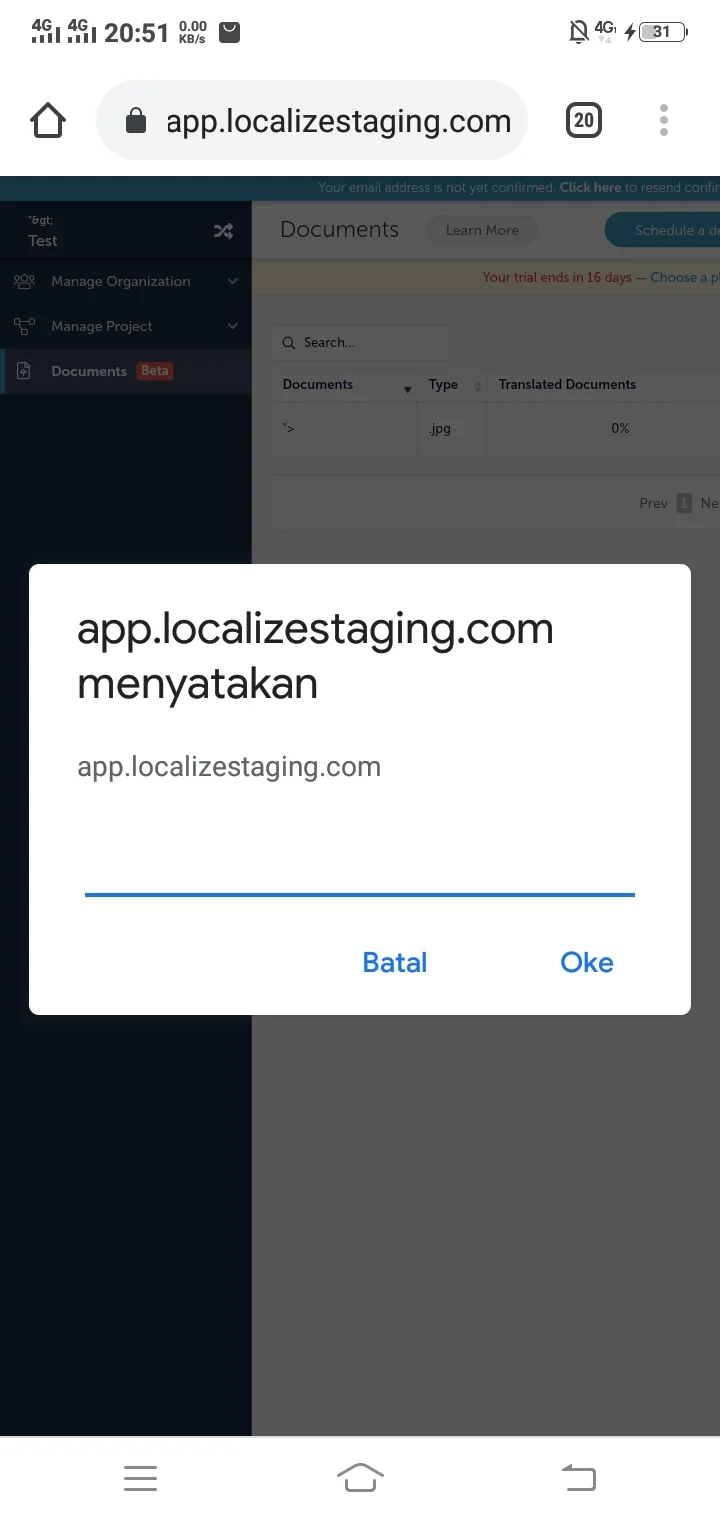
What the report shows
The target is the documents feature of app.localizestaging.com, a Localize application. The researcher reported a stored cross-site scripting issue in the document title field, rated medium severity and paid a 50.00 USD bounty. The report was disclosed on 27 September 2021.
The vulnerable URL given is:
https://app.localizestaging.com/documents
The payload used was:
"><img src=x onerror=alert(document.domain)>
The reproduction steps are short and direct:
- Log in to your account.
- Create a project.
- For the question "What are you translating?", select documents.
- Upload a document.
- Enter the payload in the Document Title field.
- Save it.
- The XSS triggers.
The report does not describe the exact request that carries the title, the server response, or which page rendered the stored value. It also does not say whether the payload fired for the submitting user only or for other users viewing the document, and it gives no fix details.
The only attachment is a screenshot of the payload firing:
Root cause
The report shows the document title being saved and the payload firing, but does not state the cause. The payload begins with a double quote and a closing angle bracket, which suggests the title was placed inside an HTML attribute in the rendered markup: the quote closes the attribute, the > closes the tag, and the injected img element is parsed as markup. The onerror handler then runs when the browser fails to load src=x. The report does not say where the escaping fails or whether storage is involved.
Impact
The report's impact section claims cookie theft, JavaScript execution and access to sensitive information, without demonstrating them. Because the script is stored server-side and served back to anyone who requests the affected information, the practical reach depends on who views the document title, which the report does not establish. The impact should be read with that caveat: the report demonstrates script execution in the application origin, and the rest follows from what the session and page expose.
How this kind of bug works
Stored XSS happens when user-controlled input is persisted (in a database, a log, a comment table, a document record) and later written into an HTML response without encoding appropriate to the context. The browser cannot tell application data from application markup, so any characters that are meaningful in that context, such as ", ', <, > or &, can break out of the data position and introduce new markup or script.
The context matters. A value placed between tags needs < and & handled; a value placed inside a quoted attribute needs the matching quote character handled as well; a value inside a JavaScript string, a URL or a CSS block needs its own escaping rules. Encoding for the wrong context, or sanitising on input instead of encoding on output, leaves the hole open. The defences that stop it are contextual output encoding at every sink, a strict Content Security Policy that blocks inline handlers and untrusted script sources, and treating all stored data as untrusted no matter who entered it.
How to test for it
- Map every place where you can submit text that persists: titles, names, descriptions, comments, labels, filenames, tags. Note where the value is later displayed, and to whom.
- Submit a unique, harmless marker first, for example a distinctive string, and find every page and API response where it appears. This tells you the sinks before you try to break anything.
- For each sink, determine the context by inspecting the rendered HTML: between tags, inside an attribute, inside a script block, inside a URL. Craft a probe that matches that context, such as a quote plus a tag for attribute contexts, and watch whether the markup is parsed rather than displayed as text.
- Use a benign proof such as an alert of the document domain, and check whether it fires on reload and, importantly, in a second account or session that views the same object.
- Record the exact request that stores the value and the exact response that renders it, since a report is much stronger when both are shown.
A positive result is your probe appearing as live markup in the response and executing in the browser. Common false positives are: the value being reflected only in the immediate response to your own request (reflected, not stored); the payload appearing HTML-encoded in the page source; execution only inside a context you control, such as a preview that renders in a sandboxed frame; or a payload that fires only because of a browser quirk in a context the application never serves to other users. Check the raw response body rather than the rendered page to be sure.
How it is fixed
Apply contextual output encoding to the title everywhere it is rendered, so that quotes, angle brackets and ampersands become entities in attribute and text contexts. Where rich content is genuinely required, sanitise it with a well-maintained HTML sanitiser on output, using an allowlist. Add a Content Security Policy that disallows inline event handlers and restricts script sources, which limits the damage of any encoding mistake that remains. Validate and length-limit input as defence in depth, but do not rely on input filtering alone.
Hunting notes
Stored XSS tends to hide in fields that are entered once and displayed in many places: object titles and names, filenames, descriptions, and anything shown in lists, dashboards, notifications or exports. Features that render user data into attributes, such as tooltips, title attributes, image alt text or link href values, are frequent offenders because developers encode for text but forget the attribute context.
Recon signals worth following: applications with many user-supplied labels and metadata fields, admin panels that display user content, and any place where the same value appears in several views. Watch for values that are escaped on one page but not another, which usually means one sink was missed.
To get a report accepted, show persistence across requests, show the exact stored request and the rendering response, and demonstrate execution in a context another user would reach, ideally from a second account. Keep the proof benign, state clearly what an attacker could access from the executed context, and avoid claims the evidence does not support.
What happened, in plain words
A security researcher found a bug in a website called Localize, at the address app.localizestaging.com. The report covers the documents area of the application. The report was rated medium severity, paid a 50.00 USD bounty, and was disclosed on 27 September 2021.
The bug is called stored cross-site scripting, or stored XSS. To understand it, imagine a guest book in a hotel lobby. Guests write messages in it, and later every visitor who opens the book reads those messages. Now imagine a guest writes not a message but a small instruction that says "whenever someone reads this page, do something for me". The hotel staff copy the message into the book without checking it, and every later reader follows the instruction. That is stored XSS: text a user saves is kept on the server and later shown to other people as if it were part of the website itself, so the browser obeys it.
The vulnerable page was the documents area:
https://app.localizestaging.com/documents
The researcher's payload, meaning the piece of text designed to trigger the bug, was:
"><img src=x onerror=alert(document.domain)>
Here is what each part does:
"is a double quote. If the website puts the title inside an HTML attribute, which is a setting written asname="value", this quote closes the value early.>closes the HTML tag that was open, so whatever comes next is treated as new page markup rather than as text.<img src=x ...>asks the browser to show an image.src=xpoints at an address calledx, which does not exist.onerror=alert(document.domain)is an instruction that runs when the image fails to load. Becausexdoes not exist, the failure is guaranteed, and the browser runsalert(document.domain), a pop-up showing the site's domain name.
The reproduction steps were:
- Log in to your account.
- Create a project.
- For the question "What are you translating?", select documents.
- Upload a document.
- Enter the payload in the Document Title field.
- Save it.
- The XSS triggers.
Each step matters. Logging in and creating a project gets you to the normal document workflow, so the test happens where real users work. Choosing documents and uploading a file reaches the screen where a title is entered. Typing the payload as the title is the attack step; the report does not describe how the value is stored. Saving is followed by step 7, where the report says the XSS triggers.
The only attachment is a screenshot of the payload firing:
The report does not show the exact request that carries the title, the server's response, or which page displayed the stored value. It also does not say whether the pop-up appeared only for the person who saved the title or for other users viewing the document, and it gives no fix details.
In general, how this kind of bug works
A web page is a mix of two things: instructions for the browser (markup, written in HTML) and data (the words and values the site wants to show). The browser decides which is which by looking at characters. A < usually starts an instruction; a " inside an attribute usually ends the value. If a website copies user data into a page without neutralising those special characters, the browser cannot tell the difference and treats the data as instructions.
Stored XSS happens when the dangerous text is saved first, in a database, a comment table, a document record or a log, and then written into a page later. The defence is called output encoding: when the site displays the value, it replaces special characters with safe codes, so a quote becomes " and a < becomes <. The browser then shows them as text. The context matters: a value placed between tags, inside a quoted attribute, inside a script block or inside a link needs its own escaping rules. Filtering input on the way in is not enough on its own; encoding at the point of display is what closes the hole. A Content Security Policy, a set of browser rules that can block inline scripts, adds a second layer.
If you want to test for this yourself:
- List every place where you can save text that stays: titles, names, descriptions, comments, labels, filenames.
- Save a harmless unique marker first and find every page where it appears. This shows you where the value is displayed before you try anything risky.
- Look at the page source to see the context: between tags, inside an attribute, inside a script. Then craft a probe that fits that context.
- Use a harmless proof such as an alert of the domain, and check whether it fires on reload and, importantly, in a second account that views the same object.
- Record the exact request that saves the value and the exact response that displays it. A report is much stronger when both are shown.
Watch out for false positives: a value that only appears in the immediate response to your own request is reflected, not stored; a payload shown encoded in the page source is safe; and a preview inside a sandboxed frame may not reflect what other users see. Check the raw response rather than the rendered page.
To fix it, encode the title for the right context everywhere it is displayed, sanitise rich content with a maintained allowlist-based sanitiser if formatting is genuinely needed, add a Content Security Policy that blocks inline handlers, and limit input length as extra defence. Stored XSS often hides in fields entered once and shown in many places, such as titles, filenames and descriptions, and in attributes like tooltips, image alt text and link addresses, where developers encode for text but forget the attribute.
Glossary
- Stored XSS: a bug where text saved on a server is later shown to users as page instructions, so a script runs in their browser.
- Payload: the crafted piece of text used to trigger a bug.
- HTML: the language of instructions that tells a browser how to display a page.
- Attribute: a setting inside an HTML tag, written as
name="value". - Tag: an HTML instruction such as
<img>, which tells the browser to show something. - Markup: the instructions in a page, as opposed to the data shown on it.
- Output encoding: converting special characters into safe codes when displaying data, so the browser shows them as text.
- Context: where in the page a value is placed (between tags, inside an attribute, inside a script), which decides how it must be escaped.
- Cookie: a small piece of data a website stores in your browser to remember your session.
- Session: the logged-in state a website keeps for you across pages.
- Content Security Policy: browser rules set by a site that restrict which scripts may run.
- Sanitiser: a tool that removes dangerous parts from user-supplied HTML.
- Allowlist: a list of things that are permitted, with everything else rejected.
- Bounty: a payment a company gives a researcher for reporting a valid security bug.
- Severity: a rating of how serious a bug is.
- Reflected XSS: a variant where the dangerous text comes back only in the immediate response to your own request and is not saved.



