How I found 3 RXSS on the Lululemon bug bounty program
The search page reflected the 'q' parameter inside a script tag with quotes escaped, but the closing script tag was not escaped, allowing an attacker to break out and inject JavaScript. The same flaw was found on two other subdomains, enabling reflected cross-site scripting.
 Published on omar0x01.medium.com
Hi everybody, today i will show you how can simple technique lead you to find multiple series vulnerabilities across the whole subdomains
The full write-up lives on its author's site
It belongs to its author, so we link to it rather than copy it. The other two tabs are our own rewrites, checked against it.
Context
Lululemon runs a bug bounty program on Bugcrowd. The researcher, Omar Hashem, was hunting on that program and started with the main domain, https://www.lululemon.co.uk. The feature of interest is the site search: the /en-uk/search endpoint takes a query parameter and the value is placed into the page inside a script tag. The write-up describes how a single reflection in that search page led to three XSS findings across different Lululemon domains.
Setup
The work was done from Kali Linux, as shown by the shell prompt in the commands. The tools used were:
- Arjun for parameter brute force.
- gau to passively collect endpoints.
- uro to deduplicate endpoints and filter out static files.
sedto rewrite the collected URLs.httpxto request the endpoints and match on the payload.
Finding it
The researcher spent some time on the main domain and then ran a parameter brute force against the search page with Arjun:
The output file looked like this:

The parameters were then fed through qsreplace:
┌──(omar㉿kali)-[~]
└─$ cat lululemon-parameters|qsreplace omar

Requesting the resulting link in a browser showed that the q parameter value is reflected between double quotes inside a script tag:
<script>some javascript code;var q="omar"; some javascript code;</script>
The value was reflected inside a JavaScript string, so the researcher tried to break out of the double quotes:
https://www.lululemon.co.uk/en-uk/search?q=omar“;alert(domain);//
The reflection came back as:
<script>some javascript code;var q="omar\";alert(domain);//"; some javascript code;</script>
The quote came back escaped with a backslash. The researcher concluded that the developer had added escaping of quotes specifically to stop attackers breaking out of the double quotes.
The next test was the open angle bracket:
https://www.lululemon.co.uk/en-uk/search?q=omar<
The reflection was:
<script>some javascript code;var q="omar<"; some javascript code;</script>
The reflection came back with the < in place. From this the researcher expected the backend to print the parameter value with something like:
<?php echo(addslashes($_GET['q'])) ?>
That is, quotes are escaped but other characters pass through. The consequence is that quotes cannot be used, but the </script> sequence can still be sent, closing the script block and opening a new tag with attacker-controlled JavaScript:
https://www.lululemon.co.uk/en-uk/search?q=</script><script>alert(document.cookie)</script>
Exploitation
Step 1: Confirm the XSS on the main domain
The first XSS was on:
https://www.lululemon.co.uk
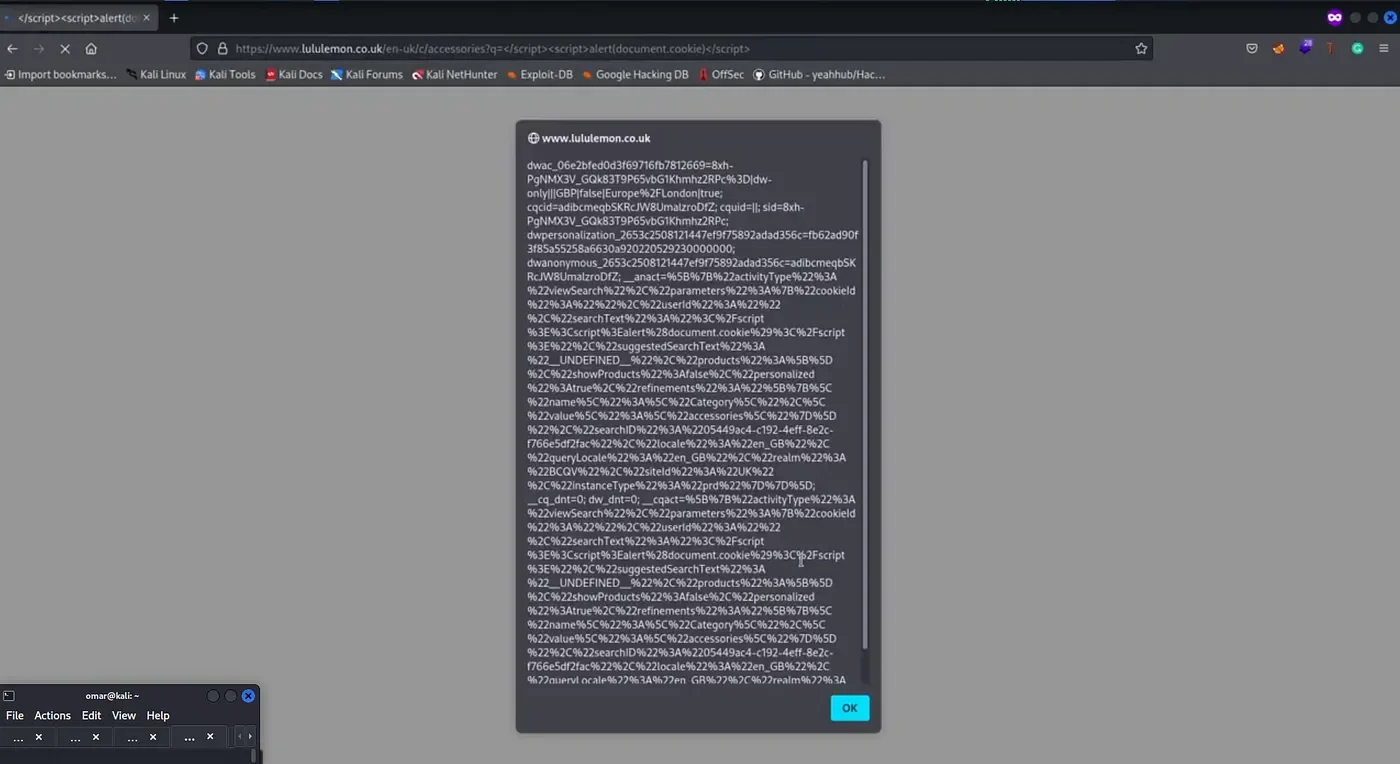
The researcher notes that when developers make a mistake in one place there is a high possibility of the same mistake elsewhere, so the next step was to test the same XSS on other domains and subdomains.
Step 2: Collect endpoints
Endpoints were collected passively with gau, deduplicated with uro, and static files such as images, JavaScript and CSS were filtered out:
┌──(omar㉿kali)-[~]
└─$ cat subdomains.txt|gau |uro >endpoints.txt
Step 3: Inject the parameter into every endpoint
A sed command was used to add the q parameter with the URL-encoded payload as its value to all endpoints:
┌──(omar㉿kali)-[~]
└─$ sed -E -i “s/\?(.*)|$/\?q=%3C%2Fscript%3E%3Cscript%3Ealert(document.cookie)%3C%2Fscript%3E/g” endpoints.txt
The substitution matches either an existing query string or the end of the line and replaces it with ?q= followed by the encoded payload %3C%2Fscript%3E%3Cscript%3Ealert(document.cookie)%3C%2Fscript%3E, which decodes to </script><script>alert(document.cookie)</script>.
Step 4: Request the endpoints and match the payload
httpx was used to request every endpoint in the list and match on the payload with the -ms argument:
┌──(omar㉿kali)-[~]
└─$ httpx -l endpoints.txt -ms “</script><script>alert(document.cookie)</script>”
The results gave two more XSS findings.
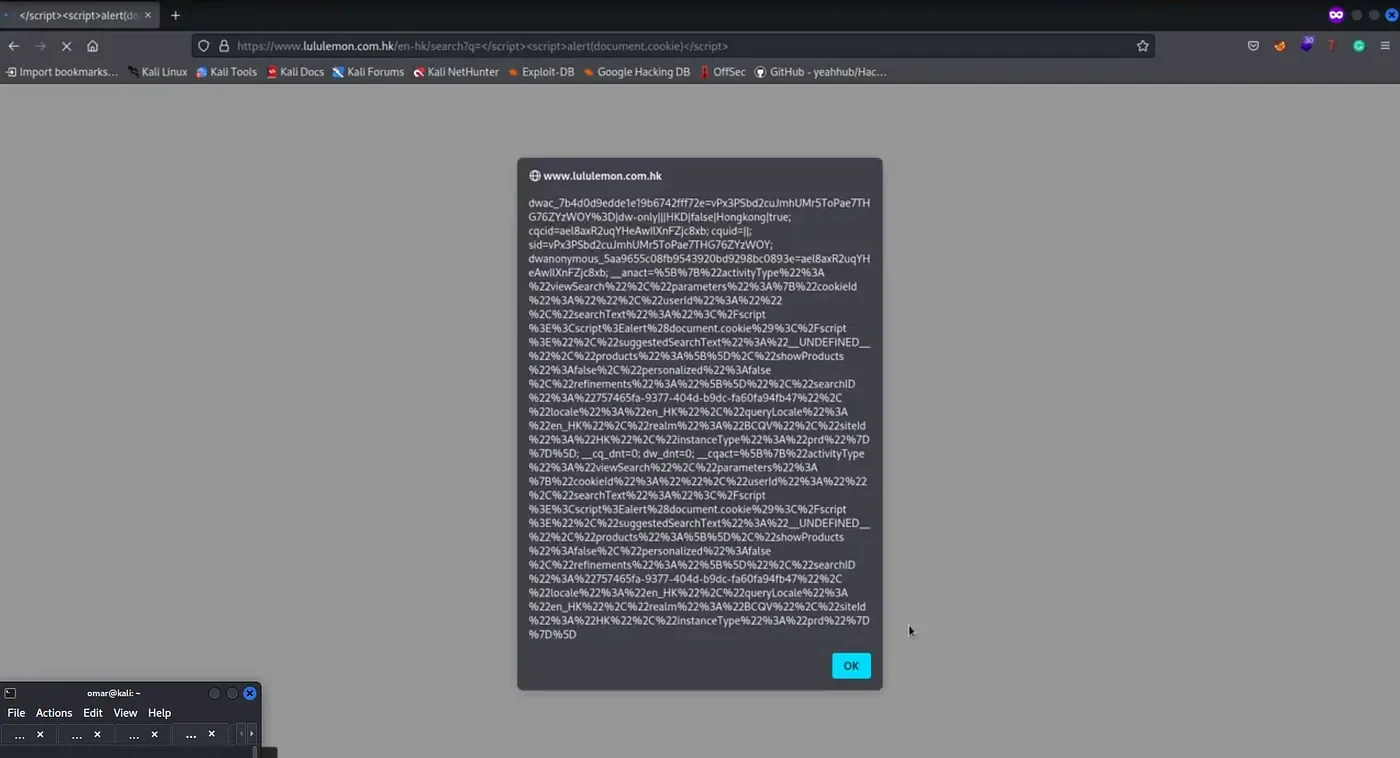
Step 5: The second XSS
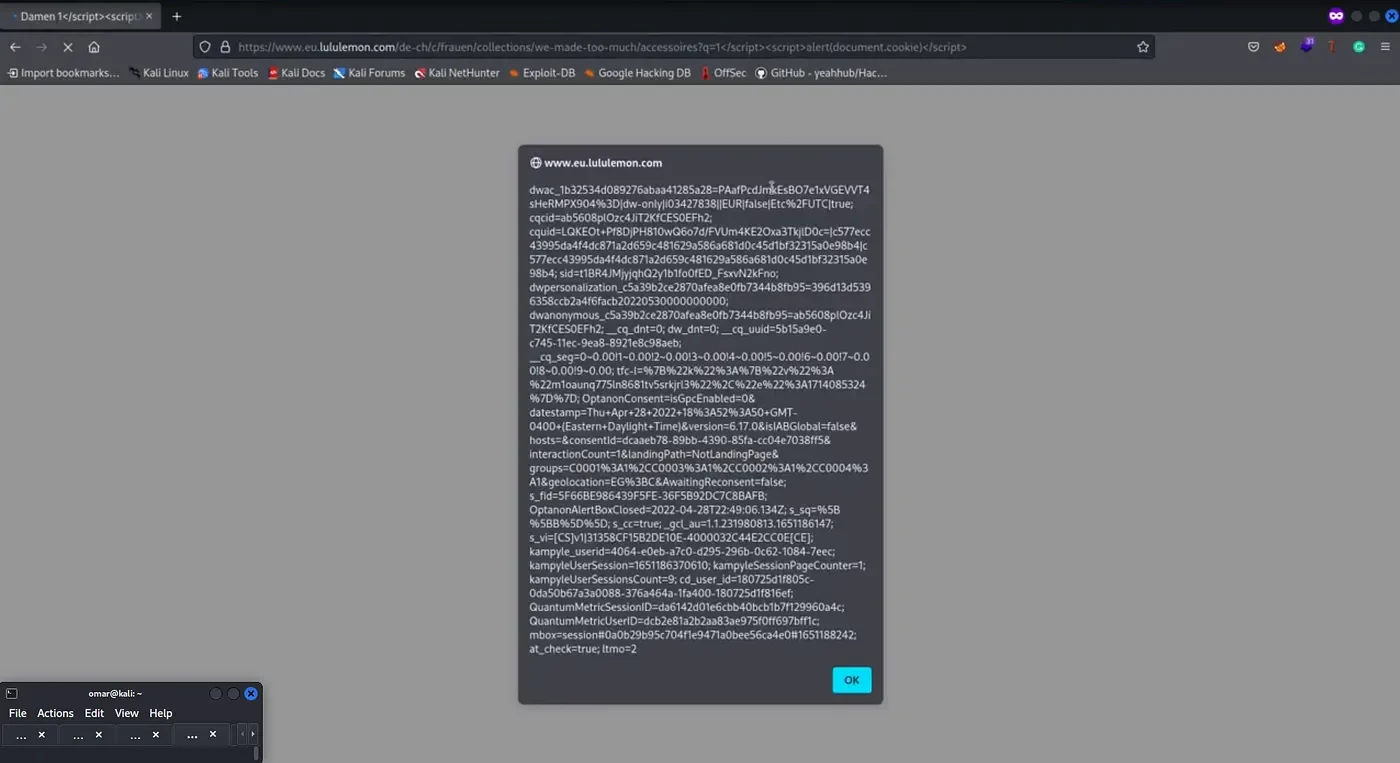
Step 6: The third XSS
Root cause
The q parameter is written into an inline script as a JavaScript string value. The researcher expected the backend to escape quotes with something like addslashes while letting < through. Because the value is placed inside a <script> element, the HTML parser still treats </script> as the end of the script block regardless of the JavaScript string context. The attacker can therefore close the script element and open a new one containing arbitrary JavaScript. Escaping quotes alone does not address this: the correct defence is context-aware output encoding, and for data placed inside a script block the safe approach is to serialise it as JSON and escape < (for example as \u003c) so that </script> can never appear in the output.
Impact
An attacker who can get a victim to open a crafted search URL can run arbitrary JavaScript in the context of the affected Lululemon domain. The payload used in the write-up reads document.cookie, so the immediate impact demonstrated is theft of cookies that are readable from JavaScript. The write-up does not describe what session handling or cookie flags the sites use, so whether session hijacking is possible depends on those details. The same technique worked on three separate domains.
Fix
The write-up does not say what was changed. Escaping only quotes is not sufficient.
Variants to test
- Run Arjun against search, filter and listing endpoints on other hosts in the same program and look for parameters reflected inside
<script>blocks. A positive result is a parameter whose value appears verbatim in the response inside a script context. - Send a value containing
</script>and check whether it comes back unencoded. A positive result is the literal sequence in the response body. - Send a value containing a double quote and check whether it is escaped with a backslash. If quotes are escaped but
<is not, the</script><script>...</script>breakout is likely to work. - Use gau and uro to build an endpoint list for the target's subdomains, append the
qparameter with the encoded payload usingsed, and match responses withhttpx -ms. A positive result is any endpoint whose response contains the decoded payload. - Test the same parameter name on sibling domains and regional subdomains, since a mistake in one place is often repeated elsewhere. A positive result is the same reflection and execution on another host.
What happened, in plain words
A security researcher was taking part in a bug bounty programme run by the clothing company Lululemon. A bug bounty programme is a deal offered by a company: if you find a security problem in their website and report it responsibly, they may reward you. The researcher started by looking at the company's main UK shopping website, https://www.lululemon.co.uk.
On that site there is a search box. You type a word, the site sends it to a page, and the page shows results. The researcher found that the word you type is also placed inside a piece of code that the page runs in your browser. That copying is the seed of the whole story. Because the copied text is not cleaned properly, a specially crafted search link can make the page run code that the attacker wrote. This kind of flaw is called cross-site scripting, usually shortened to XSS. When the malicious text is simply echoed back by the server and then run by the browser, it is called reflected XSS.
The researcher then used a few command-line tools to look for the same mistake on other Lululemon websites around the world. The researcher found the same kind of flaw on three different domains. This article walks through each step slowly, explains every tool and term, and shows the exact commands and links that were used.
Background ideas you need first
Before the steps, here are the handful of ideas the rest of the article depends on. Each one is explained from scratch.
- A web page and its source. When you open a website, your browser downloads text: HTML (the structure), CSS (the styling) and JavaScript (the code that makes the page interactive). You can see this text in most browsers with "View source" or the developer tools. Security work is largely about reading that text and asking what happens when you put unusual characters into it.
- A URL and its query string. A URL like
https://www.lululemon.co.uk/en-uk/search?q=shoeshas two parts worth naming. The part before the?says which page you want. The part after the?is the query string, a list of name and value pairs. Here the name isqand the value isshoes. Websites use query strings to pass information, such as a search term, from your browser to their server. Think of it like the note you hand to a shop assistant: the page is the counter, the query string is the note. - A parameter. The name part of a query string pair (
qin the example) is called a parameter. Different pages accept different parameters, and finding out which ones a page accepts is often the first step in testing it. - Reflection. When a server takes a value from your request and writes it straight back into the page it sends you, that is called reflection. It is like saying your name into a microphone and hearing it come out of the speaker. Reflection is not automatically dangerous, but it becomes dangerous when the reflected text is treated as code rather than as plain text.
- JavaScript and the
<script>tag. JavaScript is the programming language that browsers run. HTML pages include JavaScript inside a<script>...</script>block. Everything between those two tags is treated as code, not as visible text. If an attacker can get their own text inside a script block, the browser will run it as code. - A JavaScript string. Inside code, text is usually wrapped in quotes, for example
var q="shoes". Everything between the quotes is data, not code. A common attack is to try to sneak a closing quote into the value so that the rest of your text is treated as code instead of data. Developers defend against this by escaping quotes, which means putting a backslash before them so the browser knows the quote is just a character, not the end of the string. - A cookie. A cookie is a small piece of text that a website asks your browser to store and send back on every later request. Cookies often hold a session identifier, which is like a coat-check ticket: the server uses it to recognise you as logged in without asking for your password on every page. If an attacker can read your cookies, they may be able to impersonate you. That is why the payload in this story reads
document.cookie, which is the browser's way of exposing the cookies for the current page. - XSS (cross-site scripting). An XSS flaw lets an attacker make a trusted website run the attacker's JavaScript in a victim's browser. The browser cannot tell the difference between the site's own code and injected code, so the injected code can do anything the site's code could do, including reading cookies and page content. "Reflected" means the malicious text travels in the link the victim clicks and is echoed back by the server; nothing is stored on the server.
- A bug bounty platform. Bugcrowd is a website where companies list their bug bounty programmes. Researchers read the rules, test within them, and submit reports. The Lululemon programme was hosted there.
- Command line and Kali Linux. A command line is a text interface where you type commands instead of clicking. Kali Linux is an operating system aimed at security testing that comes with many such tools preinstalled. The prompt
┌──(omar㉿kali)-[~]and└─$in the commands below is simply the shell showing the username, the machine name and the current folder. You do not need to type it; it is shown for context. - Endpoint. An endpoint is a specific address on a server that does something, such as a search page or a login form. A single website has many endpoints.
- Subdomain. A subdomain is a prefix on a domain name, such as
www.inwww.lululemon.co.ukoreu.ineu.lululemon.com. Companies often run many subdomains for different regions or services, and a mistake on one is often repeated on another.
Step 1: Finding which parameters the search page accepts
The researcher spent some time browsing the main UK site, then wanted to know which parameters the search page understood. Rather than guess, the researcher used a tool called Arjun. Arjun is a tool for parameter brute force. It is like trying many keys on a lock to see which ones turn.
Line by line:
arjunruns the Arjun tool.-u https://www.lululemon.co.uk/en-uk/searchtells it which URL to test. This is the UK site's search page.
The output file looked like this:
Next, the researcher wanted to see each discovered parameter with a test value in place, so the file was piped through a small tool called qsreplace. Piping, the | symbol, means "take the output of the command on the left and feed it as input to the command on the right".
┌──(omar㉿kali)-[~]
└─$ cat lululemon-parameters|qsreplace omar
Line by line:
cat lululemon-parametersprints the contents of the file to the screen.|passes that output to the next command instead of the screen.qsreplace omarrewrites each URL so that every parameter's value becomesomar.
Step 2: Seeing where the value lands
The researcher opened one of the resulting links in a browser and looked at the page source. The value of the q parameter appeared inside a script block, wrapped in double quotes:
<script>some javascript code;var q="omar"; some javascript code;</script>
In plain words: the page contains a line of JavaScript that stores the search term in a variable called q. The search term is placed between two double quotes, so the browser treats it as text data. This is a place where user input ends up in a context where it could be interpreted as code. If the attacker can get out of those quotes, the rest of their input becomes code.
Step 3: Trying to break out of the quotes
The obvious next move is to send a value that closes the quote and adds code. The researcher tried this link:
https://www.lululemon.co.uk/en-uk/search?q=omar“;alert(domain);//
What this is trying to do: omar“ tries to close the string (the character used here is a curly opening quote, but the intent is a double quote), then ; ends the statement, alert(domain) would pop up a browser dialog showing the current domain, and // comments out the rest of the line so the leftover closing quote does not cause an error. If it worked, a dialog box would appear.
It did not work. The page came back like this:
<script>some javascript code;var q="omar\";alert(domain);//"; some javascript code;</script>
Notice the backslash before the quote: \". The server had put a backslash in front of the quote, which tells JavaScript "this quote is just a character, not the end of the string". The payload stayed trapped inside the string. The researcher concluded that the developer had added quote escaping to stop this attack.
Step 4: Testing the angle bracket
If quotes are blocked, what about other characters? The researcher sent a value containing <, the opening angle bracket:
https://www.lululemon.co.uk/en-uk/search?q=omar<
The page came back like this:
<script>some javascript code;var q="omar<"; some javascript code;</script>
The reflection came back with the < in place. That is a clue: the server is escaping quotes but letting other special characters through.
From this, the researcher guessed the server-side code looked something like this:
<?php echo(addslashes($_GET['q'])) ?>
Line by line:
<?phpand?>mark the start and end of a block of PHP code, a common language for building websites.echomeans "print this out into the page".addslashes(...)is a PHP function that puts a backslash before quotes and a few other characters. That matches the backslash we saw.$_GET['q']is PHP's way of reading theqvalue from the URL's query string.$_GETis the collection of values sent in the URL.
So the guess is: take the search term, escape its quotes, and print it into the page. Quotes are handled, but < and / are not. That matters because of how browsers read HTML.
Step 5: Why </script> is the key
A browser reads an HTML page from top to bottom. When it sees <script>, it switches into "run this as code" mode. It stays in that mode until it sees the exact sequence </script>, which closes the block. Crucially, the browser looks for </script> even when it appears inside a JavaScript string. The HTML parser does not care about JavaScript quotes; it only cares about the closing tag.
So if the attacker can send </script>, the browser will end the script block early. Then the attacker can open a fresh <script> block and put their own code inside it. The quote escaping is irrelevant, because the attacker never needs to break out of the string: they break out of the whole script element instead.
The researcher sent this link:
https://www.lululemon.co.uk/en-uk/search?q=</script><script>alert(document.cookie)</script>
What it does, piece by piece:
</script>closes the site's own script block early.<script>opens a new script block.alert(document.cookie)is the attacker's code.document.cookiereads the cookies for the current page, andalert(...)shows them in a pop-up dialog. It is a simple way to prove code execution without stealing anything.</script>closes the attacker's block cleanly.
Step 6: Confirming the first XSS
The payload executed on the first target:
https://www.lululemon.co.uk
The first XSS was on the UK site.
The researcher then made a sensible observation: when developers make a mistake in one place, they often make the same mistake elsewhere. So the next step was to look for the same flaw across other Lululemon domains and subdomains.
Step 7: Collecting endpoints across the company's sites
Rather than guess URLs by hand, the researcher gathered them automatically. Three tools were chained together:
┌──(omar㉿kali)-[~]
└─$ cat subdomains.txt|gau |uro >endpoints.txt
Line by line:
cat subdomains.txtprints a list of subdomains from a file. The file itself is not shown in the write-up; it is simply a list of hostnames to look at.|pipes that list into the next tool.gaupassively collects endpoints.|pipes those URLs intouro.uroremoves duplicates and filters out static files such as images, JavaScript and CSS.> endpoints.txtwrites the final list into a file calledendpoints.txt. The>symbol means "send the output into this file instead of the screen".
Why this step matters: the researcher now has a large list of real pages across the company's sites, ready to be tested in bulk.
Step 8: Adding the attack parameter to every endpoint
Next, the researcher wanted every URL in the list to carry the q parameter with the attack payload as its value. Doing that by hand for hundreds of URLs is impractical, so a text-processing tool called sed was used:
┌──(omar㉿kali)-[~]
└─$ sed -E -i “s/\?(.*)|$/\?q=%3C%2Fscript%3E%3Cscript%3Ealert(document.cookie)%3C%2Fscript%3E/g” endpoints.txt
Line by line:
sedis a stream editor: it finds text matching a pattern and replaces it.- The quoted part is the substitution rule.
s/.../.../gmeans "substitute the first pattern with the second, globally on each line". - The first pattern,
\?(.*)|$, matches either an existing query string (everything from a?to the end of the line) or, if there is no?, the end of the line. The|here means "or". - The replacement is
?q=followed by the encoded payload. %3C%2Fscript%3E%3Cscript%3Ealert(document.cookie)%3C%2Fscript%3Eis the payload written in URL encoding. URL encoding replaces characters that are awkward in a URL with a percent sign and a code.%3Cis<,%2Fis/, and%3Eis>. So the encoded string decodes to</script><script>alert(document.cookie)</script>, the same payload that worked on the UK site.endpoints.txtis the file being edited.
Why URL-encode it? Because the payload contains characters like <, > and / that have special meanings in a URL. Encoding them keeps the URL valid while still delivering the same characters to the server once it decodes them.
Step 9: Requesting every endpoint and looking for the payload
Now the researcher needed to visit every URL in the list and check whether the response contained the payload unencoded. A tool called httpx does exactly that kind of bulk request and matching:
┌──(omar㉿kali)-[~]
└─$ httpx -l endpoints.txt -ms “</script><script>alert(document.cookie)</script>”
Line by line:
-l endpoints.txttells it to read the list of URLs from the file.- The string here is the decoded payload, the same text that would appear in the page if the site reflected it without encoding.
Why match on the decoded form? Because the server decodes the URL before using the value. If the server reflects the value without encoding it, the page will contain the literal </script><script>alert(document.cookie)</script>. If the server encodes it properly, the page will contain something like </script> instead, and the match will fail. So a match is a strong signal of a vulnerable page.
The results gave two more XSS findings.
Step 10: The second XSS
The same payload worked on the Hong Kong site:
Step 11: The third XSS
And on the European site:
Three domains, one technique.
Why this works: the root cause
The q parameter is written into an inline script as a JavaScript string value. The researcher expected the backend to escape quotes with something like addslashes while letting < through. Because the value sits inside a <script> element, the HTML parser still treats </script> as the end of the script block, regardless of the JavaScript string context. The attacker can therefore close the script element and open a new one containing arbitrary JavaScript.
Escaping quotes alone does not fix this. A Content Security Policy is a set of rules a site sends to the browser saying which sources of code are allowed; if inline scripts are forbidden, an injected <script> block will not run.
What an attacker could do
An attacker who can get a victim to open a crafted search URL can run arbitrary JavaScript in the context of the affected Lululemon domain. The payload used in the write-up reads document.cookie, so the immediate impact demonstrated is theft of cookies that are readable from JavaScript. The write-up does not describe what session handling or cookie flags the sites use, so whether session hijacking is possible depends on those details. The same technique worked on three separate domains.
How it should be fixed
The write-up does not say what was changed. Escaping only quotes is not sufficient.
Variants to test
If you want to practise the same thinking on a target you are authorised to test, here are some variations:
- Run Arjun against search, filter and listing endpoints on other hosts in the same programme and look for parameters reflected inside
<script>blocks. A positive result is a parameter whose value appears verbatim in the response inside a script context. - Send a value containing
</script>and check whether it comes back unencoded. A positive result is the literal sequence in the response body. - Send a value containing a double quote and check whether it is escaped with a backslash. If quotes are escaped but
<is not, the</script><script>...</script>breakout is likely to work. - Use gau and uro to build an endpoint list for the target's subdomains, append the
qparameter with the encoded payload usingsed, and match responses withhttpx -ms. A positive result is any endpoint whose response contains the decoded payload. - Test the same parameter name on sibling domains and regional subdomains, since a mistake in one place is often repeated elsewhere. A positive result is the same reflection and execution on another host.
Glossary
- Arjun: a command-line tool that tries many parameter names against a URL to discover which ones the page accepts.
- Backslash escaping: putting a
\before a character so that it is treated as plain text rather than as code syntax. - Bug bounty programme: a scheme where a company invites researchers to find and report security problems, often with a reward.
- Bugcrowd: a platform that hosts bug bounty programmes for companies.
- Command line: a text interface where you type commands instead of clicking buttons.
- Content Security Policy (CSP): a set of rules a website sends to the browser saying which sources of code are allowed to run.
- Cookie: a small piece of text a website asks your browser to store and send back on later requests, often used to keep you logged in.
- Cross-site scripting (XSS): a flaw that lets an attacker make a trusted website run the attacker's JavaScript in a victim's browser.
- Endpoint: a specific address on a server that does something, such as a search page or a login form.
- Escaping: marking a character so it is treated as data rather than as code.
- gau: a tool that passively collects publicly known URLs for a domain.
- HTML: the language that describes the structure of a web page.
- httpx: a fast command-line HTTP client used to send many requests and filter responses.
- JavaScript: the programming language that browsers run to make pages interactive.
- JSON: a text format for representing data, commonly used to pass values between programs.
- Kali Linux: an operating system aimed at security testing that comes with many tools preinstalled.
- Parameter: a named value in a URL's query string, such as
qin?q=shoes. - Payload: the text an attacker sends to try to trigger a vulnerability.
- PHP: a programming language commonly used to build websites.
- Piping (
|): sending the output of one command as the input to another. - Query string: the part of a URL after the
?, made of name and value pairs. - Reflected XSS (RXSS): XSS where the malicious text travels in the link the victim clicks and is echoed back by the server; nothing is stored on the server.
- Reflection: when a server writes a value from your request straight back into the page it sends you.
- Regular expression: a pattern language for matching text.
- sed: a command-line tool for finding and replacing text in files.
- Session identifier: a value stored in a cookie that lets a server recognise you as logged in.
- Sink: a place in code where user input ends up in a context where it could be interpreted as code.
- Subdomain: a prefix on a domain name, such as
www.oreu., used to run separate services or regions. - uro: a tool that removes duplicate URLs and filters out static files such as images, JavaScript and CSS.
- URL encoding: writing characters in a URL as a percent sign followed by a code, such as
%3Cfor<. - Variable: a named storage slot in a program, such as
qinvar q="shoes". - XSS sink: see sink.