HubSpot Full Account Takeover in Bug Bounty
The forgot-password endpoint accepted an undocumented 'href' parameter that was used to build the magic login link, allowing an attacker to redirect the victim's login link to an attacker-controlled server. Clicking the link would send the victim's credentials to the attacker, enabling full account takeover.
 Published on omar0x01.medium.com
Hi everybody, our story today will be about how I was able to get a Full account takeover on HubSpot Public Bug Bounty Program at Bugcrowd platform
The full write-up lives on its author's site
It belongs to its author, so we link to it rather than copy it. The other two tabs are our own rewrites, checked against it.
Context
This write-up covers a full account takeover found on the HubSpot public bug bounty programme on Bugcrowd. The target was the subdomain https://growanz.hubspot.com/, and the feature under test was the forgot registration number flow, which is HubSpot's name for the forgot password function.
The function asks the user to enter an email address and then sends a magic link that lets the user log in without a registration number (password).
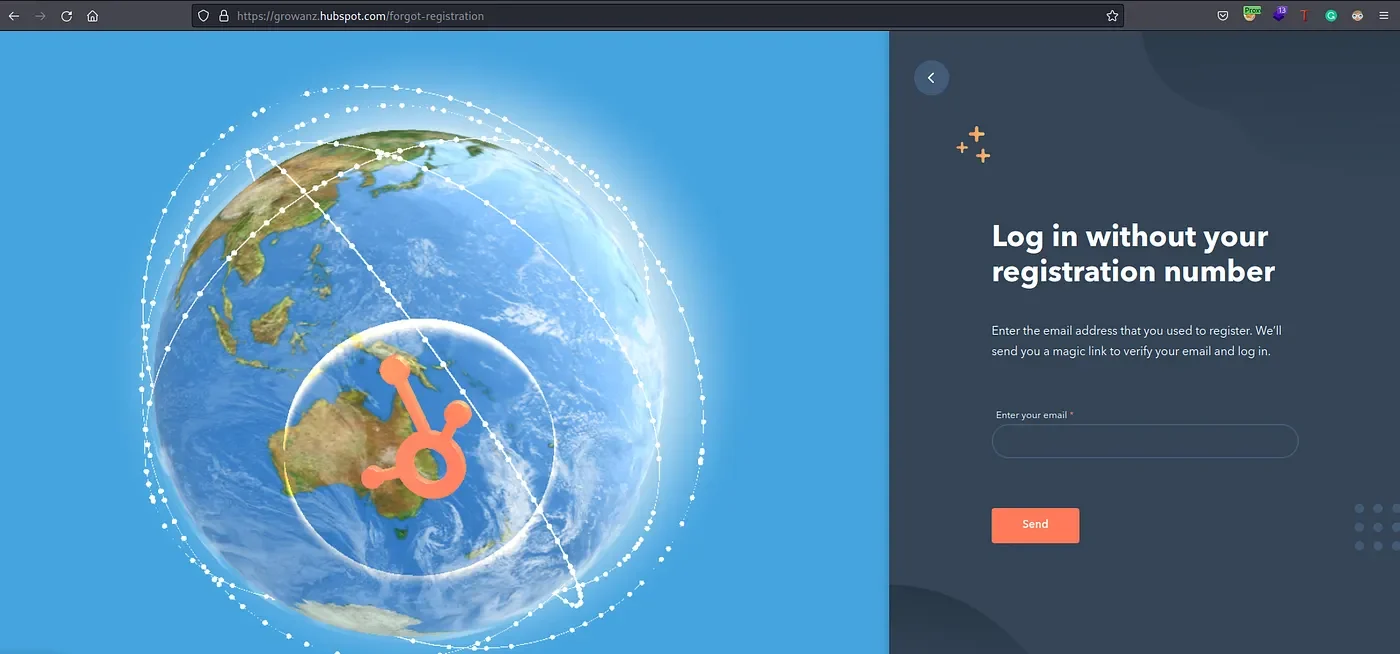
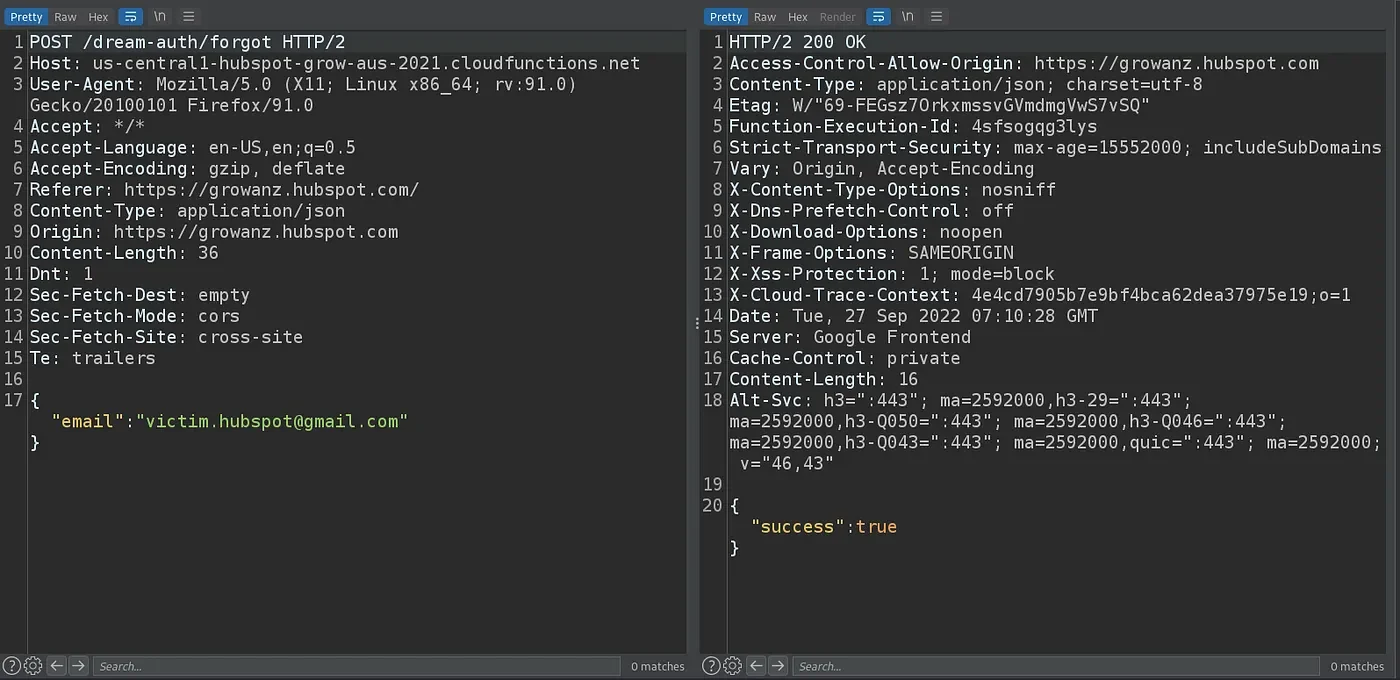
The whole investigation is about what the backend does with the email value and with the headers that surround the request, and about how the reset link is built.
Setup
The researcher tested the authentication functions of the subdomain and used a Burp Collaborator domain in several of the header and parameter tests. No accounts, roles or versions are described in the report beyond the forgot password form itself. The only precondition is that the forgot password endpoint accepts an email address and sends a mail containing a magic login link.
Finding it
The starting point was the email parameter. Because the application has to look the address up in some kind of database, the email parameter looked like the natural place to test for SQL injection.
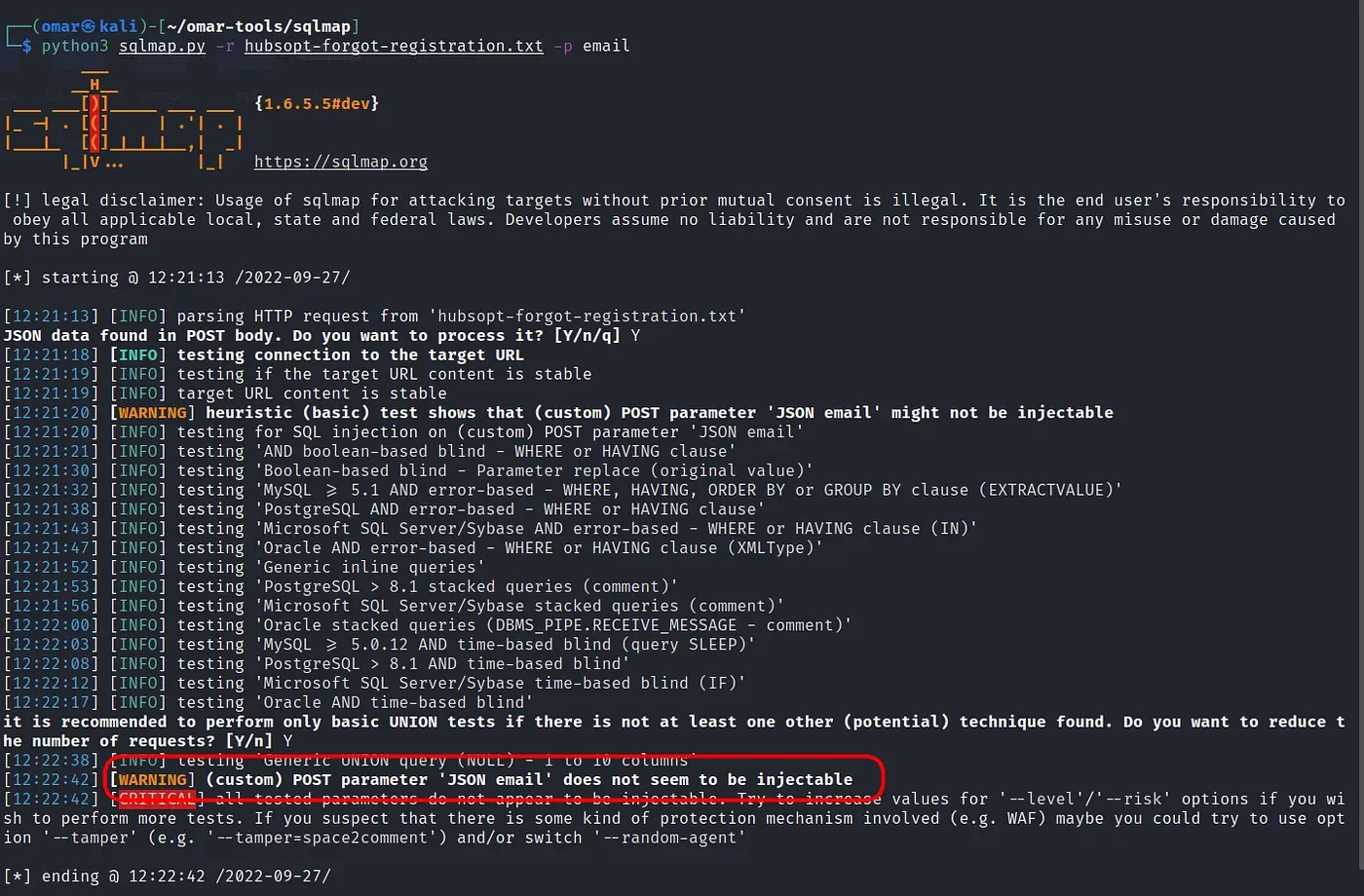
That test found nothing. The researcher then moved on to the headers that are commonly used to build the reset URI, and finally to the email parameter itself, testing several classes of injection against it.
Exploitation
Step 1: SQL injection on the email parameter
The email parameter was tested for SQL injection on the assumption that a database sits behind it. The report states that after testing it found nothing.
Step 2: Host header poisoning
Developers commonly use the Host header value when building the reset password URI, for example:
$ForgotPassURI = "https://{$_SERVER['HTTP_HOST']}/dream-auth/forgot?registration=$token&email=$email";
The idea was to change the Host header to a domain under the researcher's control so that the magic link would point there.
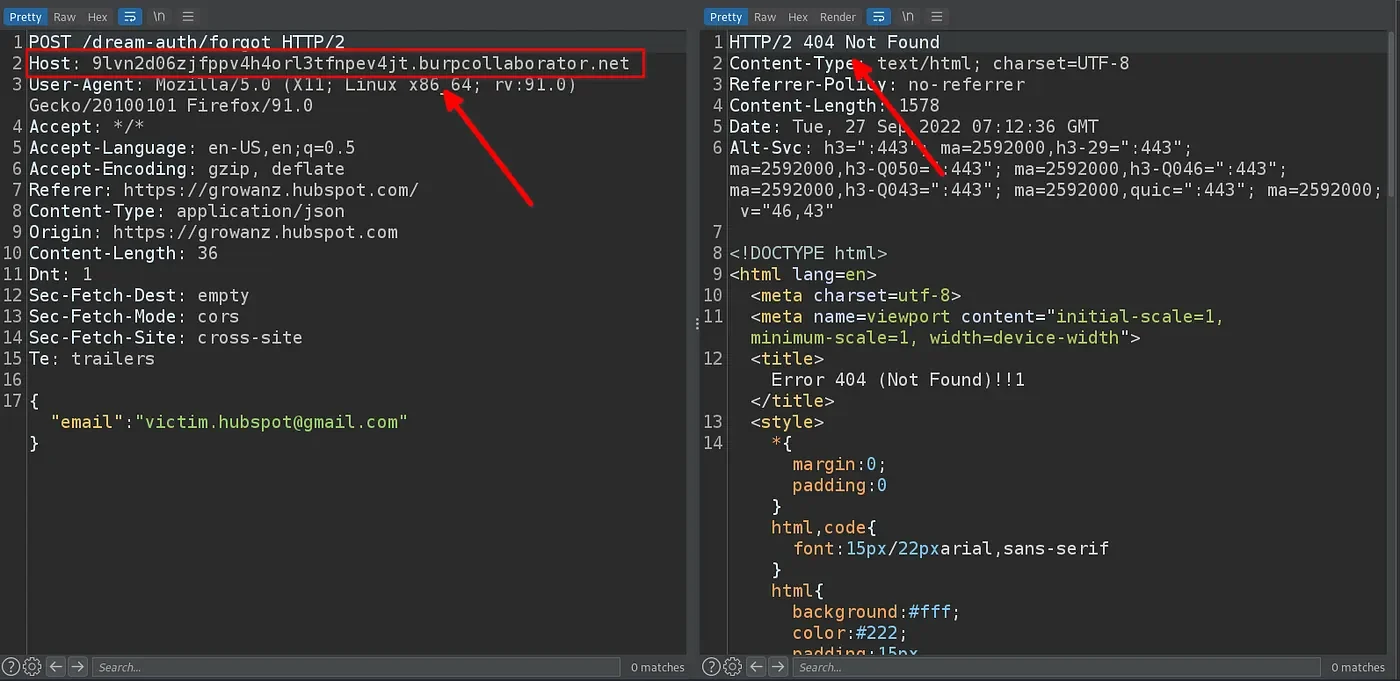
This did not work.
Step 3: Load balancer host header override
When a load balancer or reverse proxy sits between the user and the server, the application may see the load balancer's host rather than the original one, so developers sometimes read X-Forwarded-Host instead, because the proxy stores the original Host value there. Users should not be able to modify this header, but weak load balancers or reverse proxies rewrite it from user input, which makes it worth testing.
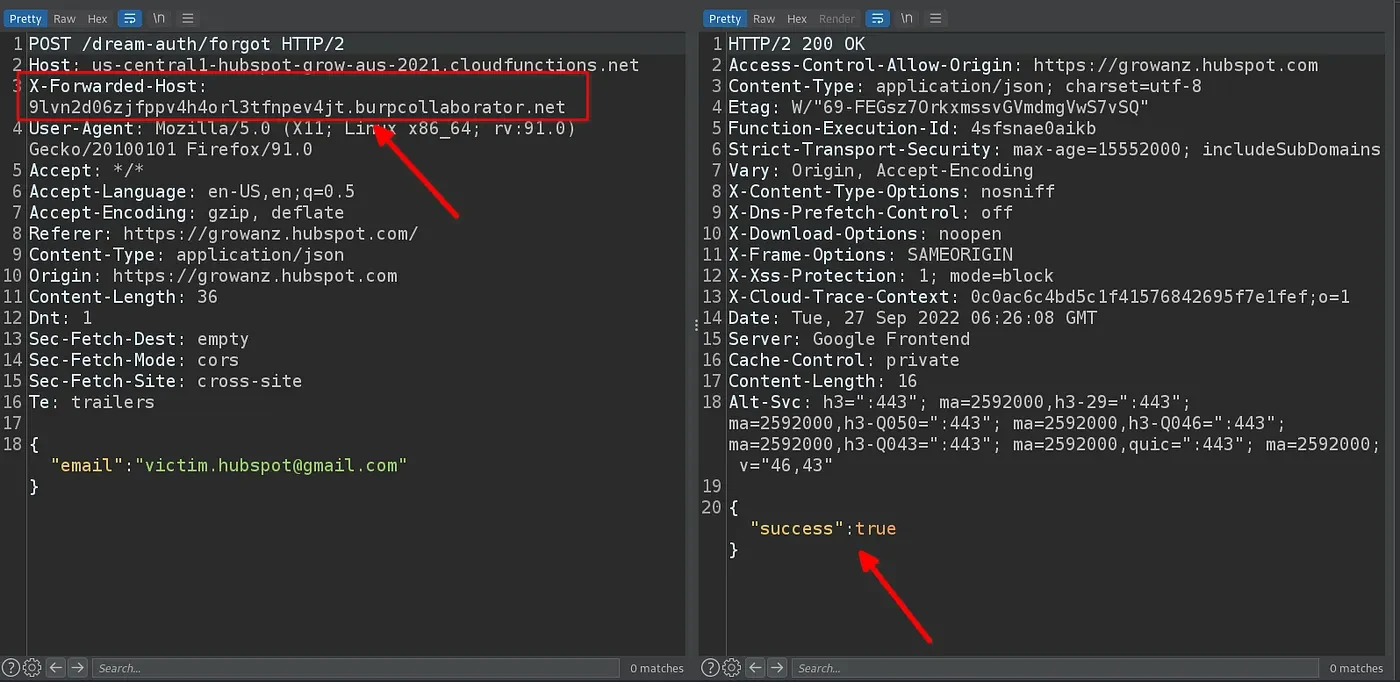
The email was sent successfully, but the forgot registration URI in the received mail still contained growanz.hubspot.com.
Step 4: Referer header
Some developers assume that the forgot password endpoint is only reached from the main subdomain and therefore use the Referer header in the reset URI:
$ForgotPassURI = "https://{$_SERVER['HTTP_REFERER']}/dream-auth-forgot?registration=$token&email=$email";
This did not work.
Step 5: Origin header
The same idea was tried with the Origin header:
$ForgotPassURI = "https://{$_SERVER['HTTP_ORIGIN']}/dream-auth-forgot?registration=$token&email=$email";
The researcher added the Burp Collaborator domain as the value.
This did not work either.
Step 6: Bypassing the regular expression
The next hypothesis was that the developers validate the header value with a regex: if the input matches, their domain is used, and if it does not match, the default subdomain from the configuration file is used. Several bypasses were tried against that assumed regex.
Matching on a host that contains growanz.hubspot.com:
growanz.hubspot.com.mydomain.com
A weak regex that uses dots without escaping them, for example ^growanz.hubspot.com$|^example.virtual.host$:
growanzXhubspot.com
Matching on a value that ends with growanz.hubspot.com:
mydomain.com/growanz.hubspot.com
Bypassing a whitelist validation:
mydomain.com%[redacted]

mydomain.com%25%32%[redacted]
None of these bypasses worked on any of the headers tried so far, so the researcher moved to the email parameter.
Step 7: HTTP parameter pollution
Applications can be monolithic, event driven, service oriented or built from microservices. Microservices expand the attack surface, and if the target uses them internally over REST APIs, parameter handling between services becomes interesting.
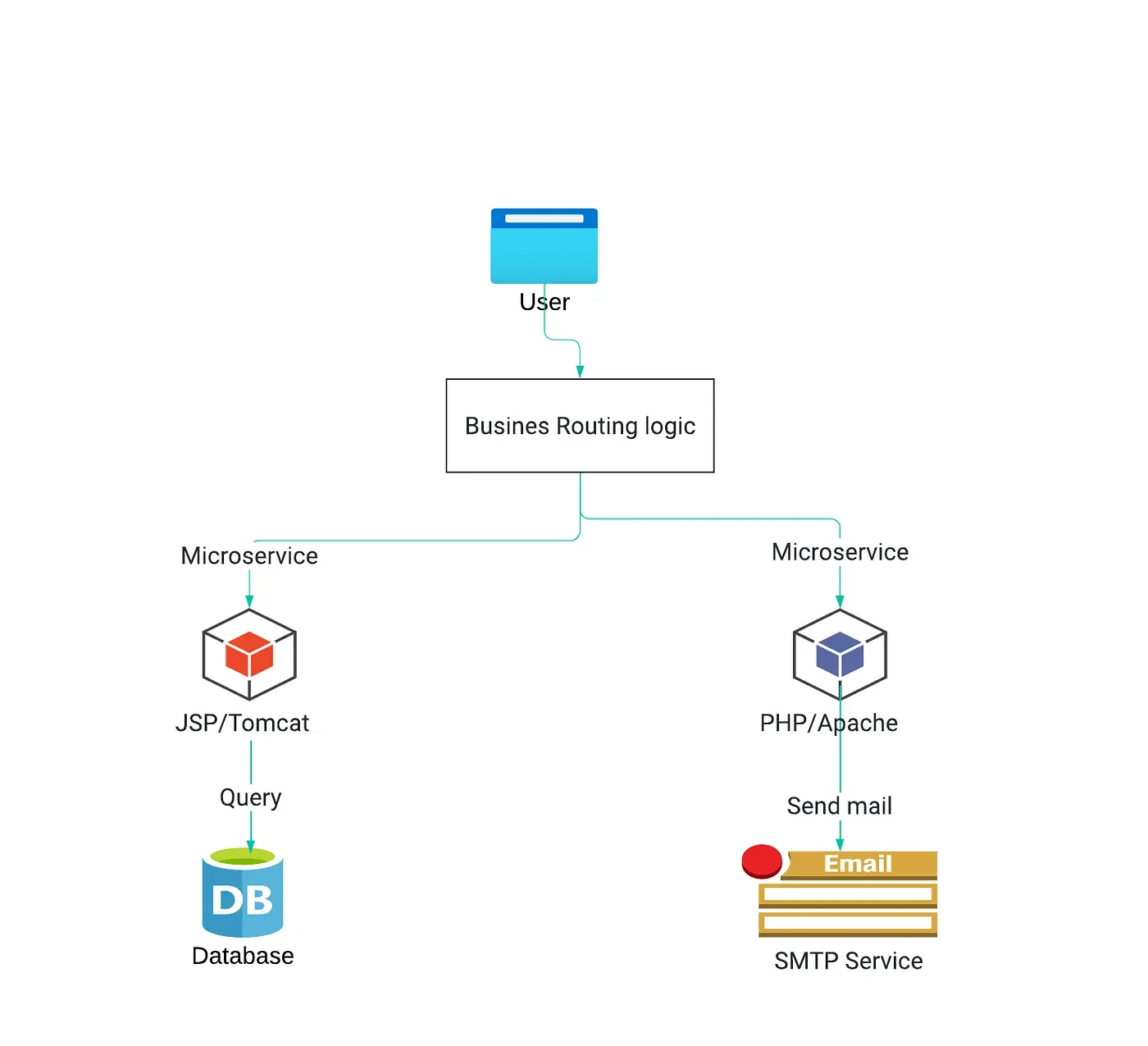
The researcher drew a graph as a simple example of the scenario: the reset password request may pass to a microservice that relies on JSP and handles database requests such as the reset password email. If the address exists, that service responds to the business routing logic, which routes the original request again to the PHP microservice that deals with SMTP and sends the reset password mail.
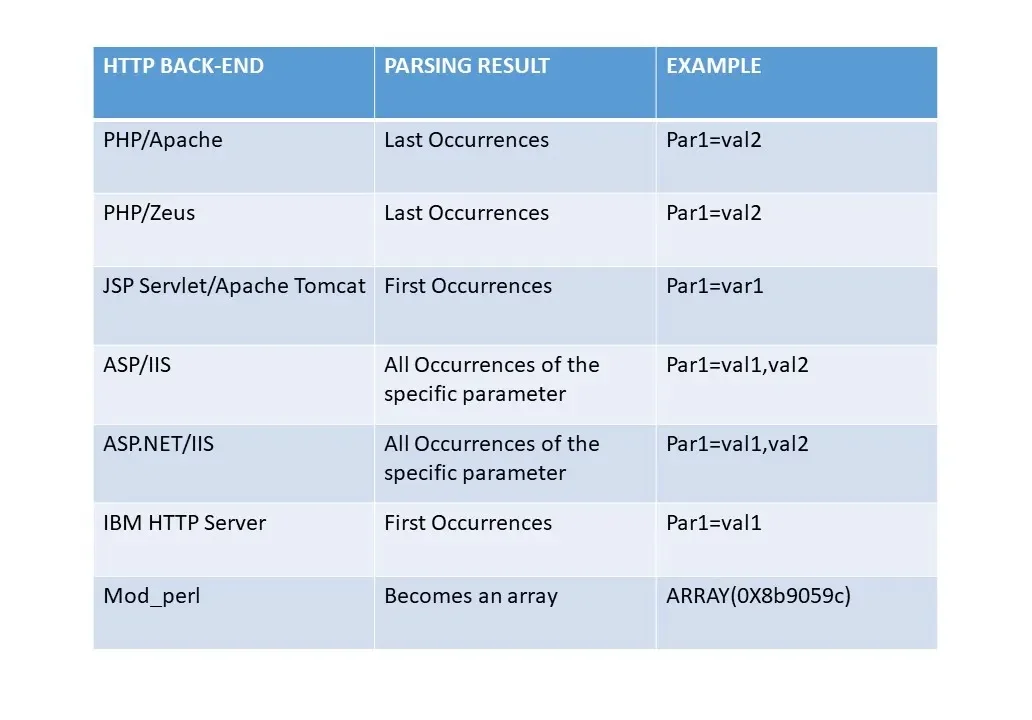
According to the table the researcher refers to, if two parameters are submitted, PHP uses the second one while other technologies such as JSP use the first one.
// HTTP parameter pollution (HPP){"email":"[redacted]","email":"[redacted]"}
So if the request reaches the JSP service that talks to the database, the reset password URI would be created for the first email, but when the request is routed again to the PHP service, the reset password mail would go to the second email.
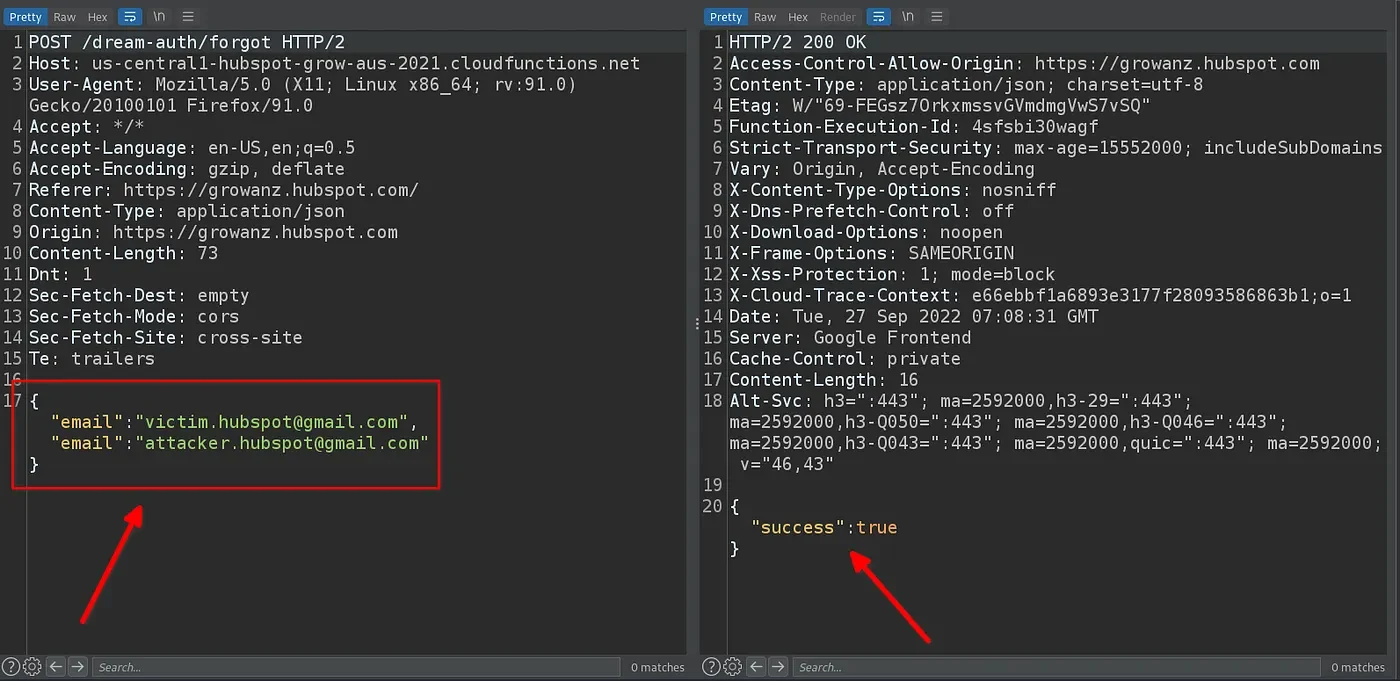
After checking the email, this did not work.
Step 8: SMTP injection chained with HTTP parameter pollution
The researcher notes that PHP is used as an example and that these attacks are not specific to PHP: they apply to other technologies that rely on SMTP parsers and services. The example processing of the email address is:
<?php//It's a simple example of using the mail functionif(isset($_POST['email'])) { $to= $_POST['email']; $subject= "Forgot Registration Number"; $message = " <html> <body> <h1>Example: to login into your account</h1> click on this magic link <a>https://growanz.hubspot.com/login?registration=$RegesNum&email=$to</a> <html> <body>"; $subject = 'Reset Password';// Set SMTP headers $additional_headers = "From: [redacted]\n" . "Content-type: text/html;"; $additional_params = ""; mail($to, $subject, $message, $additional_headers, $additional_params); }?>
All fields in the mail function are required except $additional_headers and $additional_params, which are optional.
Attacking the $to parameter
Some developers put the user's email into $to without validation, expecting the mail to go only to that user. The user can add another address using a separator. According to the official documentation, , can be used as a separator, but it has to be chained with HTTP parameter pollution by entering the victim email as another parameter, because the service that talks to the database needs a valid email to run the query on.
So when the database microservice finds the correct email and runs the query on it, the SMTP microservice, if it implements weak validation, will find the victim email as well:
// Comma saperator with HPP chain{"email":"[redacted],[redacted]","email":"[redacted]"}{"email":"[redacted]","email":"[redacted],[redacted]"}
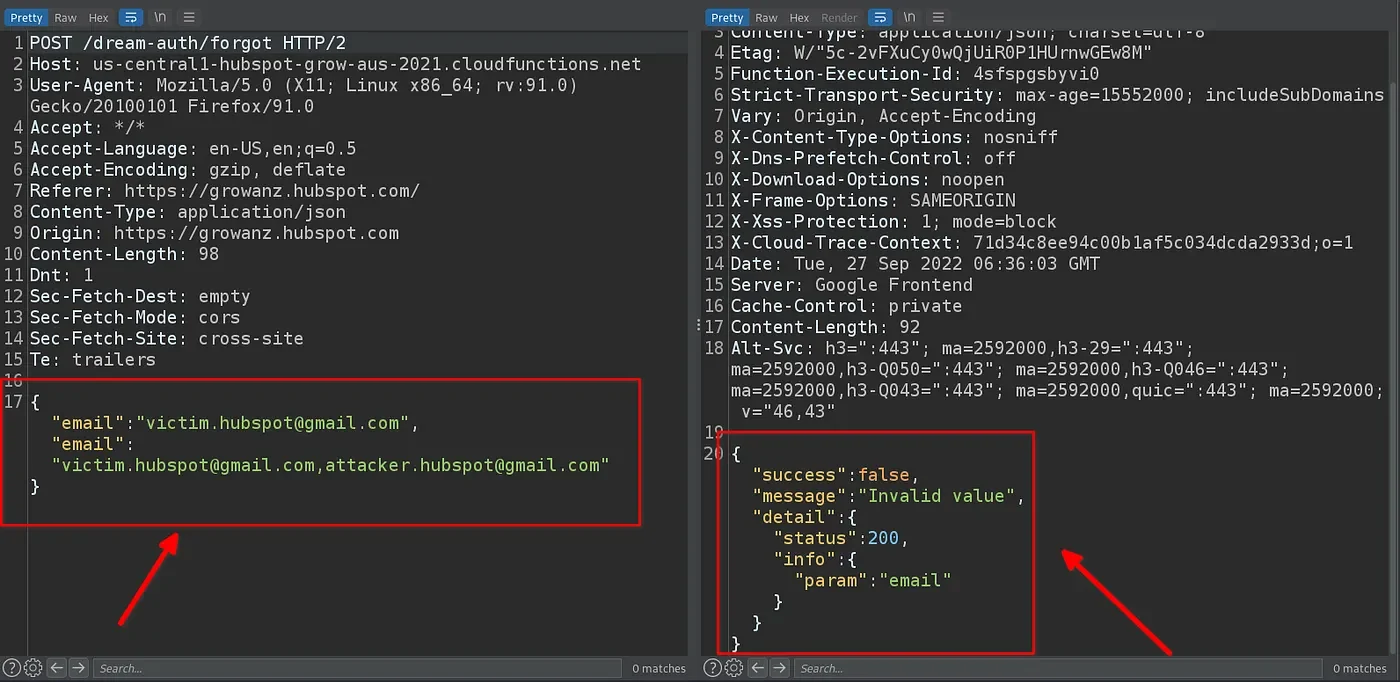
The values of the parameters were then switched.
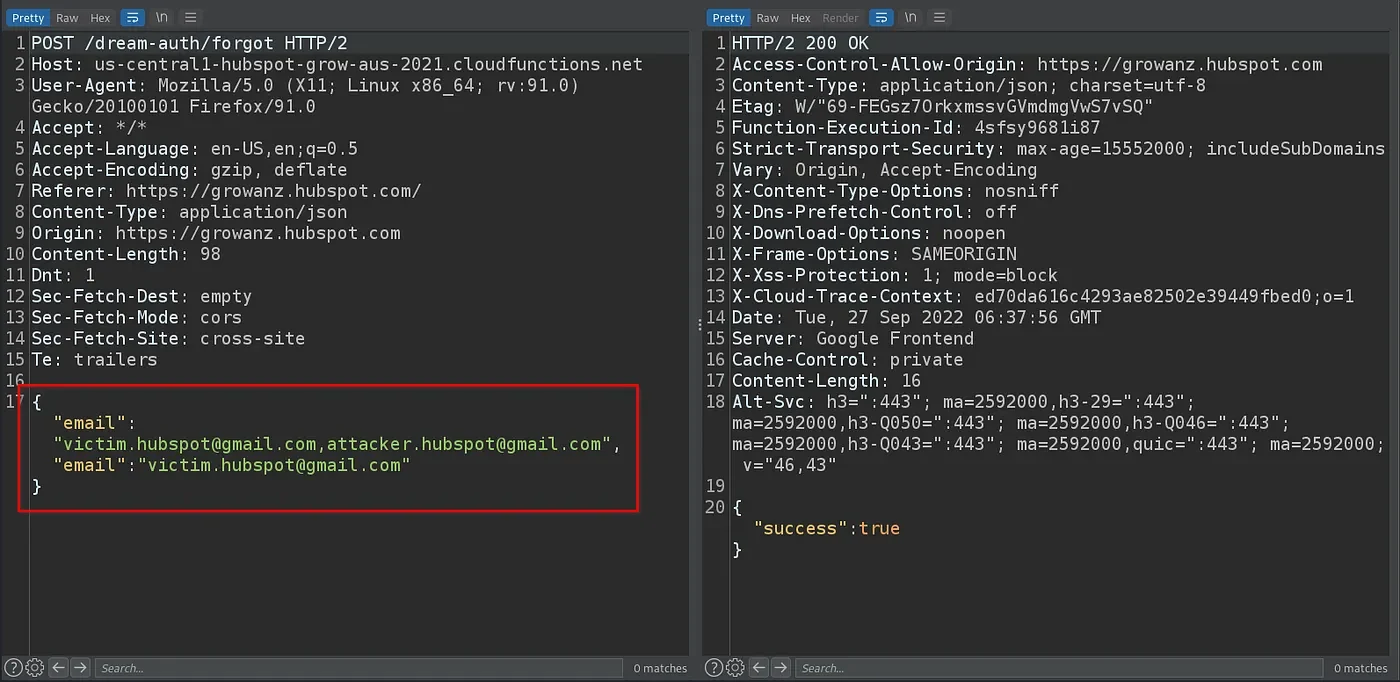
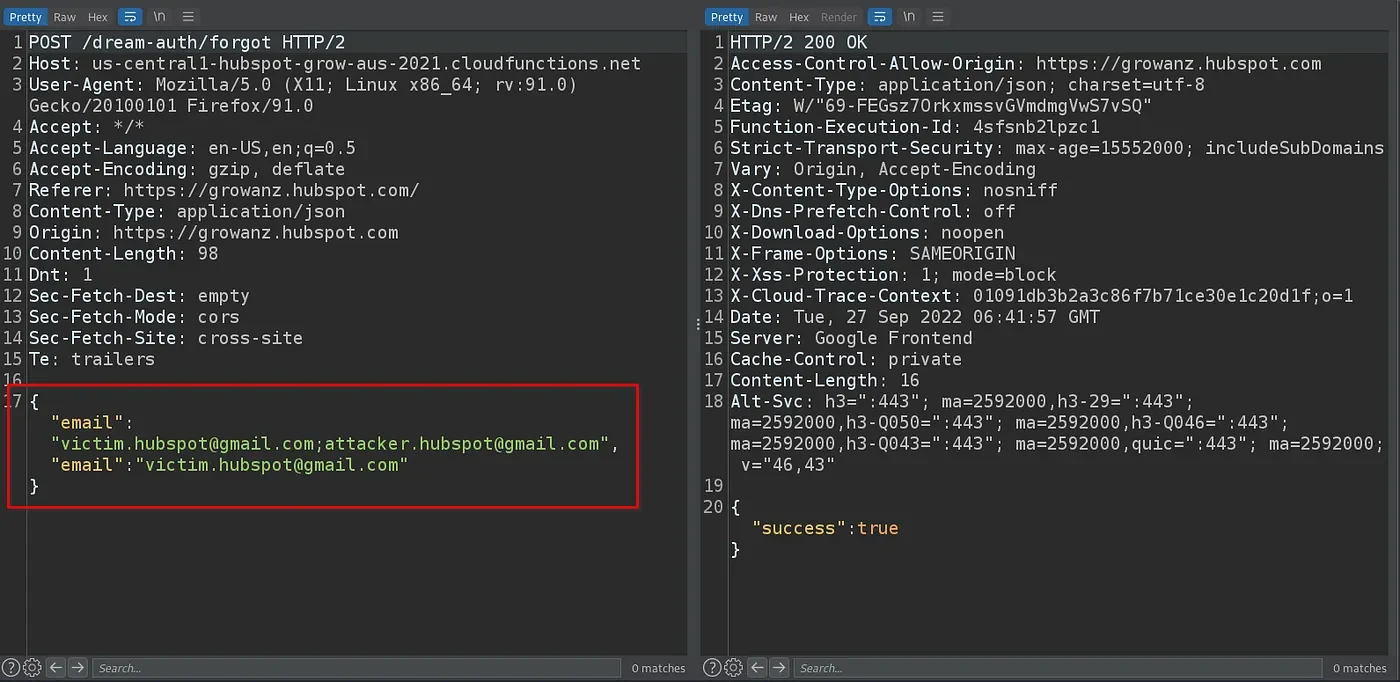
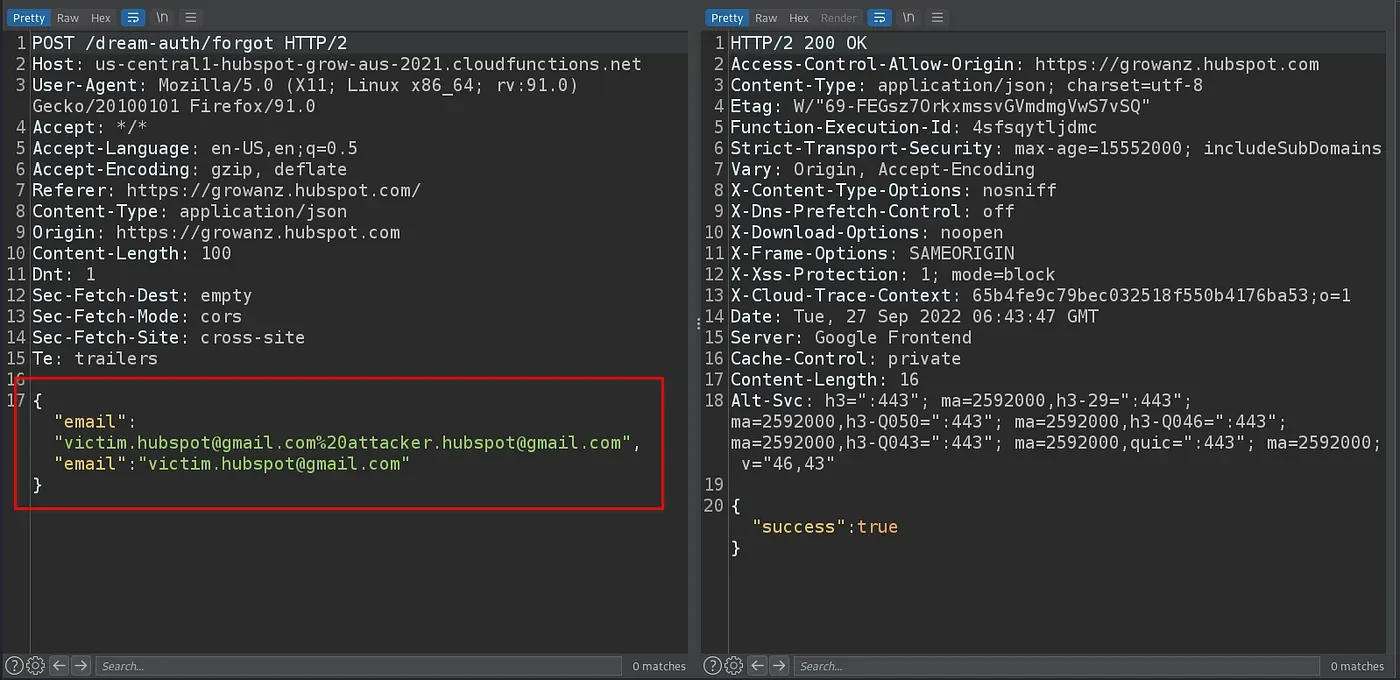
This did not work either. The official documentation lists , as a separator, but from playing with these functions locally the researcher found that other separators are accepted that are not in the documentation, such as a space and ;. That gives an advantage, because developers may validate only , to prevent adding another email and leave spaces or ; unvalidated.
// Semiclon saperator with HPP chain{"email":"[redacted];[redacted]","email":"[redacted]"}{"email":"[redacted]","email":"[redacted];[redacted]"}// Space saperator with HPP chain{"email":"[redacted]%[redacted]","email":"[redacted]"}{"email":"[redacted]","email":"[redacted]%[redacted]"}
Semicolon separator:
Space separator:
In the old version, the $to parameter was injected into the TO: header without protection against SMTP header injection, so the next step was to try that.
CRLF injection
On Unix systems only \n (line feed) is needed for SMTP header injection, while on Windows systems \r\n is needed.
Unix system (\n URL encoded):
// Carbon Copy (CC:) with HPP chain{"email":"[redacted]%0Acc:[redacted]","email":"[redacted]"}{"email":"[redacted]","email":"[redacted]%0Acc:[redacted]"}// Blind Carbon Copy (BCC:) with HPP chain{"email": "[redacted]%0Abcc:[redacted]","email":"[redacted]"}{"email":"[redacted]","email":"[redacted]%0Abcc:[redacted]"}
Windows system (\r\n URL encoded):
// Carbon Copy (CC:) with HPP chain{"email":"[redacted]%0D%0Acc:[redacted]","email":"[redacted]"}{"email":"[redacted]","email":"[redacted]%0D%0Acc:[redacted]"}// Blind Carbon Copy (BCC:) with HPP chain{"email": "[redacted]%0D%0Abcc:[redacted]","email":"[redacted]"}{"email":"[redacted]","email": "[redacted]%0D%0Abcc:[redacted]"}
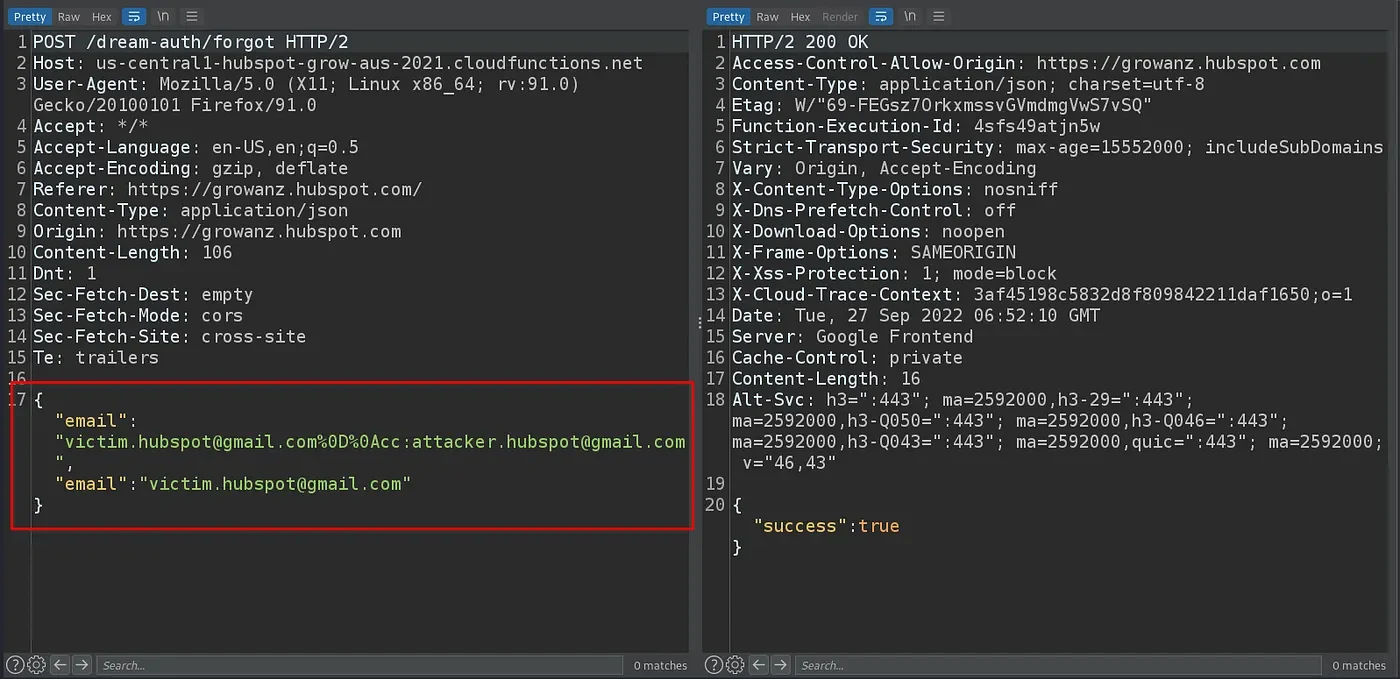
This did not work. The next hypothesis was that a newer version protects the $to parameter against CRLF and SMTP header injection: the mail() function started converting control characters such as line feed and carriage return in $subject and $to into spaces. There was a bypass for that protection, and the researcher applied it directly to the email parameter, which should be injected into $to:
// HPP chain with Bypass the mail() function protection against email header injection{"email":"[redacted]\r\n \ncc: [redacted]","email":"[redacted]"}{"email":"[redacted]","email":"[redacted]\r\n \ncc: [redacted]"}
This did not work either. The mail function in use appeared to be up to date and not vulnerable to these attacks.
Attacking the $additional_headers parameter
The $additional_headers parameter is used to add headers the developers need, for example Content-type: text/html when the mail contains HTML, or a From: [redacted] header. If, for any development logic, the email entered by the user is placed into $additional_headers, that parameter should be attacked with SMTP header injection (CRLF injection), because according to the official documentation preventing CRLF injection in $additional_headers is the developer's responsibility. These attacks had already been tried. The researcher notes that SMTP header injection is mostly encountered in contact us forms rather than reset password functions, but that developers sometimes make silly mistakes, which made it worth trying.
Step 9: OS command injection
PHP relies on the /usr/sbin/sendmail command to send mail, and some developers may prefer the command line over the built-in functions. The example given is:
$json = file_get_contents('php://input');$json = json_decode($json, true);$to = $json['email'];$command = "echo 'Example: to login into your account click on this magic link https://growanz.hubspot.com/login?registration=$token&email=$to | mail -s 'Forgot Password Mail' $to";exec($command);
Different payloads were tried to execute commands, and nothing came back.
Step 10: Array of emails
SMTP is not only used for reset password mails; it also sends internal mails and common functions such as subscribe to our news feed. One common way to send mail to all users, according to the documentation, is to put the addresses in an array such as $emails and use a function like implode(",", $emails) to join them with , and send to all addresses at once, which gives high performance, big-O(1) instead of iterator big-O(n). Developers usually do not rewrite code from scratch but copy it and edit it to fit their needs:
$json = file_get_contents('php://input');$to = json_decode($json, true);// Send emailmail(implode(",", $to['email']), $subject, $message, $headers);
If code like this is used for the reset password mail, it works fine with a single email, but adding multiple emails containing the victim and the attacker should deliver the same reset password mail of the victim to the attacker:
// Array of emails{"email":["[redacted]","[redacted]"]}
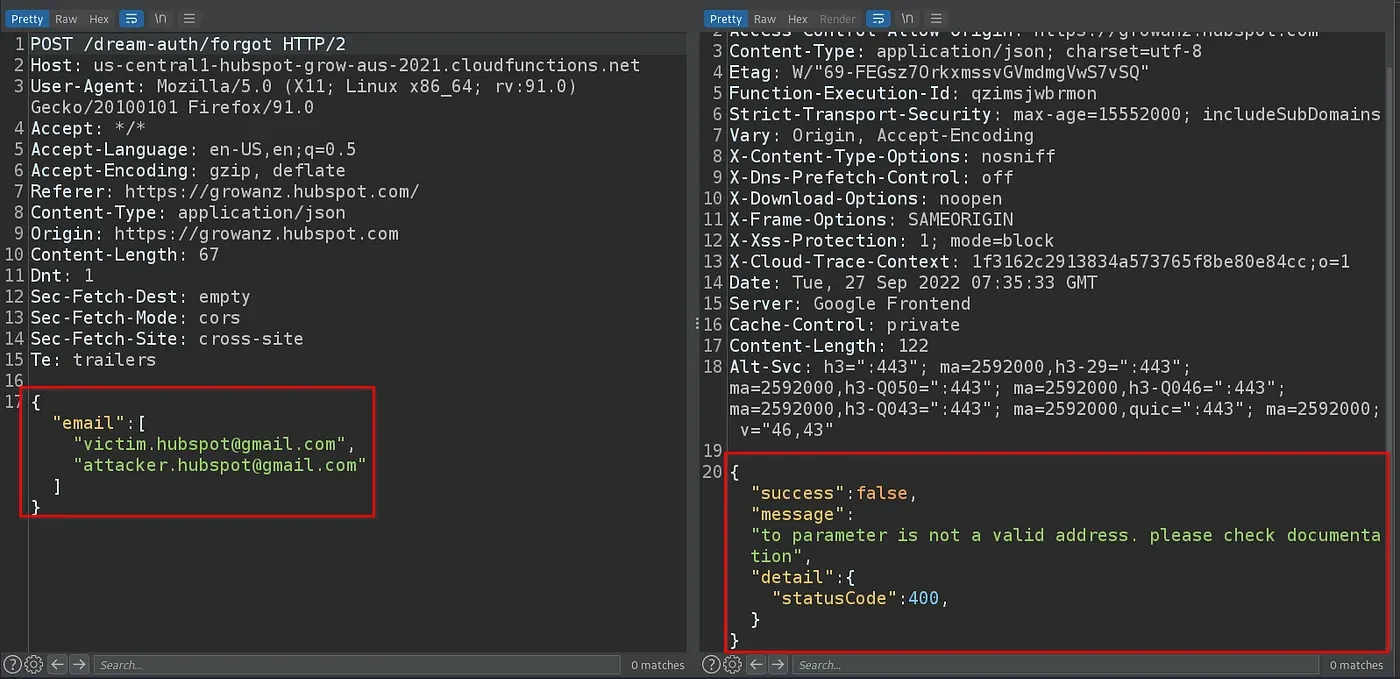
This did not work either. The error message said that the $to parameter is not a valid address, which confirmed the researcher's prediction about the backend code even though no vulnerability had been found yet.
Step 11: Parameter brute force
The API error message was worth taking advantage of, so Arjun was used to look for hidden parameters.
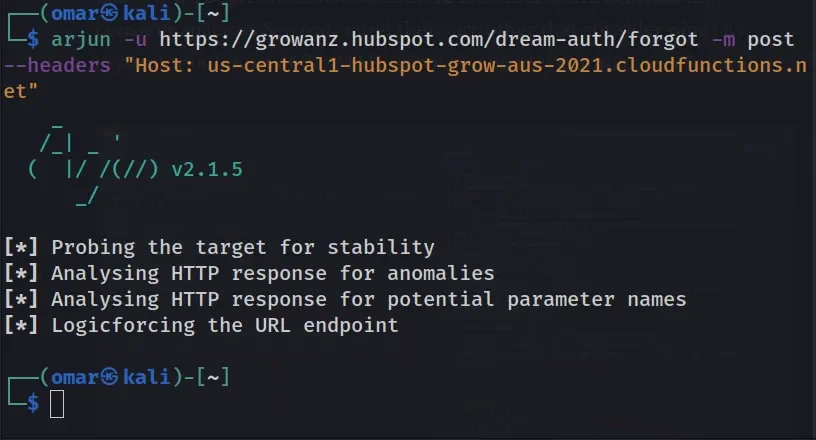
Arjun found nothing. That was strange, because the email parameter already worked, so the brute force was repeated manually. The Arjun wordlist was taken and every parameter was given a value containing all special characters in its own name, to provoke an error and detect which parameter the API uses, with this Python script:
params = open("Arjun/arjun/db/large.txt","r").readlines()params = set(params)NewParams = set()for param in params: NewParams.add('"'+param.strip()+'"'+':'+'"'+param.strip()+'\'!@#$%^&*)(?><",')NewParamsFile = open("new-params","w")for param in NewParams: NewParamsFile.write(param+"\n")
The parameters were then put into the request.
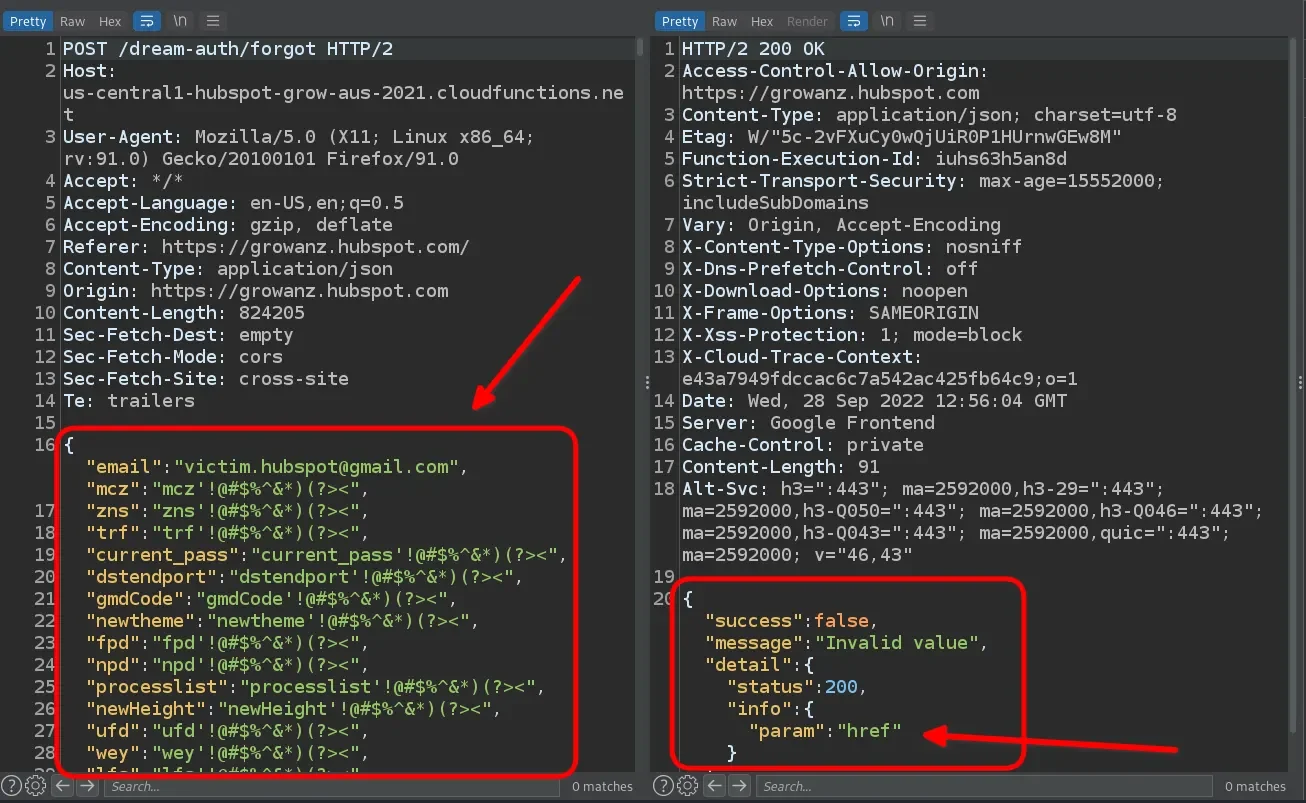
This revealed that href is used in the backend and was not detected by Arjun. The researcher calls this the golden advice: do not rely on tools if you do not know what the tool does in the background. Arjun adds four digits as the value of each parameter, which makes the email parameter value invalid, so the server always responds with invalid value for email parameter. Arjun checks the response content-length header to see whether a parameter changes it, which would mean the parameter is dynamic, but that never happened because the email value was invalid all the time, so Arjun did not detect the parameters.
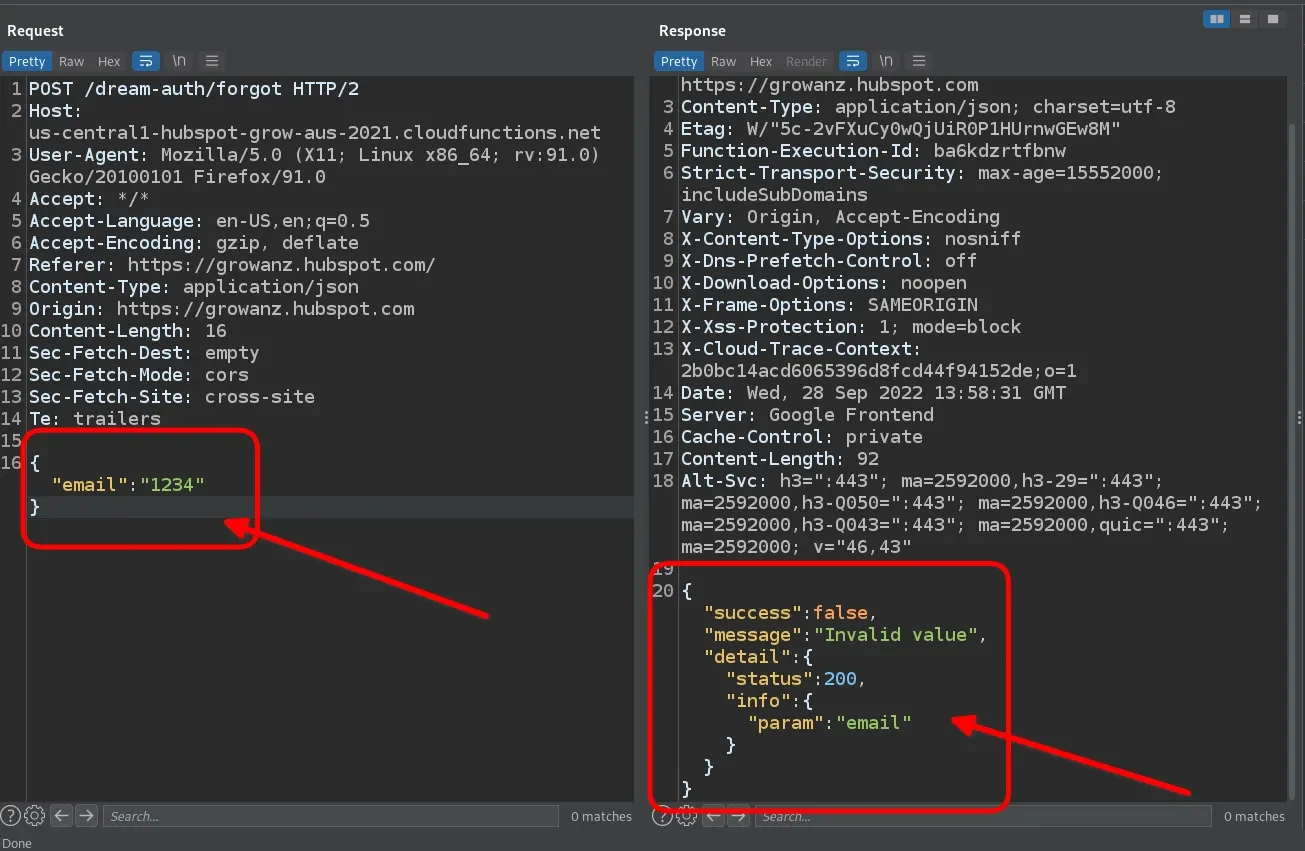
Step 12: The href parameter
Anyone who knows HTML basics knows that the href (hyper reference) value is always a URL. The questions were: why is there an href parameter here, and is it used in the forgot registration mail? To answer them, the researcher injected the Burp Collaborator into the href parameter.
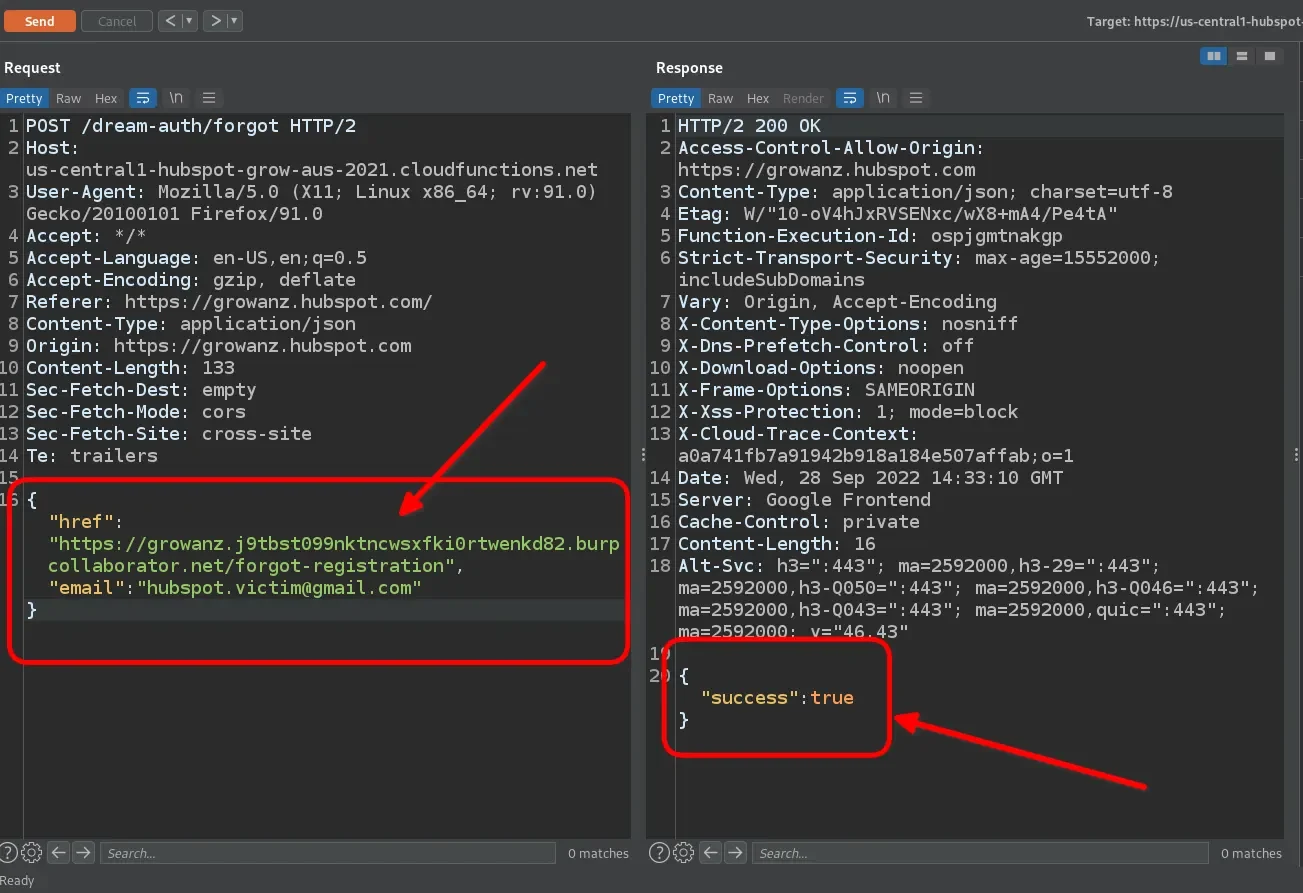
The mail was then checked.
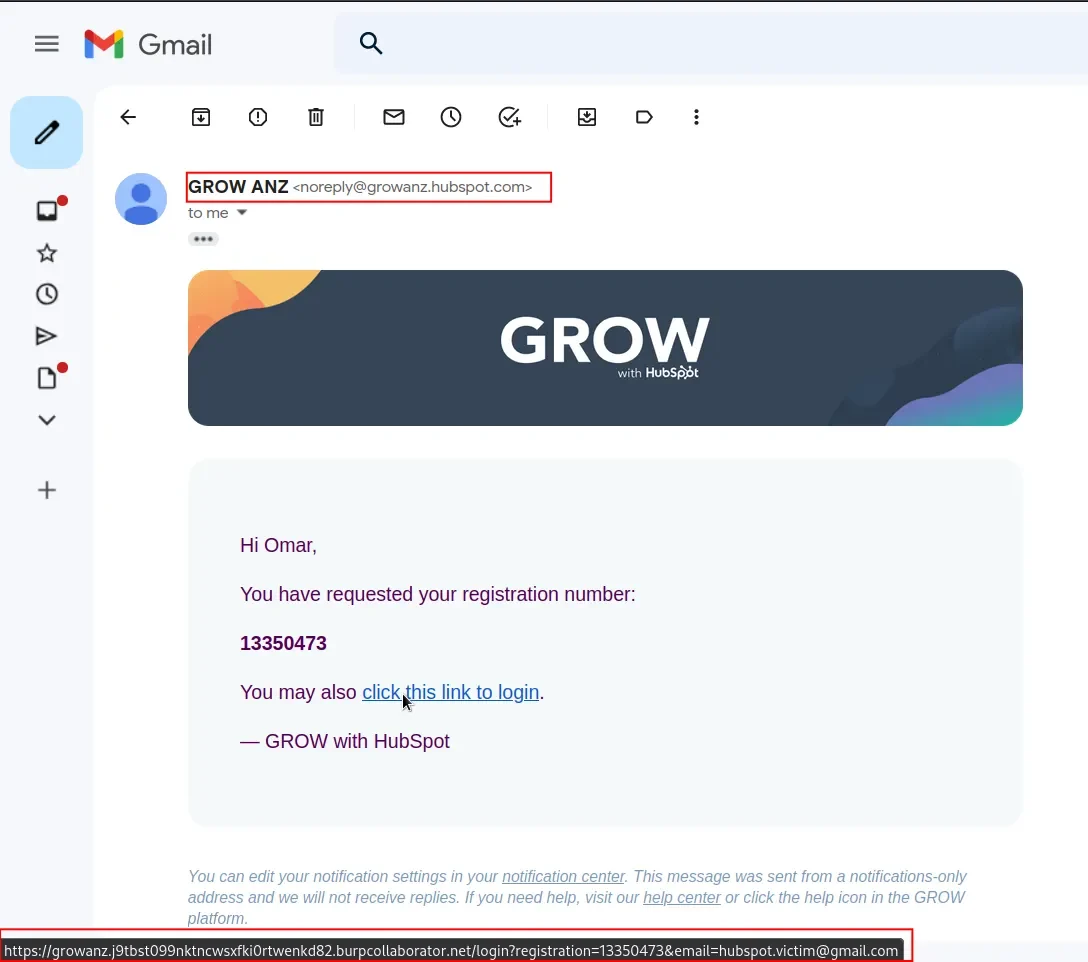
A mail was received from the hubspot.com domain.

Clicking the magic link, instead of letting the user log in, requests the Burp Collaborator server, which allows the researcher to receive the victim credentials.
Root cause
The forgot registration mail builds its magic link from an href parameter supplied by the requester, and the value ends up in the link inside the mail. The link is delivered inside a genuine mail from the hubspot.com domain, so the victim has no reason to distrust it. The earlier tests show that the reset URI itself was not built from the Host, X-Forwarded-Host, Referer or Origin headers, and that the email parameter was not vulnerable to SQL injection, SMTP injection, CRLF injection, command injection or array handling. The href parameter was simply not visible to Arjun because the tool's placeholder value for the email parameter made every response invalid, so the hidden parameter had to be found by manual brute force.
Impact
An attacker can request a forgot registration mail with the href parameter pointing at a domain they control. The victim receives a legitimate mail from hubspot.com whose magic link, when clicked, requests the attacker's server, which allows the attacker to receive the victim credentials. The report describes this as a full account takeover on the HubSpot public bug bounty programme.
Fix
The report does not describe the fix that was applied. Based on the finding, the href value used in the forgot registration mail should not be taken from user input, or should be restricted to the application's own domain, so that the magic link always points at HubSpot.
Variants to test
- Hidden parameters on other mail sending endpoints. Send each candidate parameter with a value containing special characters and look for a different error or a different response length. A positive result is a parameter name that changes the response or appears in the received mail.
hrefor link parameters in other mail templates, such as invitation, verification and contact us mails. Put a Collaborator domain in the parameter and read the mail. A positive result is a mail whose link points at the Collaborator.- Header based reset URI construction. Try
Host,X-Forwarded-Host,RefererandOriginwith a domain you control, including the regex bypasses shown above. A positive result is a reset URI in the mail that contains your domain. - HTTP parameter pollution against multi service backends. Send the same parameter twice with different values and check which value each service uses. A positive result is a mail delivered to an address that the database service would not have accepted.
- SMTP injection through the recipient field. Try
,,;, space,%0Aand%0D%0Awithcc:andbcc:chained with HPP. A positive result is a copy of the victim's mail arriving at the attacker address. - Array of emails. Send the email parameter as a JSON array of victim and attacker addresses. A positive result is the victim's reset mail arriving at the attacker address.
- Tool blind spots. When a scanner reports nothing on an endpoint that clearly takes input, repeat the brute force manually with a valid value for the known parameter, as was done here with the Python script.
What happened, in plain words
A security researcher found a way to take over a HubSpot account through the "forgot password" form. HubSpot calls this form "forgot registration number", because in HubSpot's language your password is your "registration number".
The form asks for an email address and then sends a mail containing a special link. Clicking that link logs you in without typing a password. Such a link is often called a magic link: it is a one-time key delivered by email, like a hotel key card that the reception hands you instead of a metal key.
The researcher discovered that the mail is built using a parameter called href that the backend accepts. By putting their own web address into that field, they could make the magic link point at their own server instead of HubSpot. The victim still receives a genuine mail from hubspot.com, so nothing looks suspicious. When the victim clicks the link, it requests the attacker's server, and the attacker can collect the victim's credentials. That is a full account takeover.
Getting there took many failed attempts. The rest of this article walks through each one, in the order the researcher tried them, and explains the idea behind each attempt.
The target and the feature
The target was a HubSpot subdomain:
https://growanz.hubspot.com/
A subdomain is a smaller address inside a bigger one. If hubspot.com is a large office building, growanz.hubspot.com is one office inside it. Companies often give customers their own subdomain, and each one can run slightly different software.
The feature under test was the forgot registration number flow, which is HubSpot's name for the forgot password function. The researcher was looking at the authentication functions of this subdomain, meaning the parts of the site that decide who you are: logging in, logging out, resetting a password.
The function asks us to enter an email to send a magic link to log in without a registration number (password).
So the flow is simple: you type your email, the server checks that the address exists, and it sends you a mail with a link. The whole investigation is about two questions:
- What does the server do with the email value you type?
- What does the server do with the other pieces of information that travel with your request, and how does it build the link inside the mail?
The tools used
The researcher used Burp Suite. Burp is a program that sits between your browser and a website, like a postal worker who opens every letter, lets you read it, change it, and then sends it on. It lets you see and edit every request your browser makes.
They also used a Burp Collaborator domain. A Collaborator is a special web address that the researcher controls and that records every visit it receives. It works like a security camera pointed at an empty room: if anyone walks in, you know, and you know exactly when. If you put that address somewhere in a request and later see a hit on it, you have proof that the server used your value.
No accounts, roles or software versions are described in the report beyond the forgot password form itself. The only precondition is that the endpoint accepts an email address and sends a mail containing a magic login link.
Step 1: SQL injection on the email parameter
The starting point was the email parameter. A parameter is a named value you send to a website, the way a form field has a name and a value. When you type your address into the forgot password box, your browser sends something like email=[redacted] to the server.
Because the application has to look the address up in some kind of database, the email parameter looked like the natural place to test for SQL injection.
SQL injection means sneaking database commands into a value that the site expects to be plain data. Imagine a librarian who reads out your request to a colleague: if you say "the book called Romeo and Juliet, and also please throw all the other books in the bin", a careless librarian might do both. A database is that librarian, and SQL is the language it understands.
After testing it found nothing but it was okay. The email field was not passing the researcher's text into a database command in a dangerous way.
Step 2: Host header poisoning
Every request your browser sends carries headers. Headers are extra lines of information around the actual content, like the envelope around a letter: who it is from, who it is for, what format it is in. One of them is the Host header, which says which website you are asking for. It is how one web server can host many sites and still know which one you want.
Developers commonly use the Host header value when building the reset password URI, for example:
$ForgotPassURI = "https://{$_SERVER['HTTP_HOST']}/dream-auth/forgot?registration=$token&email=$email";
Line by line:
$ForgotPassURI =stores a value in a variable, a named box that holds something for later use. Here the box is calledForgotPassURI, short for "forgot password URI"."https://starts a text string with the beginning of a web address.{$_SERVER['HTTP_HOST']}inserts the value of theHostheader that the browser sent.$_SERVERis the place where the server keeps information about the current request./dream-auth/forgot?registration=$token&email=$emailadds a path and two parameters:registration, which holds a secret token, andemail, which holds the address.- The closing
"ends the string.
A URI is just a web address, the thing you type in the address bar. A token here is a long random string that acts as a temporary key: whoever has it can use the link.
The idea was to change the Host header to a domain under the researcher's control so that the magic link would point there. If the server blindly copies whatever Host says into the link, then the link in the victim's mail would lead to the attacker's site.
This did not work.
Step 3: Load balancer host header override
When a load balancer or reverse proxy sits between the user and the server, the application may see the load balancer's host rather than the original one.
A load balancer is a traffic cop standing in front of several servers, sending each visitor to one of them so no single server gets overwhelmed. A reverse proxy is similar: a middleman that receives requests first and passes them on. Because the middleman talks to the server, the server may see the middleman's address as the Host.
To avoid losing the original information, proxies often store the original Host value in another header called X-Forwarded-Host. Developers sometimes read that header instead, because it holds what the user actually asked for.
Users should not be able to modify this header, but weak load balancers or reverse proxies rewrite it from user input, which makes it worth testing. In plain terms: the middleman is supposed to write the label itself, but a badly built middleman copies whatever label the visitor hands it.
The email was sent successfully, but the forgot registration URI in the received mail still contained growanz.hubspot.com. So the server was not using the forwarded header either.
Step 4: Referer header
Some developers assume that the forgot password endpoint is only reached from the main subdomain and therefore use the Referer header in the reset URI:
$ForgotPassURI = "https://{$_SERVER['HTTP_REFERER']}/dream-auth-forgot?registration=$token&email=$email";
This is the same pattern as before, but now the address is built from $_SERVER['HTTP_REFERER'], which holds the Referer header. The Referer header tells the server which page you came from, like a guest saying "I was sent here by the front desk".
If the server trusted that value, an attacker could claim to have come from their own site and get the link pointed there.
This did not work.
Step 5: Origin header
The same idea was tried with the Origin header:
$ForgotPassURI = "https://{$_SERVER['HTTP_ORIGIN']}/dream-auth-forgot?registration=$token&email=$email";
Again the same pattern, now reading $_SERVER['HTTP_ORIGIN']. The Origin header is similar to Referer but simpler: it says which site a request comes from, without the full page path. Browsers send it automatically for many kinds of requests.
The researcher added the Burp Collaborator domain as the value.
This did not work either.
Step 6: Bypassing the regular expression
The next hypothesis was that the developers validate the header value with a regex. A regular expression, or regex, is a pattern used to check text, like a bouncer with a list of allowed names. If the input matches the pattern, the code does one thing; if it does not match, it does another.
Here the guess was: if the input matches, their domain is used, and if it does not match, the default subdomain from the configuration file is used. Several bypasses were tried against that assumed regex. A bypass means finding an input that looks acceptable to the check but behaves differently when used.
Matching on a host that contains growanz.hubspot.com:
growanz.hubspot.com.mydomain.com
This puts the real domain at the start and the attacker's domain after it. A check that only asks "does the text contain our domain?" would say yes, but the browser reads the address from right to left when deciding where to go, so it would end up at mydomain.com.
A weak regex that uses dots without escaping them, for example ^growanz.hubspot.com$|^example.virtual.host$:
growanzXhubspot.com
In a regex, a dot normally means "any single character". If the developer forgets to escape the dots, the pattern accepts any character where the dots are, so growanzXhubspot.com passes the check even though it is a different domain.
Matching on a value that ends with growanz.hubspot.com:
mydomain.com/growanz.hubspot.com
This puts the attacker's domain first and the real one at the end, to fool a check that only looks at the ending.
Bypassing a whitelist validation:
mydomain.com%[redacted]

mydomain.com%25%32%[redacted]
A whitelist is a list of allowed values. Here the trick uses the @ sign, which in a web address separates the login part from the host part, and %23, which is the encoded form of #. %25%32%33 is a double encoding: %25 is %, %32 is 2, %33 is 3, so it decodes to %23, which decodes to #. The idea is that different parts of the system may read the address differently, so one check sees the real domain while the browser goes elsewhere.
None of these bypasses worked on any of the headers tried so far, so the researcher moved to the email parameter.
Step 7: HTTP parameter pollution
Applications can be monolithic, event driven, service oriented or built from microservices.
- A monolithic application is one big program where everything lives together, like a single shop that does everything under one roof.
- Microservices split the application into small separate programs that talk to each other, like a shopping centre where each shop does one job and they phone each other when needed.
Microservices expand the attack surface, meaning there are more places where something can go wrong. If the target uses them internally over REST APIs, parameter handling between services becomes interesting.
An API is a way for two programs to talk to each other, like a waiter taking your order to the kitchen. REST is a common style for such APIs, using simple web requests.
The researcher drew a graph as a simple example of the scenario: the reset password request may pass to a microservice that relies on JSP and handles database requests such as the reset password email. If the address exists, that service responds to the business routing logic, which routes the original request again to the PHP microservice that deals with SMTP and sends the reset password mail.
JSP and PHP are two programming languages used to build websites. SMTP is the standard protocol for sending email, the set of rules mail servers follow to hand messages to each other.
According to the table the researcher refers to, if two parameters are submitted, PHP uses the second one while other technologies such as JSP use the first one.
HTTP parameter pollution, or HPP, means sending the same parameter twice with different values. Different parts of the system may then pick different values, like two colleagues reading the same form and each taking a different line as the answer.
// HTTP parameter pollution (HPP){"email":"[redacted]","email":"[redacted]"}
This is a JSON object, a common text format for structured data. It has two entries both named email: the first holds the victim's address, the second the attacker's.
So if the request reaches the JSP service that talks to the database, the reset password URI would be created for the first email, but when the request is routed again to the PHP service, the reset password mail would go to the second email.
After checking the email, this did not work.
Step 8: SMTP injection chained with HTTP parameter pollution
The researcher notes that PHP is used as an example and that these attacks are not specific to PHP: they apply to other technologies that rely on SMTP parsers and services. A parser is a program that reads text and works out its structure, like a person reading a form and deciding which box each word belongs in.
The example processing of the email address is:
<?php//It's a simple example of using the mail functionif(isset($_POST['email'])) { $to= $_POST['email']; $subject= "Forgot Registration Number"; $message = " <html> <body> <h1>Example: to login into your account</h1> click on this magic link <a>https://growanz.hubspot.com/login?registration=$RegesNum&email=$to</a> <html> <body>"; $subject = 'Reset Password';// Set SMTP headers $additional_headers = "From: [redacted]\n" . "Content-type: text/html;"; $additional_params = ""; mail($to, $subject, $message, $additional_headers, $additional_params); }?>
Line by line:
<?phpopens a block of PHP code.if(isset($_POST['email'])) {checks whether the request contains a field calledemail.$_POSTholds values sent in the body of a form submission.$to= $_POST['email'];copies the user's email into a variable called$to, the recipient.$subject= "Forgot Registration Number";sets the subject line of the mail.$message = "starts the body of the mail.- The HTML lines build a small web page for the mail: a heading, the words "click on this magic link", and a link whose address contains
$RegesNum(the token) and$to(the email). $subject = 'Reset Password';sets the subject again, overwriting the earlier value.$additional_headers = "From: [redacted]\n" . "Content-type: text/html;";builds extra mail headers: who the mail is from, and that the body is HTML. The\nis a newline character, and the dot joins two strings together.$additional_params = "";sets an optional extra parameter to an empty string.mail($to, $subject, $message, $additional_headers, $additional_params);sends the mail using PHP's built-inmailfunction.}closes theif, and?>closes the PHP block.
All fields in the mail function are required except $additional_headers and $additional_params, which are optional.
Attacking the $to parameter
Some developers put the user's email into $to without validation, expecting the mail to go only to that user. The user can add another address using a separator. A separator is a character that marks where one item ends and the next begins, like the comma in a shopping list.
According to the official documentation, , can be used as a separator, but it has to be chained with HTTP parameter pollution by entering the victim email as another parameter, because the service that talks to the database needs a valid email to run the query on. In other words: the database service must see a real address so it agrees to send the mail, while the mail service must see both addresses so it sends a copy to the attacker.
So when the database microservice finds the correct email and runs the query on it, the SMTP microservice, if it implements weak validation, will find the victim email as well:
// Comma saperator with HPP chain{"email":"[redacted],[redacted]","email":"[redacted]"}{"email":"[redacted]","email":"[redacted],[redacted]"}
Two JSON objects are shown. In the first, the first email value contains both addresses separated by a comma, and the second email value is just the victim. In the second object the order is swapped. The point is to see which service reads which copy.
The values of the parameters were then switched.
This did not work either. The official documentation lists , as a separator, but from playing with these functions locally the researcher found that other separators are accepted that are not in the documentation, such as a space and ;. That gives an advantage, because developers may validate only , to prevent adding another email and leave spaces or ; unvalidated.
// Semiclon saperator with HPP chain{"email":"[redacted];[redacted]","email":"[redacted]"}{"email":"[redacted]","email":"[redacted];[redacted]"}// Space saperator with HPP chain{"email":"[redacted]%[redacted]","email":"[redacted]"}{"email":"[redacted]","email":"[redacted]%[redacted]"}
Here the separator is a semicolon in the first pair, and %20 in the second. %20 is the encoded form of a space, because a raw space is not allowed inside a web address.
Semicolon separator:
Space separator:
In the old version, the $to parameter was injected into the TO: header without protection against SMTP header injection, so the next step was to try that.
SMTP header injection means putting extra mail headers into a value that should only hold an address. Mail is made of headers and a body, just like a letter has an envelope and paper inside. If you can slip a newline into the recipient field, you can add your own header lines, such as a copy to another address.
CRLF injection
On Unix systems only \n (line feed) is needed for SMTP header injection, while on Windows systems \r\n is needed.
CRLF stands for carriage return and line feed, the two characters that mark the end of a line in text. Different systems disagree on which ones end a line, which is why both variants are tried.
Unix system (\n URL encoded):
// Carbon Copy (CC:) with HPP chain{"email":"[redacted]%0Acc:[redacted]","email":"[redacted]"}{"email":"[redacted]","email":"[redacted]%0Acc:[redacted]"}// Blind Carbon Copy (BCC:) with HPP chain{"email": "[redacted]%0Abcc:[redacted]","email":"[redacted]"}{"email":"[redacted]","email":"[redacted]%0Abcc:[redacted]"}
%0A is the encoded form of \n. cc: means carbon copy, a visible extra recipient, and bcc: means blind carbon copy, a hidden extra recipient. The idea is that the mail server reads the newline as the end of the recipient line and treats cc: or bcc: as a new header.
Windows system (\r\n URL encoded):
// Carbon Copy (CC:) with HPP chain{"email":"[redacted]%0D%0Acc:[redacted]","email":"[redacted]"}{"email":"[redacted]","email":"[redacted]%0D%0Acc:[redacted]"}// Blind Carbon Copy (BCC:) with HPP chain{"email": "[redacted]%0D%0Abcc:[redacted]","email":"[redacted]"}{"email":"[redacted]","email": "[redacted]%0D%0Abcc:[redacted]"}
%0D is the encoded form of \r, so %0D%0A is carriage return followed by line feed.
This did not work. The next hypothesis was that a newer version protects the $to parameter against CRLF and SMTP header injection: the mail() function started converting control characters such as line feed and carriage return in $subject and $to into spaces. There was a bypass for that protection, and the researcher applied it directly to the email parameter, which should be injected into $to:
// HPP chain with Bypass the mail() function protection against email header injection{"email":"[redacted]\r\n \ncc: [redacted]","email":"[redacted]"}{"email":"[redacted]","email":"[redacted]\r\n \ncc: [redacted]"}
Here the newline characters are written literally as \r\n and \n inside the JSON, with a space between them. The idea is that the protection replaces some of these characters with spaces, but the remaining ones still form a line break that the mail server accepts.
This did not work either. The mail function in use appeared to be up to date and not vulnerable to these attacks.
Attacking the $additional_headers parameter
The $additional_headers parameter is used to add headers the developers need, for example Content-type: text/html when the mail contains HTML, or a From: [redacted] header. If, for any development logic, the email entered by the user is placed into $additional_headers, that parameter should be attacked with SMTP header injection (CRLF injection), because according to the official documentation preventing CRLF injection in $additional_headers is the developer's responsibility. These attacks had already been tried.
The researcher notes that SMTP header injection is mostly encountered in contact us forms rather than reset password functions, but that developers sometimes make silly mistakes, which made it worth trying.
Step 9: OS command injection
PHP relies on the /usr/sbin/sendmail command to send mail, and some developers may prefer the command line over the built-in functions. The example given is:
$json = file_get_contents('php://input');$json = json_decode($json, true);$to = $json['email'];$command = "echo 'Example: to login into your account click on this magic link https://growanz.hubspot.com/login?registration=$token&email=$to | mail -s 'Forgot Password Mail' $to";exec($command);
Line by line:
$json = file_get_contents('php://input');reads the raw body of the request into a variable.$json = json_decode($json, true);turns that JSON text into a structured value the code can use.$to = $json['email'];takes theemailfield out of it.$command = "echo '...' | mail -s 'Forgot Password Mail' $to";builds a shell command.echoprints text, the|symbol pipes that text into themailprogram, and-ssets the subject. The user's email is pasted straight into the command.exec($command);runs the command on the operating system.
OS command injection means getting your own operating system commands run by the server, because your input was pasted into a command line. It is like writing extra instructions on an order form and having the kitchen follow them.
Different payloads were tried to execute commands, and nothing came back.
Step 10: Array of emails
SMTP is not only used for reset password mails; it also sends internal mails and common functions such as subscribe to our news feed. One common way to send mail to all users, according to the documentation, is to put the addresses in an array such as $emails and use a function like implode(",", $emails) to join them with , and send to all addresses at once, which gives high performance, big-O(1) instead of iterator big-O(n).
An array is an ordered list of values, like a shopping list. implode glues the items together with a separator. Big-O is a way of describing how much work an algorithm does as the input grows: big-O(1) means the work stays the same no matter how many items there are, while big-O(n) means the work grows with the number of items.
Developers usually do not rewrite code from scratch but copy it and edit it to fit their needs:
$json = file_get_contents('php://input');$to = json_decode($json, true);// Send emailmail(implode(",", $to['email']), $subject, $message, $headers);
Line by line:
- The first two lines read the request body and decode the JSON, as before.
// Send emailis a comment, ignored by the program.mail(implode(",", $to['email']), $subject, $message, $headers);takes theemailfield, joins its items with commas, and passes the result as the recipient list tomail.
If code like this is used for the reset password mail, it works fine with a single email, but adding multiple emails containing the victim and the attacker should deliver the same reset password mail of the victim to the attacker:
// Array of emails{"email":["[redacted]","[redacted]"]}
Here email is not a single text value but a list, shown by the square brackets, holding two addresses.
This did not work either. The error message said that the $to parameter is not a valid address, which confirmed the researcher's prediction about the backend code even though no vulnerability had been found yet.
Step 11: Parameter brute force
The API error message was worth taking advantage of, so Arjun was used to look for hidden parameters.
Arjun is a tool that guesses parameter names. It sends many requests, each with a different candidate name, and watches whether the response changes. Brute force means trying many possibilities systematically instead of being clever, like trying every key on a keyring until one opens the door.
Arjun found nothing. That was strange, because the email parameter already worked, so the brute force was repeated manually. The Arjun wordlist was taken and every parameter was given a value containing all special characters in its own name, to provoke an error and detect which parameter the API uses, with this Python script:
params = open("Arjun/arjun/db/large.txt","r").readlines()params = set(params)NewParams = set()for param in params: NewParams.add('"'+param.strip()+'"'+':'+'"'+param.strip()+'\'!@#$%^&*)(?><",')NewParamsFile = open("new-params","w")for param in NewParams: NewParamsFile.write(param+"\n")
Line by line:
params = open("Arjun/arjun/db/large.txt","r").readlines()opens Arjun's list of candidate parameter names and reads it line by line.params = set(params)turns the list into a set, which removes duplicates.NewParams = set()creates an empty set for the results.for param in params:starts a loop over every candidate name.NewParams.add('"'+param.strip()+'"'+':'+'"'+param.strip()+'\'!@#$%^&*)(?><",')builds a JSON-style entry: the name in quotes, a colon, then the name again followed by a pile of special characters, all in quotes.strip()removes stray spaces and newlines.NewParamsFile = open("new-params","w")opens a file for writing.for param in NewParams:loops over the results.NewParamsFile.write(param+"\n")writes each one on its own line.
The idea is that a parameter the server actually uses will react badly to a value full of special characters, producing an error, while an unknown parameter is ignored.
The parameters were then put into the request.
This revealed that href is used in the backend and was not detected by Arjun. The researcher calls this the golden advice: do not rely on tools if you do not know what the tool does in the background. Arjun adds four digits as the value of each parameter, which makes the email parameter value invalid, so the server always responds with invalid value for email parameter. Arjun checks the response content-length header to see whether a parameter changes it, which would mean the parameter is dynamic, but that never happened because the email value was invalid all the time, so Arjun did not detect the parameters.
Content-length is a header that says how big the response body is. If a parameter changes the page, the size often changes too, which is what Arjun watches for.
Step 12: The href parameter
Anyone who knows HTML basics knows that the href (hyper reference) value is always a URL. HTML is the language web pages are written in, and href is the attribute that holds the address a link points to.
The questions were: why is there an href parameter here, and is it used in the forgot registration mail? To answer them, the researcher injected the Burp Collaborator into the href parameter.
The mail was then checked.
A mail was received from the hubspot.com domain.
Clicking the magic link, instead of letting the user log in, requests the Burp Collaborator server, which allows the researcher to receive the victim credentials.
Root cause
The forgot registration mail builds its magic link from an href parameter supplied by the requester, and the value ends up in the link inside the mail. The link is delivered inside a genuine mail from the hubspot.com domain, so the victim has no reason to distrust it.
The earlier tests show that the reset URI itself was not built from the Host, X-Forwarded-Host, Referer or Origin headers, and that the email parameter was not vulnerable to SQL injection, SMTP injection, CRLF injection, command injection or array handling. The href parameter was simply not visible to Arjun because the tool's placeholder value for the email parameter made every response invalid, so the hidden parameter had to be found by manual brute force.
Impact
An attacker can request a forgot registration mail with the href parameter pointing at a domain they control. The victim receives a legitimate mail from hubspot.com whose magic link, when clicked, requests the attacker's server, which allows the attacker to receive the victim credentials. The report describes this as a full account takeover on the HubSpot public bug bounty programme.
Fix
The report does not describe the fix that was applied. Based on the finding, the href value used in the forgot registration mail should not be taken from user input, or should be restricted to the application's own domain, so that the magic link always points at HubSpot.
Variants to test
- Hidden parameters on other mail sending endpoints. Send each candidate parameter with a value containing special characters and look for a different error or a different response length. A positive result is a parameter name that changes the response or appears in the received mail.
hrefor link parameters in other mail templates, such as invitation, verification and contact us mails. Put a Collaborator domain in the parameter and read the mail. A positive result is a mail whose link points at the Collaborator.- Header based reset URI construction. Try
Host,X-Forwarded-Host,RefererandOriginwith a domain you control, including the regex bypasses shown above. A positive result is a reset URI in the mail that contains your domain. - HTTP parameter pollution against multi service backends. Send the same parameter twice with different values and check which value each service uses. A positive result is a mail delivered to an address that the database service would not have accepted.
- SMTP injection through the recipient field. Try
,,;, space,%0Aand%0D%0Awithcc:andbcc:chained with HPP. A positive result is a copy of the victim's mail arriving at the attacker address. - Array of emails. Send the email parameter as a JSON array of victim and attacker addresses. A positive result is the victim's reset mail arriving at the attacker address.
- Tool blind spots. When a scanner reports nothing on an endpoint that clearly takes input, repeat the brute force manually with a valid value for the known parameter, as was done here with the Python script.
Glossary
- Account takeover: gaining control of someone else's account, usually by obtaining their login credentials or a working login link.
- API: a way for two programs to talk to each other, like a waiter carrying orders between you and the kitchen.
- Array: an ordered list of values, like a shopping list.
- Arjun: a tool that guesses hidden parameter names by sending many requests and watching for changes in the response.
- Authentication: the process of proving who you are, such as logging in.
- Big-O: a way of describing how much work an algorithm does as the input grows.
- Brute force: trying many possibilities systematically until one works.
- Burp Collaborator: a web address controlled by the researcher that records every visit it receives, used to detect when a server uses a supplied value.
- Burp Suite: a program that sits between your browser and a website so you can see and edit every request.
- Bypass: an input that looks acceptable to a check but behaves differently when used.
- Content-length: a header that states the size of the response body.
- CRLF: carriage return and line feed, the characters that mark the end of a line in text.
- CRLF injection: slipping line break characters into a value so that extra lines, such as mail headers, are added.
- Database: an organised store of information that a program can look things up in.
- Header: an extra line of information sent with a request or a mail, like the writing on an envelope.
- Host header: the header that says which website the browser is asking for.
- HPP (HTTP parameter pollution): sending the same parameter twice with different values so different parts of the system may read different values.
- href: the HTML attribute that holds the address a link points to.
- HTML: the language web pages are written in.
- JSON: a common text format for structured data, using curly braces for objects and square brackets for lists.
- JSP: a programming language used to build websites.
- Load balancer: a middleman that spreads incoming traffic across several servers.
- Magic link: a link sent by email that logs you in without a password, like a one-time key card.
- Microservices: an application split into small separate programs that talk to each other.
- Monolithic: an application built as one big program where everything lives together.
- Origin header: a header that says which site a request comes from.
- OS command injection: getting your own operating system commands run by the server because your input was pasted into a command line.
- Parameter: a named value sent to a website, like a form field with a name and a value.
- Parser: a program that reads text and works out its structure.
- PHP: a programming language used to build websites.
- Referer header: a header that says which page you came from.
- Regex (regular expression): a pattern used to check text, like a bouncer with a list of allowed names.
- REST: a common style for APIs that uses simple web requests.
- Reverse proxy: a middleman that receives requests first and passes them on to the server.
- SMTP: the standard protocol for sending email.
- SMTP header injection: slipping extra mail headers into a value that should only hold an address.
- SQL injection: sneaking database commands into a value that the site expects to be plain data.
- Subdomain: a smaller address inside a bigger one, like one office inside a building.
- Token: a long random string that acts as a temporary key.
- URI: a web address.
- Whitelist: a list of allowed values.
- X-Forwarded-Host: a header in which a proxy stores the original
Hostvalue it received.





