How I Found Multiple SQL Injections in 5 Minutes in Bug Bounty
The application had SQL injection vulnerabilities in the 'letter', 'pos', and 'lookup' parameters, allowing an attacker to execute arbitrary SQL queries and extract database information such as the version.
 Published on infosecwriteups.com
Hi everybody, SQL Injection is one of the most critical vulnerabilities that can be found in web applications I will show you today how I found multiple SQL Injection vulnerabilities while hunting so let’s refer to our target as target.com
The full write-up lives on its author's site
It belongs to its author, so we link to it rather than copy it. The other two tabs are our own rewrites, checked against it.
SQL injection remains one of the most damaging classes of bug in web applications, and this write-up walks through how I found several of them on a single target in a short session. The target is referred to throughout as target.com. The report does not describe the product or the feature beyond the fact that a page takes a letter parameter, a pos parameter and a lookup parameter, and that the backend answers with a database error string when a query fails.

Context
The application exposes a page, target.php, that accepts parameters and answers with a database error string when a query fails. When a query breaks, the application does not return a stack trace or a 500: it returns HTTP 200 with the body text Query failed. That single behaviour is what made the whole exercise possible, because it gives a reliable oracle for whether a payload reached the database and whether it parsed.
Setup
The tools used were sqlmap and a small passive reconnaissance pipeline built from gau, uro, qsreplace and httpx. No accounts, roles or special preconditions are mentioned.
Finding it
While taking a fast look at the HTML source of the page, I noticed two hidden parameters.
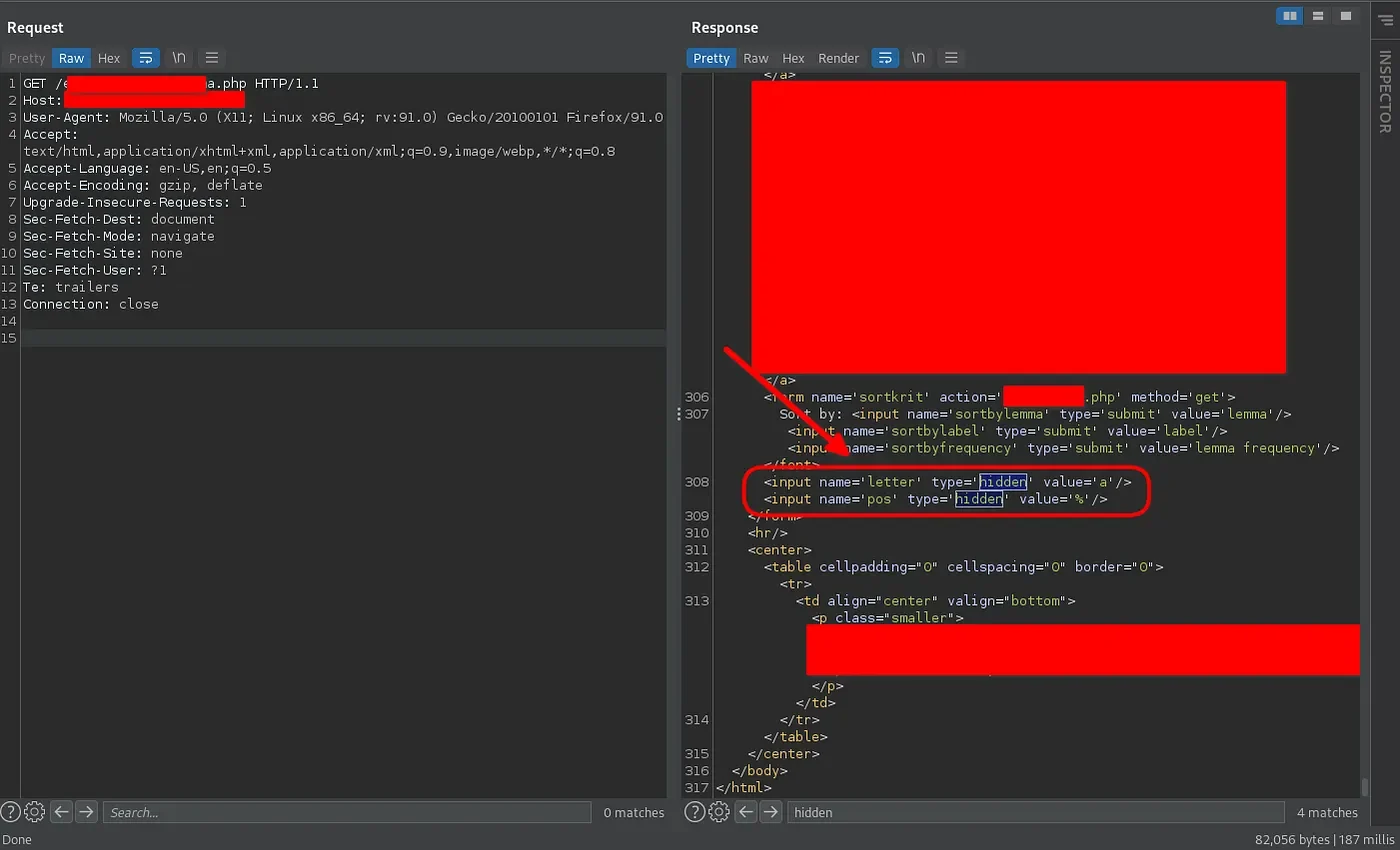
The two hidden parameters were letter and pos.
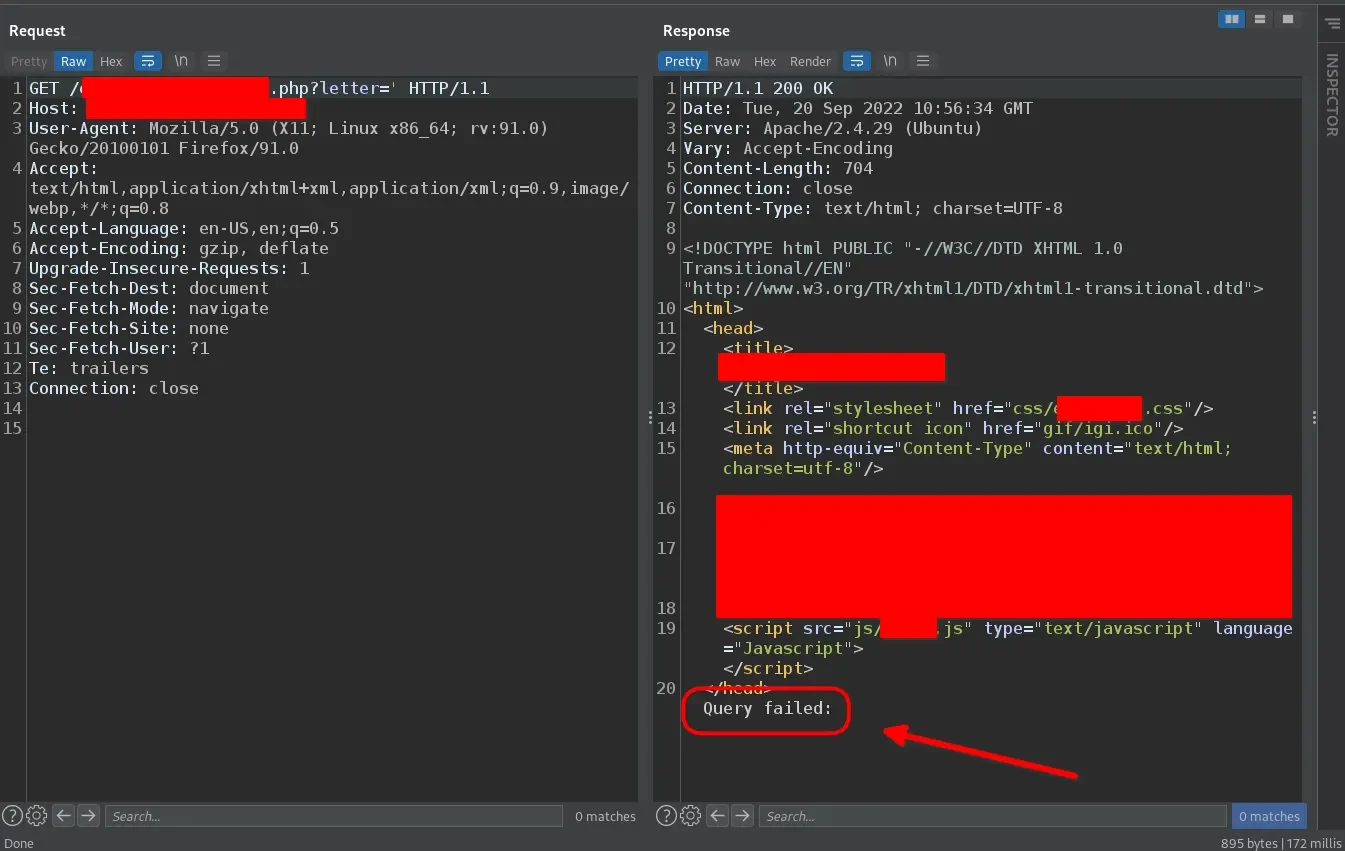
I started with letter and appended a single quote.
The response came back as HTTP 200 OK, which tells us the application does some error handling rather than letting the exception surface as a server error. The body, however, contained Query failed, which strongly suggests a database handled the query in the backend and rejected the malformed syntax. That is the first confirmation of injectable input.
Exploitation
Step 1: count the columns
To work out how many columns the underlying query returns, I used ORDER BY:
?letter=a' ORDER BY 2 -- V
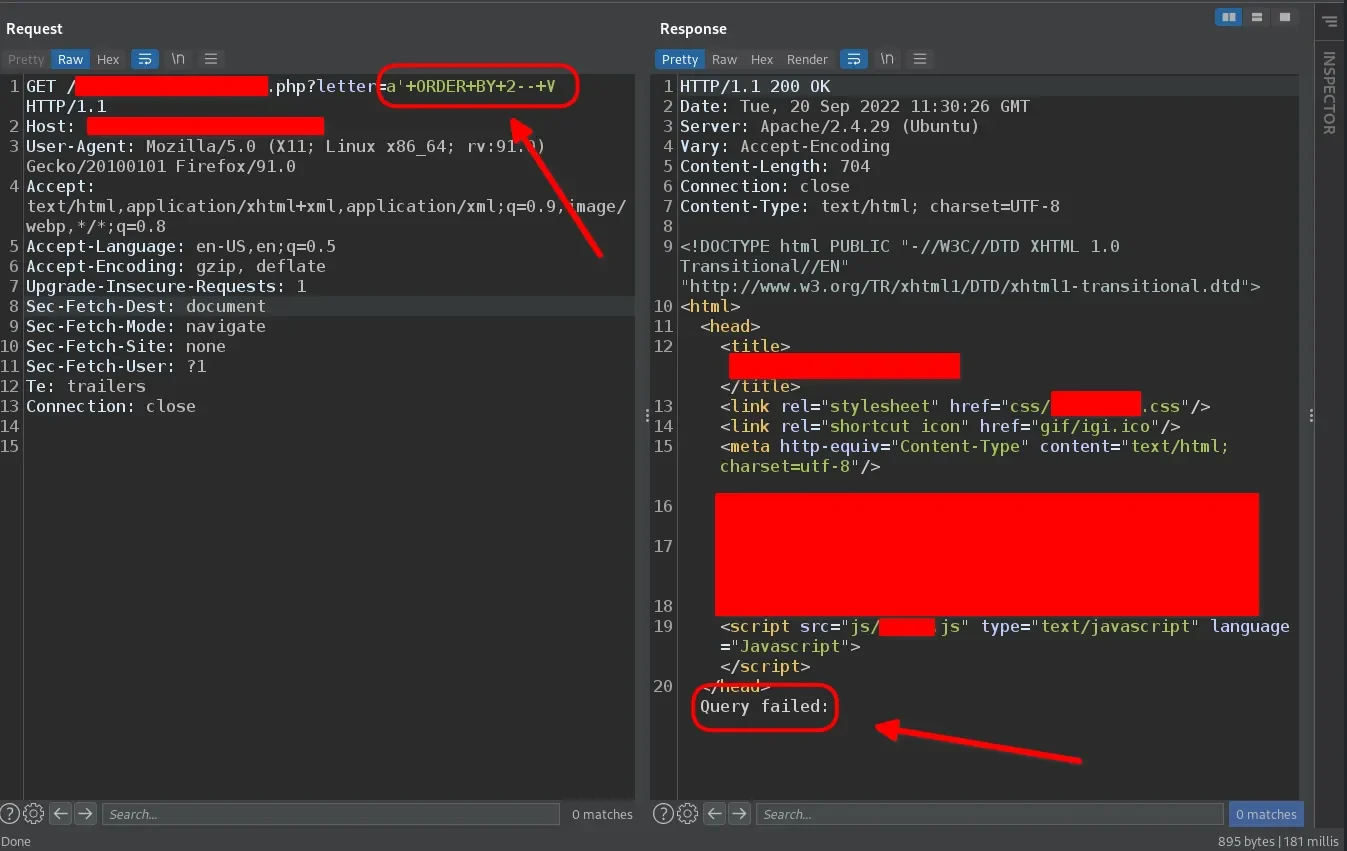
The response was Query failed.
?letter=a' ORDER BY 1 -- V
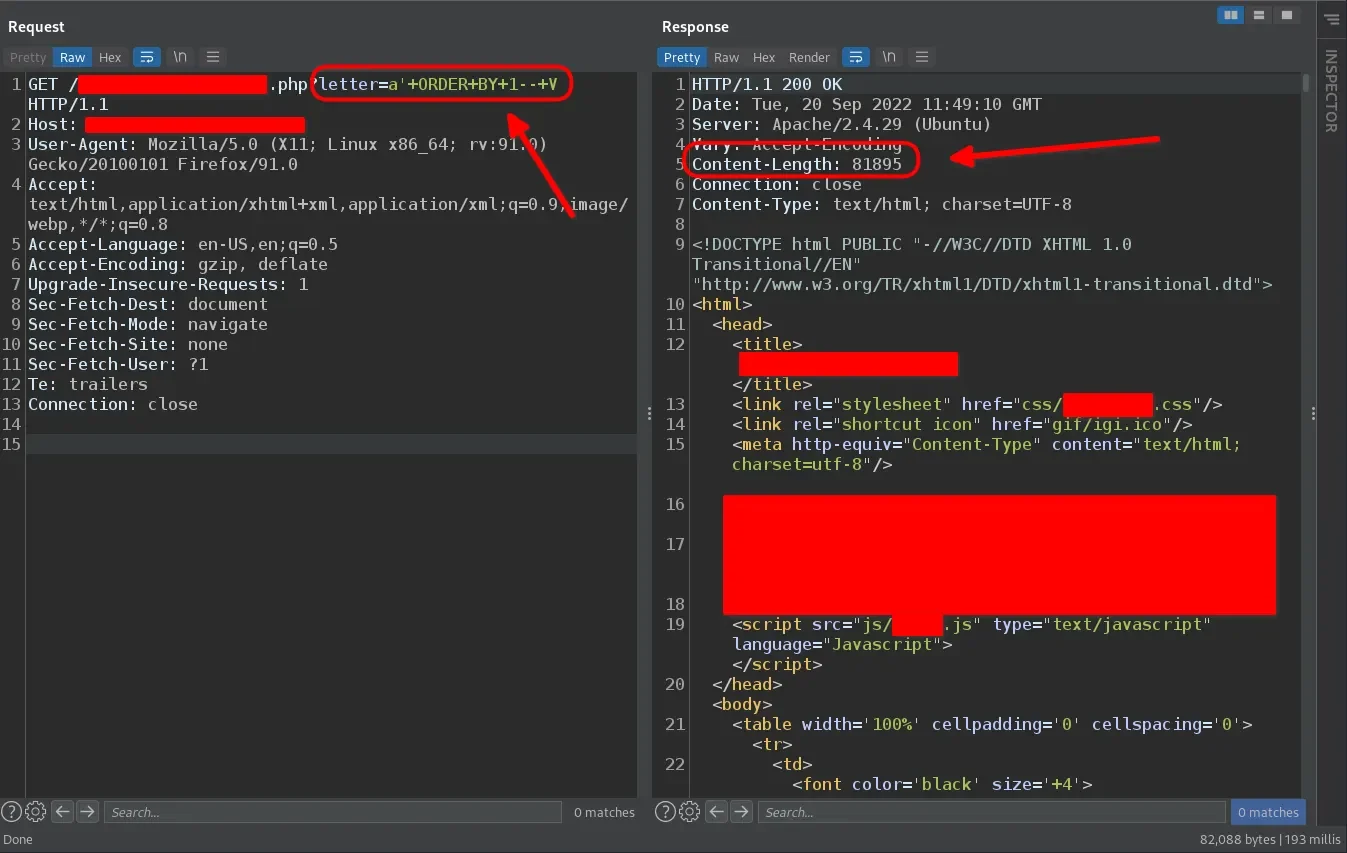
This one executed and did not return Query Failed:. The trailing -- V comments out the rest of the original statement; the space after -- matters in MySQL-style comment syntax.
Step 2: try a UNION to read the version
With one column confirmed, the obvious next move is a UNION SELECT:
?letter=a' UNION SELECT VERSION() -- -
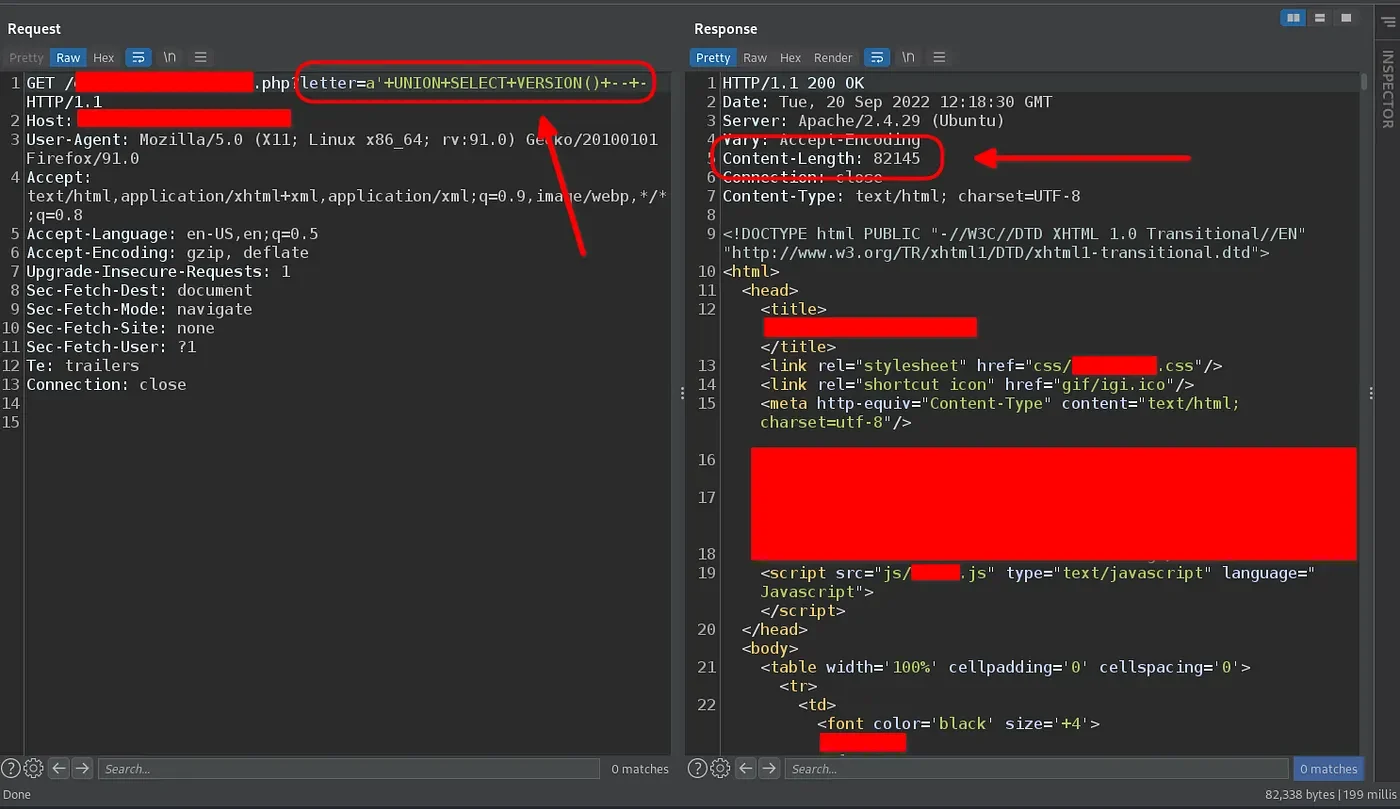
The query executed, but the version did not appear in the response.
Step 3: switch to boolean-based blind
Since I could not see query output, I moved to blind techniques and tested a pair of conditions that should differ only in truth value:
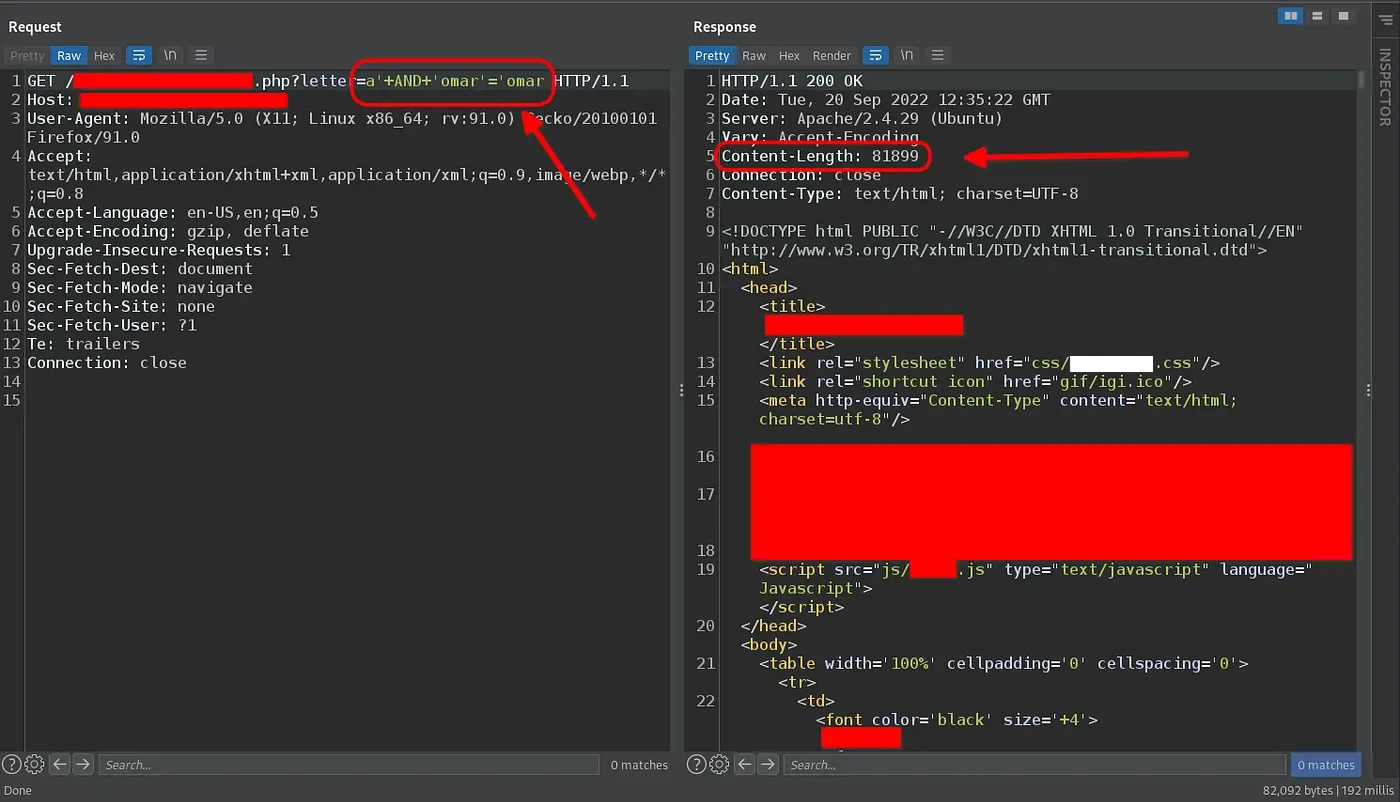
?letter=a' AND 'omar'='omar
?letter=a' AND 'omar'='not-omar
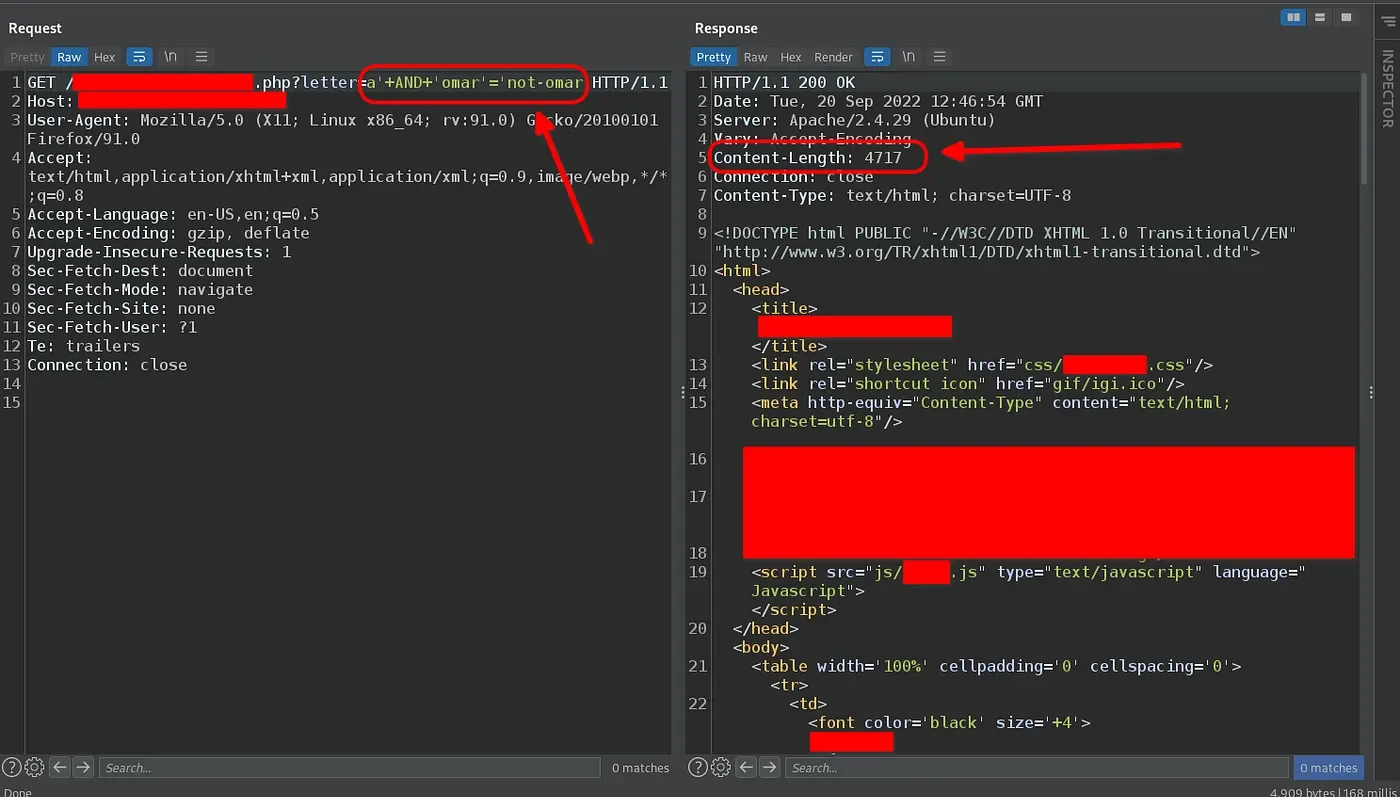
This is boolean-based SQL injection. Comparing the two responses showed a clear signal in the Content-Length header:
| Condition | Content-Length |
|---|---|
| True | larger than 80 thousand |
| False | in the range of 5 thousand |
That difference is the oracle. Every subsequent question is asked as a true/false condition, and the answer is read off the response size.
Step 4: extract the version one character at a time
To pull a value out character by character I combined three functions. MID() works like SUBSTR() and SUBSTRING(): it extracts a substring from a string at a given position. So MID(VERSION(),1,1) extracts the first character of the version string, and MID(VERSION(),2,1) extracts the second. ORD() converts a character to its decimal value, which lets me compare numerically instead of guessing characters.
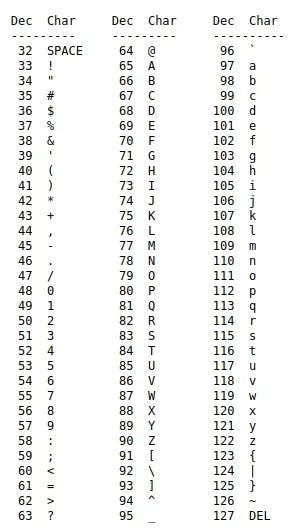
ASCII Table
As an example of the arithmetic: if the first character of VERSION() were a, then ORD(MID(VERSION(),1,1)) would be 97 according to the table above. Using ranges rather than exact matches is what turns a heavy brute force into a smart light brute force.
First, is the first character a lowercase letter?
?letter=a' AND ORD(MID(VERSION(),1,1))>96 AND 'omar'='omar
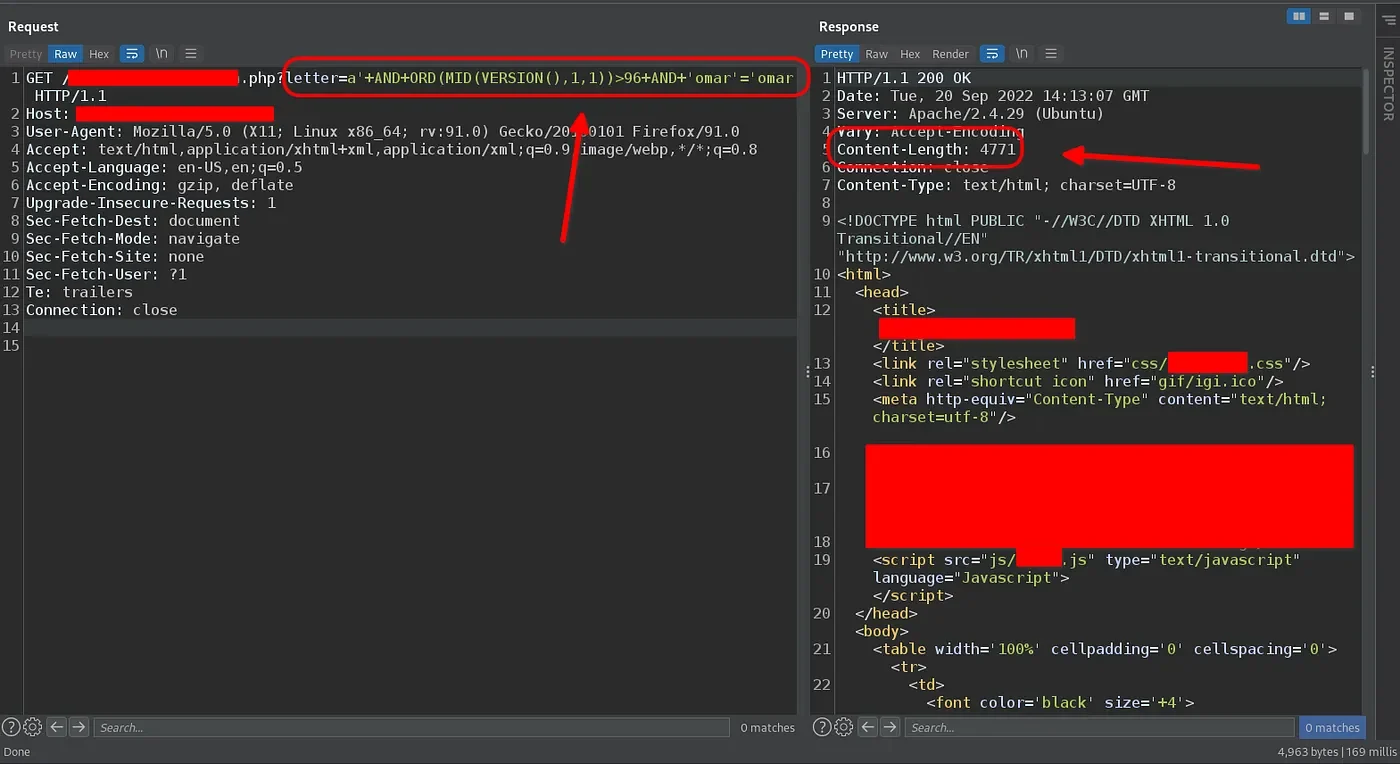
According to the Content-Length, the condition is false.
Next, is it an uppercase letter?
?letter=a' AND ORD(MID(VERSION(),1,1))>64 AND 'omar'='omar
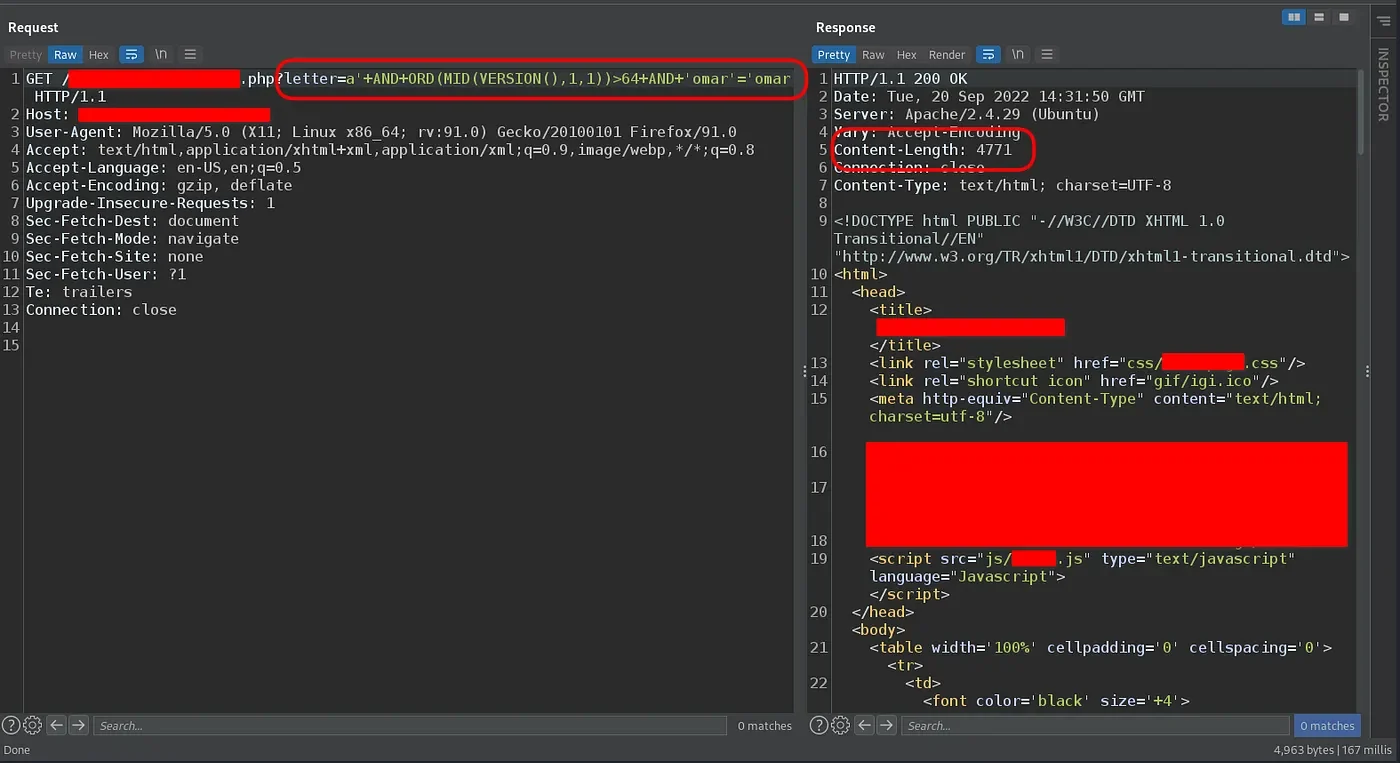
Again false according to the Content-Length.
Next, is it a digit? Two bounds are needed:
?letter=a' AND ORD(MID(VERSION(),1,1))<58 AND 'omar'='omar
?letter=a' AND ORD(MID(VERSION(),1,1))>47 AND 'omar'='omar
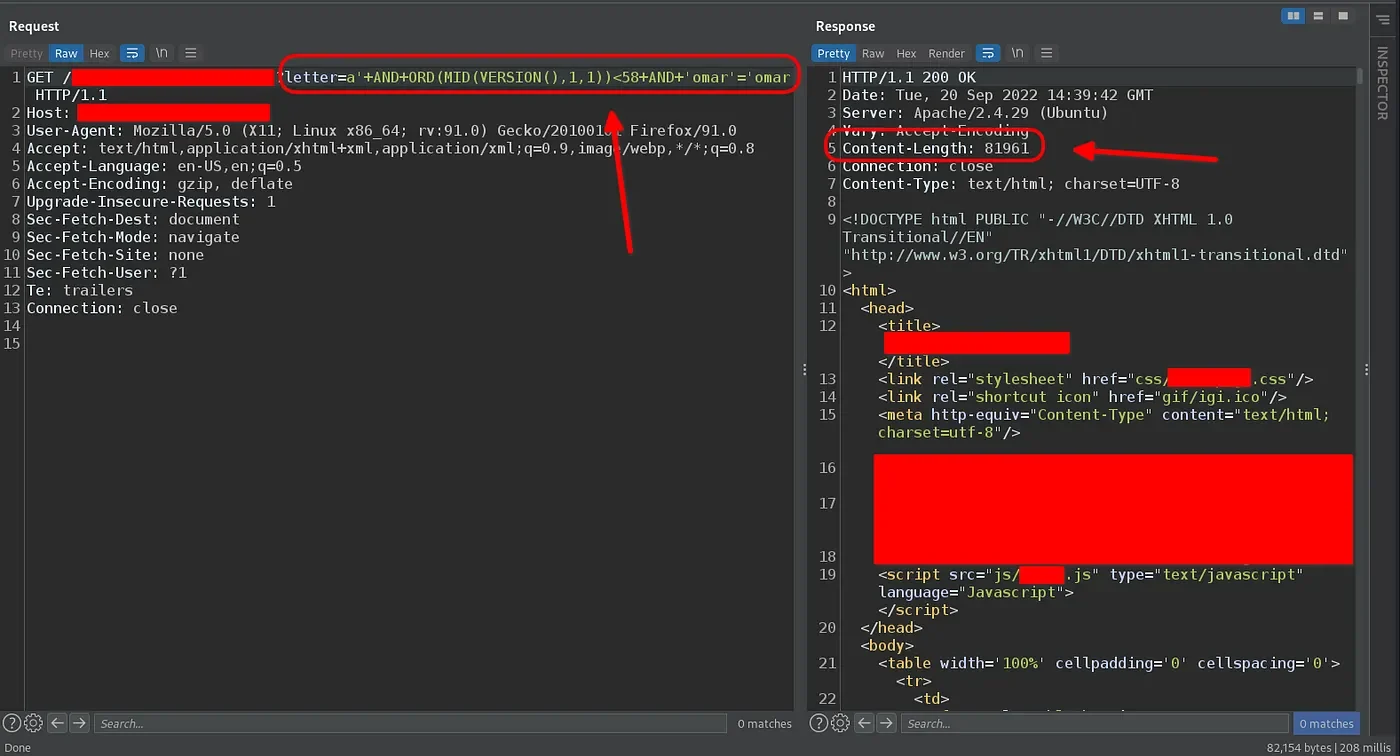
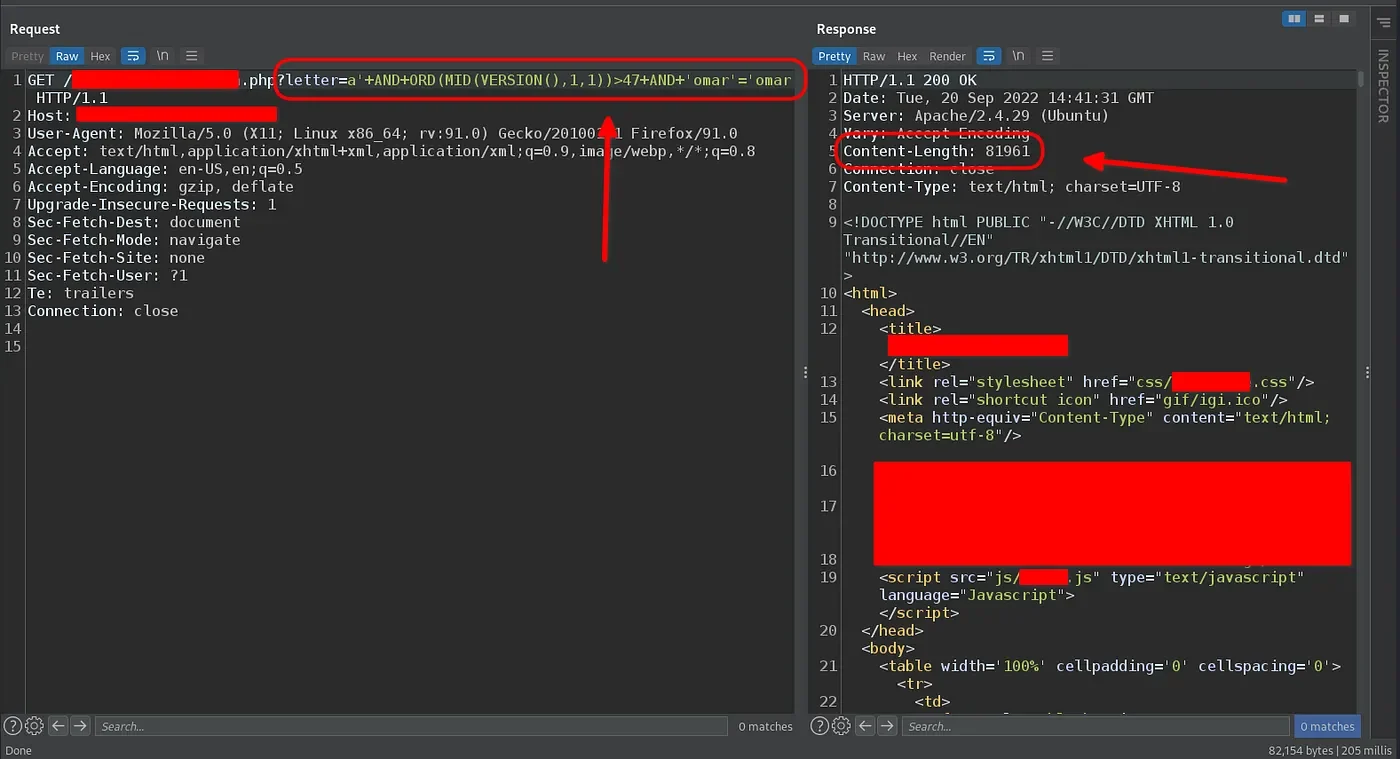
Both queries are a true condition according to the Content-Length, so the character lies between 48 and 57 inclusive.
Finally, pin the exact value:
?letter=a' AND ORD(MID(VERSION(),1,1))=53 AND 'omar'='omar
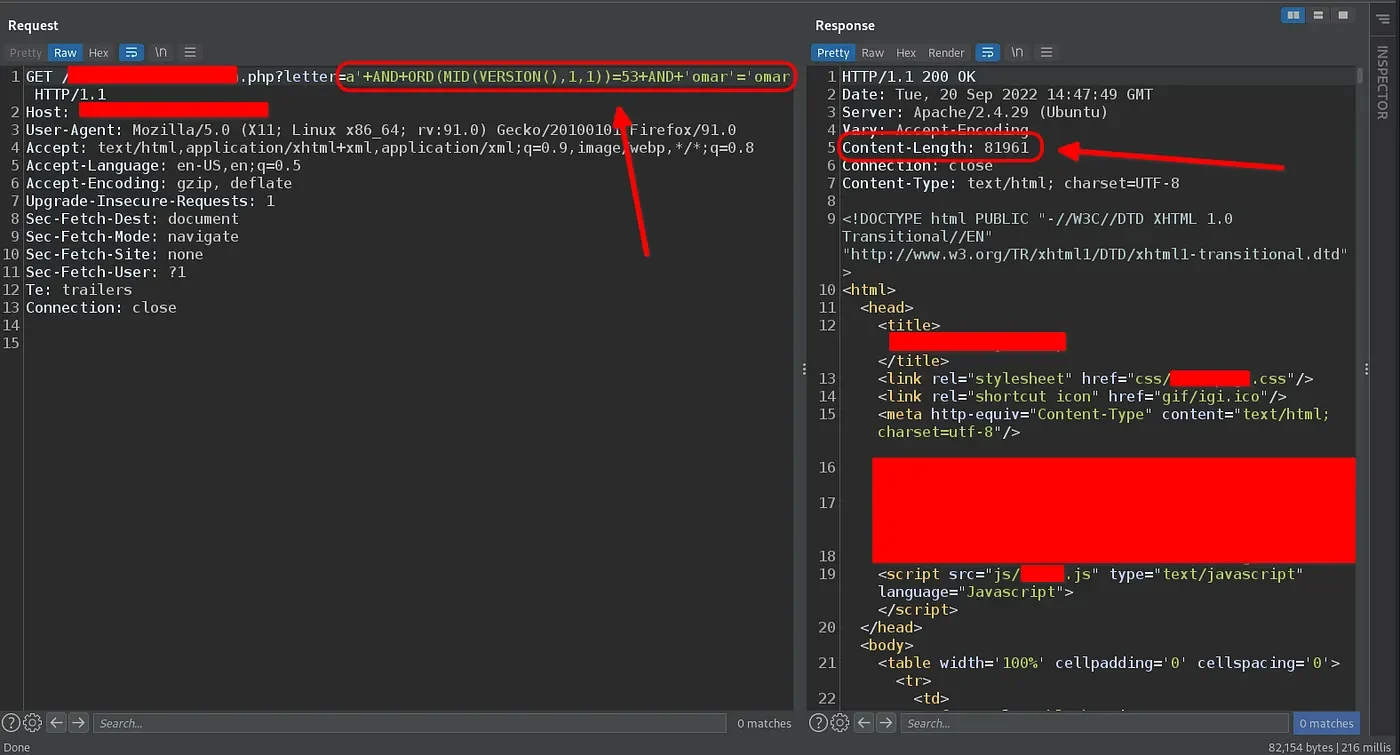
The condition is true according to the Content-Length. The first character of the version string is therefore 5 according to the ASCII table.
The point of the range checks is request economy: instead of roughly 100 requests to extract one substring, the same substring can be recovered in fewer than 10. This is the same technique sqlmap uses to extract the banner.
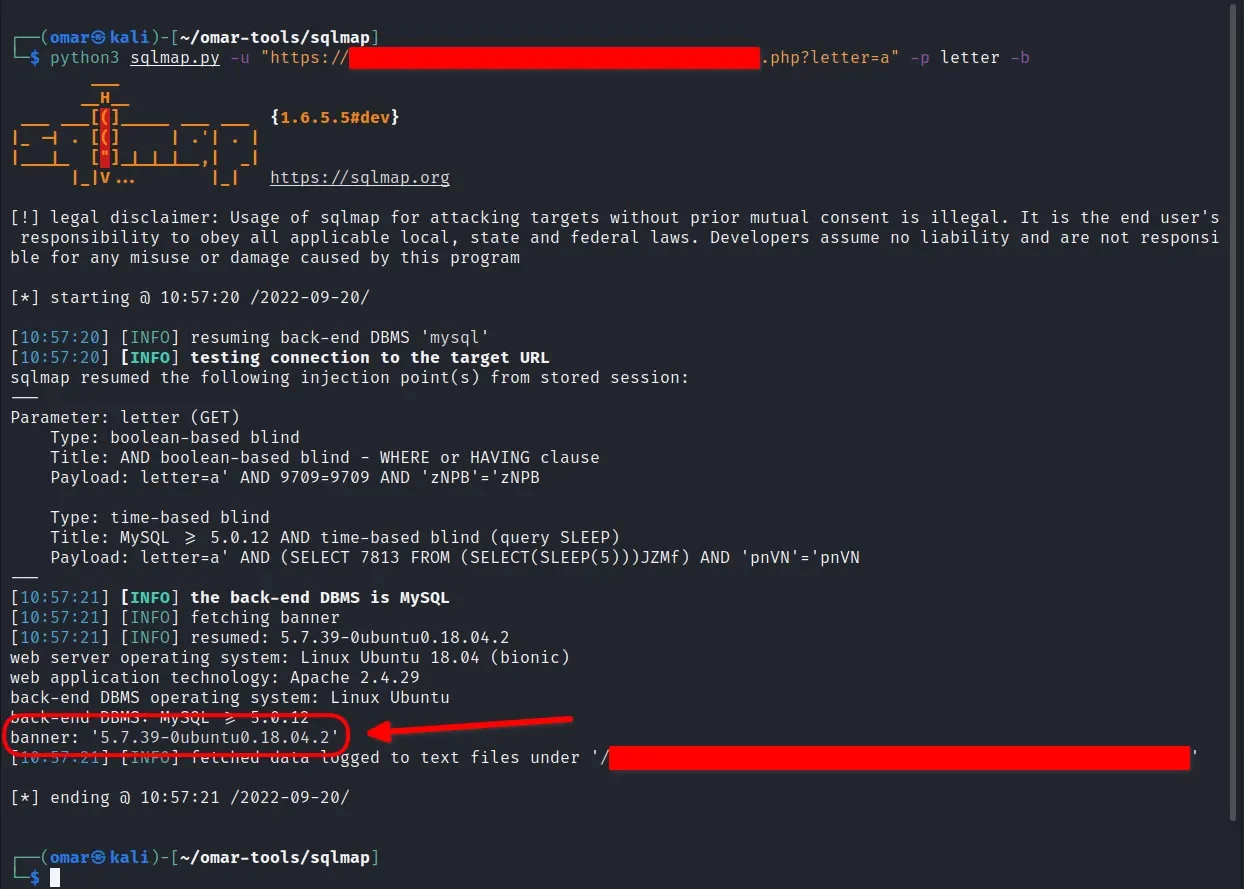
Step 5: confirm with sqlmap on letter
Having had my fun with the manual technique, I moved to sqlmap to confirm and to pull the banner:
Step 6: the second injection, on pos
Back to the HTML source:
As noted earlier, there were two hidden parameters, letter and pos. The same test on pos:
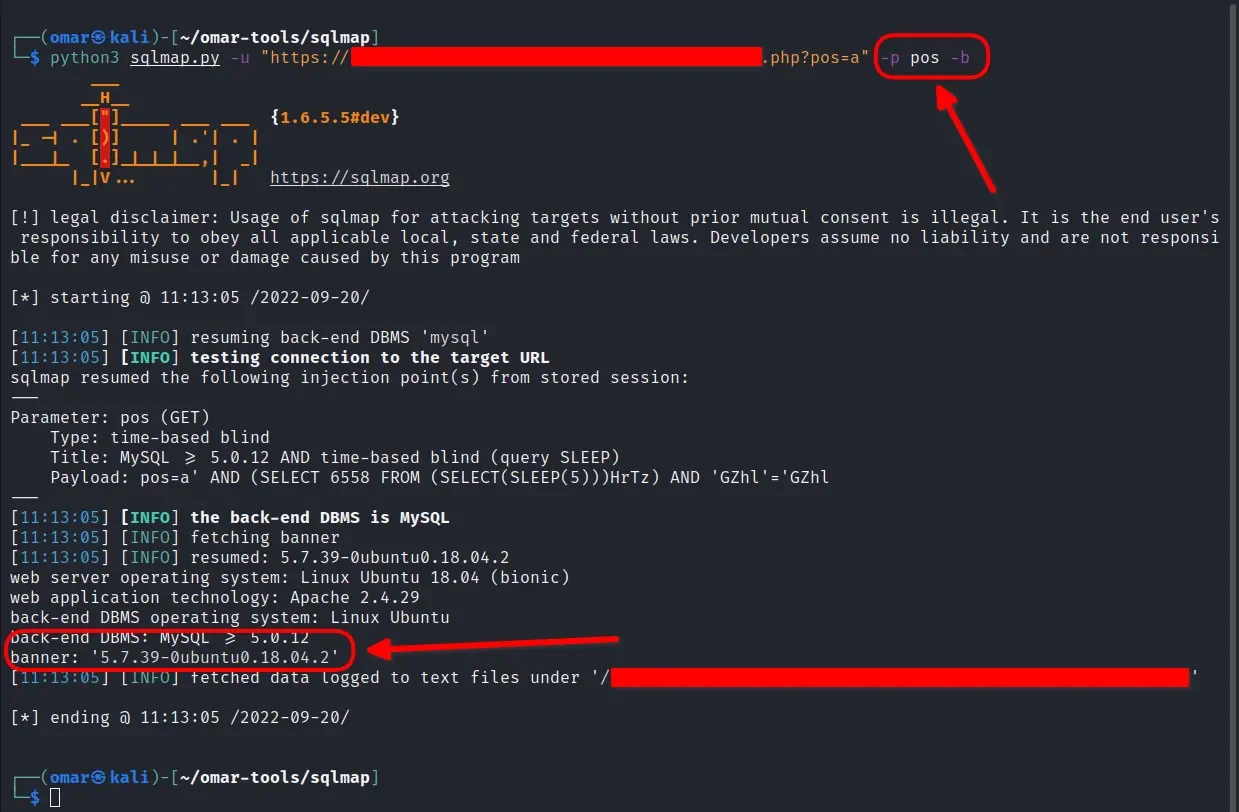
That is the second SQL injection.
Step 7: automate across the estate
Developers usually make the same mistakes across an application, so I automated the same attack across all parameters and endpoints. The reconnaissance step collects endpoints from AlienVault's Open Threat Exchange, the Wayback Machine and Common Crawl using gau, then filters the output with uro to drop images, CSS and JavaScript and keep only unique endpoints:
┌──(omar㉿kali)-[~]
└─$ gau target.com |uro > passive-endpoints
Next, keep only endpoints that carry parameters:
┌──(omar㉿kali)-[~]
└─$ cat passive-endpoints|grep '?' >parameter-endpoint
Then replace every parameter value with a single quote:
┌──(omar㉿kali)-[~]
└─$ cat parameter-endpoint|qsreplace \' >sqli-test-endpoints
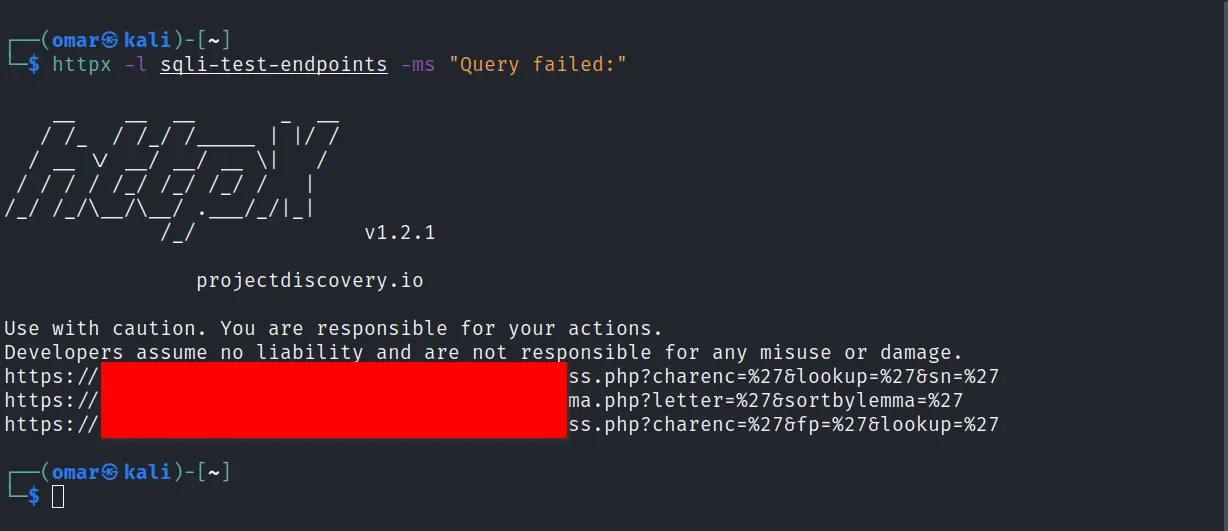
Finally, request each URL and keep only the responses that contain the error string:
┌──(omar㉿kali)-[~]
└─$ httpx -l sqli-test-endpoints -ms "Query failed:"
Step 8: the third injection, on lookup
One parameter, lookup, responded with Query failed::
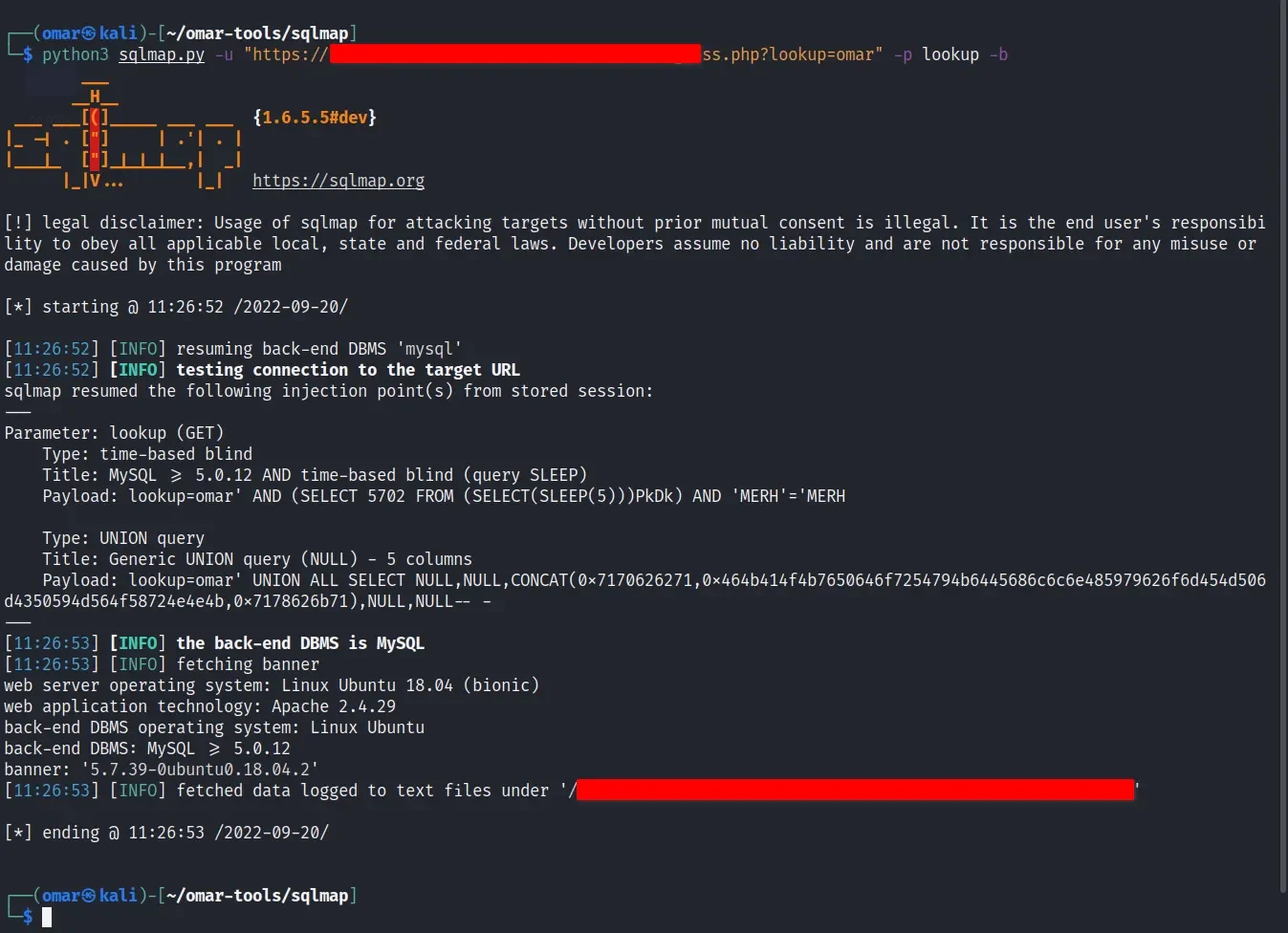
That gave a new one: the third SQL injection.
Root cause
The behaviour is consistent with user-controlled parameter values being concatenated into SQL statements without parameterisation, so a single quote in letter, pos or lookup breaks out of the string literal and lets the rest of the statement be rewritten. The error handling does not prevent this: it catches the database exception and returns HTTP 200 with a generic Query failed body, which hides the stack trace but still leaks a boolean signal (error versus no error) and, once a valid payload is used, a measurable difference in Content-Length. The report does not describe the server-side code, so the exact query construction is not shown; the behaviour is consistent with string concatenation.
Impact
An unauthenticated attacker can inject into at least three parameters on the target and, using boolean-based blind techniques, extract data from the database one character at a time. The report demonstrates extraction of the first character of the version string and runs sqlmap with -b on all three parameters. The Content-Length oracle makes extraction slow but practical, and passive reconnaissance surfaced a third injectable parameter, which suggests the issue is not isolated.
Fix
The correct remediation is to stop building SQL by concatenation and use parameterised queries or prepared statements for every parameter, including hidden form fields such as letter and pos, which are just as attacker-controlled as visible ones. Input validation on its own is not a substitute for parameterisation.
Variants to test
- Hidden form fields. Read the HTML source of every page and enumerate
input type="hidden"names, then test each one as a parameter. A positive result is a change in response body, status orContent-Lengthwhen a single quote is appended. - Error-string fingerprinting. Send a single quote to every parameter and grep responses for database error strings. A positive result is a response containing the error text while the status stays 200.
ORDER BYcolumn counting. Increment the column index until the error appears, then step back one. A positive result is a clean response atORDER BY 1and an error atORDER BY 2, as here.UNION SELECTreflection check. TryUNION SELECT VERSION()and look for the value in the body. A positive result is the version string appearing in the response; a negative result (query executes, no value) means blind techniques are needed.- Boolean pair. Compare
AND 'x'='x'againstAND 'x'='y'and diffContent-Length. A positive result is a stable, repeatable size difference between the two. - Range-based character extraction. Use
ORD(MID(VERSION(),1,1))with>96,>64,<58,>47and an equality check to narrow each character. A positive result is a consistent true/false pattern matching the ASCII table. - Passive endpoint harvesting. Run
gauover the target domain, filter withuro, keep URLs containing?, rewrite values withqsreplace, and scan withhttpx -msfor the error string. A positive result is any URL printed byhttpx. - Same parameter, different endpoints. Once one parameter is confirmed injectable, test the same parameter name on other paths and the same path with other parameter names, since the same mistake is often repeated across an application.
Hope you enjoyed the write-up.
What happened, in plain words
A security researcher was looking at a website (called target.com in the write-up) and found three parameters whose input reached the site's database. By typing a single quote character into those fields, he could make the database complain, and by carefully crafting the text he sent, he could ask the database yes/no questions and read back information one character at a time. He found three separate vulnerable parameters, then used a small set of command-line tools to look for the same mistake across the site. This article walks through exactly what he did, step by step, assuming you have never done any security testing before.
First, some background you will need
Before we start, here are the ideas that come up again and again. Read these once and the rest of the article will make sense.
What is a database? A database is a program that stores information in an organised way, like a very large, very strict spreadsheet. A website's database might hold user accounts, product listings, articles, or anything else the site needs to remember. When you search on a website, the site asks the database a question and shows you the answer.
What is a query? A query is the question the website asks the database. Queries are written in a language called SQL (Structured Query Language). A simple one looks like SELECT name FROM users WHERE id = 5, which means "give me the name of the user whose id is 5".
What is SQL injection? When a website builds a query by gluing together fixed SQL text and whatever the visitor typed, a visitor can type SQL code instead of ordinary text. The database cannot tell the difference between the website's own SQL and the visitor's SQL, so it runs both. That is SQL injection: the visitor's input changes the meaning of the query. It is one of the most serious kinds of bug because it can let an outsider read, change or delete data they should never see.
What is a parameter? A parameter (sometimes called a query string parameter) is a named value stuck on the end of a web address after a question mark. In https://example.com/search?word=cat, the parameter is called word and its value is cat. Websites use parameters to pass information from the browser to the server. If you change the value in the address bar and press Enter, you are changing what the server receives.
What is a hidden parameter? A web page's HTML source (the raw code behind the page, which you can see with your browser's "View Source" option) can contain form fields that are not displayed on screen. These are often used to carry information the site needs but the visitor does not need to see. They are still sent to the server exactly like visible fields, so they can still be tampered with.
What is an HTTP status code? Every time your browser asks a server for something, the server replies with a number. 200 means "OK, here is the page". 500 means "something broke on the server". 404 means "not found". These numbers are useful because they tell you how the server reacted.
What is a response header? Alongside the page content, the server sends a set of small labels called headers. One of them is Content-Length, which says how many bytes the page body contains. If the same page comes back with a noticeably different Content-Length depending on what you typed, that difference is a clue about what happened inside the server.
What is a blind injection? Sometimes the site does not show you the database's answer directly. You cannot see the data, but you can still ask yes/no questions and watch for a side effect, such as the page being a different size. This is called "blind" because you are working without seeing the output.
What is a command-line tool? A program you run by typing its name in a terminal window instead of clicking an icon. Security testers use many small command-line tools because they can be chained together and run against long lists of addresses automatically.
The setup
The researcher used a tool called sqlmap to confirm the findings automatically, and a handful of small command-line tools (gau, uro, qsreplace, httpx) to search the site for the same problem.
Finding the first clues
While taking a quick look at the HTML source of the page, he noticed two hidden parameters.
Why does this matter? The two hidden parameters were called letter and pos.
He started with letter and added a single quote character to its value. A single quote is special in SQL: it marks the beginning and end of a piece of text. If the website glues your input into a query without handling quotes properly, an extra quote breaks the query's syntax, like putting an extra closing bracket in a sentence.
The response came back as HTTP 200 OK. That tells us the site does some error handling: instead of letting the failure crash the page with a server error, it catches the problem and still returns a normal-looking page. But the body of that page contained the text Query failed. That is a strong hint that a database was handling the query in the backend and rejected the broken syntax. This was the first confirmation that the input reaches the database.
Working out the shape of the query
Step 1: counting the columns
A database query can return several columns of data at once, like a table with several columns. To find out how many columns the underlying query returns, the researcher used ORDER BY, which tells the database to sort the results by a particular column number. If you ask it to sort by a column that does not exist, it errors.
?letter=a' ORDER BY 2 -- V
Line by line: ?letter=a' sets the parameter to a followed by a quote, which closes the text the site was expecting and lets the rest be read as SQL. ORDER BY 2 asks the database to sort by the second column. -- V is a comment: everything after -- is ignored by the database, which neatly disables whatever the site had written after your input. The space after -- matters in MySQL-style databases.
The response was Query failed.
?letter=a' ORDER BY 1 -- V
This one executed and did not return Query Failed:.
Step 2: trying to read the database version
With one column confirmed, the natural next step is a UNION SELECT. UNION lets you stick the results of a second query onto the results of the first, so you can ask the database for something of your own choosing. VERSION() is a built-in function that returns the database's version string, which is useful information for an attacker because different versions have different features and known weaknesses.
?letter=a' UNION SELECT VERSION() -- -
The query executed, but the version did not appear on the page. The query executed, but the version did not appear on the page, so this direct approach was not available here.
Step 3: switching to yes/no questions
Since he could not see the query's output, he moved to blind techniques. He sent two conditions that differ only in whether they are true:
?letter=a' AND 'omar'='omar
?letter=a' AND 'omar'='not-omar
AND means both parts must be true for the whole query to succeed. 'omar'='omar' is always true (a value equals itself), while 'omar'='not-omar' is always false. So the first request asks the database a question whose answer is yes, and the second asks one whose answer is no.
This is boolean-based SQL injection: boolean meaning true/false. Comparing the two responses showed a clear signal in the Content-Length header:
| Condition | Content-Length |
|---|---|
| True | larger than 80 thousand |
| False | in the range of 5 thousand |
That size difference is the oracle. An oracle, in this context, is any observable side effect that reliably tells you the answer to a yes/no question. From here on, every question is phrased as a true/false condition, and the answer is read off the response size.
Step 4: reading the version one character at a time
To pull out a value character by character, he combined three SQL functions. MID() works like SUBSTR() and SUBSTRING(): it extracts a piece of a piece of text starting at a given position. So MID(VERSION(),1,1) takes the first character of the version string, and MID(VERSION(),2,1) takes the second. ORD() converts a character into its decimal number, which lets you compare numbers instead of guessing letters.
ASCII Table
The ASCII table is a standard list that gives every character a number: for example, lowercase a is 97, uppercase A is 65, and the digit 0 is 48. As an example of the arithmetic: if the first character of VERSION() were a, then ORD(MID(VERSION(),1,1)) would be 97 according to the table above. Using ranges rather than exact matches is what turns a heavy brute force (trying every possibility one by one) into a smart light brute force (narrowing down with a few well-chosen questions).
First question: is the first character a lowercase letter? Lowercase letters sit above 96 in the table.
?letter=a' AND ORD(MID(VERSION(),1,1))>96 AND 'omar'='omar
According to the Content-Length, the condition is false.
Second question: is it an uppercase letter? Uppercase letters sit above 64.
?letter=a' AND ORD(MID(VERSION(),1,1))>64 AND 'omar'='omar
Again false according to the Content-Length.
Third question: is it a digit? Digits sit below 58 and above 47, so two bounds are needed.
?letter=a' AND ORD(MID(VERSION(),1,1))<58 AND 'omar'='omar
?letter=a' AND ORD(MID(VERSION(),1,1))>47 AND 'omar'='omar
Both queries are a true condition according to the Content-Length, so the character lies between 48 and 57 inclusive, which is the range for the digits 0 to 9.
Finally, pin the exact value:
?letter=a' AND ORD(MID(VERSION(),1,1))=53 AND 'omar'='omar
The condition is true according to the Content-Length. The first character of the version string is therefore 5 according to the ASCII table.
The point of the range checks is request economy: instead of roughly 100 requests to extract one substring, the same substring can be recovered in fewer than 10. This is the same technique sqlmap uses to extract the banner (the version string the database reports about itself).
Step 5: confirming with sqlmap on letter
Having had his fun with the manual technique, he moved to sqlmap, a free tool that automates SQL injection testing, to confirm the finding and pull the banner:
Step 6: the second injection, on pos
Back to the HTML source:
As noted earlier, there were two hidden parameters, letter and pos. The same test on pos:
Line by line: same as before, but the address now carries pos=a and -p pos points sqlmap at the pos parameter. That is the second SQL injection.
Step 7: automating across the whole site
Developers usually make the same mistakes across an application, so he automated the same attack across all parameters and endpoints. An endpoint is simply a web address that the server responds to. The reconnaissance step collects endpoints from three public archives of the web: AlienVault's Open Threat Exchange, the Wayback Machine (which stores old copies of web pages) and Common Crawl (which regularly crawls and stores pages). The tool gau fetches known addresses for a domain, and uro filters the output to drop images, CSS and JavaScript files and keep only unique endpoints.
┌──(omar㉿kali)-[~]
└─$ gau target.com |uro > passive-endpoints
Line by line: the first two lines are just the terminal prompt, showing the user and machine name; gau target.com asks the tool for known addresses on the domain; the vertical bar | pipes the output into the next tool; uro removes duplicates and uninteresting file types; > passive-endpoints writes the result into a file called passive-endpoints.
Next, keep only endpoints that carry parameters (addresses containing a question mark):
┌──(omar㉿kali)-[~]
└─$ cat passive-endpoints|grep '?' >parameter-endpoint
Line by line: cat passive-endpoints prints the file's contents; grep '?' keeps only lines containing a question mark; > parameter-endpoint saves those lines to a new file.
Then replace every parameter value with a single quote:
┌──(omar㉿kali)-[~]
└─$ cat parameter-endpoint|qsreplace \' >sqli-test-endpoints
Line by line: cat parameter-endpoint prints the list; qsreplace \' swaps each parameter's value for a single quote (the backslash escapes the quote so the shell passes it through); > sqli-test-endpoints saves the result. The idea is to send the same breaking character to every parameter on the site at once.
Finally, request each address and keep only the responses that contain the error text:
┌──(omar㉿kali)-[~]
└─$ httpx -l sqli-test-endpoints -ms "Query failed:"
Step 8: the third injection, on lookup
One parameter, lookup, responded with Query failed::
Line by line: same pattern again, this time with lookup=a in the address and -p lookup telling sqlmap which parameter to test. That gave a new one: the third SQL injection.
Why it worked
The behaviour is consistent with the application gluing whatever the visitor types into its SQL statements without separating the code from the data. A single quote in letter, pos or lookup breaks out of the text the site expected and lets the rest of the statement be rewritten. The error handling does not prevent this: it catches the database error and returns HTTP 200 with a generic Query failed body, which hides the technical details but still leaks a yes/no signal (error versus no error) and, once a valid payload is used, a measurable difference in Content-Length. The report does not show the server-side code, so the exact query construction is not visible; the behaviour is consistent with simple string concatenation.
What an attacker could do with it
Someone with no account at all can inject into at least three parameters on the target and, using boolean-based blind techniques, extract data from the database one character at a time. The report demonstrates extraction of the first character of the version string and runs sqlmap with -b on all three parameters. It does not say which tables or user data were reachable, nor whether the database account had elevated privileges, so the full extent of the damage is not established here. The Content-Length oracle makes extraction slow but practical, and passive reconnaissance surfaced a third injectable parameter, which suggests the problem is not isolated.
How to fix it
The correct fix is to stop building SQL by gluing text together and use parameterised queries (also called prepared statements) for every parameter, including hidden form fields such as letter and pos, which are just as attacker-controlled as visible ones. With parameterised queries, the database is told in advance which parts are code and which are data, so a quote in the data can never change the query's meaning. Checking input on its own is not a substitute for parameterisation.
Things worth testing on other sites
- Hidden form fields. Read the HTML source of every page and list the names of
input type="hidden"fields, then test each one as a parameter. A positive result is a change in response body, status orContent-Lengthwhen a single quote is appended. - Error-string fingerprinting. Send a single quote to every parameter and search the responses for database error text. A positive result is a response containing the error text while the status stays 200.
ORDER BYcolumn counting. Increase the column number until the error appears, then step back one. A positive result is a clean response atORDER BY 1and an error atORDER BY 2, as here.UNION SELECTreflection check. TryUNION SELECT VERSION()and look for the value in the body. A positive result is the version string appearing in the response; a negative result (query runs, no value) means blind techniques are needed.- Boolean pair. Compare
AND 'x'='x'againstAND 'x'='y'and diffContent-Length. A positive result is a stable, repeatable size difference between the two. - Range-based character extraction. Use
ORD(MID(VERSION(),1,1))with>96,>64,<58,>47and an equality check to narrow each character. A positive result is a consistent true/false pattern matching the ASCII table. - Passive endpoint harvesting. Run
gauover the target domain, filter withuro, keep addresses containing?, rewrite values withqsreplace, and scan withhttpx -msfor the error string. A positive result is any address printed byhttpx. - Same parameter, different endpoints. Once one parameter is confirmed injectable, test the same parameter name on other paths and the same path with other parameter names, since the same mistake is often repeated across an application.
Glossary
- ASCII table: a standard list that gives every character a number, such as
a= 97,A= 65,0= 48. - Banner: the version string a database reports about itself.
- Blind SQL injection: an injection where you cannot see the query's output, so you ask yes/no questions and watch for side effects.
- Boolean-based SQL injection: a blind technique where each question is phrased as a true/false condition and the answer is read from a difference in the response.
- Brute force: trying every possibility one by one until something works.
- Column: one field in a database result, like one column of a spreadsheet.
- Content-Length: an HTTP response header stating how many bytes the page body contains.
- Database: a program that stores and organises information for a website.
- Endpoint: a web address that a server responds to.
- Error handling: code that catches a failure and responds in a controlled way instead of crashing.
- gau: a command-line tool that fetches known addresses for a domain from public archives.
- Hidden parameter: a form field present in the page's HTML but not displayed on screen, still sent to the server.
- httpx: a command-line tool that sends HTTP requests to many addresses quickly and can filter responses by content.
- HTTP status code: the number a server returns with every response, such as 200 (OK) or 500 (server error).
- MID(): a SQL function that extracts a piece of text starting at a given position.
- Oracle: any observable side effect that reliably reveals the answer to a yes/no question.
- ORD(): a SQL function that converts a character to its decimal number.
- ORDER BY: a SQL clause that sorts results by a given column number.
- Parameter: a named value attached to a web address after a question mark, passed from browser to server.
- Parameterised query: a way of building SQL where code and data are kept separate, so input cannot change the query's meaning.
- Prepared statement: another name for a parameterised query.
- qsreplace: a command-line tool that replaces parameter values in a list of addresses.
- Query: a question asked of a database, written in SQL.
- Reconnaissance: the information-gathering phase of testing, collecting addresses and details before attacking.
- Response header: a small label sent alongside a page, such as
Content-Length. - sqlmap: a free tool that automates SQL injection testing and data extraction.
- SQL: Structured Query Language, the language used to talk to databases.
- SQL injection: a bug where visitor input is treated as SQL code, letting the visitor change the query's meaning.
- SUBSTR() / SUBSTRING(): SQL functions that extract part of a text, equivalent to
MID(). - UNION SELECT: a SQL construct that appends the results of a second query to the first.
- uro: a command-line tool that removes duplicate and uninteresting addresses from a list.
- VERSION(): a SQL function that returns the database's version string.