Add description to Instagram Posts on behalf of other users - 6500$
The Instagram IGTV edit endpoint accepted a media ID belonging to another user's post, allowing an attacker to add a caption to that post on the victim's behalf. The attacker could target public accounts whose posts lacked a description, including high-profile users.
 Published on medium.com
Hello folks, it’s JubaBaghdad again, today I would like to share with you an interesting bug that I found in Instagram that make me able to add description to other users Posts, are you ready !! :)
The full write-up lives on its author's site
It belongs to its author, so we link to it rather than copy it. The other two tabs are our own rewrites, checked against it.
Context
Instagram lets you attach a description (caption) to your own posts: photos, videos and IGTV videos. IGTV is the long-form, vertical video feature that Instagram launched in June 2018. On the web app, when you create an IGTV video you can edit it afterwards, and the edit action sends a request that carries the post's media ID together with the caption and title fields.
This write-up describes how that edit request could be pointed at somebody else's post, letting the researcher add a description to other users' posts on their behalf. The report was submitted to the Facebook Security Team, which owns Instagram, and the researcher was awarded a 6500 USD bounty.
Setup
The work was done against the Instagram web app at https://www.instagram.com/ and against the Instagram management option inside a Facebook Page. The researcher used:
- A Facebook Test Page, from which the Instagram tab can be opened to manage an Instagram account.
- An old Instagram account (the password had been forgotten, so it could not be logged into from the Facebook Page).
- A second test account for the testing stage.
- Burp Suite as an intercepting proxy.
No particular versions are given in the report.
Finding it
The original idea was not about captions at all. On 6 August 2018 the researcher wanted to bypass Instagram's two-factor authentication (2FA) from a Facebook Page, because a Facebook Page offers an option to manage an Instagram account. The researcher switched to the Facebook Test Page, clicked the Instagram tab and tried to log in with the old Instagram account, but could not because the password was forgotten.
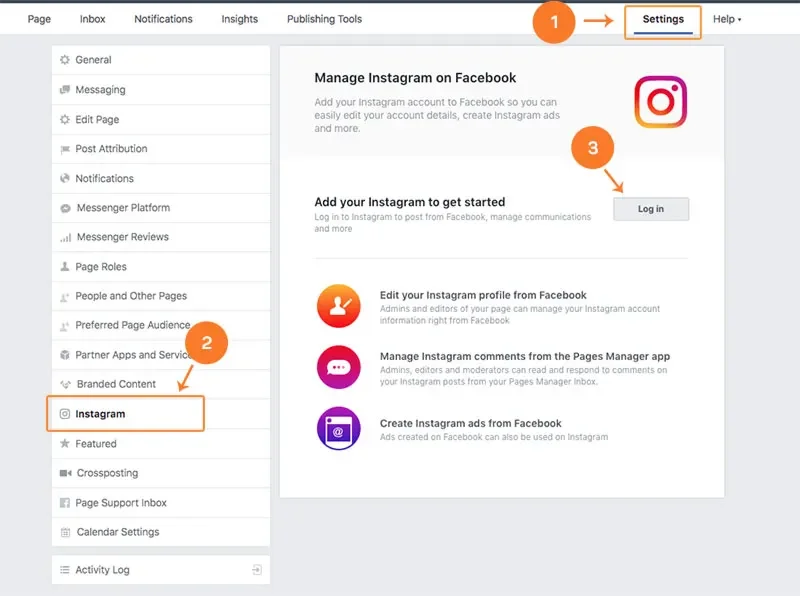
The screenshot shows the Instagram management tab on a Facebook Page, captioned by the author as "You can Manage your Instagram account from your Facebook page".
After that, the researcher opened Instagram in the web browser to check whether the old account still existed, and looked at the page.
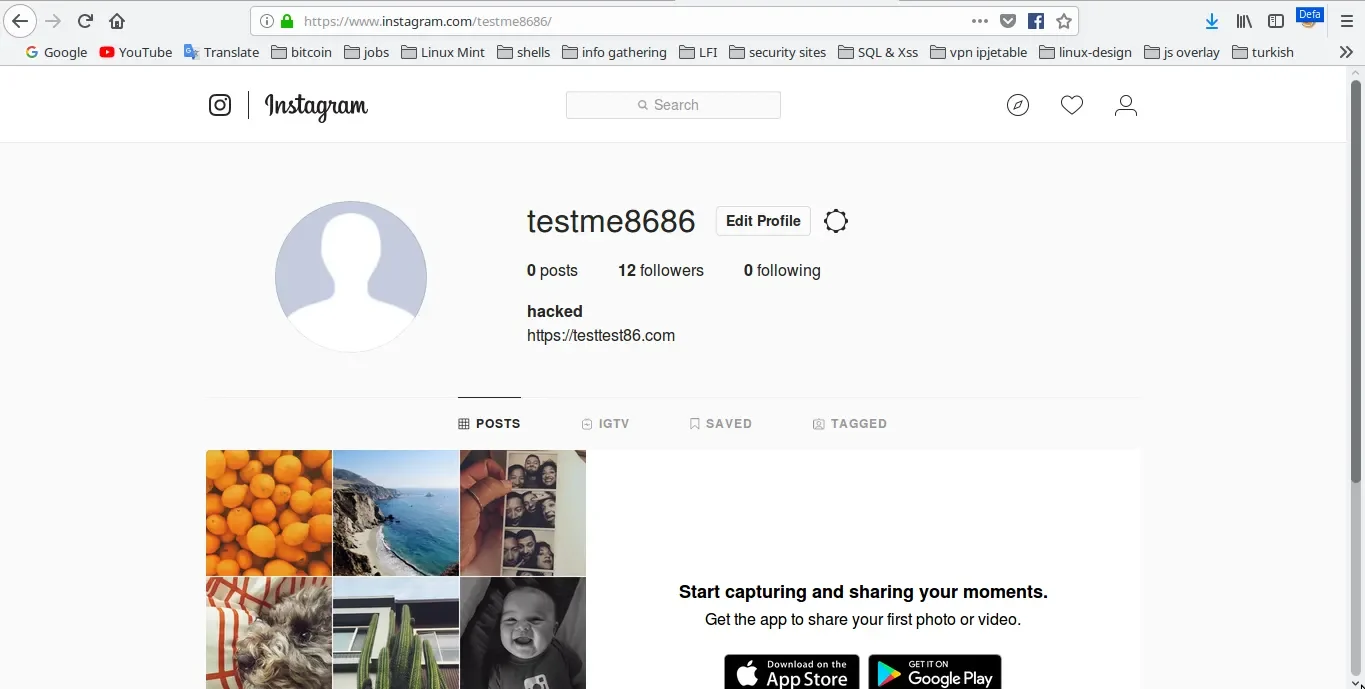
The screenshot shows the Instagram web app as it appeared in the browser. The interesting part, the author says, is easy to miss: there is an option called IGTV. The researcher's habit is to memorise the options and features of a target, so a new entry stood out immediately.
IGTV was new at the time, so the researcher read about it in the Instagram Info Center and decided to test it.
Exploitation
Step 1: create an IGTV video and intercept the edit request
The researcher created an IGTV video, clicked the edit option, and intercepted the request with Burp Suite to see which parameters the feature uses. The request was:
POST /media/1887820989027383407/edit/

caption=test&publish_mode=igtv&title=test
The parts that matter:
- Media ID:
1887820989027383407is the ID of the researcher's own IGTV video. Instagram refers to any post, whether photo, video or IGTV video, by its media ID. - Parameters:
captionandtitle. When you create a photo or video on Instagram the web app asks you to add a description, which is optional and which many users leave blank. In IGTV,captionis the description.publish_mode=igtvmarks the request as an IGTV edit.
Step 2: obtain another user's media ID
The media ID of any post can be obtained in two ways described in the report:
- Visit the post and view the page source code. The media ID appears there.
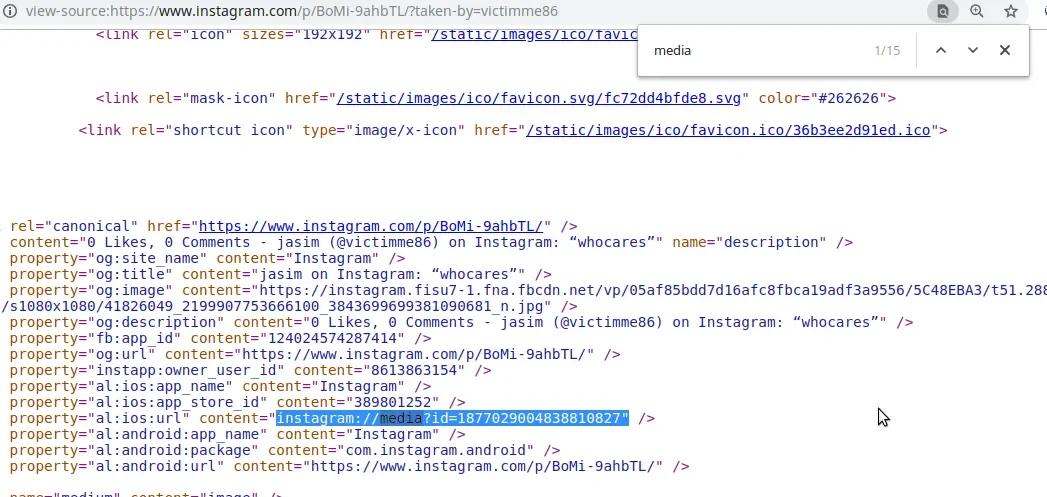
The screenshot shows a post's source code with its media ID, captioned "You can get any post's media ID from the source code".
- Visit the user's post, hit like, and intercept the resulting request with Burp Suite. The researcher used this method in the proof-of-concept video.
Step 3: swap the media ID
With a media ID in hand, the next step is to change the ID in the edit request from your own post to another user's post and see whether the server accepts it. The report does not reproduce the modified request; the change is described as replacing your media ID with the target post's media ID.
Step 4: observe the result
While testing on a second test account, the researcher found the following:
- A description can be added to other users' posts by replacing your media ID with their post's media ID, if they did not put any description on their posts.
- It works on all kinds of posts: photos, videos and IGTV videos.
- It works only on public accounts.
- The response is misleading: it returns an Internal Server error with the message "Oops an error occurred", yet the bug still works. The proof-of-concept video shows this.
That last point is the main lesson the author draws: do not rely on the response alone. Sometimes the server returns an error while the action has in fact been performed, so the effect has to be checked in the web app itself.
The embedded video is the proof of concept. The author credits the idea of not trusting the response to a video by his friend Abdellah Yaala, at minute 1:22.
Root cause
The edit endpoint takes the media ID from the request path and the caption and title from the body; the report does not describe the server-side check. This is an insecure direct object reference: the object identifier is client-controlled and authorisation is missing or insufficient. The report does not describe the server-side code, so the exact check that was absent is not stated; the behaviour is consistent with an ownership check that was never performed on this endpoint.
The report says the bug worked only when the target post had no description, but does not explain why. The response returned an Internal Server error with "Oops an error occurred", yet the bug still worked.
Impact
Because the bug works on public accounts and on posts without a description, and because many users leave descriptions blank, the author argues that millions of accounts were reachable. In the wrong hands, an attacker could target the most-followed Instagram accounts, including celebrities, and add descriptions to their posts on their behalf. The report lists public figures with their follower counts as given:
| Account | Followers |
|---|---|
| Mark Zuckerberg | 4.6 million |
| Selena Gomez | 140 million |
| Ariana Grande | 125 million |
| Beyoncé | 117 million |
| Kim Kardashian | 115 million |
| Lionel Messi | 97 million |
The author notes this could lead to a big media hype by targeting celebrities, or create problems between large companies such as Apple and Samsung. The impact is bounded by the conditions above: public accounts only, and only posts that had no description.
Fix
The bug was reported directly to the Facebook Security Team and fixed within one day. The report says the fix was fast because of the severity, but does not describe what was changed.
Timeline
| Date | Event |
|---|---|
| 6 August 2018 | Initial report |
| 14 August 2018 | Report triaged |
| 15 August 2018 | Bug fixed |
| 15 August 2018 | Fix confirmed |
| 10 October 2018 | 6500 USD bounty awarded |
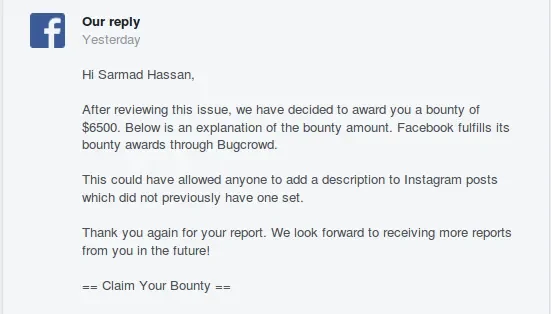
The screenshot accompanies the note that the bug was fixed within one day and rewarded with a 6500 USD bounty.
Variants to test
- Other edit endpoints with a media or object ID in the path. Create an object you own, intercept its edit or update request, and replace the ID with another account's object. A positive result is that the other account's object is modified while your session is the only credential used.
- Caption and title fields on other post types. The report says it works on all kinds of posts: photos, videos and IGTV videos. Try the equivalent update request for each post type on a target. A positive result is a description appearing on a post you do not own.
- Posts with an existing description. The report says the bug worked only when the target post had no description. Test both empty and non-empty fields to see whether the restriction is real or an artefact of the endpoint's logic.
- Private versus public accounts. The report says the bug worked only on public accounts. Test a private account you control to see whether the restriction is enforced server-side or is a side effect of visibility.
- Trusting the response. Whenever a request returns an error such as "Oops an error occurred", check the target object in the UI before concluding the action failed. A positive result is a state change despite the error response.
- Media ID discovery. Enumerate media IDs from page source and from intercepted like requests, then replay them against edit endpoints. A positive result is any ID that is accepted for a write you are not authorised to perform.
What happened, in plain words
Instagram is a photo and video sharing site. Every post on it, whether a photo, a normal video or an IGTV video, has a short text attached to it called a description (Instagram also calls it a caption). Normally you can only write the description on your own posts.
A security researcher found that the request Instagram's website sends when you edit the description of your own IGTV video could be changed so that it edited somebody else's post instead. In other words, he could write a description on other people's posts, as if he were them. He reported it to Facebook, which owns Instagram, and was paid a 6500 USD bounty.
This article walks through how he found it and how the trick works, assuming you know nothing about security testing. You only need to know how to use a browser.
Some words you will meet first
Before the story, a few ideas that come up again and again.
- Web app: a program you use through your browser, like Instagram's website. You click buttons, and your browser quietly sends messages to Instagram's computers to make things happen.
- Request: one of those messages. When you press a button, your browser sends a request to the server (Instagram's computer) and the server sends back a response, which is what your browser then shows you.
- API: the set of addresses and rules the server accepts requests on. Think of a restaurant: the menu is the API. You can only order dishes that are on the menu, and each dish has a name the kitchen understands. Instagram's website is just a customer of Instagram's API.
- Parameter: a named value inside a request, like
caption=test. It is a label plus a value, the way a form field has a name and something written in it. - Media ID: Instagram's internal number for one specific post. Every photo, video and IGTV video has one. It is like a house number: it identifies exactly one object.
- Intercepting proxy: a tool that sits between your browser and the server and lets you pause a request, read it, change it and then send it on. Burp Suite is one such tool. Imagine a postal worker who lets you open a letter before it is delivered and rewrite it.
- IDOR (Insecure Direct Object Reference): a bug where the server takes an identifier (like a media ID) straight from the request and acts on it without checking that you are allowed to touch that object. If a hotel gave you a key whenever you asked for room 402, without checking that you booked it, that would be an IDOR.
- 2FA (two-factor authentication): logging in with your password plus a second proof, such as a code sent to your phone. It makes stolen passwords less useful.
- Public account: an Instagram account whose posts anyone can see without following it. Private account: one whose posts only approved followers can see.
- Bounty: money a company pays a researcher who reports a security bug responsibly instead of abusing it.
The story of finding it
The researcher did not start out looking for a caption bug at all. On 6 August 2018 he wanted to see whether he could get past Instagram's two-factor authentication by going through a Facebook Page, because a Facebook Page has an option that lets you manage an Instagram account from inside Facebook.
He switched to his Facebook Test Page (a page Facebook lets developers create for testing) and clicked the Instagram tab. He tried to log in with an old Instagram account, but could not, because he had forgotten its password.
The screenshot shows the Instagram management tab on a Facebook Page. The author captions it: "You can Manage your Instagram account from your Facebook page".
So he opened Instagram in his web browser to check whether the old account still existed, and looked at the page.
The screenshot shows the Instagram web app in the browser. The author points out that most people would see nothing interesting here. He noticed something because of a habit: he memorises the options and features of the sites he tests, so a new entry stands out immediately. The new entry was an option called IGTV.
IGTV was a brand new Instagram feature at the time, for watching long, vertical videos from creators. He read about it in the Instagram Info Center and decided to test it.
Exploitation
Step 1: create an IGTV video and intercept the edit request
He created an IGTV video of his own, clicked the edit option, and used Burp Suite to pause the request that the edit action sent, so he could see what was inside it. The request looked like this:
POST /media/1887820989027383407/edit/

caption=test&publish_mode=igtv&title=test
Line by line:
POST /media/1887820989027383407/edit/is the address the browser called.POSTis the type of request used when you are sending data to the server to change something. The path says: edit the media whose ID is1887820989027383407. That number was the ID of his own IGTV video.caption=testis the description field, set to the wordtest.publish_mode=igtvtells the server this is an IGTV video.title=testis the title field, also set totest.
The important realisation: the post being edited is identified by a number that the browser sends. If the browser chooses the number, what happens if the browser sends a different one?
He also learned that Instagram uses this same kind of media ID for every post, not only IGTV videos: photos and ordinary videos too.
Step 2: get another user's media ID
The report describes two ways to find the media ID of somebody else's post.
- Open the post in your browser and view the page's source code (the raw text the browser received, which you can display with your browser's view-source feature). The media ID is in there.
The screenshot shows a post's source code with its media ID visible. The author captions it: "You can get any post's media ID from the source code".
- Open the user's post, click like, and intercept the request that the like sends with Burp Suite. The media ID is in that request too. He used this second method in his proof-of-concept video.
Step 3: swap the media ID
Now he had everything he needed. The plan: take the edit request from Step 1, which edits his own post, and replace his own media ID with the media ID of another user's post. Then send it and see whether the server accepts it. The report does not show the modified request itself; it describes the change as replacing your media ID with the target post's media ID.
Why would this work? Because the server, when it receives the request, has to decide whether the person sending it is allowed to edit that post. If it never checks, it will happily edit whatever ID it is given.
Step 4: see what happened
He tested on a second test account and found four things:
- He could add a description to other users' posts by replacing his media ID with theirs, but only if those posts had no description already.
- It worked on every kind of post: photos, videos and IGTV videos.
- It worked only on public accounts.
- The strangest part: the server replied with an Internal Server error and the message "Oops an error occurred", yet the description was still written. The proof-of-concept video shows this happening.
That last point is the biggest lesson in the report. Do not trust the response alone. A server can say "error" while having done the thing anyway. You have to go and look at the actual post in the web app to know what really happened.
The embedded video is the proof of concept. The author credits the idea of not trusting the response to a video by his friend Abdellah Yaala, at minute 1:22.
Why the bug worked
The edit address takes the media ID from the request path and the caption and title from the body of the request; the report does not describe the server-side check. That is the definition of an IDOR: the identifier comes from the client, and the authorisation check is missing or insufficient.
The report says the bug worked only when the target post had no description, but does not explain why. The response said "Oops an error occurred", yet the description was still written.
Why this bug is dangerous
Because the bug works on public accounts and on posts without a description, and because many users leave descriptions blank, the author argues that millions of accounts were reachable. In the wrong hands, an attacker could target the most-followed Instagram accounts, including celebrities, and write descriptions on their posts as if they were the account owner. The report lists public figures with their follower counts as given:
| Account | Followers |
|---|---|
| Mark Zuckerberg | 4.6 million |
| Selena Gomez | 140 million |
| Ariana Grande | 125 million |
| Beyoncé | 117 million |
| Kim Kardashian | 115 million |
| Lionel Messi | 97 million |
The author notes this could lead to a big media hype by targeting celebrities, or create problems between large companies such as Apple and Samsung. The impact is limited by the two conditions above: public accounts only, and only posts that had no description.
The fix
The bug was reported directly to the Facebook Security Team and fixed within one day. The report says the fix was fast because of the severity, but does not describe what was changed.
Timeline
| Date | Event |
|---|---|
| 6 August 2018 | Initial report |
| 14 August 2018 | Report triaged |
| 15 August 2018 | Bug fixed |
| 15 August 2018 | Fix confirmed |
| 10 October 2018 | 6500 USD bounty awarded |
The screenshot accompanies the note that the bug was fixed within one day and rewarded with a 6500 USD bounty.
Variants to test
If you want to look for similar bugs yourself, here are the directions the report suggests. Each one is a small experiment with a clear sign of success.
- Other edit endpoints with an object ID in the path. Create something you own, intercept the request that edits it, and replace the ID with another account's object. Success means the other account's object changes while your session is the only credential used.
- Caption and title fields on other post types. The report says it works on all kinds of posts: photos, videos and IGTV videos. Try the equivalent update request for each post type. Success means a description appears on a post you do not own.
- Posts with an existing description. The report says the bug worked only when the target post had no description. Test both empty and non-empty fields to see whether the restriction is real or just a quirk of how the endpoint works.
- Private versus public accounts. The report says the bug worked only on public accounts. Test a private account you control to see whether the restriction is enforced by the server or is a side effect of visibility.
- Trusting the response. Whenever a request returns an error such as "Oops an error occurred", check the target object in the interface before concluding the action failed. Success means a state change despite the error response.
- Media ID discovery. Collect media IDs from page source and from intercepted like requests, then replay them against edit endpoints. Success means any ID is accepted for a write you are not authorised to perform.
Glossary
- Web app: a program you use through your browser, where the browser talks to a server behind the scenes.
- Request: a message your browser sends to a server, for example when you press a button.
- Response: the message the server sends back, which your browser displays.
- API: the set of addresses and rules a server accepts requests on, like a restaurant menu.
- Parameter: a named value inside a request, such as
caption=test. - Media ID: Instagram's internal number identifying one specific post.
- Intercepting proxy: a tool placed between browser and server that lets you pause, read and modify requests. Burp Suite is one.
- Burp Suite: the intercepting proxy used in this report.
- IDOR (Insecure Direct Object Reference): a bug where the server acts on an identifier taken from the request without checking that you are allowed to touch that object.
- 2FA (two-factor authentication): logging in with your password plus a second proof, such as a code on your phone.
- Public account: an Instagram account whose posts anyone can see.
- Private account: an Instagram account whose posts only approved followers can see.
- IGTV: Instagram's feature for long, vertical videos, launched in June 2018.
- Caption / description: the text attached to a post.
- Source code: the raw text a browser receives for a page, which you can display with the view-source feature.
- Internal Server error: an error response from the server meaning something went wrong on its side.
- Bounty: money a company pays a researcher who reports a security bug responsibly.
- Triaged: reviewed and accepted as a real issue by the security team.
- Proof of concept (PoC): a demonstration, often a video, showing the bug actually working.
- Session: the state of being logged in, which the server tracks so it knows who is making each request.
- Credential: proof of identity, such as a password or a logged-in session.



