How I was able to delete any image in Facebook community
The attachment parameter in Facebook's community question forum accepted any photo's fbid, allowing an attacker to attach another user's photo to their own answer. Deleting the attacker's answer also deleted the victim's original photo, and the same flaw affected Facebook Workplace.
 Published on medium.com
Bug Bounty
The full write-up lives on its author's site
It belongs to its author, so we link to it rather than copy it. The other two tabs are our own rewrites, checked against it.
Context
Facebook runs a community question forum at https://www.facebook.com/help/community, where users post questions and answers, and can attach a photo to either. The same feature exists on Workplace at https://workplace.facebook.com/help/work/community. When a user posts an answer with an attached photo, the browser sends an asynchronous POST to the forum backend, and the photo is referenced by an fbid, the identifier of an uploaded photo on Facebook.
The report describes an IDOR in that attachment handling: the fbid sent with an answer was trusted as-is, so an attacker could reference another user's photo, and deleting the attacker's answer eventually removed the victim's photo.
Setup
- Two accounts: a test account, Sadiq Hamed, used as the attacker, and the researcher's real account, Sarmad Hassan, used as the victim.
- Burp Suite as an intercepting proxy.
- A question on the community forum to post answers to. The researcher used:
https://www.facebook.com/help/community/question/?id=10155342339873049&rdrhc
Finding it
The researcher posted an answer with an attached photo and intercepted the request. The request was:
The interesting part is the attachment parameter, which carries the photo uploaded from the user's machine. URL-decoded, it is:
attachment={"fbid":275252333010477}
fbid is the id of any uploaded photo on Facebook. The value describes which photo the answer should reference, which is what made it worth manipulating.
Exploitation
Step 1: Reference the victim's photo from the attacker's answer
The researcher logged in as the test account (Sadiq Hamed, the attacker), posted an answer, intercepted the request in Burp, and replaced the test account's fbid with the fbid of the photo attached to the real account's answer (Sarmad Hassan, the victim). The answer posted successfully with the victim's photo attached.
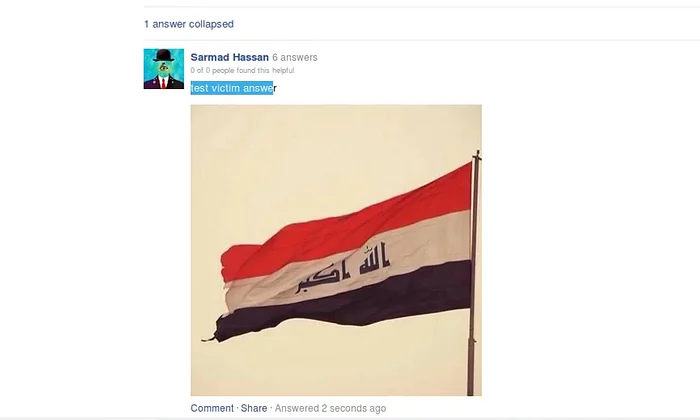
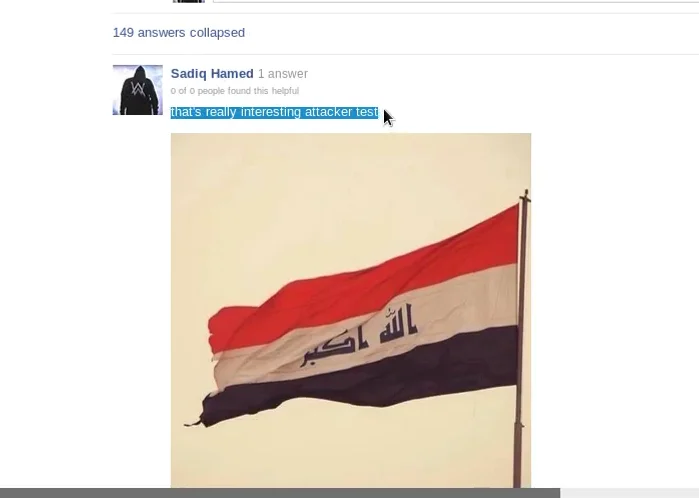
The first image shows the victim account's answer with its attached photo; the second shows the attacker account's answer carrying the same fbid, and therefore the same photo.

At this point both answers referenced the same fbid, which is the IDOR.
Step 2: Delete the attacker's answer
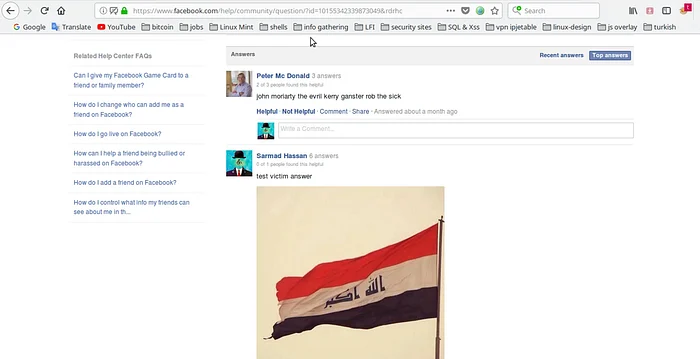
The reasoning was that deleting the answer from the attacker account should delete the victim's attached photo too, because both answers had the same fbid. The researcher deleted the answer from the attacker account and refreshed the victim's page, but the photo was still there.
Step 3: Wait and refresh
Assuming deletion might be asynchronous, the researcher refreshed both accounts repeatedly for more than a minute and checked the victim account again. The victim's photo was gone.
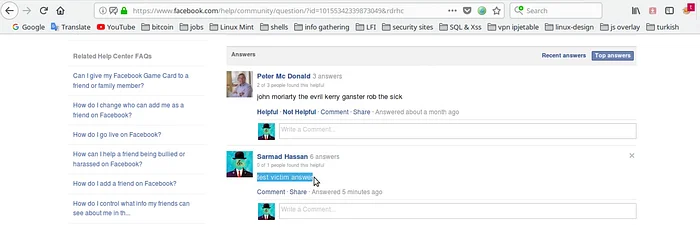
So the sequence is: post an answer as the attacker with the victim's fbid, delete that answer, and the victim's photo is removed from their answer.
Step 4: Extending the target
The same behaviour worked on photos uploaded by the Facebook help team itself, and on Workplace at https://workplace.facebook.com/help/work/community.
Step 5: Obtaining an fbid that is not yours
The remaining problem was getting the fbid of another user's photo. A friend, Max Pasqua, pointed out a relationship between the image URL and the fbid: the second number in the image URL filename, combined with a constant of 3333333. The method, as explained in the report:
- Get the image link, for example:
https://scontent.febl3-1.fna.fbcdn.net/v/t39.2229-6/[redacted].jpg?oh=[redacted]&oe=5B05ACC9
- Take this part of the URL:
[redacted].jpg?oh=[redacted]&oe=5B05ACC9
- Take the second number between the underscores, here
500237376979766. - Subtract
3333333(a constant) from it. - The formula is:
fbid = 500237376979766-3333333 ==> 500237373646433
So the fbid for that image link is 500237373646433. Note that the report's step 4 mentions subtracting 263936780808699 from 3333333, while the formula and worked example use the second number minus 3333333; the worked example is the one that produces the stated fbid.
Root cause
The attachment parameter, containing the fbid, is accepted from the client without checking that the photo belongs to the account posting the answer. An answer created by one account can point at another account's photo. Deletion of the answer then removes the referenced photo, regardless of who uploaded it, though not immediately. The report does not describe the server-side code, so the exact check that was missing is likely an ownership check on fbid at post time, and possibly again at delete time.
Impact
On https://www.facebook.com/help/community, an attacker could:
- Delete any attached photo uploaded by the Facebook help team.
- Delete any attached photo in any user question.
- Delete any attached photo in any user answer.
The same three actions were possible on https://workplace.facebook.com/help/work/community.
The attack requires knowing the target photo's fbid, which the report shows can be derived from the image URL. Deletion is not immediate: the photo was still present right after the attacker's answer was deleted and disappeared after repeated refreshes over more than a minute.
Fix
Facebook fixed the issue; the report gives no details of the change. A fix addressing the root cause would be to authorise the fbid against the posting account when the answer is created, and to verify ownership again when the answer and its attachment are deleted.
Variants to test
- Attachment identifiers in post and comment endpoints. Submit a post with an attachment id belonging to another account. A positive result is the post rendering the other account's attachment.
- Delete-after-reference. Create content referencing someone else's attachment, then delete your content and watch the owner's attachment over several minutes with repeated refreshes. A positive result is the owner's attachment disappearing.
- Derived identifiers from CDN URLs. Where image URLs embed numeric ids, look for a fixed offset between the URL number and the object id, as with the
3333333constant here, and use the derived id in place of your own. A positive result is the server accepting the derived id for an object you do not own. - Staff or system-owned content. Try the same substitution against attachments uploaded by support or help-team accounts. A positive result is deletion of content the attacker has no relationship with.
- Parallel products. Repeat on sibling deployments of the same forum feature, such as Workplace here. A positive result is the same behaviour on the second domain.
Timeline
| Date | Event |
|---|---|
| Jan. 27, 2018 | Initial report |
| Feb. 07, 2018 | Report triaged |
| Feb. 13, 2018 | Fixed by Facebook |
| Feb. 19, 2018 | Fix confirmed |
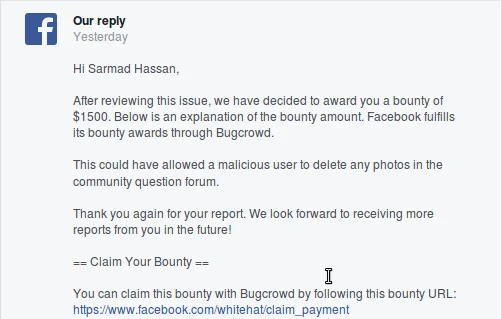
| Feb. 23, 2018 | Bounty of $1,500 awarded |
Takeaways
- Never give up.
- Try to understand the web app and its parameters, and put it in your notes.
- When there are images in the web app, always focus on image id parameters, because there is a chance of IDOR there.
- Manipulate parameters.
- Burp Suite is your best friend; intercept everything.
- If you did not find a bug, try another day and keep digging until you find a valid one.
What happened, in plain words
Facebook runs a help forum where people ask questions and other people answer them. You can attach a picture to your question or your answer. When you do, your browser tells Facebook's server which picture to use by sending a number called an fbid, short for Facebook id, which is the identifier of a photo that has been uploaded to Facebook.
The researcher found that he could send another account's fbid and the server accepted it. So he posted an answer from one account but pointed it at a photo that belonged to a different account. Then he deleted his own answer, and after repeated refreshes over more than a minute the other account's photo disappeared. In other words, an attacker could delete any attached photo, including photos posted by Facebook's own help team, on both the normal help forum and on Workplace, Facebook's version of the forum for companies.
This kind of mistake has a name: IDOR, which stands for Insecure Direct Object Reference. The idea is simple. Imagine a cloakroom where you hand in your coat and get a ticket with a number on it. If the attendant gives back whatever coat matches the number you hand over, without checking that the ticket is really yours, you can read someone else's number off their ticket and walk away with their coat. Here the "ticket number" is the fbid, and the server never checked whose ticket it was.
A few words you will meet in this article, explained from zero:
- A server is the computer somewhere in the world that holds the website and answers your browser's requests.
- A request is the message your browser sends to the server, for example "please save this answer". The server sends back a response, for example "done".
- An API (Application Programming Interface) is the set of addresses and rules a website offers so that programs, including the JavaScript running in your browser, can talk to the server without reloading the whole page. Think of it as the service counter at the back of a shop: the shop front is the page you see, the counter is where the actual work gets done.
- A cookie is a small piece of text your browser stores for a website and sends back with every request. Facebook uses cookies to know who you are, so you do not have to type your password on every click. If someone steals your cookie, they can act as you, which is why cookies are treated as secrets.
- A token is similar: a value that proves you are allowed to do something. The
fb_dtsgvalue in the request below is a token Facebook puts in its pages to make sure a request really came from the site and not from some other page pretending to be Facebook. - URL encoding is a way of writing characters that are not allowed in a URL. For example
%7Bmeans{and%22means a double quote. So%7B%22fbid%22%3A275252333010477%7Dis just{"fbid":275252333010477}written in a form that can travel inside a URL. - JSON is a simple text format for data, made of names and values in curly braces, like
{"fbid":275252333010477}. - Burp Suite is a program that sits between your browser and the server. It can pause every request so you can read it and change it before it is sent. Think of a postal worker who lets you open each letter, rewrite it, and then post it on.
- A proxy is exactly that middleman: your browser sends its traffic to the proxy, and the proxy forwards it to the server.
- Intercepting means catching a request in the proxy and holding it so you can edit it.
- Asynchronous (or async) means the page sends a request in the background and updates itself without a full reload. That is why the address in the request below contains the word
async. - POST is one of the request types. A GET asks the server for something, a POST sends data to the server to create or change something, such as posting an answer.
- URL-decoded means turning the
%7Bstyle back into normal characters so you can read it. - CDN stands for Content Delivery Network: a network of servers that serve images and other files quickly. Facebook image links point at a CDN host, which is why the example link below starts with
scontent. - Root cause is the underlying mistake that makes the bug possible, as opposed to its visible symptom.
- Triaged means the security team looked at the report and accepted it as a real issue worth working on.
The setup
The researcher used two accounts. One was a test account, Sadiq Hamed, which played the attacker: the account doing the bad thing. The other was his own real account, Sarmad Hassan, which played the victim: the account whose photo gets deleted. Having both accounts is the standard way to test whether one user can affect another.
He also used Burp Suite as an intercepting proxy, and he needed a question on the forum to post answers to. The question he used was:
https://www.facebook.com/help/community/question/?id=10155342339873049&rdrhc
This is an ordinary forum page address. The id= part tells Facebook which question to show. The rdrhc part is an extra marker Facebook adds to some links; it does not matter for the bug.
Finding it
He posted an answer with a photo attached and let Burp catch the request on its way out. This is the request the browser sent:
Line by line, in plain words:
POST /help/community/async/post_answer/?...is the first line. It says: send data (POST) to the address/help/community/async/post_answer/, which is the API endpoint for posting an answer. The part after the?carries extra details:view=top(show answers in a certain order),question_id=10155342339873049(which question the answer belongs to),helpCommunityPath=%2Fbusiness%2Fhelp%2Fcommunity%2F(a path setting, where%2Fis an encoded slash), anddpr=1(a display setting).Host: www.facebook.comtells the server which website the request is for. One server can host many sites, so it needs to know.User-Agentsays which browser and operating system sent the request. Here it is Firefox 58 on 64-bit Ubuntu Linux.AcceptandAccept-Languagesay what kind of reply the browser can handle and in which language.Referersays which page the request came from. It is the question page.Content-Type: application/x-www-form-urlencodedsays the data in the body is formatted like a form: names and values joined with&.Content-Length: 404says the body is 404 bytes long.Cookiecarries the browser's stored values for Facebook. These are the login and session values, which is why they are shown asxxxhere.c_user=100015771374169is the account number of the logged-in user. Never share real cookie values with anyone.Connection: closeasks the server to close the connection after replying.- The blank line separates the headers from the body.
- The body is the actual form data.
fb_dtsg=xxxis Facebook's anti-forgery token.answer=testis the text of the answer.attachment=%7B%22fbid%22%3A275252333010477%7Dis the photo, in URL-encoded JSON.view=toprepeats the setting.__user=100015771374169is the account number again. The remaining__a,__dyn,__req,__be,__pc,__rev,jazoest,__spin_r,__spin_band__spin_tvalues are internal bookkeeping fields Facebook's page adds; they are not the interesting part.
The part that caught his eye was the attachment parameter, because that is what carries the photo the user uploaded from their own computer. URL-decoded, it reads:
attachment={"fbid":275252333010477}
So the attachment is a small JSON object with one field, fbid, whose value is 275252333010477. fbid is the id of any uploaded photo on Facebook. The key observation is that this value is supplied by the browser. The server is told "use photo number 275252333010477", and the substitution worked. That is what made it worth changing.
Exploitation
Step 1: Point the attacker's answer at the victim's photo
He logged in as the test account (Sadiq Hamed, the attacker), posted an answer, caught the request in Burp, and replaced the test account's fbid with the fbid of the photo attached to his real account's answer (Sarmad Hassan, the victim). The answer posted successfully, with the victim's photo attached to it.
The first image shows the victim account's answer with its attached photo. The second shows the attacker account's answer carrying the same fbid, and therefore the same photo. Two different accounts, two different answers, one photo between them.
At this point both answers pointed at the same fbid. That is the IDOR: the server accepted a reference to an object (the photo) that the posting account did not own.
Step 2: Delete the attacker's answer
His reasoning was that if deleting an answer also deletes the photo attached to it, and both answers shared the same fbid, then deleting the attacker's answer should delete the victim's photo too. He deleted the answer from the attacker account and refreshed the victim's page. The photo was still there.
This is a useful lesson in itself: a negative result at first glance does not mean the bug is not there. It may just mean the effect is not instant.
Step 3: Wait and refresh
Assuming the deletion might happen in the background, he refreshed both accounts repeatedly for more than a minute and checked the victim account again. The victim's photo was gone.
So the full sequence is: post an answer as the attacker using the victim's fbid, delete that answer, and the victim's photo is removed from their answer. The attacker never touched the victim's account.
Step 4: Extending the target
The same behaviour worked on photos uploaded by the Facebook help team itself, and on Workplace at https://workplace.facebook.com/help/work/community. The same behaviour worked on Workplace at https://workplace.facebook.com/help/work/community.
Step 5: Getting an fbid that is not yours
One problem remained. To attack someone, you need their photo's fbid, and you do not normally know it. A friend, Max Pasqua, pointed out a relationship between the image URL and the fbid: the second number in the image's filename, combined with a constant of 3333333. The method, as explained in the report:
- Get the image link, for example:
https://scontent.febl3-1.fna.fbcdn.net/v/t39.2229-6/[redacted].jpg?oh=[redacted]&oe=5B05ACC9
- Take this part of the URL:
[redacted].jpg?oh=[redacted]&oe=5B05ACC9
- Take the second number between the underscores, here
500237376979766. - Subtract
3333333(a constant) from it. - The formula is:
fbid = 500237376979766-3333333 ==> 500237373646433
So the fbid for that image link is 500237373646433.
In plain words: the image link is served by a CDN, and the long filename contains several numbers separated by underscores. The second of those numbers, minus a fixed offset of 3333333, gives the photo's fbid. A fixed offset like this is a common pattern in web applications: two numbers that always differ by the same amount. Once you spot it, you can turn a public image link into the private identifier the server uses internally. The report's step 4 mentions subtracting 263936780808699 from 3333333, while the formula and the worked example use the second number minus 3333333; the worked example is the one that produces the stated fbid.
Root cause
The attachment parameter, which contains the fbid, was accepted from the browser even when the photo belonged to another account. An answer created by one account can point at another account's photo. Deleting the answer then removes the referenced photo, no matter who uploaded it, though not immediately. The report does not describe the server-side code, so the exact check that was missing is most likely an ownership check on fbid when the answer is posted, and possibly again when it is deleted.
Impact
On https://www.facebook.com/help/community, an attacker could:
- Delete any attached photo uploaded by the Facebook help team.
- Delete any attached photo in any user question.
- Delete any attached photo in any user answer.
The same three actions were possible on https://workplace.facebook.com/help/work/community.
The attack requires knowing the target photo's fbid, which the report shows can be worked out from the image URL. Deletion is not immediate: the photo was still present right after the attacker's answer was deleted, and disappeared after repeated refreshes over more than a minute.
Fix
Facebook fixed the issue; the report gives no details of the change. A fix addressing the root cause would be to check the fbid against the posting account when the answer is created, and to verify ownership again when the answer and its attachment are deleted.
Variants to test
- Attachment identifiers in post and comment endpoints. Submit a post with an attachment id belonging to another account. A positive result is the post showing the other account's attachment.
- Delete-after-reference. Create content that references someone else's attachment, then delete your content and watch the owner's attachment over several minutes with repeated refreshes. A positive result is the owner's attachment disappearing.
- Derived identifiers from CDN URLs. Where image URLs contain numeric ids, look for a fixed offset between the URL number and the object id, as with the
3333333constant here, and use the derived id in place of your own. A positive result is the server accepting the derived id for an object you do not own. - Staff or system-owned content. Try the same substitution against attachments uploaded by support or help-team accounts. A positive result is deletion of content the attacker has no relationship with.
- Parallel products. Repeat on sibling deployments of the same forum feature, such as Workplace here. A positive result is the same behaviour on the second domain.
Timeline
| Date | Event |
|---|---|
| Jan. 27, 2018 | Initial report |
| Feb. 07, 2018 | Report triaged |
| Feb. 13, 2018 | Fixed by Facebook |
| Feb. 19, 2018 | Fix confirmed |
| Feb. 23, 2018 | Bounty of $1,500 awarded |
Takeaways
- Never give up.
- Try to understand the web app and its parameters, and put it in your notes.
- When there are images in the web app, always focus on image id parameters, because there is a chance of IDOR there.
- Manipulate parameters.
- Burp Suite is your best friend; intercept everything.
- If you did not find a bug, try another day and keep digging until you find a valid one.
Glossary
- API: the set of addresses and rules a website offers so programs can talk to its server, like a service counter behind the shop front.
- Asynchronous: a request sent in the background so the page can update without a full reload.
- Attacker: in a test, the account that tries to do something it should not be allowed to do.
- Burp Suite: a program that sits between browser and server, letting you pause, read and change requests.
- CDN (Content Delivery Network): a network of servers that deliver images and files quickly, often on a host name like
scontent. - Cookie: a small piece of text a website stores in your browser and receives back with each request, often used to keep you logged in.
- Endpoint: a specific address on a server that performs a specific action, such as posting an answer.
fbid: the identifier of an uploaded photo on Facebook.- GET: a request type that asks the server for something.
- Host: the header that tells the server which website the request is for.
- IDOR (Insecure Direct Object Reference): a bug where the server accepts an identifier supplied by the user and acts on the object it names without checking that the user owns it.
- Intercepting: catching a request in a proxy and holding it so it can be read or edited.
- JSON: a simple text format for data, made of names and values in curly braces.
- POST: a request type that sends data to the server to create or change something.
- Proxy: a middleman program that traffic passes through on its way to the server.
- Request: the message a browser sends to a server.
- Response: the message a server sends back.
- Root cause: the underlying mistake that makes a bug possible.
- Server: the computer that holds a website and answers requests.
- Token: a value that proves you are allowed to do something, such as the
fb_dtsganti-forgery value. - Triaged: reviewed by a security team and accepted as a real issue.
- URL-decoded: turned from
%7Bstyle back into normal readable characters. - URL encoding: writing characters that are not allowed in a URL as
%codes. - Victim: in a test, the account whose data or content is the target of the attack.



