IDOR FACEBOOK: malicious person add people to the “Top Fans”
The endpoint that lets a user opt in to a page's 'Top Fans' list did not verify that the request came from the user it named, so an attacker could add any other user to that list without their consent. The attacker could not read private data, but could force a public association between a victim and a page.
 Published on medium.com
Today I will write the story of this publication that I shared with my friends when I discovered a security issues on Facebook
The full write-up lives on its author's site
It belongs to its author, so we link to it rather than copy it. The other two tabs are our own rewrites, checked against it.
Context
Facebook Pages had recently gained a feature that lets a page's followers be categorised as its "Top Fans". The feature is optional: a user who follows a page and whom Facebook considers a top fan receives a notification, and can then choose to opt in and display a Top Fans badge. The researcher describes the affected product area as Pages and the vulnerability type as privacy and authorisation.

The report is about the endpoint that records a user's opt-in to the Top Fans list. In normal use, the request that opts a user in is generated by that user, from their own notification, and carries their own identifiers.
Setup
The report does not describe any special accounts, tools, versions or preconditions beyond the following: the attacker needs to be a user who has received the Top Fans notification for a page, so that they have a legitimate opt-in request to work from. The victim is any user the attacker wants to add to the list. The request is intercepted.
Finding it
After digging around in Facebook looking for possible bugs, the researcher noticed the newly added Top Fans feature and the notification that invites a user to be added to the list. Poking around in the HTTP requests, the researcher found that the endpoint used to send a request to join the Top Fans list did not verify that the sender is actually the sender. In other words, the identifiers of the user being opted in were taken from the request itself and were not tied to the authenticated session that sent it.
The flaw allows a malicious person to add users to the Top Fans list without the user sending or approving the request.
Exploitation
Step 1: the notification
Facebook sends messages to all users who follow certain pages and whom Facebook considers the Top Fans of the page.
Step 2: open the opt-in dialog
The malicious person clicks on the notification of the Top Fans that Facebook has sent them. The dialog is loaded from this URL:
Step 3: intercept the opt-in request
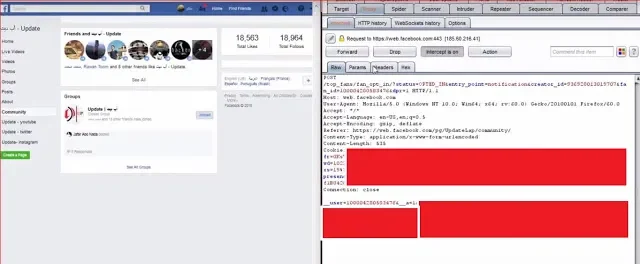
After clicking on the "display Top Fans badge" icon, the request is intercepted.
Step 4: change the fan identifier
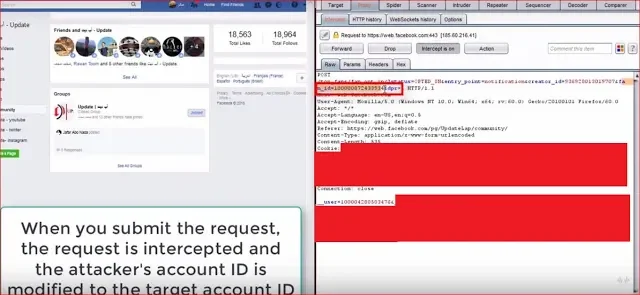
The attacker modifies the link to point at the victim's information:
The attacker modifies the link to the victim's information.
Step 5: send the request
The attacker sends the request after editing it.
Step 6: result
The target person has now been added to the list of the Top Fans without their knowledge and without them sending the request.
Root cause
The opt-in endpoint did not verify that the sender is actually the sender. Because the endpoint did not verify the sender, a malicious person could add users to the Top Fans list. The report does not describe the server-side code, so the exact implementation is not shown; the missing ownership check is what the researcher observed from the request behaviour.
Impact
The researcher characterises the impact as greater on privacy than on security. An attacker can find people who are interested in a page by following their comments or likes, and then add them to the page's Top Fans list. The attacker cannot access any user data. The harm is that a user can be shown as interacting with a page and classified as one of its top fans when they do not like its content; the researcher describes being classified among a page's most engaged users as a violation of privacy.
Fix
Timeline
| Date | Event |
|---|---|
| 27 Jun 2018 | The report was submitted |
| 27 Jun 2018 | The vulnerability was accepted |
| 29 Jun 2018 | The security team said they were patching the vulnerability |
| 29 Jun 2018 | Re-testing showed the security defect still existed |
| 05 Jul 2018 | The report was reopened |
| 17 Jul 2018 | Patches were done |
| 19 Jul 2018 | Bounty awarded |
Variants to test
- Swap the user identifier in any opt-in, opt-out or subscription endpoint for another user's identifier and replay the request. A positive result is a state change on the other user's account, such as being added to a list or subscribed to a page.
- Change the page identifier as well as the fan identifier, to see whether the endpoint also fails to check the relationship between the two. A positive result is a victim being added to a page they do not follow.
- Replay the same request from a second account with a different session. A positive result is that the second account can still opt in the first account's user, showing the check is on the parameter and not the session.
- Look for the same pattern in other notification-driven flows where the client supplies both the actor and the target identifiers. A positive result is any action performed on behalf of, or against, a user who did not initiate it.
What happened, in plain words
Facebook Pages had a feature called "Top Fans". When you follow a page and Facebook decides you are one of its most engaged followers, you get a notification inviting you to be shown as a Top Fan. The feature is optional: you can accept the invitation and display a badge, or ignore it.
The researcher found that the endpoint used to send a request to join the Top Fans list did not verify that the sender is actually the sender. A malicious person could modify the request to the victim's information and send it. The other person was then added to the page's Top Fans list without ever agreeing to it.
The researcher classifies this as a privacy and authorisation problem. The attacker cannot access any user data; the harm is being added to the Top Fans list without knowledge.
The feature, and the words you need
Before the steps, a few terms that come up constantly.
- A page on Facebook is a public profile for a business, a celebrity, a band or a cause. People follow a page to see its posts.
- A notification is the little alert Facebook shows you, for example a bell icon with a number next to it. Clicking it opens whatever Facebook wants to tell you about.
- An endpoint is one specific address on a website that does one specific job. Think of a large office building: the street address gets you into the building, but each counter inside handles one kind of paperwork.
top_fans/fan_opt_inis one such counter: it handles the paperwork for joining the Top Fans list. - A parameter is a named value attached to the end of a web address, after a
?, written asname=valueand separated by&. In a shop,?colour=red&size=largewould be two parameters. They are how a browser tells a website which item, which page, which user it is talking about. - An HTTP request is the message your browser sends to a website when you click something or load a page. It contains the address, the parameters, and usually a session cookie: a short string the site gave your browser at login so it can recognise you on the next request. The cookie is what proves "this request comes from this logged-in account".
- An intercepting proxy is a tool that sits between your browser and the website. It lets you pause a request before it leaves, read it, edit it, and then send it on. It is like intercepting a letter at the post office, changing a line, and posting it again.
- IDOR stands for Insecure Direct Object Reference. It means the website lets you name an object (here, a user) directly in the request, and does not check that you are allowed to act on that object. Everyday comparison: a cloakroom that hands out coats to anyone who reads out a ticket number, without checking that the ticket is theirs.
- Authorisation is the check that a logged-in user is allowed to do the thing they are asking for. Authentication is proving who you are; authorisation is deciding what you may do. This bug is an authorisation failure: the user was properly logged in, but was allowed to act for somebody else.
What the researcher did first
The researcher was exploring Facebook looking for possible bugs and noticed the recently added Top Fans feature, together with the notification that invites a follower to join the list. The interesting part was not the screen but the traffic behind it, so the researcher looked at the HTTP requests the page made and found that the endpoint used to join the Top Fans list did not verify that the sender is actually the sender.
In plain terms: the request contains a field saying which user is being opted in. The server read that field and acted on it, but never compared it with the account behind the session cookie. The two could be different people, and the server would not notice.
The steps, one at a time
Step 1: the notification arrives
Facebook sends messages to all users who follow certain pages and whom Facebook considers the Top Fans of the page. This is the normal, intended start of the flow: the site itself invites you.
Why this matters for the attack: the attacker needs one of these invitations, because it gives them a genuine opt-in request to copy and edit. Without a real request of their own, there would be nothing to modify.
Step 2: open the opt-in dialog
The malicious person clicks on the notification of the Top Fans that Facebook has sent them. The dialog is loaded from this URL:
Line by line:
https://web.facebook.comis the site being talked to./top_fans/fan_opt_in_dialog/is the endpoint that draws the dialog, the small window asking whether you want the badge.?starts the list of parameters.page_id=(PageID)says which page this is about.&separates the next parameter.fan_id=[UserID]says which fan is being asked.
So this address means: "show the Top Fans dialog for this page, to this user". Both identifiers describe the attacker, because the attacker is the one who received the notification.
Step 3: intercept the request
After clicking on the "display Top Fans badge" icon, the request is intercepted.
This is where the intercepting proxy earns its place. The attacker does not let the request go straight to Facebook; they hold it, look at it, and prepare to change it. The reason for pausing here is that this request is the one that actually records the opt-in, so it is the one worth editing.
Step 4: change the fan identifier
The attacker modifies the link to point at the victim's information:
Line by line:
/top_fans/fan_opt_in/is the endpoint that records the opt-in. Note it is a different address from the dialog in step 2: the dialog only displays the question, this one stores the answer.status=OPTED_INis the answer being stored: this user has opted in.entry_point=notificationsays the request came from the notification flow. It is a label describing where the user came from.creator_id=[Page ID]identifies the page whose Top Fans list is being changed.fan_id=[Victim ID]identifies the user being added to that list.
The attacker modifies the link to the victim's information.
Step 5: send the request
The attacker sends the request after editing it. From the server's point of view this looks like an ordinary opt-in: a logged-in user, a valid page, a valid fan identifier, the right status. Nothing in the request is malformed.
Step 6: the result
The target person has now been added to the list of the Top Fans without their knowledge and without them sending the request. They did not send or approve the request.
Why it worked
The opt-in endpoint trusted the fan_id supplied in the request instead of deriving the fan from the authenticated session.
Because the endpoint did not verify the sender, a malicious person could add users to the Top Fans list. The report does not show the server-side code, so the exact implementation is not visible; what the researcher observed is the behaviour of the request, and the missing ownership check that behaviour implies.
Impact
The researcher characterises the impact as greater on privacy than on security. An attacker can find people who are interested in a page by following their comments or likes, and then add them to the page's Top Fans list. The attacker cannot access any user data.
The harm is reputational and social rather than technical: a user can be shown as interacting with a page and classified as one of its top fans when they do not like its content. The researcher describes being classified among a page's most engaged users as a violation of privacy. Think of a club publishing a list of its most loyal members and putting your name on it without asking; nobody has read your private files, but your name is now attached to something you never chose.
The fix
The report does not describe the change that was made. In everyday terms: stop asking the visitor which coat is theirs and start reading the ticket the cloakroom itself issued.
Timeline
| Date | Event |
|---|---|
| 27 Jun 2018 | The report was submitted |
| 27 Jun 2018 | The vulnerability was accepted |
| 29 Jun 2018 | The security team said they were patching the vulnerability |
| 29 Jun 2018 | Re-testing showed the security defect still existed |
| 05 Jul 2018 | The report was reopened |
| 17 Jul 2018 | Patches were done |
| 19 Jul 2018 | Bounty awarded |
The re-test on 29 June showed the security defect still existed. That is why the report was reopened on 5 July. Verifying a fix is part of the job, not an optional extra.
Variants to test
These are the same idea applied elsewhere. Each one is a small experiment you could run with an intercepting proxy on your own accounts.
- Swap the user identifier in any opt-in, opt-out or subscription endpoint for another user's identifier and replay the request. A positive result is a state change on the other user's account, such as being added to a list or subscribed to a page.
- Change the page identifier as well as the fan identifier, to see whether the endpoint also fails to check the relationship between the two. A positive result is a victim being added to a page they do not follow.
- Replay the same request from a second account with a different session. A positive result is that the second account can still opt in the first account's user, showing the check is on the parameter and not the session.
- Look for the same pattern in other notification-driven flows where the client supplies both the actor and the target identifiers. A positive result is any action performed on behalf of, or against, a user who did not initiate it.
Glossary
- Page: a public profile on Facebook for a business, person or cause, which other users can follow.
- Follower / fan: a user who has chosen to see a page's posts; a top fan is one Facebook ranks among the page's most engaged followers.
- Notification: an alert from the site telling a user that something happened or inviting them to do something.
- Endpoint: one specific address on a website that performs one specific action.
- Parameter: a named value in a web address, written
name=valueafter a?and separated by&. - HTTP request: the message a browser sends to a website to ask for a page or an action.
- Session cookie: a short string the site gives the browser at login and the browser sends back on each request, so the site can recognise the account.
- Intercepting proxy: a tool placed between browser and website that can pause, read and edit requests before they are sent.
- IDOR (Insecure Direct Object Reference): a flaw where the site lets a request name an object such as a user directly, and does not check that the requester is allowed to act on it.
- Authentication: proving who you are, usually by logging in.
- Authorisation: deciding what a logged-in user is allowed to do.
- Opt in: to actively agree to something, here to be shown as a Top Fan.
- Root cause: the underlying reason a bug exists, as opposed to its visible symptom.
- Replay: to send a captured request again, possibly after editing it.
- PoC (proof of concept): a demonstration that a bug is real, usually the smallest set of steps that shows it.
- Bounty: a payment a company makes to a researcher who reports a valid security bug.



