Story and Repro Steps
The Mapillary Android app failed to enforce server-side length limits on organization name and description fields, allowing an attacker to store oversized or malformed JSON data. When a victim's account was added to such an organization, the app crashed permanently upon accessing the Capture feature, preventing image uploads.
 Published on pathleax.medium.com
Hello everyone! This is my first Bug Bounty from Facebook Social Media Platform (Meta, Inc)
The full write-up lives on its author's site
It belongs to its author, so we link to it rather than copy it. The other two tabs are our own rewrites, checked against it.
Context
Mapillary is a street level imagery platform that Facebook (Meta, Inc) acquired in June 2020. It combines street images from any camera into a visualisation to improve maps. The feature at the centre of this write-up is Organization: it lets a user create a private organization and add members to contribute. Organizations are tied to the app's main feature, Capture, because an organization is required to upload images.
The bug described here lets an attacker remotely and permanently crash the Mapillary Android app for a chosen user by supplying that user's UID (Unique ID). The crash takes out the Capture and Organization options for that user without any interaction on their part, which can permanently stop them from capturing and uploading images.
Setup
The researcher worked with two accounts:
- A primary account, used to create a test organization and to send the GraphQL requests.
- A secondary Mapillary test account, added into the organization to observe the effect on the Android app.
Tools used: an intercepting proxy (the report describes intercepting the request and sending it to repeater), the Mapillary Android application, and Python for the two scripts described below. The report does not give app or library versions.
Finding it
The researcher started on the Organization feature and first tried XSS, putting JavaScript prompt and alert code into the description and name fields, with no success.
He then clicked "Edit Name", typed random lengthy text and submitted it. The client refused the change because of a max length limit set in the input box. The same applies to both input boxes, Name and Description, so the screenshots may vary between the two fields.
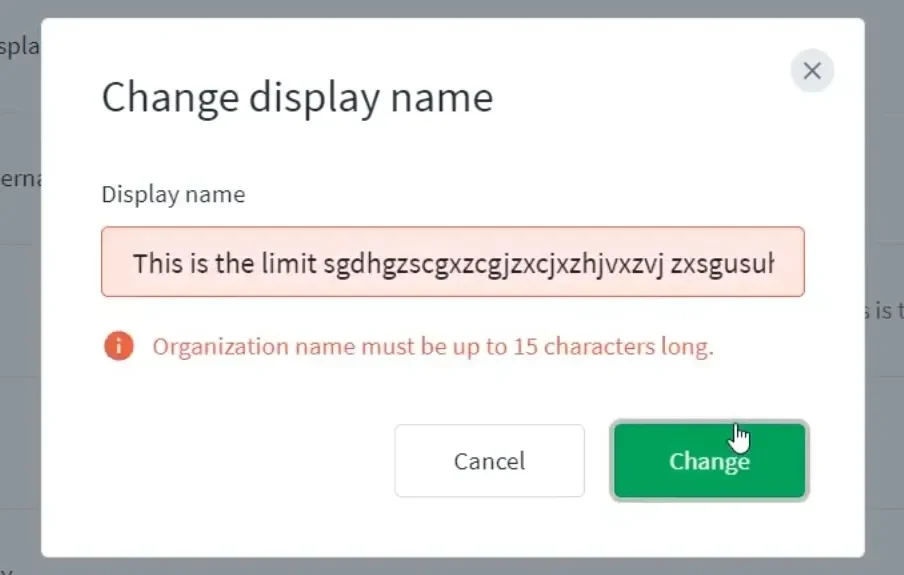
Because the limit was a client side error, the next question was whether the server enforced the same limit. To test that, he entered a short text in the input box, submitted by clicking "Change", and intercepted the request.
Exploitation
Step 1: Intercept the update request
The intercepted request was a POST with a JSON body, which he sent to repeater for testing.
Endpoint: https://graph.mapillary.com/graphql
Body: {"operationName":"update_organization","variables":{"id":"[ORG_ID]","description":"[D_TEXT]","name":"[N_TEXT]"},"query":"[REDACTED]"}
Where [ORG_ID] is the Organization ID, [REDACTED] is the query, [D_TEXT] is the description text value and [N_TEXT] is the name text value.
Step 2: Bypass the length limit on the server
The max length was 160 characters for the description and 15 characters for the name. He entered lengthy characters for both fields, pressed send request, and got this response.
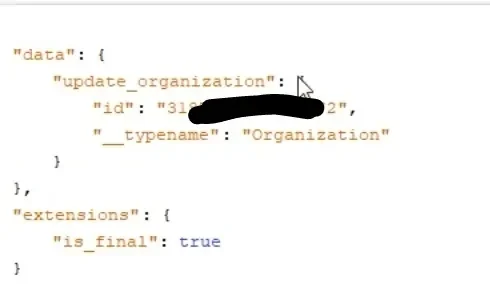
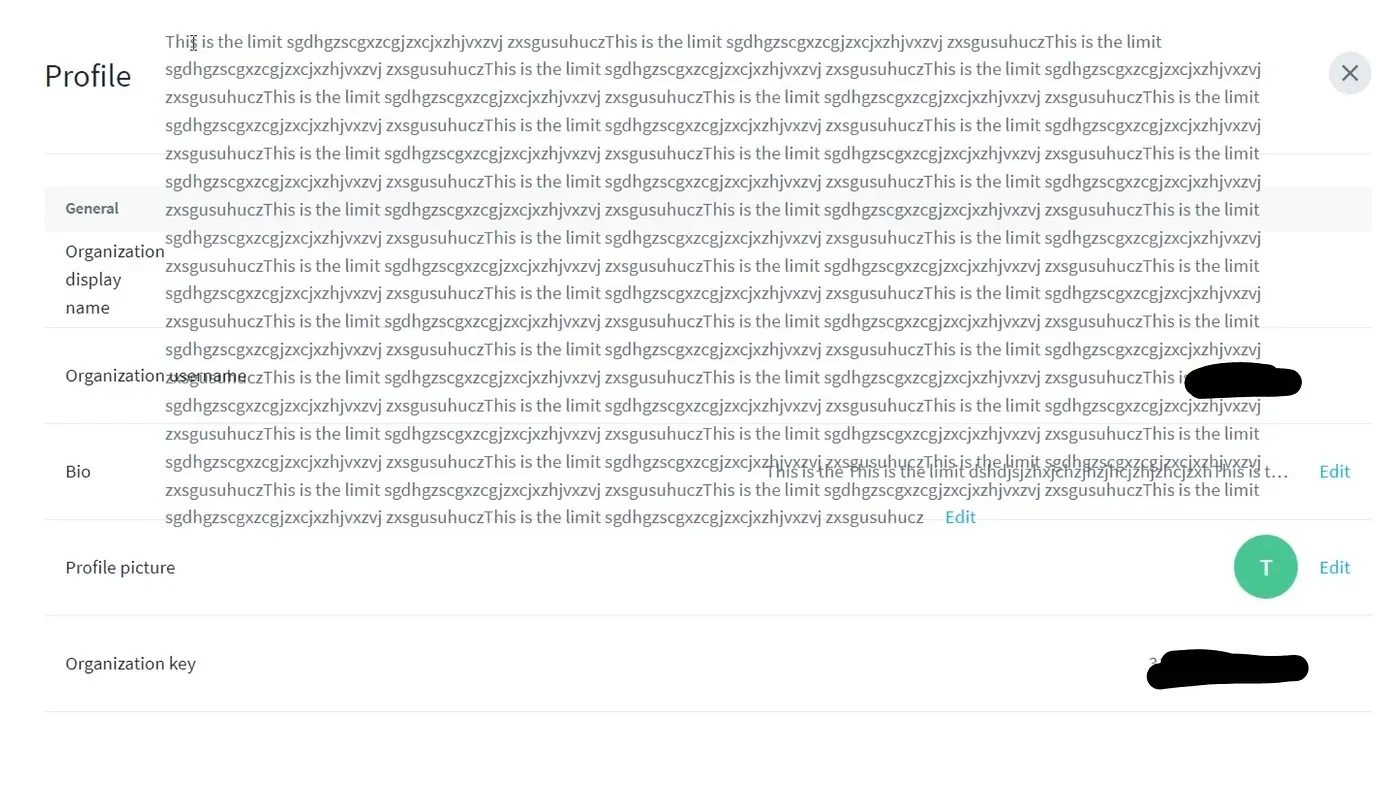
He then checked his Organization page: the max length limitation was not implemented on the server.
Step 3: Find an impact
Before submitting, the researcher worried that a triager might mark the bug as Informative or N/A because there was no impact, so he looked for a good impact first. He found that a JSON Parsing Exception can crash Android apps.
Step 4: Confirm the organization reaches the app
He downloaded the Mapillary Android application and logged in with his secondary Mapillary test account, then added that account into his organization to check whether it shows up.
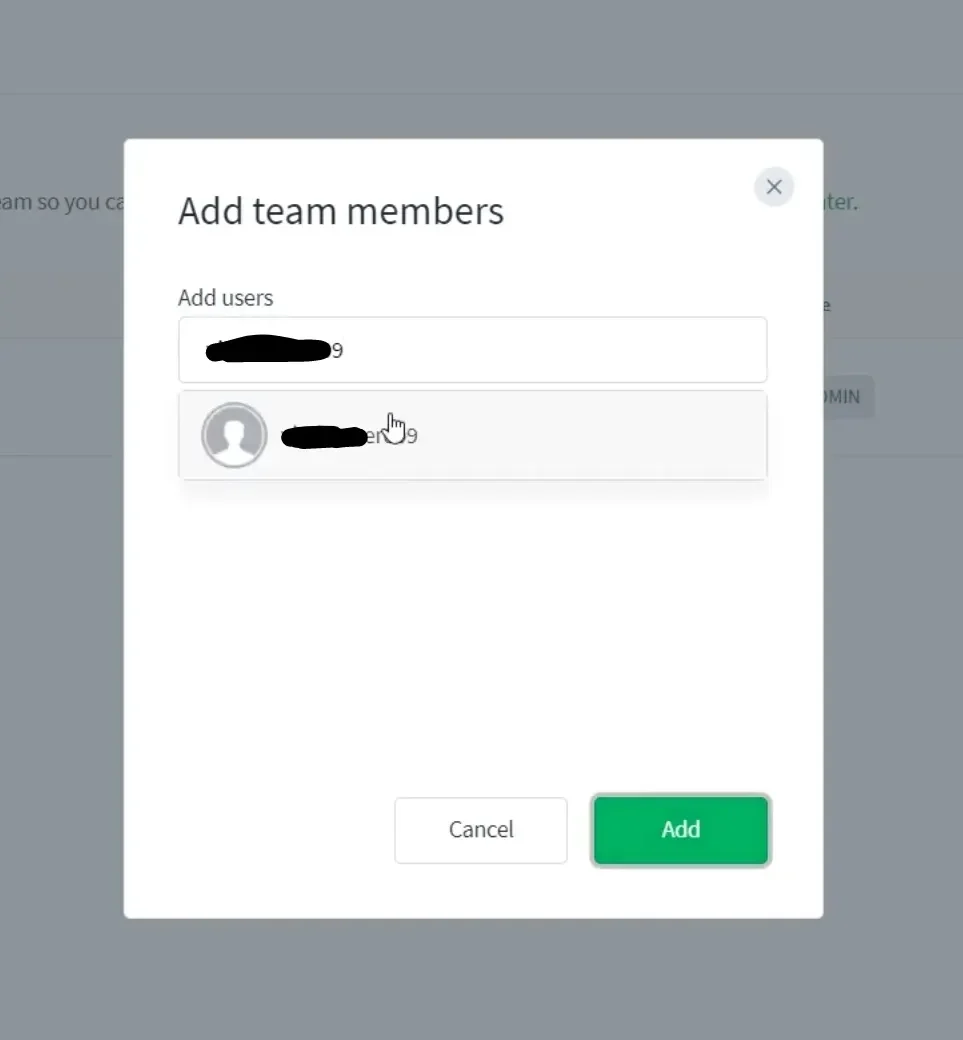
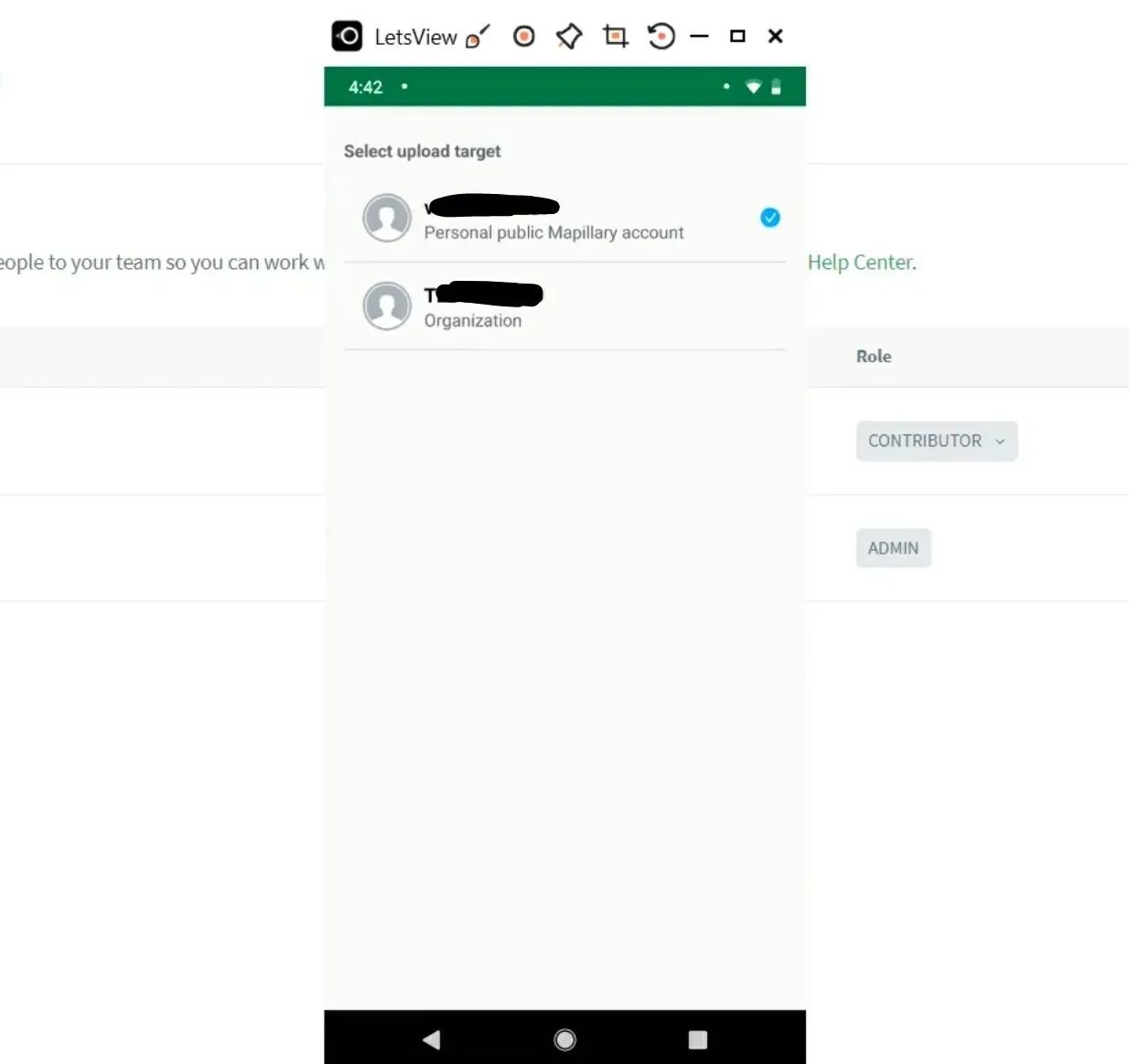
A new organization account appeared in the "Organization" section on the secondary account. He also learned that the organization is connected with the main feature called "Capture", because it is required to upload images.
Step 5: Build the payload organizations
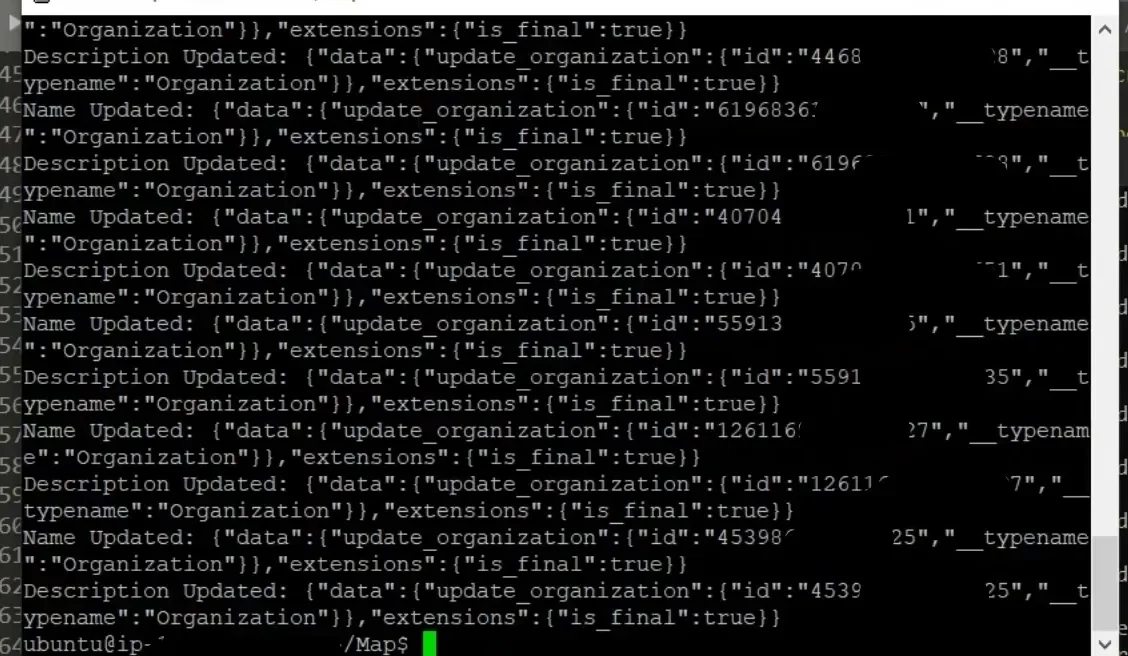
He coded a Python script which creates 30 dummy organization accounts and renames description and name with a large JSON payload or malformed big/lengthy text.
Step 6: Add the target by UID
A second Python script adds a targeted user by UID to all 30 dummy organizations. He used it to add his secondary test account.
Step 7: Trigger the crash
He opened the Mapillary app and clicked the "Capture" button. The app crashed.
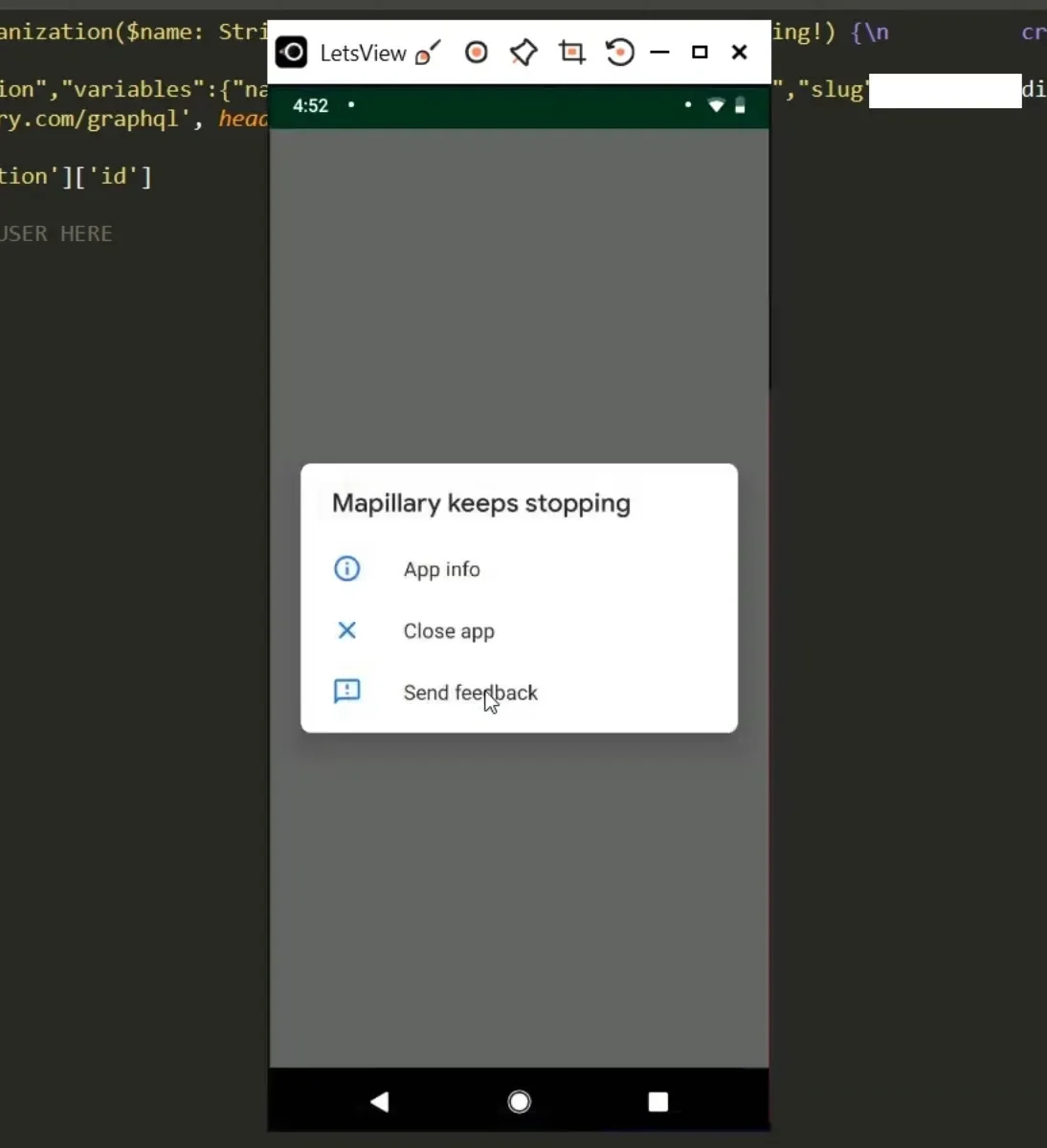
It was a remote crash, and the affected user could no longer access this main feature via an Android smartphone. The crash was permanent, because there was no feature to remove yourself from someone's organization.
Step 8: Scaling the attack
A few days later he found a way to scrape the UID of almost all Mapillary users by intercepting requests for street images and checking the responses for the uploader/owner UID.
Root cause
The server did not enforce the length limits that the client enforced: 160 characters for the description and 15 for the name. The client side input box limit was therefore only a usability control, and the GraphQL endpoint accepted arbitrarily long or malformed values for both fields.
Those stored values are then consumed by the Android app, and a large JSON payload or malformed text in the organization name or description triggers a JSON Parsing Exception. A large JSON payload or malformed big/lengthy text in the organization name or description triggers a JSON Parsing Exception in the app, and the app crashes when the affected user opens Capture. Because organization membership is required for Capture and there is no way for a user to remove themselves from someone else's organization, the crash condition persists.
Impact
An attacker who knows a user's UID can crash that user's Mapillary Android app, specifically its main Capture and Organization features, without any interaction from the victim. This can permanently stop the user from capturing and uploading images on an Android smartphone. The report notes that UIDs of almost all Mapillary users could be scraped from street image requests, which removes the main precondition for targeting.
Fix
The report records that the issue was fixed on 06 Oct 2021 and the fix was confirmed the same day. It does not describe the change itself.
Variants to test
- Other GraphQL mutations with client-only limits. Intercept any mutation that writes a text field and resend it with a value far beyond the client limit. A positive result is the oversized value persisted when the object is read back.
- Other mobile clients consuming the same fields. Add a test account to an organization with an oversized or malformed name or description and open every screen that renders organization data. A positive result is a crash or parse error in the client.
- Membership without consent. Check whether an organization owner can add arbitrary users by UID and whether the added user can leave. A positive result is that the added user has no way to remove themselves, which turns any stored-value crash into a persistent one.
- UID enumeration from public responses. Inspect responses for public content (for example image listings) for uploader or owner identifiers. A positive result is a stable identifier that can be fed into the membership mutation.
What happened, in plain words
Mapillary is a website and phone app that collects street-level photos, the kind of pictures you see on a map when you drag the little yellow person onto a road. Facebook, now called Meta, bought Mapillary in June 2020, and Mapillary was listed on Facebook's bug bounty programme. A bug bounty programme is a deal: a company says "if you find a security problem in our product and tell us privately, we may pay you a reward". The person who found this bug is Abhishek Pathak, and this was his first bug bounty from Facebook.
The product has a feature called Organization. Think of it like a club: you create the club, it is private, and you invite members so they can contribute. Organizations matter because they are tied to the app's main feature, Capture, which is the part of the app used to take and upload street images. You need to belong to an organization to upload images.
The bug: an attacker who knows a user's UID (a Unique ID, a number that identifies an account, like a membership number) can make that user's Mapillary Android app crash, remotely, without the user doing anything. The crash takes out the Capture and Organization features. And because there was no way for a user to remove themselves from someone else's organization, the crash was permanent: the victim could no longer capture or upload images from an Android phone.
How did it work in one sentence? The website's form only checked the length of the organization name and description in the browser, not on the server. The attacker sent very long, malformed text straight to the server, the server stored it, and the phone app later choked on that text and crashed.
The setup
The researcher used two accounts:
- A primary account, used to create a test organization and to send the crafted requests.
- A secondary Mapillary test account, added into the organization so he could watch what happened on the Android app.
He also used three kinds of tool:
- An intercepting proxy. When your browser talks to a website, it sends requests and receives responses. A proxy sits in the middle and lets you pause a request, read it, change it, and send it on. "Repeater" is a tab in such a tool where you can resend the same request over and over with small changes, which is exactly what you want when testing whether a server checks something.
- The Mapillary Android application, to see the effect on a real phone app.
- Python, a programming language, to write two small scripts that automate repetitive work.
The report does not give app or library versions.
Finding it
He started on the Organization feature and first tried XSS (Cross Site Scripting). XSS is when you manage to get your own code, usually JavaScript, to run inside someone else's web page. A classic test is to put prompt or alert code into a text field: if a pop-up appears when the page is viewed, the field is executing code. He put JavaScript prompt and alert code into the description and name fields and got no success.
He then clicked "Edit Name", typed random lengthy text and submitted it. The browser refused the change because of a max length limit set in the input box. A max length limit is the little rule that stops you typing more than a certain number of characters into a box. The same limit applied to both input boxes, Name and Description, so the screenshots may vary between the two fields.
The screenshot shows the input box refusing the long name because of the length limit.
Because the limit was a client side error, the next question was whether the server enforced the same limit. This is the key idea of the whole bug. "Client side" means the check happens in your browser, on your own computer, and your browser is under your control, so any check there can be bypassed. "Server side" means the check happens on the company's computer, which you cannot tamper with. A useful comparison: a nightclub with a sign saying "over 18 only" at the door, where the bouncer is the server. If the sign is the only check and there is no bouncer, anyone can walk in.
To test that, he entered a short text in the input box, submitted by clicking "Change", and intercepted the request.
Exploitation
Step 1: Intercept the update request
The intercepted request was a POST with a JSON body, which he sent to repeater for testing.
Endpoint: https://graph.mapillary.com/graphql
Body: {"operationName":"update_organization","variables":{"id":"[ORG_ID]","description":"[D_TEXT]","name":"[N_TEXT]"},"query":"[REDACTED]"}
Where [ORG_ID] is the Organization ID, [REDACTED] is the query, [D_TEXT] is the description text value and [N_TEXT] is the name text value.
Let us unpack that, piece by piece.
- Endpoint is the address the request is sent to.
https://graph.mapillary.com/graphqlis Mapillary's API address. An API is the way one piece of software asks another piece of software to do something, like a waiter taking your order to the kitchen: you do not go into the kitchen yourself, you tell the waiter what you want. Here the browser is the customer and the Mapillary server is the kitchen. - GraphQL is a style of API where the request says exactly which operation it wants and what data goes with it. That is why the body has an
operationNamefield: it names the operation, hereupdate_organization, meaning "change an organization's details". - POST is the type of request used when you are sending data to the server, as opposed to just asking for a page.
- JSON is a text format for structured data, made of names and values in curly braces, like a very strict shopping list. The body above is JSON.
variablesis the part of the JSON that carries the actual values: the organization'sid, itsdescription, and itsname.queryis the part that describes the operation itself. The report redacts it, so we do not know its contents.- The square-bracket placeholders are just labels for the parts he would swap out when testing.
Step 2: Bypass the length limit on the server
The max length was 160 characters for the description and 15 characters for the name. He entered lengthy characters for both fields, pressed send request, and got this response.
The screenshot shows the server's reply after the oversized values were sent.
He then checked his Organization page: the max length limitation was not implemented on the server.
The screenshot shows the Organization page after the oversized values were sent, with the max length limitation not implemented on the server.
In other words, the bouncer was missing. The browser had refused the long text, but the server, when asked directly, accepted it. This is a common and important pattern: client side validation is not security. It is a convenience for honest users, nothing more.
Step 3: Find an impact
Before submitting, the researcher worried that a triager might mark the bug as Informative or N/A because there was no impact. A triager is the person at the company who reads incoming bug reports and decides whether they are real and how serious they are. "Informative" or "N/A" (not applicable) means "thanks, but this does not count as a security bug". A missing length check on its own often lands in that bucket, because nothing bad visibly happens.
So he looked for a good impact first. He found that a JSON Parsing Exception can crash Android apps. A parsing exception is what happens when a program is handed text in a format it expects to understand, and the text does not fit the rules. Imagine being handed a form where the "date of birth" box contains a whole paragraph: you cannot process it, and if you are not careful, you fall over. If the app does not handle that failure gracefully, it crashes.
Step 4: Confirm the organization reaches the app
He downloaded the Mapillary Android application and logged in with his secondary Mapillary test account, then added that account into his organization to check whether it shows up.
The screenshot shows the secondary test account being added to the organization.
A new organization account appeared in the "Organization" section on the secondary account. He also learned that the organization is connected with the main feature called "Capture", because it is required to upload images.
The screenshot shows the organization appearing in the secondary account, and the link to Capture.
This step matters because it proves the chain: whatever is stored in the organization's name and description is read by the phone app. If the app never looked at those fields, the oversized text would be harmless.
Step 5: Build the payload organizations
He coded a Python script which creates 30 dummy organization accounts and renames description and name with a large JSON payload or malformed big/lengthy text.
The screenshot relates to the Python script that creates the dummy organizations.
A payload here simply means the malicious content you put into a field. The script automates what he had already done by hand: create an organization, then send the update request with oversized or malformed text. Doing it 30 times by hand would be slow and error-prone, which is why a script is used.
Step 6: Add the target by UID
A second Python script adds a targeted user by UID to all 30 dummy organizations. He used it to add his secondary test account.
This is the part that turns a stored bad value into an attack on a specific person. The attacker does not need the victim's password or any action from the victim. They only need the victim's UID, the membership number, and the ability to add that UID to an organization they control.
Step 7: Trigger the crash
He opened the Mapillary app and clicked the "Capture" button. The app crashed.
The screenshot relates to the crash after clicking Capture.
It was a remote crash, and the affected user could no longer access this main feature via an Android smartphone. The crash was permanent, because there was no feature to remove yourself from someone's organization. That last detail is what makes this more than a nuisance: normally you would just leave the club, but here the club had no exit door.
Step 8: Scaling the attack
A few days later he found a way to scrape the UID of almost all Mapillary users by intercepting requests for street images and checking the responses for the uploader/owner UID.
"Scrape" means collecting data automatically from responses. Public street images have to say who uploaded them, and that response contains the uploader's or owner's UID. So the one precondition for the attack, knowing the victim's UID, could be met for almost every user. The report does not give the exact request or response used for this.
Root cause
The server did not enforce the length limits that the client enforced: 160 characters for the description and 15 for the name. The client side input box limit was therefore only a usability control, and the GraphQL endpoint accepted arbitrarily long or malformed values for both fields.
Those stored values are then consumed by the Android app, and a large JSON payload or malformed text in the organization name or description triggers a JSON Parsing Exception. A large JSON payload or malformed big/lengthy text in the organization name or description triggers a JSON Parsing Exception in the app, and the app crashes when the affected user opens Capture. Because organization membership is required for Capture and there is no way for a user to remove themselves from someone else's organization, the crash condition persists.
Impact
An attacker who knows a user's UID can crash that user's Mapillary Android app, specifically its main Capture and Organization features, without any interaction from the victim. This can permanently stop the user from capturing and uploading images on an Android smartphone. The report notes that UIDs of almost all Mapillary users could be scraped from street image requests, which removes the main precondition for targeting.
Fix
The report records that the issue was fixed on 06 Oct 2021 and the fix was confirmed the same day.
Variants to test
These are the same ideas applied elsewhere, written for someone who is learning:
- Other GraphQL mutations with client-only limits. A mutation is a GraphQL operation that changes data, like
update_organization. Intercept any mutation that writes a text field and resend it with a value far beyond the client limit. A positive result is the oversized value persisted when the object is read back. - Other mobile clients consuming the same fields. Add a test account to an organization with an oversized or malformed name or description and open every screen that renders organization data. A positive result is a crash or parse error in the client.
- Membership without consent. Check whether an organization owner can add arbitrary users by UID and whether the added user can leave. A positive result is that the added user has no way to remove themselves, which turns any stored-value crash into a persistent one.
- UID enumeration from public responses. Inspect responses for public content (for example image listings) for uploader or owner identifiers. A positive result is a stable identifier that can be fed into the membership mutation.
Timeline
- 02 Oct 2021: initial report
- 03 Oct 2021: triaged
- 06 Oct 2021: fixed
- 06 Oct 2021: confirmation of fix
- 11 Oct 2021: bounty awarded
- 20 Oct 2021: updated Hall of Fame
Glossary
- API: the agreed way for one program to ask another program to do something, like a waiter carrying orders between you and the kitchen.
- Bug bounty programme: a company's offer to pay people who privately report security problems in its products.
- Capture: Mapillary's main app feature for taking and uploading street images; it requires organization membership.
- Client side: checks or code that run on the user's own device, such as the browser or phone app, and can therefore be bypassed.
- Crash: when a program stops working unexpectedly because it hit something it could not handle.
- Endpoint: the address a request is sent to, here
https://graph.mapillary.com/graphql. - GraphQL: a style of API where the request names the operation and supplies its values.
- Handler: the piece of server code that processes a particular request.
- Impact: the real harm a bug can cause, which decides whether a report counts as a security issue.
- Intercepting proxy: a tool that sits between your browser and a website so you can pause, read, change and resend requests.
- JSON: a text format for structured data made of names and values in curly braces.
- JSON Parsing Exception: an error raised when a program is given text that does not follow the JSON rules it expects.
- Max length limit: a rule that stops more than a certain number of characters being entered or accepted.
- Mutation: a GraphQL operation that changes data rather than just reading it.
- Organization: Mapillary's private club feature; you create it and add members, and membership is needed to upload images.
- Payload: the content you deliberately put into a field to test or attack something.
- POST: the type of request used to send data to a server.
- Repeater: a tab in an intercepting proxy for resending the same request repeatedly with changes.
- Scrape: to collect data automatically from responses.
- Server side: checks or code that run on the company's own computers, which the user cannot tamper with.
- Triager: the person at the company who reads a bug report and decides whether it is valid and how serious it is.
- UID: Unique ID, a number that identifies an account, like a membership number.
- XSS (Cross Site Scripting): getting your own code, usually JavaScript, to run inside someone else's web page.
- 200 response: the standard HTTP status meaning the request succeeded.


