Hijack Facebook user due to broken link on Facebook shop feature on IOS Facebook APP
A Facebook username was registered that matched a path used by the Facebook shop feature, causing links to that path to resolve to the attacker's profile. An attacker could redirect users who clicked the shop button on unverified shop pages to their own profile.

Bug Bounty Reports
The full write-up lives on its author's site
It belongs to its author, so we link to it rather than copy it. The other two tabs are our own rewrites, checked against it.
Context
Facebook lets a user choose a username, which becomes the path of their profile: www.facebook.com/username. Separately, Facebook's business offering exposes pages under the business.facebook.com host, for example www.business.facebook.com/overview. A Facebook page can have a shop, and the shop has a button in the mobile app.
The write-up describes what happens when a username collides with a path that Facebook's own features link to, and how the mobile app resolves those links.
Setup
- A Facebook account whose username can be changed. The author registered the usernames
overviewand latergraphql. - The iOS Facebook app, which is the environment where the shop button misbehaved. The author also reproduced from Facebook Lite, which redirected him to the browser.
- A Facebook page with an unverified shop, owned by another user, to observe the shop button behaviour.
- The author attempted to intercept app traffic with Burp Suite but did not succeed.
Finding it
The starting idea was simple: Facebook usernames are paths, so a username could be chosen to match a path that some Facebook feature already links to. The author tried a few path names he came across while browsing Facebook features. Facebook accepted overview, giving a profile at:
www.facebook.com/overview
The hypothesis was that some service somewhere pointed at facebook.com/overview instead of the intended www.business.facebook.com/overview.
To test it, the author created a Facebook post containing the business URL:
www.business.facebook.com/overview
Hovering the link showed the author's own profile rather than the business path. Facebook was trimming the subdomain and treating www.business.facebook.com/overview as www.facebook.com/overview.
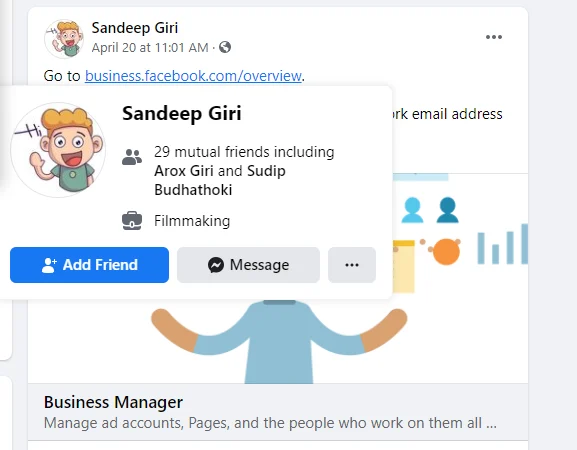
Fig1: Hovering to the URL business.facebook.com/overview displays the profile.
The author searched marketing groups for posts containing business.facebook.com/overview and saw they showed his profile on hover. Pasting the same URL into chat redirected people to the profile instead of the correct path.
The first report was rejected.
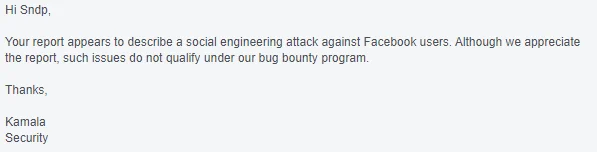
Facebook Reply to my first report
The author reasoned that posting the URL manually would look like social engineering, so the stronger case was a link that Facebook itself generates and users click, such as a feature button or hyperlink. That led to registering a second username, graphql, which Facebook allowed.
Exploitation
Step 1: register a username that matches an API path
The author changed the username to graphql, so the profile became:
www.facebook.com/graphql
No action was taken that day. The next day a Facebook user sent a message asking the author to stop hacking her page. She explained that when she clicked the shop button on her page, she was redirected to the author's profile.
The author was about 90% sure the request was going to www.facebook.com/graphql (the profile) instead of an API endpoint such as graph.facebook.com/graphql/..., but could not confirm it because he did not know how to intercept requests from the iPhone Facebook app.
Step 2: identify the conditions
Research showed the behaviour only occurred when both conditions held:
- The Facebook page had an unverified shop.
- The visitor used the mobile Facebook app.
Verified shops pointed to the correct shop endpoints for their respective owners. Non-verified shops pointed to http://facebook.com/graphql, which was the author's profile.
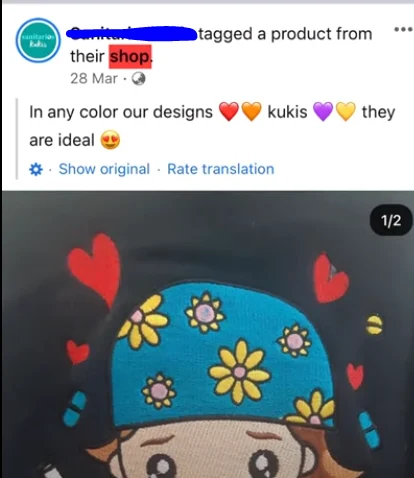
Fig3: All user who clicks the shop button from nonverified Facebook page are redirected to my profile
Step 3: report, and get rejected for missing detail
The issue was reported as the ability to hijack every user who clicks the shop button on a Facebook page, since they are redirected to the author's profile. Facebook rejected it.
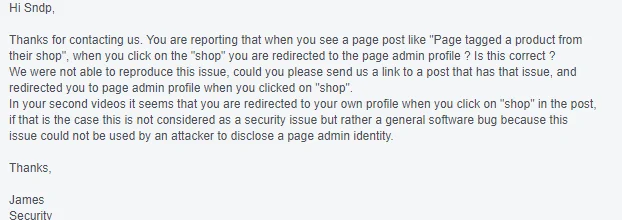
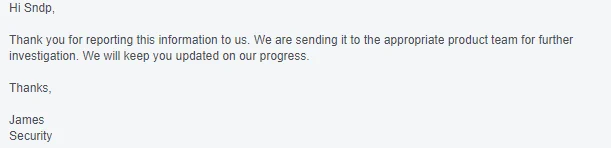
The author's analysis: the reproduction steps were not specific enough even though a video was included, and he had not mentioned the device used. The report had been filed under the Facebook web category offered at submission time. The back and forth lasted a week; another video was sent, still without stating the device. One day the bug was not reproducible, which the author took to mean a page owner had reported it and it had been fixed. The next day it worked again. The author later realised he needed to mention the device used, sent an apology, and asked Facebook to reproduce using an iPhone. The bug was triaged the next day.
Step 4: confirm the URL being resolved
After triage the author tried to capture the app's traffic with Burp Suite, following tutorials on intercepting Facebook app traffic, but still failed. The request made when a user taps the shop hyperlink in the page post was not captured by the author.
Reproducing from Facebook Lite gave the answer: the lite version redirected to the browser, and the URL could be copied:
https://www.graph.facebook.com/graphql
This confirmed the theory that Facebook was treating the link as facebook.com/graphql, consistent with the first demonstration where the subdomain was trimmed.
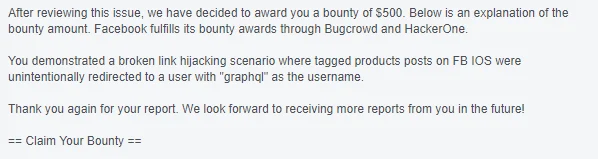
A few days later Facebook awarded a $500 bounty.
Root cause
Two behaviours combine:
- Facebook resolves a URL by trimming the subdomain, so
www.business.facebook.com/overviewis treated aswww.facebook.com/overview, andwww.graph.facebook.com/graphqlaswww.facebook.com/graphql. - Usernames occupy the same path namespace as internal paths, so a user can register
overvieworgraphqland own that path onwww.facebook.com.
The shop button for a non-verified shop pointed at http://facebook.com/graphql rather than a dedicated shop endpoint, so the trimmed URL landed on the attacker's profile. Verified shops used correct shop endpoints and were unaffected. The exact client-side or server-side code that performs the trimming is not shown in the report; the conclusion is drawn from the observed redirects.
Impact
Any user who tapped the shop button on a page with an unverified shop, while using the mobile Facebook app, was redirected to the attacker's profile. The author describes this as hijacking those users, who were redirected to his profile page. The behaviour depended on the unverified shop state and the mobile app; the author could not confirm the underlying request without traffic interception.
Fix
The report does not describe any fix.
Variants to test
- Register usernames matching internal paths (
overview,graphql,settings,marketplace) and check whether any feature link resolves tofacebook.com/<name>after subdomain trimming. A positive result is a feature link that lands on the registered profile. - Test other subdomains of the same product (
business.,graph.,developers.) with the same path. A positive result is the same trimming behaviour on a different host. - Check state-dependent features: verified versus unverified shops, business versus personal pages. A positive result is a redirect difference between the two states.
- Reproduce from a second client (Lite, browser, Android) to see whether the redirect is handed to the browser and the final URL can be captured. A positive result is a URL showing the trimmed host and the attacker's username.
What happened, in plain words
Facebook lets every account pick a username. That username becomes the address of your profile page, in the form www.facebook.com/username. If you pick the username alice, your profile lives at www.facebook.com/alice.
Facebook also runs a separate site for businesses, at business.facebook.com. One of the pages there is www.business.facebook.com/overview. Separately, a Facebook page can have a shop, and the shop has a button in the mobile app.
This write-up is about what happens when a username you are allowed to register is the same word as a path that Facebook's own features link to. The author registered the usernames overview and later graphql, and found that Facebook's mobile app was sending people to his profile instead of to the shop.
A few ideas you need before the details make sense:
- A URL is the address you type in a browser, like
www.facebook.com/overview. It has parts. The host is the part afterhttps://and before the first slash, for examplewww.facebook.com. The path is what comes after the host, for example/overview. - A subdomain is a word added in front of the main domain. In
www.business.facebook.com,businessis a subdomain offacebook.com, andwwwis another one. Companies use subdomains to run different services on different addresses. - An API is a way for one piece of software to talk to another. Think of it as a service counter at a shop: you do not walk into the storeroom yourself, you go to the counter, ask for something by name, and get an answer back. Facebook's app talks to Facebook's servers through such counters, and many of them live at addresses ending in
/graphql. - A username here is just a word you choose that becomes part of your profile address. It is not a password and it does not give you any special access. It only decides where your profile page sits.
Setup
To follow along, the author needed:
- A Facebook account whose username can be changed. He registered
overviewfirst, and latergraphql. - The iOS Facebook app, which is the iPhone version of the app. This is where the shop button misbehaved. He also reproduced the problem from Facebook Lite, a lighter version of the app, which redirected him to the phone's browser.
- A Facebook page with an unverified shop, owned by another user, so he could watch what the shop button did. An unverified shop is a shop that Facebook has not confirmed belongs to a real, checked business. A verified shop is one Facebook has checked.
- He tried to capture the app's network traffic with a tool called Burp Suite, which sits between an app and the internet and records the requests. He did not succeed.
Finding it
The starting idea was simple. Facebook usernames are paths, so you could pick a username that matches a path some Facebook feature already links to. The author tried a few path names he came across while browsing Facebook features. Facebook accepted overview, which gave him a profile at:
www.facebook.com/overview
This block is just the address of his profile after he chose that username. Nothing more: the word overview became his profile path.
The guess was that somewhere, some Facebook service was pointing at facebook.com/overview instead of the intended www.business.facebook.com/overview. In other words, a link meant for the business site might lose its business part and land on whatever profile owns the word overview.
To test it, he created a Facebook post containing the business URL:
www.business.facebook.com/overview
This is the address of the business overview page. He put it in a post and then hovered over the link with the mouse. Hovering usually shows you where a link will take you before you click. Instead of the business path, the hover showed his own profile. Facebook was trimming the subdomain and treating www.business.facebook.com/overview as www.facebook.com/overview.
Fig1: Hovering to the URL business.facebook.com/overview displays the profile.
He searched marketing groups for posts containing business.facebook.com/overview and saw they showed his profile on hover. Pasting the same URL into chat redirected people to the profile instead of the correct path.
The first report was rejected.
Facebook Reply to my first report
The author reasoned that posting the URL manually would look like social engineering, meaning tricking people into clicking something. The stronger case was a link that Facebook itself generates and users click, such as a feature button or hyperlink. That led to registering a second username, graphql, which Facebook allowed.
Exploitation
Step 1: register a username that matches an API path
He changed the username to graphql, so the profile became:
www.facebook.com/graphql
Again, this is only the address of his profile.
No action was taken that day. The next day a Facebook user sent a message asking him to stop hacking her page. She explained that when she clicked the shop button on her page, she was redirected to his profile.
He was about 90% sure the request was going to www.facebook.com/graphql (the profile) instead of an API endpoint such as graph.facebook.com/graphql/..., but could not confirm it because he did not know how to intercept requests from the iPhone Facebook app.
Step 2: identify the conditions
Research showed the behaviour only occurred when both conditions held:
- The Facebook page had an unverified shop.
- The visitor used the mobile Facebook app.
Verified shops pointed to the correct shop endpoints for their respective owners. Non-verified shops pointed to http://facebook.com/graphql, which was the author's profile.
Fig3: All user who clicks the shop button from nonverified Facebook page are redirected to my profile
Step 3: report, and get rejected for missing detail
He reported the issue as the ability to hijack every user who clicks the shop button on a Facebook page, since they are redirected to his profile. Facebook rejected it.
His analysis: the reproduction steps were not specific enough even though a video was included, and he had not mentioned the device used. The report had been filed under the Facebook web category offered at submission time. The back and forth lasted a week; another video was sent, still without stating the device. One day the bug was not reproducible, which he took to mean a page owner had reported it and it had been fixed. The next day it worked again. He later realised he needed to mention the device used, sent an apology, and asked Facebook to reproduce using an iPhone. The bug was triaged the next day.
Step 4: confirm the URL being resolved
After triage he tried to capture the app's traffic with Burp Suite, following tutorials on intercepting Facebook app traffic, but still failed. The request made when a user taps the shop hyperlink in the page post was not captured by the author.
Reproducing from Facebook Lite gave the answer: the lite version redirected to the browser, and the URL could be copied:
https://www.graph.facebook.com/graphql
This is the address the app was actually using. Read it in parts: www.graph.facebook.com is the host, and /graphql is the path. The word graph is a subdomain, just like business was earlier. When Facebook trimmed that subdomain, the address became www.facebook.com/graphql, which was his profile. That confirmed the theory that Facebook was treating the link as facebook.com/graphql, consistent with the first demonstration where the subdomain was trimmed.
A few days later Facebook awarded a $500 bounty.
Root cause
Two behaviours combine:
- Facebook resolves a URL by trimming the subdomain, so
www.business.facebook.com/overviewis treated aswww.facebook.com/overview, andwww.graph.facebook.com/graphqlaswww.facebook.com/graphql. - Usernames occupy the same path namespace as internal paths, so a user can register
overvieworgraphqland own that path onwww.facebook.com.
The shop button for a non-verified shop pointed at http://facebook.com/graphql rather than a dedicated shop endpoint, so the trimmed URL landed on the attacker's profile. Verified shops used correct shop endpoints and were unaffected. The exact client-side or server-side code that performs the trimming is not shown in the report; the conclusion is drawn from the observed redirects.
Impact
Any user who tapped the shop button on a page with an unverified shop, while using the mobile Facebook app, was redirected to the attacker's profile. The author describes this as hijacking those users, who were redirected to his profile page. The behaviour depended on the unverified shop state and the mobile app; the author could not confirm the underlying request without traffic interception.
Fix
The report does not describe any fix.
Variants to test
- Register usernames matching internal paths (
overview,graphql,settings,marketplace) and check whether any feature link resolves tofacebook.com/<name>after subdomain trimming. A positive result is a feature link that lands on the registered profile. - Test other subdomains of the same product (
business.,graph.,developers.) with the same path. A positive result is the same trimming behaviour on a different host. - Check state-dependent features: verified versus unverified shops, business versus personal pages. A positive result is a redirect difference between the two states.
- Reproduce from a second client (Lite, browser, Android) to see whether the redirect is handed to the browser and the final URL can be captured. A positive result is a URL showing the trimmed host and the attacker's username.
Glossary
- API: a way for one piece of software to talk to another, like a service counter where you ask for something by name and get an answer back.
- Bounty: a reward a company pays a researcher for reporting a security problem.
- Burp Suite: a tool that sits between an app and the internet and records the requests, used to see what an app is sending.
- Endpoint: a specific address on a server that a program sends requests to.
- Facebook Lite: a lighter version of the Facebook app for phones.
- Host: the part of a URL after
https://and before the first slash, for examplewww.facebook.com. - Hijack (in this report): sending a user to the attacker's profile page instead of the page they meant to visit.
- Hover: resting the mouse pointer over a link so the browser shows where it will take you.
- iOS: the operating system on Apple iPhones.
- Path: the part of a URL after the host, for example
/overview. - Social engineering: tricking people into doing something, such as clicking a link, rather than breaking in technically.
- Subdomain: a word added in front of the main domain, like
businessinbusiness.facebook.com. - Triage: the stage where a company's security team confirms a reported bug is real and worth working on.
- Unverified shop: a shop on a Facebook page that Facebook has not confirmed belongs to a checked business.
- URL: the address of a page or resource, like
www.facebook.com/overview. - Username: the word a user picks that becomes the path of their profile, as in
www.facebook.com/username. - Verified shop: a shop on a Facebook page that Facebook has confirmed belongs to a checked business.





