How I Might Have Hacked Any Microsoft Account
 Published on thezerohack.com
After my Instagram account takeover vulnerability, I was searching for similar loopholes in other services. I found Microsoft is also using the similar technique to reset user’s password so I decided to test them for any rate limiting vulnerability.
The full write-up lives on its author's site
It belongs to its author, so we link to it rather than copy it. The other two tabs are our own rewrites, checked against it.
Context
This write-up describes a vulnerability the researcher found in Microsoft's online account password reset flow, which he says might have allowed anyone to take over any Microsoft account without the owner's consent. Microsoft's security team patched the issue and paid a $50,000 bounty under their Identity Bounty Program. The researcher, Laxman Muthiyah, had previously found a similar account takeover issue on Instagram and went looking for the same class of weakness in other services. He noticed Microsoft used a similar technique to reset a user's password, so he decided to test it for rate limiting weaknesses.
The feature in question is the forgot password page. To reset a Microsoft account's password, a user enters their email address or phone number, then selects the email address or mobile number that can be used to receive a security code.
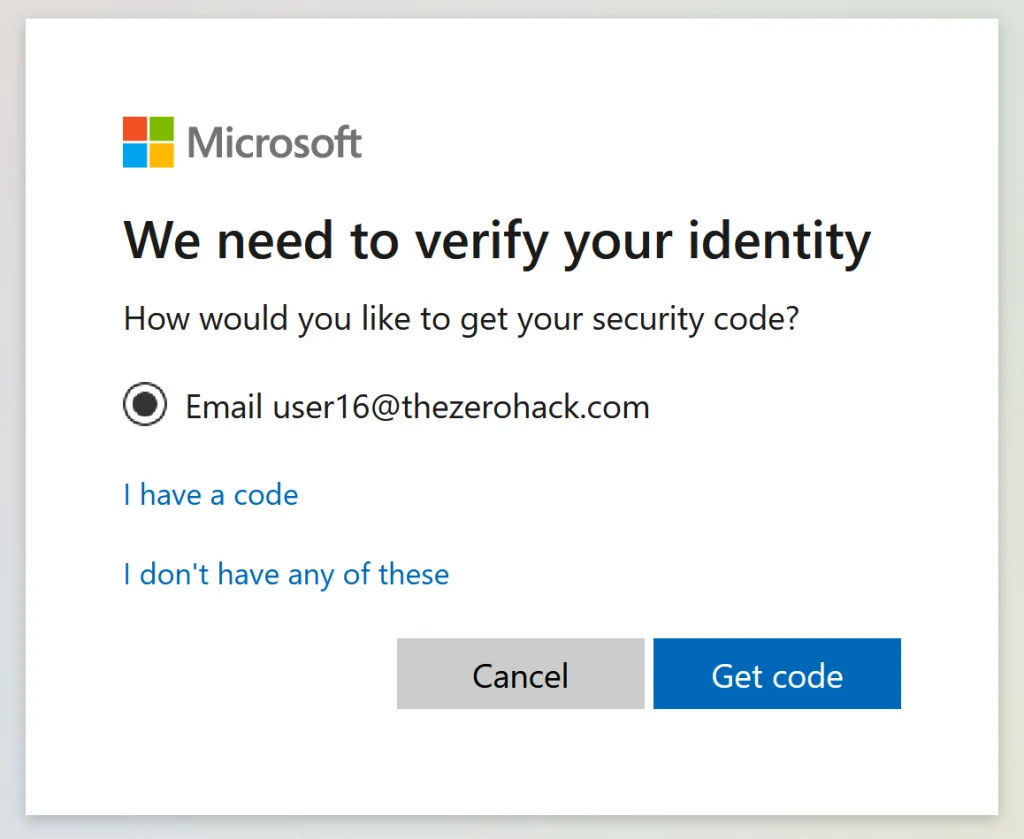
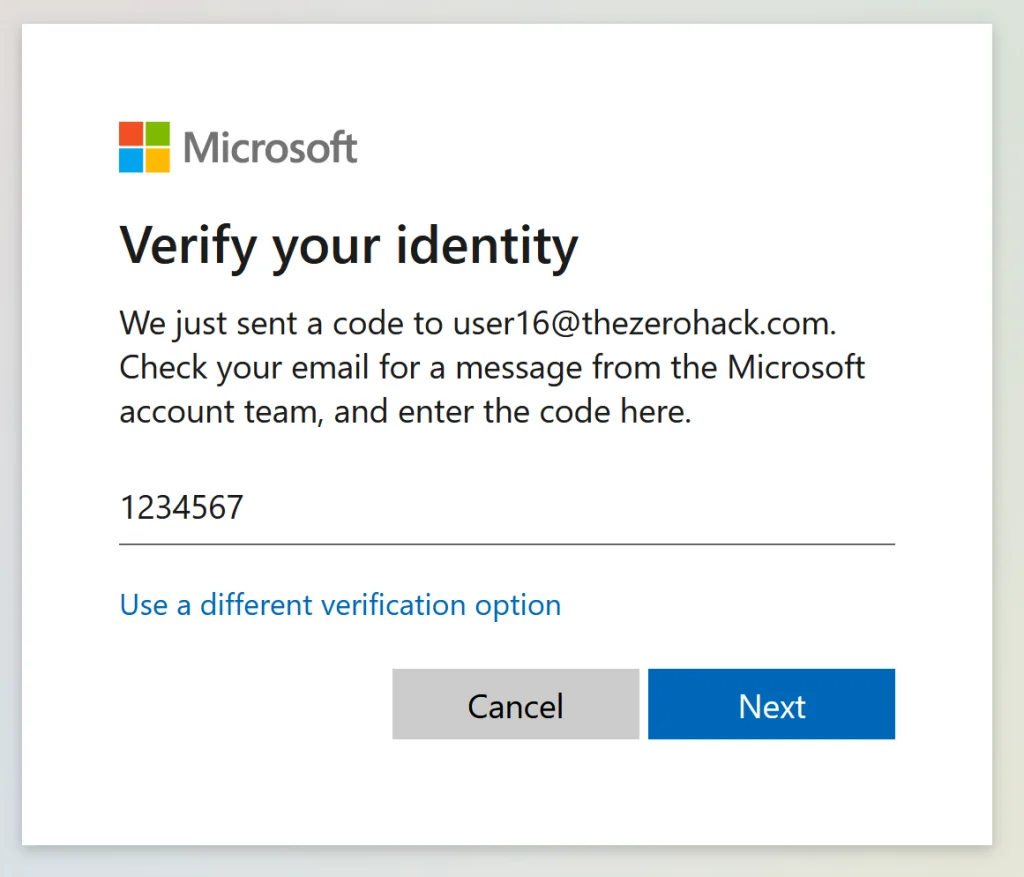
Once the user receives the 7 digit security code, they enter it to reset the password. The researcher's reasoning was that if an attacker could brute force all combinations of the 7 digit code (10^7 = 10 million codes), they could reset any user's password without permission. He expected rate limits to prevent large numbers of attempts.
Setup
The report does not describe specific accounts, roles, tool versions or a detailed lab setup. What it does say is that the researcher tested the forgot password flow on Microsoft online services, first on an account without two factor authentication and then on an account with 2FA enabled. He used interception tooling to capture the HTTP POST request made to the code validation endpoint, and he wrote automation code to encrypt codes and send many concurrent requests. He mentions that tools like Burp Intruder could not be used because they would not perform the encryption step.
Finding it
The researcher intercepted the HTTP POST request made to the code validation endpoint. It looked like this:
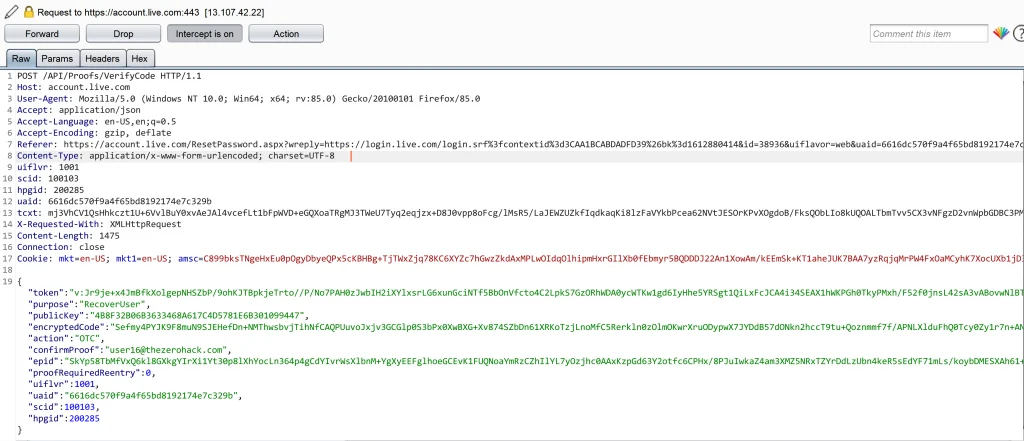
Looking at the screenshot, the code 1234567 that was entered was nowhere present in the request. It was encrypted and then sent for validation. The researcher guessed that this was done to prevent automated brute force tools from exploiting the system. This meant he could not automate testing multiple codes using tools like Burp Intruder, since they would not do the encryption part.

After some time, he figured out the encryption technique and was able to automate the entire process, from encrypting the code to sending multiple concurrent requests.
Exploitation
Step 1: Confirm that rate limits exist
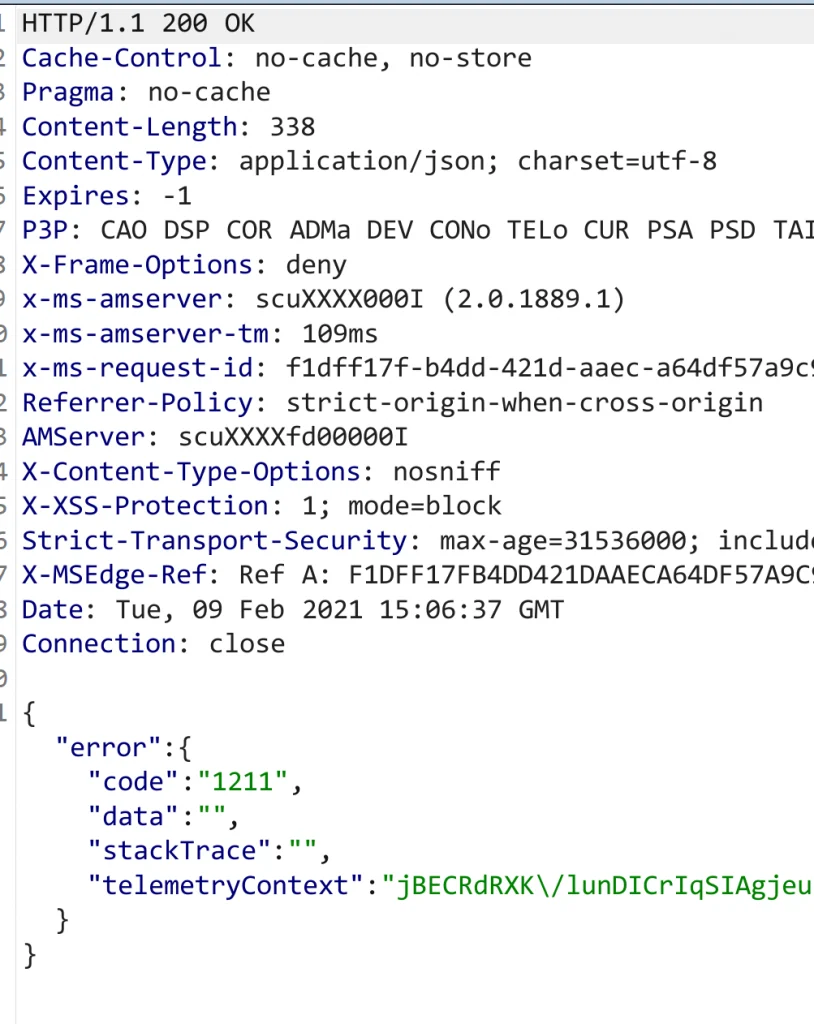
His initial test showed the presence of rate limits, as expected. Out of 1000 codes sent, only 122 of them got through. The others were limited with a 1211 error code, and the system blocked the respective user account from sending further attempts if requests were sent continuously.
Step 2: Try concurrent requests
He then tried sending simultaneous or concurrent requests, as he had done for Instagram. This allowed him to send large numbers of requests without getting blocked, but he was still unable to get a successful response while injecting the correct 7 digit security code. He thought some control was in place to prevent this type of attack. Although he got an error while sending the right code, there was still no evidence of the user being blocked as in the initial test, so he kept hoping there was something there.

Step 3: Identify the timing condition
After some days, he realised that the system was blacklisting the IP address if all the requests did not hit the server at the same time. Even a few milliseconds of delay between requests allowed the server to detect the attack and block it. He tweaked his code to handle this scenario and tested it again.

Step 4: Get the successful response
Surprisingly, it worked, and he was able to get the successful response this time.
He sent around 1000 seven digit codes, including the right one, and was able to get to the next step to change the password.
Step 5: Accounts with 2FA
The process above is valid only for users who do not have two factor authentication enabled. If a user has enabled 2FA, the attacker would also have to bypass the two factor code authentication to change the password.
He tested an account with 2FA and found that both are the same endpoint, vulnerable to this type of attack. First, the user is prompted to enter a 6 digit code generated by an authenticator app, and only then are they asked to enter the 7 digit code sent to their email address or phone number. After that, they can change the password.
Putting it all together, an attacker would have to send all the possibilities of the 6 and 7 digit security codes, around 11 million request attempts, and they would have to be sent concurrently to change the password of any Microsoft account, including those with 2FA enabled.
The researcher notes that this is not at all an easy process. Sending such a large number of concurrent requests would require a lot of computing resources as well as thousands of IP addresses to complete the attack successfully.
He recorded a video of all the bypasses and submitted it to Microsoft along with detailed steps to reproduce the vulnerability. Microsoft was quick to acknowledge the issue.
Root cause
The report does not give a code level explanation of the root cause. The researcher observed that rate limiting and IP based blocking could be defeated by sending requests concurrently enough that they all hit the server at the same time. In the first test, only 122 of 1000 codes were accepted, the rest returning 1211, with the account blocked on continuous attempts. With simultaneous requests he was not blocked, but the correct code still did not succeed until he removed delays. The IP blacklisting that followed non simultaneous bursts could be avoided by removing even millisecond level delays between requests. The code was encrypted before sending, so tools like Burp Intruder could not be used. The researcher figured out the encryption technique and automated the process.
Impact
According to the report, an attacker who could send the full set of 6 and 7 digit code possibilities concurrently, around 11 million request attempts, could change the password of any Microsoft account, including accounts with 2FA enabled. The researcher hedges this heavily: the attack requires a lot of computing resources and thousands of IP addresses, and is not at all easy to carry out. The issue was patched in November 2020. His case was initially assigned a different security impact than he expected, and after a few back and forth emails it was assigned to Elevation of Privilege (Involving Multi-factor Authentication Bypass). Due to the complexity of the attack, the bug severity was assigned as important instead of critical.
Fix
The report only confirms that the issue was patched and that the researcher received the bounty of $50,000 USD on February 9th, 2021 through HackerOne, with approval to publish the article on March 1st, 2021.
Bounty and acknowledgement
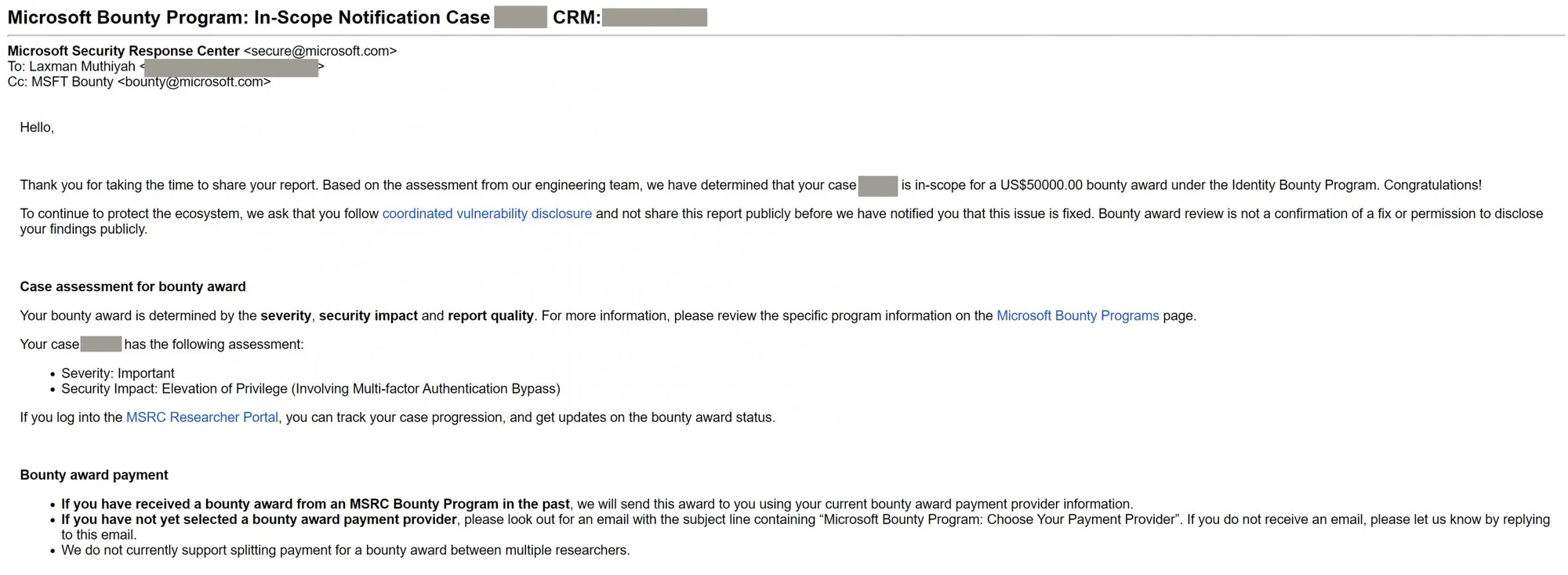
The report includes the bounty email from MSRC.
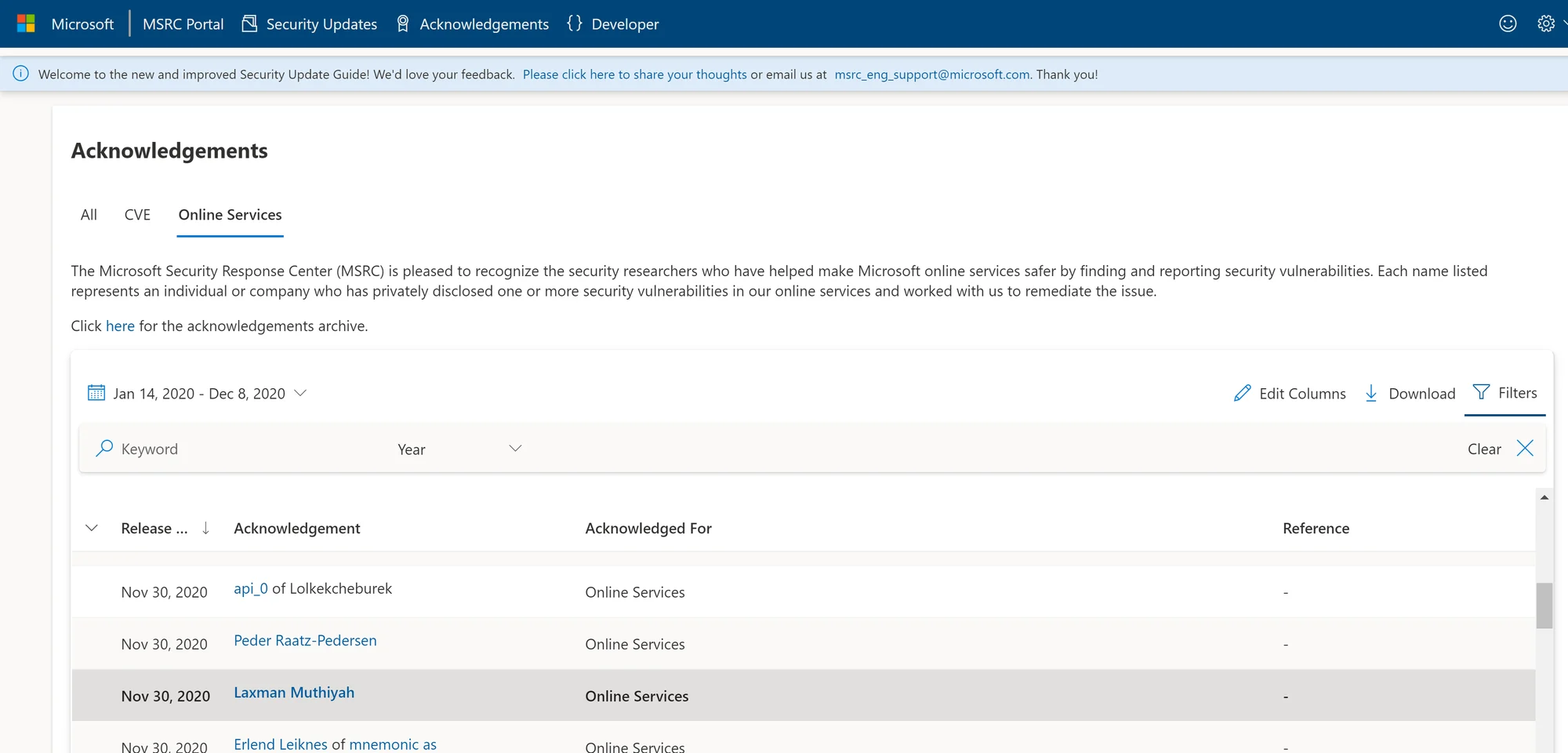
It also includes Microsoft's acknowledgement for reporting the issue.
The researcher thanks Dan, Jarek and the entire MSRC Team for patiently listening to his comments, providing updates and patching the issue, and thanks Microsoft for the bounty.

Variants to test
The report does not list variants, but the pattern it describes suggests concrete things to try on other targets. Each is framed as a test, with what a positive result looks like.
- Concurrent submission against a code validation endpoint. Find a password reset or verification flow that accepts a numeric code, capture the validation request, and send many guesses simultaneously rather than sequentially. A positive result is that the correct code returns a success response while the per account rate limit that blocks sequential attempts does not trigger.
- Timing sensitivity of IP based blocking. Send bursts with small, deliberate delays between requests and compare with fully simultaneous bursts. A positive result is that the delayed burst gets the IP or account blocked while the simultaneous burst does not, which indicates the defence depends on requests arriving at different times.
- Client side or reversible code encryption. Look for a validation request where the entered code does not appear in plaintext. If the transformation can be reproduced in automation, a positive result is that a script can generate valid encrypted codes and the endpoint accepts them.
- Multi step verification chains. Where a flow asks for a 6 digit authenticator code and then a 7 digit code, test whether both steps share the same endpoint and the same weakness. A positive result is that concurrent guessing works at both steps, which would matter for accounts with 2FA enabled.
- Error code behaviour under load. Record the error codes returned when limits are hit (the report saw
1211) and check whether they change under concurrent load. A positive result is that the limiting error disappears or the account is not blocked when requests are simultaneous.
What happened, in plain words
A security researcher named Laxman Muthiyah found a weakness in the way Microsoft lets people reset a forgotten password. The password reset process asks you to prove you own the account by typing a short numeric code that Microsoft sends to your email address or phone. The researcher found that sending guesses concurrently could get past the defences, though he notes the attack would need a lot of computing resources and thousands of IP addresses. In theory that would let an attacker change the password of any Microsoft account, even one protected with two factor authentication. Microsoft fixed the problem in November 2020 and paid the researcher a $50,000 bounty. The report does not give a code level explanation of the fix.
This article walks through the same story for someone who has never done security testing. Every technical idea is explained from scratch the first time it appears.
The researcher and the background
The author is Laxman Muthiyah, a security researcher. Before this work he had found a similar account takeover issue on Instagram. An account takeover means someone else gains control of your account, for example by changing your password so you can no longer log in. Having found that pattern once, he went looking for the same kind of weakness in other online services. He noticed that Microsoft used a similar technique to reset a user's password, so he decided to test Microsoft's reset flow for weaknesses in its rate limiting.
Rate limiting is a defence where a server refuses to answer too many requests from the same person or account in a short period. Think of a cash machine that swallows your card after three wrong PIN entries: the point is to make guessing impractical. If a service has no effective rate limit, an attacker can simply keep guessing.
The feature being tested
The feature is the forgot password page. To reset a Microsoft account's password, a user enters their email address or phone number. Microsoft then asks which email address or mobile number should receive a security code.
A security code here is a short number that Microsoft sends to a channel the real owner controls (their inbox or their phone). Typing it back proves you can read that channel, which is a weak but common way to prove you own an account. The image shows the step where the user picks which contact method should receive the code.
Once the user receives the 7 digit security code, they type it in to reset the password. The researcher's reasoning was simple: a 7 digit code has 10 possible values per digit, so there are 10 to the power of 7, that is 10 million, possible codes. If an attacker could try every combination, they could reset any user's password without permission. He expected rate limits to stop anyone making that many attempts.
A brute force attack is exactly this: trying every possible value of a secret until one works. It only succeeds when the number of possibilities is small enough, or when the service lets you try too many times. Ten million sounds like a lot, but a computer can send requests very quickly, which is why rate limits matter.
Setup
The report does not describe specific accounts, roles, tool versions or a detailed lab setup. What it does say is that the researcher tested the forgot password flow on Microsoft online services, first on an account without two factor authentication and then on an account with 2FA enabled.
Two factor authentication (2FA) means logging in requires two different proofs: usually your password plus a second code, often generated by an app on your phone. It exists so that a stolen password alone is not enough. The report later shows that 2FA mattered here too.
He used interception tooling to capture the HTTP POST request made to the code validation endpoint, and he wrote automation code to encrypt codes and send many concurrent requests. He mentions that tools like Burp Intruder could not be used because they would not perform the encryption step.
A few of those terms need unpacking:
- An HTTP request is the message your browser sends to a web server when you do something, such as submitting a form. An HTTP POST request is the kind used to send data (like a code you typed) to the server.
- An endpoint is a specific address on a server that accepts a particular kind of request. Think of a large office building: the street address is the website, and each endpoint is a specific service window inside.
- Interception tooling is software that sits between your browser and the server so you can see and edit the requests. A common example is a proxy, which is like a post office clerk who opens every letter, lets you read and rewrite it, then sends it on.
- Burp Intruder is a feature of the Burp Suite proxy that automates sending many variations of a request, typically used to try many passwords or codes. It is the standard tool for brute forcing through a proxy.
- Concurrent requests are requests sent at the same time rather than one after another. Sequential means one finishes before the next starts; concurrent means many are in flight together.
Finding it
The researcher intercepted the HTTP POST request made to the code validation endpoint. It looked like this:
Looking at the screenshot, the code 1234567 that was entered was nowhere present in the request. It was encrypted and then sent for validation. The researcher guessed that this was done to prevent automated brute force tools from exploiting the system. This meant he could not automate testing multiple codes using tools like Burp Intruder, since they would not do the encryption part.
Encryption here means scrambling the code before sending it, so that the value on the wire does not look like the number the user typed. The server unscrambles it and checks it. The point of doing this in a login or reset flow is to make casual automation harder: a tool that just substitutes 0000000, 0000001 and so on into the request will send values the server cannot unscramble, so every attempt fails.
After some time, he figured out the encryption technique and was able to automate the entire process, from encrypting the code to sending multiple concurrent requests.
Exploitation
Step 1: Confirm that rate limits exist
His initial test showed the presence of rate limits, as expected. Out of 1000 codes sent, only 122 of them got through. The others were limited with a 1211 error code, and the system blocked the respective user account from sending further attempts if requests were sent continuously.
In plain terms: he sent 1000 guesses one after another. The server accepted 122 of them and rejected the rest with the error code 1211. When he kept going, the account itself was blocked from making more attempts. This is the rate limit working as designed. The image shows the pattern of accepted and rejected attempts.
Step 2: Try concurrent requests
He then tried sending simultaneous or concurrent requests, as he had done for Instagram. This allowed him to send large numbers of requests without getting blocked, but he was still unable to get a successful response while injecting the correct 7 digit security code. He thought some control was in place to prevent this type of attack. Although he got an error while sending the right code, there was still no evidence of the user being blocked as in the initial test, so he kept hoping there was something there.
This is an important observation. In the first test, sending too many requests got the account blocked. In the concurrent test, the account was not blocked, but the correct code still did not produce a success. That combination suggested the defence had changed shape rather than disappeared: something else was now stopping him, and it was not the per account block he had seen before.
Step 3: Identify the timing condition
After some days, he realised that the system was blacklisting the IP address if all the requests did not hit the server at the same time. Even a few milliseconds of delay between requests allowed the server to detect the attack and block it. He tweaked his code to handle this scenario and tested it again.
An IP address is the numeric address your computer uses on a network, roughly like a postal address for your connection. Blacklisting an IP address means the server refuses to serve requests coming from that address. The researcher's insight was that the server was watching the timing of requests: if they arrived spread out by even a few milliseconds, it noticed and blocked the source. If they arrived together, it did not. A millisecond is one thousandth of a second, so this was a very tight timing requirement.
Step 4: Get the successful response
Surprisingly, it worked, and he was able to get the successful response this time.
He sent around 1000 seven digit codes, including the right one, and was able to get to the next step to change the password. In other words, once the requests were timed to land together, the correct code among them was accepted and the flow moved on to the password change step.
Step 5: Accounts with 2FA
The process above is valid only for users who do not have two factor authentication enabled. If a user has enabled 2FA, the attacker would also have to bypass the two factor code authentication to change the password.
He tested an account with 2FA and found that both are the same endpoint, vulnerable to this type of attack. First, the user is prompted to enter a 6 digit code generated by an authenticator app, and only then are they asked to enter the 7 digit code sent to their email address or phone number. After that, they can change the password.
An authenticator app is a phone app that generates a fresh short code every 30 seconds or so, tied to your account. Because the code changes constantly, it is much harder to guess than a fixed password. Here, though, the 6 digit code was checked at the same endpoint, which the researcher found vulnerable to this type of attack.
Putting it all together, an attacker would have to send all the possibilities of the 6 and 7 digit security codes, around 11 million request attempts, and they would have to be sent concurrently to change the password of any Microsoft account, including those with 2FA enabled.
The researcher notes that this is not at all an easy process. Sending such a large number of concurrent requests would require a lot of computing resources as well as thousands of IP addresses to complete the attack successfully. The researcher notes that thousands of IP addresses would be needed to complete the attack successfully.
He recorded a video of all the bypasses and submitted it to Microsoft along with detailed steps to reproduce the vulnerability. Microsoft was quick to acknowledge the issue.
Root cause
From what the researcher observed, the likely design weakness is that the code validation endpoint relied on rate limiting and IP based blocking that could be defeated by sending requests concurrently enough that they all hit the server at the same time. The per account limit seen in the first test (only 122 of 1000 codes accepted, the rest returning 1211, with the account blocked on continuous attempts) did not hold when requests were simultaneous. The IP blacklisting that followed non simultaneous bursts could be avoided by removing even millisecond level delays between requests. The encryption of the submitted code raised the bar for off the shelf tools but did not stop a determined attacker who reverse engineered the encryption and automated it.
A useful comparison: a bouncer who counts people entering a club one by one will stop the queue after a few. But if a hundred people rush the door in the same instant, the counting never happens.
Impact
According to the report, an attacker who could send the full set of 6 and 7 digit code possibilities concurrently, around 11 million request attempts, could change the password of any Microsoft account, including accounts with 2FA enabled. The researcher hedges this heavily: the attack requires a lot of computing resources and thousands of IP addresses, and is not at all easy to carry out. The issue was patched in November 2020. His case was initially assigned a different security impact than he expected, and after a few back and forth emails it was assigned to Elevation of Privilege (Involving Multi-factor Authentication Bypass). Due to the complexity of the attack, the bug severity was assigned as important instead of critical.
Elevation of Privilege is a category meaning the attacker gains abilities they should not have, such as changing someone else's password. Severity is how serious a bug is judged to be; the report says this one was rated important rather than critical because of how hard it is to carry out.
Fix
The report only confirms that the issue was patched and that the researcher received the bounty of $50,000 USD on February 9th, 2021 through HackerOne, with approval to publish the article on March 1st, 2021.
HackerOne is a platform where security researchers report bugs to companies and companies pay bounties. A bounty is a reward paid for finding and reporting a security problem responsibly.
Bounty and acknowledgement
The report includes the bounty email from MSRC.
MSRC is Microsoft's Security Response Center, the team that handles security reports. The image shows the email confirming the bounty.
It also includes Microsoft's acknowledgement for reporting the issue.
The researcher thanks Dan, Jarek and the entire MSRC Team for patiently listening to his comments, providing updates and patching the issue, and thanks Microsoft for the bounty.
Variants to test
The report does not list variants, but the pattern it describes suggests concrete things to try on other targets. Each is framed as a test, with what a positive result looks like.
- Concurrent submission against a code validation endpoint. Find a password reset or verification flow that accepts a numeric code, capture the validation request, and send many guesses simultaneously rather than sequentially. A positive result is that the correct code returns a success response while the per account rate limit that blocks sequential attempts does not trigger.
- Timing sensitivity of IP based blocking. Send bursts with small, deliberate delays between requests and compare with fully simultaneous bursts. A positive result is that the delayed burst gets the IP or account blocked while the simultaneous burst does not, which indicates the defence depends on requests arriving at different times.
- Client side or reversible code encryption. Look for a validation request where the entered code does not appear in plaintext. If the transformation can be reproduced in automation, a positive result is that a script can generate valid encrypted codes and the endpoint accepts them.
- Multi step verification chains. Where a flow asks for a 6 digit authenticator code and then a 7 digit code, test whether both steps share the same endpoint and the same weakness. A positive result is that concurrent guessing works at both steps, which would matter for accounts with 2FA enabled.
- Error code behaviour under load. Record the error codes returned when limits are hit (the report saw
1211) and check whether they change under concurrent load. A positive result is that the limiting error disappears or the account is not blocked when requests are simultaneous.
Glossary
- Account takeover: when someone else gains control of your account, for example by changing your password.
- API: a defined way for one piece of software to talk to another, like a service window where you make a specific request and get a specific answer.
- Authenticator app: a phone app that generates a fresh short code every 30 seconds or so, tied to your account.
- Blacklisting: refusing to serve requests from a particular source, such as an IP address.
- Bounty: a reward paid by a company for responsibly reporting a security problem.
- Brute force: trying every possible value of a secret until one works.
- Burp Intruder: a feature of the Burp Suite proxy that automates sending many variations of a request.
- Concurrent requests: requests sent at the same time rather than one after another.
- Elevation of Privilege: a category of bug where the attacker gains abilities they should not have.
- Encryption: scrambling data so it does not look like the original, with the server able to unscramble it.
- Endpoint: a specific address on a server that accepts a particular kind of request.
- HackerOne: a platform where researchers report bugs to companies and companies pay bounties.
- HTTP POST request: the kind of HTTP request used to send data, such as a code you typed, to a server.
- HTTP request: the message your browser sends to a web server when you do something.
- Interception tooling: software that sits between your browser and the server so you can see and edit requests.
- IP address: the numeric address your computer uses on a network.
- Millisecond: one thousandth of a second.
- MSRC: Microsoft's Security Response Center, the team that handles security reports.
- Proxy: software that sits between your browser and the server, letting you read and rewrite requests.
- Rate limiting: a defence where a server refuses to answer too many requests from the same person or account in a short period.
- Security code: a short number sent to a channel the real owner controls, used to prove ownership.
- Severity: how serious a bug is judged to be.
- Two factor authentication (2FA): logging in requires two different proofs, usually a password plus a second code.




