How I Hacked Instagram Again
 Published on thezerohack.com
Last month, I published a write-up on Instagram account takeover vulnerability where I was able to hack any Instagram with in 10 minutes. This is also a similar vulnerability with less severity.
The full write-up lives on its author's site
It belongs to its author, so we link to it rather than copy it. The other two tabs are our own rewrites, checked against it.
Context
Instagram's password reset flow relies on a recovery code sent to the user, which is then verified by the client. In the version of the Android application described here, the verification request carries two values: the recovery code itself and a device_id. The device_id is a random string generated by the Instagram application, and the server uses it as the unique identifier against which a password reset code is validated.
The author had previously published a write-up on an Instagram account takeover that allowed hacking any Instagram account within 10 minutes. The vulnerability described here is similar in nature but of lower severity, and it was found on Instagram and reported through the Meta / Facebook bug bounty programme.

Setup
The work was done against the Instagram mobile API at i.instagram.com, using the Android client. The request shown in the report identifies itself with the following client details:
- User-Agent:
Instagram 92.0.0.11.114 Android (27/8.1.0; 440dpi; 1080×2150; Xiaomi/xiaomi; Redmi Note 6 Pro; tulip; qcom; en_IN; 152830654) - Locale:
en-IN, en-US - Content type:
application/x-www-form-urlencoded; charset=UTF-8
Finding it
The starting observation is that the device_id is the value the Instagram server uses to validate password reset codes. When a user requests a pass code from their mobile device, a device ID is sent along with the request, and the same device ID is used again when the pass code is verified.
The question the researcher asked was simple: what happens if the same device ID is used to request pass codes for multiple Instagram accounts? Testing showed that a single device ID can be used to request multiple pass codes belonging to different users.
Exploitation
Step 1: understand the verification request
The verification endpoint accepts the recovery code and the device ID as form parameters:
POST /api/v1/accounts/account_recovery_code_verify/ HTTP/1.1
User-Agent: Instagram 92.0.0.11.114 Android (27/8.1.0; 440dpi; 1080×2150; Xiaomi/xiaomi; Redmi Note 6 Pro; tulip; qcom; en_IN; 152830654)
Accept-Language: en-IN, en-US
Content-Type: application/x-www-form-urlencoded; charset=UTF-8
Accept-Encoding: gzip, deflate
Host: i.instagram.com
Connection: keep-alive

recover_code=123456&device_id=*device-id*
recover_code is the six digit code delivered to the account owner. device_id is the random string generated by the Instagram application. The server uses the device ID to validate the pass code.
Step 2: request codes for many accounts with one device ID
Using the same device_id, the attacker requests password reset codes for a large number of Instagram accounts. Each request issues a code for a different user, but all of those codes are associated with the attacker's single device ID.
Step 3: brute force the code space
A six digit pass code has one million possible values, from 000001 to 999999. Because the codes for many accounts are all valid against the same device ID, guessing codes against that device ID is effectively guessing against every account whose code was issued to it. The attacker increments the pass code one by one and submits it to the verification endpoint.
Step 4: work within the expiry window
The codes expire after 10 minutes, so the entire attack, from requesting the codes to completing the guesses, has to happen inside that window.
The arithmetic behind the attack
The researcher frames the success rate in terms of how many accounts are included:
- Requesting codes for 100,000 users with the same device ID gives a 10 percent success rate, since 100,000 codes are issued to that device ID.
- Requesting codes for 1,000,000 users would allow hacking all one million accounts easily by incrementing the pass code one by one.
So an attacker who wants a 100 percent success rate should request codes for one million users, and complete the guessing within the 10 minute expiry.
Root cause
The design mistake is that the password reset code is validated against the device_id supplied by the client rather than being bound to the account that requested it. The same device ID can be used to request pass codes of multiple Instagram accounts. Every code issued in that way becomes a valid guess against the same device ID, which turns a per-account brute force problem into a single shared pool of codes. The codes expire after 10 minutes, so the entire attack should happen within that window.
Impact
An attacker can take over Instagram accounts without the owner's consent, provided the attacker requests reset codes for a sufficiently large number of accounts and completes the guessing within the 10 minute expiry. The success rate scales with the number of accounts whose codes are issued to the same device ID: Requesting codes for 100,000 users gives a 10 percent success rate, and one million users would allow hacking all of them. The report describes this as similar to the earlier account takeover but with less severity.
Fix
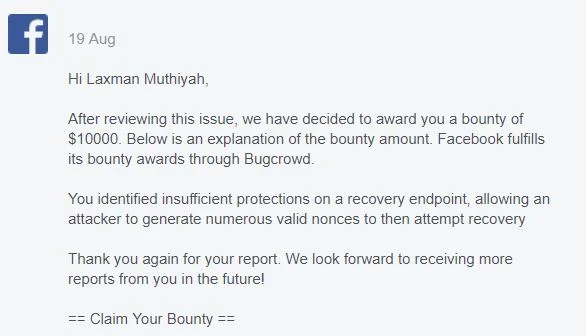
The issue was resolved by the Facebook security team, and the researcher notes that Instagram accounts can no longer be hacked using this vulnerability. The report does not describe the specific change that was made. The Facebook security team rewarded the researcher with $10,000 through their bug bounty programme.
Variants to test
- Shared device identifiers in other reset flows. Look for any recovery or verification endpoint that accepts a client-generated identifier (device ID, installation ID, session fingerprint) alongside a short numeric code. A positive result is that the same identifier can be used to request codes for several different accounts and each code verifies against it.
- Code pools across accounts. Request codes for a batch of accounts you control with one identifier, then try each code against the identifier rather than against the account that requested it. A positive result is a code issued for account A verifying while the request is made in the context of account B.
- Rate limiting on verification. Check whether the verification endpoint throttles repeated wrong guesses per identifier, per account or per IP. A positive result is that guesses continue to be accepted at a rate that makes a large code pool practical within the code's expiry window.
- Expiry enforcement. Confirm that codes really stop working after the stated lifetime, and that the lifetime is measured from issuance rather than from the last request. A positive result is a code still verifying after the advertised expiry.
- Identifier reuse across sessions. Try the same identifier from a fresh install or a different network. A positive result is that previously issued codes still verify, showing the identifier alone is sufficient.
What happened, in plain words
Instagram lets you get back into your account if you forget your password. You tap "forgot password", Instagram sends a short number code to your phone, you type it in, and you are back in. That flow is called a password reset, and the short number is called a recovery code or pass code.
Laxman Muthiyah found that this flow could be abused. The Instagram app sends a random string called a device_id along with the request, and the Instagram server checks the recovery code against that device_id rather than against the account that asked for it. If one device_id can be used to request codes for many different accounts, then all of those codes become valid guesses against that single device_id. An attacker who requests codes for a very large number of accounts and then tries every possible six digit code can log into some of those accounts without their owners' permission. That is an account takeover.
The Facebook and Instagram security team fixed the issue and paid the researcher $10,000 through their bug bounty programme. A bug bounty programme is a scheme where a company pays people who report security problems to it, instead of punishing them.
This is a follow-up to an earlier write-up by the same researcher about an Instagram account takeover that let him hack any Instagram account within 10 minutes. The bug described here is similar but less severe.
The pieces you need to understand first
Before the steps make sense, here are the basic ideas, explained from zero.
- An API is the way one piece of software talks to another. Think of a restaurant: you do not walk into the kitchen, you tell the waiter what you want and the waiter brings it back. The Instagram app is the customer, the Instagram server is the kitchen, and the API is the waiter taking requests and bringing responses. When the app wants to reset a password, it sends a request to the API.
- A request is a message sent to a server asking it to do something. It has a method (like
POST, meaning "here is some data, please act on it"), a path (which part of the service you are talking to), some headers (extra information about the request), and a body (the actual data). - A header is a small label attached to a request. For example,
User-Agenttells the server what kind of app and device is calling, andContent-Typetells it how the body is formatted. - A form parameter is a name and value pair sent in the body, written as
name=valueand joined with&. It is the same idea as filling in a web form with your name and address. - A
device_idis a random string that the Instagram app generates to identify an installation of the app. It is not a password and it is not secret. It is more like a coat check ticket: whoever holds the ticket can collect the coat, and the ticket does not prove who you are. - A recovery code (or pass code) is the short number Instagram sends you to prove you own the account. Here it is six digits long.
- Brute force means trying every possible value until one works. If a code has six digits, there are one million possible values, so a patient attacker can try them all.
- Account takeover means getting into someone else's account without their permission. It is the goal of the attack here.
- A bug bounty programme is a company's offer to pay security researchers who report problems responsibly.
Setup
The work was done against the Instagram mobile API at i.instagram.com, using the Android client. The request in the report identifies itself with these client details:
- User-Agent:
Instagram 92.0.0.11.114 Android (27/8.1.0; 440dpi; 1080×2150; Xiaomi/xiaomi; Redmi Note 6 Pro; tulip; qcom; en_IN; 152830654) - Locale:
en-IN, en-US - Content type:
application/x-www-form-urlencoded; charset=UTF-8
Finding it
The starting observation is that the device_id is the value the Instagram server uses to validate password reset codes. When a user requests a pass code from their mobile device, a device ID is sent along with the request, and the same device ID is used again when the pass code is verified.
The question the researcher asked was simple: what happens if the same device ID is used to request pass codes for multiple Instagram accounts? Testing showed that a single device ID can be used to request multiple pass codes belonging to different users.
Exploitation
Step 1: understand the verification request
The verification endpoint accepts the recovery code and the device ID as form parameters:
POST /api/v1/accounts/account_recovery_code_verify/ HTTP/1.1
User-Agent: Instagram 92.0.0.11.114 Android (27/8.1.0; 440dpi; 1080×2150; Xiaomi/xiaomi; Redmi Note 6 Pro; tulip; qcom; en_IN; 152830654)
Accept-Language: en-IN, en-US
Content-Type: application/x-www-form-urlencoded; charset=UTF-8
Accept-Encoding: gzip, deflate
Host: i.instagram.com
Connection: keep-alive

recover_code=123456&device_id=*device-id*
Line by line, in plain words:
POST /api/v1/accounts/account_recovery_code_verify/ HTTP/1.1says: send data to this address on the server, using version 1.1 of the HTTP protocol (the language browsers and apps use to talk to servers). The pathaccount_recovery_code_verifyis the part of the API that checks a recovery code.User-Agent: ...tells the server which app and device is calling. Here it pretends to be the Instagram Android app on a Xiaomi Redmi Note 6 Pro. Servers often behave differently for different apps, so matching the real app helps the request look normal.Accept-Language: en-IN, en-USsays the caller prefers Indian English, then US English. It is a hint about the user's language settings.Content-Type: application/x-www-form-urlencoded; charset=UTF-8says the body is formatted as form fields, the samename=value&name=valuestyle you see in a web address after a question mark.Accept-Encoding: gzip, deflatesays the caller can accept compressed responses, to save bandwidth.Host: i.instagram.comnames the server being contacted. One server can host many sites, so this tells it which one is wanted.Connection: keep-aliveasks to keep the network connection open for further requests, rather than opening a new one each time.- The blank line separates the headers from the body.
recover_code=123456&device_id=*device-id*is the body.recover_codeis the six digit code delivered to the account owner.device_idis the random string generated by the Instagram application. The server uses the device ID to validate the pass code.
Step 2: request codes for many accounts with one device ID
Using the same device_id, the attacker requests password reset codes for a large number of Instagram accounts. Each request issues a code for a different user, but all of those codes are associated with the attacker's single device ID.
Why do this? Because the server checks the code against the device ID, not against the account. If every code from every account is filed under the same device ID, then the attacker only has to guess against one shared pile of codes instead of one account at a time.
Step 3: brute force the code space
A six digit pass code has one million possible values, from 000001 to 999999. Because the codes for many accounts are all valid against the same device ID, guessing codes against that device ID is effectively guessing against every account whose code was issued to it. The attacker increments the pass code one by one and submits it to the verification endpoint.
Think of it like a row of lockers that all open with the same keypad. If you can try every combination on that one keypad, you are not attacking one locker, you are attacking all of them at once.
Step 4: work within the expiry window
The codes expire after 10 minutes, so the entire attack, from requesting the codes to completing the guesses, has to happen inside that window. Expiry is a time limit: after 10 minutes the code stops working, so the attacker cannot take all day.
The arithmetic behind the attack
The researcher frames the success rate in terms of how many accounts are included:
- Requesting codes for 100,000 users with the same device ID gives a 10 percent success rate, since 100,000 codes are issued to that device ID.
- Requesting codes for 1,000,000 users would allow hacking all one million accounts easily by incrementing the pass code one by one.
So an attacker who wants a 100 percent success rate should request codes for one million users, and complete the guessing within the 10 minute expiry.
Root cause
The design mistake is that the password reset code is validated against the device_id supplied by the client rather than being bound to the account that requested it. The same device ID can be used to request pass codes of multiple Instagram accounts. Every code issued in that way becomes a valid guess against the same device ID, which turns a per-account brute force problem into a single shared pool of codes. The codes expire after 10 minutes, so the entire attack should happen within that window.
In everyday terms: the server should have asked "does this code belong to this account?" but instead it asked "does this code belong to this device ID?" Since anyone can pick a device ID, the second question is much easier to cheat.
Impact
An attacker can take over Instagram accounts without the owner's consent, provided the attacker requests reset codes for a sufficiently large number of accounts and completes the guessing within the 10 minute expiry. The success rate scales with the number of accounts whose codes are issued to the same device ID: Requesting codes for 100,000 users gives a 10 percent success rate, and one million users would allow hacking all of them. The report describes this as similar to the earlier account takeover but with less severity.
Fix
The issue was resolved by the Facebook security team, and the researcher notes that Instagram accounts can no longer be hacked using this vulnerability. The report does not describe the specific change that was made. The Facebook security team rewarded the researcher with $10,000 through their bug bounty programme.
Variants to test
If you are learning to look for bugs like this, here are the same ideas to try on other systems. Each one is a question you can ask about a password reset flow.
- Shared device identifiers in other reset flows. Look for any recovery or verification endpoint that accepts a client-generated identifier (device ID, installation ID, session fingerprint) alongside a short numeric code. A positive result is that the same identifier can be used to request codes for several different accounts and each code verifies against it.
- Code pools across accounts. Request codes for a batch of accounts you control with one identifier, then try each code against the identifier rather than against the account that requested it. A positive result is a code issued for account A verifying while the request is made in the context of account B.
- Rate limiting on verification. Check whether the verification endpoint throttles repeated wrong guesses per identifier, per account or per IP. A positive result is that guesses continue to be accepted at a rate that makes a large code pool practical within the code's expiry window. Rate limiting means the server starts refusing requests after too many in a short time, like a bouncer who stops letting people in once the club is full.
- Expiry enforcement. Confirm that codes really stop working after the stated lifetime, and that the lifetime is measured from issuance rather than from the last request. A positive result is a code still verifying after the advertised expiry.
- Identifier reuse across sessions. Try the same identifier from a fresh install or a different network. A positive result is that previously issued codes still verify, showing the identifier alone is sufficient.
Glossary
- API: the interface one piece of software uses to ask another piece of software to do something, like a waiter taking your order to the kitchen.
- Request: a message sent to a server asking it to perform an action, made up of a method, a path, headers and a body.
- Header: a small label attached to a request or response that carries extra information, such as what app is calling or how the body is formatted.
- Form parameter: a
name=valuepair sent in a request body, joined with&, the same style as fields in a web form. device_id: a random string generated by the Instagram app to identify an installation; it is not secret and not tied to a person.- Recovery code / pass code: the short number Instagram sends to prove you own an account; here it is six digits.
- Password reset: the flow that lets you regain access to an account when you have forgotten the password, usually by receiving a code.
- Brute force: trying every possible value until one works.
- Account takeover: getting into someone else's account without their permission.
- Bug bounty programme: a scheme where a company pays people who report security problems to it.
- Endpoint: a specific address on a server that performs a particular function, such as verifying a recovery code.
- Rate limiting: a server's practice of refusing requests after too many arrive in a short period, to slow down guessing.
- Expiry: the time after which a code or token stops being accepted.
- Root cause: the underlying design or coding mistake that makes a vulnerability possible.
- Severity: how serious a vulnerability is, usually based on how much damage it can cause and how easy it is to exploit.
- User-Agent: a header that tells the server what app, device and version is making the request.
- Content-Type: a header that tells the server how the body of the request is formatted.
- HTTP: the protocol browsers and apps use to exchange requests and responses with servers.
- POST: an HTTP method meaning "here is some data, please act on it".
- Locale: the language and region settings a client prefers, such as
en-INfor Indian English. - Session fingerprint: a value built from characteristics of a client's connection or device, used to recognise it across requests.
- IP address: the numeric address of a device on a network, often used by servers to identify where requests come from.
- Throttle: to deliberately slow down or limit the rate of something, such as repeated login attempts.





