New technique 403 bypass lyncdiscover.microsoft.com
The author found that requesting a 403-protected path on lyncdiscover.microsoft.com with HTTP/1.0 and no headers returned 200, and that the same trick could reveal the origin server's IP behind a CDN. An attacker could read files that were meant to be forbidden and learn the server's real address.
 Published on medium.com
Hi I have been working on the HTTP protocol for some time. After checking and researching, I found out that version 1.0 of the HTTP protocol can be used to bypass 403.
The full write-up lives on its author's site
It belongs to its author, so we link to it rather than copy it. The other two tabs are our own rewrites, checked against it.
Context
This write-up describes a 403 bypass technique found on lyncdiscover.microsoft.com, a Microsoft domain. The author, Abbas Heybati, does not describe the application behind the domain beyond the files he found, so the exact product and feature are not stated. What he does show is that certain paths on the host returned 403 Forbidden to a normal request, and that changing the HTTP protocol version to 1.0 and sending no header values made the same paths return 200.
The author frames the finding as a general HTTP protocol issue: he says he had been researching the HTTP protocol for some time and found that version 1.0 of the protocol can be used to bypass 403 responses. He also extends the technique to CDN bypass and server IP discovery, which he demonstrates at the end.
Setup
The report does not describe any accounts, roles, tooling versions or configuration. The only stated precondition is that the target paths return 403 Forbidden to a normal request. The author says he started by doing FUZZ on the lyncdiscover.microsoft.com domain, which is how he found the files in question.
Finding it
Fuzzing the domain surfaced a couple of files that responded with 403 Forbidden. One of them was reach%2fsip.svc.
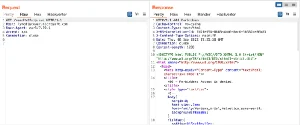
The screenshot shows the 403 Forbidden response for reach%2fsip.svc. After checking, the author concluded that when he cleared all the header values, the server reacted to the Host header. That observation, combined with his earlier research on the HTTP protocol, led him to change the HTTP protocol version to 1.0 and to set no value in the headers.
Exploitation
Step 1: Change the protocol version and drop the header values
The author changed the HTTP protocol version to 1.0 and did not set any value in the header. He gives this tip for why it works:
When we do not put Host in the header if the server and any other security mechanism is not configured in the right way. It puts the destination address itself in the header, and this makes us known as local.
In other words, when the Host header is absent, the server fills in the destination address itself, and the request is then treated as coming from a local source. The report does not include the raw request, so the exact bytes sent are not reproduced here.
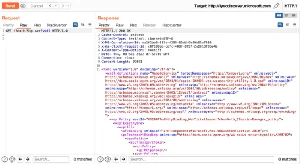
With that change, the previously forbidden file returned 200.
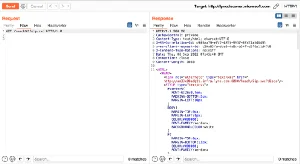
The screenshot shows the 200 response for reach%2fsip.svc. A second screenshot follows the same point.
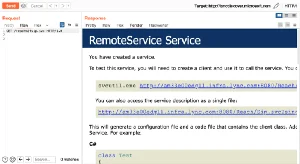
Step 2: Repeat on another file
The author then tried another file with the same method, and it was bypassed again. The second file was Reach/Sip.svc?wsdl, which had also returned 403 Forbidden.
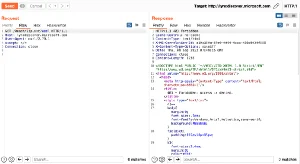
After applying the same change, that file returned 200 as well.
Step 3: Use the method to bypass a CDN and obtain server IPs
The author adds a further use for the technique: it can also be used to bypass a CDN and obtain server IPs. He shows one example. The first response includes a Location header.
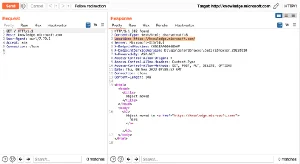
As he explains, the Location header shows the address of the domain itself in the response. He then uses the same method again and sends the request, and this time the response shows the main address of the server.
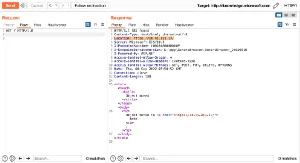
The second screenshot shows the Location response containing the server's main address. The report does not give the raw request or the exact IP values, so the specific addresses are not reproduced here.
Root cause
The author's explanation is that the server, and any other security mechanism, is not configured in the right way. When the Host header is not supplied, the server puts the destination address itself in the header, and the request is then treated as local.
The role of HTTP/1.0 in this is not explained in detail beyond the author's statement that version 1.0 of the protocol can be used to bypass 403. The CDN behaviour is likewise described only at the level of the Location header revealing the origin address.
Impact
The direct impact shown is access to files that were meant to be forbidden: reach%2fsip.svc and Reach/Sip.svc?wsdl both returned 200 instead of 403. The author does not describe what those files contain or what actions they allow, so the practical consequences beyond the disclosure itself are not stated.
The secondary impact is CDN bypass: the technique can reveal the main address of the server behind the CDN, which the author demonstrates through the Location header.
Fix
Based on the author's own explanation, the condition to correct is the server's handling of requests without a Host header: the access decision should not treat such a request as local, and the Host value should not be derived in a way that grants that trust. The report does not go further than this.
Variants to test
- Other forbidden paths on the same host. Apply the same change, HTTP/1.0 with no header values, to other paths that return
403. A positive result is a200where the normal request gives403. - Other hosts with path-based 403 rules. The author's tip is about servers that are not configured correctly, so the same test is worth trying on other hosts that return 403. A positive result is the same switch from
403to200. - CDN-fronted hosts. Send the request with the same method and inspect the
Locationheader. A positive result is aLocationvalue that reveals the origin or main server address rather than the CDN address, as in the author's example.
What happened, in plain words
A security researcher named Abbas Heybati was looking at a Microsoft web address, lyncdiscover.microsoft.com. Some files on that address were locked: when you asked for them, the server answered 403 Forbidden, which is the web's way of saying "you are not allowed to see this".
He found that by changing one small detail of how his request was written, the same files answered 200, which means "here you go, everything is fine". The detail was the version of the language that browsers and servers use to talk to each other, called HTTP, plus leaving out a piece of information that requests normally carry.
He then showed a second use for the same trick: it can reveal the real address of a server that is hidden behind a content delivery network (CDN), a service that sits in front of a website to speed it up and hide it.
This article walks through the same steps for someone who has never done security testing before. Every term is explained the first time it appears, and there is a glossary at the end.
The background you need first
Before the steps make sense, here are the ideas involved, from zero.
A server and a request. When you type an address into your browser, your computer sends a message to another computer, called a server, asking for a page or a file. That message is a request. The server's answer is a response. This back and forth is the whole of the web.
HTTP. HTTP (HyperText Transfer Protocol) is the set of rules for how those requests and responses are written. Both sides must agree on the format, otherwise nothing works. HTTP has had several versions over the years. Version 1.0 is an old one; version 1.1 and 2 are the ones used almost everywhere today. Think of it like the format of a formal letter: the same information can be laid out in an old-fashioned way or a modern way, and a careful reader should accept both.
Headers. Every request carries a small block of extra information at the top, called headers. Each header is a label and a value, a bit like the fields on an envelope: who it is from, who it is for, what kind of contents are inside. One important header is called Host. It tells the server which website name the visitor was trying to reach, because one server machine can host many websites at once. Without Host, the server has to guess or fill in a default.
Status codes. The first thing in a response is a three-digit number. 200 means success. 403 means the server understood the request but refuses to allow it. 404 means the thing does not exist. These numbers are the server's short answer before any content.
Fuzzing (FUZZ). Fuzzing means trying lots of different inputs quickly and automatically to see what comes back. In web testing it usually means asking the server for many possible file and folder names in a row, and watching which ones answer differently. It is like trying every key on a big keyring in a lock, one after another, to find the ones that turn.
A .svc file. The files in this story end in .svc. That suffix is commonly used by services that expose an API. An API is a way for one program to talk to another program over the network, rather than a page meant for a human to look at. You can picture it as a serving hatch in a restaurant wall: you pass a request through it and get data back, without going into the kitchen.
WSDL. One of the files has ?wsdl on the end. WSDL is a description document: it is the menu that tells a client program which operations an API offers and how to call them. Asking for it is like asking a restaurant for its menu before ordering.
CDN. A content delivery network is a network of servers spread around the world that sit in front of a website. Visitors talk to the nearest CDN server, which is fast, and the CDN fetches the real content from the origin, the actual server behind it. One side effect is that the origin's address is hidden from the public. That hiding is a security measure, because it makes the origin harder to attack directly.
The Location header. Some responses include a header called Location, which tells the client "the thing you want is over there" and gives an address. It is used for redirects, the automatic forwarding you see when a page moves.
What the vulnerability class means. A "403 bypass" is exactly what it sounds like: a way to get past a 403 Forbidden answer without being given permission. The server has a rule that says "this file is off limits", and the bypass makes the request look like something the rule does not cover. The rule is still there; the request simply stops matching it.
Finding the locked files
The author says he started by fuzzing the domain lyncdiscover.microsoft.com. The point of this step is discovery: he did not know in advance which files existed, so he asked for many names and watched the answers. A couple of files came back 403 Forbidden, meaning they existed but were protected.
One of them was reach%2fsip.svc.
The screenshot shows the 403 Forbidden response for reach%2fsip.svc. The %2f inside the name is worth a note: it is the encoded form of a forward slash /. Web addresses cannot always contain certain characters directly, so they are written in a percent-encoded form. %2f is the encoded form of a forward slash /.
This first result is the baseline. Before changing anything, you need to know what a normal request gets, so that you can tell whether a later change made a difference. Here the normal answer is 403.
Working out what the server was reacting to
The author then experimented. He cleared all the header values and observed that the server reacted to the Host header. In plain terms: when the usual information at the top of the request was removed, the server's behaviour depended on what it was told about the destination name. That told him the access decision was tied to that header, and it gave him the idea of removing it entirely.
He combined that observation with earlier research of his on HTTP, where he had found that version 1.0 of the protocol can be used to bypass 403 responses. So the change he made had two parts: use HTTP/1.0, and send no header values.
Step 1: change the protocol version and drop the header values
The author changed the HTTP protocol version to 1.0 and did not set any value in the header. He gives this tip for why it works:
When we do not put Host in the header if the server and any other security mechanism is not configured in the right way. It puts the destination address itself in the header, and this makes us known as local.
Line by line, in plain words:
- "When we do not put Host in the header": the request goes out without the field that normally says which website name is wanted.
- "if the server and any other security mechanism is not configured in the right way": this only works when the server has been set up carelessly. A correctly configured server would reject a request with no destination name, or handle it safely.
- "It puts the destination address itself in the header": instead of refusing, the server fills in the missing value on its own, using the address the request arrived at.
- "and this makes us known as local": because the value was filled in by the server rather than supplied by the visitor, the request ends up looking as though it came from the machine itself, that is, from a trusted local source. The rule that blocked outside visitors no longer applies.
The everyday comparison: a building's reception desk has a rule that visitors must sign in and show a badge. If someone walks in through a door marked "staff only" and nobody checks, they are treated as staff for the rest of the visit, not because they proved anything, but because the check was skipped.
The report does not include the raw request, so the exact bytes sent are not reproduced here. What it does show is the result: the previously forbidden file returned 200.
The screenshot shows the 200 response for reach%2fsip.svc, the same file that gave 403 before. A second screenshot follows the same point.
Why this step was taken: the first screenshot established that the file was protected. The observation about the Host header suggested the protection depended on that header. Removing it, in the older protocol version, tested whether the protection would still apply. It did not.
Step 2: repeat on another file
The author then tried another file with the same method, and it was bypassed again. The second file was Reach/Sip.svc?wsdl, which had also returned 403 Forbidden.
The screenshot shows the 403 Forbidden response for Reach/Sip.svc?wsdl. The ?wsdl part is a query string: extra information appended to the address after a question mark, here asking for the description document of the service.
After applying the same change, that file returned 200 as well.
The screenshot shows the 200 response for Reach/Sip.svc?wsdl.
Why this step was taken: one success could be a quirk of a single file. Trying a second, different file checks whether the technique works elsewhere on the server. It did.
Step 3: use the method to bypass a CDN and obtain server IPs
The author adds a further use for the technique: it can also be used to bypass a CDN and obtain server IPs. An IP address is the numeric address of a machine on the internet, the equivalent of a street address; the domain name is the friendly label that points to it. He shows one example. The first response includes a Location header.
As he explains, the Location header shows the address of the domain itself in the response. In other words, the redirect points back at the public name, not at anything hidden.
He then uses the same method again and sends the request, and this time the response shows the main address of the server.
The second screenshot shows the Location response containing the server's main address. The report does not give the raw request or the exact IP values, so the specific addresses are not reproduced here.
Why this step was taken: a CDN exists partly to keep the origin server's address out of public view. If a request can make the server answer with a redirect that names the origin, the hiding has failed.
Why it works
The author's explanation is that the server, and any other security mechanism, is not configured in the right way. When the Host header is not supplied, the server puts the destination address itself in the header, and the request is then treated as local.
The role of HTTP/1.0 in this is not explained in detail beyond the author's statement that version 1.0 of the protocol can be used to bypass 403. The report does not say which component made the access decision or how the Host value was derived. The CDN behaviour is likewise described only at the level of the Location header revealing the origin address.
What the impact is
The direct impact shown is access to files that were meant to be forbidden: reach%2fsip.svc and Reach/Sip.svc?wsdl both returned 200 instead of 403. The author does not describe what those files contain or what actions they allow, so the practical consequences beyond the disclosure itself are not stated.
The secondary impact is CDN bypass: the technique can reveal the main address of the server behind the CDN, which the author demonstrates through the Location header.
How to fix it
Based on the author's own explanation, the condition to correct is the server's handling of requests without a Host header: the access decision should not treat such a request as local, and the Host value should not be derived in a way that grants that trust. The report does not go further than this.
Variants to test
If you want to try the same idea yourself, these are the variations the write-up points to. Each one keeps the same change: HTTP/1.0 with no header values.
- Other forbidden paths on the same host. Apply the same change to other paths that return
403. A positive result is a200where the normal request gives403. - Other hosts with path-based 403 rules. The author's tip is about servers that are not configured correctly, so the same test is worth trying on other hosts that return 403. A positive result is the same switch from
403to200. - CDN-fronted hosts. Send the request with the same method and inspect the
Locationheader. A positive result is aLocationvalue that reveals the origin or main server address rather than the CDN address, as in the author's example.
Glossary
- API: a way for one program to talk to another over a network, exchanging requests and data rather than pages for a person to read.
- CDN (content delivery network): a network of servers placed in front of a website to speed it up and to hide the real server behind it.
- Fuzzing (FUZZ): automatically trying many different inputs to see which ones produce a different or interesting response.
- Header: a labelled piece of extra information sent with a request or response, such as who it is for or what type of content it holds.
- Host header: the header that names which website the visitor was trying to reach, needed because one server can host many sites.
- HTTP: the rules that define how browsers and servers write requests and responses to each other.
- HTTP/1.0: an older version of those rules, still understood by most servers.
- IP address: the numeric address of a machine on the internet, which a domain name points to.
- Location header: a response header that gives an address, used when the server redirects the client somewhere else.
- Origin server: the real server behind a CDN, which holds the actual content.
- Percent-encoding: writing a character in a web address as a percent sign plus a code, for example
%2ffor/. - Query string: the part of an address after a question mark, carrying extra information such as
?wsdl. - Request: the message a client sends to a server asking for something.
- Response: the server's answer to a request, starting with a status code.
- Status code: the three-digit number at the start of a response, such as
200for success or403for forbidden. .svcfile: a file suffix commonly used for services that expose an API.- WSDL: a description document that lists the operations an API offers and how to call them.
- 403 Forbidden: the status code meaning the server understood the request but refuses to allow it.
- 403 bypass: a way of getting past a
403 Forbiddenanswer without being granted permission.



