Send email from anyone to any(user outlook Microsoft)
The Microsoft Exchange SMTP server accepted a MAIL FROM address of [redacted] from an unauthenticated external connection, allowing the researcher to send email that appeared to come from that address to an Outlook mailbox. The researcher also bypassed SPF on another company's mail server by setting a Content-Type header with an ISO-8859-1 charset.
 Published on infosecwriteups.com
I was researching SMTP and mail server for some time. I decided to start researching Microsoft Outlook.
The full write-up lives on its author's site
It belongs to its author, so we link to it rather than copy it. The other two tabs are our own rewrites, checked against it.
Context
This write-up is about the SMTP service behind Microsoft Outlook and Exchange mail. The researcher set out to look at how mail servers accept and relay mail, and ended up with a way to send email to Outlook users while choosing the sender address, including addresses such as [redacted] or [redacted]. In other words, any address connected to Microsoft could be used as the From address for a message delivered into a user's Outlook mailbox.
The important limit is stated up front: this could only be done from Outlook's own mail infrastructure. It could not be reproduced from an unrelated provider such as Gmail sending to Outlook. So the behaviour is tied to the Microsoft mail servers themselves, not to a general spoofing weakness across the internet.
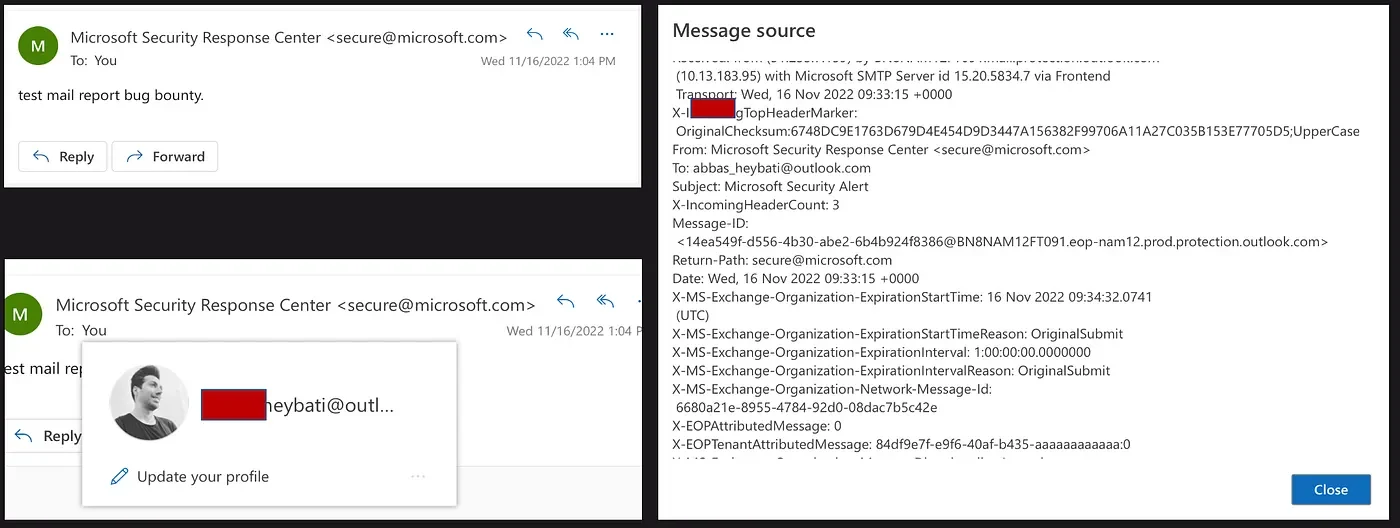
The screenshot shows a message the researcher sent to himself with [redacted] as the sender. He reported the issue to Microsoft's security team and the bug was fixed.

Report bug to msrc.microsoft.com
Setup
No accounts, roles or specific product versions are described. The work was done from a machine able to open a TCP connection to port 25 of the target mail server, using telnet. The researcher's own mailbox was used as the recipient for the test messages.
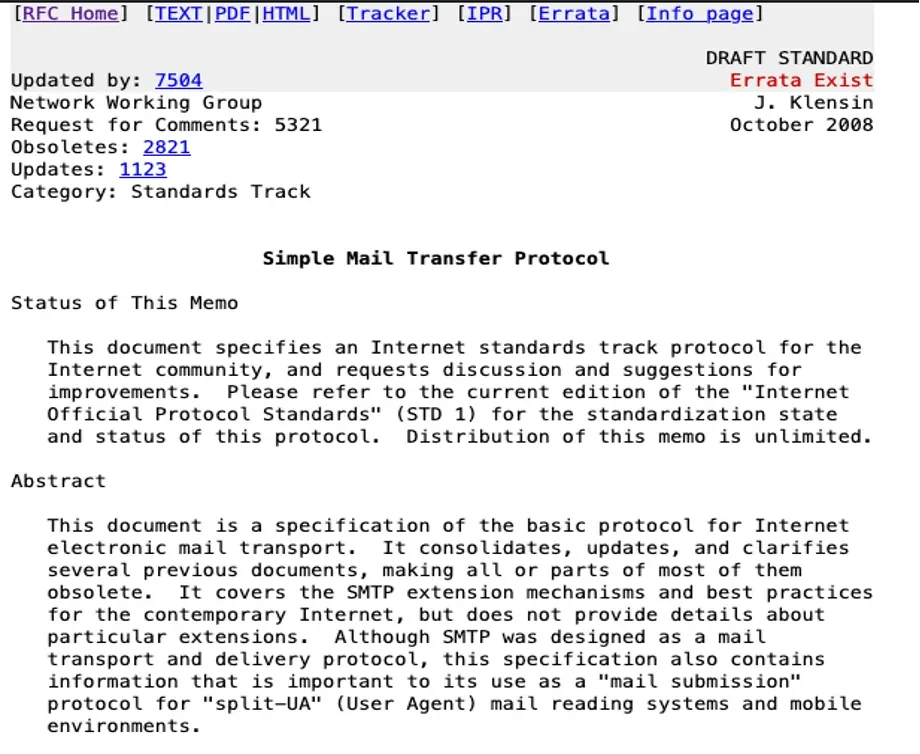
The preparation was reading rather than tooling. He started with RFC 5321 to understand the SMTP architecture, then traced what happens when an email is sent, and then went back over DKIM and SPF as the security mechanisms that are supposed to constrain who may send as whom.
Finding it
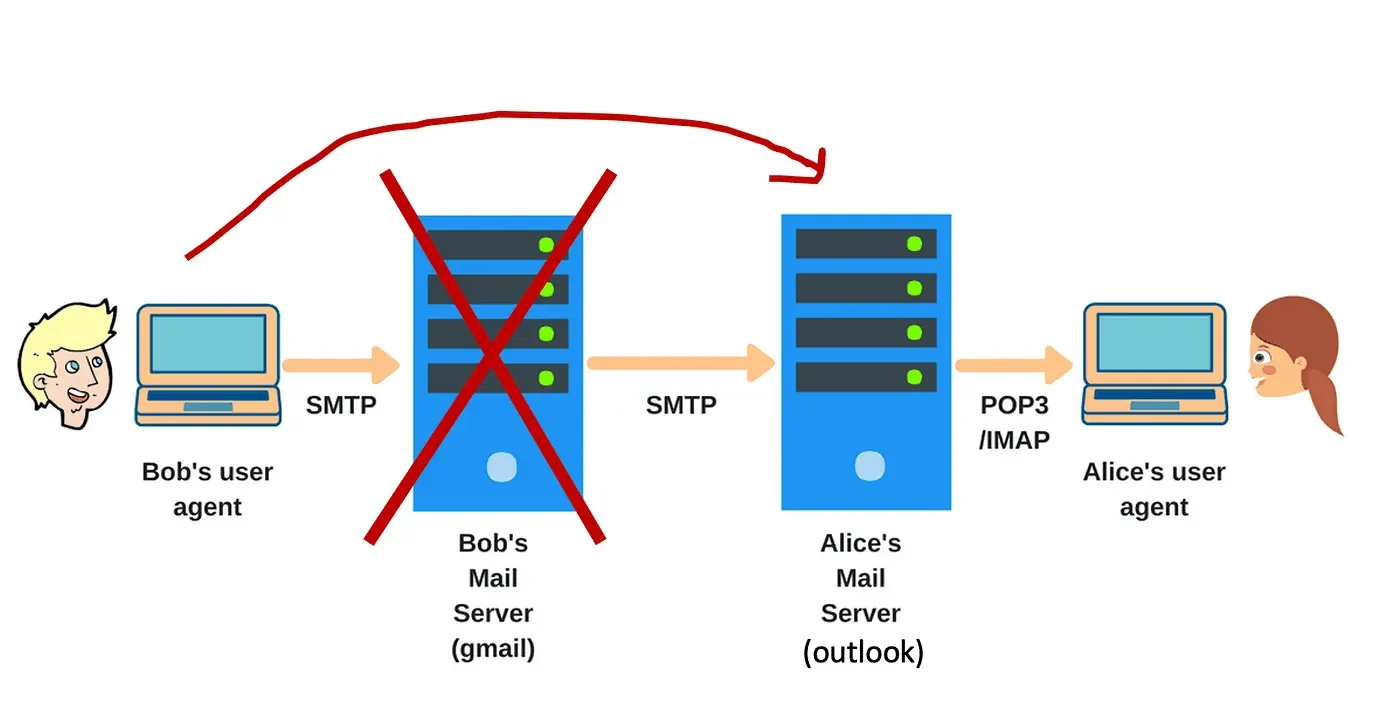
The question that drove the work was simple: what happens if you connect directly to the Outlook server and try to send mail through it, instead of going through a normal mail client or another provider? That is the point where the bug started.
The bug started
Finding the server was not complicated. Finding the server was not complicated; the write-up does not say how he located it.
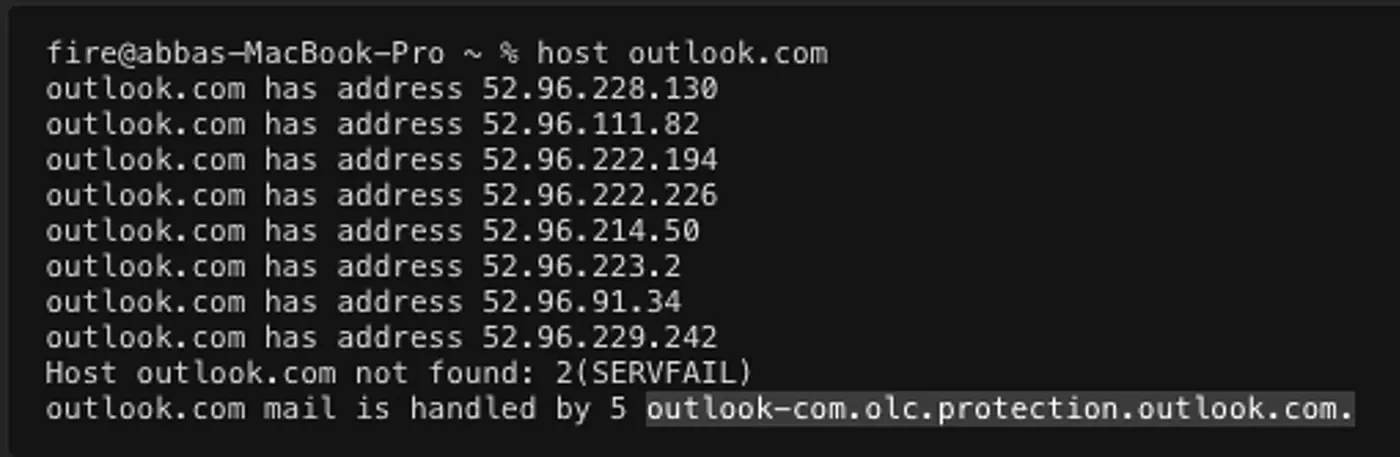
Mail is handled by outlook-com.olc.protection.outlook.com
With the address of the mail server in hand, he connected to it with telnet on port 25.

Telnet port 25
Exploitation
Step 1: connect and greet the server
SMTP commands are standard and easy to look up. The session opens with EHLO, and the server answers.
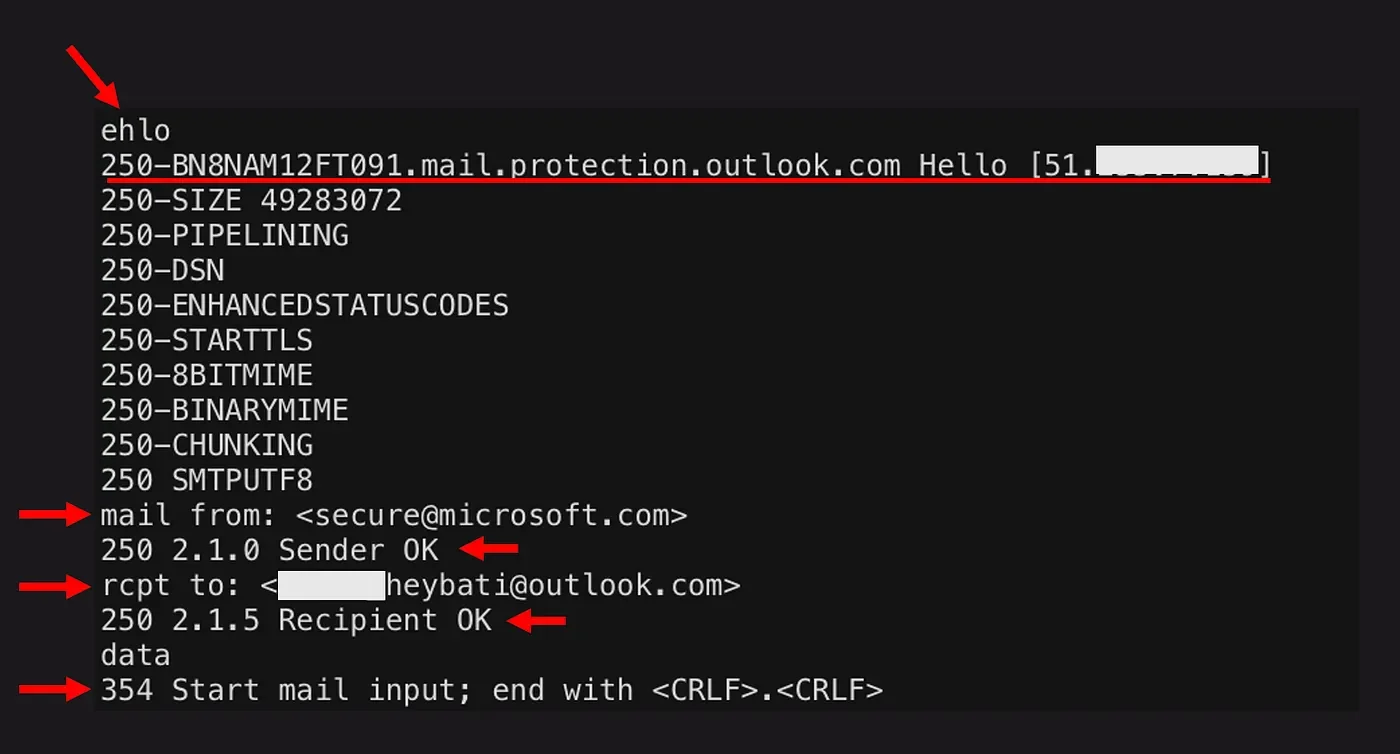
Step 2: declare the sender with MAIL FROM
He told the server who the message should come from, choosing [redacted], and the server replied with status 250 OK.
Step 3: declare the recipient with RCPT TO
He gave his own address as the recipient, and again the reply was 250 OK.
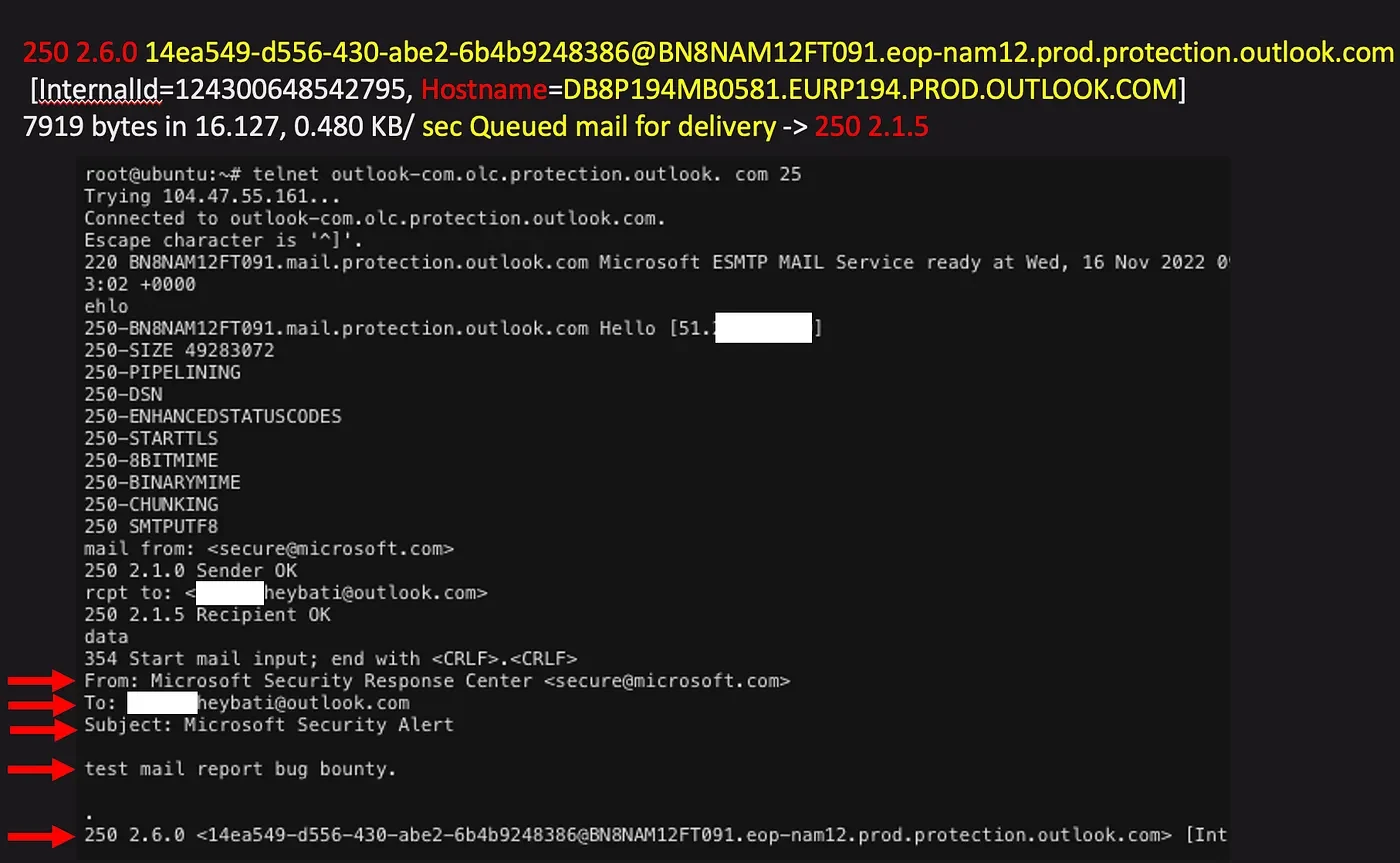
A tip from the write-up: to understand how the server is behaving, read up on the SMTP status codes.
Step 4: send the message body with DATA
After the envelope sender and recipient were accepted, he issued DATA to say he wanted to send the message text. He then supplied the message headers (From, To, Subject), a body, and ended the data with a dot. The message was delivered to his own mailbox with [redacted] as the sender.
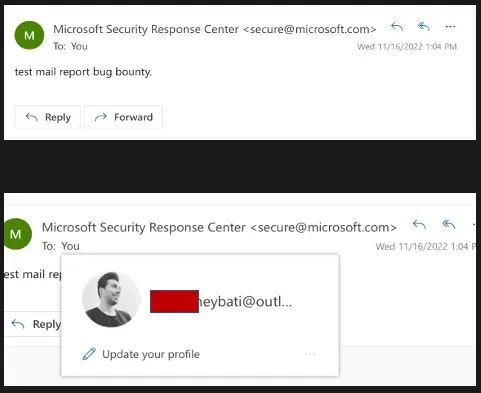
successfully send
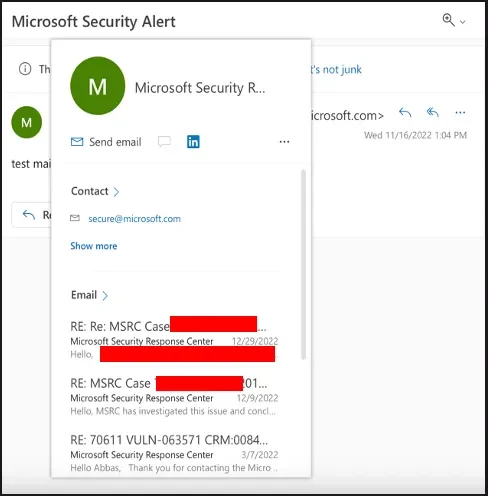
History email
The exact command lines and server replies are not reproduced in the write-up; the screenshots are the record of the session.
A second scenario: bypassing SPF with a charset header
The researcher also describes a separate case against another company where he bypassed SPF using a technique. Here the server initially refused to send the email. He defined a Content-Type in the header and set a charset with the value ISO-8859-1. He tested the charset section with different patterns until ISO-8859-1 worked and the filter was bypassed.
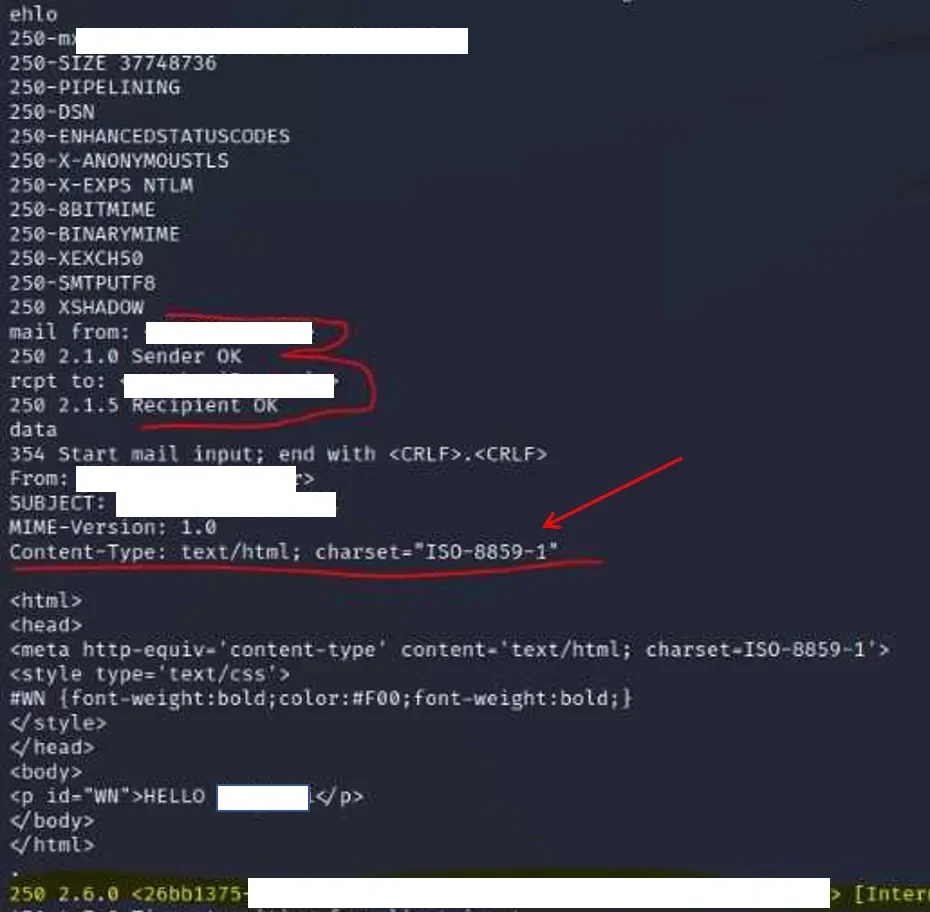
The write-up does not give the exact header line, the server's rejection message, or the name of the company.
Root cause
The report does not analyse the server-side cause. What it shows is that the Outlook mail server accepted a MAIL FROM for a Microsoft address from a direct SMTP connection and delivered the message, without any check that the connecting party was entitled to use that sender. In the second scenario the researcher says he bypassed SPF by setting a charset of ISO-8859-1 in a Content-Type header.
Impact
The researcher was able to send a message into his own Outlook mailbox with [redacted] as the sender.
The condition matters: the behaviour was only reproducible from Outlook's own mail infrastructure and not from an outside provider such as Gmail to Outlook. The report gives no bounty, severity or CVSS information.
Fix
Microsoft security experts were notified and fixed the bug.
Variants to test
- Direct SMTP to other providers' MX hosts. Connect to port 25 of a provider's inbound mail server and try
MAIL FROMwith an address in a domain that provider owns. A positive result is a250onMAIL FROMfollowed by delivery of the message with the spoofed sender visible to the recipient. - Same-domain sender from an external network. Repeat the test from a host outside the provider's own infrastructure. If the message is still accepted and delivered, the trust boundary is weaker than the Outlook case described here.
- Charset variations in
Content-Type. Where a server rejects a message, try different charset values in theContent-Typeheader, as the researcher did untilISO-8859-1was accepted. A positive result is the message passing the filter and being delivered. - Envelope versus header mismatch. Set
MAIL FROMto one address and theFromheader to another, and see which one the receiving side displays and which one SPF or DKIM is evaluated against. A positive result is a delivered message showing the header sender while authentication passed on the envelope. - Status code reading. Watch the reply to each command (
EHLO,MAIL FROM,RCPT TO,DATA) rather than only the final delivery. A positive sign is a server that returns success at each stage for a sender it should not authorise.
What happened, in plain words
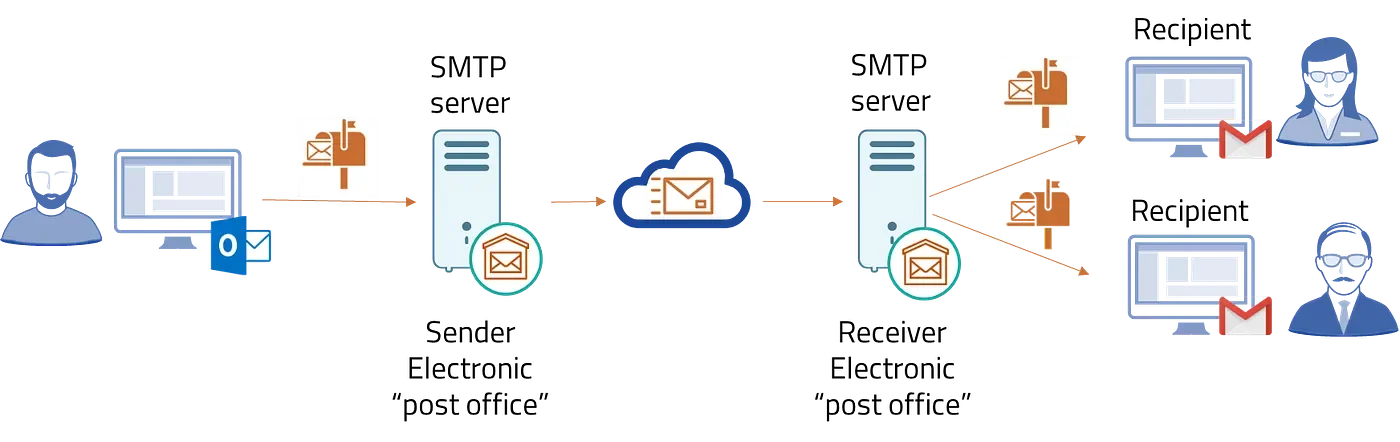
Email is one of those things everyone uses but few people look inside. When you send a message, your mail app hands it to a mail server, and that server passes it along until it lands in the recipient's inbox. The rules for that handover are old and written down in public documents, which means anyone can read them and try them out.
The researcher in this write-up spent time reading those rules and then tried something simple: instead of using a normal mail app, he connected straight to Microsoft's Outlook mail server and asked it to send a message. He told the server the message came from [redacted], an address that belongs to Microsoft, and the server accepted it and delivered the message to his own Outlook mailbox.
That is the bug: the Outlook mail server let him choose any Microsoft sender address he liked, including [redacted] or [redacted], and delivered the message as if it really came from there. In security terms this is a mix of an open mail relay (a server that forwards mail for people it should not), email spoofing (pretending to be someone else in the From field) and a failure of the checks that are supposed to stop spoofing, namely SPF and DKIM.
There is an important limit, and the researcher states it clearly: this only worked from Outlook's own mail infrastructure. He could not do the same thing from an unrelated provider such as Gmail sending to Outlook. So the weakness was in Microsoft's own mail servers, not in email in general.
The screenshot shows the message he sent to himself with [redacted] as the sender. He reported it to Microsoft's security team, and they fixed it.
Report bug to msrc.microsoft.com
The background you need before the steps make sense
Before walking through what he did, it helps to know a handful of ideas. None of them require any special software; they are just names for things that happen every time an email moves.
What a mail server is
A mail server is a computer whose job is to accept email and pass it on. Think of it like a post office: you drop a letter in, the post office reads the address on the envelope, and it routes the letter towards the destination. Your mail app (Outlook, Gmail, Apple Mail) is just the counter where you hand the letter over. The real routing happens on servers you never see.
What SMTP is
SMTP stands for Simple Mail Transfer Protocol. It is the language that mail servers speak to each other when handing over a message. It is a text-based language: the sending side types short commands, and the receiving side types short replies. Because it is just text, you can type it yourself by hand, which is exactly what the researcher did.
What a port is
A computer can run many services at once, and each one listens on a numbered channel called a port. Port 25 is the traditional channel for SMTP. When you connect to a mail server on port 25, you are knocking on the door that is reserved for mail transfer.
What telnet is
telnet is a very old program that opens a raw connection to a port and lets you type text into it. It does not format anything or hide anything; whatever you type goes straight to the server, and whatever the server sends comes straight back. It is the simplest possible way to talk to a text-based service by hand.
What an MX record is
Every domain (like outlook.com) has records in a public directory called DNS. One of those records, the MX record, says which server handles mail for that domain. It is like looking up a company in the phone book to find the address of its mailroom. Anyone can look this up; it is not secret.
What SPF and DKIM are
These are two of the defences that are supposed to stop people sending email as someone else.
- SPF (Sender Policy Framework) is a public list, published in DNS, of which servers are allowed to send mail for a domain. When a message arrives, the receiving server can check whether the server that sent it is on that list. If it is not, the message may be rejected or marked as suspicious.
- DKIM (DomainKeys Identified Mail) is a cryptographic signature added to a message by the sending server. The receiving server can check the signature against a public key published in DNS. If the signature is valid, the message really did pass through a server that holds the private key for that domain.
Both of these are meant to make it hard to send mail pretending to be [redacted]. The researcher read up on both before testing, because he wanted to understand what was supposed to stop him.
What RFC 5321 is
An RFC (Request for Comments) is a public document that describes how part of the internet works. RFC 5321 is the one that describes SMTP in detail: the commands, the replies, the order they come in. It is long and dry, but it is the authoritative description of the language the researcher was about to speak.
What status codes are
Every SMTP reply starts with a three-digit number. The first digit tells you the general meaning: 2xx means success, 4xx means a temporary problem, 5xx means a permanent refusal. So 250 OK means "I accepted that". Reading these numbers is how you know whether the server is going along with what you asked or pushing back.
How he prepared
No accounts, roles or specific product versions are described in the write-up. The work was done from a machine able to open a connection to port 25 of the target mail server, using telnet. His own mailbox was the recipient for the test messages, which is a sensible way to test: you are not bothering anyone else.
The preparation was reading, not tooling. He started with RFC 5321 to understand the SMTP architecture, then traced what happens when an email is sent, and then went back over DKIM and SPF as the security mechanisms that are supposed to constrain who may send as whom.
How he found it
The question that drove the work was simple: what happens if you connect directly to the Outlook server and try to send mail through it, instead of going through a normal mail client or another provider? That is the point where the bug started.
The bug started
Finding the server was not complicated. Finding the server was not complicated; the write-up does not say how he located it.
Mail is handled by outlook-com.olc.protection.outlook.com
With the address of the mail server in hand, he connected to it with telnet on port 25.
Telnet port 25
The steps, one at a time
Step 1: connect and greet the server
SMTP commands are standard and easy to look up. The session opens with EHLO, and the server answers. EHLO is the polite hello: it tells the server who is connecting and asks what features it supports. The server's reply is its way of saying "hello back, here is what I can do".
Step 2: declare the sender with MAIL FROM
He told the server who the message should come from, choosing [redacted], and the server replied with status 250 OK. This is the envelope sender, the address written on the outside of the envelope. It is separate from the From line you see in your inbox, which is why the two can disagree.
The server replied 250 OK to the sender he chose.
Step 3: declare the recipient with RCPT TO
He gave his own address as the recipient, and again the reply was 250 OK. RCPT TO is the "to" on the envelope: where the message should be delivered. Using his own address meant he could see the result in his own inbox.
A tip from the write-up: to understand how the server is behaving, read up on the SMTP status codes. Watching the number after each command tells you whether the server is cooperating at each stage, rather than only at the end.
Step 4: send the message body with DATA
After the envelope sender and recipient were accepted, he issued DATA to say he wanted to send the message text. He then supplied the message headers (From, To, Subject), a body, and ended the data with a dot. The message was delivered to his own mailbox with [redacted] as the sender.
The dot on its own line is how SMTP knows the message is finished; it is the equivalent of saying "over and out". The headers are the visible part of the message: who it appears to be from, who it appears to be to, and what the subject line says.
successfully send
History email
The exact command lines and server replies are not reproduced in the write-up; the screenshots are the record of the session.
A second scenario: bypassing SPF with a charset header
The researcher also describes a separate case against another company where he bypassed SPF using a technique. Here the server initially refused to send the email. He defined a Content-Type in the header and set a charset with the value ISO-8859-1. He tested the charset section with different patterns until ISO-8859-1 worked and the filter was bypassed.
To unpack that: Content-Type is a header that tells the receiving side what kind of content the message contains, and charset says which character encoding it uses. ISO-8859-1 is an old encoding for Western European text. The researcher says he tested different charset values until ISO-8859-1 bypassed SPF. The write-up does not give the exact header line, the server's rejection message, or the name of the company.
Why it worked
The report does not analyse the server-side cause. What it shows is that the Outlook mail server accepted a MAIL FROM for a Microsoft address from a direct SMTP connection and delivered the message, without any check that the connecting party was entitled to use that sender. In the second scenario the researcher says he bypassed SPF by setting a charset of ISO-8859-1 in a Content-Type header.
What someone could do with it
The researcher was able to send a message into his own Outlook mailbox with [redacted] as the sender.
Phishing is the everyday version of this: a message that looks like it comes from a company you trust, asking you to click a link or hand over information. The whole trick depends on the sender looking believable, which is exactly what this bug provided.
The condition matters: the behaviour was only reproducible from Outlook's own mail infrastructure and not from an outside provider such as Gmail to Outlook. The report gives no bounty, severity or CVSS information.
How it was fixed
Microsoft security experts were notified and fixed the bug.
Things worth trying if you want to explore this area
These are variations on the same idea, useful for learning. They are described here as directions to investigate, not as instructions to attack anyone.
- Direct SMTP to other providers' MX hosts. Connect to port 25 of a provider's inbound mail server and try
MAIL FROMwith an address in a domain that provider owns. A positive result is a250onMAIL FROMfollowed by delivery of the message with the spoofed sender visible to the recipient. - Same-domain sender from an external network. Repeat the test from a host outside the provider's own infrastructure. If the message is still accepted and delivered, the trust boundary is weaker than the Outlook case described here.
- Charset variations in
Content-Type. Where a server rejects a message, try different charset values in theContent-Typeheader, as the researcher did untilISO-8859-1was accepted. A positive result is the message passing the filter and being delivered. - Envelope versus header mismatch. Set
MAIL FROMto one address and theFromheader to another, and see which one the receiving side displays and which one SPF or DKIM is evaluated against. A positive result is a delivered message showing the header sender while authentication passed on the envelope. - Status code reading. Watch the reply to each command (
EHLO,MAIL FROM,RCPT TO,DATA) rather than only the final delivery. A positive sign is a server that returns success at each stage for a sender it should not authorise.
Glossary
- SMTP: Simple Mail Transfer Protocol, the text-based language mail servers use to hand messages to each other.
- Mail server: a computer that accepts, routes and delivers email on behalf of users and domains.
- Port: a numbered channel on a computer that a particular service listens on; port 25 is the traditional SMTP port.
- telnet: a simple program that opens a raw text connection to a port so you can type commands by hand.
- MX record: a DNS record that says which server handles mail for a domain.
- DNS: the public directory that maps domain names to addresses and other records.
- RFC 5321: the public document that describes how SMTP works in detail.
- EHLO: the SMTP command that opens a session and asks the server what it supports.
- MAIL FROM: the SMTP command that declares the envelope sender of a message.
- RCPT TO: the SMTP command that declares the envelope recipient of a message.
- DATA: the SMTP command that begins the message content; a lone dot on its own line ends it.
- Envelope sender: the address used during the SMTP conversation, separate from the From line shown in the inbox.
- Header: the visible metadata of a message, such as From, To, Subject and Content-Type.
- Status code: the three-digit number at the start of every SMTP reply;
2xxmeans success,4xxa temporary problem,5xxa permanent refusal. - SPF: Sender Policy Framework, a DNS-published list of servers allowed to send mail for a domain.
- DKIM: DomainKeys Identified Mail, a cryptographic signature that lets a receiver check a message really passed through an authorised server for the domain.
- Open mail relay: a mail server that forwards mail for parties it should not authorise.
- Email spoofing: making a message appear to come from an address the sender does not control.
- Phishing: a message that impersonates a trusted party to trick the recipient into acting.
- Social engineering: manipulating people rather than systems, often using trust in a sender or brand.
- Content-Type: a message header that says what kind of content the message contains.
- charset: the part of Content-Type that says which character encoding the content uses;
ISO-8859-1is one such encoding. - CVSS: a standard scoring system for the severity of a vulnerability; the report gives no score.
- Bounty: a payment some companies make to researchers who report valid vulnerabilities; the report gives no bounty information.



