After the upload of an private file, using transformations, the file becomes public without the possibility of changing it.

- Triaged in 5 days
- Fixed in 19 days
- Paid in 32 days
- Disclosed after 5 months
Summary:
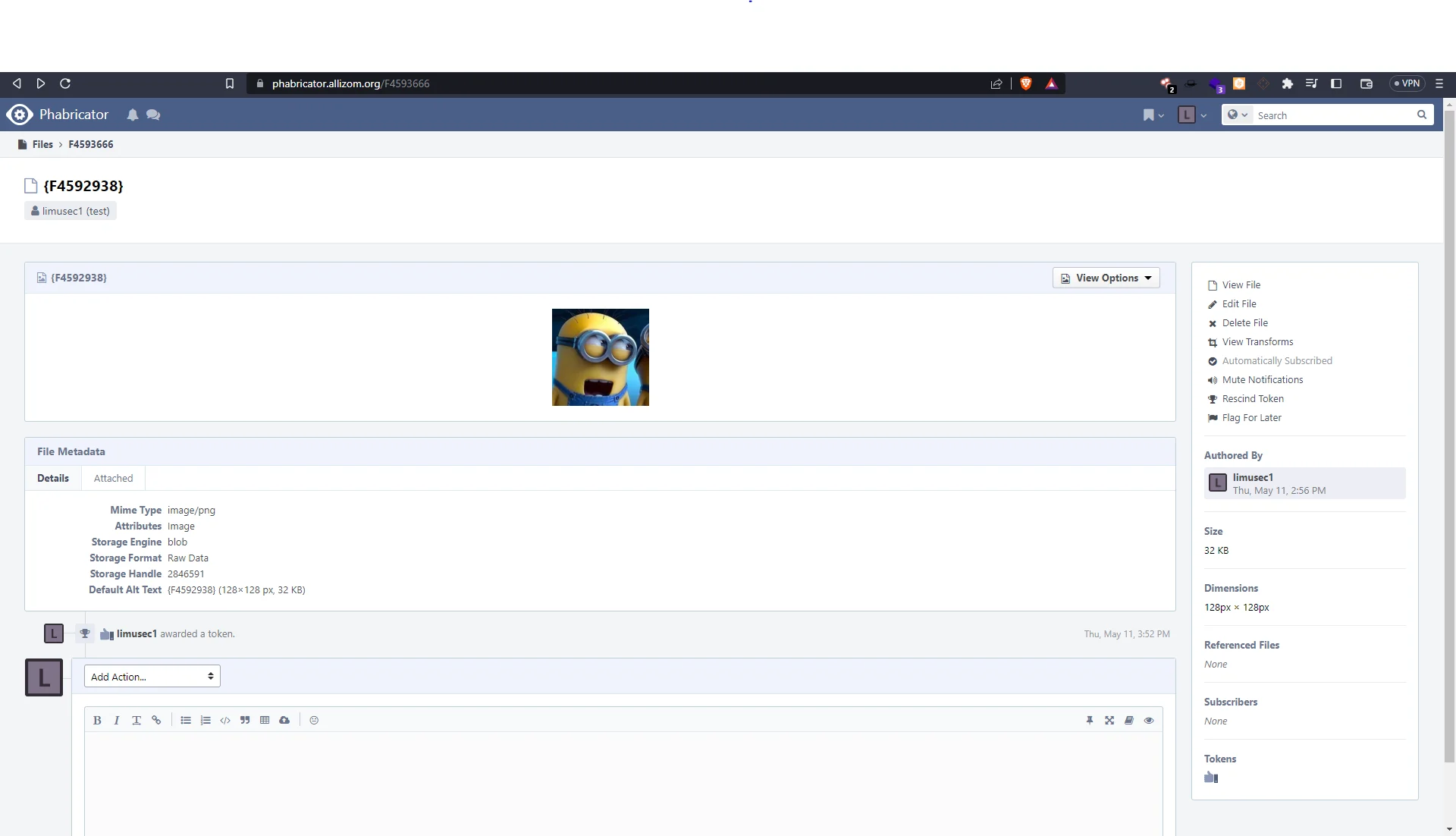
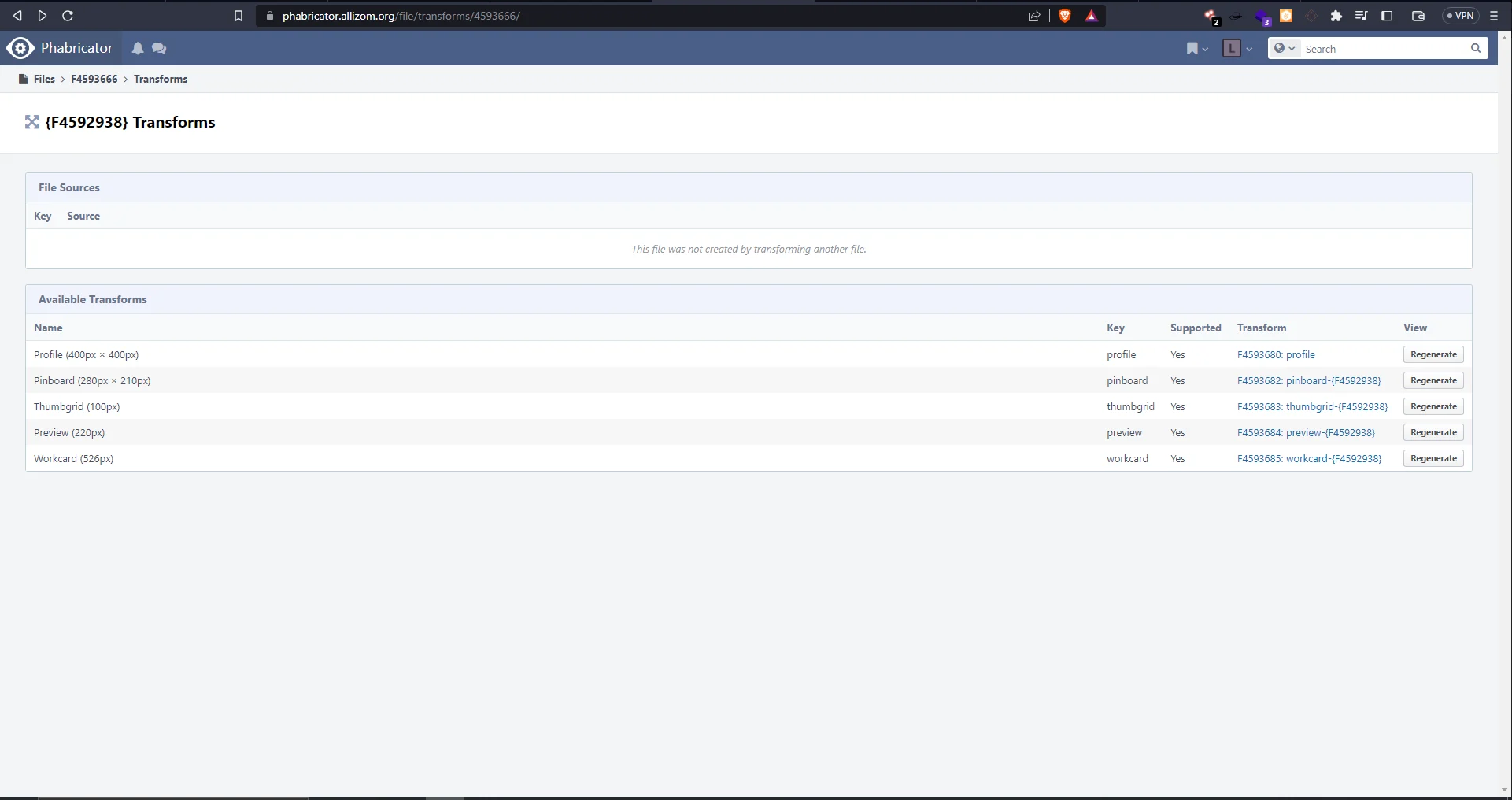
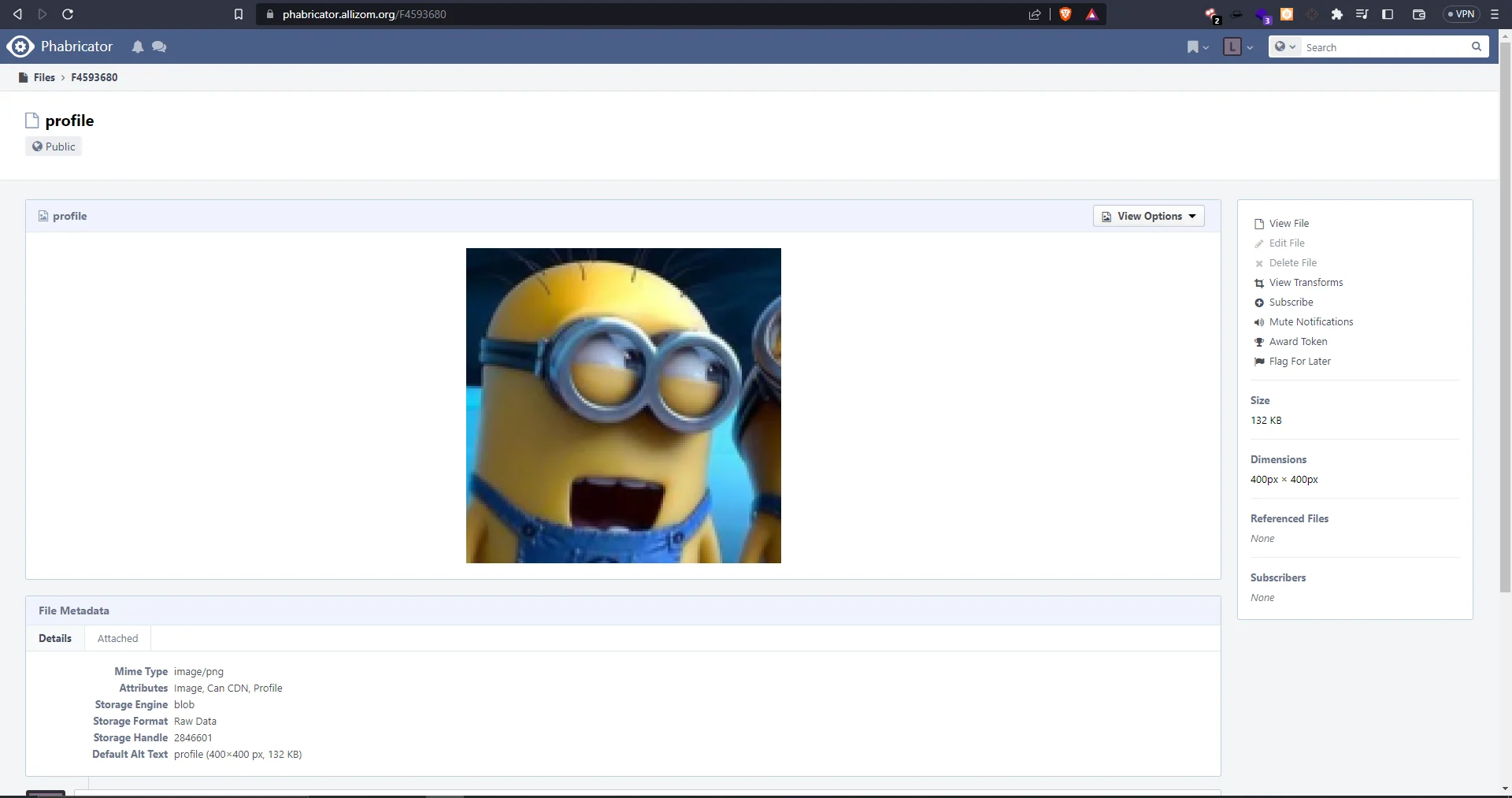
When an user uploads a private file, ex (Screenshot 1), where only he has access to. Using the "View transformations" function can generate different kinds of image transformations (Screenshot 2). But after the generation of that transformation for example clicking on the regenerate button next to profile. The function will create a cropped public image, where the user is unable to edit or modify his own generated image (Screenshot 3).
Issue: You have a picture with you smiling and your passport holding in your hand (An example would be a "know you customer purpose" selfie). You like that picture on how you look, so you upload it on phabricator, privately, assuming nobody can view it. You click on view transformations, to modify and crop that picture, to get rid of the sensitive data passport you are holding in your hand, so only the face remains. After you clicked on the regenerate next to profile, you realize the crop doesn't work as intended and your passport data is still in there. So you want to modify/delete that picture but you cant. And what's worse that picture visible to anyone and you don't have access to remove it nor to modify it.
Steps To Reproduce:
[add details for how we can reproduce the issue]
1.Upload a private picture here: https://phabricator.allizom.org/file/upload/ 2.Change the visibility to no one or just you. 3. After the upload, click on "View Transformations" on the right. 4. There you can create different transformations when you click on regenerate. 5. After that you, you get a new preview to your generated picture. 6. Now go back, to the transforms page, and you get a new link on phabricator, that is public, and can't be changed.
I've added a video that showcases this behavior.
Supporting Material/References:
[list any additional material (e.g. screenshots, logs, etc.)] I've added screenshots and a video to showcase this issue.
- [attachment / reference]
Impact
The user is assuming that he can upload private data securely. Not knowing that the transform feature will make his uploaded files public with no way to delete it, could in worst case leak PII information.
Attachments
Context
Phabricator is a suite of web-based development collaboration tools, and Mozilla runs an instance of it at phabricator.allizom.org. One of its features is file upload with per-file visibility controls: a user can upload a file and restrict who may see it, down to only themselves. Phabricator also offers image transformations, reached through a "View Transformations" action on a file, which lets the owner generate derived versions of an image, for example a cropped profile picture.
The report concerns the interaction between those two features. A file that is private at the original level can have derived images generated from it, and those derived images are served at their own URLs with their own access rules. The researcher found that a derived image produced through the transformation workflow was reachable publicly and could not be edited or removed by the user who created it.
Setup
The report does not describe any special accounts, roles, tools or versions. The only precondition is an account on phabricator.allizom.org that is able to upload files and use the transformation feature. The researcher used a browser and recorded the behaviour in screenshots and a screen recording.
Finding it
The researcher uploaded a file and set its visibility so that nobody or only the uploader could see it. The transformation feature is then used on that private file. The expectation is that anything derived from a private file inherits, or at least respects, the same restriction.
What the researcher observed is that after generating a transformation, and in particular after pressing the regenerate button next to the profile transformation, a new cropped image is produced and published at a public link. Going back to the transforms page shows that new link, and the user has no way to change it. The derived image is therefore public while the source file remains private, and the owner cannot modify or delete the derived copy.
The researcher illustrated the problem with a concrete scenario: a user uploads a photo of themselves holding their passport, for example a "know your customer" style selfie, and marks it private. They open the transformations view to crop the image so that only the face remains and the passport is removed. After regenerating the profile transformation, the crop does not work as intended and the passport data is still visible in the generated image. The user then wants to modify or delete that image but cannot, and the image is visible to anyone.
Exploitation
Step 1: upload a private picture
The researcher uploads a file at the upload endpoint:
https://phabricator.allizom.org/file/upload/
This is the standard Phabricator file upload page. The file is uploaded through the normal form; no special request is needed.
Step 2: restrict visibility
On the same upload flow, the visibility is changed to "no one" or to the uploader only. This is the control that is supposed to keep the file private, and it applies to the original file.
Step 3: open the transformations view
After the upload, the researcher clicks "View Transformations" on the right-hand side of the file page. This is the entry point to the derived-image feature.
Step 4: generate transformations
In the transformations view, different transformations can be created by clicking regenerate. The report does not list the individual transformation types beyond the profile one used later.
Step 5: inspect the generated preview
After regenerating, a new preview of the generated picture is returned. At this point the derived image exists and is shown to the user.
Step 6: return to the transforms page and observe the public link
Going back to the transforms page reveals a new link on Phabricator for the generated image. That link is public and cannot be changed. This is the core of the finding: the derived image is served without the visibility restriction that applies to the original file, and the interface offers no way for the owner to alter or remove it.
The screenshots and the recording show the sequence. The first screenshot shows the private file as uploaded:
The second shows the transformations view where derived images are generated:
The third shows the resulting generated image and its public link:
The recording walks through the whole flow:
Root cause
The report does not include code or server responses, so the exact mechanism is not stated. What the behaviour implies is that derived images are stored and served as separate objects whose access policy is not tied to the source file's visibility. The resulting object is published at a link that is public, and the owner is given no control over that object afterwards. In other words, the visibility setting is enforced on the original file but not propagated to its transformations, and the transformation objects are not exposed in a way that lets the owner edit or delete them. Whether this is a missing policy check on the derived file, a default-public storage location, or a caching layer that bypasses the file policy is not established by the report; those are likely candidates rather than confirmed causes.
Impact
The impact is a confidentiality breach of user-uploaded data. A user who relies on the private visibility setting to protect sensitive material can have a derived version of that material published publicly without their knowledge or consent, and without any ability to retract it. The researcher's example is a selfie holding a passport, where the intent was to crop out the document; if the crop fails, the passport remains in a publicly reachable image. In the worst case this leaks PII. The severity assigned was medium, with a CVSS score of 6.5, and the weakness classified as improper access control (generic). A bounty of 1,000 USD was awarded.
Fix
The report does not describe the fix that was applied. What the behaviour calls for is that derived images inherit the visibility of their source file, that the transformation objects are subject to the same access checks as the original, and that the owner is able to delete or regenerate a transformation so that a bad crop can be corrected or withdrawn. Whether Mozilla implemented any of this is not stated in the report.
Variants to test
- Upload a file with visibility restricted to the uploader, generate each available transformation type, and request the resulting URLs while logged out. A positive result is any derived image that loads without authentication.
- Repeat with visibility set to a specific user or project, then request the derived URL as an unrelated account. A positive result is a derived image visible to someone outside the intended audience.
- Check whether the derived URL changes when the source file's visibility is tightened after the transformation was generated. A positive result is a derived image that stays public after the source is restricted.
- Try deleting the source file and then requesting the derived URL. A positive result is a derived image that remains reachable after the original is gone.
- Look for other features that generate secondary objects from private content, such as thumbnails, previews, exports or rendered documents, and test whether those objects carry the same policy as the source.
Hunting notes
This kind of bug tends to hide wherever an application derives a second object from a protected one: image transformations, thumbnails, document previews, exports and cached renderings. The signal during recon is a feature that produces a new URL or identifier separate from the original resource. If that new identifier can be fetched without the session that owns the source, the policy is probably not being applied to the derived object.
The researcher made the impact concrete with a user story about a private selfie containing a passport that the user tried to crop. That combination, a confidentiality leak plus loss of control over the leaked object, is what turns a policy gap into an accepted report. The report was disclosed on 20 October 2023.
What happened, in plain words
Phabricator is a collection of tools that teams use to work together on software, all inside a web browser. Mozilla runs one copy of it at phabricator.allizom.org. One thing you can do there is upload files, and each file has a visibility setting: you can decide who is allowed to see it, down to only yourself. Phabricator also has a feature called image transformations, which you reach with a button labelled "View Transformations". That feature makes new versions of an image, for example a cropped version to use as a profile picture.
This report is about what happens when those two features meet. A file that is private can have new images generated from it. Those new images are stored and served at their own web addresses, with their own rules about who may see them. The researcher found that a generated image could be opened by anyone, and that the person who created it could not edit or delete it.
A useful everyday comparison: think of a private drawer in your desk, and a photocopier that makes a copy of whatever you put in it. You expect the copy to stay as private as the drawer. Here the copy ended up on a public noticeboard, and you had no way to take it down.
The setup
The report does not mention any special accounts, roles, tools or software versions. The only thing you need is an account on phabricator.allizom.org that can upload files and use the transformation feature. The researcher used an ordinary browser and recorded what happened in screenshots and a screen recording.
Finding it
The researcher uploaded a file and set its visibility so that nobody or only the uploader could see it. Then they used the transformation feature on that private file. The reasonable expectation is that anything made from a private file inherits, or at least respects, the same restriction.
What actually happened: after generating a transformation, and in particular after pressing the regenerate button next to the profile transformation, a new cropped image was produced and published at a public link. Going back to the transforms page showed that new link, and the user had no way to change it. So the generated image was public while the source file stayed private, and the owner could not modify or delete the generated copy.
The researcher made the problem concrete with a story. A user uploads a photo of themselves holding their passport, for example a "know your customer" style selfie, and marks it private. They open the transformations view to crop the image so that only the face remains and the passport is removed. After regenerating the profile transformation, the crop does not work as intended and the passport data is still visible in the generated image. The user then wants to modify or delete that image but cannot, and the image is visible to anyone.
Walking through the steps
Step 1: upload a private picture
The researcher uploads a file at the upload page:
https://phabricator.allizom.org/file/upload/
This is just the normal Phabricator page for uploading a file. The file goes up through the ordinary form on that page; no special request is needed. The researcher started here because the whole issue depends on a file existing in the first place, and on that file being private.
Step 2: restrict visibility
On the same upload flow, the visibility is changed to "no one" or to the uploader only. This is the control that is supposed to keep the file private, and it applies to the original file. The researcher set it deliberately, because the bug only matters if the user has asked for privacy and the system fails to honour that request.
Step 3: open the transformations view
After the upload, the researcher clicks "View Transformations" on the right-hand side of the file page. This is the entrance to the feature that makes derived images. The researcher went here because this is where new versions of the private file get created.
Step 4: generate transformations
In the transformations view, different transformations can be created by clicking regenerate. The report does not list the individual transformation types beyond the profile one used later. The point of this step is to make the system produce a derived image from the private source.
Step 5: inspect the generated preview
After regenerating, a new preview of the generated picture is returned. At this point the derived image exists and is shown to the user. The researcher looked at the preview to confirm that a new image had really been created.
Step 6: return to the transforms page and observe the public link
Going back to the transforms page reveals a new link on Phabricator for the generated image. That link is public and cannot be changed. This is the heart of the finding: the derived image is served without the visibility restriction that applies to the original file, and the interface offers no way for the owner to alter or remove it.
The screenshots and the recording show the sequence. The first screenshot shows the private file as uploaded:
The second shows the transformations view where derived images are generated:
The third shows the resulting generated image and its public link:
The recording walks through the whole flow:
Why it happens
The report does not include code or server responses, so the exact mechanism is not stated. What the behaviour implies is that derived images are stored and served as separate objects whose access policy is not tied to the source file's visibility. The resulting object is published at a web address that is public, and the owner is given no control over that object afterwards.
In other words, the visibility setting is enforced on the original file but not carried over to its transformations, and the transformation objects are not exposed in a way that lets the owner edit or delete them. Whether this is a missing permission check on the derived file, a default-public storage location, or a caching layer that skips the file policy is not established by the report; those are likely candidates rather than confirmed causes.
What it means for users
The impact is a leak of data that users uploaded. Someone who relies on the private visibility setting to protect sensitive material can have a derived version of that material published publicly without their knowledge or consent, and without any ability to take it back. The researcher's example is a selfie holding a passport, where the intent was to crop out the document; if the crop fails, the passport remains in a publicly reachable image. In the worst case this leaks PII, meaning personal information that can identify a person.
The severity assigned was medium, with a CVSS score of 6.5, and the weakness classified as improper access control (generic). A bounty of 1,000 USD was awarded.
The fix
The report does not describe the fix that was applied. What the behaviour calls for is that derived images inherit the visibility of their source file, that the transformation objects are subject to the same access checks as the original, and that the owner is able to delete or regenerate a transformation so that a bad crop can be corrected or withdrawn. Whether Mozilla implemented any of this is not stated in the report.
Other cases worth testing
- Upload a file with visibility restricted to the uploader, generate each available transformation type, and request the resulting web addresses while logged out. A positive result is any derived image that loads without logging in.
- Repeat with visibility set to a specific user or project, then request the derived address as an unrelated account. A positive result is a derived image visible to someone outside the intended audience.
- Check whether the derived address changes when the source file's visibility is tightened after the transformation was generated. A positive result is a derived image that stays public after the source is restricted.
- Try deleting the source file and then requesting the derived address. A positive result is a derived image that remains reachable after the original is gone.
- Look for other features that generate secondary objects from private content, such as thumbnails, previews, exports or rendered documents, and test whether those objects carry the same policy as the source.
Notes for anyone hunting similar bugs
This kind of bug tends to hide wherever an application makes a second object from a protected one: image transformations, thumbnails, document previews, exports and cached renderings. The signal during recon, meaning the early exploration of a target, is a feature that produces a new web address or identifier separate from the original resource. If that new identifier can be fetched without the session that owns the source, the policy is probably not being applied to the derived object.
The researcher made the impact concrete with a user story about a private selfie containing a passport that the user tried to crop. That combination, a confidentiality leak plus loss of control over the leaked object, is what turns a policy gap into an accepted report. The report was disclosed on 20 October 2023.
Glossary
- Phabricator: a suite of web-based tools for software teams, including file uploads and code review.
- Instance: one running copy of a piece of software, here Mozilla's own installation of Phabricator.
- Visibility setting: a per-file option that decides who is allowed to see the file.
- Image transformation: a new image generated from an existing one, for example a cropped version.
- Derived image: any image produced from another image, such as a transformation or thumbnail.
- Endpoint: a specific web address that a browser or program sends a request to.
- URL: the address of a page or file on the web.
- Access control: the rules that decide who may see or change something.
- Improper access control: a weakness where those rules are missing or wrong, so someone can reach something they should not.
- Confidentiality breach: a situation where information meant to stay private becomes visible to others.
- PII: personal information that can identify a specific person, such as a passport photo.
- CVSS score: a standard number from 0 to 10 that rates how serious a security issue is.
- Severity: a label such as low, medium or high that summarises how serious an issue is.
- Bounty: money paid to a researcher for reporting a valid security issue.
- Session: the period during which a website remembers that you are logged in.
- Recon: the early exploration of a target to find features worth testing.
- Cache: a store of copies kept to serve content faster, which can sometimes skip normal checks.

