DeepSurface Security Advisory: LPE in Firefox on Windows
When Firefox is installed to a non-default directory on Windows, the installation folder inherits permissions that let any local user write files there. An attacker with an account on the same machine could place a malicious DLL that Firefox loads, taking over the victim's account.
 Published on deepsurface.com
Firefox is vulnerable to local privilege escalation (LPE) attacks under certain conditions on Windows platforms. This would allow an attacker to perform a local privilege escalation attack against Firefox users using the same Windows system.
The full write-up lives on its author's site
It belongs to its author, so we link to it rather than copy it. The other two tabs are our own rewrites, checked against it.
Context
Firefox is a popular open source web browser developed by the Mozilla Foundation. On Windows, the installer lets the user pick a custom installation directory instead of the default location. That choice is the whole subject of this advisory: when Firefox is installed somewhere other than the default, the permissions on the installation directory can allow any other user on the same Windows system to take control of the accounts of users who run Firefox from it.
The mechanism is DLL hijacking, also called DLL sideloading. The advisory points to a previous DeepSurface blog post on Windows service permissions and DLL sideloading for background on the vulnerability class, and to earlier advisories from the same team: CVE-2021-29221 (Erlang on Windows), CVE-2021-26556 (Octopus Deploy on Windows) and CVE-2021-35982 (Adobe Reader).
The finding came out of security research and product support work in which the team found numerous products in enterprise environments installed with insecure filesystem permissions. Firefox was one of them, and the team investigated the cause.
Setup
- Download the latest Firefox for Windows, 64-bit English, from the Mozilla download page. At the time of initial discovery this was version 89.0.
- Run a custom installation and set the installation directory to
C:\firefox. The directory can be created through the installer GUI. - Leave every other installer option at its default.
- Create a new unprivileged local user account to act as the attacker.
- Keep a second account, the "victim", which runs Firefox.
No special tooling is needed on the attacker side beyond the ability to write a file into the installation directory. The payload used in the demonstration is a dbghelp.dll prepared by the researchers; the advisory refers to a tooling directory for how that file was generated.
Finding it
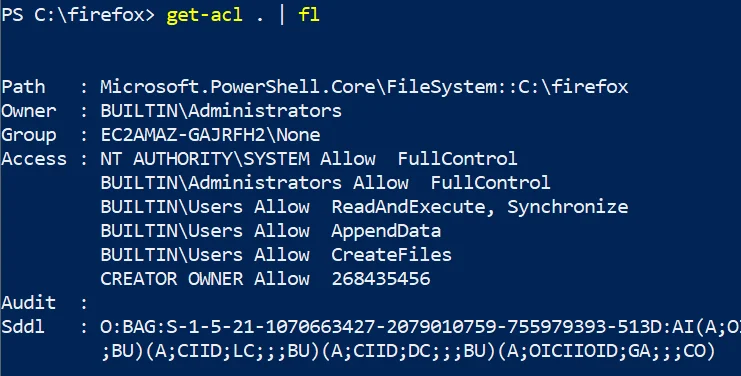
After installing to C:\firefox, the researchers inspected the permissions on the installation directory. The directory grants BUILTIN\Users Allow *, and those permissions are inherited from the drive root. In practice this means any local user can create new files in the installation directory.
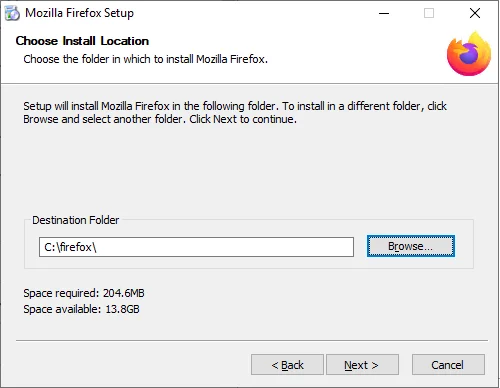
The screenshot above shows the installer step where the custom installation directory is chosen. The permissions view below shows the inherited entry on the installation directory.
The researchers placed a dbghelp.dll in the writable installation directory, and it was executed when the victim started Firefox.
Exploitation
Step 1: create the attacker account
Create a new unprivileged user account on the Windows system. This account needs nothing more than the ordinary ability to write files, which the inherited permissions on C:\firefox already grant.
Step 2: plant the DLL
As the unprivileged user, download the provided dbghelp.dll and move it into the C:\firefox directory.
The researchers placed the prepared dbghelp.dll in the installation directory, and it was executed when the victim started Firefox.
Step 3: wait for the victim to start Firefox
As the "victim" user, start Firefox. A number of terminal windows appear as the payload executes. With the default payload, a message is also written to the file C:\pwned.
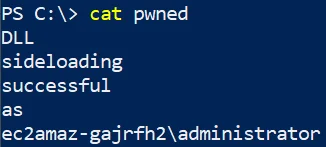
The screenshot shows the terminal windows that appear as the payload executes.
Root cause
When Firefox is installed to a location other than the default, the installation directory can inherit permissions from the drive root, which in the researchers' setup granted BUILTIN\Users Allow *. Firefox then loads libraries from that directory, so any local user who can write there can substitute a library and have it executed by another user who launches the browser.
Mozilla's position, quoted in the advisory, is that this is intended behaviour rather than a bug:
Upon further discussion, we agree with the reporters that a local privilege escalation is possible here. However, this behaviour is, to our eyes, a feature and not a bug, since it enables home users to easily share an installation. That is, if you installed into a world-writeable directory (e.g.
c:\Firefox), then you get a world-writeable (i.e. updatable by anybody) Firefox installation. That's a property that we want to preserve.Since this may not be appropriate for enterprise users, we intend to clearly document this behaviour. We intend to update SUMO and the Security Technical Implementation Guides maintained by the US Department of Defence to be clear that multi-user installations should install to
c:\Program Files(required to leverage the maintenance service) or to a directory which will not inherit world-writeable permissions. Enterprise installations to network drives likely already meet that criteria.
So the design decision is deliberate: a world-writeable installation directory yields an installation that anybody can update. Mozilla treats the behaviour as a feature for home users and intends to document it for enterprise deployments.
Impact
An attacker with a local account on the same Windows system can perform a local privilege escalation against Firefox users on that machine. The attack requires that Firefox was installed to a non-default directory whose permissions allow other local users to create files, which is what happens when the directory inherits world-writeable permissions from the drive root. Under those conditions, the attacker gains code execution in the context of any user who subsequently starts Firefox from that installation. The advisory does not assign a severity score or state a bounty.
Fix
Mozilla chose not to correct the vulnerability. Instead it intends to document the behaviour in SUMO and in the Security Technical Implementation Guides maintained by the US Department of Defence, making clear that multi-user installations should install to c:\Program Files, which is required to leverage the maintenance service, or to a directory that will not inherit world-writeable permissions. Enterprise installations to network drives likely already meet that criterion.
DeepSurface recommends that all Firefox users do one or more of the following:
- Avoid installing Firefox in a directory other than standard paths such as
C:\Program Files, since Mozilla does not guarantee the security of these installations. - Audit existing Firefox installations to ensure the installation paths do not allow all users to modify the installation binaries or the folders containing them.
Variants to test
- Other Windows applications installed to a custom directory. Install a product to a path such as
C:\appand inspect the ACL on the directory. A positive result is an inheritedBUILTIN\Users Allow *entry that lets a low-privileged account create files next to the binaries. - DLL search order in the installation directory. As an unprivileged user, place a candidate DLL in the installation directory and start the application as another user. A positive result is the payload running in the victim's context, for example a terminal window appearing or a marker file being written.
- Drive-root inheritance. Check whether the installation directory's permissions are inherited from the drive root rather than set explicitly. A positive result is a directory whose ACL matches the root and grants write access to ordinary users.
- Shared or network installation locations. For enterprise deployments, check whether the install path is writable by all users. A positive result is a path where a standard user account can modify the binaries or the folders containing them.
- Existing installations after upgrades. Audit existing installations that were created with a custom path. A positive result is an old custom path that still carries world-writeable permissions.
What happened, in plain words
Firefox is a web browser made by the Mozilla Foundation. When you install Firefox on Windows, the installer normally puts it in a standard folder. But the installer also lets you choose a different folder, and that choice is what this advisory is about.
When Firefox is installed somewhere other than the default, the folder it lives in can end up with permissions that let any other user on the same Windows computer write new files into it. The researchers placed a dbghelp.dll in that folder, and it ran when the real user next opened Firefox. So another user can drop a file with the right name into the folder, and when the real user next opens Firefox, that file runs as if it were part of the browser. The attacker's code then runs with the victim's account rights. This is called local privilege escalation, or LPE: an attacker who already has a low-powered account on the machine uses it to reach a more powerful one.
The specific trick is called DLL hijacking, or DLL sideloading. The team at DeepSurface found this while looking at products in company networks that had been installed with unsafe folder permissions. Firefox was one of them. They told Mozilla through responsible disclosure, and Mozilla decided not to change the behaviour, saying it is a feature that lets home users share an installation.
A few terms before we go further. A DLL (dynamic link library) is a file full of code that a program loads when it needs it, a bit like a shared toolbox that many programs can borrow from. Permissions (also called an ACL, access control list) are the rules that say which users may read, change or add files in a folder. Inherited permissions are rules a folder gets automatically from the folder above it, the way a child inherits a family name without choosing it. Local means on the same computer, as opposed to over the internet. Privilege escalation means going from a limited account to a more powerful one.
Context
Firefox is a popular open source web browser developed by the Mozilla Foundation. On Windows, the installer lets the user pick a custom installation directory instead of the default location. That choice is the whole subject of this advisory: when Firefox is installed somewhere other than the default, the permissions on the installation directory can allow any other user on the same Windows system to take control of the accounts of users who run Firefox from it.
The mechanism is DLL hijacking, also called DLL sideloading. The advisory points to a previous DeepSurface blog post on Windows service permissions and DLL sideloading for background on the vulnerability class, and to earlier advisories from the same team: CVE-2021-29221 (Erlang on Windows), CVE-2021-26556 (Octopus Deploy on Windows) and CVE-2021-35982 (Adobe Reader).
A CVE is a public catalogue number for a known security flaw, so people can refer to the same issue unambiguously. The finding came out of security research and product support work in which the team found numerous products in enterprise environments installed with insecure filesystem permissions. Firefox was one of them, and the team investigated the cause.
Setup
To reproduce the problem, the researchers set up a normal Windows machine with two accounts: one low-powered account for the attacker and one ordinary account for the victim. Here is the sequence.
- Download the latest Firefox for Windows, 64-bit English, from the Mozilla download page. At the time of initial discovery this was version 89.0.
- Run a custom installation and set the installation directory to
C:\firefox. The directory can be created through the installer GUI. - Leave every other installer option at its default.
- Create a new unprivileged local user account to act as the attacker.
- Keep a second account, the "victim", which runs Firefox.
An unprivileged account is a normal user account without administrator rights. It can run programs and write files in places it is allowed to, but it cannot change system settings. The point of using one is to show that the attack does not need administrator rights to start.
No special tooling is needed on the attacker side beyond the ability to write a file into the installation directory. The payload used in the demonstration is a dbghelp.dll prepared by the researchers; the advisory refers to a tooling directory for how that file was generated. A payload here just means the file the attacker wants the victim's computer to run.
Finding it
After installing to C:\firefox, the researchers inspected the permissions on the installation directory. The directory grants BUILTIN\Users Allow *, and those permissions are inherited from the drive root. In practice this means any local user can create new files in the installation directory.
BUILTIN\Users is the built-in Windows group that contains ordinary user accounts. Allow * means that group is allowed to do everything the entry covers, including creating files. The drive root is the top of a disk, such as C:\. When a folder is created directly under the root and nobody sets special rules on it, it copies the root's rules. If the root lets ordinary users write, so does the new folder.
The screenshot above shows the installer step where the custom installation directory is chosen. The permissions view below shows the inherited entry on the installation directory.
Because Firefox loads DLLs from its own installation directory, a directory that any local user can write to turns into a DLL sideloading opportunity: an unprivileged user drops a library with a name Firefox will load, and the library runs in the context of whoever starts the browser next. "In the context of" means with that person's account and rights, as if they had run it themselves.
Exploitation
Step 1: create the attacker account
Create a new unprivileged user account on the Windows system. This account needs nothing more than the ordinary ability to write files, which the inherited permissions on C:\firefox already grant. The reason for this step is to prove the attacker does not need to be an administrator: a plain user account is enough.
Step 2: plant the DLL
As the unprivileged user, download the provided dbghelp.dll and move it into the C:\firefox directory.
This line is just the full path of the planted file: the folder C:\firefox, then the file name dbghelp.dll. The file name matters: it is a library name that Firefox resolves from its installation directory, so placing it there means the browser will load the attacker's copy rather than a legitimate one. The attacker's copy has the same name as the file the researchers prepared, so Firefox picks it up. The attacker's copy has the same name, so Firefox picks it up without noticing the swap.
Step 3: wait for the victim to start Firefox
As the "victim" user, start Firefox. A number of terminal windows appear as the payload executes. With the default payload, a message is also written to the file C:\pwned.
The screenshot shows the terminal windows that appear as the payload executes. A terminal window is the black command window Windows opens to run a program. Seeing several of them appear is the visible sign that the planted file ran. The file C:\pwned is a marker: its existence proves the attacker's code really executed under the victim's account.
Root cause
When Firefox is installed to a location other than the default, the installation directory can inherit permissions from the drive root, which in the researchers' setup granted BUILTIN\Users Allow *. Firefox then loads libraries from that directory, so any local user who can write there can substitute a library and have it executed by another user who launches the browser.
Mozilla's position, quoted in the advisory, is that this is intended behaviour rather than a bug:
Upon further discussion, we agree with the reporters that a local privilege escalation is possible here. However, this behaviour is, to our eyes, a feature and not a bug, since it enables home users to easily share an installation. That is, if you installed into a world-writeable directory (e.g.
c:\Firefox), then you get a world-writeable (i.e. updatable by anybody) Firefox installation. That's a property that we want to preserve.Since this may not be appropriate for enterprise users, we intend to clearly document this behaviour. We intend to update SUMO and the Security Technical Implementation Guides maintained by the US Department of Defence to be clear that multi-user installations should install to
c:\Program Files(required to leverage the maintenance service) or to a directory which will not inherit world-writeable permissions. Enterprise installations to network drives likely already meet that criteria.
So the design decision is deliberate: a world-writeable installation directory yields an installation that anybody can update. Mozilla treats the behaviour as a feature for home users and intends to document it for enterprise deployments. World-writeable means every user on the machine can change the files. SUMO is Mozilla's support website. The Security Technical Implementation Guides are configuration checklists published by the US Department of Defence. The maintenance service is the Windows component Firefox uses to install updates.
Impact
An attacker with a local account on the same Windows system can perform a local privilege escalation against Firefox users on that machine. The attack requires that Firefox was installed to a non-default directory whose permissions allow other local users to create files, which is what happens when the directory inherits world-writeable permissions from the drive root. Under those conditions, the attacker gains code execution in the context of any user who subsequently starts Firefox from that installation. The advisory does not assign a severity score or state a bounty.
Fix
Mozilla chose not to correct the vulnerability. Instead it intends to document the behaviour in SUMO and in the Security Technical Implementation Guides maintained by the US Department of Defence, making clear that multi-user installations should install to c:\Program Files, which is required to leverage the maintenance service, or to a directory that will not inherit world-writeable permissions. Enterprise installations to network drives likely already meet that criterion.
DeepSurface recommends that all Firefox users do one or more of the following:
- Avoid installing Firefox in a directory other than standard paths such as
C:\Program Files, since Mozilla does not guarantee the security of these installations. - Audit existing Firefox installations to ensure the installation paths do not allow all users to modify the installation binaries or the folders containing them.
To audit here means to check the permissions on each installation folder and confirm that ordinary users cannot change the program files inside it.
Variants to test
The same idea can be checked on other software and in other setups. Each item below is a small experiment you can run on a test machine.
- Other Windows applications installed to a custom directory. Install a product to a path such as
C:\appand inspect the ACL on the directory. A positive result is an inheritedBUILTIN\Users Allow *entry that lets a low-privileged account create files next to the binaries. The binaries are the program's own executable files. - DLL search order in the installation directory. As an unprivileged user, place a candidate DLL in the installation directory and start the application as another user. A positive result is the payload running in the victim's context, for example a terminal window appearing or a marker file being written. DLL search order is the list of folders a program checks, in order, when it needs a library.
- Drive-root inheritance. Check whether the installation directory's permissions are inherited from the drive root rather than set explicitly. A positive result is a directory whose ACL matches the root and grants write access to ordinary users.
- Shared or network installation locations. For enterprise deployments, check whether the install path is writable by all users. A positive result is a path where a standard user account can modify the binaries or the folders containing them. A network location is a folder on another machine that this computer reaches over the network.
- Existing installations after upgrades. Audit existing installations that were created with a custom path. A positive result is an old custom path that still carries world-writeable permissions.
Glossary
- ACL (access control list): the list of rules on a file or folder saying which users and groups may read, write or change it.
- Audit: to check a system's settings against what they should be, here the permissions on installation folders.
- Binaries: the executable program files that make up an application.
- BUILTIN\Users: the built-in Windows group containing ordinary user accounts.
- CVE: a public catalogue number for a known security vulnerability.
- DLL (dynamic link library): a file of shared code that programs load when they need it.
- DLL hijacking / DLL sideloading: tricking a program into loading an attacker's library instead of the real one, usually by placing a file with the right name where the program looks first.
- Drive root: the top-level folder of a disk, such as
C:\. - Inherited permissions: rules a folder receives automatically from the folder above it.
- Local: on the same computer, not over the internet.
- Local privilege escalation (LPE): using a limited account on a machine to gain the rights of a more powerful account.
- Maintenance service: the Windows component Firefox uses to install updates.
- Network location: a folder on another computer reached over a network.
- Payload: the file or code an attacker wants the target to run.
- Permissions: the rules controlling who may read, write or change a file or folder.
- Privilege escalation: going from a lower-powered account to a higher-powered one.
- Responsible disclosure: telling a vendor about a security flaw privately so it can be fixed before details are published.
- Security Technical Implementation Guides (STIGs): configuration checklists published by the US Department of Defence.
- SUMO: Mozilla's support website.
- Terminal window: the command window Windows opens to run a program.
- Unprivileged account: a normal user account without administrator rights.
- World-writeable: a file or folder that every user on the machine is allowed to change.

