Found vulnaribility on subdomain of nasa.gov simply using censys
An internal subdomain of nasa.gov had its signup feature enabled, allowing anyone to register and access internal functionality. The reporter found it via subdomain enumeration and reported it to the VDP.
 Published on medium.com
Hi, i have found low level vulnaribility on subdomain of nasa.gov simply using censys.At first i have used the process mentioned at my blog(https://medium.com/@kandar.souvik6/live-subdomain-enumeration-using-censys-43a8b6e9e775) to find live subdomain of nasa.gov . Then i have found a very interesting internal…
The full write-up lives on its author's site
It belongs to its author, so we link to it rather than copy it. The other two tabs are our own rewrites, checked against it.
What the report shows
The researcher went looking for live subdomains of nasa.gov using Censys, following a subdomain enumeration process described in a separate blog post. From that enumeration they identified an internal subdomain, referred to in the report as redacted.nasa.gov, which had a signup feature enabled.
The finding is that anyone could register an account on that subdomain and then use the internal features it exposed. The report does not describe which features were reachable after signup, what data they returned, or what the account gave access to beyond the general statement that the whole internal feature set was usable.
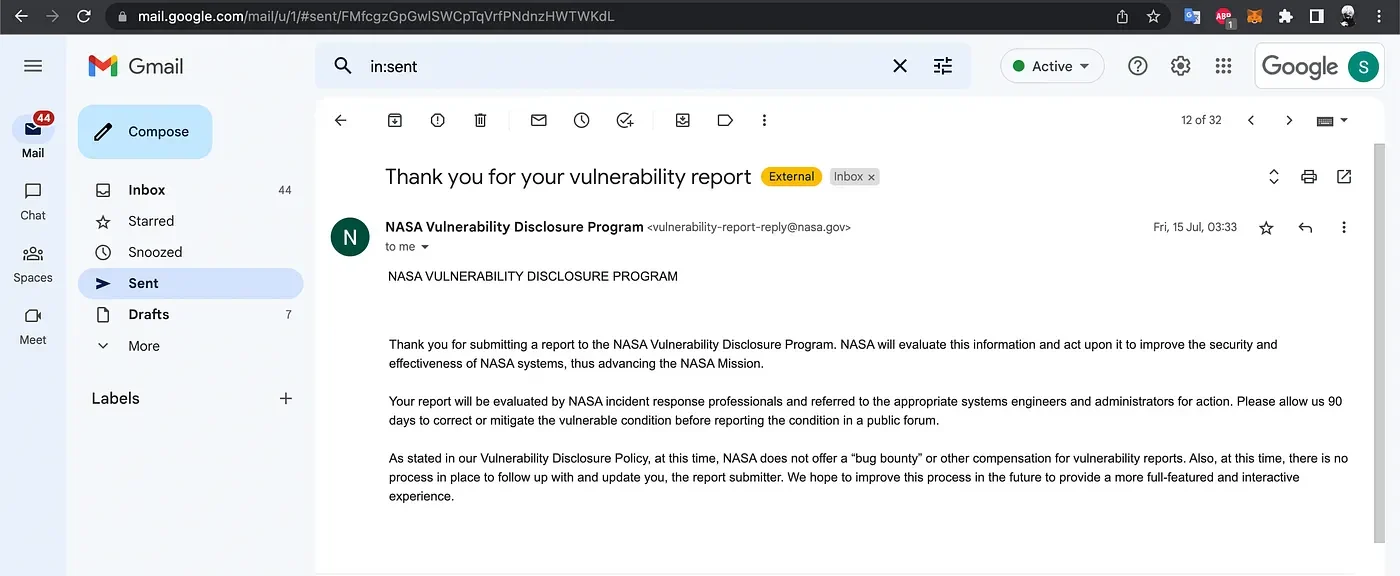
The researcher submitted the finding to NASA's vulnerability disclosure programme. A response arrived within a day; the report includes a screenshot of that response.
About a month later, attempting to open the subdomain returned ERR_CONNECTION_TIMED_OUT. When the researcher tried to open the subdomain about a month later, the browser showed ERR_CONNECTION_TIMED_OUT.
The report gives no severity rating, no CVSS score, no bounty amount and no weakness classification. It describes the issue as low level.
Root cause
The report points to an internal subdomain with a signup feature enabled. The report says only that an internal subdomain had a signup feature enabled, so anyone could register and use the internal features.
Impact
In the researcher's words, an attacker could sign up on the subdomain and use the whole internal feature. That is the extent of the claim: unauthenticated registration leading to use of internal functionality. The report does not enumerate the data or actions reachable, so the practical impact beyond access to those features is not established in the text.
How this kind of bug works
Internal applications are often built on the assumption that only staff will reach them. That assumption usually rests on network placement rather than on the application itself: the service sits behind a VPN, an internal DNS zone, or an IP allowlist. When the same service is also published on a public hostname, or when a proxy or load balancer forwards traffic to it, the assumption no longer holds. The application still has its signup form, its default roles and its feature set, but now the whole internet can reach them.
Enumeration data makes these hosts easy to find. Certificate transparency logs, scan engines and DNS datasets record hostnames that were never meant to be advertised, and a host that answers on 443 with a login or signup page stands out immediately.
The failure is one of exposure rather than of a coding mistake in a single parameter. Defences are therefore mostly architectural: keep internal services off public DNS and public addresses, require authentication at the edge for anything internal, and treat self-registration as a privileged capability that must be explicitly enabled per environment.
How to test for it
- Collect candidate hostnames from certificate transparency, scan engine datasets and passive DNS, then resolve them and check which ones answer.
- For each live host, request the root path and common application paths, and read the response for signs of an internal tool: admin panels, dashboards, staging banners, version strings, or a login page with a registration link.
- Where a signup form exists, register a normal account with a disposable identity and observe what the application grants. Record the role assigned and the navigation items shown.
- Walk the features available to the new account and note anything that looks operational rather than customer-facing.
- Keep requests minimal and non-destructive. Do not attempt to modify other users' data or to escalate beyond the role the signup grants.
A positive result is a publicly reachable host that issues an account to an unauthenticated stranger and then exposes functionality that is clearly meant for staff. Evidence should include the hostname, the registration step, and a screenshot or response showing the internal feature reachable from that account.
Common false positives: a marketing or documentation site that happens to live on a subdomain with a newsletter form; a public product with a legitimate self-service signup; a host that resolves publicly but returns a generic error or a VPN gateway page; and cached scan data pointing at a host that no longer exists. Confirm the behaviour live before reporting.
How it is fixed
The standard fixes are to remove the public DNS record and public address for the internal service, or to place it behind an authenticating proxy or VPN so that unauthenticated requests never reach the application. Where the service must stay public, disable self-registration and require accounts to be provisioned by an administrator. Reviewing which environments share configuration with production prevents internal features from being enabled on internet-facing deployments in the first place.
Hunting notes
These hosts tend to hide in large organisations with many teams and long-lived DNS zones: subdomains named for internal tools, environments or teams, hosts that answer only on one port, and applications whose landing page has no branding. Recon signals worth acting on are a hostname that appears in certificate logs but nowhere in public documentation, a login page with a registration link, and response headers or page footers naming an internal framework.
To make the report land, show the exposure and the access in one chain: the hostname is public, the signup succeeds without invitation, and a specific internal feature is reachable afterwards. Keep the demonstration read-only and stop at the first proof. Programmes accept these reports when the boundary crossed is obvious from the evidence, so include the exact steps and the observed responses rather than a general claim that internal features are usable.
What happened, in plain words
A security researcher wanted to know which parts of NASA's website, nasa.gov, were reachable from the ordinary internet. A large organisation's website is usually split into many smaller sites called subdomains, each with its own address, a bit like a company building with many separate rooms. The researcher used a search engine for internet-connected machines called Censys to list subdomains that were actually live, following a method described in a separate blog post.
Among the results was an internal subdomain, written in the report as redacted.nasa.gov. "Internal" here means a site the organisation built for its own staff rather than for the public. This one had a signup feature enabled.
That is the whole finding: an attacker could sign up on the subdomain and use the whole internal feature. The report does not say which features those were, what data they showed, or what the new account could actually do beyond the general statement that the internal functionality was usable.
The researcher sent the finding to NASA's vulnerability disclosure programme. A vulnerability disclosure programme, or VDP, is a channel an organisation opens so that outsiders can report security problems safely instead of being treated as intruders. A response came back within a day, and the report includes a screenshot of it.
About a month later, trying to open the subdomain ended in ERR_CONNECTION_TIMED_OUT. When the researcher tried to open the subdomain about a month later, the browser showed ERR_CONNECTION_TIMED_OUT, a message meaning the connection attempt got no answer and gave up.
The report gives no severity rating, no CVSS score (a standard way of scoring how serious a flaw is), no bounty amount and no formal weakness category. It simply calls the issue low level.
In general, how this kind of bug works
Many organisations build tools for internal use only: staff directories, dashboards, admin panels, staging copies of a product. These tools are often protected by where they sit on the network rather than by the application itself. The service might only be reachable through a company VPN (a private tunnel into the office network), or only from internal addresses. The builders assume that if you can reach the page, you are probably staff.
That assumption breaks the moment the same service is also published on a public address, or when a proxy or load balancer quietly forwards internet traffic to it. The application itself has not changed: it still has its signup form, its default user roles and all its features. But now the whole internet can reach them. Think of a staff-only door at the back of a shop that someone has, without noticing, also opened onto the street.
Finding such hosts is not hard. Several public datasets record hostnames that were never meant to be advertised: certificate transparency logs (public records of the security certificates websites use), scan engines such as Censys, and passive DNS data. A host that answers on the standard secure web port, 443, and shows a login or signup page stands out immediately.
Because the mistake is one of exposure rather than a coding error in a single field, the defences are mostly architectural: keep internal services off public DNS and public addresses, require authentication at the edge before any internal request reaches the application, and treat self-registration as a privileged capability that must be switched on deliberately for each environment.
How to test for it
- Collect candidate hostnames from certificate transparency, scan engine datasets and passive DNS, then check which ones actually answer.
- For each live host, request the root path and common application paths, and read the response for signs of an internal tool: admin panels, dashboards, staging banners, version strings, or a login page with a registration link.
- Where a signup form exists, register a normal account with a disposable identity and observe what the application grants. Record the role assigned and the navigation items shown.
- Walk the features available to the new account and note anything that looks operational rather than customer-facing.
- Keep requests minimal and non-destructive. Do not attempt to modify other users' data or to escalate beyond the role the signup grants.
A positive result is a publicly reachable host that hands an account to an unauthenticated stranger and then exposes functionality clearly meant for staff. Evidence should include the hostname, the registration step, and a screenshot or response showing the internal feature reachable from that account.
Common false positives: a marketing or documentation site that happens to live on a subdomain with a newsletter form; a public product with a legitimate self-service signup; a host that resolves publicly but returns a generic error or a VPN gateway page; and cached scan data pointing at a host that no longer exists. Confirm the behaviour live before reporting.
How it is fixed
The standard fixes are to remove the public DNS record and public address for the internal service, or to place it behind an authenticating proxy or VPN so that unauthenticated requests never reach the application. Where the service must stay public, disable self-registration and require accounts to be provisioned by an administrator. Reviewing which environments share configuration with production prevents internal features from being enabled on internet-facing deployments in the first place.
Hunting notes
These hosts tend to hide in large organisations with many teams and long-lived DNS zones: subdomains named for internal tools, environments or teams, hosts that answer only on one port, and applications whose landing page has no branding. Recon signals worth acting on are a hostname that appears in certificate logs but nowhere in public documentation, a login page with a registration link, and response headers or page footers naming an internal framework.
To make the report land, show the exposure and the access in one chain: the hostname is public, the signup succeeds without invitation, and a specific internal feature is reachable afterwards. Keep the demonstration read-only and stop at the first proof. Programmes accept these reports when the boundary crossed is obvious from the evidence, so include the exact steps and the observed responses rather than a general claim that internal features are usable.
Glossary
- Subdomain: a smaller site under a main domain, such as
redacted.nasa.govundernasa.gov; like a named room inside a building. - Censys: a search engine that indexes internet-connected machines and services, useful for finding hosts that answer publicly.
- Subdomain enumeration: the process of listing subdomains that exist and are live, usually from public datasets.
- Internal subdomain: a hostname intended for staff or internal use rather than the public.
- Signup feature: a form that lets a visitor create their own account without an invitation or approval.
- Vulnerability disclosure programme (VDP): an official channel for outsiders to report security problems to an organisation.
- Severity rating: a label describing how serious a flaw is.
- CVSS: a standard scoring system for the severity of a vulnerability.
- Bounty: a payment some programmes make for valid reports.
- Weakness classification: a formal category naming the type of flaw.
- VPN: a private tunnel that gives access to an internal network from outside.
- Proxy: an intermediary server that forwards requests, and can enforce authentication before they reach an application.
- Load balancer: a server that distributes incoming traffic across several back-end servers.
- Certificate transparency logs: public records of the security certificates websites use, which reveal hostnames.
- Passive DNS: recorded historical data about which hostnames resolved to which addresses.
- Port 443: the standard network port for secure web traffic (HTTPS).
- DNS record: the entry that maps a hostname to a network address.
- Authentication: proving who you are, for example by logging in.
- Authorisation: what an authenticated user is allowed to do.
- Role: the set of permissions an account is granted.
- Self-registration: allowing users to create their own accounts instead of an administrator creating them.
- False positive: a finding that looks like a problem but is not one on closer inspection.
ERR_CONNECTION_TIMED_OUT: a browser message meaning the connection attempt received no answer and gave up.- Non-destructive testing: checking a system without changing or damaging data.

