Get as image function pulls any Insights/NRQL data from any New Relic account (IDOR)
The 'Get as image' feature for integration dashboards failed to verify that the supplied account_id belonged to the requesting user. An attacker could change the account_id to any other New Relic account and retrieve arbitrary NRQL query results as an image, potentially exposing data from any account.
 Published on jonbottarini.com
This writeup walks you through the full process as to how I found a pretty bad Insecure Direct Object Reference (IDOR) in New Relic.
The full write-up lives on its author's site
It belongs to its author, so we link to it rather than copy it. The other two tabs are our own rewrites, checked against it.
Context
New Relic offers a product line called New Relic Infrastructure, which lets customers add third party integrations. Common integrations include AWS, Azure and, most recently at the time of writing, Google Cloud Platform (GCP). Within the GCP integration there is also the ability to create dashboards.
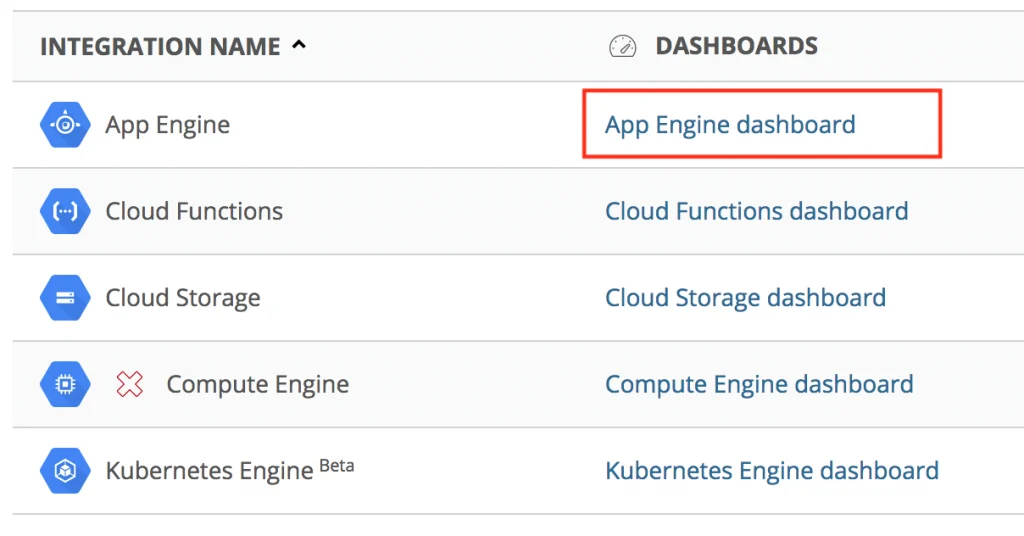
Dashboards are common across New Relic, but the dashboards inside the integrations section had something unique: the dropdown menu for each chart offers actions that are not present in any of the other dashboard areas.
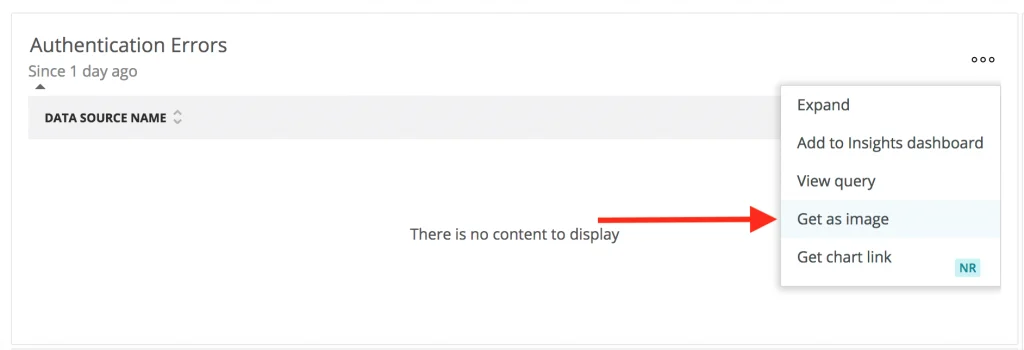
One of those options was "Get as image". It converts the NRQL query that generates the dashboard into an image, and that is where the vulnerability sat. The New Relic Query Language (NRQL) is documented at:
Setup
The researcher had a New Relic account with the account number 1523936, and used Burp (including Burp Intruder) to capture and modify the request that generates a dashboard image. No other roles, versions or preconditions are described.
Finding it
The normal POST request that generates the dashboard image looks like this:
{"query":{"account_id":1523936,"nrql":"SELECT count(*) FROM IntegrationError FACET dataSourceName SINCE 1 DAY AGO"},"account_id":1523936,"endpoint":"/v2/nrql","title":"Authentication Errors"}
The application failed to check whether the account_id belonged to the user making the request. The account number 1523936 belonged to the researcher, but changing it to another number pulled data from another account.
Exploitation
Step 1: change the account ID
With control over the value, the account ID could be set to any other account ID on New Relic. Because account IDs are incremental, an attacker could put the request into Burp Intruder, mark the account ID value and increment it by one on each request, pulling data from any or all accounts on New Relic.
Step 2: change the NRQL query
The NRQL query could be modified as well, so instead of pulling the data that generated the original dashboard, the request could be changed to something like this:
{"query":{"account_id":any_account_number_here,"nrql":"SELECT * FROM SystemSample"},"account_id":any_account_number_here,"endpoint":"/v2/nrql","title":"Uh oh!"}
This runs the SystemSample NRQL query against any account ID. The downloaded image was an empty chart:
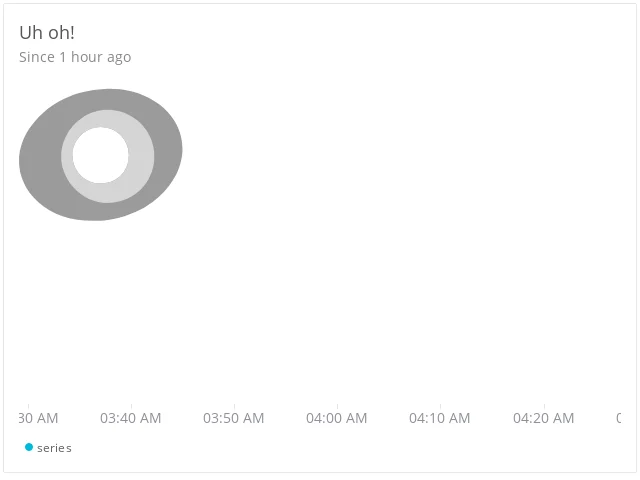
That confirmed the request was hitting other accounts, but the returned information was useless on its own: just an empty chart.
Step 3: find the image URL in a response header
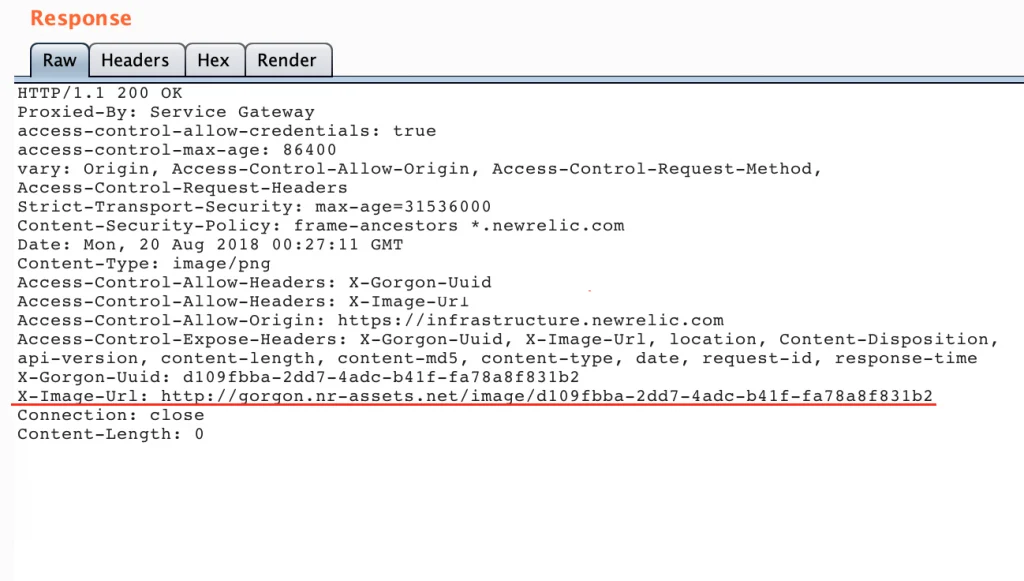
After trying different NRQL queries, the researcher found an interesting header in the server response to this type of request:
X-Image-Url: http://gorgon.nr-assets.net/image/{UNIQUE_ID}
Step 4: request a different chart type
Adding ?type= to the end of the URL shows different chart types, which allows more data to be exfiltrated than normal. An incorrect ?type= value lists all available chart options in the error message:
{"code":"BadRequestError","message":"uhoh is not a valid Vizco chart type. Permitted Types: apdex area bar baseline billboard bullet empty event-feed funnel heatmap histogram json line markdown pie stacked-horizontal-bar scatter table traffic-light vertical-bar"}
Any of those chart types can be used to return more information than the NRQL query normally would:
X-Image-Url: http://gorgon.nr-assets.net/image/{UNIQUE_ID}?type=json
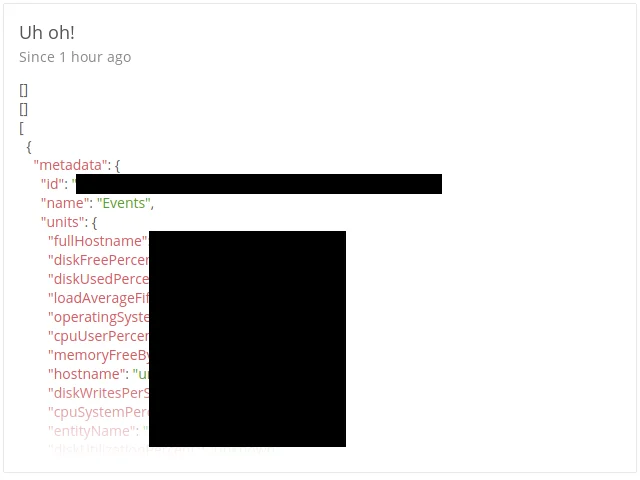
With type=json, the response is a JSON dump of the dashboard, downloaded as a photo, and it can be performed against any account.
Step 5: increase the amount of data per request
To exfiltrate as much data as possible in each request, add &height=2000 at the end of the URL:
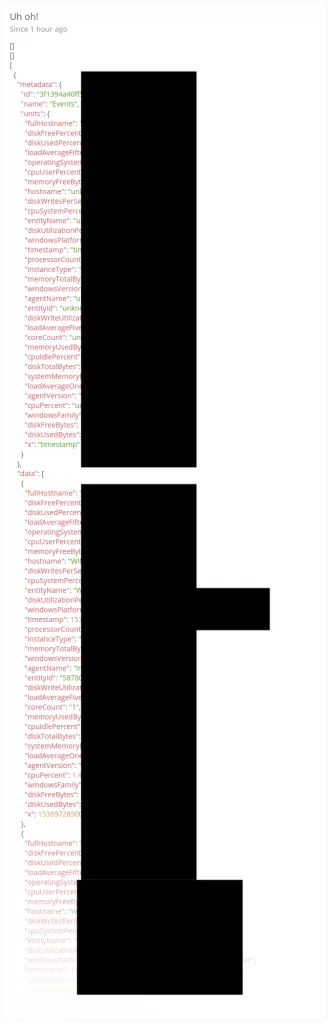
X-Image-Url: http://gorgon.nr-assets.net/image/{UNIQUE_ID}?type=json&height=2000
Root cause
New Relic's own explanation is that the report identified a logic error in the validation code in their backend authentication proxy. A very specific combination of configuration options for an application resulted in the validation checks not taking place. In other words, the validation checks did not take place for that configuration, which is why the account_id parameter was accepted for accounts that did not belong to the requester.
Impact
Changing the account_id value allowed querying NRQL data from any other New Relic account, and because account IDs are incremental, could enumerate accounts. The type=json parameter turns the chart image into a JSON dump of the dashboard, and height=2000 increases how much data comes back per request. The researcher describes the bug as "pretty bad" and notes that the JSON dump works against any account.
Fix
New Relic fixed the issue within a few days. Their comment: once they identified the logic error, they searched for anywhere that combination of configuration options was used to mitigate the issue quickly, then made a permanent fix of the logic issue, ensuring that account validation always took place before the request was allowed to proceed. The researcher was awarded $2,500.
Variants to test
- Look for endpoints that accept an object identifier in more than one place (here, both inside
queryand at the top level) and change each copy independently. A positive result is data from an account or object you do not own. - On image or export features, check response headers for URLs to generated assets and try adding query parameters such as
?type=to them. A positive result is a different rendering format, especially a structured one like JSON, returning more data than the UI shows. - Send an invalid value to a type or format parameter and read the error message. A positive result is a list of accepted types that includes formats you were not offered in the UI.
- Try size parameters such as
heighton generated images or exports. A positive result is a larger response containing more records. - Where identifiers are numeric and sequential, increment them with an intruder-style tool. A positive result is consistent responses for identifiers that do not belong to your account.
What happened, in plain words
A security researcher found a way to read data from other people's accounts on New Relic, a service that companies use to watch how their websites and servers are behaving. New Relic lets a customer connect outside services (called integrations) and build little picture panels (called dashboards) that summarise that data. One of those panels had a button called "Get as image" that turns the panel into a picture file. The request that builds that picture contained an account number, and the server never checked that the account number really belonged to the person asking. By changing the number, the researcher could pull data from any New Relic account. Because account numbers go up one at a time, a script could simply try every number in turn. The researcher reported it, New Relic fixed it within a few days, and the researcher was paid $2,500.
This article walks through the whole thing slowly, assuming you have never done security work before. You only need to be comfortable using a browser.
Some words you will meet first
Before the story, here are the ideas that come up again and again. Each one is explained properly the first time it appears below too, but a quick map helps.
- Server: the computer somewhere else that holds the website's data and answers your browser's questions. Think of a restaurant kitchen: you never go in, you just send an order and food comes back.
- Request: the message your browser sends to the server, for example "please give me this page" or "please build this chart".
- Response: the message the server sends back, for example the page itself, a picture, or an error.
- API: a way for one piece of software to talk to another, rather than for a human to click around. It is like a service counter at the restaurant where you hand over a written order form instead of reading the menu. The website's own pages often use the same counter behind the scenes.
- Parameter: one named piece of information inside a request, such as
account_idorheight. On an order form, each box you fill in is a parameter. - Account ID: the number that identifies which customer's data you mean. New Relic gives every customer a number.
- IDOR (Insecure Direct Object Reference): a bug where the server lets you name an object (here, an account) directly by its identifier, but forgets to check that the object is yours. The everyday version: a hotel clerk hands over any room key you ask for, without checking that you are staying in that room.
- NRQL (New Relic Query Language): New Relic's own mini-language for asking questions about stored data, a bit like asking a librarian "count all the books added in the last day, grouped by shelf".
- Dashboard: a page of charts that summarise data.
- Integration: a connection between New Relic and another company's service, so that data from that service flows into New Relic.
- Burp: a tool that sits between your browser and the server so you can look at, and change, requests before they are sent. Think of it as an interception desk in the post room: every letter passes through your hands and you can rewrite it.
- Burp Intruder: the part of Burp that sends the same request many times, each time with one value swapped for the next in a list (for example, 1, 2, 3, 4...).
- Header: extra labelled information attached to a request or response, separate from the main content. Like the printed lines on an envelope (sender, postmark) that are not the letter itself.
- JSON: a plain text format for structured data, using curly brackets and labels, easy for programs to read.
- Exfiltrate: to get data out of a system, here by making the server hand it back to you.
The product and the feature
New Relic has a product line called New Relic Infrastructure. Customers use it to watch their servers and cloud services. It supports third party integrations, and common ones include AWS, Azure and, most recently at the time of writing, Google Cloud Platform (GCP). Inside the GCP integration you can also create dashboards.
Dashboards exist all over New Relic, so at first this looked ordinary. But the dashboards inside the integrations section had something the others did not: the dropdown menu on each chart offered extra actions that were not present in any other dashboard area.
One of those extra options was "Get as image". It takes the NRQL query that produced the chart and renders it as an image file.
NRQL is documented here:
Setting up
The researcher had a New Relic account with the account number 1523936. To see and change the request that builds a dashboard image, the researcher used Burp, including Burp Intruder. Burp works as a middleman: your browser is told to send its traffic through Burp, Burp shows you each request, and you can edit it before letting it continue to the server. That is how you go from "clicking a button in a website" to "sending a hand-written order to the API".
Finding it
When you click "Get as image", the browser sends a POST request. POST is simply the kind of request used when you are sending information to the server rather than just asking for a page. The normal request looks like this:
{"query":{"account_id":1523936,"nrql":"SELECT count(*) FROM IntegrationError FACET dataSourceName SINCE 1 DAY AGO"},"account_id":1523936,"endpoint":"/v2/nrql","title":"Authentication Errors"}
Line by line, in plain words:
- The whole thing is one JSON object: a set of labelled values inside curly brackets.
"query"holds the actual question being asked of the database. Inside it there are two labels."account_id":1523936insidequerysays which customer's data the question is about. This is the researcher's own account number."nrql":"SELECT count(*) FROM IntegrationError FACET dataSourceName SINCE 1 DAY AGO"is the question itself.SELECT count(*)means "count the rows".FROM IntegrationErrormeans "from the table of integration errors".FACET dataSourceNamemeans "group the count by the name of the data source", so you get one number per source instead of one grand total.SINCE 1 DAY AGOlimits it to the last day."account_id":1523936appears a second time, at the top level, outsidequery. So the account number is sent in two places in the same request."endpoint":"/v2/nrql"says which part of the API should handle this. Think of it as the counter number you walk up to."title":"Authentication Errors"is the label that will appear on the chart.
The important observation: the application failed to check whether the account_id belonged to the user making the request. The number 1523936 was the researcher's own, but changing it to another number pulled data from another account. The server trusted the number in the request.
This is the IDOR pattern. The server has a list of objects (accounts) and lets the client name one directly, but skips the step of asking "is this one yours?".
Exploitation
Step 1: change the account ID
Once the researcher controlled that value, it could be set to any other account ID on New Relic. The reason this is worse than a single-account leak is that account IDs are incremental: they go up by one. So an attacker could put the request into Burp Intruder, mark the account ID value, and tell it to add one on each request. Intruder then sends the request over and over, incrementing the account ID each time, and you collect the answers. That turns one broken check into a way to walk through any or all accounts on New Relic.
Why do this step at all? Because the first question in any IDOR is "does the server actually use my number, or does it quietly use my login to decide?" Changing the number and getting someone else's data answers that question.
Step 2: change the NRQL query
The account number was not the only thing under the researcher's control. The NRQL query travels in the same request, so it could be rewritten too. Instead of asking for the data that generated the original dashboard, the request could be changed to something like this:
{"query":{"account_id":any_account_number_here,"nrql":"SELECT * FROM SystemSample"},"account_id":any_account_number_here,"endpoint":"/v2/nrql","title":"Uh oh!"}
Line by line:
"account_id":any_account_number_hereappears twice again, once insidequeryand once at the top level. The placeholder text stands for whatever number you want to try."nrql":"SELECT * FROM SystemSample"is a different question.SELECT *means "give me every column", not just a count.FROM SystemSamplemeans "from the table of system samples", which is the raw performance data New Relic collects about a machine. So this asks for the full raw records rather than a tidy summary."endpoint":"/v2/nrql"is the same API counter as before."title":"Uh oh!"is just the chart label, chosen here as a joke.
Why change the query? Because the original query only produced a small summary. If you can ask your own question, you can ask for far more, and you can ask for exactly the kind of data you are curious about.
This query runs the SystemSample NRQL query against any account ID. The image that came back was an empty chart:
That empty chart is actually useful evidence. It confirms the request was reaching other accounts, because the chart was built and returned, but the returned information was useless on its own: just an empty chart. An empty result can mean the account has no matching data, or that the query was wrong, or that something else is filtering it. So the researcher kept experimenting.
Step 3: find the image URL in a response header
After trying different NRQL queries, the researcher found an interesting header in the server's response to this type of request:
X-Image-Url: http://gorgon.nr-assets.net/image/{UNIQUE_ID}
Line by line:
X-Image-Urlis the name of the header. Headers starting withX-are custom ones a company invented for itself, rather than part of a standard. The name tells you it holds a URL for an image.http://gorgon.nr-assets.net/image/{UNIQUE_ID}is the value: a web address on New Relic's asset host where the generated image is stored.{UNIQUE_ID}is a placeholder for a long identifier that differs for each generated image.
Why does this matter? Because the chart image is not sent back inside the response body. The server builds the image, stores it, and replies with a link to it. That link is a normal web address, and normal web addresses can be edited by hand in a browser. So the researcher now had a second, simpler way to interact with the generated chart: change the address.
Step 4: request a different chart type
Adding ?type= to the end of the URL shows different chart types, which allows more data to be exfiltrated than normal. The ? marks the start of the query string, the part of a web address that carries extra settings, and type= is a setting whose value you supply.
If you give ?type= an incorrect value, the server lists all the available chart options in the error message:
{"code":"BadRequestError","message":"uhoh is not a valid Vizco chart type. Permitted Types: apdex area bar baseline billboard bullet empty event-feed funnel heatmap histogram json line markdown pie stacked-horizontal-bar scatter table traffic-light vertical-bar"}
Line by line:
"code":"BadRequestError"says the request was rejected because something in it was wrong. This is the server's way of saying "I did not understand that setting"."message"is the human-readable explanation. It saysuhohis not a valid Vizco chart type.Permitted Types:is followed by the full list of chart types the server accepts:apdex area bar baseline billboard bullet empty event-feed funnel heatmap histogram json line markdown pie stacked-horizontal-bar scatter table traffic-light vertical-bar.
Why is an error message valuable? Because it is a free instruction manual. The website's menu only offered a few chart styles, but the server accepts many more, and one of them is json. JSON is the structured text format described earlier, which is far easier to read and to process than a picture of a chart. The server was willing to hand back the underlying data as text, not just as a drawing.
Any of those chart types can be used to return more information than the NRQL query normally would:
X-Image-Url: http://gorgon.nr-assets.net/image/{UNIQUE_ID}?type=json
Line by line:
- The address is the same asset link as before.
?type=jsonasks the server to render the chart as JSON instead of as a picture.
With type=json, the response is a JSON dump of the dashboard, downloaded as a photo, and it can be performed against any account. In other words, the same broken check that let the researcher name someone else's account now also produces a full text dump of that account's chart data, rather than a small picture.
Step 5: increase the amount of data per request
To exfiltrate as much data as possible in each request, add &height=2000 at the end of the URL:
X-Image-Url: http://gorgon.nr-assets.net/image/{UNIQUE_ID}?type=json&height=2000
Line by line:
?type=jsonis the same setting as before.&separates one setting from the next in a query string.height=2000asks for a taller output. The report says adding&height=2000lets you exfiltrate as much data as possible in each request.
Why bother? Raising the height is a cheap way to get more per trip.
Root cause
New Relic's own explanation is that the report identified a logic error in the validation code in their backend authentication proxy. A very specific combination of configuration options for an application resulted in the validation checks not taking place. In plain terms: for that particular combination of settings the validation checks did not take place, so the account_id parameter was accepted for accounts that did not belong to the requester. The lock was on the door, but one particular door frame meant the lock never engaged.
Impact
Changing the account_id value allowed querying NRQL data from any other New Relic account. Because account IDs are incremental, they could enumerate accounts, walking the numbers one by one. The type=json parameter turns the chart image into a JSON dump of the dashboard, and height=2000 increases how much data comes back per request. The researcher describes the bug as "pretty bad" and notes that the JSON dump works against any account.
Fix
New Relic fixed the issue within a few days. Their comment: once they identified the logic error, they searched for anywhere that combination of configuration options was used, to mitigate the issue quickly, then made a permanent fix of the logic issue, ensuring that account validation always took place before the request was allowed to proceed. The researcher was awarded $2,500.
Variants to test
These are the general lessons, phrased as things to try if you are learning to look for similar bugs.
- Look for endpoints that accept an object identifier in more than one place (here, both inside
queryand at the top level) and change each copy independently. A positive result is data from an account or object you do not own. - On image or export features, check response headers for URLs to generated assets and try adding query parameters such as
?type=to them. A positive result is a different rendering format, especially a structured one like JSON, returning more data than the UI shows. - Send an invalid value to a type or format parameter and read the error message. A positive result is a list of accepted types that includes formats you were not offered in the UI.
- Try size parameters such as
heighton generated images or exports. A positive result is a larger response containing more records. - Where identifiers are numeric and sequential, increment them with an intruder-style tool. A positive result is consistent responses for identifiers that do not belong to your account.
Glossary
- API: a way for software to talk to software, using structured requests and responses rather than a human clicking pages.
- Account ID: the number that identifies a New Relic customer's data.
- Authentication proxy: a component that sits in front of the real application and checks who is allowed to do what before passing the request on.
- Burp: a tool that intercepts traffic between your browser and a server so you can read and edit requests.
- Burp Intruder: the part of Burp that repeats one request many times, swapping a chosen value for each entry in a list.
- Dashboard: a page of charts summarising data.
- Endpoint: the specific address of one API function, such as
/v2/nrql. - Exfiltrate: to get data out of a system and into your hands.
- Header: labelled extra information attached to a request or response, separate from the main content.
- IDOR (Insecure Direct Object Reference): a bug where the server lets you name an object by its identifier without checking that the object belongs to you.
- Integration: a connection that lets data from another company's service flow into New Relic.
- JSON: a plain text format for structured data, built from labels and values in curly brackets.
- NRQL (New Relic Query Language): New Relic's language for asking questions about stored data.
- Parameter: one named piece of information in a request, such as
account_idorheight. - POST: the kind of request used to send information to a server, as opposed to simply asking for a page.
- Query string: the part of a web address after
?, carrying extra settings such astype=json. - Request: the message your browser or tool sends to a server.
- Response: the message the server sends back.
- Server: the remote computer that holds data and answers requests.
- Vizco: the name of the charting component that renders New Relic charts, as named in the error message.